AWS Compute Blog
Accelerate multiplayer game hosting with AWS m8azn instances
Online multiplayer gaming continues to grow, with players demanding lower latency, higher concurrency, and more immersive experiences than ever before. For game studios hosting dedicated multiplayer servers on AWS, infrastructure decisions directly impact player experience and retention, server tick rates, and ultimately, revenue.
Games are becoming more computationally demanding while offering richer gameplay experiences. Studios need instances that maintain consistent player experiences in increasingly complex and dense computational game experiences.
In this post, we explore how AWS m8azn instances powered by AMD’s 5th gen EPYC processors perform with a real game: Mob Rush. M8azn instances offer up to 2x compute performance and 5 GHz CPU frequency compared to previous generation M5zn instances, and up to 24% higher performance than M8a instances. M8azn instances deliver up to 4.3x higher memory bandwidth and 10x larger L3 cache compared to M5zn instances allowing latency-sensitive and compute-intensive workloads to achieve results faster. These instances also offer up to 2x networking throughput and up to 3x EBS throughput versus M5zn instances. This post walks through the deployment of the game and reviews the performance metrics across varying player counts.
When to choose m8azn for multiplayer hosting
Not every workload requires m8azn. Game modes that require high performance and low latency computation are ideal matches for m8azn instances. M8azn instances are ideal for games that benefit from higher compute performance, larger L3 cache, and higher memory bandwidth.
Ideal use cases
- Session-based high density multiplayer games: Games with discrete match sessions that spin up and tear down servers dynamically benefit from the fast startup performance of m8azn and high player density per instance.
- Physics-intensive game servers: Titles relying heavily on PhysX collision detection, rigid-body simulation, and real-time raycast operations see significant gains from improved FPU throughput.
- Variable player load scenarios: Live service games with daily peak hours or seasonal events benefit from the cost efficiency at both low and high utilization levels.
- High-density hosting: Studios seeking to maximize concurrent game sessions per instance to reduce per-player infrastructure cost.
Mob Rush
In this post, we run the game Mob Rush. Mob Rush is a multiplayer game where players collect and grow a crowd in a war of numbers style competition. Mob Rush is built with the Unity game engine. Our test infrastructure includes a local test orchestrator, two game servers, and a series of load generation servers. The following diagram shows our testing setup:
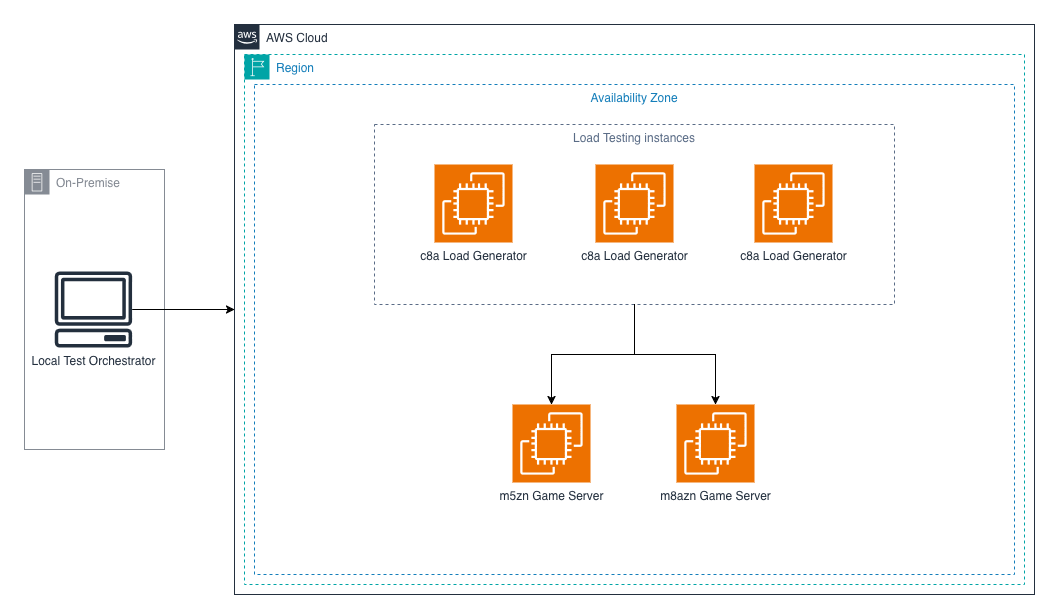
Load testing configuration
Our load testing scenario compares the m5zn instance that our game currently runs on with the new m8azn to decide if the new instance is a migration candidate. We compare player experience metrics (FPS, tick-rate, and others) and instance performance metrics (CPU utilization, tick-rate, players per server, and others) to see how well Mob Rush runs on newer hardware.
Methodology
Benchmarks were conducted using a Unity multiplayer game server build, simulating concurrent player connections with synthetic load generation. Our current game servers perform well to around 4,000 simultaneous player connections before the player experience started to degrade as the server was overloaded. For our benchmarks we have tested each instance type at the 3,000 player threshold, and then increased to 4,000 players, 6,000 players and 8,000 players and recorded how each instance performed.
| Parameter | Configuration |
| Instance Types | m8azn.xlarge (4 vCPU, 16 GB) vs. m5zn.xlarge (4 vCPU, 16GB) |
| OS / AMI | Ubuntu 22.04 LTS |
| Unity Version | Unity 2020.3.12f1, headless Linux build |
| Concurrency Scenarios | Gradual ramp from zero players to number of players that overload the instance causing player experience impact |
| Metrics Collected | Connection success rate, connection latency (avg/P50/P95/P99/max), batch processing time, run queue depth, context switches/second, softirq/second, TCP retransmits, listen overflows |
| Test Duration | 562 seconds total (202 s ramp at 100 connections/sec + 360 s sustained hold) |
Results
Our testing results are displayed in the following charts. The new m8azn instances start to shine as load increases. M5zn instances start to have significant latency spikes and max latency numbers once we get to around 6,000 CCU, which severely impacts the player experience. We can push the m8azn instances to 8,000 CCU before experiencing player impact or introducing any latency spikes >500ms.
| Metric | m5zn.2xlarge | m8azn.2xlarge |
| Player Count | 3,000 | |
| Average Latency | 9.7ms | 8ms |
| P99 Latency | 22ms | 28ms |
| Max Latency | 43ms | 23ms |
| Peak Run Queue | 575 | 14 |
| TCP Re-transmits | 0 | 0 |
| Latency Spikes > 500ms | 0 | 0 |
| Errors | 0 | 0 |
| Metric | m5zn.2xlarge | m8azn.2xlarge |
| Player Count | 4,000 | |
| Average Latency | 8.6ms | 7.2ms |
| P99 Latency | 29ms | 24ms |
| Max Latency | 76ms | 29ms |
| Peak Run Queue | 451 | 24 |
| TCP Re-transmits | 0 | 0 |
| Latency Spikes > 500ms | 0 | 0 |
| Errors | 0 | 0 |
| Metric | m5zn.2xlarge | m8azn.2xlarge |
| Player Count | 6,000 | |
| Average Latency | 6.8ms | 6.5ms |
| P99 Latency | 22ms | 22ms |
| Max Latency | 29ms | 27ms |
| Peak Run Queue | 318 | 27 |
| TCP Re-transmits | 0 | 0 |
| Latency Spikes > 500ms | 0 | 0 |
| Errors | 0 | 0 |
| Metric | m5zn.2xlarge | m8azn.2xlarge |
| Player Count | 8,000 | |
| Average Latency | 25ms | 9.7ms |
| P99 Latency | 542ms | 27ms |
| Max Latency | 2386ms | 238ms |
| Peak Run Queue | 651 | 87 |
| TCP Re-transmits | 0 | 0 |
| Latency Spikes > 500ms | 97 | 0 |
| Errors | 0 | 0 |
Price-performance comparison for 100k CCU
One methodology to calculating price/performance of these instances is to compare the cost of running enough instances to serve 100,000 players while maintaining an optimal and minimal latency player experience. All prices discussed in this section are based on us-east-1 OnDemand Linux pricing at the time of writing.
To serve 100k CCU with m5zn.xlarge instances, we would need to provision approximately 20 m5zn.xlarge instances (each instance can support 5,000 CCU before player experience degrades). Each m5zn.xlarge costs $0.3303/hr. That brings our hourly cost to $6.606/hr per 100k CCU.
In comparison, we only need 13 m8azn.xlarge instances to serve 100k CCU, thanks to the ~61% performance improvement of average latency of m8azn at 8,000 CCU per instance. Each m8azn.xlarge costs $0.4129/hr. Our hourly cost for 100k CCU in this scenario is $5.3677/hr. M8azn instances clearly demonstrate better price performance when compared to m5zn instances.
Conclusion
M8azn instances represent a compelling upgrade path for multiplayer game studios currently running on older generation instances. The combination of AMD EPYC processor improvements, enhanced memory bandwidth, and superior network performance delivers measurable benefits across the workloads that matter most for game hosting.
Try out m8azn in your development environment and calculate price/performance gains to see if m8azn is right for your workload. The Optimizing EC2: Hands-on Strategies for Cost-effective Performance workshop can guide you in comparing performance and calculating your overall price/performance savings across different instances.