AWS Compute Blog
Per-customer invoice management with Amazon EventBridge Scheduler
Many software as a service (SaaS) platforms need to bill each customer on their unique billing cycle, based on the date they signed up. This creates a complex scheduling problem: an individually timed invoice generation event per customer, each followed by precisely timed payment reminders. On a large platform, that adds up to millions of events.
In this post, we show you how to use Amazon EventBridge Scheduler as the time-aware backbone of a per-customer billing system. You learn how to create recurring schedules for invoice generation, spawn one-time schedules for payment reminders, and manage the full customer billing lifecycle, all without building or operating scheduling infrastructure.
Overview
This solution uses the following AWS services:
- Amazon EventBridge Scheduler: Manages the per-customer recurring and one-time schedules.
- AWS Lambda: Runs the invoice generation and reminder logic.
- Amazon Simple Email Service (Amazon SES): Sends the invoice and reminder email.
- Amazon DynamoDB: Stores the reminder log that makes reminder delivery idempotent.
- Amazon Simple Queue Service (Amazon SQS): Provides the dead-letter queue for failed invocations.
Prerequisites
To follow along with this post, you need:
- An AWS account.
- The AWS Command Line Interface (AWS CLI) configured with appropriate credentials.
- Python 3.12 or later with Boto3. Python 3.9 has reached end of support as a Lambda runtime, so use a current runtime for new functions.
- An AWS Identity and Access Management (IAM) role with permissions to create Amazon EventBridge Scheduler schedules and invoke Lambda functions.
- A DynamoDB table named
billing-reminder-logwithidempotency_keyas its partition key, and time to live (TTL) enabled on thettlattribute so that old reminder records expire on their own. - A verified sending identity in Amazon SES. If your account is still in the SES sandbox, request production access before you send to arbitrary customer addresses, because the sandbox only allows sending to verified addresses.
- An SQS queue to use as the dead-letter queue for failed schedule invocations.
The problem
You run a SaaS platform. Each customer signs up on a different day, and their billing cycle starts from that signup date. Customer A signed up on March 3, so they get invoiced on the 3rd of every month. Customer B signed up on the 17th, and they get invoiced on the 17th. You have 500,000 customers, each with their own billing anchor date.
Now layer on payment reminders: 7 days before the invoice is due, 3 days before, and the day it is due. That is four scheduled actions per customer per billing cycle, which comes to millions of events every month.
How do you build this?
The traditional approach (and why it breaks)
Most teams consider one of these patterns:
- A cron job that scans the database every hour: Query all customers, check whether anyone is due for an invoice or a reminder, and process them. This works at small scale but becomes a bottleneck fast. The job takes longer as your customer base grows. If it crashes mid-run, you miss invoices. If it runs slowly, reminders arrive late.
- A queue with delayed messages: An appealing idea at first glance, but Amazon SQS caps
DelaySecondsat 15 minutes (900 seconds), which rules it out for billing events scheduled days or weeks ahead.
Both approaches share the same drawback: you are building and operating scheduling infrastructure instead of focusing on your billing product.
The building block: Amazon EventBridge Scheduler
Amazon EventBridge Scheduler is purpose-built for this problem. It is a fully managed scheduling service that handles billions of one-time and recurring invocations. You create a schedule, tell it when to fire and what to invoke, and walk away. There is no infrastructure to manage, no polling, and no worker fleets.
For per-customer billing, Scheduler becomes the time-aware backbone of your invoicing system:
- Each customer gets their own recurring schedule for invoice generation.
- Each billing cycle spawns one-time schedules for payment reminders.
- Scheduler handles the timing, and your application handles the business logic.
Architecture
The following diagram shows the end-to-end flow, from customer signup through invoice generation and payment reminders.
At signup, the application creates a recurring monthly schedule for the customer’s signup day. On each billing day, this schedule invokes the invoice generation Lambda function. The function sends the invoice through Amazon SES and sets up three one-time payment reminders: 7 days before the due date, 3 days before, and on the due date. Each reminder invokes the Send Payment Reminder Lambda function, which notifies the customer only if the invoice is still unpaid. When a payment arrives, a separate handler deletes any outstanding reminders so no further messages go out.
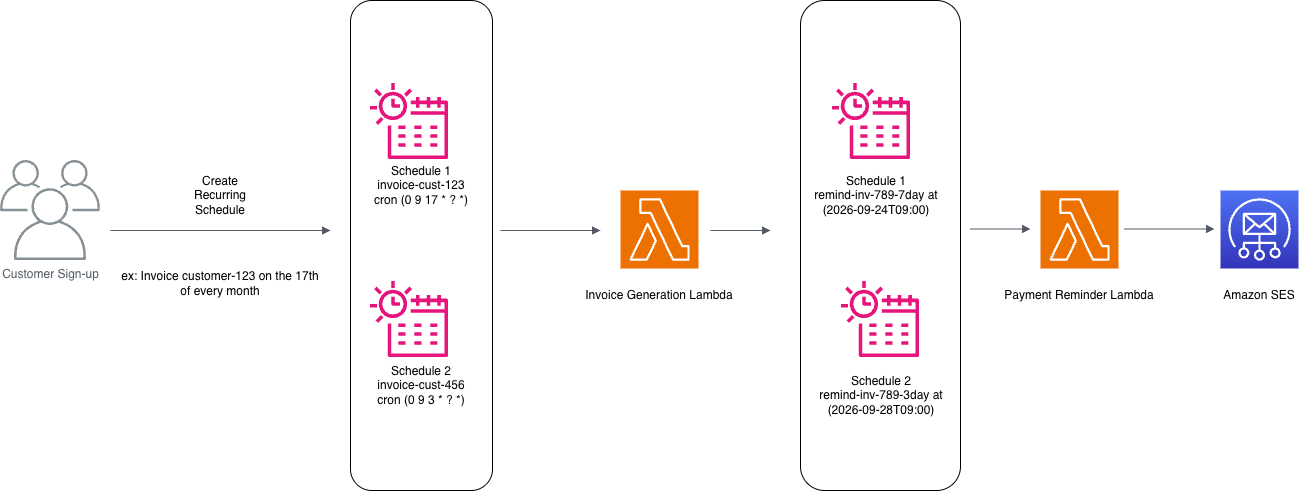
Figure 1: Invoice generation and payment reminders with Amazon EventBridge Scheduler
Implementation
The complete implementation is available in the accompanying GitHub repository. The AWS Serverless Application Model (AWS SAM) template provisions the DynamoDB tables, SQS dead-letter queue, Amazon EventBridge Scheduler groups, AWS Key Management Service (AWS KMS) key, and AWS Lambda functions described in this section. The rest of this section walks through the design of each component.
Step 1: Create schedule groups
Before creating any schedules, make sure the schedule groups exist. The sample declares them in the AWS SAM template so they are provisioned once at stack deploy time.
Step 2: Create a recurring invoice schedule at signup
When a customer signs up, the signup handler creates a recurring schedule based on their signup date. For customers who sign up on the 29th, 30th, or 31st, the sample clamps the billing day to the last day of each month using the L cron special character, so no customer is skipped in February or in 30-day months. The handler is idempotent: if the schedule already exists (for example, after a retry), it updates the schedule instead of failing.
Step 3: Generate the invoice and schedule reminders
The invoice generation Lambda function, GenerateInvoice, does the billing work and then creates one-time schedules for the payment reminders. It includes an idempotency check to prevent duplicate invoices if Scheduler delivers the event more than once.
Step 4: Send reminders with idempotency
The reminder Lambda function, SendPaymentReminder, checks whether the invoice is still outstanding and whether this specific reminder was already sent, which prevents duplicate reminders on retry.
Step 5: Cancel reminders on payment (event-driven)
Instead of checking payment status only when a reminder fires, a payment handler cancels outstanding reminders immediately when a payment is received. Your payment processing system triggers this handler (for example, through an Amazon EventBridge event or an SQS message from your payment gateway).
Step 6: Handle customer lifecycle changes
When a customer cancels, upgrades, or changes their billing cycle, update or delete their schedule accordingly. One thing to be careful of: UpdateSchedule replaces the entire schedule configuration rather than merging changes, so any field you leave out is lost. Always read the existing schedule first, then apply your changes and write it back in full.
Why Scheduler is the right building block
The following table compares the do-it-yourself (DIY) approach with Amazon EventBridge Scheduler for each operational concern.
| Concern | DIY Approach | With Scheduler |
| Per-customer timing | Complex database queries to find who is due | Each customer has their own schedule, so no queries are needed |
| Reminder precision | Polling interval determines accuracy | Fires at the minute you specify, within the flexible time window you configure |
| Scale | More customers = more polling load, more workers | Scheduler handles millions of schedules natively |
| Missed executions | Crashed cron host = missed invoices | Fully managed, built-in retries with a dead-letter queue |
| Early payment | Reminders fire anyway, or you build cancellation logic into your poller | Delete the schedule and it does not fire |
| Lifecycle changes | Update database records, hope the poller picks up the change | Update or delete the schedule directly |
| Operational overhead | Manage worker fleets, monitor queue depth, handle clock skew | Zero infrastructure to manage |
Operational considerations
Before you run this design in production, consider the following operational factors.
Schedule groups for organization
Use schedule groups to organize and manage schedules by function:
billing-invoices: All recurring invoice generation schedules.billing-reminders: All one-time payment reminder schedules.
With schedule groups, you can tag a set of schedules for organization and access control, list schedules by category, and delete all schedules in a group if needed (for example, during testing).
Quotas and request rates at scale
Service quotas matter once you move past a test account. One quota is the number of schedules. The default limit is 10 million schedules per account per Region, and it is adjustable through Service Quotas. The CreateSchedule and UpdateSchedule APIs also have request rate quotas, which matters if you backfill existing customers in a single migration. Spread that backfill over time if you do not need to backfill immediately.
Scheduler also throttles invocations, with a default of 500–1,000 transactions per second (TPS) depending on the Region and adjustable to tens of thousands of TPS. To deal with an invocation spike (for example, the majority of your customers having invoices due at the same time), we recommend using the Flexible Time Window feature. In this post, we use it to spread each burst over 15 minutes, which smooths the load on your downstream Lambda functions and on Amazon SES without changing what the customer sees on their invoice.
Monitoring
Monitor schedule health with Amazon CloudWatch metrics, and capture any failed invocations in a dead-letter queue.
- CloudWatch metrics: Monitor
InvocationAttemptCount,InvocationDroppedCount,InvocationThrottleCount, andTargetErrorCountper schedule group. - Dead-letter queue: Configure a dead-letter queue on your schedules to capture failed invocations that exhaust retries, and alarm on the
InvocationsSentToDeadLetterCountmetric so a failed delivery pages you instead of sitting silent in the queue. - Invoice audit trail: Log every invoice generation and reminder send to an Amazon DynamoDB table or Amazon CloudWatch Logs for compliance.
Retry policy
The retry policy and dead-letter queue are applied to every schedule target the sample creates. This retries transient Lambda failures up to three times over 1 hour, and permanently failed invocations land in the SQS dead-letter queue for investigation.
Cost at scale
Amazon EventBridge Scheduler pricing is based on invocations, and the AWS Free Tier covers 14 million invocations per month. The 500,000-customer example in this post generates four scheduled events per customer per month (one invoice and three reminders), which is 2 million invocations, so the scheduling layer costs nothing at that scale. Scale the same design to 10 million customers and you generate 40 million invocations per month, of which 26 million are billable at $1.00 per million, so the scheduling layer costs roughly $26 per month.
The costs that grow with this design sit in the targets rather than in the scheduling:
- AWS Lambda charges for each invocation and its duration.
- Amazon SES charges per email, so the three reminders per customer per cycle are the largest line item in this workload.
- Amazon DynamoDB charges for the reminder log writes and reads, which the TTL setting keeps from accumulating.
Check the pricing page for each service for current rates in your AWS Region.
Cleanup
To avoid incurring charges, delete the resources you created. If you deployed the accompanying SAM sample, run sam delete --stack-name <stack-name>, which removes the Lambda functions, DynamoDB tables, SQS queue, KMS key, and IAM roles in one command. Before deleting the stack, delete any schedules the sample created at runtime, because schedule groups cannot be deleted while they still contain schedules. If you deployed the resources manually, delete them in this order:
- Delete the schedule groups. Deleting a group also deletes the schedules it contains.
- Delete the Lambda functions (
GenerateInvoiceandSendPaymentReminder). - Delete the IAM roles (
SchedulerInvoiceRoleandSchedulerReminderRole). - Delete the SQS dead-letter queue.
- Delete the
billing-reminder-logDynamoDB table.
Conclusion
Billing is inherently time-driven. Every customer has a cycle, every invoice has a due date, and every reminder has a send time. When you build billing infrastructure, you are building scheduling infrastructure whether you set out to or not.
With Amazon EventBridge Scheduler, you can stop building scheduling infrastructure and focus on your billing logic. Each customer’s billing lifecycle becomes a set of schedules, created at signup, updated when plans change, and deleted at cancellation. The timing is managed for you, the service scales to millions of schedules per Region, and the operational burden of running the scheduler moves to AWS.
If your application has per-customer timing, Scheduler is the building block that makes it straightforward.
To deploy this solution, use the accompanying AWS SAM project on GitHub, which provisions the Lambda functions, DynamoDB tables, Amazon EventBridge Scheduler groups, and SQS dead-letter queue described in this post. For more information about the service, see the Amazon EventBridge Scheduler documentation and the Amazon EventBridge Scheduler product page. For more serverless learning resources, visit Serverless Land.