AWS Contact Center
Build Unified Voice, Video and Chat Communications with Amazon Connect
1. Introduction
Amazon Connect supports voice/video and chat as separate channels, each with its own APIs. Using native or custom widgets, these channels operate independently. This works for most contact center scenarios.
But what happens when a customer and an agent need more than just talking and seeing each other?
For example, a customer calls to finalize a loan application. The agent confirms pre-approval. But the customer must review and sign a document, and the mailed copy hasn’t arrived. The agent could ask the customer to hang up, wait for the mail, or start a separate chat. That means multiple interactions, different agents, and potentially days of delay.
What if the agent could send the document while staying on the call? The customer signs and returns it—same agent, same engagement, minutes not days.
That’s what this post covers. We walk through a solution that unifies voice/video and chat into one seamless customer experience.
1.1. Why Amazon Connect makes this possible
The core challenge is simple: how does a customer text and share files with an agent during a live call?
Amazon Connect provides the necessary APIs and tools. The StartWebRTCContact API initiates voice and video calls. The DescribeContact API exposes the agent ID once an agent answers. Contact flows support attributes for routing logic that targets a specific agent. The Chat Widget accepts contact attributes at initialization, so your application can pass the agent ID when the chat starts.
None of these capabilities are new. What’s new is how we wire them together. A custom UI extracts the agent ID from an active call and feeds it into the chat routing logic. The customer remains connected to the same agent throughout the chat—no need to disconnect or wait in a separate queue.
1.2. Business value
Unifying channels within a single customer-agent engagement delivers measurable impact.
For customers: No callbacks, no transfers, no waiting in another queue. The loan customer walks away with an approved application in minutes, not days.
For operations: The agent handles the complete customer journey end to end. No duplicate work, no handoff friction, no follow-up tasks consuming agent capacity.
For compliance: Every voice and chat exchange is tied to one agent, one customer, and one case. In regulated industries, this linkage of contact records across channels simplifies auditing.
2. Solution architecture
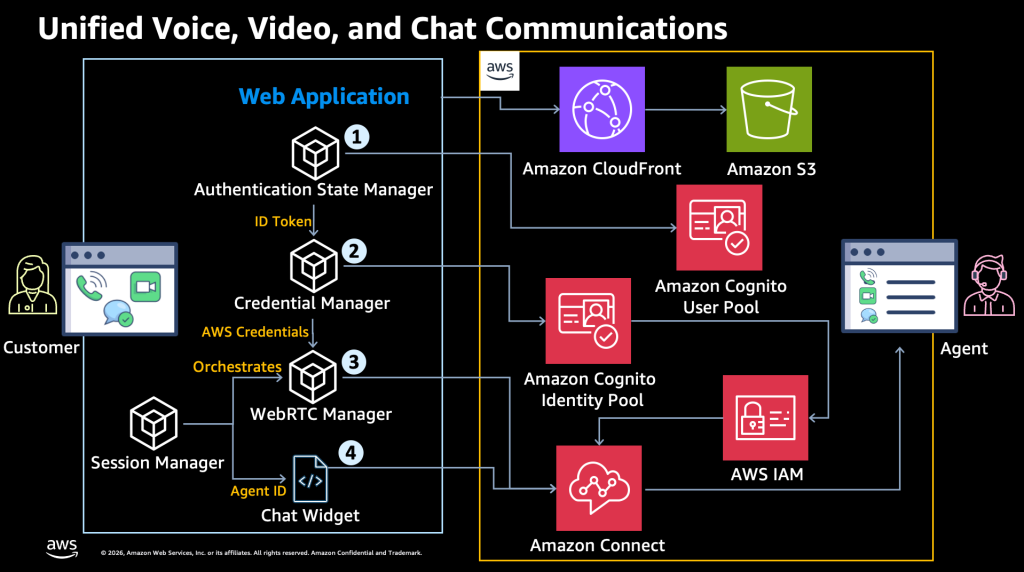
The solution connects a custom frontend to AWS services across three layers: hosting and delivery, authentication and authorization, and real-time communication.
2.1. Overview
The following steps correspond to the numbered labels in Figure 1.
Step 1 — Authentication. The customer logs into the user interface. The frontend sends their credentials to an Amazon Cognito user pool, which validates them and returns an ID token.
Step 2 — Authorization. The frontend passes the ID token to an Amazon Cognito identity pool, which calls AWS STS AssumeRoleWithWebIdentity. An IAM role grants least-privilege Amazon Connect permissions, and temporary credentials flow back to the frontend. This is an important design choice. The frontend never holds long-lived secrets. Every credential is scoped and short-lived.
Step 3 — Voice and video call. The customer starts a call. The frontend uses the temporary credentials to invoke the StartWebRTCContact API, which triggers the WebRTCQueueRouting contact flow. This flow distributes the call to an available agent and returns the Amazon Chime SDK meeting configuration. The frontend initializes the Chime SDK session and manages the real-time audio and video streams. Meanwhile, the frontend calls the DescribeContact API to retrieve the agent ID from the active contact and stores it locally.
Step 4 — Chat with the same agent. When the customer opens the chat, the frontend passes the stored agent ID to the Amazon Connect Chat Widget, which loads from the Amazon Connect hosted endpoint. The chat contact triggers the ChatAgentRouting contact flow, which uses the agent ID to route directly to the same agent already on the call. This is the step that ties everything together: voice/video and chat converge on a single agent. When the engagement ends, the frontend calls the StopContact and DisconnectParticipant APIs for clean session termination.
2.2. Frontend components
Five components make up the user interface, each with a distinct responsibility.
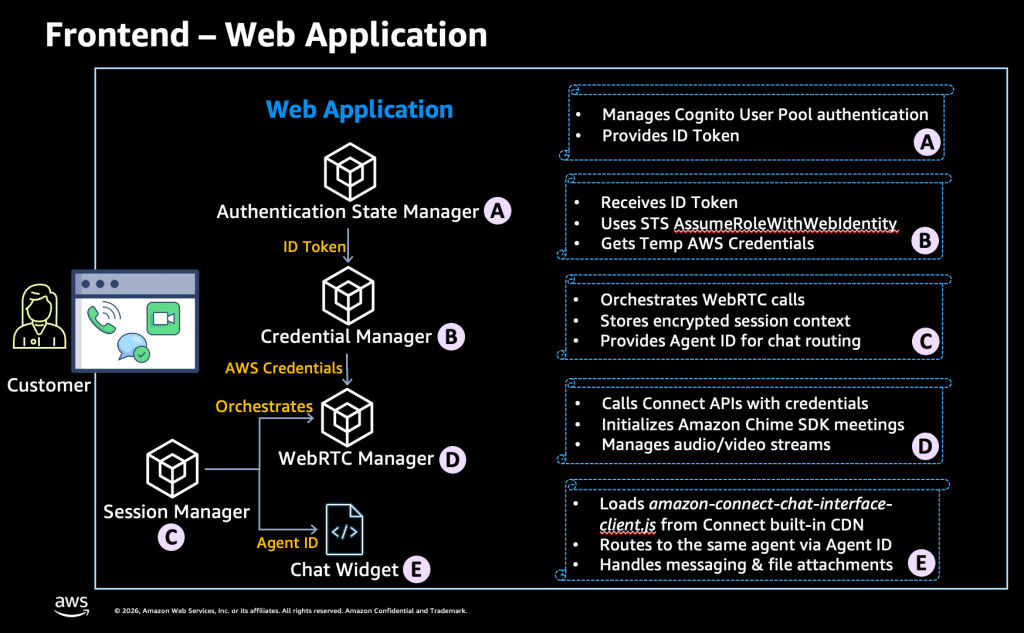
The Authentication State Manager handles login through the Cognito user pool flow and produces the ID token.
The Credential Manager exchanges that token for temporary AWS credentials scoped to Amazon Connect APIs.
The Session Manager coordinates everything. It stores encrypted session context in local storage, drives call initiation, and captures the agent ID so that the Chat Widget knows where to route.
The WebRTC Manager owns real-time media: calling StartWebRTCContact, initializing the Chime SDK session, and managing audio/video streams.
The Chat Widget loads from the Amazon Connect hosted endpoint. It receives the agent ID from the Session Manager and routes the chat to the same agent. It handles the full chat lifecycle: contact creation, WebSocket connections, messaging, and file attachments.
2.3. Backend services
Three layers of AWS services power the backend.
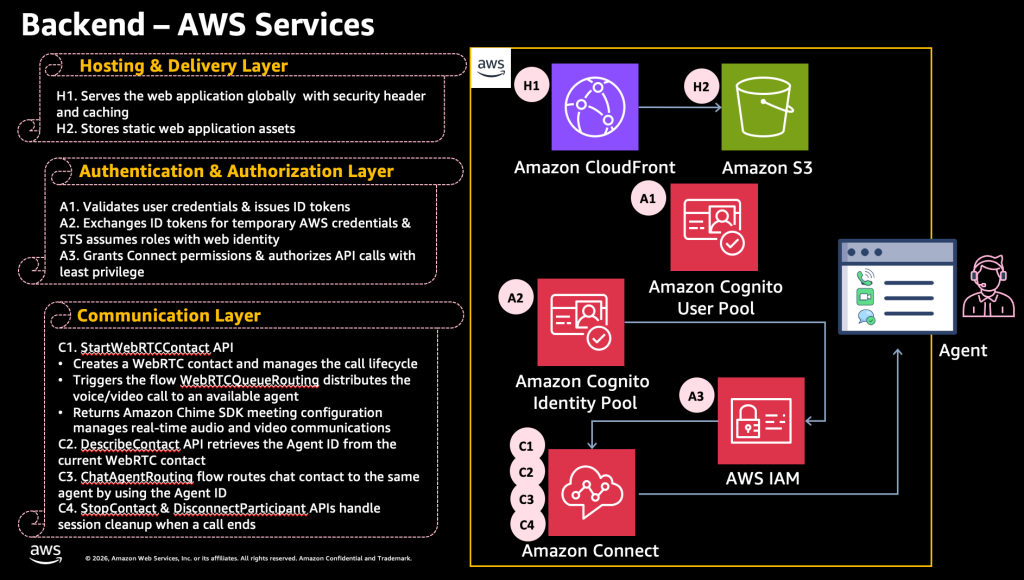
Hosting and Delivery: Amazon CloudFront serves the UI globally with security headers and caching. Amazon S3 stores static assets.
Authentication and Authorization: Amazon Cognito user pool, Amazon Cognito identity pool, AWS STS, and IAM chain together. The frontend gets exactly the permissions it needs — nothing more.
Communication: This is where real-time engagement happens. The StartWebRTCContact API triggers the WebRTCQueueRouting flow to assign an agent. The API returns the Amazon Chime SDK configuration, which the frontend uses to establish real-time audio and video. The DescribeContact API extracts the agent ID. The ChatAgentRouting flow routes chat to that same agent. The StopContact and DisconnectParticipant APIs clean up the session.
3. Prerequisites
Before deploying, make sure you have:
- An AWS account
- An Amazon Connect instance with file attachments enabled
- AWS CDK v2 installed and configured
- Node.js v20.x or later
- AWS CLI configured with appropriate permissions
4. Deploy the solution and clean up
The complete solution is packaged as an AWS CDK application in the GitHub repository. The stack provisions everything: CloudFront, S3, Cognito, IAM roles, and Amazon Connect contact flows.
The README walks through each step: clone the repo, install dependencies, configure your Connect instance, deploy the stack, create a test user, and verify the unified experience.
Follow along with the step-by-step deployment walkthrough. When you’re done testing, make sure to tear down all resources to avoid unnecessary charges.
5. Conclusion and next steps
We showed how to unify voice/video and chat with one Amazon Connect agent in a single customer-agent engagement. The solution wires together existing capabilities: StartWebRTCContact and DescribeContact APIs, contact flow routing, Amazon Chime SDK, the standard chat widget, and short-lived AWS credentials through Amazon Cognito and AWS STS.
Keep in mind, this is one approach. You can also build a custom voice/video and chat widget from scratch for full flexibility. The Amazon Connect APIs, such as StartChatContact to initiate chat, CreateParticipantConnection to establish the WebSocket connection, SendMessage for messaging, and StartAttachmentUpload and CompleteAttachmentUpload for file sharing, give you granular control over every interaction, but at the cost of added implementation complexity. Where possible, leverage Amazon Connect built-in capabilities first and customize only where you need to.
Now it’s your turn. Start by identifying where customers need multiple touchpoints to complete a task, such as document signing, visual troubleshooting, or form submission. Deploy the solution from the GitHub repository, walk through the solution yourself, and see it in action. Then pilot with one team and one use case. Measure handle time, first-contact resolution, and customer effort before and after. Use that data to evaluate whether the solution fits your customer service operations.
6. Related materials
- Solution GitHub repository
- Amazon Connect Administrator Guide: Set up in-app, web, video calling, and screen sharing capabilities
- Amazon Connect StartWebRTCContact API
- Amazon Connect DescribeContact API
- Amazon Chime SDK for JavaScript
- Amazon Connect Cognito Developer Guide
- Amazon Connect Administrator Guide: Add a chat user interface to your website
About the authors
 |
Ying Qian brings over 19 years of contact center technology experience, having held roles spanning Solutions Architect, Technical Project Manager, ICT Lead Engineer, and Operations Engineer. At AWS, she works as the service-aligned Solutions Architect, leading the Amazon Connect Telephony & Resiliency SME team, and helping customers unlock business value by guiding Amazon Connect implementations aligned with AWS Well-Architected Framework principles. Outside of work, she enjoys jogging, hiking the Alps with her family, and swimming in Lake Constance. |
 |
Nelson Martinez is an Applied AI Senior Solutions Architect based in Sydney, with over 31 years of experience spanning Contact Centre, Unified Communications, IP Telephony, and Networking across Australia and the United States. Over the past five years at AWS, he has specialized in Cloud Contact Centre and Applied AI solutions, working directly with customers to deliver industry-leading implementations at a global scale. |