AWS Contact Center
Create smarter contact center experiences with the Amazon Connect assistant
Introduction
Contact center leaders face an increasingly complex challenge: customers expect instant, personalized service across every channel, while human agents juggle multiple systems, knowledge bases, and workflows to resolve issues. Traditional approaches – building custom integrations for each system, training agents on dozens of applications, and manually updating customer records – are time-consuming, expensive, and difficult to scale.
What if your AI could do more than just answer questions? What if it could actually take action – looking up customer information, creating work orders, processing refunds, and updating records – all while maintaining the security and governance your organization requires?
Consider a typical scenario: A customer calls about a billing issue. The agent must check the CRM, review payment history in the billing system, search knowledge bases for policies, and manually create a case, all while keeping the customer engaged. This juggling act leads to longer handle times, frustrated customers, and burned-out agents.
Amazon Connect enables you to build AI agents that move beyond simple conversations to taking meaningful actions on behalf of customers and human agents. Through integration with Model Context Protocol (MCP), a robust tools framework, and out-of-the box observability capabilities, Amazon Connect empowers you to build, deploy, and operate production-grade AI agents at scale.
Understanding AI agents and assistants
In Amazon Connect, AI agents are the intelligent components you create and configure. They access knowledge bases, invoke tools, and reason over results to resolve customer issues. Assistants are the conversational interfaces through which people interact with one or more AI agents. The Connect assistant is the default interface for human agents, supervisors, and customers, though companies can customize and rename their customer-facing experience.
The challenge: Breaking down system silos
Modern contact centers operate across a complex ecosystem of systems. A single customer interaction might require accessing:
- Customer relationship management (CRM) systems for account history
- Knowledge-bases for product information and troubleshooting guides
- Ticketing systems for case management
- Billing platforms for payment processing
- Scheduling systems for appointments
- Inventory databases for product availability
Human agents spend valuable time switching between applications, searching for information, and manually updating records across systems. This context-switching not only slows resolution times but also increases the cognitive load on agents, leading to errors, burnout, and inconsistent customer experiences.
Meanwhile, customers expect seamless experiences whether they’re interacting with an AI agent for self-service or speaking with a human agent. They don’t care about your internal systems – they just want their issues resolved quickly and accurately.
AI agents that take action
Amazon Connect enables you to build AI agents that can securely access data, execute workflows, and reason over results across your entire technology ecosystem. The orchestration architecture is largely the same whether you’re building AI agents for self-service automation or agent assistance – you simply configure them for different use cases. Here’s how the platform works:
Model Context Protocol (MCP) integration
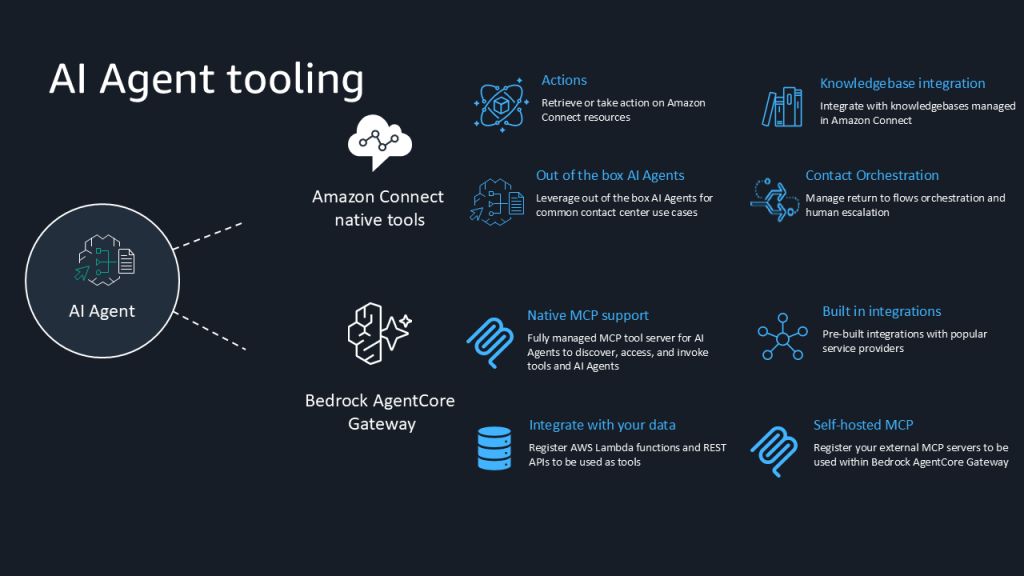
MCP provides a standardized mechanism for AI agents to discover and invoke tools across your systems. Instead of building custom integrations for each application, you can leverage a unified framework:
Connect once, use everywhere: Register MCP servers through Amazon Bedrock AgentCore Gateway to transform diverse APIs, AWS Lambda functions, and remote services into standardized tools that any AI agent can use. Integrate with third-party applications like Salesforce, ServiceNow, or your custom business systems through MCP servers. Your AI agents can then invoke these tools to retrieve data, create records, or trigger workflows. Configure tool-specific instructions and examples to guide AI agents on when and how to use each tool.
Leverage Native Capabilities: Amazon Connect provides a built-in MCP server with immediate access to Amazon Connect, Customer Profiles, Cases, and Assistant APIs with no additional configuration required for first party Amazon Connect tools.
Encapsulate Custom Logic: Create flow modules in Amazon Connect Flows to encapsulate complex business logic and workflows. These reusable, parameterized components can be invoked as tools by AI agents, allowing you to maintain your existing business processes while enabling AI-powered automation.
Fine-grained control: For each tool, you can override input values using JSON path expressions, filter outputs to return only relevant data, and set user confirmation requirements for sensitive operations, and control what actions can be taken via Security Profiles. This ensures AI agents interact with tools safely and efficiently.
Why this matters
Traditional contact center integrations require custom development for each system, creating maintenance overhead and limiting agility. With MCP, you build the integration once and any AI agent can use it. This dramatically reduces time-to-market for new capabilities and makes it easier to evolve your contact center as your business needs change.
Create faster with visual configuration
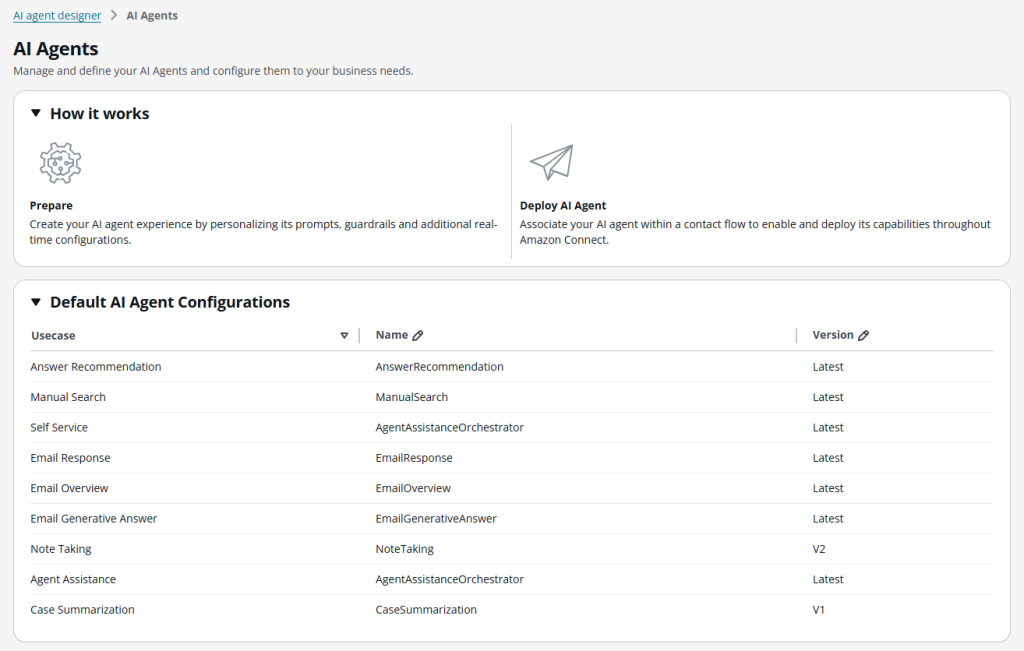
The AI agent designer in the Amazon Connect admin console makes it easy to configure and manage AI agent capabilities without writing code:
Visual tool configuration: Select which tools your AI agents can access through an intuitive interface. Configure tool parameters, set user confirmation requirements for sensitive actions, and define how tools should be invoked. AI agents and prompts support versioning with immutable versions and LATEST alias support for dynamic updates. This means you can update prompts or model configurations without requiring updates to the associated AI agent.
Flexible tool types: Support for MCP tools (first-party and third-party integrations), flow modules (custom business logic), and return-to-control mechanisms (hand-off to human agents or other flow handling).
Smart orchestration: Orchestration AI agents use large language models to intelligently plan and execute multi-step workflows. Rather than following rigid decision trees, these agents dynamically select and chain tools based on customer intent, reasoning over results at each step to determine the next best action. The agent considers available tools, accumulated context from previous interactions, and the current customer need to create adaptive workflows. These agents can handle both self-service interactions and agent assistance scenarios across voice, chat, tasks, and email channels.
Start fast with out-of-the-box AI agents: Amazon Connect provides system AI agents for common use cases that you can use immediately or customize for your specific needs:
- Self-service agents for voice and chat channels
- Agent assistance agents for voice, chat, tasks, and email
- Manual search agent for knowledge base queries
- Answer recommendation agent for proactive suggestions
- Case summary agent for automated case documentation
- Email agents for overview, recommendation, and draft generation
These pre-built agents accelerate your time-to-value while giving you the flexibility to tailor them to your business requirements.
Security-first design with granular permissions
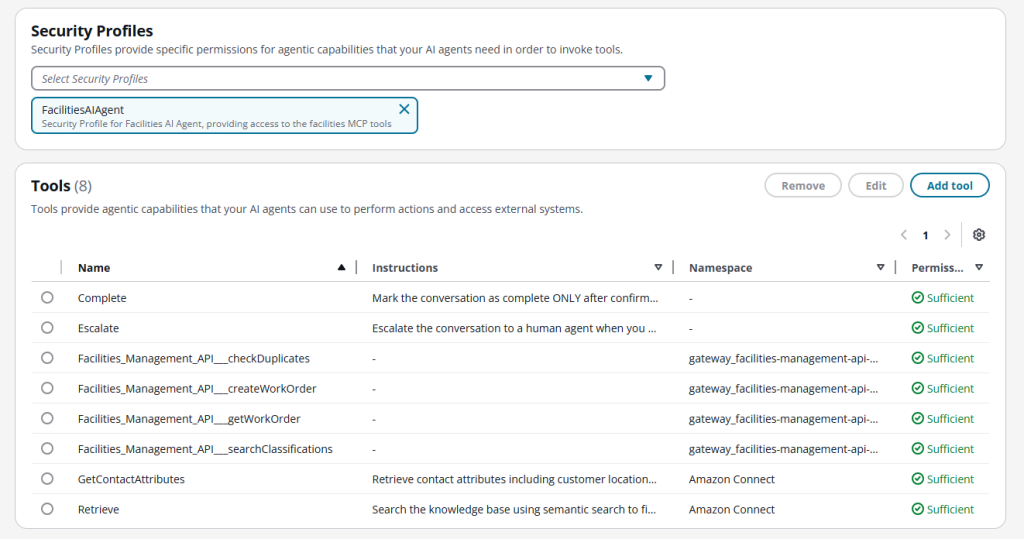
Every tool interaction is governed by Amazon Connect’s security profiles, giving you fine-grained control over what each AI agent can do:
- Define tool access: Specify which tools specific AI agents can invoke
- Require confirmations: Set user confirmation requirements for sensitive operations like refunds or account changes
- Audit everything: Maintain complete audit trails of all tool invocations
- Control data access: Manage permissions at the field level
Security profiles are created in the Connect admin console and assigned to AI agents during configuration. This ensures that agents only have access to the tools and data they need for their specific use case, maintaining security and compliance while enabling powerful automation.
Comprehensive observability
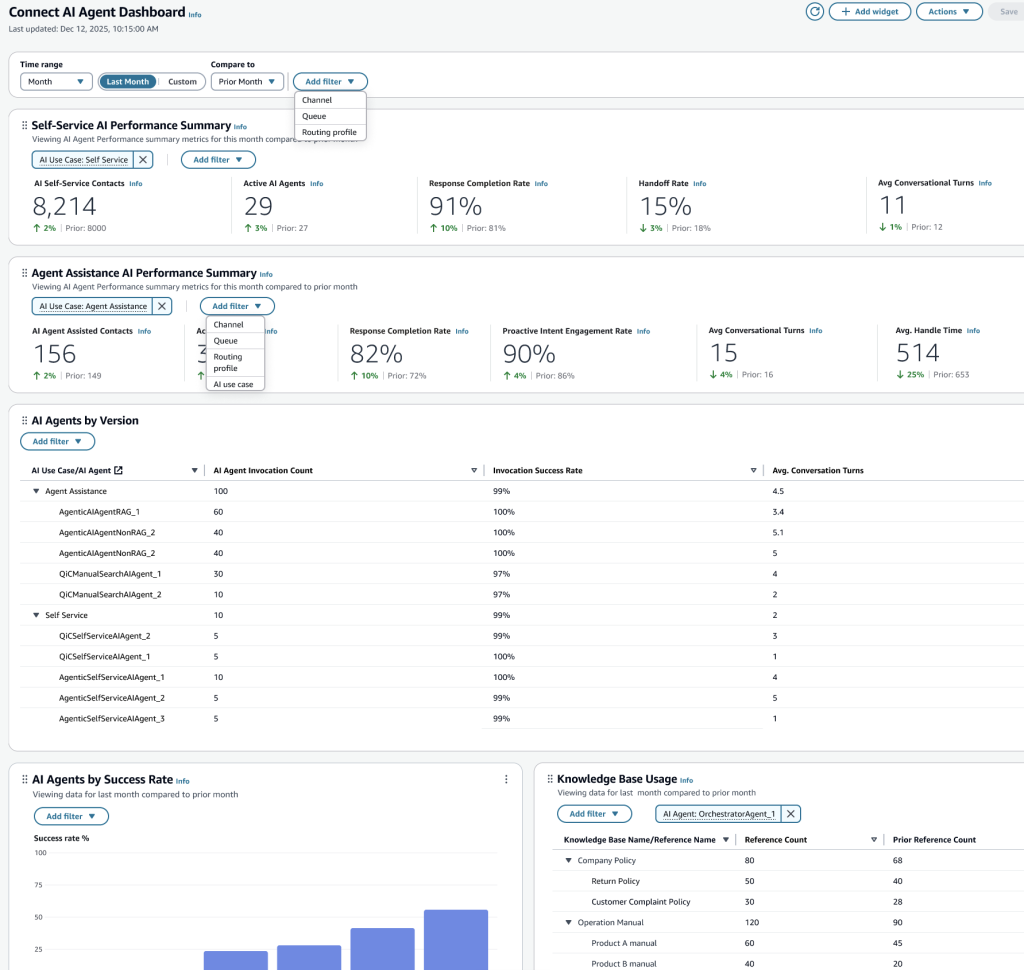
Amazon Connect provides built-in observability to measure, monitor, and optimize AI agent performance. Track key metrics like hand-off rates, conversation turns, task completion rates, and tool selection accuracy through customizable dashboards.
Access metrics through three complementary interfaces:
- Connect analytics dashboards: Customizable views for trend monitoring and real-time insights
- Metrics APIs: Programmatic access for integration with your existing tools and workflows
- Connect data lake: Advanced analysis capabilities to measure business impact
The solution also integrates AI agent metrics with contact details and evaluation forms, enabling automated quality management and intelligent alerting. Compare performance across different AI agent versions before rolling out changes to production, reducing risk and enabling data-driven optimization.
Examples: AI agents in action
The following examples demonstrate how orchestration AI agents use reasoning to plan multi-step workflows, integrate with both native (1p) and third-party (3p) systems through MCP, and adapt based on what they discover.
The first example focuses on self-service automation with external system integration, showcasing 3p MCP, reasoning, and flow modules. The second example highlights agent assistance using native Connect capabilities, emphasizing 1p MCP tools and knowledge retrieval. Together, they illustrate the full breadth of AI agent capabilities.
Self-service facilities management
A customer calls about an AC malfunction in their office. The orchestration AI agent handles the entire interaction autonomously, demonstrating how AI agents reason through multi-step workflows and integrate with external systems.
Understanding the request and gathering context
The AI agent identifies the issue through natural language: an AC malfunction requiring facilities support. It retrieves the customer’s profile and location (Building A, Floor 3, Suite 301) from Customer Profiles using native 1p MCP tools.
Reasoning: “To create a work order, I need to check for duplicates and classify this issue correctly.”
Integrating with third-party systems (3p MCP)
The AI agent calls the facilities management system via a registered 3p MCP server to check for duplicate tickets at this location. Finding none, it queries the facilities system’s problem classification tool to identify the appropriate code (HVAC-AC-002).
Confirming before taking action
The AI agent presents the work order details: “I’ll create a work order for your AC issue at Building A, Floor 3, Suite 301, classified as urgent priority. May I proceed?” After receiving confirmation, it creates the work order through the 3p MCP integration.
Reasoning: “The work order is created. Now I should log this for tracking and send confirmation.”
Completing the workflow with flow modules
The facilities system returns work order WO-2024-002001 with technician details. The AI agent executes a custom flow module to send an email confirmation and update the contact record -demonstrating how flow modules encapsulate complex business logic that AI agents can invoke as tools.
Key capabilities demonstrated:
- Reasoning: AI agent plans multi-step workflow dynamically
- 3p MCP integration: Seamless connection to external facilities system
- Flow modules: Reusable business logic invoked as tools
- User confirmation: Human control over sensitive operations
- Adaptive behavior: If the facilities system is unavailable, the agent can gracefully handle errors or escalate

Agent assistance for complex billing disputes
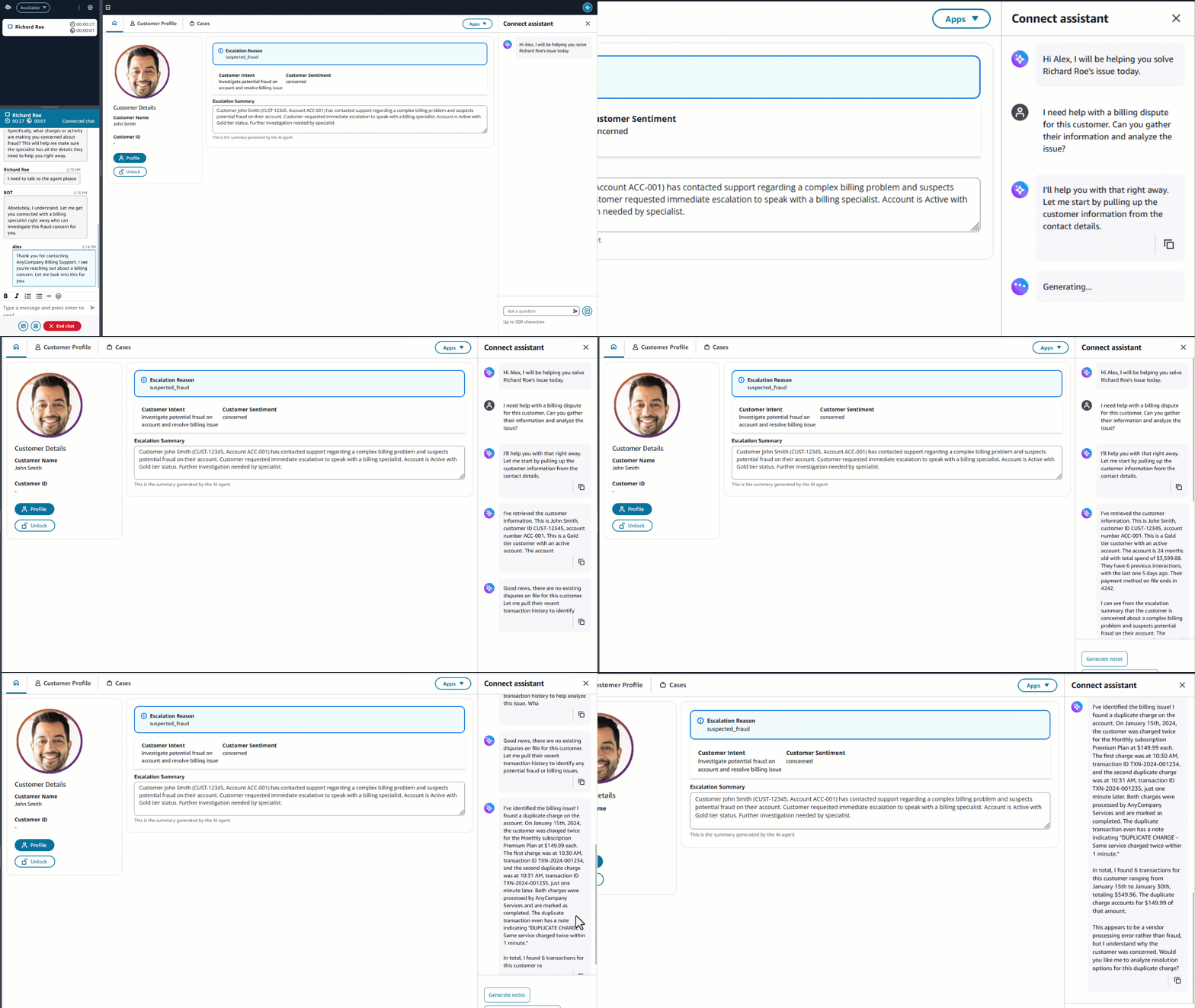
A human agent is helping a customer with a billing dispute. The agent asks the Connect assistant for help, demonstrating how the same orchestration architecture supports agent assistance through native 1p MCP tools.
Proactive context gathering with 1P MCP tools
The AI agent automatically gathers context using native Amazon Connect capabilities. It retrieves the customer’s complete account history, payment methods, and previous interactions from Customer Profiles. It searches for related billing cases using the SearchCases tool – all through 1p MCP, requiring no additional configuration.
Reasoning: “I need to understand the billing discrepancy and find relevant policies to provide accurate guidance.”
Knowledge retrieval and analysis
The AI agent searches across multiple knowledge bases using the QueryAssistant and Retrieve tools (1p MCP) for relevant billing policies. It then queries the billing system (3p MCP) to retrieve transaction details, identifying a duplicate charge from a vendor system error.
Presenting options to the human agent
The Connect assistant surfaces three resolution options with supporting policy references:
- Full refund with expedited processing (2-3 business days)
- Account credit with 10% goodwill adjustment
- Payment plan adjustment for future billing
Executing the resolution with 1p tools
After the agent selects option 1 with customer approval, the AI agent orchestrates the resolution using native 1p MCP tools:
- Creates a case to track the refund
- Executes a custom flow module for the refund workflow
- Updates Customer Profiles with conversation notes
- Creates a follow-up task for the billing team
Key capabilities demonstrated:
- 1p MCP tools: Native Amazon Connect capabilities available out-of-the-box
- Knowledge retrieval: Multi-source search and policy analysis
- Reasoning: Dynamic planning based on discovered information
- Agent assistance: AI augments human agent without replacing them
- Hybrid integration: Combines 1p tools (Amazon Connect) with 3p systems (billing)
The human agent maintains control throughout, with the AI agent handling research, analysis, and execution while the agent focuses on the customer relationship.
How AI agents work
Unlike traditional rule-based systems that follow predetermined decision trees, orchestration AI agents use large language models to dynamically plan and reason through customer interactions.
Dynamic planning: When a customer interaction begins, the AI agent analyzes the request and creates a plan based on available tools and configured instructions. This isn’t a static workflow – the agent adapts based on what it discovers at each step. In the facilities example, the agent reasoned through checking for duplicates before creating a work order, demonstrating adaptive planning.
Reasoning over results: After invoking a tool, the agent reasons over the results to determine the next action, maintaining context throughout the conversation. In the billing example, the agent analyzed transaction data and knowledge base policies to generate resolution options.
Human control: For sensitive operations, you can configure tools to require user confirmation. The AI agent will present the planned action, explain what it will do, and wait for approval before proceeding – ensuring humans remain in control of critical decisions.
MCP integration: The agent can invoke both native 1p MCP tools (Customer Profiles, Cases, Knowledge bases) and third-party 3p MCP tools (facilities systems, billing systems) seamlessly, creating unified workflows across your technology ecosystem.
How to get started with AI agents in Amazon Connect
The examples above demonstrate the power of orchestration AI agents, but they’re just the beginning. You can create AI agents tailored to your specific business needs, combining native Connect capabilities, third-party integrations, and custom workflows.
Getting started with AI agents is straightforward. Here’s the high-level approach:
- Configure AI agents: In the AI agent designer within your Amazon Connect admin workspace, access pre-configured AI agents or create custom AI Agents for personalized use cases.
- Configure tools: Register MCP servers for third-party integrations, create flow modules for custom logic, or leverage native Connect capabilities that are available out-of-the-box.
- Create and customize: Start with system AI prompts, then customize prompts and tool configurations for your specific needs. Set up security profiles to control tool access.
- Deploy and monitor: Test in sandbox environments, deploy to production channels, and monitor performance through the observability dashboard.
For detailed step-by-step instructions, see the Amazon Connect Administrator Guide.
Measuring success
Once your AI agents are deployed, Amazon Connect’s observability capabilities help you measure performance and demonstrate business value. Here’s what to track:
Adoption and engagement metrics:
Track AI-involved contact percentage by channel and use case, plus proactive intent detection rates for agent assistance. These metrics help you identify which channels are gaining traction and where additional promotion might be needed.
Efficiency and performance metrics:
Monitor hand-off rates, conversation turns, average handle time, task completion rates, and AI agent turn latency to identify improvement opportunities. Compare these metrics across different AI agent versions to understand what works best for your use cases.
Quality and accuracy metrics:
Evaluate response faithfulness, completeness, and helpfulness using LLM-as-a-judge evaluation. Track tool selection accuracy, parameter resolution accuracy, and tool invocation success rates to refine prompts and improve AI agent performance.
Automated quality management:
Set up intelligent monitoring to catch issues early:
- Configure rules to automatically flag interactions requiring review (e.g., low sentiment scores, multiple escalations)
- Set up alerts based on AI agent performance conditions (e.g., hand-off rate exceeds threshold)
- Access detailed activity traces for troubleshooting, including request/response payloads, tool invocations, and latency profiles
- Search by AI agent attributes to quickly find and analyze specific interaction patterns
- This proactive approach helps you identify and resolve issues before they impact customer satisfaction.
Business impact:
Connect AI agent metrics to business outcomes: first-contact resolution rates, customer satisfaction scores (CSAT), operational cost per contact, and agent productivity metrics. Correlating AI agent performance with business KPIs demonstrates clear ROI and justifies continued investment.
Demo
Want to see AI agents in action? Watch this demonstration showing how an orchestration AI agent handles a facilities management request from start to finish:
The demo shows how the AI agent autonomously gathers customer context, checks for duplicate tickets, classifies the issue, and creates a work order – all while keeping the customer informed and maintaining control over sensitive operations through confirmation workflows.
Conclusion
Amazon Connect’s Assistant capabilities represent a foundational shift in how contact centers operate. By enabling AI agents to take meaningful actions while maintaining security and governance, organizations can deliver exceptional customer experiences at scale.
The combination of Model Context Protocol integration, visual configuration tools, granular security controls, and comprehensive observability creates a powerful platform for building intelligent, action-oriented customer experiences. Whether you’re automating self-service interactions or augmenting human agents with AI assistance, Amazon Connect provides the foundation you need.
Ready to transform your contact center with AI agents that take action? Get started today by visiting the Amazon Connect documentation or contact your AWS account team to discuss your specific use cases.
Resources
Do you want to learn how to build AI agents in Amazon Connect? The Amazon Connect Administrator Guide provides comprehensive documentation on creating orchestration AI agents, configuring tools, and setting up security profiles. Learn more at Create AI Agents in Amazon Connect.
Do you want to get hands-on with AI agents? Follow the Building Intelligent Customer Service with Agentic AI on Amazon Connect workshop to learn how to register MCP servers, configure tools, and deploy your first orchestration agent!
Do you want to integrate third-party systems with AI agents? Learn about Model Context Protocol integration and how to connect your existing business systems. See Enable AI agents to retrieve information and complete actions with MCP tools.
Do you want to monitor AI agent performance? Explore the observability dashboard and learn how to track key metrics, set up alerts, and optimize configurations. Learn more at AI Agent performance dashboard.
About the Authors
 Alex Schrameyer (he/him) is a Worldwide Solutions Architect Lead for Agent Experience at Amazon Web Services (AWS) based in the Chicago area. He believes that exceptional agent experiences are the cornerstone of outstanding customer service, and focuses on architecting solutions that empower both human agents and AI agents to deliver seamless customer experiences. Alex enjoys traveling around the world, and you might find him at your local baseball stadium or theme park. Alex Schrameyer (he/him) is a Worldwide Solutions Architect Lead for Agent Experience at Amazon Web Services (AWS) based in the Chicago area. He believes that exceptional agent experiences are the cornerstone of outstanding customer service, and focuses on architecting solutions that empower both human agents and AI agents to deliver seamless customer experiences. Alex enjoys traveling around the world, and you might find him at your local baseball stadium or theme park. |
|
Abhishek Pandey (he/him) is a Principal Solutions Architect with Amazon Web Services based in Houston, TX. Abhishek is passionate about architecting creative solutions that support business innovation across different industries and specialized in helping customers design and implement AI contact center solutions using Amazon Connect and the broader AWS ecosystem. Outside of work, he loves to hang out with family and friends. |
|
Baswaraj Thota (he/him) is a Senior Solution Architect with Amazon Web Services. With more than 15 years of IT experience, Baswaraj has helped many organizations to implement sophisticated, scalable, and secure solutions across many different industries. Outside of work, he loves to play cricket, jog and traveling. |