Containers
Deep dive: Streamlining GitOps with Amazon EKS capability for Argo CD
Organizations use GitOps as the standard for managing Kubernetes deployments at scale. Running Argo CD in production means managing high availability, upgrades, Single Sign-On (SSO) configuration, and cross-cluster connectivity. This operational scope grows with each additional cluster across regions or AWS accounts.
Amazon Elastic Kubernetes Service (EKS) Capability for Argo CD – referred to as “Argo CD Capability” in the remainder of this blog post – is part of the newly launched Amazon EKS Capabilities feature. It provides a fully managed GitOps continuous deployment solution that eliminates the operational overhead of running Argo CD on your clusters. The capability runs in AWS managed service accounts outside of your clusters, with AWS handling scaling, upgrades, inter-cluster communications, and offering native integrations with other AWS services such as AWS Secret Manager, Amazon Elastic Container Registry (ECR), AWS CodeCommit and AWS CodeConnections.
In this deep dive, we explore advanced scenarios with Argo CD including hub-and-spoke multi-cluster deployments, native AWS service integrations, multi-tenancy implementation, scaling with advanced Argo CD configurations and integration with CI/CD pipeline.
For a detailed comparison with self-managed solutions, see Comparing EKS Capability for Argo CD to self-managed Argo CD.
Architecture overview: Hub-and-Spoke topology
In a hub-and-spoke architecture, the Argo CD Capability is created on a dedicated central EKS cluster (the hub) that serves as the control plane for GitOps operations, and it is not created on the spoke clusters. Although Argo CD in the central hub cluster can technically manage and deploy applications to both the hub and the spoke clusters, in this blog the hub cluster is designed exclusively for management tasks and does not host any business workloads.
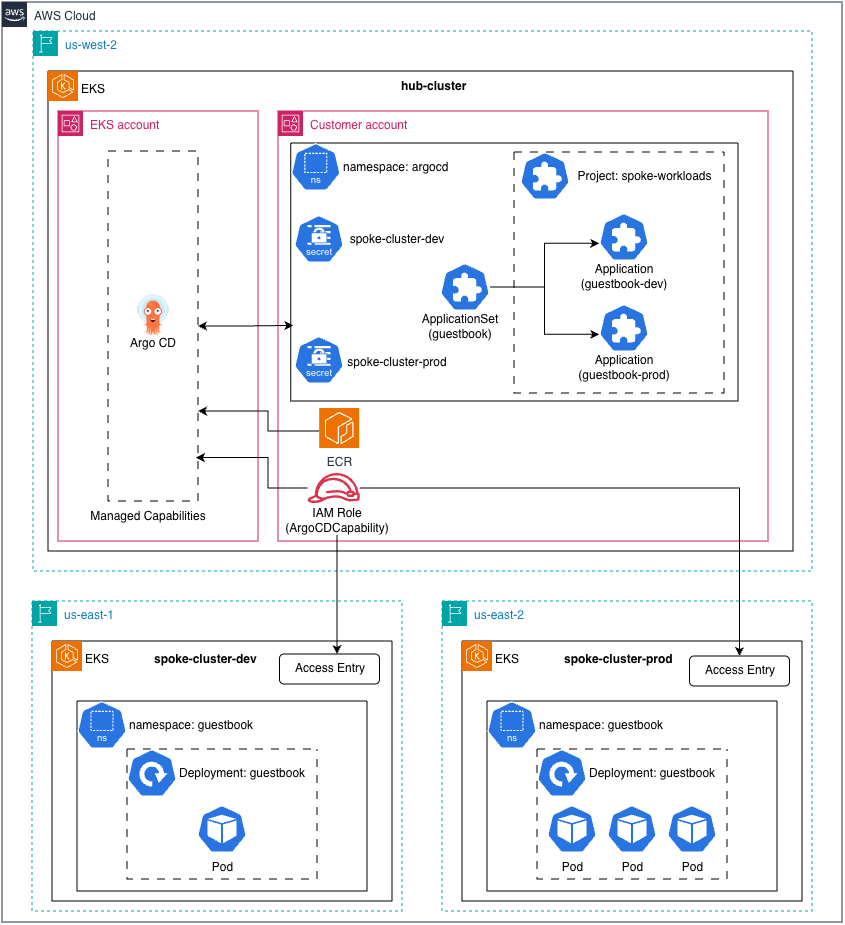
“Figure 1: Sample topology of hub-and-spoke model for Argo CD Capability”
This topology provides platform teams with a single pane of glass to orchestrate deployments across an entire fleet of clusters—whether they’re in different regions, accounts, or have private Kubernetes API endpoints.
Prerequisites
Before you begin, verify that you have the following tools and configurations in place.
- eksctl version 0.220.0 or later
- kubectl configured for your clusters
- Helm version 3.8+ for packaging and push charts to ECR
- Argo CD CLI (optional, for CLI operations)
- AWS IAM Identity Center configured in your account
- envsubst to substitute environment variables in YAML files
Solution Walkthrough
Clone the sample git repository:
Configure AWS IAM Identity Center
AWS IAM Identity Center (IDC) is required for the Argo CD Capability. It provides centralized user management across all AWS services, federation with existing identity providers such as Okta, Azure AD, and Google Workspace.
If you don’t have an IDC instance configured with users and groups, please see the AWS documentation to create it.
We assume your account is already configured with AWS IDC groups eks-argo-cd-admins and eks-argo-cd-developers. If your group names differ, update them in get-aws-identity-center-config.sh.
The following command collects the IDC configurations into environment variables used to create the Argo CD Capability:
Create hub cluster with Argo CD Capability
The following eksctl configuration creates the hub cluster with the Argo CD capability and maps IDC groups to Argo CD’s built-in RBAC roles: ADMIN and VIEWER. This mapping allows users in those IDC groups to authenticate into Argo CD with the corresponding permissions.
The capability role also includes additional AWS permissions for services such as Amazon ECR, AWS Secrets Manager, AWS CodeCommit, and AWS CodeConnections. These permissions allow Argo CD to pull artifacts from ECR, retrieve secrets, and access Git repositories.
Run the following command to create file hub-cluster.yaml with the environment variables substituted and create the hub cluster – this may take around 20 mins.
This figure highlights the contents of hub-cluster.yaml.template used to configure the Argo CD Capability.
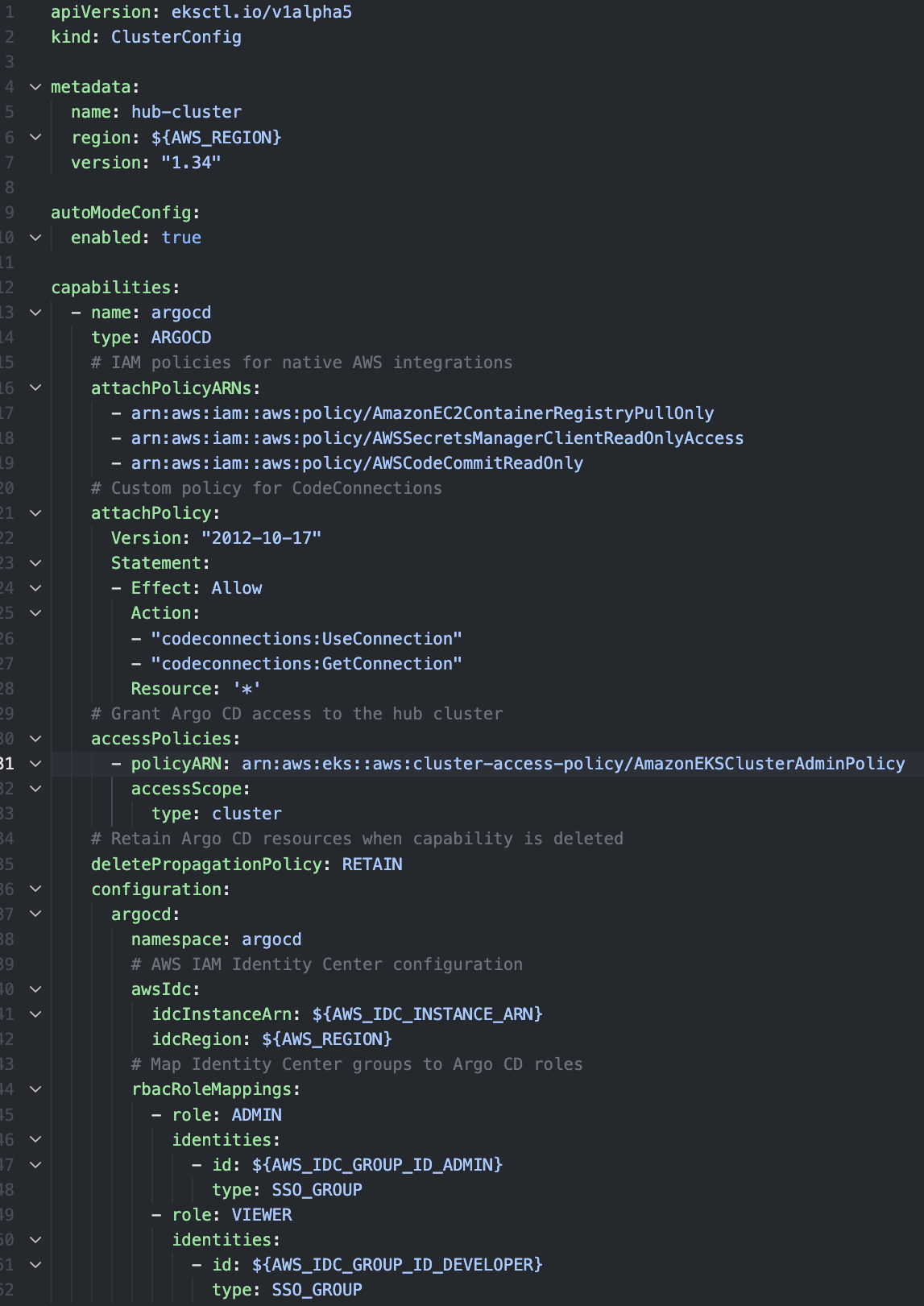
“Figure 2: eksctl cluster configuration for hub cluster”
Once the cluster is created, configure kubectl, export the environment variables that will be needed in subsequent steps and get the Argo CD endpoint URL.
Open the Argo CD Server URL in your browser and sign in with your IDC credentials as a user from the admin group. The Argo CD capability automatically provisions the Argo CD CRDs and the default project in your cluster. You can verify that using the following command:
Create spoke clusters
Spoke clusters are your workload clusters. These clusters can be in different regions, different AWS accounts, or fully private with no public Kubernetes API endpoint. The Argo CD Capability handles all these scenarios without requiring Amazon Virtual Private Cloud (VPC) peering, AWS Transit Gateway, or complex Identity and Access Management (IAM) role chaining. For Argo CD running in the hub cluster to deploy workloads to a spoke cluster, the spoke cluster must grant the Argo CD Capability IAM role access through an EKS Access Entry. This gives Argo CD the Kubernetes permissions required to interact with the spoke cluster’s API server. For demonstration purposes, we grant the AmazonEKSClusterAdminPolicy, in production environments, implement least-privilege access by creating custom policies that grant only the required permissions for your Argo CD deployments.
The following eksctl configuration files create two spoke clusters, spoke-cluster-dev and spoke-cluster-prod, both with access entries for the Argo CD capability IAM role, granting permission to deploy to these clusters. Note that these commands may take around 20-25 mins.
The following image shows the spoke-dev-cluster.yaml.template file, which defines the EKS Access Entry for the spoke cluster.
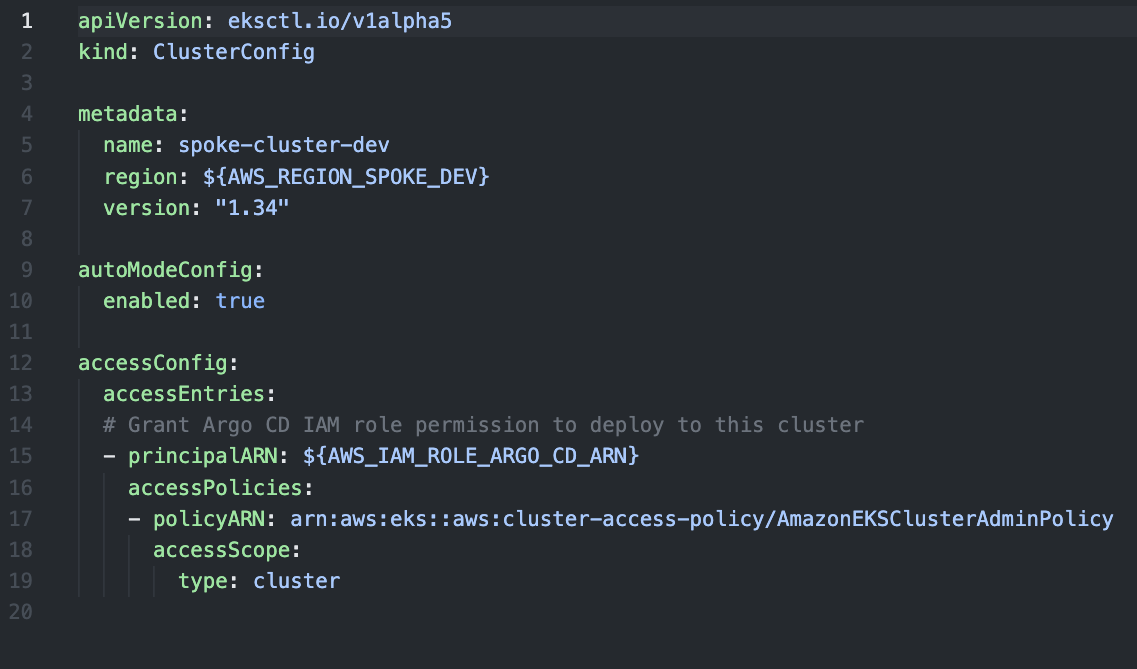
“Figure 3: eksctl cluster configuration for spoke clusters”
With self-managed Argo CD, cross-account access requires creating IAM roles in each target account with trust policies, configuring EKS Pod Identity or IAM Roles for Service Accounts (IRSA), and often setting up network connectivity. The Argo CD Capability eliminates all of this because EKS Access Entries handle cross-account authentication natively. Once you have clusters created, configure kubectl, and export the environment variables required for subsequent steps
Register clusters with Argo CD
All EKS clusters must be registered with Argo CD via a Kubernetes secret, including the same cluster where the Argo CD capability is enabled. For this walkthrough, we register the hub cluster as in-cluster, which is the standard name in self-managed Argo CD deployments.
Every cluster is scoped to an Argo CD project, which is a logical grouping of applications. If the secret does not specify a project, Argo CD uses the default project. We register the spoke clusters with project spoke-workloads, which we create later in the multi-tenancy section.
The Argo CD Capability can be deployed to fully private EKS clusters without any additional networking configuration. AWS automatically manages connectivity between the Argo CD and your private clusters, eliminating the need for VPC peering, Transit Gateway, private hosted zones for DNS, or custom security group rules. With the Argo CD Capability, the cluster is registered by specifying its EKS cluster ARN in the server field, rather than the Kubernetes API URL used in self-managed Argo CD. The use of labels and annotations on the secret become powerful selectors and parameters when using Argo CD ApplicationSets to dynamically create contextualized Argo CD Applications:
Run the following commands to register the clusters with Argo CD:
The following figure shows the content of the manifest file and configuration required for cluster registration.
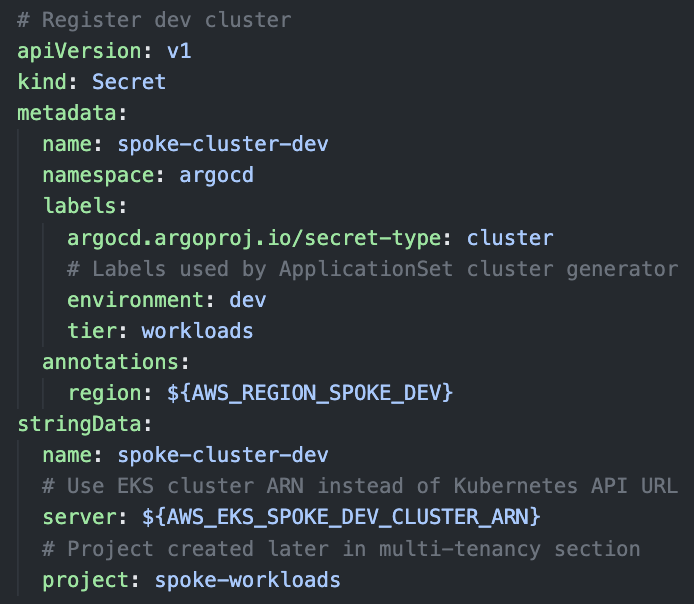
“Figure 4: Cluster secret configuration for dev cluster”
Configure Git sources
Argo CD supports multiple source types for application manifests. The Argo CD Capability enhances this model with native AWS service integrations that simplifies authentication and eliminates credential management overhead. Public Git repositories work without any additional configuration, and no Kubernetes Secret is required.
For private repositories, create a Kubernetes Secret with your credentials. Use repo-creds for credentials that apply to multiple repositories, or repository for a specific repository:
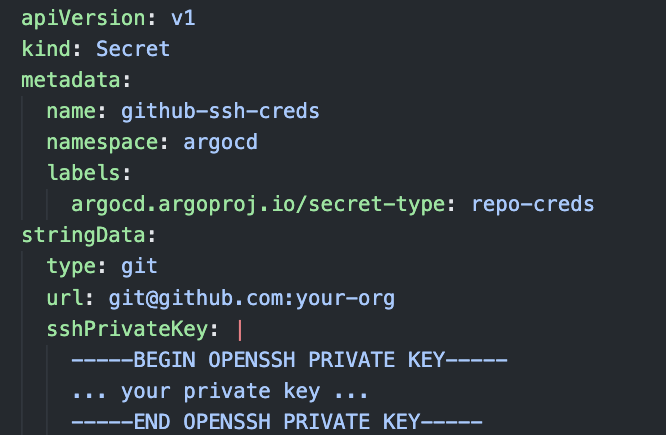
“Figure 5: Git repository secret example with ssh private key”
Instead of storing credentials directly in Kubernetes Secrets, you can reference secrets stored in AWS Secrets Manager using the secretArn field. This provides centralized secret management, automatic rotation workflows using AWS APIs, and audit logging through CloudTrail.
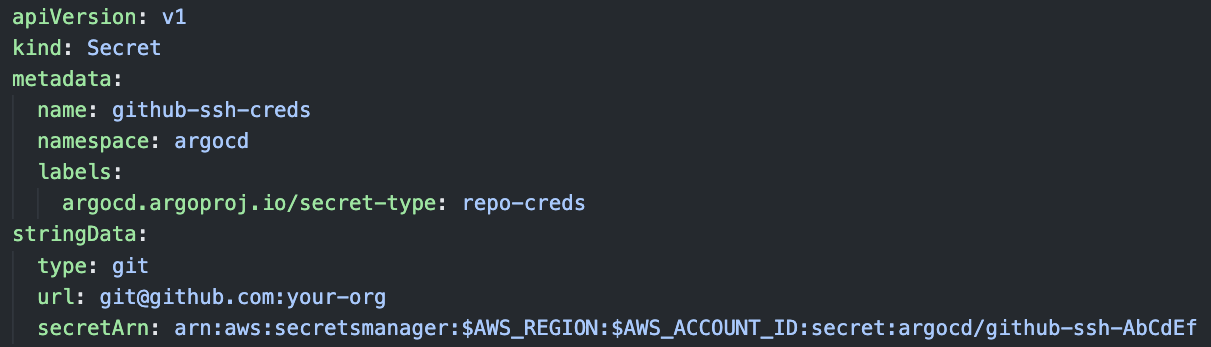
“Figure 6: Git repository secret example referencing AWS Secret Manager secret”
AWS CodeConnections provides managed OAuth authentication for third-party Git providers including GitHub, GitLab, Azure DevOps and Bitbucket. This eliminates the need to manage personal access tokens or SSH keys. If your GitLab self-managed or GitHub Enterprise Server is only accessible on a VPC including on-premises, you can use CodeConnections to let Argo CD access these git repositories.
Here’s an example using CodeConnections the repoURL field contains the CodeConnection value
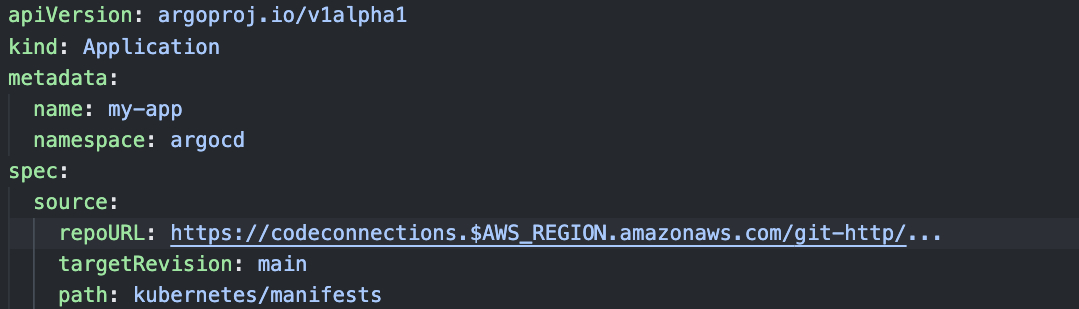
“Figure 7: Example of Argo CD Application referencing CodeConnection repository”
For detailed configuration, see Connect to Git repositories with AWS CodeConnections.
Native ECR integration
Native Amazon ECR authentication simplifies a common operational challenge with self-managed Argo CD. With self-managed Argo CD, you need to implement workarounds like CronJobs to refresh ECR tokens every 12 hours. The managed capability handles this automatically by using the IAM Role associated with the Argo CD Capability.
The following commands create an ECR repository, authenticate Helm with the registry, clone the Argo CD example applications, package the guestbook Helm chart, and push it to ECR:
Verify that helm-guestbook:0.1.0 exists in ECR, as shown below.

“Figure 8: Helm chart: helm-guestbook stored in ECR”
Argo CD v3.1 introduces OCI support, enabling the use of OCI-compliant container registries as sources for configuration artifacts (Helm Charts or manifest files). This means Argo CD can pull Kubernetes manifests packaged as OCI artifacts from registries that follow the OCI image and distribution specifications.
Specify the OCI image repository URL in the repoURL field using the oci:// scheme, followed by the registry and image name.
The following example shows how to use the ECR image URL in the Argo CD Application manifest:
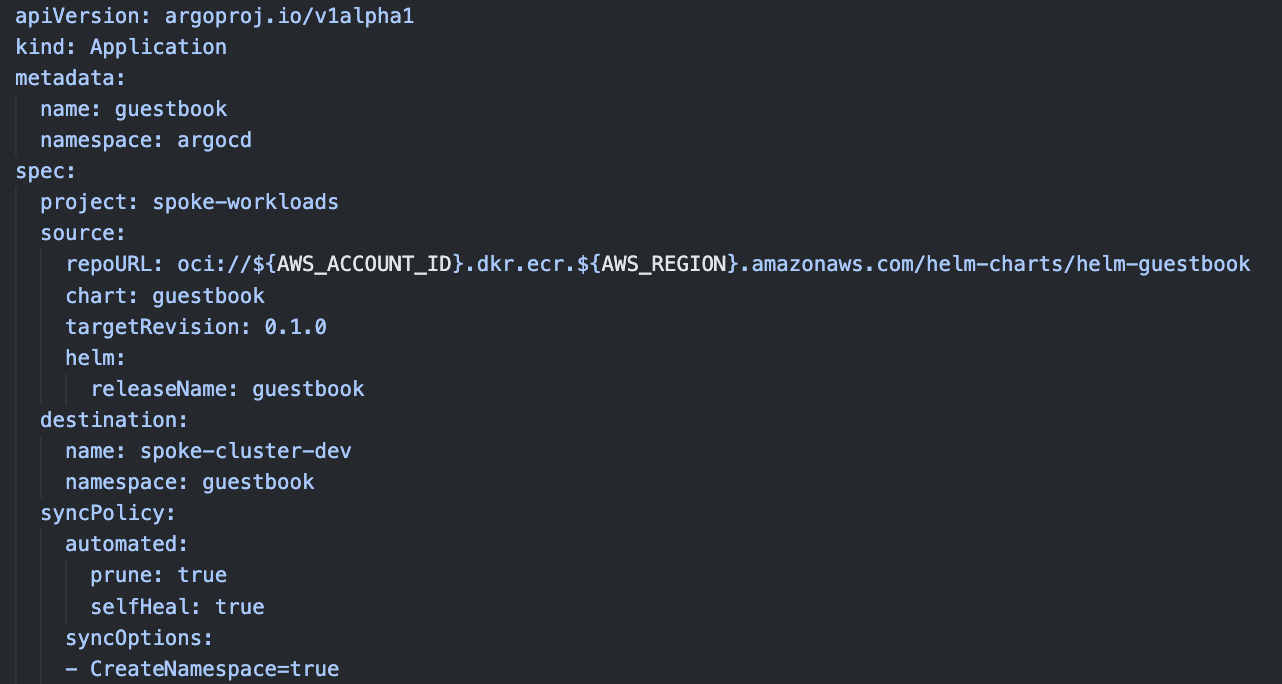
“Figure 9: Argo CD example Application with helm chart in ECR as source”
Implement multi-tenancy with projects
Argo CD Projects (AppProject) provides logical grouping and access control for Applications. In a hub-and-spoke architecture, they are essential to restricting approved repositories, define allowed clusters and namespaces, governing which Kubernetes resource types can be created, and enabling CI/CD pipelines with scoped permissions. The spoke clusters we registered earlier reference this project in their configuration.
The following commands creates a project with security guardrails for the spoke clusters:
Below image shows the constraints and RBAC roles configured for all the Argo CD Applications associated with the project spoke-workloads.
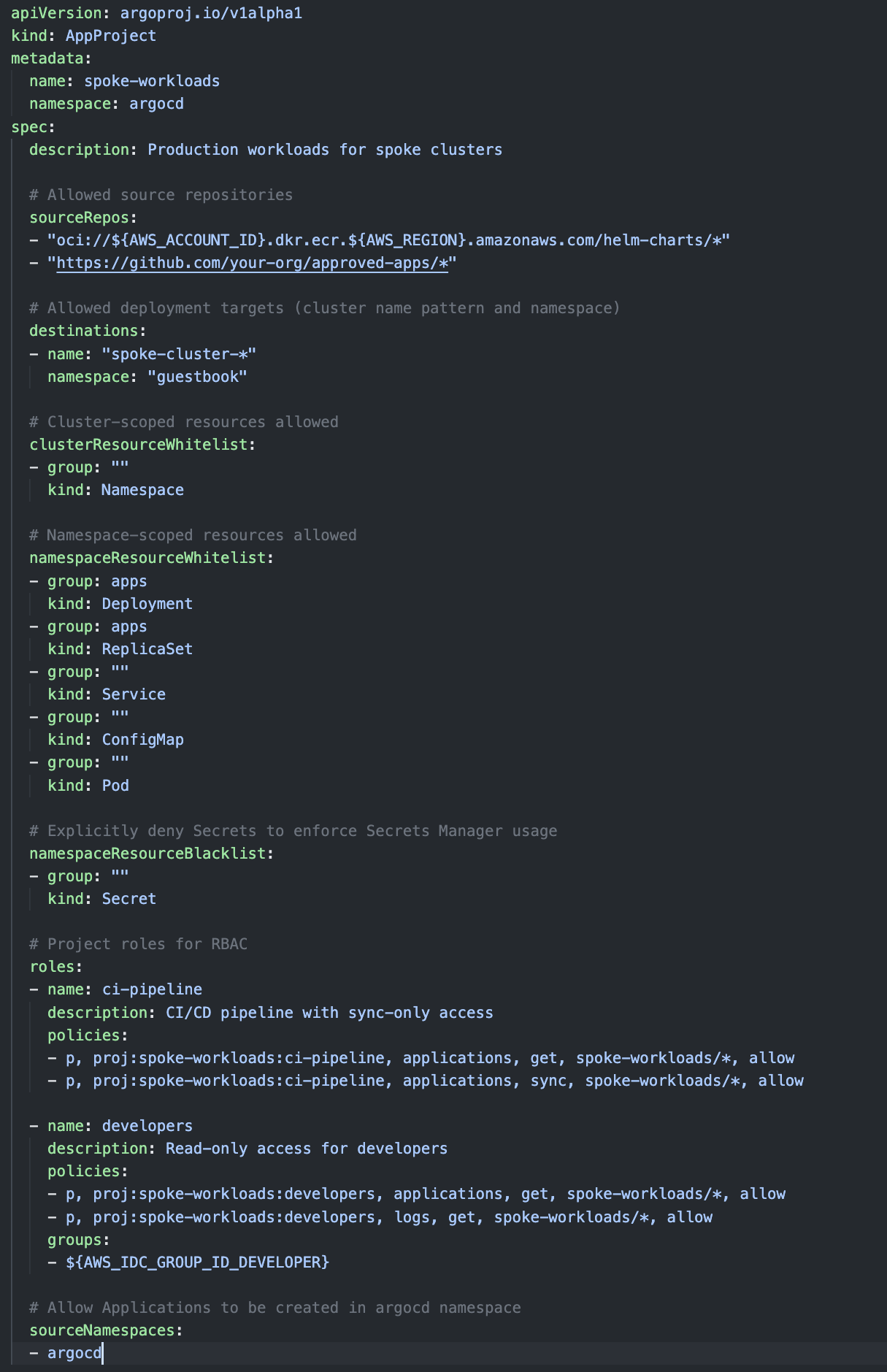
“Figure 10: Argo CD AppProject”
Scale deployments with ApplicationSets
While individual Applications work well for single deployments, ApplicationSets enable you to deploy the same application across multiple clusters using templates and generators. This is particularly powerful in hub-and-spoke architectures where you need consistent deployments across environments.
The cluster generator automatically creates Applications for each registered cluster that matches your selector. The following deploys guestbook to both dev and prod clusters. The templatePatch applies environment specific configurations, with dev using automated sync and a single replica, and prod requiring manual sync and three replicas:
The following figure shows the Argo CD ApplicationSet manifest file
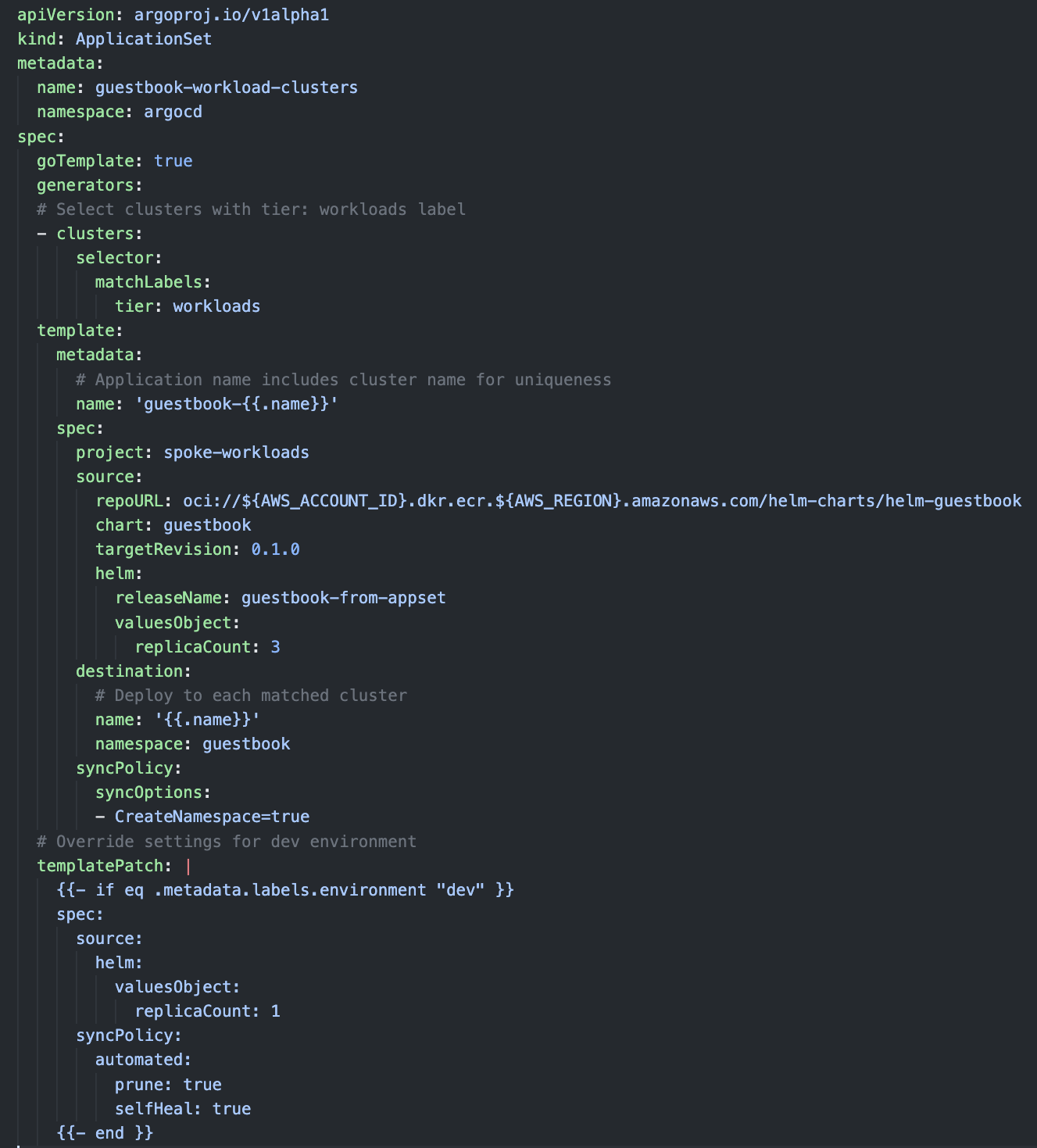
“Figure 11: Argo CD ApplicationSet” On the Argo CD UI you will see two Argo CD Applications one per each spoke cluster
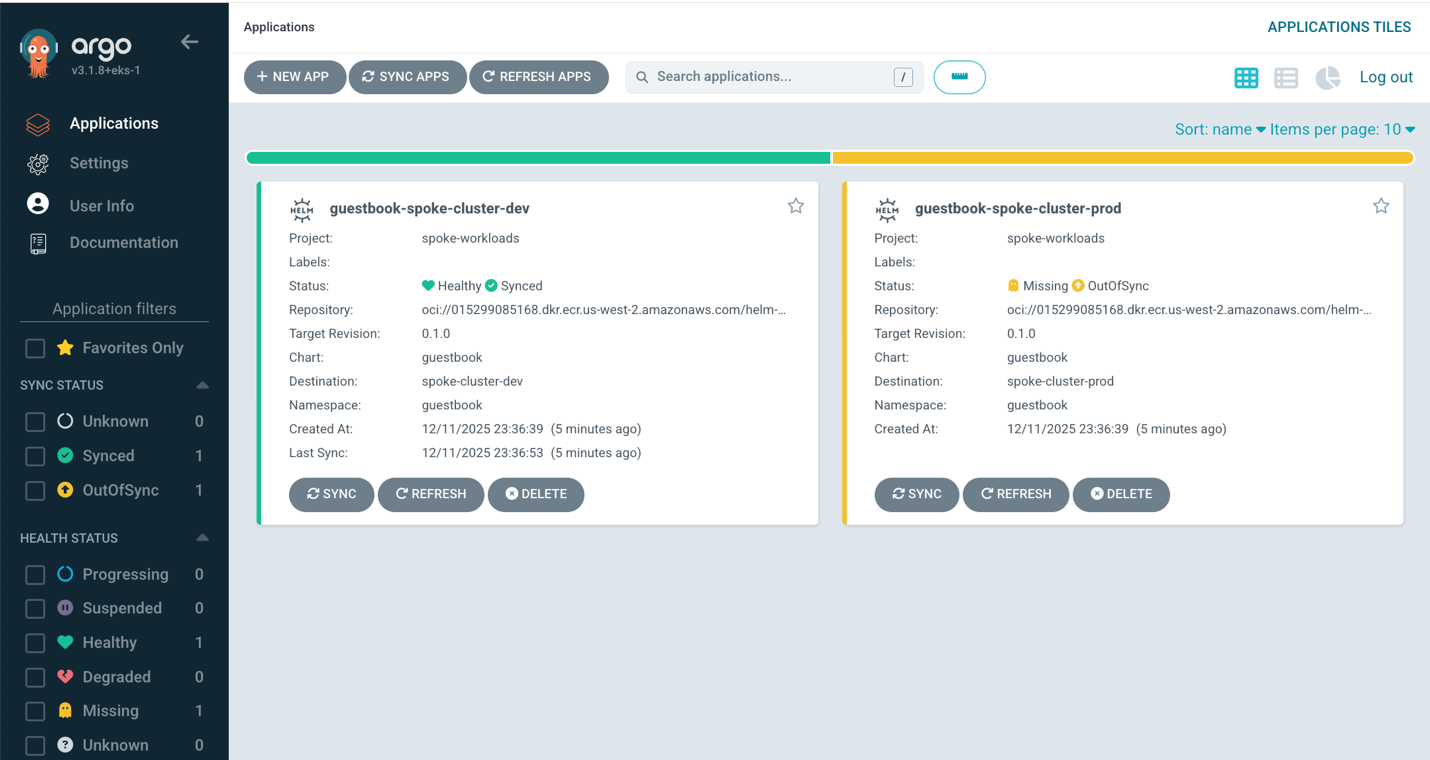
“Figure 12: Argo CD UI showing generated Applications in dev and prod clusters”
This ApplicationSet automatically creates guestbook-spoke-cluster-dev and guestbook-spoke-cluster-prod Applications. When you add new clusters with the matching label, Argo CD automatically deploys guestbook to them.
For more advanced patterns like environment-specific configurations or multi-dimensional deployments, see Use ApplicationSets in the EKS documentation.
CI/CD pipeline integration
The Argo CD CLI enables automation of deployments from CI/CD pipelines. The Argo CD Capability supports project-scoped tokens for least-privilege access, so pipelines operate with only the permissions they require.
To generate a pipeline token, open the Argo CD UI and navigate to Settings, then Projects, then spoke-workloads, then Roles, then ci-pipeline. Scroll to JWT Tokens and select Create. Copy and securely store the token in your CI/CD system’s secrets management.
This token is project scoped and can be configured with an expiration up to 365 days. You can also create a global account token from the UI, but this token has a hard expiration of 12 hours and is not recommended for automation pipelines.
Configure the Argo CD CLI with the following environment variables:
Since we created the Application in the prod cluster with auto sync disabled, we control when to promote using a pipeline.
The argocd cli exits when the application is healthy.
Operational visibility
With the EKS Capability for Argo CD, you don’t have direct access to controller logs since the service runs in the AWS control plane. However, you have full visibility through Kubernetes events and resource status. Inspect the Kubernetes Events in the argocd namespace:
Inspect the Argo CD Application status:
For backup and restore of Argo CD resources, leverage AWS Backup for Amazon EKS. This saves all Kubernetes resources in the argocd namespace, including Application and ApplicationSet definitions, AppProject configurations, cluster registration secrets, and repository credential secrets. AWS Backup for EKS provides flexible recovery options—you can restore the entire cluster or selectively restore specific namespaces, allowing for granular recovery based on your operational needs.
Clean up
To avoid incurring ongoing charges, delete the resources created in this walkthrough. Deleting the hub cluster also removes the Argo CD capability and all associated resources:
Conclusion
The Argo CD Capability transforms GitOps operations by eliminating the overhead of managing Argo CD infrastructure. In this post, we explored hub-and-spoke architecture for centralized multi-cluster management, native IDC integration replacing complex Open ID Connect (OIDC) configurations, simplified cross-account and cross-region deployments using EKS Access Entries, native ECR authentication without token refresh workarounds, ApplicationSets for templated multi-cluster deployments, project-based multi-tenancy with CI/CD integration, and leveraging AWS Backup for native backups.
The Argo CD capability is particularly powerful when combined with other EKS Capabilities. You can use Argo CD to deploy AWS Controllers for Kubernetes (ACK) resources for infrastructure management, or kro (Kube Resource Orchestrator) compositions for platform abstractions, all via GitOps workflows.
To learn more, see Create an Argo CD capability, Configure repository access, and Use ApplicationSets. For pricing details, see EKS Capabilities pricing.
About the authors
 Jesse Butler is a Principal Product Manager for Amazon EKS, helping customers build with Kubernetes and cloud native technologies on AWS.
 Carlos Santana is a Senior Worldwide Specialist Solutions Architect at AWS, where he focuses on cloud-native technologies, Kubernetes, and AI/ML systems. As a CNCF Ambassador, he bridges AWS-specific solutions with the broader open-source ecosystem, specializing in Amazon EKS, container orchestration, and emerging technologies like the Model Context Protocol (MCP) and Agentic AI systems.
 Sébastien is a Senior Specialist Solutions Architect at AWS, where he has been driving customer success since 2019. He brings deep expertise in AWS container solutions and cloud-native technologies, with a particular focus on Kubernetes, AI/ML systems, and large-scale distributed architectures. Throughout his tenure, Sébastien has partnered with organizations across diverse industry segments in EMEA and France, helping them adopt container technologies and implement best practices for modern cloud infrastructure.
 Satish Patil is a Sr. Solutions Architect based in Dallas, TX. He works with the Worldwide Public Sector team as a migration specialist. He is passionate about helping customers through their cloud migration and modernization journey, with a strong focus on cloud-native technologies, Kubernetes, and GitOps.
 Pankaj Walke is a Senior Open Source Engineer at AWS. He is works for Cloud Native Operational Excellence (CNOE) initiative with a focus on Platform Engineering on Kubernetes and CNCF technologies.
 Badrish Shanbhag is a Sr. Containers Specialist SA at AWS, with nearly two decades of experience helping customers design, architect, and implement large-scale distributed systems. He works closely with customers on Kubernetes-based platforms, including running production workloads and AI/ML pipelines on Amazon EKS.