Containers
Encrypt Amazon ECS traffic: VPC encryption controls and Service Connect TLS
Encrypting traffic between Amazon Elastic Container Service (Amazon ECS) workloads is a common security and compliance requirement. Virtual private cloud (VPC) encryption controls and Service Connect TLS give you two native ways to encrypt traffic between Amazon ECS workloads. Choosing the right approach means balancing security coverage against operational complexity. Traditionally, implementing encryption meant managing certificates, modifying application code, or deploying sidecar proxies, all of which add operational complexity.
In this post, you learn how to set up VPC encryption controls for network-layer encryption through the AWS Nitro System. You also learn how to verify encryption status in VPC Flow Logs. You also compare VPC encryption controls with Service Connect TLS to identify the right fit for your workload. A hands-on walkthrough shows you how to activate VPC encryption controls on a VPC running AWS Fargate tasks. You then confirm that traffic is encrypted at the network layer and verify that Service Connect TLS is issuing certificates for application-layer encryption.
VPC encryption controls: Infrastructure-level encryption
Amazon Virtual Private Cloud (Amazon VPC) provides VPC encryption controls, a capability that gives you centralized visibility and enforcement of encryption in transit for traffic within and across VPCs in a Region.
For Amazon ECS workloads running on AWS Fargate (the serverless compute engine for containers), the setup requires no code changes. When you activate VPC encryption controls in monitor mode, encryption takes effect automatically. It applies the next time a task is replaced through a new deployment, rolling update, or platform version refresh. The encryption is transparent to your application, with no sidecar containers or certificate management required.
VPC encryption controls operates in two modes. Monitor mode adds an encryption-status field to VPC Flow Logs. With this field, you can see your encryption posture before making changes and audit traffic between any resources in your VPC without modifying your application. The possible values of the encryption-status field in the VPC Flow Logs are:
- 0: unencrypted.
- 1: encrypted at the network layer (Nitro AES-256-GCM).
- 2: encrypted at the application layer (such as TLS on port 443).
- 3: encrypted at both layers.
Enforce mode goes further, preventing the creation or attachment of resources that allow unencrypted traffic within the VPC. After you turn it on, new resources must run on encryption-compliant infrastructure.
In a typical Amazon ECS architecture, traffic from an Application Load Balancer to your Fargate tasks, traffic between tasks, and traffic to other VPC resources is encrypted at the network layer. VPC encryption controls covers traffic that stays within the VPC boundary, when workloads are running on Nitro-based infrastructure. For details on how VPC encryption controls works beyond ECS, see the launch blog post and documentation.
Application-level encryption
At Layer 7, application-level encryption protects data within the application protocol itself (such as TLS over HTTP or gRPC). Unlike network-layer encryption, it provides cryptographic proof of service identity through certificates. Each service can verify which peer it is communicating with. Two approaches are available for Amazon ECS workloads: Service Connect TLS for managed certificate lifecycle, and custom application-level TLS for full control.
VPC encryption controls encrypts intra-VPC traffic at the network layer. It doesn’t identify which service originated or received it. If you need certificate-based service identity or encryption beyond the VPC boundary, consider two other approaches.
Amazon ECS Service Connect is a managed networking feature that handles service discovery, traffic routing, and load balancing for your ECS services. With TLS active, it adds application-layer encryption with cryptographic service identity by integrating with AWS Private Certificate Authority (AWS Private CA) to issue, distribute, and rotate X.509 certificates. Each service gets its own certificate, providing proof of which service is making or receiving a connection. Service Connect TLS encrypts traffic between Service Connect-configured Amazon ECS services within the same namespace and uses TLS 1.3. It doesn’t cover traffic to databases, caches, or targets outside of Service Connect. If you already use Service Connect for service discovery and load balancing, you can turn on TLS without adding another tool. For a detailed walkthrough of activating TLS on Service Connect, refer to the Service Connect TLS documentation.
Custom Application-level TLS remains the approach for Amazon ECS workloads that require mutual authentication between services. It also applies when you need encryption for non-HTTP or non-gRPC protocols, or encrypted connections to targets outside the VPC. Your application handles certificate loading, TLS negotiation, and connection management directly. You control the full configuration, but you also own the operational complexity. This includes issuing certificates, distributing them securely to containers, rotating them before expiry, and updating applications when certificates change.
Combining approaches
You can combine these three approaches. As a base layer, VPC encryption controls encrypts intra-VPC traffic at the network level and adds visibility through flow logs. Service Connect TLS adds application-layer encryption with cryptographic service identity on top, for services that need certificate-based proof of encryption or already benefit from the Service Connect networking features. Application-level TLS covers the remaining scenarios: mutual authentication, non-standard protocols, and targets outside the VPC boundary.
For Amazon ECS workloads that don’t require application-layer identity, VPC encryption controls alone encrypts traffic in transit, removing the need for code changes or certificate management. Add Service Connect TLS if you need certificate-based service identity or already use Service Connect for networking.
Choosing the right approach
VPC encryption controls is a practical starting point for Amazon ECS workloads that need encryption in transit without application-level changes. It encrypts intra-VPC traffic at the network layer with zero code changes, no certificate management, and no sidecar containers. The trade-off is that it provides no service identity: you know traffic is encrypted, but not which service sent it. It also only covers traffic within the VPC, so connections to external endpoints remain unprotected at this layer.
The UI Service sits behind an Application Load Balancer (ALB). Amazon ECS Service Connect with TLS handles service-to-service communication. An HTTPS listener on the ALB encrypts traffic to the services. Service Connect and the ALB encrypt traffic at the application level. Beyond the application-level encryption, you activated hardware-level encryption with VPC encryption controls. The hardware-level encryption only applies to the internal VPC network, so connections from the ALB to end users don’t include hardware-level encryption.
Custom application-level TLS is the right choice when you need mutual authentication (mTLS), must encrypt non-HTTP/gRPC protocols, or need to protect traffic to targets outside the VPC. You get full control over cipher suites, certificate policies, and trust chains. The trade-off is significant operational overhead: you own certificate issuance, secure distribution to containers, rotation before expiry, and application updates when certificates change.
For many workloads, we recommend layering these approaches. Use VPC encryption controls as your baseline, always on with minimal configuration, and add Service Connect TLS for service identity where needed, and reserve Custom Application-level TLS for edge cases that require full control.
Use this table to match your security requirements with the right implementation strategy.
| VPC encryption controls | Service Connect TLS | Custom Application-level TLS | |
| Encryption layer | Network (L3, Nitro AES-256-GCM) | Application (L7, TLS 1.3) | Application (L7) |
| Code changes required | None | None (Service Connect configuration only) | Yes |
| Certificate management | None | Automatic (AWS Private CA) | Manual |
| Scope | Traffic within the VPC | Amazon ECS services with Service Connect | Any target |
| Service identity | No | Yes (X.509 certificates) | Yes |
| Auditing | VPC Flow Logs (encryption-status field) | Amazon CloudWatch metrics | Application logs |
| Non-ECS targets | Yes (within VPC, if Nitro-based) | No | Yes |
| Mutual authentication | No | Not currently | Yes |
| Cost | Per-VPC hourly rate (pricing) | AWS Private CA (pricing) + AWS Secrets Manager (pricing) | Operational overhead |
After you turn on VPC encryption controls, you can verify the encryption state of your traffic using VPC Flow Logs. The encryption-status field in VPC Flow Logs reports the encryption state of each traffic flow, allowing you to audit whether traffic between your Amazon ECS tasks is encrypted at the network layer, the application layer, or both.
VPC encryption controls with Service Connect TLS walkthrough
This walkthrough shows how VPC encryption controls applies to Amazon ECS workloads running on AWS Fargate. You set up the environment, turn on VPC encryption controls, and observe tasks shifting to encryption-capable hardware. Tasks migrate through lifecycle operation events, with new steps executing on encryption-capable infrastructure.
This walkthrough deploys a web store application with these components (see the sample GitHub repository):
- UI: Front end user interface, aggregates API calls to other services.
- Catalog: API for product listings and details with a dedicated database.
- Assets: API to serve static assets like product images.
The Application Load Balancer (ALB) exposes the UI Service. The services use Amazon ECS Service Connect with TLS for service-to-service communication. The ALB uses an HTTPS listener to encrypt traffic to the services. Service Connect and the ALB encrypt traffic at the application level. Beyond the application-level encryption, you activated hardware-level encryption with VPC encryption controls. The hardware-level encryption only applies to the internal VPC network, so connections from the ALB to end users don’t include hardware-level encryption.
The architecture diagram shows the encryption-level details.
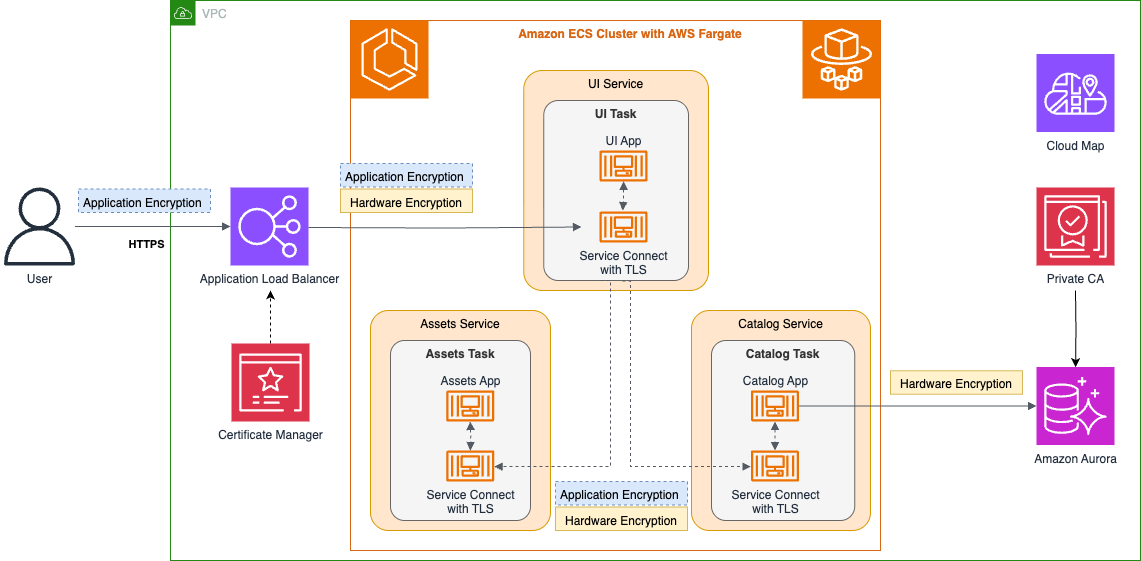
Figure 1: Sample application architecture with VPC encryption controls and Service Connect TLS
Deploy a sample web store on AWS Fargate with VPC encryption controls and Service Connect TLS active, so you can observe both encryption layers in action.
Prerequisites
The walkthrough uses AWS Cloud Development Kit (AWS CDK) to provision infrastructure. It also uses a load generator to simulate application traffic. You need the following:
- AWS Command Line Interface (AWS CLI) configured with appropriate credentials.
- Node.js (v18+).
- AWS CDK CLI (
npm install -g aws-cdk). - hey load generator (
brew install heyon macOS). - An AWS account with permissions to create VPCs, Amazon ECS clusters, Amazon Relational Database Service (Amazon RDS) instances, AWS Private CA, and Amazon CloudWatch resources.
Note: You will create resources that incur costs, including an AWS Private CA, Amazon Aurora Serverless v2, AWS Fargate tasks, VPC encryption controls (per-VPC hourly rate), and an Application Load Balancer. For details, refer to AWS Private CA pricing and Amazon VPC pricing. Delete all resources when you’re done by following the Clean up section.
Deploy the sample application
Deploy the infrastructure and application stack:
- Clone the main branch of the GitHub repository:
- Run this script to set up the environment:
This script creates a self-signed certificate, imports it into AWS Certificate Manager (ACM), installs dependencies, and deploys the CDK stack. At the end it prints the stack outputs you will need in later steps. Deployment takes about 15–20 minutes.
- Load the required environment variables:
- Turn on VPC encryption controls:
Verify that VPC encryption controls is active in the AWS Management Console VPC settings or use the AWS CLI to describe the VPC encryption configuration.
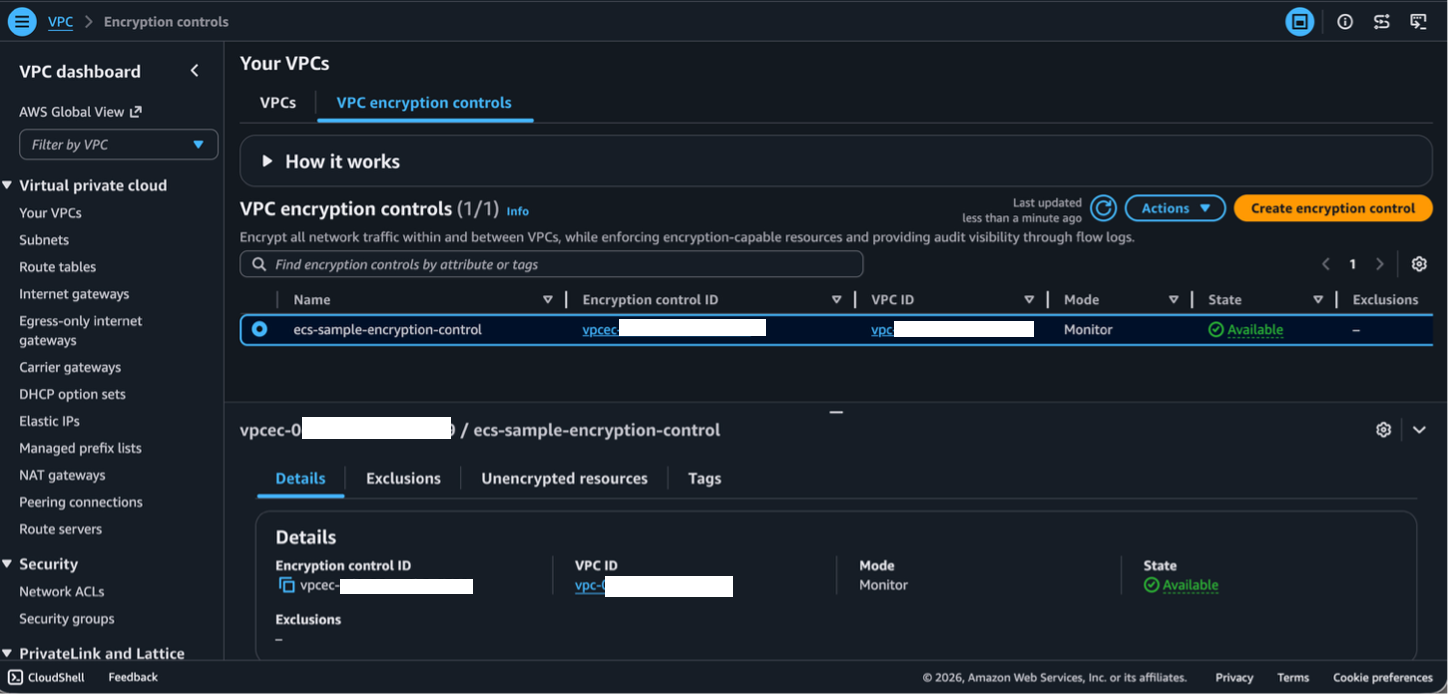
Figure 2: VPC encryption controls in the AWS Management Console
Verify that VPC Flow Logs capture the encryption state of task-to-task traffic, confirming whether Nitro-level encryption is active.
Verify encryption status
Generate traffic and confirm the encryption status in VPC Flow Logs:
- Generate synthetic application traffic.Pass the APP_URL from the script output to the hey load generator. You need multiple requests because VPC Flow Logs aggregate traffic over intervals.
- Review the VPC Flow Logs and the encryption status:
This script:
- Retrieves the private IPs of the running service tasks (catalog, assets, UI).
- Queries VPC Flow Logs from Amazon CloudWatch Logs Insights.
- Filters results to show only entries matching those task IPs (excluding ALB, database, NAT gateway, and non-VPC traffic) so the output focuses on ECS task-to-task encryption state.
The output includes an encryption-status column that indicates the encryption state of each traffic flow. The possible values are: 0 (unencrypted), 1 (encrypted at the network layer with Nitro AES-256-GCM), 2 (encrypted at the application layer, such as TLS on port 443), 3 (encrypted at both layers), or a dash (-) meaning VPC encryption controls is not active, or if the flow log cannot determine the status.
The encrypted column in the output displays a 0. When you turn on VPC encryption controls, it doesn’t restart or redeploy running tasks. These Fargate tasks launched before VPC encryption controls was activated, so they run on their original infrastructure until the next task replacement. The network layer doesn’t yet encrypt their traffic.
The output confirms that traffic between services is not yet encrypted at the network layer:
Task IPs:
tls-catalog 10.0.3.57
tls-assets 10.0.3.185
tls-ui 10.0.2.112
Excluding: ALB, Database, NAT Gateway, and non-VPC IPs
Waiting for query results...
src dst srcport dstport proto pkts bytes start end action status direction path encrypted
10.0.2.112 10.0.3.57 43012 8080 6 18 3530 1781734834 1781734853 ACCEPT OK ingress - 0
10.0.3.57 10.0.2.112 8080 43012 6 9 3716 1781734834 1781734853 ACCEPT OK egress 1 0
10.0.2.112 10.0.3.57 43002 8080 6 238 46824 1781734803 1781734830 ACCEPT OK ingress - 0
10.0.2.112 10.0.3.57 53902 8080 6 416 81966 1781734803 1781734830 ACCEPT OK ingress - 0
10.0.3.57 10.0.2.112 8080 53902 6 208 103768 1781734803 1781734830 ACCEPT OK egress 1 0
10.0.3.57 10.0.2.112 8080 43002 6 119 60269 1781734803 1781734830 ACCEPT OK egress 1 0
10.0.2.112 10.0.3.57 53902 8080 6 737 144472 1781734778 1781734789 ACCEPT OK egress 1 0
10.0.3.57 10.0.2.112 8080 43002 6 376 190405 1781734778 1781734789 ACCEPT OK ingress - 0
10.0.3.57 10.0.2.112 8080 43012 6 402 196171 1781734778 1781734789 ACCEPT OK ingress - 0
10.0.2.112 10.0.3.57 43012 8080 6 805 157946 1781734778 1781734789 ACCEPT OK egress 1 0
10.0.3.57 10.0.2.112 8080 53902 6 367 178914 1781734778 1781734789 ACCEPT OK ingress - 0
...
Results 1: VPC Flow Logs output before redeployment. The encrypted column shows 0, meaning traffic between ECS tasks is not yet encrypted at the network layer.
Force tasks to relaunch on encryption-capable infrastructure and confirm that traffic is now encrypted at the network layer.
Verify encryption after redeployment
After confirming that existing tasks are not yet encrypted, force a redeployment so tasks launch on encryption-capable infrastructure.
- Force a redeployment of the ECS tasks.Force the service deployment so tasks migrate to encryption-capable infrastructure:
- Generate new synthetic application traffic.After redeployment, generate traffic again using the hey load generator. This second round of traffic will flow through the newly launched tasks.
- Review the VPC Flow Logs and the encryption status:
The query follows the same verification pattern:
- Retrieves the private IPs of the running service tasks (catalog, assets, UI).
- Queries VPC Flow Logs from Amazon CloudWatch Logs Insights.
- Filters results to show only entries matching those task IPs.
The encryption-status column should now display 1, which indicates that Nitro AES-256-GCM encrypts traffic at the network layer. The redeployment replaced the original tasks with new ones that launched after VPC encryption controls was active, so their traffic flows over encrypted connections.
After redeployment, the results show that service-to-service traffic is now encrypted:
Task IPs:
tls-catalog 10.0.3.151
tls-assets 10.0.3.98
tls-ui 10.0.2.130
Excluding: ALB, Database, NAT Gateway, and non-VPC IPs
Waiting for query results...
src dst srcport dstport proto pkts bytes start end action status direction path encrypted
10.0.3.151 10.0.2.130 8080 48850 6 410 200304 1781736374 1781736404 ACCEPT OK egress 1 1
10.0.2.130 10.0.3.151 48850 8080 6 806 158000 1781736374 1781736404 ACCEPT OK ingress - 1
10.0.2.130 10.0.3.151 48858 8080 6 770 150920 1781736374 1781736404 ACCEPT OK ingress - 1
10.0.3.151 10.0.2.130 8080 48858 6 388 182941 1781736374 1781736404 ACCEPT OK egress 1 1
10.0.2.130 10.0.3.151 48858 8080 6 310 60254 1781736314 1781736355 ACCEPT OK egress 1 1
10.0.3.151 10.0.2.130 8080 48858 6 158 73370 1781736314 1781736355 ACCEPT OK ingress - 1
…
Results 2: VPC Flow Logs output after redeployment. The encrypted column shows 1, confirming Nitro AES-256-GCM encryption is active for all task-to-task traffic.
Confirm that Service Connect TLS is issuing certificates from your Private CA, proving application-layer encryption between services.
Verify Service Connect TLS certificates
Confirm that Service Connect TLS is issuing and rotating certificates for service-to-service communication:
ECS Service Connect with TLS is active, so traffic between services is also encrypted at the application layer.
Connect to a running task and verify that Service Connect TLS is issuing certificates for service-to-service communication. To connect to the running ECS task, use ECS Exec (--enable-execute-command) that was activated in the previous step when you redeployed the ECS tasks.
- First, get the private IP of the Catalog task and a UI task ARN to exec into:
- Start an interactive session in the UI task. Inside the container, install
openssl(not included by default) and verify the TLS certificate on the Catalog service:
The output shows a certificate from your Private CA with a Subject Alternative Name matching tls-catalog.ecs-sample.local. This confirms Service Connect TLS is encrypting service-to-service traffic with automatically rotated certificates.
Certificate:
Data:
Version: 3 (0x2)
Serial Number:
21:4c:bd:a4:29:c7:…
Signature Algorithm: sha256WithRSAEncryption
Issuer: C = US, O = ecs-sample, OU = ecs-sample-ou
Validity
Not Before: Jun 19 11:09:05 2026 GMT
Not After : Jun 26 12:09:05 2026 GMT
Subject: OU = ecs-sample-ou, O = ecs-sample, C = US
Subject Public Key Info:
Public Key Algorithm: id-ecPublicKey
Public-Key: (256 bit)
pub:
04:d1:55:0c:….
ASN1 OID: prime256v1
NIST CURVE: P-256
X509v3 extensions:
X509v3 Subject Alternative Name: critical
DNS:tls-catalog.ecs-sample.local
X509v3 Basic Constraints:
CA:FALSE
X509v3 Authority Key Identifier:
38:AC:2B:72:87:A3:2E:DB:1D:…
X509v3 Subject Key Identifier:
EE:6C:BC:AA:2B:1C:D4:1E:F9:…
X509v3 Key Usage: critical
Digital Signature, Key Agreement
X509v3 Extended Key Usage:
TLS Web Server Authentication, TLS Web Client Authentication
Signature Algorithm: sha256WithRSAEncryption
Signature Value:
a5:e0:c11:b9:9b:51:c5:dc:a7:db:92:14:6b:ab:e2:
0f:9f:23:0b:…..
Results 3: Certificate of Catalog service running ECS Service Connect
Clean up resources
Remove all deployed resources and verify removal:
- Delete the VPC encryption controls and remove all running Amazon ECS services:
- Destroy all AWS resources created by the AWS CDK stack and remove the ALB certificate:
Verify that all resources have been removed.
Conclusion
VPC encryption controls encrypts intra-VPC traffic for Amazon ECS workloads without code changes and complements Service Connect TLS and application-level TLS.
Start with VPC encryption controls in monitor mode to understand your current encryption posture. Then evaluate whether you need additional approaches.
For more details, refer to the VPC encryption controls documentation, the Amazon ECS Service Connect TLS documentation, and the AWS CDK sample for Service Connect with TLS.
Try activating VPC encryption controls in monitor mode on your own VPC to understand your current encryption posture. If you have questions or feedback, leave a comment on this post.