Containers
Implement per-pod image pull permissions with ECR repository policies on Amazon EKS
If your organization runs a multi-tenant Amazon Elastic Kubernetes Service (Amazon EKS) cluster, you likely need to scope access to Amazon Elastic Container Registry (Amazon ECR) container image repositories per team. Each team needs access only to their own repositories, blocked from pulling other teams’ images.
By default, Amazon EKS configures image pull permissions for Amazon ECR at the node level. Pods running on the same node share the same node credentials and the same access to ECR repositories, regardless of which team owns them. Each team might own their own ECR repositories, but the shared node role gives pods in the cluster equal access to Amazon ECR.
For platform teams that want to assign repository permissions at the pod level, giving each team’s applications their own scoped access to specific repositories, this has been a challenge. It required custom admission policies, third-party policy engines, or per-team node groups. Starting with Kubernetes 1.34, Kubernetes Enhancement Proposal (KEP) 4412 introduces per-pod credential support for kubelet image pulls, making pod-level repository permissions possible with AWS native controls. AWS added full support for this feature on Amazon EKS v1.35 or later.
This post shows how to scope Amazon ECR image pull permissions to individual Kubernetes pods using the ecr-credential-provider and ECR repository policies on Amazon EKS.
Solution overview
In an Amazon EKS cluster, each node is assigned a node AWS Identity and Access Management (IAM) role. The kubelet process on each node uses this role to execute operations required for provisioning containers, such as pulling container images from Amazon ECR. Image pull authentication is handled by provider-specific binaries, called credential providers. When a pod is being provisioned, the kubelet matches the image URI against its CredentialProviderConfig and invokes the corresponding credential provider binary. EKS nodes include the ecr-credential-provider with a baseline configuration that allows the kubelet to authenticate with ECR and pull container images using the node’s IAM role.
Because the node IAM role includes ECR pull permissions by default, all pods on the node share the same access to ECR repositories. The image pull process has no visibility into Kubernetes-specific details such as namespaces, pod labels, or service accounts, which are typically used for team isolation.
KEP 4412 introduces per-pod credential support for kubelet image pulls. When the tokenAttributes field is configured in the CredentialProviderConfig, the kubelet projects a service account token bound to the pod and passes it to the credential provider. The ECR credential provider can then use an IAM role defined in the pod service account annotation to authenticate with ECR, instead of using the node IAM role. It does this by calling the AWS Security Token Service (AWS STS) AssumeRoleWithWebIdentity API. This allows each team to use their own IAM role for ECR access, while platform teams can use ECR repository policies to block or allow access to private repositories.
Two layers of enforcement work together: the team IAM role scopes who the pod authenticates as, and the ECR repository policy decides what that identity can access.
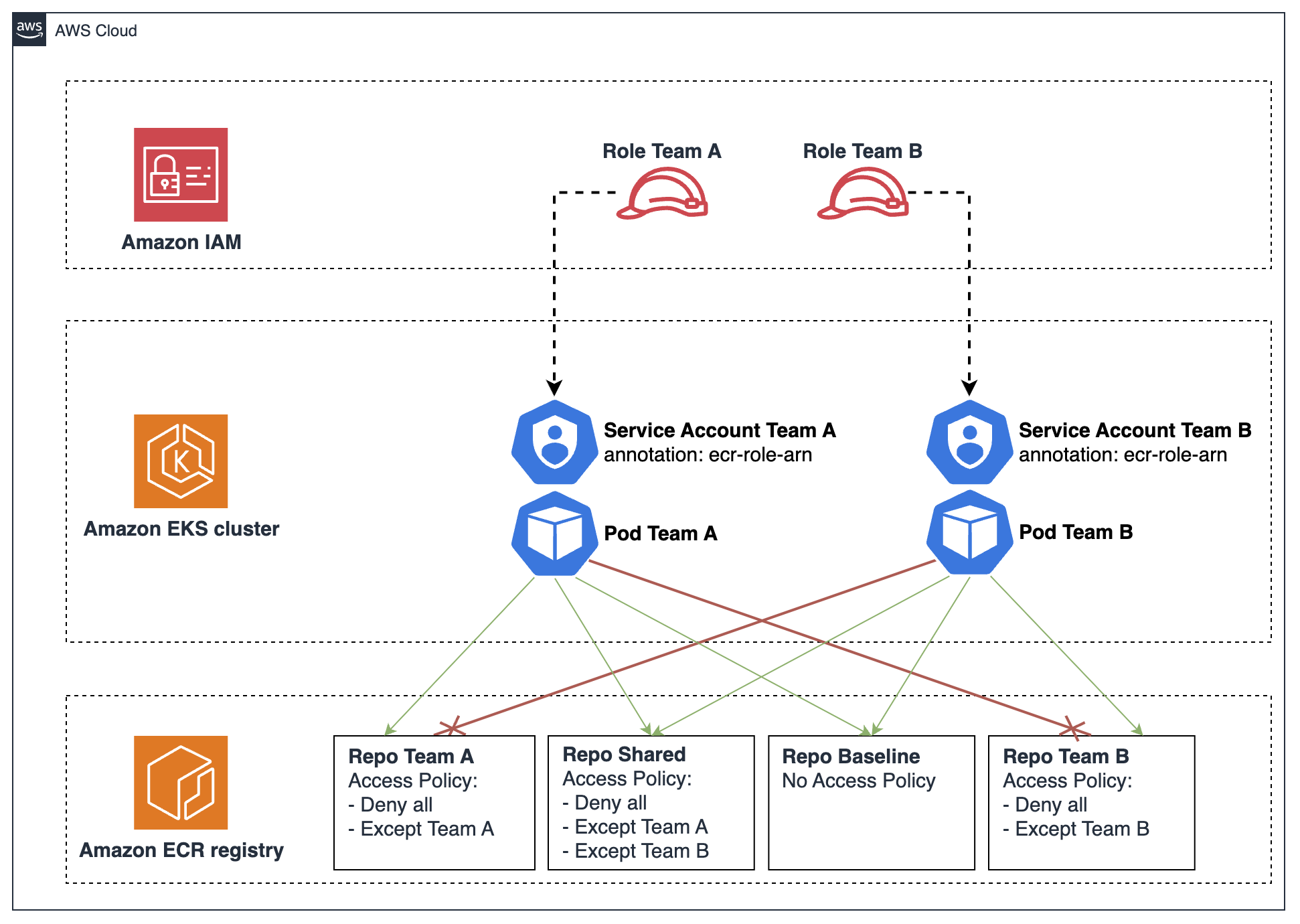
Figure 1: Per-pod Amazon ECR image pull flow with AWS STS and repository policy enforcement
The full flow works as follows:
- A pull IAM role is created per team, with an OpenID Connect (OIDC) trust policy scoped to the team’s service accounts.
- Team applications create pods with the
eks.amazonaws.com/ecr-role-arnservice account annotation, pointing to the team’s pull IAM role. - The kubelet projects a service account token bound to the pod and passes it to the
ecr-credential-provider. - The provider reads the
ecr-role-arnannotation and calls STSAssumeRoleWithWebIdentitywith the OIDC token and the role ARN. - STS validates the OpenID Connect (OIDC) token against the cluster’s OIDC provider and returns temporary credentials scoped to the team IAM role.
- The provider calls ECR
GetAuthorizationTokenusing the team IAM role credentials. - ECR returns an authorization token. The provider passes it back to the kubelet.
- The kubelet (through the container runtime) uses the ECR token to pull the ECR image.
- ECR evaluates the repository’s resource policy at this point. If the policy allows the team IAM role, the pull succeeds. If it denies the principal (for example, another team’s role or the node role), the pull fails with
403 Forbidden.
This feature relies on a similar mechanism to IAM Roles for Service Accounts (IRSA), but it targets a different outcome. IRSA uses the eks.amazonaws.com/role-arn service account annotation to define an IAM role that a running pod assumes to access AWS resources at runtime. The ECR pull role uses the eks.amazonaws.com/ecr-role-arn annotation to tell the kubelet and the ECR credential provider which role to assume when pulling the pod’s image from ECR. In short, IRSA scopes what the application can do once running. The ECR pull role scopes what image the pod is allowed to pull.
Two main requirements are needed to enable KEP 4412 in EKS:
- EKS v1.35 or later (cluster and nodes): The
KubeletServiceAccountTokenForCredentialProvidersfeature gate reached beta and is on by default in EKS 1.34. However, theecr-credential-provideronly added full support for the feature (including fallback to the node role) in v1.35. EKS v1.35 or later ensures the feature is fully functional end to end. - Role-based access control (RBAC) audience permission applied before nodes join: The kubelet needs permission to request service account tokens with the
sts.amazonaws.comaudience. Without the required ClusterRole and ClusterRoleBinding in place, the kubelet cannot project tokens, all image pulls fail, and nodes will not become Ready. In the following walkthrough, you will create the required ClusterRole and ClusterRoleBinding before provisioning EKS nodes.
Walkthrough
In this walkthrough, you will create an Amazon EKS cluster, provision the necessary infrastructure, and deploy sample applications for two teams (Team A and Team B) to demonstrate per-pod ECR pull permissions. The full source code, Terraform configuration, and deployment scripts are available in the GitHub repository.
Prerequisites
- AWS account with permissions to create Amazon Virtual Private Cloud (Amazon VPC), EKS, ECR, and IAM resources.
- Terraform >= 1.5.
- AWS Command Line Interface (AWS CLI) v2.
- kubectl
- A container runtime such as docker or finch for pushing images to ECR.
Step 1: Configure the environment for deployment
Clone the repository:
Update infra-tf/variables.tf to configure how resources will be provisioned in your environment:
- aws_region (required) – AWS Region for all resources.
- cluster_name (required) – EKS cluster name.
- cluster_version – Kubernetes version (>= 1.35). Default: 1.35.
- node_instance_type – Amazon Elastic Compute Cloud (Amazon EC2) instance type for nodes. Default: t3.medium.
Step 2: Deploy infrastructure
Run the script:
This script uses Terraform to provision all required AWS resources and configuration to showcase this solution.
EKS cluster and VPC networking
Terraform creates an EKS cluster and the required VPC networking.
RBAC audience permission
Terraform provisions a ClusterRole and ClusterRoleBinding that grant the system:nodes group the ability to request tokens with the sts.amazonaws.com audience. This grants permissions to the kubelet to project pod service account tokens when calling the ECR credential provider.
This ClusterRole and ClusterRoleBinding must exist before any node joins the cluster.
EKS node group with per-pod credential provider configuration
Nodes must be provisioned with an updated ECR credential provider configuration. The standard configuration includes matchImages patterns for ECR registries. The key addition is the tokenAttributes section, relevant for KEP 4412. This configuration tells the kubelet to attach a service account token when invoking the credential provider, which provides per-pod identity when calling ECR APIs. This allows the ecr-credential-provider to read the ecr-role-arn annotation from the pod service account and assume the team IAM role to authenticate with ECR.
When a pod service account doesn’t have the ecr-role-arn annotation, the provider falls back to the node IAM role. This means that system pods (VPC CNI, kube-proxy, CoreDNS) and shared workloads continue to pull images without changes.
The following snippet, from infra-tf/eks.tf file in the GitHub repository, shows the node UserData that writes the CredentialProviderConfig at node boot:
Key fields in tokenAttributes:
| Field | Value | Purpose |
| serviceAccountTokenAudience | sts.amazonaws.com | The audience claim in the projected token, required by STS for AssumeRoleWithWebIdentity API. |
| cacheType | ServiceAccount | Cache credentials per service account (all pods with the same service account share cached credentials). |
| requireServiceAccount | false | Allow pods without a service account to fall back to the node role. |
| optionalServiceAccountAnnotationKeys | eks.amazonaws.com/ecr-role-arn | Tells the kubelet to include this annotation value from the pod service account in the request to the provider. |
IAM roles per team for ECR pull access
Terraform provisions one IAM role per team, scoped to the team’s namespace. Each team annotates their pod service accounts with their ECR pull role to provide credentials for image pull operations. The role trust policy uses the cluster’s OIDC provider as the federated principal to allow all pods in the team’s namespace to assume it. This pattern enforces a namespace trust boundary, which is standard for Kubernetes multi-tenant clusters.
The following snippet, inside the infra-tf/iam-roles.tf file, shows the Team A role trust policy:
Team roles include the AWS managed policy AmazonEC2ContainerRegistryPullOnly, the same policy AWS recommends attaching to the EKS node IAM role for baseline ECR pull permissions. Reusing it here means each team’s pull role grants the minimum permissions needed to pull images, matching the node role’s baseline.
ECR repositories with access policies
ECR repositories show different use cases, such as team private, shared, or baseline repositories with no repository policy attached.
Repositories:
- team-a/app – private repository for Team A.
- team-b/app – private repository for Team B.
- shared/app – shared repository accessible to both teams.
- baseline/app – unprotected repository with no access policy.
As a platform team managing shared and private ECR repositories, you’re now in a position to control access using ECR repository policies.
For each private repository, deny access to all AWS principals and define an exception list to allow access to specific AWS principals. Because this is an explicit Deny, principals not listed in the exception are blocked regardless of their own IAM permissions. Make sure the exception list includes every principal that legitimately needs access, such as the team’s pull role, the image-push tooling for continuous integration and continuous delivery (CI/CD), and any break-glass admin. Otherwise, those pulls or pushes will also fail.
The following snippet, found in the infra-tf/ecr.tf file, shows the ECR repository policy for the Team A repository:
Step 3: Configure cluster access
After the infrastructure is created, configure access to the EKS cluster:
Step 4: Push container images to ECR
Push container images to ECR repositories. The script builds and pushes four images to the Amazon ECR repository you created with Terraform. It requires a container runtime in your environment to build and push images to ECR. It automatically detects and uses docker, podman, or finch.
Step 5: Deploy applications and verify access
The following script creates namespaces and deploys sample workloads for different teams to showcase multiple scenarios: team pod service accounts annotated with the team’s pull IAM role, and pods without service account using the node role as a fallback mechanism.
Eleven pods across three identity types demonstrate per-pod credential isolation. The baseline/app repository acts as a control with no ECR repository policy, showing the default behavior where any AWS principal can pull. The protected repositories (team-a/app, team-b/app, shared/app) show how repository policies enforce team-level isolation.
Each team pod can pull images from the team’s own repository and the shared repository. However, pods from one team cannot pull from another team’s repository, as expected.
Pods without an ECR pull role annotation fall back to the node role, which can access the baseline repository but is denied access to protected team repositories.
This confirms that pull isolation is enforced per team, and other workloads are blocked from accessing team private repositories, while pods retain baseline access to repositories without repository policy.
Verify pod status to confirm that repository access works as expected:
Team A
| Deployment | ECR Image | ServiceAccount | Credential Used | Result |
| team-a-to-own | team-a/app | sa-team-a-to-own | ECR pull role (team-a) | ✅ Running |
| team-a-to-team-b | team-b/app | sa-team-a-to-team-b | ECR pull role (team-a) | ❌ Denied by repo policy |
| team-a-to-shared | shared/app | sa-team-a-to-shared | ECR pull role (team-a) | ✅ Running |
| team-a-to-baseline | baseline/app | sa-team-a-to-baseline | ECR pull role (team-a) | ✅ Running |
Notice that the cross-team access from team-a to team-b wasn’t allowed, because of the permissions attached to the respective ServiceAccount ECR pull role.
Team B
| Deployment | ECR Image | ServiceAccount | Credential Used | Result |
| team-b-to-own | team-b/app | sa-team-b-to-own | ECR pull role (team-b) | ✅ Running |
| team-b-to-team-a | team-a/app | sa-team-b-to-team-a | ECR pull role (team-b) | ❌ Denied by repo policy |
| team-b-to-shared | shared/app | sa-team-b-to-shared | ECR pull role (team-b) | ✅ Running |
| team-b-to-baseline | baseline/app | sa-team-b-to-baseline | ECR pull role (team-b) | ✅ Running |
The same behavior happens here for cross-team access. Team-b cannot pull from the team-a repository.
No ECR pull role (default ServiceAccount, node role fallback)
| Deployment | ECR Image | ServiceAccount | Credential Used | Result |
| node-role-to-team-a | team-a/app | default | Node role (fallback) | ❌ Denied by repo policy |
| node-role-to-shared | shared/app | default | Node role (fallback) | ❌ Denied by repo policy |
| node-role-to-baseline | baseline/app | default | Node role (fallback) | ✅ Running |
Lastly, pods without a ServiceAccount (using the Kubernetes default ServiceAccount without an ECR pull role annotation) default to using the IAM role attached to the node for image pulls. This role isn’t allowed to pull any team-related image, including the one shared across both teams.
Clean up
To avoid incurring future charges, delete the resources created in this walkthrough.
First, remove the Kubernetes resources:
Then destroy the infrastructure:
This runs terraform destroy, which deletes the VPC, EKS cluster, ECR repositories (including all images), and IAM roles.
Conclusion
In this post, you implemented per-pod Amazon ECR image pull permissions on Amazon EKS using Kubernetes KEP 4412 and ECR repository policies. Platform teams can now enforce granular control over team repository access with a two-layer approach. Per-team IAM roles scope each pod’s image-pull credentials, and ECR repository policies control which identities can pull from each repository. This improves tenant isolation in multi-tenant EKS clusters using native AWS controls, without additional Kubernetes admission controllers or custom policies. System pods and existing workloads continue to work unchanged through the node role fallback, preserving backward compatibility.
To learn more, see the following resources:
- KEP 4412: Projected Service Account Tokens for Kubelet Image Credential Providers
- Kubernetes v1.34: Service Account Tokens for Image Pulls (Beta)
- AWS ECR Credential Provider — ServiceAccountToken Support
- Amazon ECR repository policies