Containers
Implementing feature flags in container environments with AWS AppConfig
Feature flags (also known as feature toggles) decouple feature releases from container deployments. In containerized environments on Amazon Elastic Container Service (Amazon ECS) and Amazon Elastic Kubernetes Service (Amazon EKS), the immutable nature of containers means changing behavior traditionally requires rebuilding and redeploying images. Feature flags address this by decoupling configuration changes from container restarts.
Common approaches to dynamic configuration in containers each have limitations. Environment variables require task or pod restarts. Mounting configuration from external stores adds complexity and requires custom polling logic. These approaches either force redeployments or push caching and synchronization complexity into your application code.
AWS AppConfig, a capability of AWS Systems Manager, solves both problems with the sidecar pattern: the AWS AppConfig Agent runs alongside your application container, handling configuration retrieval, caching, and refresh automatically. Your application reads flags through a local HTTP call. It needs no SDK, no polling logic, and no credential management in your code.
In this post, you implement a discount promotion feature flag in ECS and EKS environments using this pattern. You set up AWS AppConfig, deploy the agent sidecar on both platforms, and toggle application behavior at runtime without redeploying containers.
The sidecar pattern for AWS AppConfig
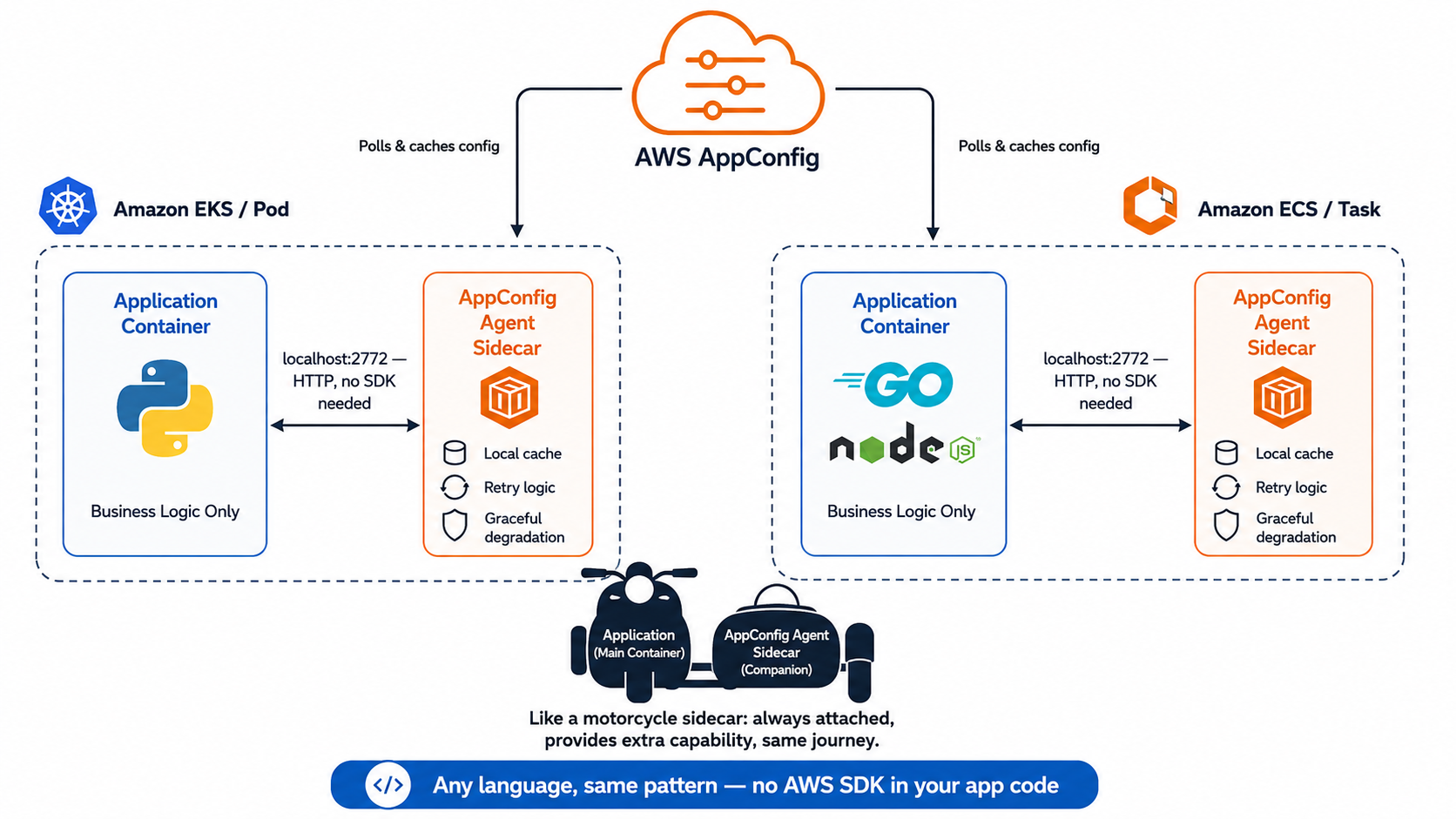
Figure 1: The sidecar pattern, showing an Amazon EKS pod running an application container beside an AWS AppConfig Agent sidecar on the left and an Amazon ECS task with the same arrangement on the right, where both sidecars poll AWS AppConfig to provide local caching, retry logic, and graceful degradation
The AWS AppConfig Agent deploys as a sidecar container in the same pod (EKS) or task (ECS) as your application. It creates a local HTTP endpoint on localhost:2772 that your application queries for configuration data. The agent handles authentication, polling, caching, and graceful degradation when the service is not reachable. Your application only makes an HTTP GET.
During the container Init phase, the agent establishes a session with AWS AppConfig. If you configure a prefetch list, the agent retrieves configuration eagerly at startup. Otherwise, it fetches on the first request. On each application request, your code makes a local HTTP call that completes in microseconds because it never leaves the execution environment. In the background, the agent polls AWS AppConfig at a configurable interval (default: 45 seconds) to check for updates.
This pattern provides several advantages over direct API integration:
- Language-agnostic access – Any application can read flags through HTTP, no SDK required.
- Automatic refresh – The agent polls AWS AppConfig at configurable intervals and updates its local cache transparently.
- Resilience – Continues serving cached configuration during network issues, so a configuration fetch error alone doesn’t take down your application.
- Reduced throttling risk – Your application never calls the AWS AppConfig API directly. The agent’s local cache absorbs application-level concurrency, significantly reducing API calls. Note that accounts with a very high number of agent instances might still encounter service-level throttling.
- Consistent implementation – Identical pattern across ECS and EKS, any programming language or framework.
Architecture overview
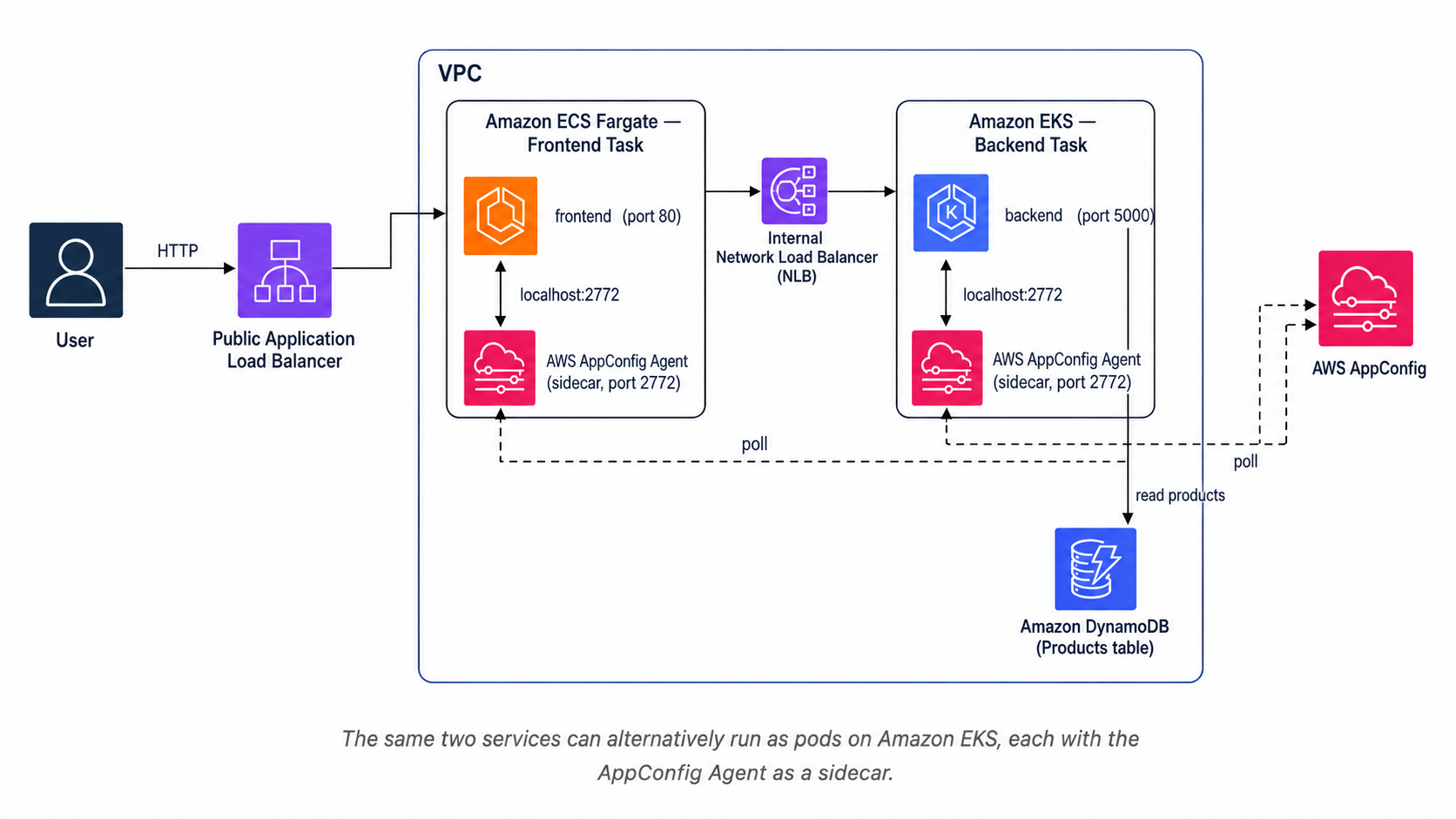
The sample application consists of a frontend and backend service deployed in containers. The frontend displays a product catalog, and the backend provides product data through an API. Both containers have the AWS AppConfig Agent sidecar deployed alongside them. The agent retrieves the latest configuration from AWS AppConfig and exposes it at http://localhost:2772.
When the discount feature flag is enabled through AWS AppConfig, the backend detects the change and applies the discount percentage to product prices. The frontend simultaneously updates its UI to display promotional messaging. All of this happens without code deployments or container restarts, so both users and operators experience no interruption.
Setting up AWS AppConfig
Before deploying the containers, set up AWS AppConfig. Create an application to serve as a logical container for your configuration resources, an environment named “Demo” to represent the deployment target, and a feature flag configuration profile to define the structure of your flags. Finally, create a deployment strategy that specifies a gradual deployment over 15 minutes with automatic rollback capabilities.
Within the profile, define the discount feature flag:
For advanced use cases, use a multi-variant flag to offer different discount levels to different user segments:
Deploying on Amazon EKS
Deploy the AWS AppConfig Agent as a sidecar in the same pod. The agent uses AWS Identity and Access Management (IAM) Roles for Service Accounts (IRSA) for authentication:
Key points for the EKS deployment:
- The agent uses
/as the liveness probe path. - Prometheus annotations expose the agent’s metrics for scraping.
- Containers share the pod network namespace, so the application reaches the agent through
localhost:2772. - The
serviceAccountNameprovides AWS credentials through IAM Roles for Service Accounts (IRSA), which removes the need for embedded credentials. - Resource limits prevent the lightweight agent sidecar from affecting application performance.
- Multiple replicas demonstrate how configuration changes propagate consistently across all pod instances.
Deploying on Amazon ECS
For Amazon ECS, define a task with both the application and agent containers. The agent uses the task role for AWS authentication:
Key points for the ECS deployment:
- Use the
POLL_INTERVALenvironment variable to configure polling frequency (see the agent configuration reference). - The
/endpoint is the health check path for the agent. - The
dependsOnclause with"condition": "START"makes sure the agent is running before the application container starts. - The task role provides AWS credentials automatically. The agent resolves your task execution role credentials without additional setup.
- The task uses AWS Fargate for serverless container execution, which removes infrastructure management.
Reading feature flags from your application
Query the agent through localhost. Responses are in the nano-to-microsecond range, so no application-level cache is needed:
Use the flag to control behavior:
Best practices
- Use deployment strategies – Configuration changes carry risk, like code changes. Define a gradual rollout strategy (for example, linear 20 percent every 2 minutes over 10 minutes with a 5-minute bake time). AWS AppConfig integrates with Amazon CloudWatch alarms to automatically revert changes if error rates or latency spike during deployment.
- Use the feature-flag profile type – The
AWS.AppConfig.FeatureFlagstype provides a console experience for non-technical users, built-in support for multi-variant flags, and tools for identifying and cleaning up stale feature flags. This is the recommended approach over freeform JSON. - Do not cache in application code – The agent responses are fast enough (nano/microsecond range). Querying the agent inline on every request gives you the freshest data and completely avoids caching logic bugs in your code.
- Plan for fallbacks – Define sensible defaults for all flags so your application continues functioning if the agent is temporarily unreachable. Implement your feature checks so the “off” state is always the safe default.
- Use validators – JSON Schema or AWS Lambda validators prevent invalid configurations from deploying to your container fleet. For example, constrain a discount percentage to between 0 and 100 to prevent serious errors.
Conclusion
AWS AppConfig with the sidecar pattern provides a working foundation for feature flags in containerized applications on Amazon ECS and Amazon EKS. You can extend it with production controls such as HTTPS, authentication, private networking, and non-root containers to match your organization’s security requirements. The pattern abstracts configuration management from application code, works identically across container platforms and programming languages, and supports safe deployments with gradual rollouts and automatic rollback.
Compared to building custom configuration management or using environment variables, this approach eliminates redeployment overhead, provides sub-millisecond reads from the local agent cache, and delivers production safety mechanisms out of the box. As your feature management needs grow from boolean flags to multi-variant experiments across user segments, AWS AppConfig scales with you without requiring changes to your container deployment pattern.
The complete code for this post is available in the GitHub repository aws-samples/sample-appconfig-feature-toggle-ecs-eks. It includes CloudFormation templates, the frontend and backend containers, and the ECS and EKS deployment manifests.