Containers
Run GPU batch inference on Amazon ECS Managed Instances with scale to zero
GPU batch inference on Amazon Elastic Container Service (Amazon ECS) used to require self-managed Amazon Elastic Compute Cloud (Amazon EC2) instances with Auto Scaling groups, launch templates, Amazon Machine Image (AMI) version tracking, and manual capacity configuration. ECS Managed Instances alleviate that operational burden. You define your compute requirements, and Amazon ECS handles instance provisioning, AMI updates, NVIDIA driver management, and security patching for GPU-capable instances inside your account.
In this post, you deploy a single AWS CloudFormation stack that creates a GPU batch inference pipeline on Amazon ECS for asynchronous workloads. The pipeline uses ECS Managed Instances with Amazon Simple Queue Service (Amazon SQS) for job buffering and AWS Application Auto Scaling to scale the service to zero when idle. You submit a text payload, the system provisions a GPU instance, runs inference with a 1.7-billion parameter generative AI model (text-to-speech in this example), and writes natural-sounding speech to Amazon Simple Storage Service (Amazon S3). When the queue is empty, the service scales back to zero tasks and zero instances. You pay only for active inference time.
Solution overview
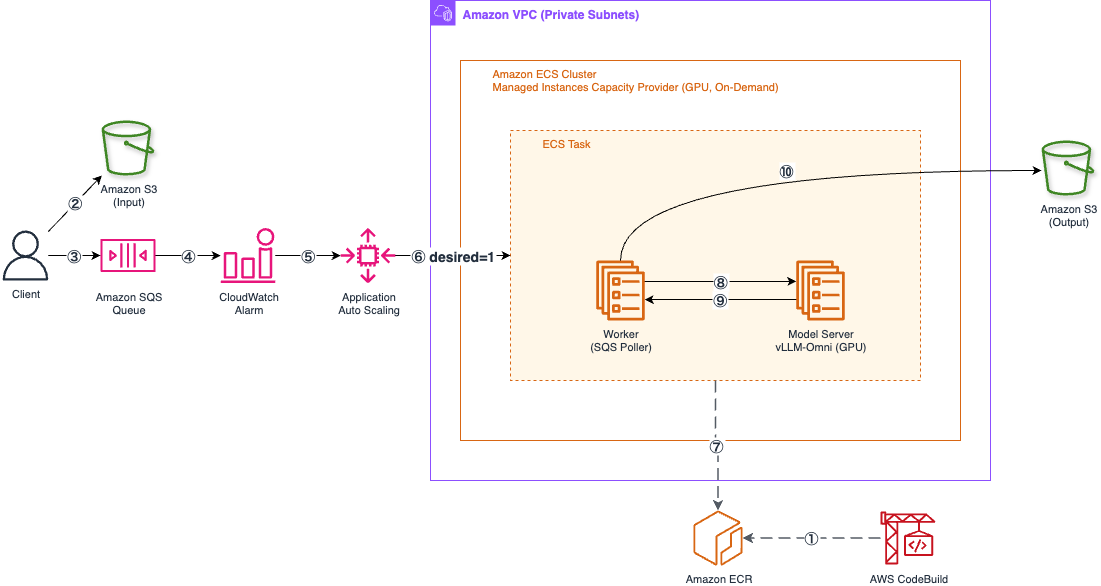
Figure 1: GPU batch inference pipeline on Amazon ECS. An SQS message triggers scale-out through a CloudWatch alarm and Application Auto Scaling. The ECS Managed Instances capacity provider provisions a GPU instance. The worker container polls the queue, calls the model server for inference, and uploads the result to S3. When the queue empties, the service scales back to zero
The architecture uses the following components:
- ECS Managed Instances capacity provider provisions On-Demand GPU instances using attribute-based instance selection. The capacity provider specifies NVIDIA as the manufacturer, a minimum GPU memory threshold of 20 GB (which facilitates Ampere-generation or newer GPUs), and a single-GPU constraint. Amazon ECS selects the most cost-effective instance type that meets those requirements.
- GPU health monitoring and metrics automatically detects NVIDIA GPU hardware failures through the Data Center GPU Manager (DCGM) and replaces impaired instances without operator intervention. Native GPU metrics in Amazon CloudWatch Container Insights provide visibility into utilization, memory, and thermal conditions at the device level.
- Amazon SQS queue buffers inference requests. Jobs are durable across instance lifecycle events.
- AWS Application Auto Scaling monitors the queue depth through an Amazon CloudWatch alarm. When messages arrive, it sets the ECS service desired count to 1. When the queue is empty for 5 consecutive minutes, it scales back to 0.
- AWS CodeBuild builds container images with model weights baked in, avoiding runtime downloads.
- Amazon Virtual Private Cloud (Amazon VPC) with private subnets and a NAT Gateway provides network isolation.
The reference implementation uses Qwen3-TTS (a 1.7B-parameter text-to-speech model, Apache 2.0 licensed) served by vLLM-Omni. The infrastructure pattern works for GPU models that process jobs from a queue.
Prerequisites
- AWS CLI v2 configured with credentials that have permissions to deploy CloudFormation stacks, create AWS Identity and Access Management (IAM) roles, and manage Amazon ECS resources.
- Git (to clone the sample repository).
- Sufficient service quotas for at least one NVIDIA GPU instance type with 20 GB or more of GPU memory in your target Region.
Verify that your Region has qualifying GPU instances before deploying:
If the output is empty, choose a different Region.
Walkthrough
Clone the repository and set your target Region:
Deploy the infrastructure
This creates the VPC, S3 bucket, SQS queue, Amazon Elastic Container Registry (Amazon ECR) repository, AWS CodeBuild project, Amazon ECS cluster with the Managed Instances capacity provider, task definition, service at zero desired count, and autoscaling rules.
Build and push container images
Package the source code and upload it to S3 for CodeBuild:
Trigger the build:
The first build takes approximately 25 minutes. CodeBuild downloads model weights from Hugging Face and bakes them into the container image alongside the inference runtime.
Submit an inference job
The repository includes a submit-job.sh script that reads stack outputs, uploads a JSON payload to S3, and sends an SQS message:
This triggers the cold start sequence. The CloudWatch alarm evaluates SQS queue depth every 60 seconds. Because SQS metrics are published at 1-minute intervals, the alarm might take up to 2 minutes to fire after the first message arrives. After it fires, Application Auto Scaling sets the service desired count to 1. The ECS Managed Instances capacity provider provisions a GPU instance, pulls the container image (~14 GB with baked weights), starts the model server, and compiles CUDA graphs on first inference. End-to-end, expect approximately 13 minutes from job submission to first audio output. Subsequent jobs while the task is still running complete in approximately 2 seconds.
Retrieve the output
The submit script prints the S3 path for the output WAV file. After the job completes, download it:
After 5 minutes with no messages in the queue, the scale-in alarm triggers and sets desired count back to 0. The instance terminates, and you return to zero cost.
Design decisions for GPU inference on ECS
Baked model weights. Model weights are downloaded during the Docker image build, not at runtime. Combined with TRANSFORMERS_OFFLINE=1, the container runs fully air-gapped after image pull. This alleviates runtime network dependencies and cold start variability from model downloads.
CUDA compatibility layer. The environment variable VLLM_ENABLE_CUDA_COMPATIBILITY=1 allows the container to run even if the CUDA toolkit version in the image is slightly ahead of the NVIDIA driver on the host. ECS Managed Instances refresh instances every 14 days for security patching, which might update the driver version. The compatibility layer helps prevent version mismatches from blocking container startup.
Fault tolerance through statelessness. The worker processes one SQS message at a time and deletes it only after uploading the result to S3. If the instance terminates or the process crashes, the unfinished message returns to the queue after the visibility timeout expires. No checkpointing is needed because partial inference output has no reuse value.
Accelerator selection. The capacity provider uses attribute-based instance selection with a 20 GB GPU memory floor, a single-GPU constraint, and NVIDIA as the manufacturer. vLLM-Omni requires CUDA Compute Capability 8.0 or higher (Ampere generation and newer) for its FlashAttention backend. The 20 GB threshold excludes pre-Ampere single-GPU instances (T4 at 16 GB, V100 at 16 GB) while automatically including current and future Ampere-class GPUs without template updates.
GPU observability. ECS Managed Instances publish native NVIDIA GPU metrics to Amazon CloudWatch through Container Insights with enhanced observability. You can monitor GPU utilization, memory usage, and thermal conditions without installing additional agents. Combined with GPU health auto-repair, which automatically replaces instances with critical GPU hardware failures, the pipeline recovers from hardware issues without operator intervention.
Cost considerations
The primary cost advantage is zero idle cost. Running a GPU instance through ECS Managed Instances costs the Amazon EC2 instance price plus an ECS Managed Instances management fee, billed per-second like the EC2 charge itself. See the ECS Managed Instances pricing page for current rates by instance type and Region. Scaling to zero means you pay for that combined rate only while a GPU instance is actually running a job. If your workload processes jobs for 4 hours a day instead of running continuously, you pay for those 4 hours instead of 24. The savings scale with how bursty your job arrival pattern is.
GPU management fees on ECS Managed Instances were reduced starting July 1, 2026. G-series fees dropped 35%, and P-series and AWS Trainium fees dropped 60%, making this pattern more cost-effective than before. See the announcement for details.
For GPU Spot pricing, you can modify the capacity provider configuration to use Spot instances with attribute-based instance type selection. GPU Spot availability varies by Region and is less predictable than CPU Spot, so verify capacity in your target Region before switching.
The NAT Gateway incurs hourly charges plus per-GB data transfer. For frequent deployments, consider adding a VPC endpoint for Amazon ECR to reduce data transfer costs.
Clean up
The S3 bucket uses DeletionPolicy: Retain and versioning to help prevent accidental data loss. Delete all object versions before removing the bucket:
Delete all images from the Amazon ECR repository:
Wait for all instances to deregister from the cluster (if a task was recently running):
Delete the stack:
Conclusion
This post shows how to run GPU batch inference on Amazon ECS using Managed Instances with scale-to-zero. The pattern avoids idle GPU costs for asynchronous workloads by provisioning compute only when jobs arrive in the queue and terminating it when the backlog clears.
Use this pattern when your inference workload is bursty, latency tolerance is measured in minutes (not milliseconds), and you want to avoid managing GPU instance lifecycle, AMIs, and drivers. For workloads that require sub-second response times, keep a minimum desired count of 1 to maintain a warm instance.
The complete source code, CloudFormation template, and detailed instructions are available in the GitHub repository. To learn more about ECS Managed Instances capabilities including attribute-based instance selection and GPU health monitoring, see the Amazon ECS Managed Instances page.