Although Kubernetes offers scalability for GitLab Runner deployments, the operational overhead can’t be ignored. Organizations starting with containerized continuous integration/continuous development (CI/CD) without mature container practices often underestimate both the financial implications and security complexities. The true Total Cost of Ownership (TCO) extends far beyond the initial infrastructure provisioning, demanding meticulous architectural decisions that balance scale, cost efficiency, and security posture. To navigate these complexities successfully, enterprises need a managed solution that abstracts the operational burden.
Amazon Elastic Kubernetes Service (Amazon EKS) provides a robust platform for container orchestration. With the introduction of Amazon EKS Auto Mode, the management of Kubernetes clusters has been streamlined by automatically provisioning infrastructure, choosing optimal compute instances, dynamically scaling resources, continually optimizing compute for costs, patching operating systems (OS), and integrating with AWS security services.
In this post we demonstrate how using GitLab Runners on EKS Auto Mode, combined with Amazon Elastic Compute Cloud (Amazon EC2) Spot Instances, can deliver enterprise-scale CI/CD capabilities while achieving up to 90% cost reduction when compared to traditional deployment models. This approach not only optimizes operational expenses, but also provides resilient, scalable pipeline execution.
Solution overview
This solution implements a production-ready GitLab Runner deployment on EKS Auto Mode, using infrastructure as code (IaC) best practices, as shown in the following figure. It uses Amazon EC2 Spot Instance fleet management for optimal cost-performance ratio, while implementing comprehensive security controls through predefined Role Bases Access Control (RBAC) policies and AWS Identity and Access Management (IAM) roles. This solution uses credentials with IRSA for the runner’s AWS identity. The better pod identity approach isn’t possible as of this writing, but could be added following this issue being resolved. Two node pools are used for the implementation: one is used for the main runner on demand (you can also use a compute savings plan or reserved instance), and one is used for the ephemeral runners in a spot configuration.
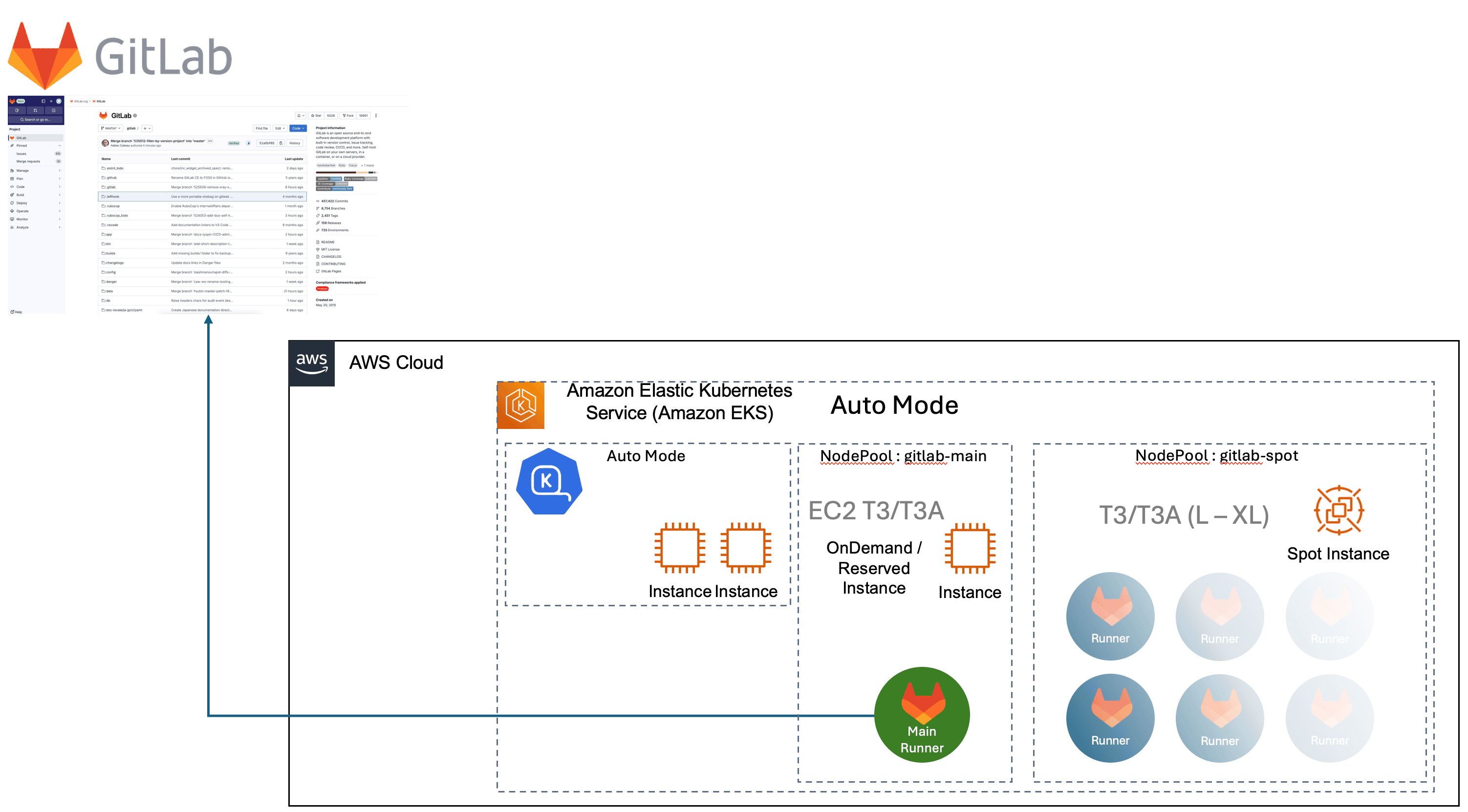
Figure 1: Architecture
Prerequisites
For this solution, you need the following prerequisites:
Optional:
- If you’re running a private GitLab deployment, then you need network connectivity for this deployment. For more detailed information on specific configuration steps, you can refer to the official GitLab documentation.
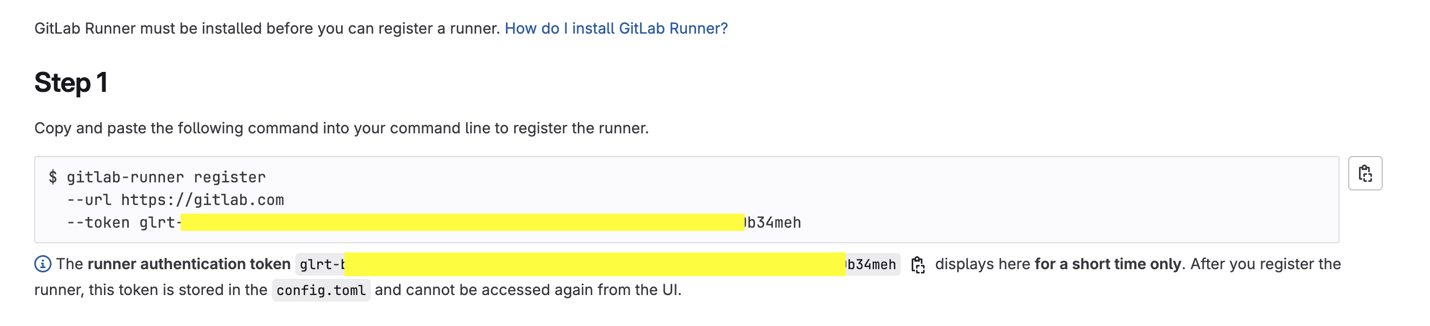
Figure 2: GitLab Token
Walkthrough
The sample attached to this post comes with a fully contained script that deploys the environment end to end.
- Deploy an EKS Auto Mode cluster
- Configure IAM roles and IRSA provider
- Set up spot instances configuration
- Install GitLab Runner using Helm
- Configure health checks and monitoring
Follow this link to the GitHub repository.
Configuration files
Two files are used to load the configurations for the environment.
defaults.json : A file with opinionated defaultscustom.json (Optional): A file with your modifications to the defaults- If the file doesn’t exist, then it is created by the script with at minimum the
runner_token in it.
Here are the elements of the config.
{
  // AWS Configuration
  "aws": {
    "region": "us-west-2", // AWS region for deployment
    "tags": {
      "Environment": "staging", // Environment tag for resource identification
      "Project": "gitlab-runners", // Project name for cost tracking
      "Owner": "myteam" // Team responsible for resources
    }
  },
  // EKS Cluster Configuration
  "eks": {
    "cluster_name": "my-gitlab-runners", // Name of the EKS cluster
    "version": "1.32" // Kubernetes version
  },
  // GitLab Runner Configuration
  "gitlab": {
    "namespace": "gitlab-runners", // Kubernetes namespace for GitLab runners
    "service_account": "my-gitlab-runner-sa", // Service account name for RBAC
    "url": "https://gitlab.example.com/", // GitLab instance URL
    "runner_token": "glrt-xxxxxxxxxxxxxxxxxxxx", // GitLab runner registration token
    "concurrent_jobs": 20, // Maximum concurrent jobs
    "chart_version": "0.55.0", // GitLab Runner Helm chart version
    // Resource limits and requests for runner pods
    "resources": {
      "limits": {
        "memory": "512Mi", // Maximum memory allocation
        "cpu": "500m", // Maximum CPU allocation (0.5 cores)
        "ephemeral_storage": "10Gi" // Maximum ephemeral storage
      },
      "requests": {
        "memory": "256Mi", // Requested memory allocation
        "cpu": "250m", // Requested CPU allocation (0.25 cores)
        "ephemeral_storage": "5Gi" // Requested ephemeral storage
      }
    },
    // Health check configuration for runner pods
    "health_check": {
      "livenessProbe": {
        "initialDelaySeconds": 90, // Wait time before first liveness check
        "periodSeconds": 15, // Interval between liveness checks
        "timeoutSeconds": 5, // Timeout for each probe
        "successThreshold": 1, // Consecutive successes to mark as healthy
        "failureThreshold": 3 // Consecutive failures before restart
      },
      "readinessProbe": {
        "initialDelaySeconds": 20, // Wait time before first readiness check
        "periodSeconds": 15, // Interval between readiness checks
        "timeoutSeconds": 5, // Timeout for each probe
        "successThreshold": 1, // Consecutive successes to mark as ready
        "failureThreshold": 3 // Consecutive failures before marking unready
      }
    }
  }
}
Get started
Clone this repository and install the configuration files using the provided script:
git clone https://github.com/aws-samples/sample-gitlab-runner-on-eks-auto-mode.git
cd sample-gitlab-runner-on-eks-auto-mode/scripts
./1-install-eks-auto-mode-cluster.sh
Selected output of the script:
Configuration loaded from ../configs/defaults.json
Custom configuration file not found. Let's create one.
Creating custom configuration file at ../configs/custom.json
Enter your GitLab runner registration token: glrt-###################################################34meh
Enter comma-separated list of AWS managed policies (default: ReadOnlyAccess):
…
Creating EKS cluster config file...
Creating EKS cluster...
…
2025-07-24 14:25:10 [✔]  EKS cluster "gitlab-eks-auto" in "ca-central-1" region is ready
Adding karpenter instance pool...
nodepool.karpenter.sh/gitlab-main created
nodepool.karpenter.sh/gitlab-spot created
Getting OIDC provider URL...
OIDC Provider URL: https://oidc.eks.ca-central-1.amazonaws.com/id/74E2169256ED730538300DD3668D3EBB
OIDC Provider: oidc.eks.ca-central-1.amazonaws.com/id/74E2169256ED730538300DD3668D3EBB
AWS Account ID: 000000000000
Creating IAM OIDC identity provider...
…
Installing/upgrading GitLab Runner...
…
Gitlab runner is up and running!
NAME                                 READY   STATUS    RESTARTS   AGE
pod/gitlab-runner-6c795f878c-qnjs7   1/1     Running   0          57s
NAME                            READY   UP-TO-DATE   AVAILABLE   AGE
deployment.apps/gitlab-runner   1/1     1            1           58s
NAME                                       DESIRED   CURRENT   READY   AGE
replicaset.apps/gitlab-runner-6c795f878c   1         1         1       58s
---------------------------
Installation complete!
---------------------------
Before you start using the runner, please attach a policy to the IAM Role: gitlab-runner-role
```
The following figures show various views of what’s being created.

Figure 3: AWS CloudFormation template
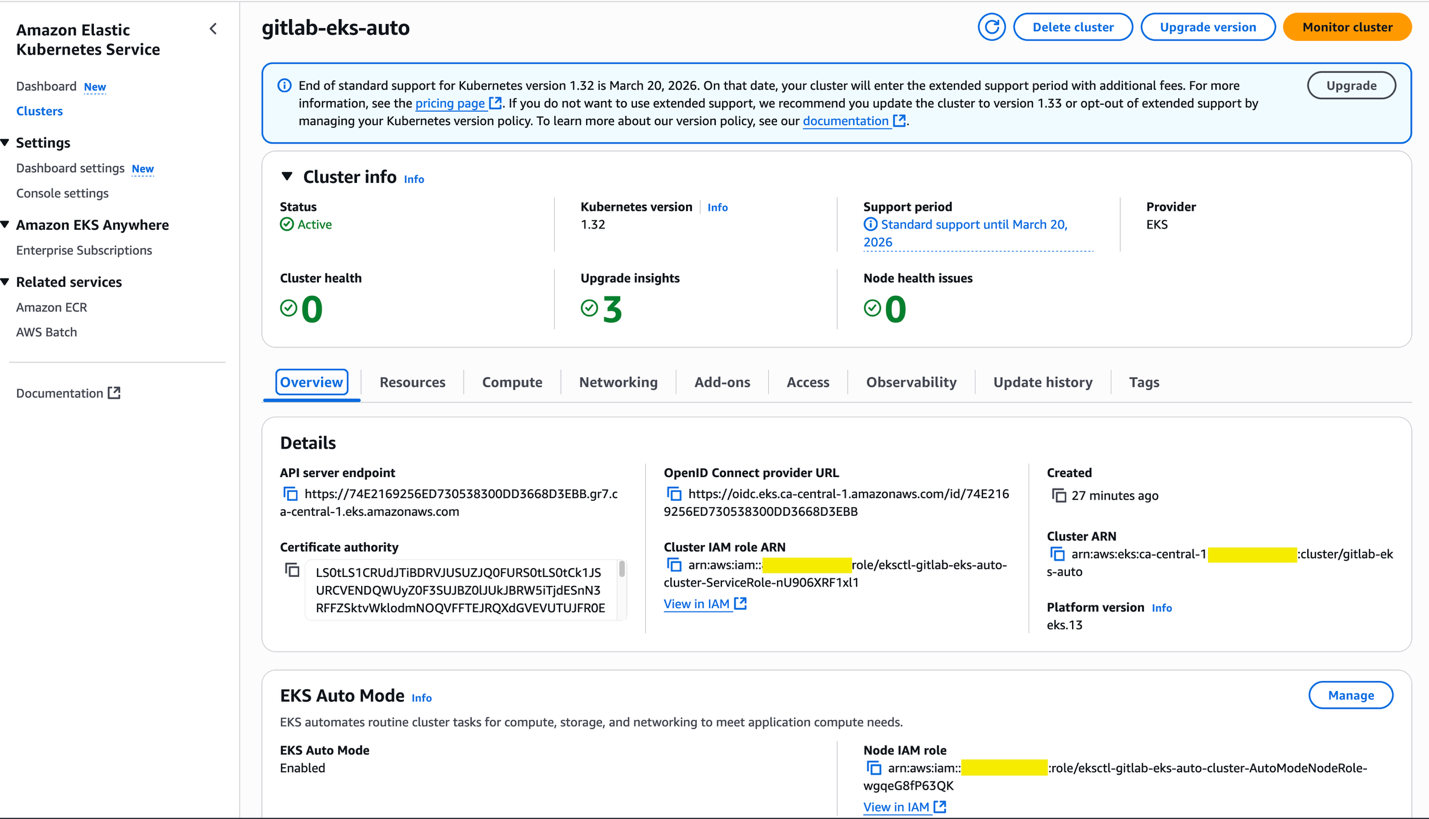
Figure 4: EKS Auto Mode cluster

Figure 5: Base Amazon EKS node with Base Runner pod
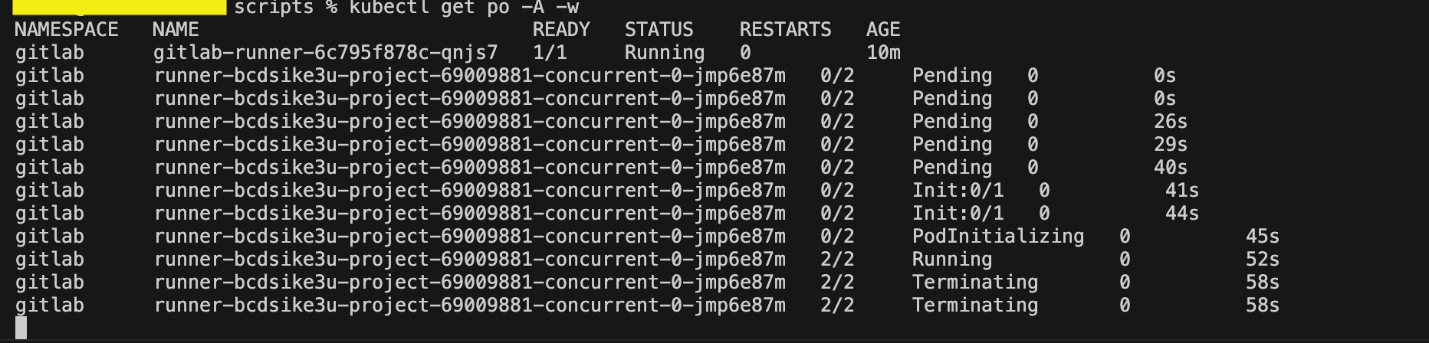
Figure 6: Runner pods life cycle

Figure 7: Spot instance node
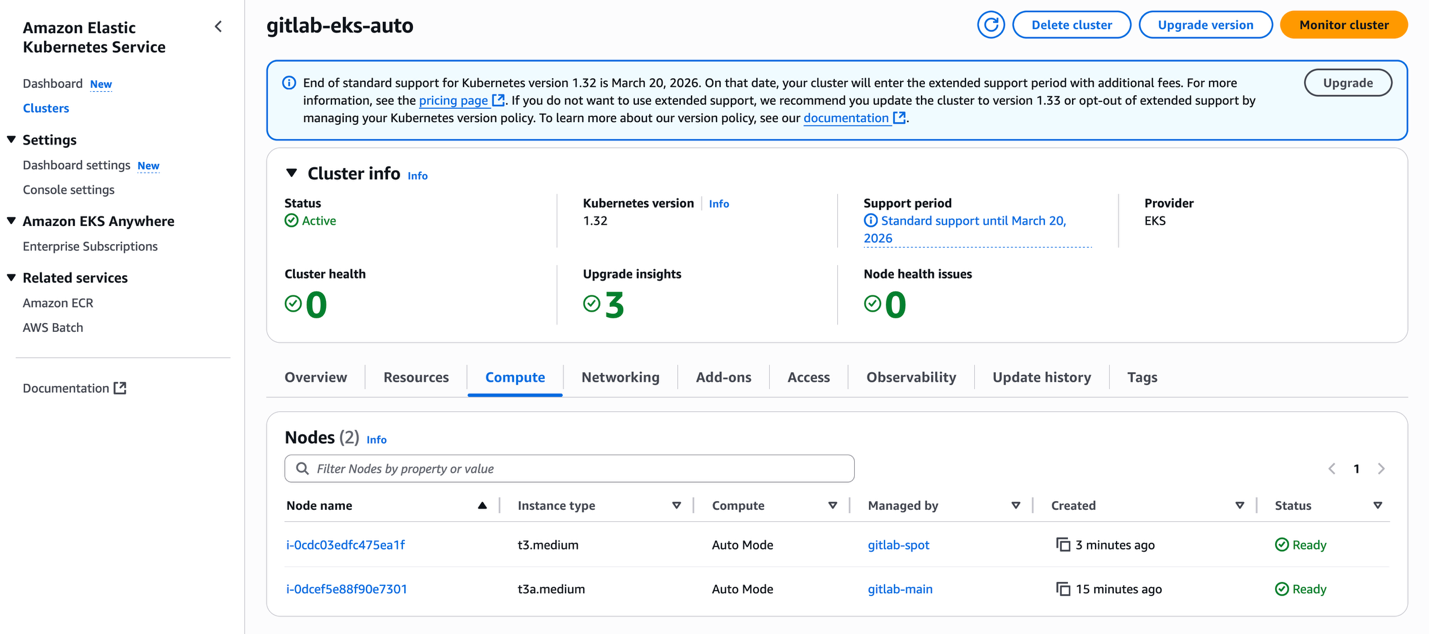
Figure 8: Karpenter nodes in EKS Auto Mode
Policies
Attach the policies you need to the runner’s role, which is mentioned at the end of the script,
Before you start using the runner, please attach a policy to the IAM Role: gitlab-runner-role
For example, you can add the AWS managed role AmazonEC2ContainerRegistryPowerUser, which enables GitLab Runner to build and push container images to Amazon Elastic Container Registry (Amazon ECR).
Cleaning up
To avoid incurring future charges, delete the resources through the cleanup script:
chmod +x scripts/99-cleanup.sh
cd scripts
./99-cleanup.sh
Conclusion
Teams can use Amazon EKS Auto Mode with GitLab Runners to significantly reduce their operational overhead while maintaining enterprise-grade CI/CD capabilities. This solution provides several key benefits:
- Up to 90% cost reduction through optimized spot instance usage
- Streamlined cluster management with the EKS Auto Mode intelligent automation
- Enhanced security through prescribed RBAC and OIDC integration
- Improved reliability with automated health checks
- Streamlined infrastructure maintenance with automated patching and updates
Although this implementation is a solid foundation, teams can further customize it based on their specific needs. Consider exploring more optimizations such as reserved instances in combination with spot instances, custom scaling policies, or integration with AWS Secrets Manager for sensitive workloads.
Get started with the provided IaC templates in our GitHub repository, and share your feedback or contributions with the community.
More reads:
About the authors
 David Haché is a Senior Solution Architect at Amazon Web Services (AWS)