AWS Database Blog
Optimizing correlated subqueries in Amazon Aurora PostgreSQL
Correlated subqueries can cause performance challenges in Amazon Aurora PostgreSQL-Compatible Edition, often causing applications to experience reduced performance as data volumes grow. In this post, we explore the advanced optimization configurations available in Aurora PostgreSQL that can transform these performance challenges into efficient operations without requiring you to modify a single line of SQL code. The configurations we are going to explore are the subquery transformation and the subquery cache optimizations.
If you’re experiencing performance impacts due to correlated subqueries or planning a database migration where rewriting a query using correlated subquery to a different form isn’t feasible, the optimization capabilities of Aurora PostgreSQL could deliver the performance improvement you need.
Understanding correlated subqueries
A correlated subquery is a nested query that references columns from its outer query, creating a dependency that requires the inner query to execute once for each row processed of the outer query. This relationship is what makes them both powerful and potentially problematic for performance.
Anatomy of a correlated subquery
The following diagram shows a correlated subquery that finds the maximum order amount for each customer by looking up their orders in a separate table. For each customer row in the main query, the subquery executes once to find that specific customer’s highest order total using the matching customer_id from the orders table.

Key components:
- Outer query: Processes the main dataset (customers table)
- Inner query: The subquery that depends on outer query values
- Correlation condition:
o.customer_id = c.customer_idlinks the queries - Correlated column:
c.customer_idfrom the outer query used in the inner query
The performance challenge
Traditional execution of correlated subqueries follows this pattern:
- Fetch one row from the outer query
- Execute the subquery with correlated values fetched from step 1
- Return the subquery result
- Repeat for the next outer row
For 10,000 customers with 500 orders each, this would imply 10,000 separate subquery executions, resulting in sub-optimal performance for the query.
Aurora PostgreSQL provides two powerful methods to overcome the performance challenges of correlated subqueries: subquery transformation optimization and subquery cache optimization.
Subquery transformation
The subquery transformation optimization automatically converts correlated subqueries into efficient join-based execution plans. Instead of running the same subquery repeatedly for each row in your outer table, this optimization runs the subquery just once and stores the results in a hash lookup table. The outer query then simply looks up the answers it needs from the hash table, which is much faster than recalculating the same thing repeatedly.
The subquery transformation feature delivers the greatest reduction in query execution time in several key scenarios. When your outer query is expected to return large result sets of more than 1,000 rows, the transformation can significantly improve performance. The feature excels with expensive subqueries that include aggregations, complex joins, and sorting operations within the subquery itself. It proves particularly valuable when indexes are missing on correlation columns, because the transformation eliminates the need for these indexes. Migration scenarios where rewriting queries isn’t feasible represent another ideal use case; you can use subquery transformation to improve performance without modifying existing SQL code. A best-case scenario for the subquery transformation optimization occurs when the table is large and has missing indexes and the subquery result uses aggregation functions.
How to enable subquery transformation
Aurora PostgreSQL can automatically transform eligible correlated subqueries into efficient join operations. This can be enabled at either the session or parameter group level.
Limitations and scope
The transformation applies only when the following conditions are met:
- Correlated columns appear only in the subquery
WHEREclause - Subquery
WHEREconditions useANDoperators exclusively - The subquery must return a scalar value using aggregate functions like:
MAX,MIN,AVG,COUNT, orSUM. - No
LIMIT,OFFSET, orORDER BYoperators can be present in the subquery - There are no indexes present on the outer query or subquery join columns
The following are examples of queries that would not be optimized by subquery transformation based on these limitations:
A correlated field in a SELECT clause:
OR conditions in a WHERE clause:
A LIMIT in the subquery:
The subquery cache
The subquery cache optimization stores and reuses subquery results for repeated correlation values, reducing computational overhead and improving performance when the same subquery conditions are evaluated multiple times. The ideal scenario for enabling the subquery cache is when you have high correlation value repetition (many rows with the same attributes), expensive subquery computations, queries ineligible for plan transform, and when the cached result is finite. A perfect example scenario occurs when the subquery condition is too complicated, so the subquery transform won’t work for the query, and the cache hit rate is more than 30%, which indicates there are repeated rows in the outer table.
The subquery cache optimization adds a PostgreSQL Memoize node, a caching layer between a nested loop and its inner subquery, storing results to avoid redundant computations. Instead of executing the subquery for every customer row, the Memoize node:
- Caches results based on the
customer_id(cache key). - Reuses cached results when the same
customer_idappears again. - Reduces redundant computations by storing previously calculated max (
total_amount) values.
How to enable subquery caching
Subquery caching complements transformation by storing and reusing subquery results. It can be enabled in two ways.
You can enable subquery caching at the session level:
You can also enable in your cluster parameter group, using the following dynamic parameter:
Finally, you can check the change has been applied:
Limitations and scope
The following are subquery types that are can be used in the subquery cache:
- Scalar subqueries with correlation
- Deterministic functions only
- Hashable correlation column types
The operators IN, ANY, ALL cannot be used with statements in the subquery cache.
When to use subquery transform or subquery cache
The subquery cache can be enabled independently of subquery transformation, which means you can use subquery caching as a standalone performance enhancement or in combination with subquery transformation for maximum optimization. Use subquery transformation by itself when you have large datasets with minimal repeated values and your subqueries meet the strict requirements, because it can significantly reduce execution time by converting nested loops into efficient joins. Use the subquery cache when your queries have complex conditions that prevent transformation but contain many repeated correlation values, allowing the cache to store and reuse results even when transformation isn’t possible.
Where subqueries meet the requirements for both subquery transformation and caching because of repeated correlation values, then you will get maximum benefit by using both optimizations:
In such cases, the optimizer will do the transform first and subsequently the subquery cache will be used to build the query plan.
Subquery optimizations in action
Let’s look at how to use these two optimizations in practice. For subquery transformation, we will measure impact in query execution time before and after optimization. For subquery cache, we will measure impact in cache hit ratio (CHR).
Subquery transformation impact
To review the impact of subquery transformation, we start by generating test data. The following data preparation SQL statements create two tables, the first called inner_table with three columns (id, a, and b) and populates it with 10,000 rows of data where column a cycles through values 1–100 and column b contains random numbers. The code then fills the second outer_table with 50,000 rows split between repeated values (1–100) and unique values (101–25100), followed by gathering statistics on both tables.
An index isn’t needed in this example, because correlated subquery transformation works best without indexes. This is because subquery transformations can remove the need for indexes by converting multiple table scans into a single table scan, reducing query complexity and avoiding the storage overhead and Data Manipulation Language (DML) latency penalties associated with maintaining indexes.
Before enabling the transformation:
After enabling the transformation:
Sections indicating that a hash lookup table is being used instead of repeated subquery executions for every row in the outer table are highlighted in bold.
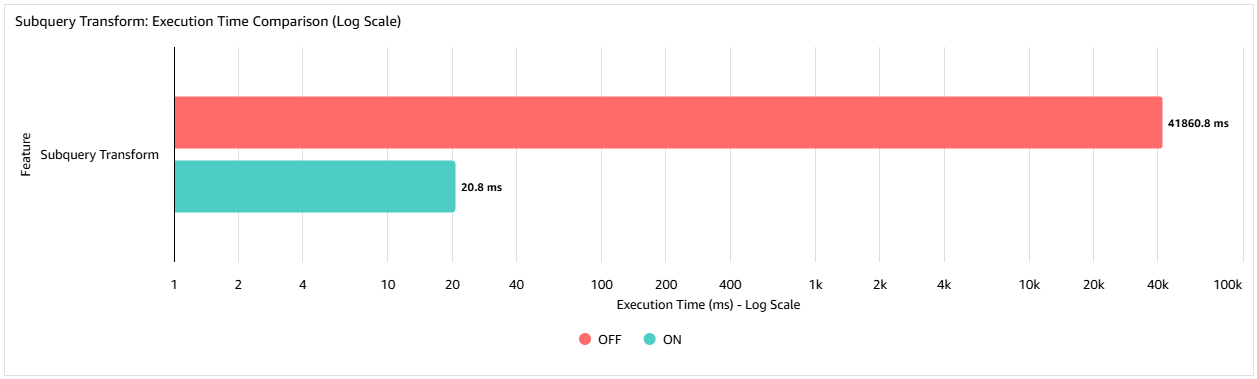
The following graph shows the execution time (in milliseconds) in a test case with an inner table of 10,000 rows and an outer table of 75,000 rows. By using the subquery transform, the query execution time is reduced by 99.95% compared to not using the feature, from 41seconds down to 20.8 milliseconds. The percentage improvement realized is data-dependent, but this example demonstrates the scale of improvement that can be achieved.
Subquery cache impact
Just like reviewing the impact of subquery transformation, the first step to review the impact of using a subquery cache is to generate test data. The following SQL code creates two tables (outer_table and inner_table) with identical structures (id, a, bcolumns) and populates inner_table with 10,000 sequential rows while filling outer_table with 100,000 rows split between repeated values (1–100) in the first half and unique values (101–50100) in the second half. The script concludes by updating the database statistics for both tables using the ANALYZE command.
An index isn’t needed because when indexes are present and usable, individual subquery executions might already be fast enough that caching provides diminishing returns.
Without the subquery cache:
With the subquery cache:
Highlighted in bold are the cache hits and misses showing a 49.9% CHR.
Understanding cache hit rate
The Cache Hit Rate determines cache effectiveness and is calculated like the following:
From this output, we can determine our CHR in the preceding example to be 49.9%. In general, for the subquery cache, a CHR above 70% is considered excellent. A CHR rate above 30% is good, and below 30%, the cache can be disabled because of limited benefit.
This is because—unlike shared buffer CHRs, which can reasonably reach 90% or more because the same data pages are frequently accessed—a 70% CHR for subquery cache reflects realistic data distribution patterns where only a portion of users have duplicate correlation values. A 50% CHR means half the customers in the outer query have duplicate values (such as repeat purchases), which represents normal business scenarios, whereas expecting 90% would imply unrealistic data patterns where nearly all users have identical behaviours.
You can also set parameters related to the subquery cache to decide whether the cache gets used. For each cached subquery, after the number of cache misses defined by apg_subquery_cache_check_interval is exceeded, the system evaluates whether caching that particular subquery is beneficial by comparing the CHR against the apg_subquery_cache_hit_rate_threshold. If the CHR falls below this threshold, the subquery is removed from the cache. The following are the defaults for these parameters.
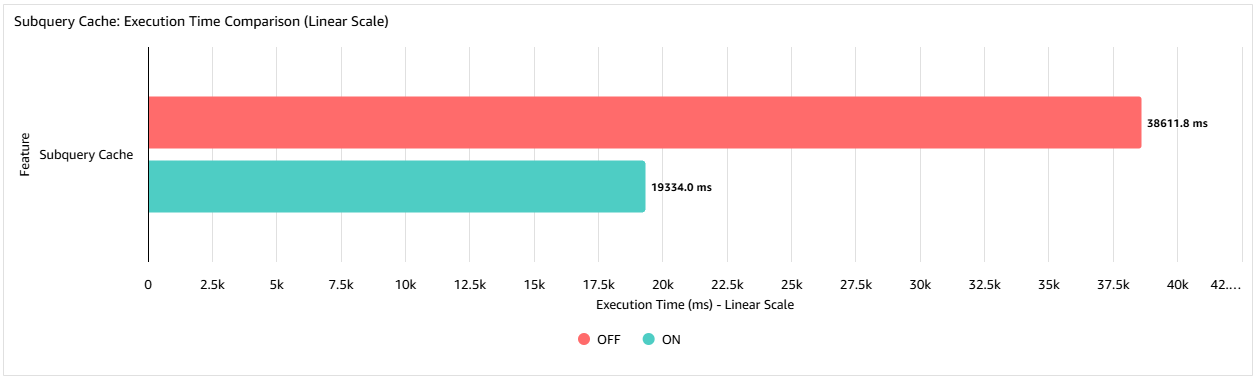
The following graph shows that in this example when using the subquery cache the query execution time is reduced to 50% of its original execution time. The improvement you achieve will vary from case to case. For example, the effectiveness of the cache will be influenced by the number of repeated rows in the outer query.
When to consider alternatives
Consider using the original PostgreSQL plan when you have excellent indexes already existing on correlation columns, queries execute infrequently, you have a small dataset for the outer query, or you’re dealing with complex subqueries with multiple correlation conditions. Consider manually rewriting the query when the plan is too complex to transform or when the cache hit rate is less than 30% in the subquery cache.
Conclusion
In this post, you have seen how the correlated subquery optimizations available in Aurora PostgreSQL can significantly improve performance through two complementary techniques: automatic subquery transformations and intelligent subquery caching. These features work together to tackle slow correlated queries without requiring code rewrites. Subquery transformation optimizes queries behind the scenes for significant speed improvements, while caching remembers results from expensive subqueries that repeatedly process similar data patterns. You can implement these optimizations incrementally, monitor their effects through Amazon CloudWatch, and test safely using the Amazon Aurora cloning and blue/green deployment features before production rollout, reducing the need to spend time rewriting complex queries and allowing Aurora to automatically handle the performance optimization heavy lifting.
To get started implementing these optimizations in your own environment, see Optimizing correlated subqueries in Aurora PostgreSQL and dive deeper into performance analysis techniques at this PostgreSQL page about reading EXPLAIN plans.