.NET on AWS Blog
Building a .NET Log Analysis System using Amazon Bedrock
Introduction
Log analysis helps you maintain reliable applications by identifying issues, troubleshooting problems, and gaining operational insights. Traditional log analysis struggles with unstructured data and requires hours of manual work to extract meaningful patterns. Generative AI transforms this process by automatically identifying anomalies, understanding context, and surfacing specific recommendations without complex configuration.
In this post, I’ll show you how to build a .NET-based log analysis system using Amazon Bedrock. You’ll combine .NET with Anthropic’s Claude 3.5 Sonnet foundation model available in Amazon Bedrock to create a solution that goes beyond log storage and visualization to deliver AI-powered pattern detection.
Solution Overview
This solution demonstrates a serverless architecture and integrates a .NET application with Amazon CloudWatch Logs for centralized log storage and management. The solution combines with the natural language processing capabilities of foundation models in Amazon Bedrock. This approach interprets log data without the need to write custom query rules or pattern matching logic for rule configuration.
The architecture diagram shown in Figure 1 illustrates how the solution works.
1. Log Generation: The Log Generator .NET App creates simulated application logs and writes them to Amazon CloudWatch every 15 seconds.
2. Log Retrieval: The Log Analyzer .NET App queries Amazon CloudWatch every 30 seconds to retrieve logs from a configurable time window (default: 5 minutes).
3. AI Analysis: The Log Analyzer sends the retrieved logs to Amazon Bedrock, which routes them to Claude Sonnet 3.5 for intelligent analysis.
4. Insights Delivery: Claude Sonnet 3.5 model analyzes the logs for patterns, anomalies, performance issues, and user behavior, then returns actionable insights and recommendations back to the Log Analyzer, which displays them to users.
This cycle repeats continuously, providing near real-time operational intelligence without manual rule configuration.
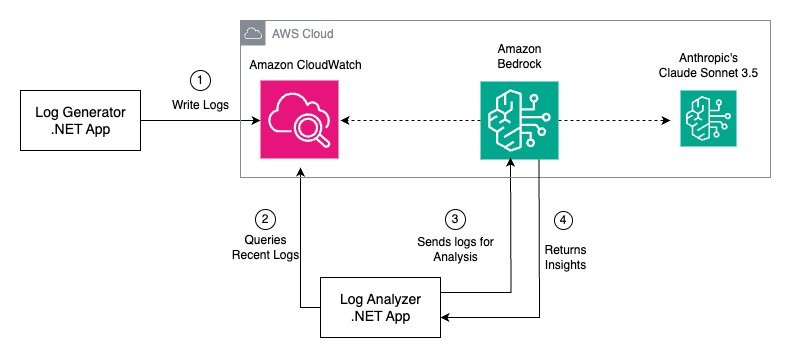
Figure 1: Solution Architecture
In the following sections, I’ll dive into the implementation details of each component, showing you how to build this system step by step.
Prerequisites
To implement this solution, be sure you have the following:
1. An AWS account with Amazon Bedrock access
2. Enable access to Claude 3.5 Sonnet model in Amazon Bedrock. Follow the guide: Access Amazon Bedrock foundation models
3. AWS Identity and Access Management permission for Amazon Bedrock and for Amazon CloudWatch.
4. AWS CLI installed and configured on your machine
5. .NET 8 SDK installed on your development machine
6. A code editor (Visual Studio or Visual Studio Code with the C# extension)
AI-powered log analysis with Amazon Bedrock
The core of this system’s intelligence lies in its integration with Amazon Bedrock. After retrieving logs from Amazon CloudWatch, the log analyzer sends data to Anthropic’s Claude 3.5 Sonnet foundation model available in Amazon Bedrock.
This advanced large language model processes the log data to:
- Identify patterns and trends across multiple log entries, within a configurable 5-minute rolling window.
- Detecting anomalies or unusual system behaviors.
- Generate human-readable summaries of log activities.
- Suggest potential root causes for errors or performance issues.
Amazon Bedrock’s foundational model analysis is then processed by the .NET Analyzer application to present actionable insights to the user.
Note: This solution uses Claude 3.5 Sonnet, which can be invoked directly using its model ID. For newer foundation models (Claude 4 and beyond), Amazon Bedrock requires creating and using an inference profile in model invocation, a resource that defines the model and regions for routing requests. You can create application inference profiles using the AWS CLI or SDK. For detailed instructions refer to Set up a model invocation resource using inference profiles.
How this solution differs from CloudWatch Logs Insights
While CloudWatch Logs Insights provides powerful query capabilities for searching and aggregating log data using SQL-like syntax, this solution adds an AI-powered interpretation layer. CloudWatch Logs Insights requires you to know what patterns to search for and write specific queries, whereas this solution uses Amazon Bedrock to discover anomalies, correlate events, and provide natural language insights without predefined queries and making operational intelligence accessible without query expertise.
Key Components
Here are the key components used in this solution.
- Log Generator (.NET Console App)
The log generator application creates sample application logs and stores them in Amazon CloudWatch. The application simulates user activity across a web application with randomized events. The core functionality uses the AWS SDK for .NET to write structured log entries. The log generator creates new log entries every 15 seconds, providing a steady stream of data for the analyzer to process.The generator implements a customCloudWatchLoggerclass that integrates with the standard .NETILoggerinterface. It structures log entries as JSON objects with timestamp, log level, and message information, automatically organizing them into CloudWatch log streams based on machine name and date (log-stream-{MachineName}-{YYYYMMDD}). The application creates a realistic distribution of log levels, 90% informational with 8% warnings and 2% errors, simulating typical web application behavior.The complete project file (Program.cs for LogGenerator) with all dependencies is provided in the Deployment section later in this post.
- Amazon CloudWatch Logs
Amazon CloudWatch Logs serves as the centralized log repository. The solution uses CloudWatch’s native time-based filtering through FilterLogEvents API to retrieve logs within specific time ranges. Log entries are automatically organized into log streams (log-stream-{MachineName}-{YYYYMMDD}), enabling efficient querying of recent data which is typically most relevant for log analysis scenarios.
- Log Analyzer (.NET Console App)The log analyzer application forms the intelligence layer of this solution, periodically querying Amazon CloudWatch Logs for recent entries and sending them to Amazon Bedrock for analysis. It implements a continuous monitoring loop that checks for new logs every 30 seconds, with a configurable time window (default 5 minutes) to ensure analysis remains relevant to current system behavior.The application accepts custom analysis prompts via command-line arguments, enabling teams to focus on specific operational concerns such as security threats, performance bottlenecks, or business metrics without code modifications.The application retrieves logs using CloudWatch’s FilterLogEvents API within the specified time range, then constructs carefully formatted prompts for Claude 3.5 Sonnet model with the serialized log data, configuring temperature and token parameters to balance analysis depth with response time.The analyzer handles the complete workflow from data retrieval to insight presentation, managing the asynchronous communication with both Amazon CloudWatch Logs and Amazon Bedrock services. It includes robust error handling to ensure continuous operation even when encountering service disruptions or unexpected data formats, making it suitable for production monitoring scenarios.The complete project file (
Program.cs for LogAnalyzer) with all dependencies is provided in the Deployment section later in this post.
- Amazon Bedrock
Amazon Bedrock provides serverless access to Claude and other foundation models. This solution uses large language model (LLM) capabilities to analyze structured log data, identifying patterns, anomalies, and potential issues. Amazon Bedrock handles the computational demands of natural language processing and provides a simple, unified API interface via Amazon Bedrock Runtime, which integrates with .NET application using the AWS SDK for .NET (AWSSDK.BedrockRuntimepackage andAmazonBedrockRuntimeClient).
Implementation
For this blog post, you’ll run both the log generator and log analyzer on your development machine to quickly set up and test the system. For production deployments, you’ll need to address scalability, availability, and monitoring, but the implementation principles you’ll learn here apply directly to production environments.
Step 1: Creating a CloudWatch Log Group:
To store log data, create a CloudWatch Log Group using the following AWS CLI command.
aws logs create-log-group \
--log-group-name ApplicationLogs \
--region us-east-1
The log group will contain log streams that are automatically organized by machine name and date, following the pattern log-stream-{MachineName}-{YYYYMMDD}.
Step2: Developing the Log Generator
Create a .NET console application to simulate the generation of log data.
1. First, create a new .NET console application. Run the following command: dotnet new console -n LogGenerator
cd LogGenerator
2. Add required NuGet packages:
dotnet add package AWSSDK.CloudWatchLogs
dotnet add package Microsoft.Extensions.Logging
3. Replace Program.cs with the following code: (Program.cs for LogGenerator)
using Amazon.CloudWatchLogs;
using Amazon.CloudWatchLogs.Model;
using Microsoft.Extensions.Logging;
using System.Text.Json;

class Program
{
    static async Task Main(string[] args)
    {
        var cloudWatchClient = new AmazonCloudWatchLogsClient();
        var logger = new CloudWatchLogger(cloudWatchClient, "ApplicationLogs");

        Console.WriteLine("Log Generator started. Generating logs every 15 seconds...");

        var random = new Random();
        string[] users = { "user1", "user2", "user3", "user4", "user5" };
        string[] actions = { "login", "logout", "view_page", "update_profile", "make_purchase" };
        string[] pages = { "home", "products", "profile", "cart", "checkout" };

        while (true)
        {
            var logLevel = GetRandomLogLevel(random);
            var user = users[random.Next(users.Length)];
            var action = actions[random.Next(actions.Length)];
            var page = pages[random.Next(pages.Length)];
            var duration = random.Next(10, 5000);

            var message = $"User '{user}' performed action '{action}' on page '{page}'. Duration: {duration}ms";

            await logger.LogAsync(logLevel, message);
            Console.WriteLine($"[{DateTimeOffset.UtcNow}] {logLevel}: {message}");

            await Task.Delay(15000); // Wait for 15 seconds
        }
    }

    static LogLevel GetRandomLogLevel(Random random)
    {
        var levels = new[] { LogLevel.Information, LogLevel.Information, LogLevel.Information,
                             LogLevel.Warning, LogLevel.Error };
        return levels[random.Next(levels.Length)];
    }
}

public class CloudWatchLogger : ILogger
{
    private readonly AmazonCloudWatchLogsClient _cloudWatchClient;
    private readonly string _logGroupName;
    private readonly string _logStreamName;

    public CloudWatchLogger(AmazonCloudWatchLogsClient cloudWatchClient, string logGroupName)
    {
        _cloudWatchClient = cloudWatchClient;
        _logGroupName = logGroupName;
        _logStreamName = $"log-stream-{Environment.MachineName}-{DateTimeOffset.UtcNow:yyyyMMdd}";

        // Ensure log stream exists
        EnsureLogStreamExists().Wait();
    }

    private async Task EnsureLogStreamExists()
    {
        try
        {
            await _cloudWatchClient.CreateLogStreamAsync(new CreateLogStreamRequest
            {
                LogGroupName = _logGroupName,
                LogStreamName = _logStreamName
            });
        }
        catch (ResourceAlreadyExistsException)
        {
            // Log stream already exists, which is fine
        }
    }

    void ILogger.Log<TState>(LogLevel logLevel, EventId eventId, TState state, Exception? exception, Func<TState, Exception?, string> formatter)
    {
        var logEntry = new
        {
            Timestamp = DateTimeOffset.UtcNow.ToUnixTimeMilliseconds(),
            LogLevel = logLevel.ToString(),
            Message = formatter(state, exception)
        };

        var logMessage = JsonSerializer.Serialize(logEntry);

        var putLogEventsRequest = new PutLogEventsRequest
        {
            LogGroupName = _logGroupName,
            LogStreamName = _logStreamName,
            LogEvents = new List<InputLogEvent>
            {
                new InputLogEvent
                {
                    Timestamp = DateTime.UtcNow,
                    Message = logMessage
                }
            }
        };

        _cloudWatchClient.PutLogEventsAsync(putLogEventsRequest);
    }

    public async Task LogAsync(LogLevel logLevel, string message)
    {
        ((ILogger)this).Log(logLevel, 0, message, null, (state, _) => state);
    }

    public bool IsEnabled(LogLevel logLevel) => true;

    IDisposable? ILogger.BeginScope<TState>(TState state) => null;
}
Step 3: Building the Log Analyzer
The log analyzer application will retrieve logs from Amazon CloudWatch Logs and use Amazon Bedrock to analyze them.
1. Create another .NET console application. Run the following command:
dotnet new console -n LogAnalyzer
cd LogAnalyzer
2. Add required packages:
dotnet add package AWSSDK.CloudWatchLogs
dotnet add package AWSSDK.BedrockRuntime
3. Replace Program.cs with the following code: (Program.cs for LogAnalyzer)
using Amazon.BedrockRuntime;
using Amazon.BedrockRuntime.Model;
using Amazon.CloudWatchLogs;
using Amazon.CloudWatchLogs.Model;
using System.Text.Json;

class Program
{
    static async Task Main(string[] args)
    {
        var cloudWatchClient = new AmazonCloudWatchLogsClient();
        var bedrockClient = new AmazonBedrockRuntimeClient();

        // Parse command-line arguments
        string customPrompt = args.Length > 0 && !string.IsNullOrWhiteSpace(args[0])
            ? args[0]
            : "Analyze these logs for anomalies and patterns. Focus on:\n" +
              "1. Temporal patterns and timing anomalies\n" +
              "2. User behavior and activity patterns\n" +
              "3. Performance metrics and bottlenecks\n" +
              "4. Error correlation with performance issues\n" +
              "5. System health indicators and recommendations";

        int timeWindowMinutes = 5; // Default 5 minutes
        if (args.Length > 1 && int.TryParse(args[1], out int parsedMinutes) && parsedMinutes > 0)
        {
            timeWindowMinutes = parsedMinutes;
        }

        Console.WriteLine("Log Analyzer started...");
        Console.WriteLine($"Analysis Prompt: {(args.Length > 0 && !string.IsNullOrWhiteSpace(args[0]) ? "Custom" : "Default")}");
        Console.WriteLine($"Time Window: {timeWindowMinutes} minutes");
        Console.WriteLine();

        while (true)
        {
            try
            {
                Console.WriteLine($"\nChecking for logs at {DateTimeOffset.UtcNow}...");

                var logs = await GetRecentLogs(cloudWatchClient, "ApplicationLogs", timeWindowMinutes);
                Console.WriteLine($"Found {logs.Count} logs");

                if (logs.Count > 0)
                {
                    Console.WriteLine("Analyzing logs with Bedrock...");
                    var analysis = await AnalyzeLogs(bedrockClient, logs, customPrompt);
                    Console.WriteLine("\nAnalysis Result:");
                    Console.WriteLine(analysis);
                }
                else
                {
                    Console.WriteLine($"No logs found in the last {timeWindowMinutes} minutes.");
                }
            }
            catch (Exception ex)
            {
                Console.WriteLine($"Error: {ex.Message}");
            }

            Console.WriteLine("\nWaiting 30 seconds before next check...");
            await Task.Delay(TimeSpan.FromSeconds(30));
        }
    }

    static async Task<List<Dictionary<string, object>>> GetRecentLogs(AmazonCloudWatchLogsClient client, string logGroupName, int timeWindowMinutes)
    {
        var now = DateTimeOffset.UtcNow;
        var timeAgo = now.AddMinutes(-timeWindowMinutes);

        var request = new FilterLogEventsRequest
        {
            LogGroupName = logGroupName,
            StartTime = timeAgo.ToUnixTimeMilliseconds(),
            EndTime = now.ToUnixTimeMilliseconds()
        };

        var response = await client.FilterLogEventsAsync(request);

        var logs = new List<Dictionary<string, object>>();

        foreach (var logEvent in response.Events)
        {
            try
            {
                // Parse the JSON message back to structured data
                var logData = JsonSerializer.Deserialize<Dictionary<string, object>>(logEvent.Message);
                if (logData != null)
                {
                    logs.Add(logData);
                }
            }
            catch (JsonException)
            {
                // If JSON parsing fails, create a simple structure
                logs.Add(new Dictionary<string, object>
                {
                    ["Timestamp"] = logEvent.Timestamp ?? DateTimeOffset.UtcNow.ToUnixTimeMilliseconds(),
                    ["Message"] = logEvent.Message,
                    ["LogLevel"] = "Information"
                });
            }
        }

        return logs;
    }

    static async Task<string> AnalyzeLogs(AmazonBedrockRuntimeClient client, List<Dictionary<string, object>> logs, string analysisPrompt)
    {
        // Convert logs to a readable format for Claude
        var jsonOptions = new JsonSerializerOptions { WriteIndented = true };
        string logsContent = JsonSerializer.Serialize(logs, jsonOptions);

        var requestBody = new
        {
            anthropic_version = "bedrock-2023-05-31",
            max_tokens = 500,
            messages = new[]
            {
                new
                {
                    role = "user",
                    content = new[]
                    {
                        new
                        {
                            type = "text",
                            text = $"{analysisPrompt}:\n\nLog Data:\n{logsContent}"
                        }
                    }
                }
            }
        };

        var request = new InvokeModelRequest
        {
            ModelId = "anthropic.claude-3-5-sonnet-20240620-v1:0",
            ContentType = "application/json",
            Accept = "application/json",
            Body = new MemoryStream(JsonSerializer.SerializeToUtf8Bytes(requestBody))
        };

        try
        {
            var response = await client.InvokeModelAsync(request);

            using var reader = new StreamReader(response.Body);
            var responseJson = await reader.ReadToEndAsync();

            var responseObj = JsonSerializer.Deserialize<Dictionary<string, JsonElement>>(responseJson);

            if (responseObj is null)
            {
                return "Failed to deserialize Bedrock response.";
            }

            if (!responseObj.TryGetValue("content", out var content))
            {
                return "No 'content' field found in response.";
            }

            if (content.GetArrayLength() == 0)
            {
                return "Content array is empty.";
            }

            var firstContent = content[0];
            if (!firstContent.TryGetProperty("text", out var text))
            {
                return "No 'text' property found in content.";
            }

            return text.GetString() ?? "No text content found";
        }
        catch (Exception ex)
        {
            return $"Error calling Bedrock: {ex.Message}";
        }
    }
}
Step 4: Testing the System
To validate the functionality of this log analysis system, you need to run the log generator to populate the CloudWatch log group with sample data. Then, execute log analyzer to examine the results, showcasing the insights provided by the integration of .NET and Amazon Bedrock.
Run both applications in separate terminal windows:
1. Open terminal and run following commands to start the Log Generator:
cd LogGenerator
dotnet run
Expected Output:
Log Generator started. Generating logs every 15 seconds...
[1/6/2026 9:24:36 AM +00:00] Error: User 'user2' performed action 'view_page' on page 'products'. Duration: 911ms
[1/6/2026 9:24:51 AM +00:00] Information: User 'user4' performed action 'view_page' on page 'home'. Duration: 1647ms
[1/6/2026 9:25:06 AM +00:00] Information: User 'user3' performed action 'make_purchase' on page 'products'. Duration: 2244ms
2. Open another terminal to start the Log Analyzer:
cd LogAnalyzer
dotnet run
# Optional: Use custom prompt and time window

 # dotnet run "Focus on security threats and unauthorized access" 10  # Custom prompt with 15-minute window<

 # dotnet run "" 15  # Default prompt with 15-minute window
Expected output:
Key Points to Observe
1. Log Generator continuously creates realistic log entries (after every 15 seconds).
2. Log Analyzer periodically checks for new logs (after every 30 seconds).
3. When logs are found, they’re sent to Amazon Bedrock for analysis.
4. The analysis results provide insights about user behavior, system performance, and potential issues.
This setup demonstrates the complete workflow from log generation to AI-powered analysis, showing how .NET applications can effectively integrate with Amazon Bedrock for AI-powered log analysis.
Cost Analysis
The following are estimated costs for running this log analysis solution in the us-east-1 region, based on hypothetical usage. Always check the Amazon Bedrock pricing page for current pricing.
Sample Scenario: A typical application generating 100,000 log entries per month, with each log entry containing approximately 100 characters (timestamp, log level, user action, duration). The system analyzes logs every 30 seconds, examining a 5-minute rolling window of recent logs.
| Cost component | Details | Calculation | Monthly cost |
| CloudWatch Logs | |||
| Data Ingestion | 10 MB at $0.50/GB | 0.01 GB × $0.50 | $0.01 |
| Data Storage | 10 MB at $0.03/GB/month | 0.01 GB × $0.03 | $0.00 |
| Amazon Bedrock (Calude 3.5 Sonnet) | |||
| Input Tokens | ~25.3M tokens at $3/1M tokens | 25.3 × $3 | $75/82 |
| Output Tokens | ~1.4M tokens at $15/1M tokens | 1.4 × $15 | $21.60 |
| Total Monthly Costs | $97.43 | ||
Handling Token Limits in High-Volume Scenarios
Claude 3.5 Sonnet (anthropic.claude-3-5-sonnet-20240620-v1:0) supports up to 200,000 input tokens and 4,096 output tokens. While the 5-minute log window works well for typical applications, high-traffic production environments may generate log volumes exceeding these limits.
To address high-volume scenarios, refer to the following mitigation methods:
1. Filter by severity: Use CloudWatch filter patterns to analyze only Error and Warning logs.
2. Token limit protection: Estimate token count and truncate to the most recent logs if approaching the 200K limit.
3. Sampling: For extreme volumes, analyze a representative sample rather than all logs.
4. Prioritization: Sort logs by severity and recency, keeping the most critical entries.
Clean-up
Follow these steps to clean up the resources created:
1. Delete the CloudWatch log group:
aws logs delete-log-group --log-group-name ApplicationLogs
2. Stop Running Applications: Terminate the LogGenerator and LogAnalyzer applications by pressing Ctrl+C in their respective terminal windows.
3. Remove Local Project Files:
rm -rf ~/Desktop/blogdotnet/LogAnalyzer
rm -rf ~/Desktop/blogdotnet/LogGenerator
4. Check that the CloudWatch log group has been deleted:
aws logs describe-log-groups
Conclusion
In this blog post, I demonstrated how to build a .NET-based log analysis system that leverages the power of foundation modela available in Amazon Bedrock. By combining the strengths of .NET development and Amazon Bedrock, we’ve created a solution that can transform your application logs into valuable, actionable insights. As you continue to work with .NET and explore the possibilities of AWS services, consider how you can integrate these technologies to solve your real-world challenges.
For further exploration, check out these additional resources: