AWS Transform now offers CLI-based .NET modernization with an AWS-managed transformation, which is free of charge within limits. In this post, I’ll walk you through modernizing .NET solutions from the command line using the ATX CLI.
AWS Transform already offers multiple experiences, including Visual Studio IDE for developers and web console for IT professionals, so why another experience? If you prefer working from the command line or need to script autonomous transformation into an existing pipeline, the CLI experience is for you.
Overview
The ATX CLI is available for Windows, macOS, and Linux. Unlike the IDE and web console experiences, you don’t sign in with AWS IAM Identity Center when working with ATX CLI. Instead, it detects your AWS account and region using your AWS CLI configuration. For a comparison of experiences, refer to How to work with the .NET agent in the AWS Transform User Guide.
When you modernize .NET solutions with the ATX CLI, AWS Transform custom is the agent performing the transformation. With the AWS-managed transformation AWS/dotnet-modernization, there is no billing charge and 50,000 agent minutes per month are included. See AWS Transform Pricing for details and examples. This lets you run standard .NET modernization transformations, such as porting .NET Framework applications to cross-platform .NET on Linux, without incurring agent minute costs for typical workloads.
Here’s the command syntax:
atx custom def exec -n AWS/dotnet-modernization -p <path> [-q] [-x] [-t]
atx custom def exec -n AWS/dotnet-modernization -p <path> [-q] [-x] [-t]
• The -n (name) option specifies the name of the transformation definition. You must specify AWS/dotnet-modernization for the no-charge transformation.
• The -p (path) option specifies the path to your .NET solution, which must be a Git repository. Transformation is in-place and overwrites files with updated code.
• The -t (trust) option trusts all tools without prompting you.
• The -q (quiet) option shows the agent conversation only and hides tool execution details.
• The -x (autonomous) option runs in autonomous mode without user interaction. Use this for unattended operation and scripted transformation.
Like the other AWS Transform for .NET experiences, you can converse with the agent and choose between autonomous or interactive mode. In interactive mode, you can discuss and customize the modernization plan, set checkpoints to review results during transformation, ask for additional changes, and iterate till satisfied.
Walkthrough
I’ll show you how to modernize with the ATX CLI two ways. First, autonomously for unattended operation or use in scripts. Then, interactively, where you work alongside the agent to plan and supervise the modernization.
Prerequisites
I invite you to follow along with the walkthrough using your own .NET Framework solution. Here’s what you’ll need:
- Set up AWS Transform for your AWS account.
- Install and configure the AWS CLI.
- Install the ATX CLI and its prerequisites.
- .NET SDK (versions for your original code and modernization target).
- An AI code companion such as Kiro.
Autonomous modernization
To demonstrate autonomous modernization, I’ll modernize a .NET Framework real estate listings website. To kick off modernization, I open a PowerShell command window and enter the following command line. The command options specify the AWS-managed transformation name, the path where my solution resides, permission to trust all tools, and run autonomously.
atx custom def exec -n AWS/dotnet-modernization -p C:\blog\RealEstateWebsite -t -x
AWS Transform starts up, shown in Figure 1. It displays the path to the conversation log and the artifact directory where it will store transformation artifacts. I take note of these because I’ll want to review them later.
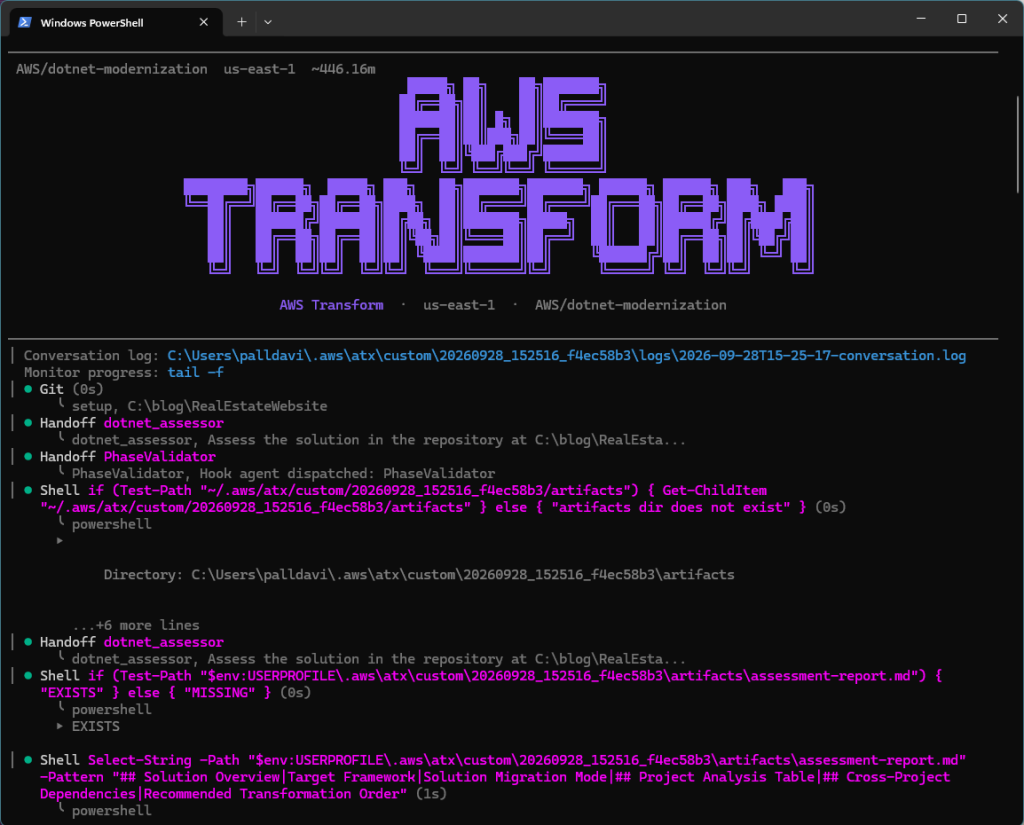
Figure 1: Starting autonomous transformation with ATX CLI
The transformation now runs, autonomously and unattended.
When transformation completes (Figure 2), you’ll see a summary of changes and information about file changes in a Git commit.
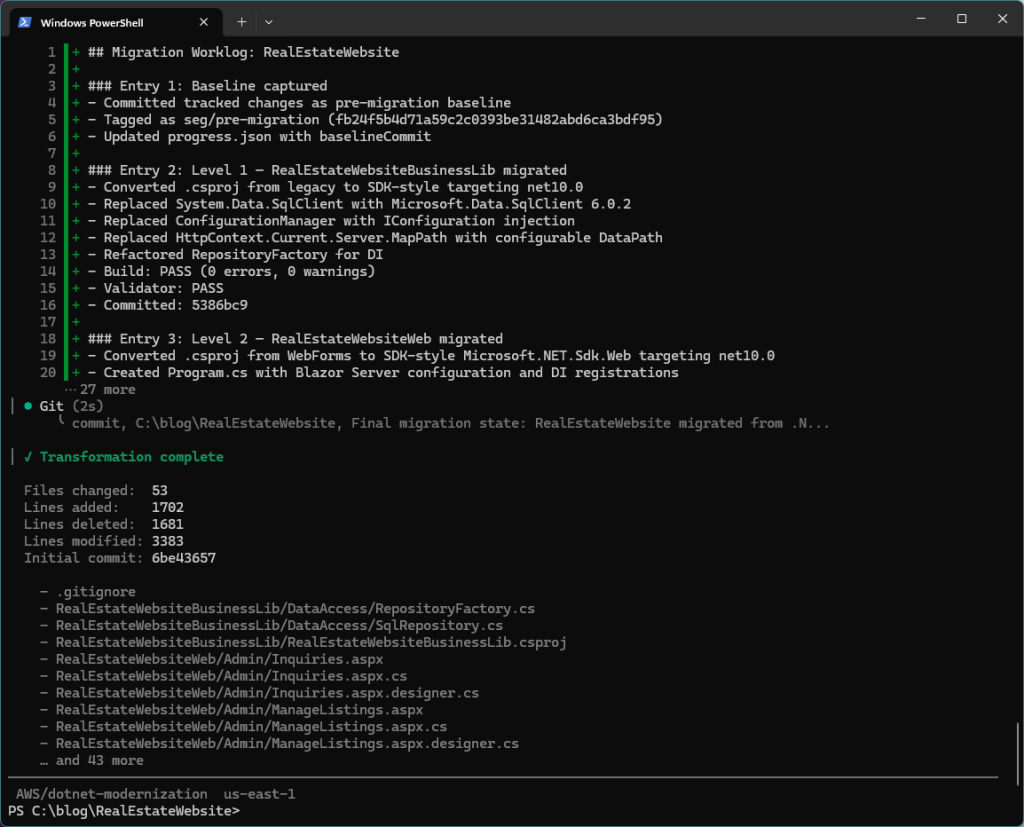
Figure 2: end of autonomous transformation
Review artifacts
AWS Transform modernization is now complete. I next review the artifacts (Figure 3). These include:
• Assessment report (assessment-report.md): analysis of the original application and findings.
• Migration plan (migration-plan.md): The migration plan the agent generated based on the assessment.
• Migration summary (migration-summary.md): a summary of the migration work performed.
• Validation summary (validation-summary.md): a summary of validation checks performed on the modernized code.
• Next steps (nextsteps.md): recommended post-transformation tasks you can carry out with an AI code companion.
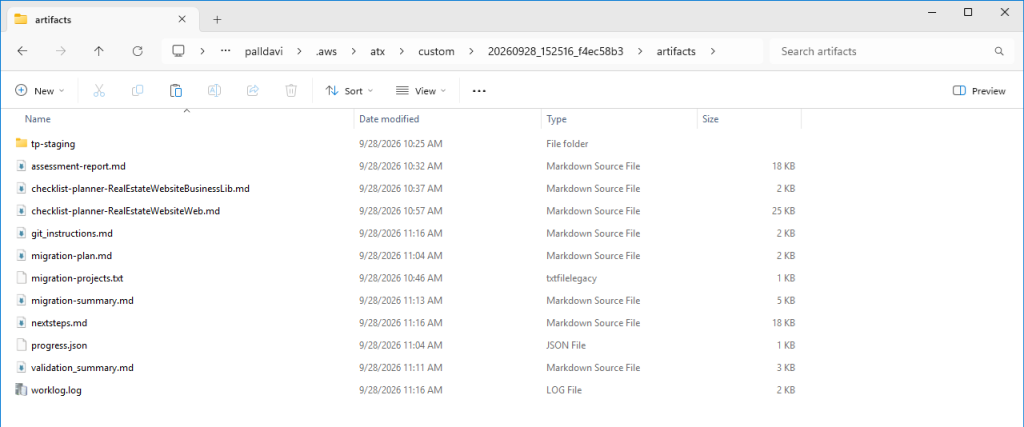
Figure 3: Transformation artifacts
Finalize with AI Code Companion
Whether you transform autonomously or interactively, you’ll usually have some post-transformation work to do with an AI code companion. One of those is addressing any tasks AWS Transform lists in the Next Steps markdown file (Listing 1).
# Next Steps: RealEstateWebsite

## 1\. Transformation Context

|Attribute|Value|
|-|-|
|**Solution**|RealEstateWebsite.sln|
|**Location**|`C:\\blog\\RealEstateWebsite`|
|**Source**|.NET Framework 4.6.1 (WebForms)|
|**Target**|.NET 10.0 (Blazor Server)|
|**Projects**|RealEstateWebsiteBusinessLib (class library), RealEstateWebsiteWeb (Blazor Server)|
|**Date**|2026-09-28|
|**Build Status**|✅ PASS — 0 errors, 0 warnings|
|**Blocking Issues**|None|

## 2\. Priority Summary

|#|Priority|Item|Source|
|-|-|-|-|
|1|**\[CRITICAL]**|CSV file path resolution — `DataPath` set to relative `"App\_Data"` in appsettings.json resolves against CWD, not ContentRootPath; app will crash or read wrong directory if launched from a different working directory|`RepositoryFactory.GetDataPath()`, `appsettings.json`|
|2|**\[CRITICAL]**|No authentication on Admin pages — `/admin/managelistings` and `/admin/inquiries` allow anonymous Mark-as-Sold and inquiry management; any user can modify property data|`ManageListings.razor`, `Inquiries.razor` (no `\[Authorize]`)|
|3|**\[HIGH]**|`RepositoryFactory.Instance` is a static singleton registered as `AddSingleton<IDataRepository>` — `CsvRepository` file I/O is not thread-safe; concurrent Blazor circuits writing to the same CSV files will corrupt data|`Program.cs` line 10, `CsvRepository.cs` (all Save\* methods)|
|4|**\[HIGH]**|`Microsoft.Extensions.Configuration.Abstractions` pinned to preview — `10.0.0-preview.5.25277.114` should be updated to the stable `10.0.0` release when available to avoid preview-runtime dependency conflicts|`RealEstateWebsiteBusinessLib.csproj`|
|5|**\[MEDIUM]**|SQL connection string uses `Integrated Security=True` — will fail on Linux/container deployments without Windows auth; needs SQL auth or a managed identity credential|`appsettings.json` `"ConnectionString"`|
|6|**\[MEDIUM]**|`ManageListings.razor` is missing `@rendermode InteractiveServer` — the page's `@onclick` handlers (MarkSold, pagination buttons) may not fire because it defaults to static SSR|`ManageListings.razor` (compare with `Home.razor` which has `@rendermode InteractiveServer`)|
|7|**\[MEDIUM]**|All `SqlRepository` data access is synchronous (`conn.Open()`, `cmd.ExecuteReader()`) — blocks the Blazor Server circuit thread pool under load|`SqlRepository.cs` (every method)|
|8|**\[MEDIUM]**|Property image URLs in seed data reference `/images/properties/` and `/images/agents/` but `wwwroot/` only contains `css/Site.css` — images will 404 at runtime|`PopulateDatabase.sql`, `wwwroot/` directory|
|9|**\[LOW]**|`appsettings.Development.json` does not exist — consider adding one with detailed logging (`"LogLevel": { "Default": "Debug" }`) for local development|Missing file|
|10|**\[LOW]**|No HTTPS redirection middleware — `app.UseHttpsRedirection()` is not called in `Program.cs`; production traffic may be served over plaintext HTTP|`Program.cs`|

## 3\. Current Build Status

```
dotnet build RealEstateWebsite.sln
```

**Result:** ✅ PASS — 0 errors, 0 warnings across both projects.

## 4\. Remaining Build Errors

None. The solution builds cleanly.

## 5\. Incomplete Transformations

|Area|Detail|Impact|
|-|-|-|
|`@rendermode` on `ManageListings.razor`|All other interactive pages (`Home.razor`, `Listings.razor`, `MortgageCalculator.razor`, etc.) declare `@rendermode InteractiveServer`, but `ManageListings.razor` does not. The Mark-as-Sold button's `@onclick="MarkSold"` and pagination buttons will not work under static SSR.|**\[MEDIUM]** — Admin functionality broken at runtime|
|Image assets not migrated to `wwwroot/`|The original WebForms app served property/agent images from `\~/images/`. The migrated app has `wwwroot/css/Site.css` only. Image URLs in CSV seed data and SQL seed data (e.g., `/images/properties/1\_front.jpg`) will 404.|**\[MEDIUM]** — Broken images on all pages|

## 6\. Package Issues

|Package|Version|Project|Issue|Priority|
|-|-|-|-|-|
|`Microsoft.Data.SqlClient`|6.0.2|RealEstateWebsiteBusinessLib|Stable release — no issues. Replaced GAC `System.Data.SqlClient`. Verify `Encrypt=true` default behavior: connections to older SQL Server instances without TLS certificates will fail unless `TrustServerCertificate=True` or `Encrypt=False` is added to the connection string.|**\[HIGH]**|
|`Microsoft.Extensions.Configuration.Abstractions`|10.0.0-preview.5.25277.114|RealEstateWebsiteBusinessLib|Preview package — update to stable `10.0.0` when released to avoid preview-runtime coupling. If deploying on the GA .NET 10 runtime, this preview assembly may cause `FileLoadException` due to version mismatch.|**\[HIGH]**|
|`System.Web` (GAC)|Removed|Both|Fully removed — `HttpContext.Current.Server.MapPath` replaced with `IConfiguration\["DataPath"]` in `RepositoryFactory`. No remaining `System.Web` references.|✅ Done|
|`System.Configuration` (GAC)|Removed|Both|Fully removed — `ConfigurationManager.AppSettings` replaced with `IConfiguration` injection in `RepositoryFactory.Initialize()`.|✅ Done|
|`System.Data` (GAC)|Removed|Both|Fully removed — replaced by `Microsoft.Data.SqlClient` NuGet package.|✅ Done|

## 7\. Code Changes Required

### 7.1 \[CRITICAL] Fix CSV data path resolution — `RepositoryFactory.cs`

**File:** `RealEstateWebsiteBusinessLib\\DataAccess\\RepositoryFactory.cs`

**Problem:** `GetDataPath()` returns the literal string `"App\_Data"` from configuration, which resolves relative to `Environment.CurrentDirectory`, not the application's content root. If the app is launched from a different directory (e.g., via IIS, a service, or `dotnet run` from the solution root), `CsvRepository` will fail to find or create CSV files.

**Fix:** Inject `IWebHostEnvironment.ContentRootPath` or resolve the path in `Program.cs` before passing to `RepositoryFactory.Initialize()`:

```csharp
// Program.cs — resolve DataPath relative to ContentRoot
var dataPath = Path.Combine(builder.Environment.ContentRootPath,
    builder.Configuration\["DataPath"] ?? "App\_Data");
builder.Configuration\["DataPath"] = dataPath;
RepositoryFactory.Initialize(builder.Configuration);
```

### 7.2 \[CRITICAL] Add authentication/authorization to Admin pages

**Files:** `Components\\Pages\\Admin\\ManageListings.razor`, `Components\\Pages\\Admin\\Inquiries.razor`

**Problem:** The original WebForms app had no authentication (confirmed by assessment). The Admin pages at `/admin/managelistings` and `/admin/inquiries` allow anyone to mark properties as sold and view/manage inquiries.

**Fix:** At minimum, add `\[Authorize]` attributes and configure cookie authentication in `Program.cs`:

```csharp
// Program.cs
builder.Services.AddAuthentication("Cookies")
    .AddCookie("Cookies", o => o.LoginPath = "/login");
builder.Services.AddAuthorization();
// ... after app.UseRouting()
app.UseAuthentication();
app.UseAuthorization();
```

```razor
@\* ManageListings.razor / Inquiries.razor \*@
@attribute \[Authorize]
```

### 7.3 \[HIGH] Add thread-safety for CsvRepository or switch to scoped lifetime

**Files:** `Program.cs`, `CsvRepository.cs`

**Problem:** `IDataRepository` is registered as `Singleton` via `RepositoryFactory.Instance`. `CsvRepository.SaveProperties()`, `SaveAgents()`, etc. read-then-write entire CSV files with no locking. Multiple Blazor Server circuits hitting these methods concurrently will produce data loss.

**Options:**

* **Option A (recommended):** Add a `lock` object in `CsvRepository` around every Save\* method.
* **Option B:** If using SQL Server (`UseDatabase=true`), this is not a concern — each `SqlCommand` is self-contained. But if the CSV mode is used in production, locking is mandatory.

### 7.4 \[MEDIUM] Add `@rendermode InteractiveServer` to `ManageListings.razor`

**File:** `Components\\Pages\\Admin\\ManageListings.razor`

**Problem:** The page has `@onclick` handlers (`MarkSold`, pagination) but no `@rendermode InteractiveServer` directive. Without it, the page renders as static HTML and click handlers are ignored.

**Fix:** Add this line after `@page "/admin/managelistings"`:

```razor
@rendermode InteractiveServer
```

Verify `Inquiries.razor` similarly has `@rendermode InteractiveServer`.

### 7.5 \[MEDIUM] Convert SqlRepository methods to async

**File:** `RealEstateWebsiteBusinessLib\\DataAccess\\SqlRepository.cs`

**Problem:** All 18+ methods use synchronous `conn.Open()`, `cmd.ExecuteReader()`, `cmd.ExecuteScalar()`, `cmd.ExecuteNonQuery()`. In Blazor Server, these block the SignalR circuit thread pool and degrade scalability.

**Fix:** Convert to `async`/`await` using `OpenAsync()`, `ExecuteReaderAsync()`, `ExecuteScalarAsync()`, `ExecuteNonQueryAsync()`. Update `IDataRepository` to expose `Task<T>` return types. Update all Blazor page `@code` blocks to use `await` in `OnInitializedAsync()`.

### 7.6 \[HIGH] Add `TrustServerCertificate=True` or configure TLS for SQL connections

**File:** `appsettings.json`

**Problem:** `Microsoft.Data.SqlClient` 6.x defaults to `Encrypt=Mandatory`. The current connection string `Server=.;Database=RealEstateWebsiteDB;Integrated Security=True;` will throw `SqlException: A connection was established but then an error occurred during the pre-login handshake` if the local SQL Server doesn't have a trusted TLS certificate.

**Fix for local development:**

```json
"ConnectionString": "Server=.;Database=RealEstateWebsiteDB;Integrated Security=True;TrustServerCertificate=True;"
```

> ⚠️ Do not use `TrustServerCertificate=True` in production — configure a proper TLS certificate instead.

## 8\. Database Setup

### 8.1 Default mode — CSV flat files (no database required)

The app ships with `"UseDatabase": "false"` in `appsettings.json`. It reads/writes CSV files from `App\_Data/`:

* `App\_Data/Properties.csv` (5 sample properties)
* `App\_Data/Agents.csv` (5 sample agents)
* `App\_Data/Inquiries.csv` (5 sample inquiries)
* `App\_Data/PropertyImages.csv` (8 sample images)

**No database setup is needed to run the app in CSV mode.** Just run:

```
dotnet run --project RealEstateWebsiteWeb
```

### 8.2 SQL Server mode

To switch to SQL Server, update `appsettings.json`:

```json
{
  "UseDatabase": "true",
  "ConnectionString": "Server=.;Database=RealEstateWebsiteDB;Integrated Security=True;TrustServerCertificate=True;",
  "DataPath": "App\_Data"
}
```

#### Create the database schema

Run the provided SQL scripts in order:

```powershell
# Using sqlcmd (SQL Server CLI)
sqlcmd -S . -E -i RealEstateWebsiteWeb\\Database\\CreateDatabase.sql
sqlcmd -S . -E -i RealEstateWebsiteWeb\\Database\\PopulateDatabase.sql
```

**Script details:**

* `Database\\CreateDatabase.sql` — Creates `RealEstateWebsiteDB` and 4 tables (Agents, Properties, Inquiries, PropertyImages) with `IF NOT EXISTS` guards
* `Database\\PopulateDatabase.sql` — Inserts sample data (5 agents, 7 properties, 5 inquiries, 8 images); **Warning:** starts by `DELETE`-ing all rows and reseeding identities

#### Docker-based local SQL Server

```powershell
docker run -e "ACCEPT\_EULA=Y" -e "MSSQL\_SA\_PASSWORD=YourStr0ngP@ssword" -p 1433:1433 --name realestate-sql -d mcr.microsoft.com/mssql/server:2022-latest
```

Then update the connection string:

```json
"ConnectionString": "Server=localhost,1433;Database=RealEstateWebsiteDB;User Id=sa;Password=YourStr0ngP@ssword;TrustServerCertificate=True;"
```

Run the schema scripts against the container:

```powershell
sqlcmd -S localhost,1433 -U sa -P "YourStr0ngP@ssword" -i RealEstateWebsiteWeb\\Database\\CreateDatabase.sql
sqlcmd -S localhost,1433 -U sa -P "YourStr0ngP@ssword" -i RealEstateWebsiteWeb\\Database\\PopulateDatabase.sql
```

### 8.3 Known database issues

* `PopulateDatabase.sql` uses `DBCC CHECKIDENT` to reseed all tables — running it more than once will reset identity counters and may break foreign key references if production data exists.
* The `Properties.AgentId` column has a foreign key to `Agents.AgentId` — agents must be seeded before properties.

## 9\. Validation \& Testing

### 9.1 Build verification

```powershell
cd C:\\blog\\RealEstateWebsite
dotnet build RealEstateWebsite.sln
```

Expected: `Build succeeded. 0 Warning(s) 0 Error(s)`

### 9.2 Run the application (CSV mode)

```powershell
dotnet run --project RealEstateWebsiteWeb
```

Then browse to `https://localhost:5001` (or the port shown in console output).

### 9.3 Page-by-page runtime validation

Verify each migrated page renders and interactive features work:

|Route|Original Page|What to Verify|
|-|-|-|
|`/`|`Default.aspx` → `Home.razor`|Featured listings display, quick search redirects to `/listings` with query params|
|`/listings`|`Listings.aspx` → `Listings.razor`|Search filters work, pagination buttons respond, "Details" links navigate correctly|
|`/propertydetail?id=1`|`PropertyDetail.aspx` → `PropertyDetail.razor`|Property details load, image gallery displays (or gracefully shows empty if no images in `wwwroot`), inquiry form submits|
|`/agents`|`Agents.aspx` → `Agents.razor`|Agent cards render with name, specialty, experience|
|`/agentdetail?id=1`|`AgentDetail.aspx` → `AgentDetail.razor`|Agent profile and assigned listings display|
|`/mortgagecalculator`|`MortgageCalculator.aspx` → `MortgageCalculator.razor`|Calculate button computes monthly payment, amortization table renders|
|`/admin/managelistings`|`Admin/ManageListings.aspx` → `Admin/ManageListings.razor`|All properties table loads, pagination works, Mark-as-Sold updates property status **(requires `@rendermode` fix from §7.4)**|
|`/admin/inquiries`|`Admin/Inquiries.aspx` → `Admin/Inquiries.razor`|Inquiry list displays, response status updates|
|`/Error`|New (no original)|Force an error to verify the error page renders|

### 9.4 Blazor Server SignalR connectivity

* Open browser dev tools → Network → WS tab
* Confirm a `/\_blazor` WebSocket connection is established
* Click interactive elements (Search, pagination) and confirm they work without full page reload

### 9.5 SQL Server mode verification (optional)

1. Set `"UseDatabase": "true"` in `appsettings.json`
2. Run the database scripts per §8.2
3. Restart the app and repeat the page-by-page checks above
4. Verify data modifications (add inquiry, mark property sold) persist across app restarts

### 9.6 No automated tests

The original solution contained no test projects. Consider adding:

* **Integration tests** for `IDataRepository` (both `CsvRepository` and `SqlRepository`)
* **Blazor component tests** using `bunit` for page rendering verification
* **Playwright/Selenium** end-to-end tests for the full page workflow

## 10\. Deployment Considerations

### 10.1 Runtime requirements

* **.NET 10.0 runtime** (or SDK for self-contained publish)
* **WebSockets enabled** — Blazor Server requires WebSocket support on the host (IIS, Azure App Service, reverse proxy). Ensure `WebSocket Protocol` is enabled in IIS Features or the hosting platform.

### 10.2 Environment configuration

```powershell
# Production
$env:ASPNETCORE\_ENVIRONMENT = "Production"

# Publish
dotnet publish RealEstateWebsiteWeb -c Release -o ./publish
```

### 10.3 Connection string security

* Move `ConnectionString` to environment variables or a secrets manager (AWS Secrets Manager, Azure Key Vault) for production
* Never commit production connection strings to source control
* Use `dotnet user-secrets` for local development:

```powershell
  cd RealEstateWebsiteWeb
  dotnet user-secrets init
  dotnet user-secrets set "ConnectionString" "Server=.;Database=RealEstateWebsiteDB;Integrated Security=True;TrustServerCertificate=True;"
  ```

### 10.4 Static files and `wwwroot/`

* `wwwroot/css/Site.css` is the only static asset — ensure it's served by `app.UseStaticFiles()` (already configured in `Program.cs`)
* If property/agent images are added to `wwwroot/images/`, no additional configuration is needed — `UseStaticFiles()` serves everything under `wwwroot/`
* On Linux deployments, file paths are case-sensitive — verify CSS/image URL casing matches the physical file names

### 10.5 CSV data path in production

* If deploying with `UseDatabase=false`, ensure the `App\_Data/` directory is writable by the application process
* The `<Content Include="App\_Data\\\*\*\\\*" CopyToOutputDirectory="PreserveNewest" />` in the `.csproj` copies CSV files to the output directory — but deployed apps write to this location, so updates will be lost on redeployment
* For production CSV usage, set `DataPath` to a persistent volume outside the deployment directory

### 10.6 Blazor Server scaling

* Each connected browser tab maintains a SignalR circuit consuming server memory (\~250 KB baseline per circuit)
* The static singleton `IDataRepository` is shared across all circuits — ensure thread safety (see §7.3)
* Consider adding `builder.Services.AddResponseCompression()` for the WebSocket traffic

### 10.7 HTTPS

Add HTTPS redirection to `Program.cs` for production:

```csharp
app.UseHttpsRedirection();  // Add before UseStaticFiles()
```

### 10.8 Reverse proxy (IIS / NGINX)

If hosting behind IIS:

* Install the ASP.NET Core Hosting Bundle for .NET 10.0
* Enable WebSockets in IIS → Windows Features
* Set the app pool to **No Managed Code**

If hosting behind NGINX:

```nginx
location / {
    proxy\_pass https://localhost:5001;
    proxy\_http\_version 1.1;
    proxy\_set\_header Upgrade $http\_upgrade;
    proxy\_set\_header Connection "upgrade";
    proxy\_set\_header Host $host;
}
Listing 1: Next Steps markdown (nextsteps.md)
I use Kiro to do this work, opening the folder where the transformed code resides and directing it to execute the tasks in nextsteps.md. Kiro takes care of the tasks in a few minutes.
This application was modernized from .NET Framework to .NET 10. Execute the tasks in nextsteps.md.
Next, I smoke test the modernized app by running it to see if it launches. I can address any runtime issues or style issues with my AI code companion, but that isn’t necessary in this case: the site comes up, shows expected data, and looks like it should. Next, I thoroughly test the application to validate it is fully working end-to-end. The real estate website application is working as expected (Figure 4). I confirm the home page, listings page, search functionality, mortgage calculator, and administrative functions.

Figure 4: Transformed real estate website running
I had good success with this simple application and autonomous transformation, but for more ambitious modernization you’ll want to use interactive mode.
Interactive transformation
For complex modernization, I want to work alongside the agent interactively. Interactive mode gives me a high degree of control over the transformation. I can:
• Customize plan: customize the modernization plan to my liking
• Checkpoints: review results as projects are transformed
• Course correction: ask for changes and iterate till satisfied
To demonstrate interactive modernization, I’ll modernize a .NET Framework pizza ordering website to .NET 10. To start transformation, I open a command window and enter the following command line. The command options specify the AWS-managed transformation name, the path where my solution resides, permission to trust all tools, and quiet mode. Quiet mode avoids the distraction of tool execution details so I can focus on the conversation with the agent.
atx custom def exec -n AWS/dotnet-modernization -p C:\blog\PizzAha -t -q
AWS Transform starts up, shown in Figure 5. The agent asks me to confirm my target .NET version and asks whether it is okay to transform projects in parallel. I tell the agent to modernize all projects to .NET 10 and transform in parallel.
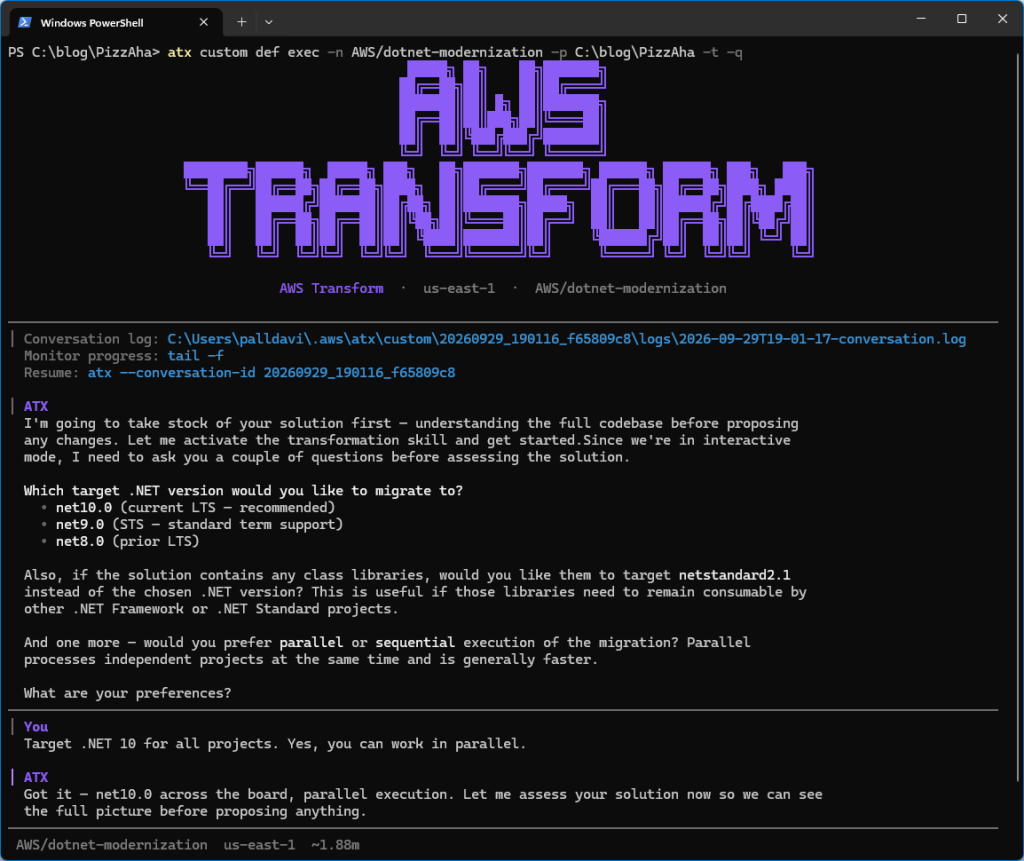
Figure 5: Starting interactive transformation
Assessment
The agent now analyzes the code. After a few minutes, it presents an assessment (Figure 6). PizzAha is a one-project Web Forms solution written in VB.NET. Neither Web Forms nor VB.NET are supported on ASP.NET Core, so it is necessary to rewrite to a different UI framework such as Blazor Server and also to convert from VB.NET to C#.
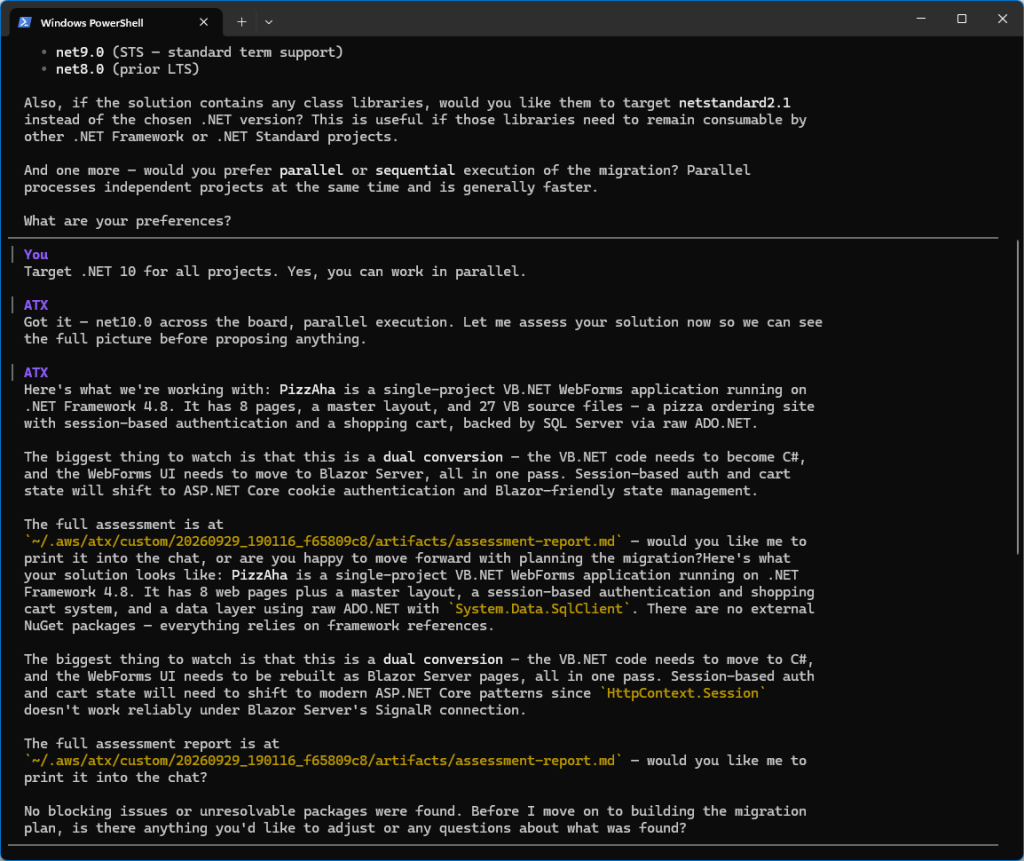
Figure 6: Assessment
At this point I can ask questions about the assessment. I’m curious what my other options are beyond Blazor, so I ask the agent, Why are you recommending Blazor Server, and are there other options? The agent gives me an in-depth explanation (Figure 7). Blazor is the default choice because it and Web Forms have similar programming models. But there are other choices, MVC with Razor views or Razor Pages without MVC.
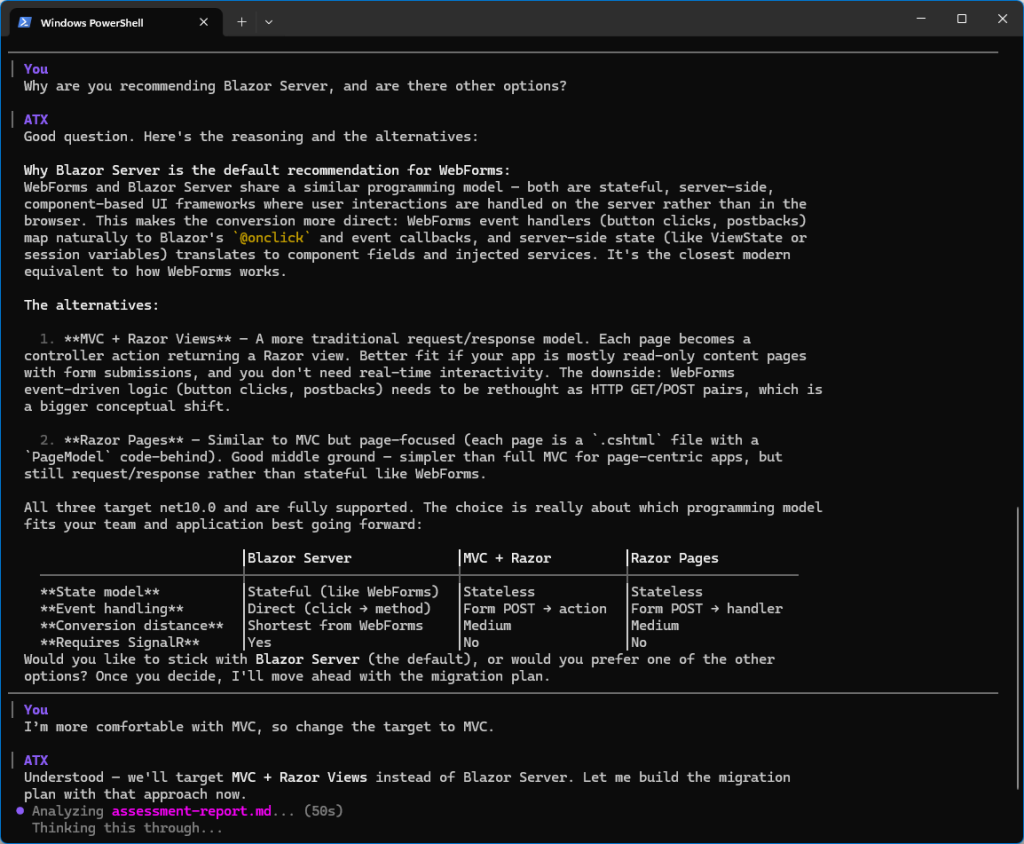
Figure 7: Discussing Web Forms target with the agent
Customizing the modernization plan
I have more familiarity and comfort with MVC over Blazor, so I instruct the agent to change the plan:
I’m more comfortable with MVC, so change the target to MVC.
The agent now presents a plan. I’d like more details, so I ask the agent to show the entire plan (Figure 8), which is also available in file migration-plan.md in the artifact directory. The full plan gives me details about what will happen to each Web Forms page, authentication, and configuration settings.
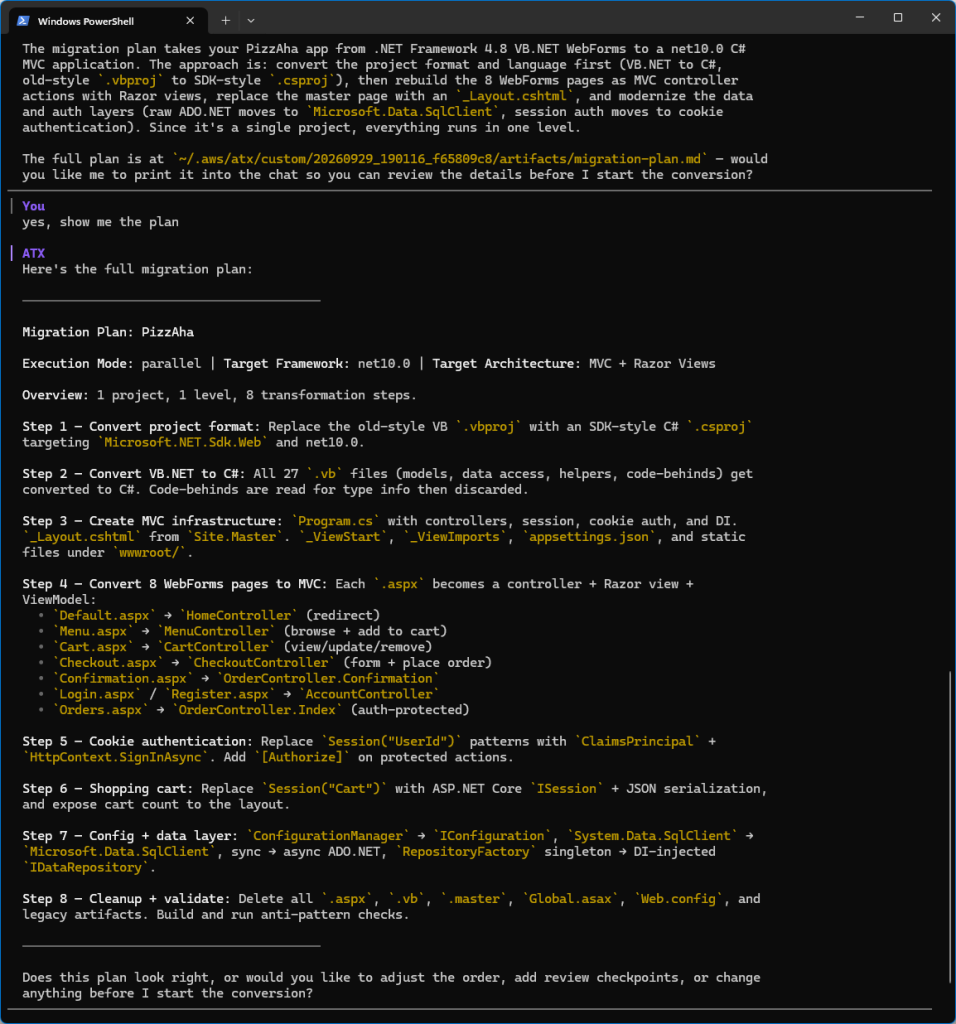
Figure 8: migration plan
The plan looks good, so I tell the agent plan approved and it begins transforming.
Checkpoints
There’s a lot going on with the web project transformation, so I instructed the agent to set a checkpoint for the web project before approving the plan. A checkpoint means the agent will pause after transformation so I can review results and perhaps ask for changes. After the web project is transformed, the agent awaits my feedback.
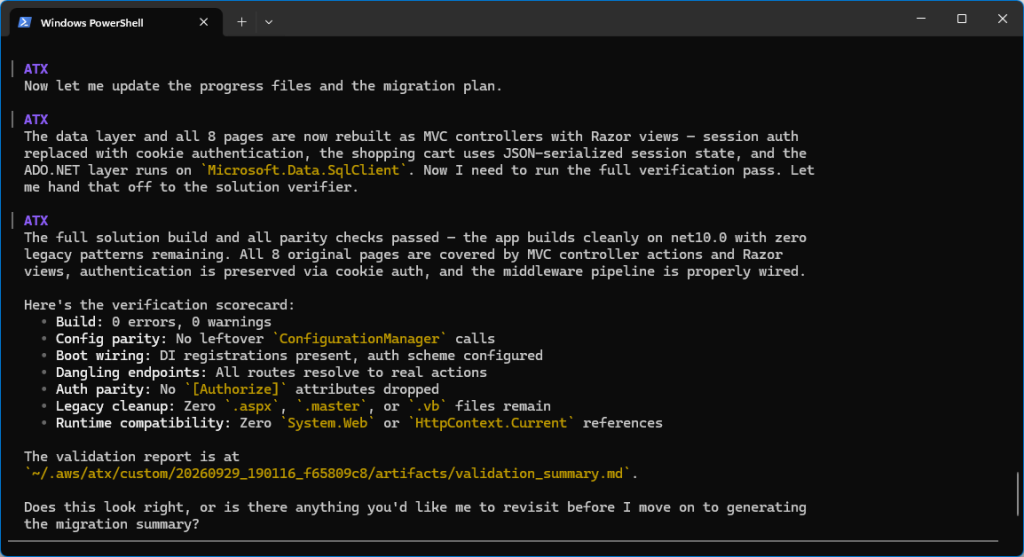
Figure 9: Stopped at checkpoint
I open the transformed solution in Visual Studio and inspect the code (Figure 10). I see it is now a .NET 10 MVC project, with .cshtml views and controllers. It builds without error.
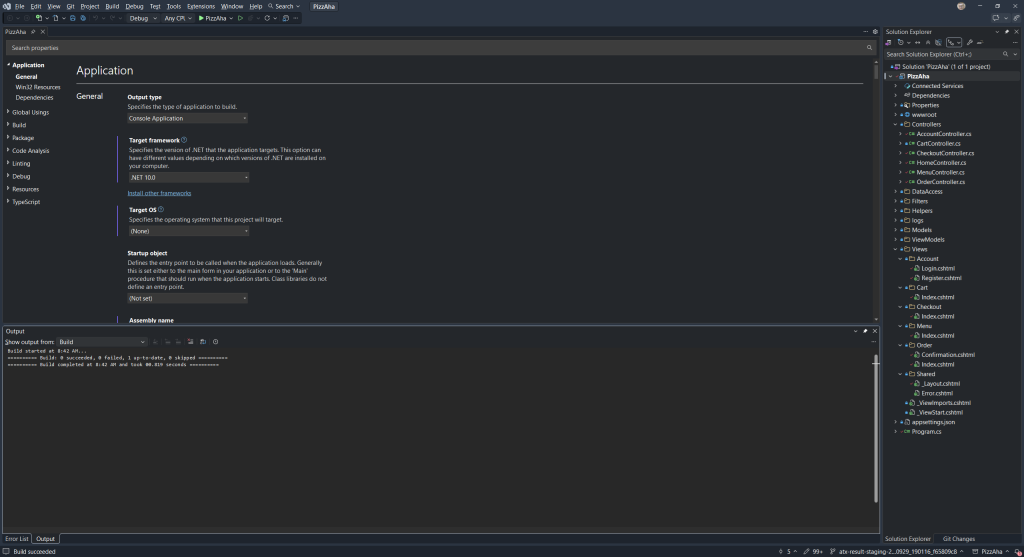
Figure 10: Inspecting the transformed code in Visual Studio
I’m curious which logger is in use, and ask the agent Which logger in use? It turns out there isn’t one, because the original Web Forms project did no logging. I like to use the Serilog logger, so I instruct the agent to Add structured logging using Serilog and it does so, further transforming the code.
Whenever I am stopped at a checkpoint, I can ask for any changes I want. That can include refinements, such as the logging I just added, or a full retry, doing the project over with revised instructions. I can iterate at a checkpoint until satisfied. At this point I’m happy and tell the agent to continue.
Migration summary
Once all projects are transformed, the agent provides a migration summary, also available in file migration-summary.md in the artifact directory (Listing 2).
# Migration Summary: PizzAha

## Overview
| Field | Value |
|-------|-------|
| Solution | PizzAha.sln |
| Source | VB.NET WebForms (.NET Framework 4.8) |
| Target | C# MVC + Razor Views (net10.0) |
| Build Status | PASS — 0 errors, 0 warnings |
| Baseline Commit | da229da1d4af8e3e2dbcc25684bb615d6b885593 |

## Per-Project Results

| Project | Source Framework | Target Framework | Architecture | Status | Notes |
|---------|-----------------|-----------------|--------------|--------|-------|
| PizzAha | .NET Framework 4.8 (VB.NET WebForms) | net10.0 | MVC + Razor Views | PASS | Dual conversion: VB→C# + WebForms→MVC |

## Change Statistics (git diff baseline → HEAD)
- **Files changed:** 100 (source files only, excluding bin/obj)
- **Lines inserted:** +1,333
- **Lines deleted:** −1,482
- **Net change:** −149 lines (leaner codebase)
- **Files added:** 37 (controllers, views, ViewModels, Program.cs, appsettings.json, helpers)
- **Files deleted:** 46 (all .aspx, .aspx.vb, .aspx.designer.vb, .master, .vb, .vbproj, Global.asax, Web.config)
- **Files renamed/moved:** 17 (static assets to wwwroot/)

## What Changed

### Language Conversion (VB.NET → C#)
All 27 `.vb` source files converted to C# equivalents:
- 4 model classes (Pizza, User, CartItem/ShoppingCart, Order/OrderItem)
- 4 data access classes (IDataRepository, InMemoryRepository, SqlServerRepository, RepositoryFactory removed)
- 1 helper class (PasswordHelper)
- 8 page code-behinds + 8 designer files + Site.Master code-behind → discarded (logic ported to controllers)

### UI Migration (WebForms → MVC + Razor Views)
| Original Page | Replacement | Route |
|---------------|-------------|-------|
| Default.aspx | HomeController.Index → redirect | / |
| Menu.aspx | MenuController + Views/Menu/Index.cshtml | /Menu |
| Cart.aspx | CartController + Views/Cart/Index.cshtml | /Cart |
| Login.aspx | AccountController.Login + Views/Account/Login.cshtml | /Account/Login |
| Register.aspx | AccountController.Register + Views/Account/Register.cshtml | /Account/Register |
| Checkout.aspx | CheckoutController + Views/Checkout/Index.cshtml | /Checkout |
| Confirmation.aspx | OrderController.Confirmation + Views/Order/Confirmation.cshtml | /Order/Confirmation/{id} |
| Orders.aspx | OrderController.Index + Views/Order/Index.cshtml | /Order |
| Site.Master | Views/Shared/_Layout.cshtml | (layout) |

### Architecture Changes
| Before | After |
|--------|-------|
| RepositoryFactory singleton | DI-injected IDataRepository |
| Session("UserId")/Session("Username") | Cookie authentication with ClaimsPrincipal |
| Session("Cart") with ViewState | ISession with JSON serialization |
| ConfigurationManager.AppSettings | IConfiguration / appsettings.json |
| System.Data.SqlClient | Microsoft.Data.SqlClient 6.0.2 |
| Global.asax Application_Start | Program.cs with minimal hosting |
| Web.config | appsettings.json |
| Content/Site.css + images/ | wwwroot/css/Site.css + wwwroot/images/ |
| No logging | Serilog structured logging (console + rolling file) |

### New Infrastructure Files
- `Program.cs` — Host builder with MVC, session, cookie auth, DI, Serilog
- `appsettings.json` — Configuration with Serilog settings
- `Views/_ViewImports.cshtml` — Tag helpers and namespace imports
- `Views/_ViewStart.cshtml` — Default layout assignment
- `Filters/CartCountActionFilter.cs` — Cart badge count for layout
- `Helpers/SessionExtensions.cs` — JSON session serialization
- 7 ViewModels (Cart, Checkout, Confirmation, Login, Menu, Orders, Register)

## NuGet Package Changes

| Package | Before | After | Action |
|---------|--------|-------|--------|
| Microsoft.Data.SqlClient | — | 6.0.2 | Added (replaces System.Data.SqlClient) |
| Serilog.AspNetCore | — | 9.0.0 | Added (structured logging per user request) |

No packages were downgraded or removed. The original solution had no NuGet packages (framework references only).

## Validation Results
All parity checks passed:
- Config parity: GATE=PASS (0 legacy ConfigurationManager calls)
- Boot wiring: GATE=PASS (DI non-empty, auth scheme present)
- Dangling endpoints: GATE=PASS (0 dangling wires)
- Auth parity: GATE=PASS (0 dropped [Authorize] attributes)
- Runtime compatibility: 0 instances of System.Web, HttpContext.Current, or runat="server"
Listing 2: Migration Summary (migration-summary.md)
I now have a complete view of what the agent did to the code.
Next Steps
The agent also produces a next steps file, nextsteps.md (Listing 3). This contains recommended post-transformation tasks for an AI code companion. These tasks can include actions the agent couldn’t handle itself and things to check to confirm Linux readiness.
# Next Steps: PizzAha

## 1. Transformation Context

| Field | Value |
|-------|-------|
| **Solution** | `C:\blog\PizzAha\PizzAha\PizzAha.sln` |
| **Source** | VB.NET WebForms (.NET Framework 4.8) |
| **Target** | C# MVC + Razor Views (net10.0) |
| **Projects** | 1 (PizzAha — pizza ordering web app) |
| **Build Status** |  PASS — 0 errors, 0 warnings |
| **Date** | 2026-09-29 |

## 2. Priority Summary

| # | Priority | Item | Section |
|---|----------|------|---------|
| 1 | **[CRITICAL]** | `SqlServerRepository.CreateOrder` does not persist `OrderItem` rows — orders placed in DB mode lose all line items | §7.1 |
| 2 | **[CRITICAL]** | No CSRF validation — `[AutoValidateAntiforgeryToken]` is missing from `Program.cs` filter config; all `[HttpPost]` actions (login, register, add-to-cart, checkout, logout) accept forged requests | §7.2 |
| 3 | **[HIGH]** | `OrderController.Confirmation` does not verify the order belongs to the current user — any visitor can view `/Order/Confirmation/{id}` for any order ID | §7.3 |
| 4 | **[HIGH]** | `CheckoutController.PlaceOrder` uses `int.Parse(userIdClaim!)` with a null-forgiving operator — throws `NullReferenceException` if the cookie claim is missing or expired mid-session | §7.4 |
| 5 | **[HIGH]** | `PasswordHelper` uses unsalted SHA256 — insecure for password storage; BCrypt.Net-Next 4.0.3 is already in the solution `packages/` folder but not referenced | §7.5 |
| 6 | **[MEDIUM]** | All `SqlServerRepository` methods use synchronous ADO.NET (`conn.Open()`, `ExecuteReader()`, `ExecuteScalar()`) — will cause thread-pool starvation under load | §7.6 |
| 7 | **[MEDIUM]** | `InMemoryRepository` uses `static` lists with no locking beyond `Interlocked` on IDs — concurrent requests can corrupt `_orders` / `_users` lists | §7.7 |
| 8 | **[MEDIUM]** | Bootstrap 3.3.7 and jQuery 3.6.0 loaded from CDN — EOL library, no SRI integrity hashes, no local fallback | §7.8 |
| 9 | **[LOW]** | Leftover `packages/` folder (`packages/BCrypt.Net-Next.4.0.3`) from original NuGet solution — can be deleted | §7.9 |
| 10 | **[LOW]** | `_Layout.cshtml` uses hardcoded URL paths (`/Menu`, `/Cart`, `/Order`) instead of Tag Helper routing (`asp-controller`/`asp-action`) | §7.10 |
| 11 | **[LOW]** | No `appsettings.Development.json` — Serilog file sink writes to `logs/` relative path in all environments | §7.11 |

## 3. Current Build Status

```
dotnet build PizzAha.sln
Build succeeded. 0 Warning(s) 0 Error(s)
```

The solution compiles cleanly targeting `net10.0` with SDK-style `Microsoft.NET.Sdk.Web`.

## 4. Remaining Build Errors

**None.** The solution builds with 0 errors and 0 warnings.

## 5. Incomplete Transformations

| Area | Status | Detail |
|------|--------|--------|
| VB.NET → C# |  Complete | All 27 `.vb` files converted; no `.vb` source files remain |
| WebForms → MVC + Razor |  Complete | All 8 `.aspx` pages + `Site.Master` replaced by 6 controllers + 8 views + `_Layout.cshtml` |
| `RepositoryFactory` singleton → DI |  Complete | `IDataRepository` registered in `Program.cs`; constructor injection throughout |
| Session auth → Cookie auth |  Complete | `ClaimsPrincipal` with `CookieAuthenticationDefaults`; `[Authorize]` on protected actions |
| `ConfigurationManager` → `IConfiguration` |  Complete | `appsettings.json` with `TaxRate`, `UseDatabase`, `ConnectionStrings:DefaultConnection` |
| `System.Data.SqlClient` → `Microsoft.Data.SqlClient` |  Complete | Package 6.0.2 referenced; `using Microsoft.Data.SqlClient` in `SqlServerRepository.cs` |
| Static assets → `wwwroot/` |  Complete | `css/Site.css` and `images/` under `wwwroot/` |
| Legacy file cleanup |  Complete | No `.aspx`, `.master`, `.asax`, `Web.config`, `.vbproj` files in source tree |
| OrderItem persistence in SQL mode |  **Not done** | `SqlServerRepository.CreateOrder` inserts into `Orders` but never inserts into an `OrderItems` table (see §7.1) |
| CSRF protection |  **Not done** | No `[AutoValidateAntiforgeryToken]` or per-action `[ValidateAntiForgeryToken]` (see §7.2) |
| Async ADO.NET |  **Not done** | All `SqlServerRepository` methods are synchronous (see §7.6) |

## 6. Package Issues

| Package | Version | Status | Action Required |
|---------|---------|--------|-----------------|
| `Microsoft.Data.SqlClient` | 6.0.2 |  Added | Replaces `System.Data.SqlClient` — verify `TrustServerCertificate=True` in connection string matches your SQL Server TLS config (6.x defaults to `Encrypt=Mandatory`) |
| `Serilog.AspNetCore` | 9.0.0 |  Added | Working — bootstrap logger + host integration configured in `Program.cs`. Rolling file sink writes to `logs/pizzaha-{Date}.log`. Confirm `logs/` directory write permissions in deployment. |
| `BCrypt.Net-Next` | 4.0.3 |  Present in `packages/` but **not referenced** | Either add as a `PackageReference` and migrate `PasswordHelper` (§7.5), or delete the `packages/BCrypt.Net-Next.4.0.3` folder |

## 7. Code Changes Required

### 7.1 [CRITICAL] `SqlServerRepository.CreateOrder` — Missing OrderItem Insert

**File:** `DataAccess/SqlServerRepository.cs`, method `CreateOrder` (line ~47–63)

**Problem:** The method inserts a row into the `Orders` table and returns the new `OrderId`, but never iterates `order.Items` to insert rows into an `OrderItems` table. When `UseDatabase=true`, every placed order will have `$0` line-item detail — order history will show amounts but no pizza items.

**Fix:** After the `INSERT INTO Orders` / `SCOPE_IDENTITY()` block, loop over `order.Items` and insert each `OrderItem`:

```csharp
foreach (var item in order.Items)
{
using var itemCmd = new SqlCommand(
"INSERT INTO OrderItems (OrderId, PizzaId, PizzaName, Size, Quantity, UnitPrice) " +
"VALUES (@OrderId, @PizzaId, @PizzaName, @Size, @Quantity, @UnitPrice)", conn);
itemCmd.Parameters.AddWithValue("@OrderId", orderId);
itemCmd.Parameters.AddWithValue("@PizzaId", item.PizzaId);
itemCmd.Parameters.AddWithValue("@PizzaName", item.PizzaName);
itemCmd.Parameters.AddWithValue("@Size", item.Size);
itemCmd.Parameters.AddWithValue("@Quantity", item.Quantity);
itemCmd.Parameters.AddWithValue("@UnitPrice", item.UnitPrice);
itemCmd.ExecuteNonQuery();
}
```

Also wrap the entire method in a `SqlTransaction` so the order and its items are atomic.

**Note:** `InMemoryRepository.CreateOrder` stores the full `Order` object (including `Items` list) in memory, so the in-memory mode is not affected.

### 7.2 [CRITICAL] Missing Anti-Forgery Token Validation

**Files:** `Program.cs`, all controllers with `[HttpPost]` actions

**Problem:** The Razor Tag Helper forms (`

`) automatically *emit* a `__RequestVerificationToken` hidden field, but no controller or global filter *validates* it. All 7 POST endpoints are vulnerable to cross-site request forgery.

**Fix — recommended (global):** In `Program.cs`, add `AutoValidateAntiforgeryTokenAttribute` to the global filter list:

```csharp
builder.Services.AddControllersWithViews(options =>
{
options.Filters.Add();
options.Filters.Add(new AutoValidateAntiforgeryTokenAttribute());
});
```

This covers all `[HttpPost]` actions in `AccountController`, `CartController`, `CheckoutController`, and `MenuController` without per-action attributes.

### 7.3 [HIGH] `OrderController.Confirmation` — Missing Authorization Check

**File:** `Controllers/OrderController.cs`, method `Confirmation(int id)`

**Problem:** The action accepts any `id` parameter and renders the confirmation page without verifying the order belongs to the authenticated user. An unauthenticated visitor or a different logged-in user can access `/Order/Confirmation/5` and see order details.

**Fix:**
1. Add `[Authorize]` to the `Confirmation` action.
2. Load the order from the repository and verify `order.UserId` matches the current user's `ClaimTypes.NameIdentifier` claim.
3. Return `NotFound()` or `Forbid()` if the order doesn't belong to the user.

**Note:** This also requires adding a `GetOrderById(int id)` method to `IDataRepository` and both repository implementations.

### 7.4 [HIGH] Null-Forgiving `userIdClaim!` in CheckoutController and OrderController

**Files:** `Controllers/CheckoutController.cs` (line ~66), `Controllers/OrderController.cs` (line ~20)

**Problem:** Both use `int.Parse(User.FindFirst(ClaimTypes.NameIdentifier)?.Value!)` with the null-forgiving operator. If the authentication cookie expires or is tampered with while the session is still active, `FindFirst` returns `null` and `int.Parse(null!)` throws a `NullReferenceException` (500 error) instead of redirecting to login.

**Fix:** Add a guard before parsing:
```csharp
var userIdClaim = User.FindFirst(ClaimTypes.NameIdentifier)?.Value;
if (string.IsNullOrEmpty(userIdClaim) || !int.TryParse(userIdClaim, out var userId))
{
return RedirectToAction("Login", "Account");
}
```

### 7.5 [HIGH] Unsalted SHA256 Password Hashing

**File:** `Helpers/PasswordHelper.cs`

**Problem:** `HashPassword` uses `SHA256.HashData` without a salt. Identical passwords produce identical hashes, enabling rainbow-table attacks. The assessment noted that `BCrypt.Net-Next 4.0.3` is already present in the solution's `packages/` folder.

**Fix:**
1. Add `` to `PizzAha.csproj`.
2. Update `PasswordHelper`:
```csharp
public static string HashPassword(string password) => BCrypt.Net.BCrypt.HashPassword(password);
public static bool VerifyPassword(string password, string hash) => BCrypt.Net.BCrypt.Verify(password, hash);
```
3. **Migration path for existing hashes:** In `VerifyPassword`, first try BCrypt verification; if it fails, fall back to the legacy SHA256 check. On successful SHA256 match, re-hash with BCrypt and update the stored hash. This preserves the demo user (`demo` / `password`) and any SQL-stored hashes.

### 7.6 [MEDIUM] Synchronous ADO.NET in `SqlServerRepository`

**File:** `DataAccess/SqlServerRepository.cs` (all 6 methods), `DataAccess/IDataRepository.cs`

**Problem:** All methods use `conn.Open()`, `cmd.ExecuteReader()`, `cmd.ExecuteScalar()` synchronously. Under concurrent load, each request blocks a thread-pool thread waiting on SQL Server I/O.

**Fix:**
1. Update `IDataRepository` to return `Task` (e.g., `Task<List> GetPizzasAsync()`).
2. Convert `SqlServerRepository` methods to use `await conn.OpenAsync()`, `await cmd.ExecuteReaderAsync()`, `await cmd.ExecuteScalarAsync()`.
3. Update `InMemoryRepository` to return `Task.FromResult(...)`.
4. Update all controller actions to `await` the repository calls.

### 7.7 [MEDIUM] Thread Safety of `InMemoryRepository` Static Collections

**File:** `DataAccess/InMemoryRepository.cs`

**Problem:** `_orders` and `_users` are `static List` shared across all requests. `List.Add` is not thread-safe — concurrent registrations or order placements can corrupt the lists. `Interlocked.Increment` protects the ID counters but not the list mutations.

**Fix:** Replace `List` with `ConcurrentBag` or protect mutations with `lock`. Alternatively, since this is a demo/development repository, document the limitation or switch to `ConcurrentDictionary<int, T>`.

### 7.8 [MEDIUM] Bootstrap 3.3.7 / jQuery 3.6.0 CDN References

**File:** `Views/Shared/_Layout.cshtml`

**Problem:** Bootstrap 3.3.7 reached end-of-life; jQuery 3.6.0 has known vulnerabilities fixed in 3.7+. Both are loaded from CDN (`maxcdn.bootstrapcdn.com`, `code.jquery.com`) without Subresource Integrity (SRI) hashes, which exposes the app to CDN compromise.

**Fix (choose one):**
- **Option A (recommended):** Upgrade to Bootstrap 5.x + jQuery 3.7+ (or drop jQuery entirely — Bootstrap 5 doesn't require it). Update the markup to Bootstrap 5 classes (e.g., `panel` → `card`, `navbar-default` → `navbar-light bg-light`).
- **Option B (quick):** Keep current versions but add SRI `integrity` and `crossorigin="anonymous"` attributes, and add a local fallback in `wwwroot/lib/`.

### 7.9 [LOW] Leftover `packages/` Folder

**Path:** `C:\blog\PizzAha\PizzAha\packages\BCrypt.Net-Next.4.0.3`

**Problem:** This is a legacy NuGet packages folder from the .NET Framework era. SDK-style projects use the global NuGet cache (`%USERPROFILE%\.nuget\packages`), so this folder is unused.

**Fix:** Delete the entire `packages/` folder. If you decide to adopt BCrypt.Net-Next (§7.5), add it as a `PackageReference` — do not reference the local `packages/` copy.

### 7.10 [LOW] Hardcoded URL Paths in `_Layout.cshtml`

**File:** `Views/Shared/_Layout.cshtml`

**Problem:** Navigation links use hardcoded paths (`/Menu`, `/Cart`, `/Order`, `/Account/Login`, `/Account/Register`) instead of Tag Helper routing. If route patterns change (e.g., adding area prefixes), these links will break silently.

**Fix:** Replace with Tag Helper attributes:
```html
Menu
Cart (@(ViewData["CartCount"] ?? 0))
```

### 7.11 [LOW] No `appsettings.Development.json`

**File:** (missing) `appsettings.Development.json`

**Problem:** The Serilog file sink writes to `logs/pizzaha-{Date}.log` in all environments. In development, you may want `Debug`-level logging to console only. There's no environment-specific override file.

**Fix:** Create `appsettings.Development.json`:
```json
{
"Serilog": {
"MinimumLevel": {
"Default": "Debug"
}
}
}
```

## 8. Database Setup

The application defaults to an in-memory repository (`"UseDatabase": false` in `appsettings.json`). No database is required for basic testing. To enable SQL Server persistence:

### 8.1 Connection String Configuration

In `appsettings.json`, the connection string is already configured:
```json
{
"UseDatabase": true,
"ConnectionStrings": {
"DefaultConnection": "Server=.;Database=PizzaApp;Integrated Security=True;TrustServerCertificate=True;"
}
}
```

Set `"UseDatabase": true` to switch from `InMemoryRepository` to `SqlServerRepository`.

> **Note:** `Microsoft.Data.SqlClient` 6.0.2 defaults to `Encrypt=Mandatory`. The connection string includes `TrustServerCertificate=True` for local development. In production, use a proper TLS certificate and remove `TrustServerCertificate=True`.

### 8.2 Database Creation

Using `sqlcmd`:
```cmd
sqlcmd -S . -E -Q "CREATE DATABASE PizzaApp"
```

Or using Docker for a local development database:
```cmd
docker run -e "ACCEPT_EULA=Y" -e "MSSQL_SA_PASSWORD=YourStr0ngP@ss!" -p 1433:1433 --name pizzaha-sql -d mcr.microsoft.com/mssql/server:2022-latest
```

If using Docker, update the connection string:
```json
"DefaultConnection": "Server=localhost;Database=PizzaApp;User Id=sa;Password=YourStr0ngP@ss!;TrustServerCertificate=True;"
```

### 8.3 Schema Installation

**The application does not include schema migration scripts.** You must manually create the required tables. Based on the SQL queries in `SqlServerRepository.cs`:

```sql
CREATE TABLE Pizzas (
Id INT PRIMARY KEY IDENTITY(1,1),
Name NVARCHAR(100) NOT NULL,
Description NVARCHAR(500) NULL,
BasePrice DECIMAL(10,2) NOT NULL,
Category NVARCHAR(50) NOT NULL,
ImagePath NVARCHAR(200) NULL,
IsAvailable BIT NOT NULL DEFAULT 1
);

CREATE TABLE Users (
Id INT PRIMARY KEY IDENTITY(1,1),
Username NVARCHAR(50) NOT NULL UNIQUE,
Email NVARCHAR(200) NOT NULL,
PasswordHash NVARCHAR(200) NOT NULL,
Phone NVARCHAR(20) NULL,
DefaultAddress NVARCHAR(500) NULL,
CreatedAt DATETIME NOT NULL DEFAULT GETDATE()
);

CREATE TABLE Orders (
Id INT PRIMARY KEY IDENTITY(1,1),
UserId INT NOT NULL REFERENCES Users(Id),
Status NVARCHAR(20) NOT NULL DEFAULT 'Pending',
DeliveryType NVARCHAR(20) NOT NULL,
DeliveryAddress NVARCHAR(500) NULL,
TotalAmount DECIMAL(10,2) NOT NULL,
TaxAmount DECIMAL(10,2) NOT NULL,
CreatedAt DATETIME NOT NULL DEFAULT GETDATE()
);

CREATE TABLE OrderItems (
Id INT PRIMARY KEY IDENTITY(1,1),
OrderId INT NOT NULL REFERENCES Orders(Id),
PizzaId INT NOT NULL,
PizzaName NVARCHAR(100) NOT NULL,
Size NVARCHAR(20) NOT NULL,
Quantity INT NOT NULL,
UnitPrice DECIMAL(10,2) NOT NULL
);
```

### 8.4 Seed Data

Seed the `Pizzas` table with menu items. The 15 pizzas defined in `InMemoryRepository.cs` (IDs 1–15, categories: Classic, Specialty, Vegetarian) should be inserted. A seed user for testing:

```sql
-- Demo user (password: "password", SHA256 hash — update after migrating to BCrypt)
INSERT INTO Users (Username, Email, PasswordHash, Phone, DefaultAddress)
VALUES ('demo', 'demo@pizza.com',
'5e884898da28047151d0e56f8dc6292773603d0d6aabbdd62a11ef721d1542d8',
'555-0100', '123 Main St');
```

### 8.5 Known Schema Issues

- **OrderItem persistence is broken** (§7.1) — `SqlServerRepository.CreateOrder` does not insert into `OrderItems`. The `OrderItems` table will remain empty until the code fix in §7.1 is applied.
- **No `GetOrderById` method** exists — the `Confirmation` page displays only the order ID, not order details. To show full order confirmation, add a method that joins `Orders` and `OrderItems`.

## 9. Validation & Testing

### 9.1 Build Verification

```cmd
dotnet build "C:\blog\PizzAha\PizzAha\PizzAha.sln"
```

Expected: `Build succeeded. 0 Warning(s) 0 Error(s)`

### 9.2 Run the Application (In-Memory Mode)

```cmd
cd C:\blog\PizzAha\PizzAha\PizzAha
dotnet run
```

Browse to `https://localhost:5001` (or the port shown in console output). Verify:

| Test Case | Route | Expected Behavior |
|-----------|-------|-------------------|
| Menu loads | `/Menu` | 15 pizzas displayed with images, category filter links work |
| Category filter | `/Menu?category=Classic` | Only Cheese, Margherita, Pepperoni, Sausage shown |
| Add to cart | POST from Menu | Redirects to `/Cart`, item appears with correct size pricing |
| Cart totals | `/Cart` | Subtotal + 8% tax (`TaxRate: 0.08`) calculated correctly |
| Remove from cart | POST RemoveItem | Item removed, totals recalculated |
| Register new user | `/Account/Register` | User created, auto-signed-in, redirected to Menu |
| Login | `/Account/Login` | Demo user: `demo` / `password` → signed in with cookie |
| Checkout (auth required) | `/Checkout` | Unauthenticated → redirect to Login with `ReturnUrl=/Checkout` |
| Place order | POST PlaceOrder | Order created, redirected to `/Order/Confirmation/{id}` |
| Order history | `/Order` | `[Authorize]`-protected; shows placed orders for current user |
| Logout | POST Logout | Cookie cleared, session cleared, redirect to Menu |
| Cart badge | All pages | `_Layout.cshtml` shows cart item count via `CartCountActionFilter` |

### 9.3 Serilog Logging Verification

After running the app and performing a few actions:
- Check console output for structured log entries
- Check `logs/pizzaha-{date}.log` file is created with entries like `Created order {OrderId}`, `User {Username} logged in`

### 9.4 SQL Server Mode Verification (After §7.1 Fix and Schema Setup)

1. Set `"UseDatabase": true` in `appsettings.json`
2. Create the database and tables (§8.2–§8.4)
3. Run `dotnet run` and repeat the test cases above
4. Verify `OrderItems` rows are created when placing an order

### 9.5 No Unit Tests

The solution does not include a test project. Consider adding one with:
```cmd
dotnet new xunit -n PizzAha.Tests
dotnet sln "C:\blog\PizzAha\PizzAha\PizzAha.sln" add PizzAha.Tests/PizzAha.Tests.csproj
```

Priority test targets: `PasswordHelper`, `SessionExtensions`, `CartCountActionFilter`, `MenuController.AddToCart` (size multiplier logic), `CheckoutController` (tax calculation).

## 10. Deployment Considerations

### 10.1 Runtime & Environment

- **Target runtime:** .NET 10.0 — ensure the deployment host has the ASP.NET Core 10.0 runtime or use a self-contained publish (`dotnet publish -c Release --self-contained`).
- **Environment variable:** Set `ASPNETCORE_ENVIRONMENT=Production` in production. This activates the exception handler middleware (`/Home/Error`) and HSTS. Note: there is no `HomeController.Error` action — add one or configure a static error page.
- **`UseDatabase`:** Must be `true` in production; in-memory data is lost on app restart.

### 10.2 Configuration Secrets

- **Connection string:** Do not commit production connection strings to `appsettings.json`. Use environment variables (`ConnectionStrings__DefaultConnection`), Azure Key Vault, AWS Secrets Manager, or `dotnet user-secrets` for development.
- **Cookie authentication:** The cookie encryption keys are ephemeral by default (generated at startup). In a multi-instance or restart-resilient deployment, configure ASP.NET Core Data Protection to persist keys (e.g., to a shared file system or database).

### 10.3 Static Assets

- Static files are served from `wwwroot/` via `app.UseStaticFiles()`.
- `css/Site.css` and `images/` (pizza images + logo) must be included in the publish output — SDK-style web projects include `wwwroot/` automatically.
- Bootstrap 3.3.7 and jQuery 3.6.0 are CDN-only — if the CDN is unavailable, the site will render without styling. Consider bundling locally for production reliability.

### 10.4 Session Configuration

- Session uses `DistributedMemoryCache` (in-process only). In a multi-instance deployment, switch to a distributed cache provider (Redis via `Microsoft.Extensions.Caching.StackExchangeRedis`, or SQL Server via `Microsoft.Extensions.Caching.SqlServer`).
- Session timeout: 30 minutes (`options.IdleTimeout = TimeSpan.FromMinutes(30)`).
- The shopping cart is stored in session as JSON-serialized `ShoppingCart` via `SessionExtensions.cs`. Cart data is lost if session expires or the app restarts.

### 10.5 Logging in Production

- Serilog writes to both console and rolling file (`logs/pizzaha-{Date}.log`, 14-day retention).
- Ensure the application has write permissions to the `logs/` directory relative to the working directory.
- For cloud deployments, consider adding a Serilog sink for your log aggregation service (CloudWatch, Seq, etc.) and disabling the file sink.

### 10.6 HTTPS

- `app.UseHsts()` is configured for non-development environments, but `app.UseHttpsRedirection()` is **not** present in `Program.cs`. Add it if HTTPS termination is handled at the application level rather than by a reverse proxy.

### 10.7 Missing Error Handling Page

- `Program.cs` configures `app.UseExceptionHandler("/Home/Error")` but `HomeController` only has an `Index` action that redirects to `/Menu`. There is no `Error` action or `Views/Shared/Error.cshtml`. In production, unhandled exceptions will result in a secondary 404. Add an `Error` action and view, or change the exception handler path.
Listing 3: Next Steps for PizzAha solution
To take care of the Next Steps tasks, I launch Kiro and open the folder where the transformed solution code is. I copy the nextsteps.md file into the folder and give Kiro context (Figure 11):
This solution was recently transformed from .NET Framework 4.8 to .NET 10. Execute the tasks in nextsteps.md.
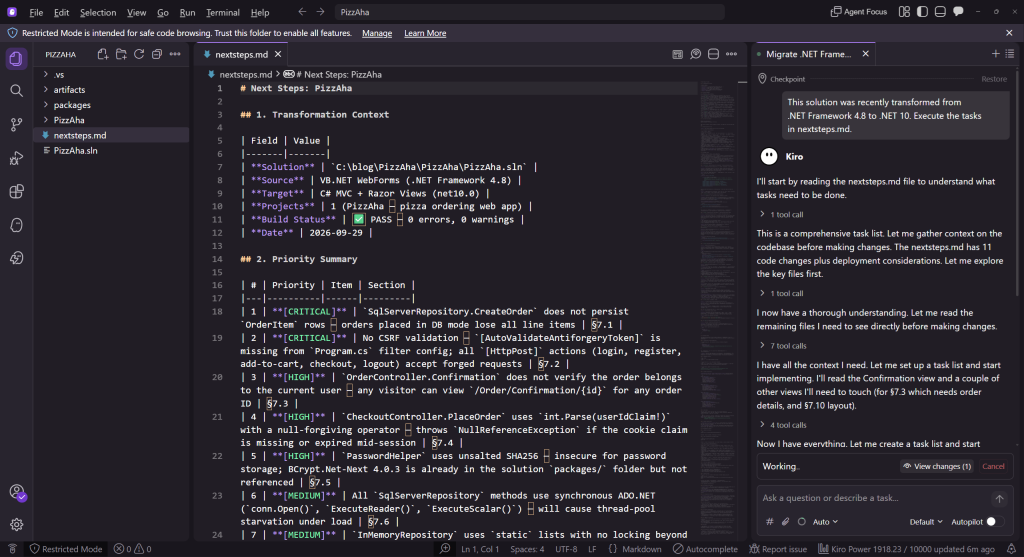
Figure 11: Using Kiro to execute Next Steps task
Kiro works for a few minutes, and announces that it has completed the task list.
Validating the modernized application
Now it’s time to check over the modernized application. I open the updated solution in Visual Studio and build it. Then I run it as a smoke-test, to see if it will launch. It does (Figure 12), and I see expected content and the UI looks correct. That’s encouraging.
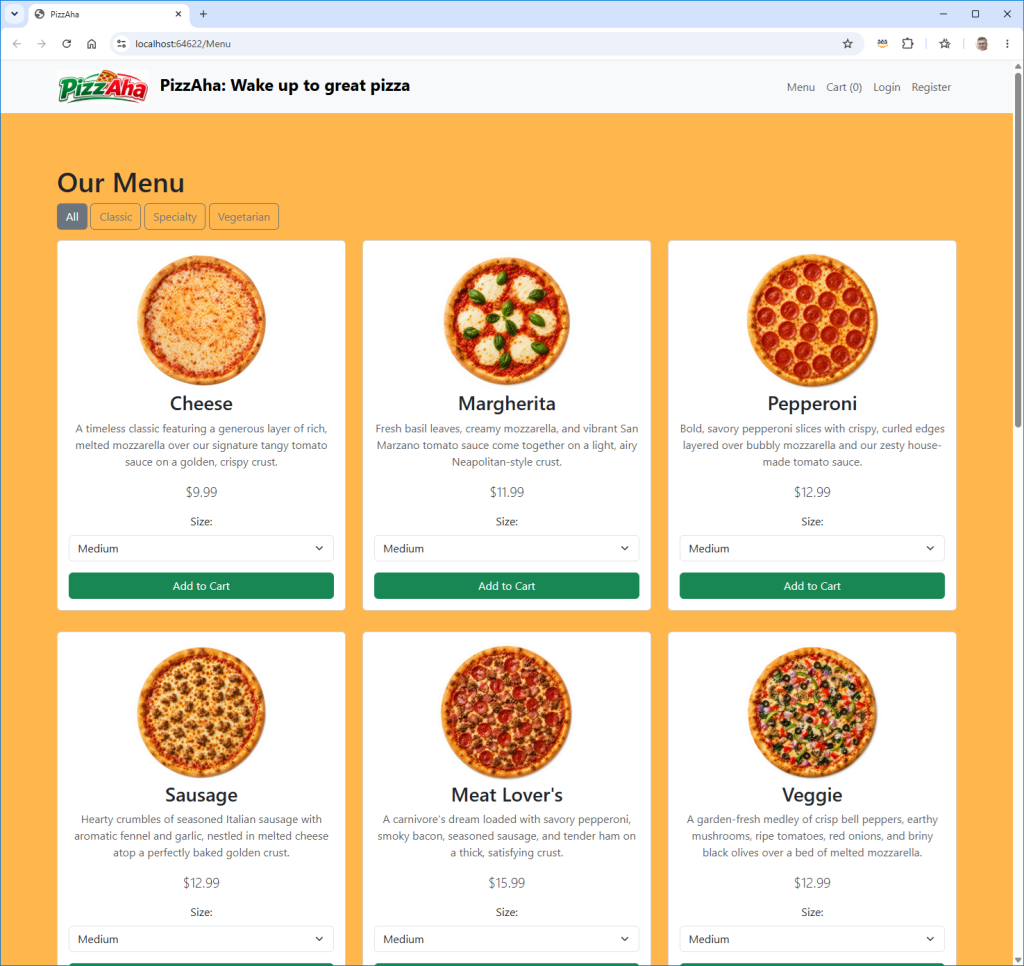
Figure 12: Modernized PizzAha app running
Finally, I check over the entire application to confirm everything looks and works like the original: selecting products, updating the shopping cart, signing in, and placing a delivery order. I can address any runtime errors I find quickly with Kiro. Once fully validated, I consider my modernized application complete.
Conclusion
In this post, I demonstrated the new AWS Transform CLI experience for .NET modernization using the AWS-managed AWS/dotnet-modernization transformation. I showed an autonomous transformation of a real estate listing website, then an interactive transformation of a pizza ordering website. In interactive mode, I was able to work alongside the agent to discuss options, customize the modernization plan, and stop at checkpoints to review results and ask for changes. I ran this on Windows, but could have also done so on a Mac or Linux machine.
If you prefer working with the command line or have scripted transformation needs, I encourage you to check out the CLI experience. This transformation is free of charge with a monthly quota of agent minutes, as described on the AWS Transform pricing page. To learn more, refer to Transform .NET solutions with the ATX CLI in the AWS Transform User Guide.