AWS for Industries
How to Build and Backtest Systematic Trading Strategies with AWS Batch and Airflow
This is the second blog in our series on factor modeling. In our first factor modeling blog, we developed a framework to mine quickly new factors using Amazon Bedrock, AWS Batch, and Step Functions from alternative data. Read more about that approach. After discovering effective factors, the natural next step is to incorporate these factors into systematic trading strategies.
1. Introduction
Hedge fund quantitative researchers and developers face significant challenges when developing and backtesting systematic trading strategies. These include processing massive volumes of historical market data, meeting intensive computational requirements, and managing complex job orchestration.
This blog shows how cloud-native AWS solutions transform the strategy development process for quants, making it scalable and extensible. We’ll show you how to implement, backtest, and analyze a long-short equity strategy using factors identified through our previous factor mining process. Find the sample code in the GitHub repository.
2. Solution Architecture
The solution combines several AWS services to create a powerful, scalable framework for quantitative strategy development:
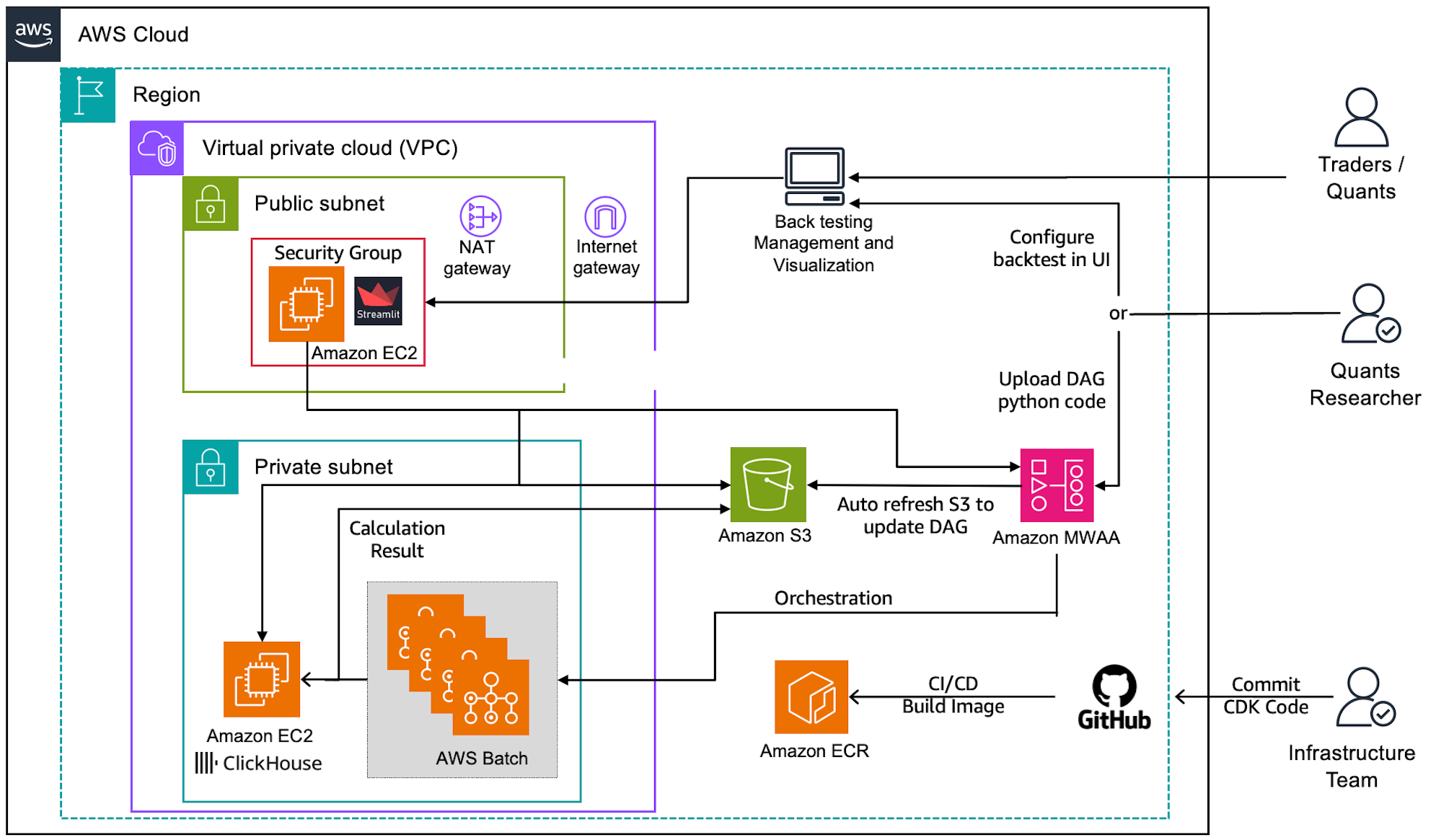 Figure 1: Overall backtesting architecture
The core components of the architecture include:
- AWS Batch provides scalable compute resources for intensive backtesting jobs, allowing parallel execution of multiple parameter combinations.
- Amazon Managed Workflows for Apache Airflow (MWAA) orchestrates the entire backtesting execution with AWS Batch.
- ClickHouse on Amazon Elastic Compute Cloud (Amazon EC2) stores and processes large volumes of market data and backtest results.
- Streamlit application on Amazon EC2 delivers both an interactive configuration interface for triggering backtests and comprehensive dashboards for analyzing strategy performance results.
This architecture delivers several benefits:
- Virtually unlimited computational power: Scale up to thousands of cores during intensive backtesting periods and scale down when not needed.
- Cost efficiency through pay-as-you-go pricing: Only pay for the compute resources you use, eliminating the need for expensive idle hardware.
- Rapid strategy validation: test multiple strategy variants simultaneously to identify promising approaches faster.
- Streamlined user experience: Abstract away infrastructure complexity through a user-friendly interface, allowing quant researchers to focus on strategy development rather than cloud infrastructure.
3. Design Principles and Usage
The framework provides a comprehensive solution for developing and testing systematic trading strategies. Here’s how to use it and the design behind it .
3.1 Strategy Development and Backtest Framework
In this factor trading framework, Backtrader serves as the backtesting engine that validates the feasibility of trading strategies. Backtrader is a popular Python framework for backtesting because of its flexibility and ease of use. Other well-known backtesting frameworks include Zipline and PyAlgoTrade. Backtrader’s advantages include its intuitive API (such as BaseStrategy class), extensive documentation, and active community support. It also offers CSV or customized data feeds, plotting capabilities, and support for various performance metrics. However, quants can choose their preferred framework based on their own needs. Some may opt to create custom backtesting solutions for maximum control and tailored functionality.
In the Backtrader framework, implement your own strategy as below:
1. Extend the BaseStrategy class
2. Implement the required methods for signal generation
3. Configure risk management parameters (take-profit, stop-loss, cooldown periods, etc)
Example of a simple long-short equity strategy implementation long_short_equity.py is included in the GitHub repository:
Before deploying to AWS, backtest your strategy in local_backtest.py at your computer, allowing developers to test trading logic on a small scale locally.
3.2 Backtesting with AWS Batch
AWS Batch is a powerful solution for parallel backtesting, offering scalability and cost-effectiveness in managing large-scale compute resources. It automatically handles the provisioning and management of necessary computational power, allowing you to run multiple backtests simultaneously without the hassle of maintaining servers. This approach reduces backtest execution time and eliminates the overhead of infrastructure management. By using AWS Batch, you focus on developing and refining your trading strategies rather than worrying about infrastructure concerns.
In this factor trading framework, streamline backtest execution with AWS Batch as below:
1. Use our sample dockerfile to build a container image with your strategy code.
2. Push this image to Amazon ECR.
3. Create an AWS Batch job definition specifying the ECR image.
4. Set up a Batch compute environment and job queue.
5. Submit backtest jobs via the AWS Console, CLI, or SDK.
3.3 Backtesting with Apache Airflow
Apache Airflow is an open-source workflow orchestration platform that excels in managing complex data pipelines through Directed Acyclic Graphs (DAGs). It provides a powerful and flexible framework for defining, scheduling, and monitoring workflows, making it ideal for orchestrating trading strategy backtests. Airflow’s rich feature set, including task dependencies, retries, and monitoring, ensures reliable execution of backtesting pipelines. Using AWS Managed Workflows for Apache Airflow (MWAA) reduces operational overhead by providing a fully managed Airflow environment.
Integrating Apache Airflow with AWS Batch creates an optimal architecture for trading strategy backtesting. This combination leverages Airflow’s sophisticated workflow orchestration capabilities with Batch’s scalable compute resources, enabling dynamic job submission and parallel execution of multiple backtesting scenarios. Airflow can be used to define the backtesting workflow, including data preparation, strategy execution, and result analysis, while AWS Batch handles the actual computation. This setup allows for efficient resource utilization, easy scaling of backtests, and centralized management of the entire backtesting process.
The solution uses a three-layer architecture of Airflow and Batch to simplify backtesting:
1. Configuration Layer: BacktestConfig class handles parameter management, validation, and combination, so you need to define your strategy parameters; the module will handle the rest
2. Orchestration Layer: BacktestDAGFactory class creates the Airflow DAG with the AWS Batch Operator, which provides you with an abstract interface for creating the backtest DAG just by passing the configurations.
3. Execution Layer: Then the DAG will trigger the AWS Batch job for the actual backtest jobs in parallel.
Usage example:
After creating your DAG file with the framework code, upload it to the MWAA’s Amazon Simple Storage Service (Amazon S3) DAG bucket using the provided script 4.deploy_dag.sh. Next, set up the required Airflow variables:
- batch_job_queue: AWS Batch job queue name
- batch_job_definition: AWS Batch job definition
- trading_strategies_bucket: S3 bucket to store results
- Database connection variables: db_host, db_port, etc.
Once the variables are configured, trigger the DAG from the Airflow UI, monitor its execution, and check logs as needed.
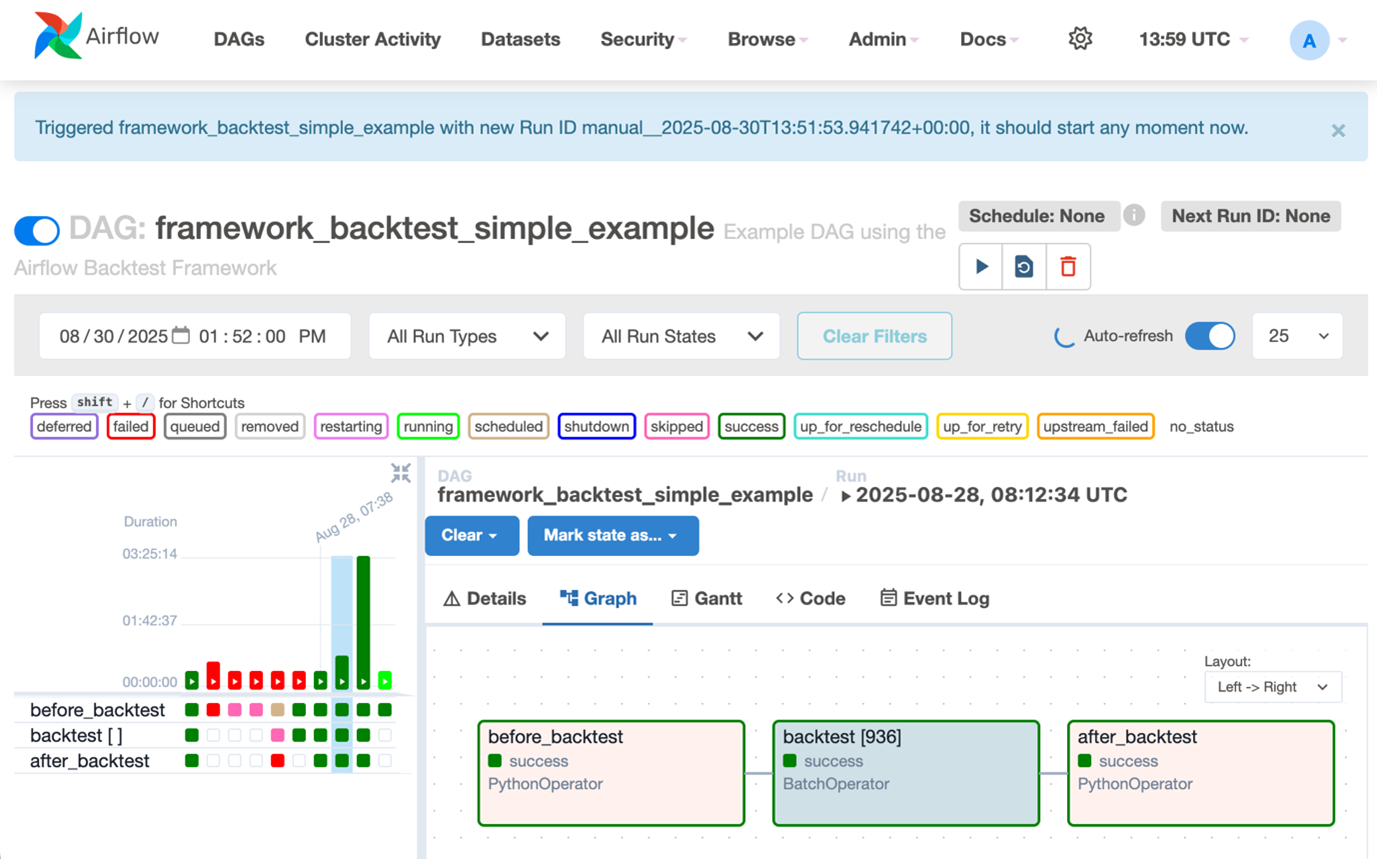
Figure 2: Airflow DAG dashboard
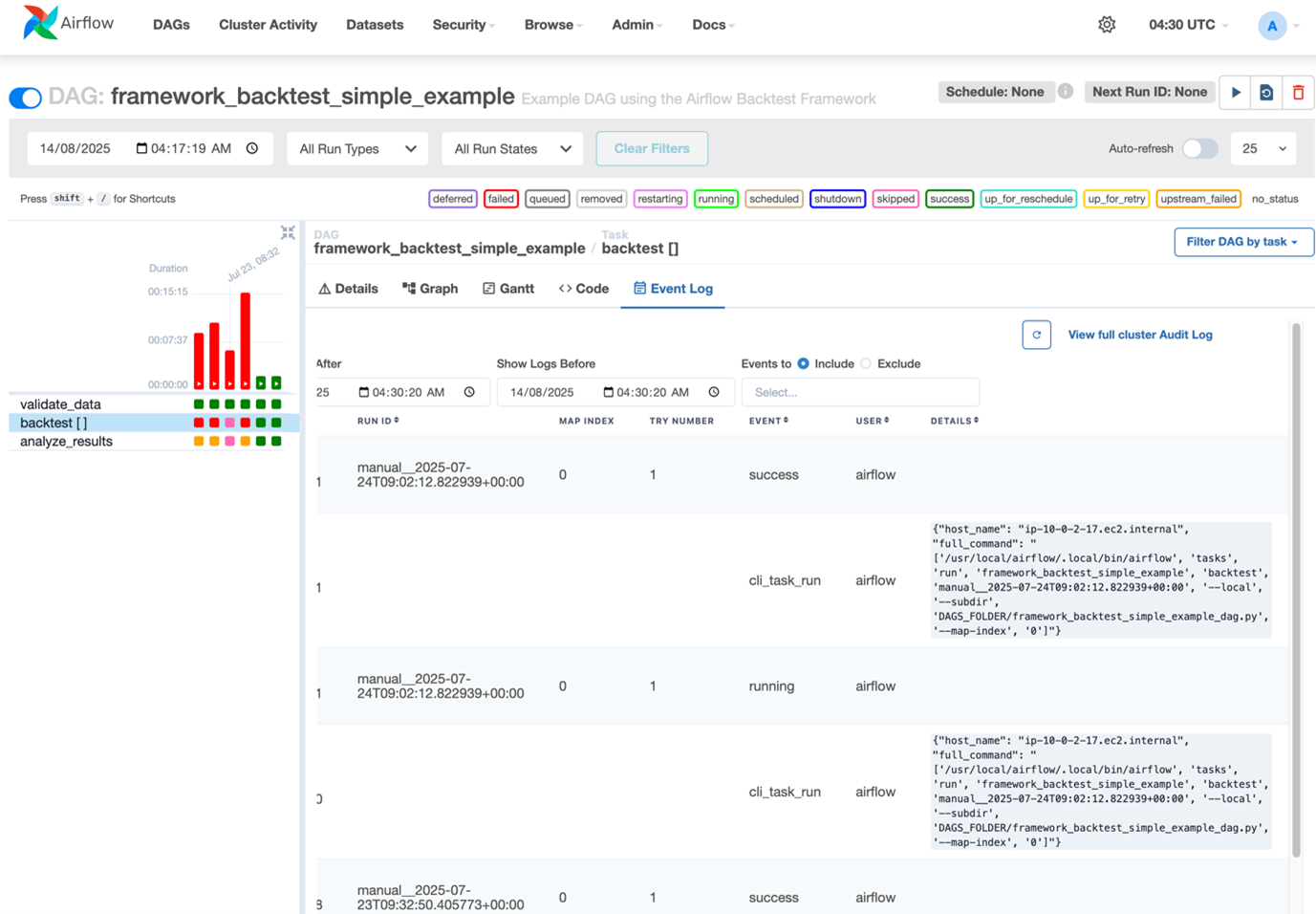
Figure 3: Airflow DAG event log
3.3.1 Backtesting with Apache Airflow
While the framework supports direct DAG creation for advanced users, we’ve also developed a user-friendly frontend interface that abstracts away the complexity of writing Airflow DAG code. This interface, built as an additional page in our Streamlit application, allows quant researchers and developers to:
1. Configure strategy parameters through a simple form interface
2. Select factors and date ranges for testing
3. Define parameter grids for optimization
4. Trigger backtest execution with a single click
The frontend communicates with Airflow via its API, auto-generating the DAG configuration based on user inputs.
This approach offers several advantages:
1. Simplified user experience: Researchers can focus on strategy parameters rather than infrastructure details
2. Reduced learning curve: No need to understand Airflow DAG syntax or AWS Batch configuration
3. Consistent execution: Standardized backtest configuration prevents common errors
4. Self-service capability: Quant teams can run backtests independently without DevOps help
3.4 Streamlit Application for Backtest Management and Visualization
Streamlit is a Python library for creating web applications. It’s excellent for interactive backtesting dashboards, offering simplicity and rapid development. Quants quickly build and deploy apps to visualize backtest results and strategy performance.
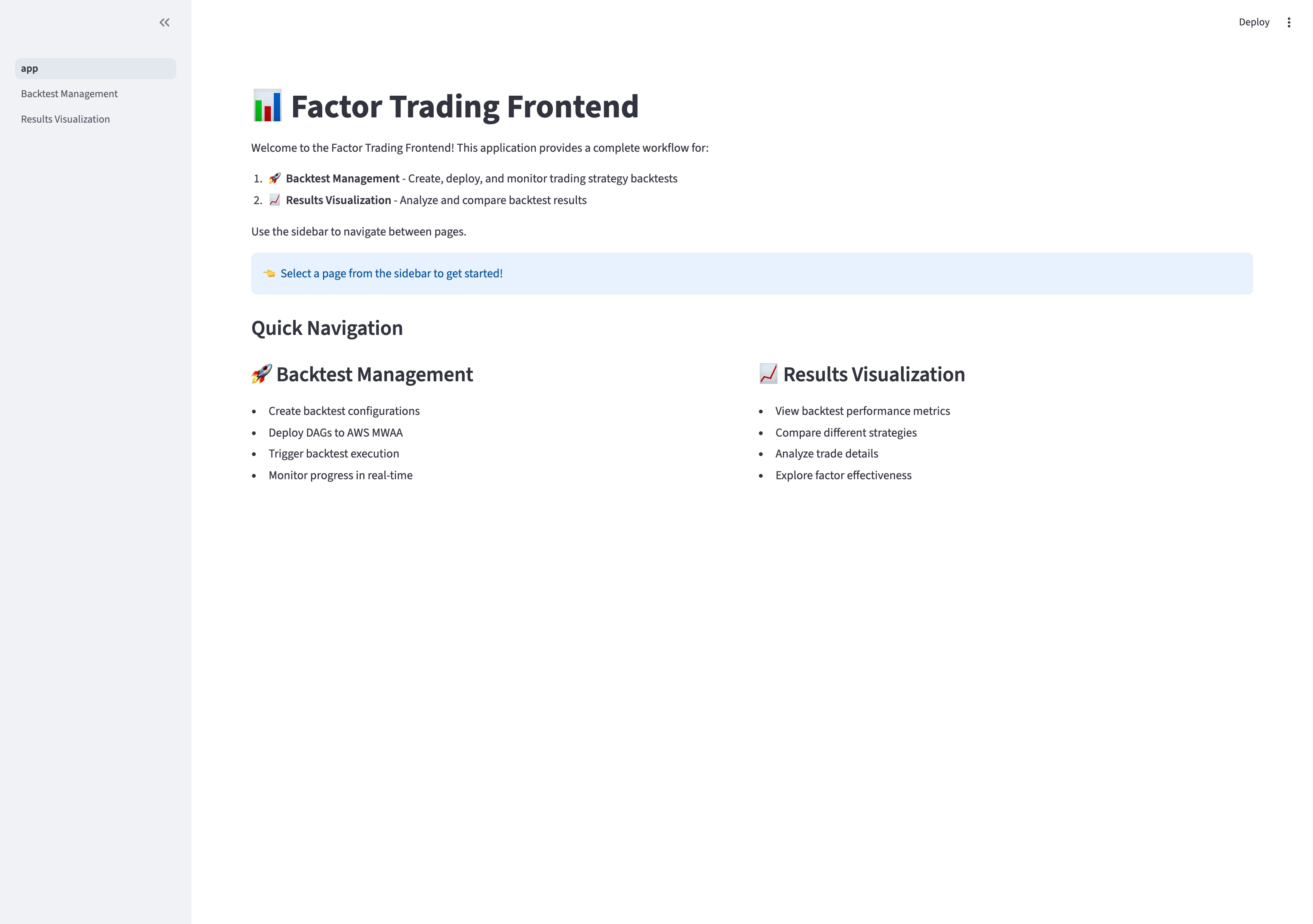
Figure 4: Backtesting Streamlit application
Our Streamlit application serves as a unified interface for the entire backtesting workflow, offering two key functionalities: Backtest Management and Results Visualization.
3.4.1 Backtest Management
The Backtest Management page provides an intuitive interface for configuring and executing backtests without writing DAG code or directly interacting with Airflow:
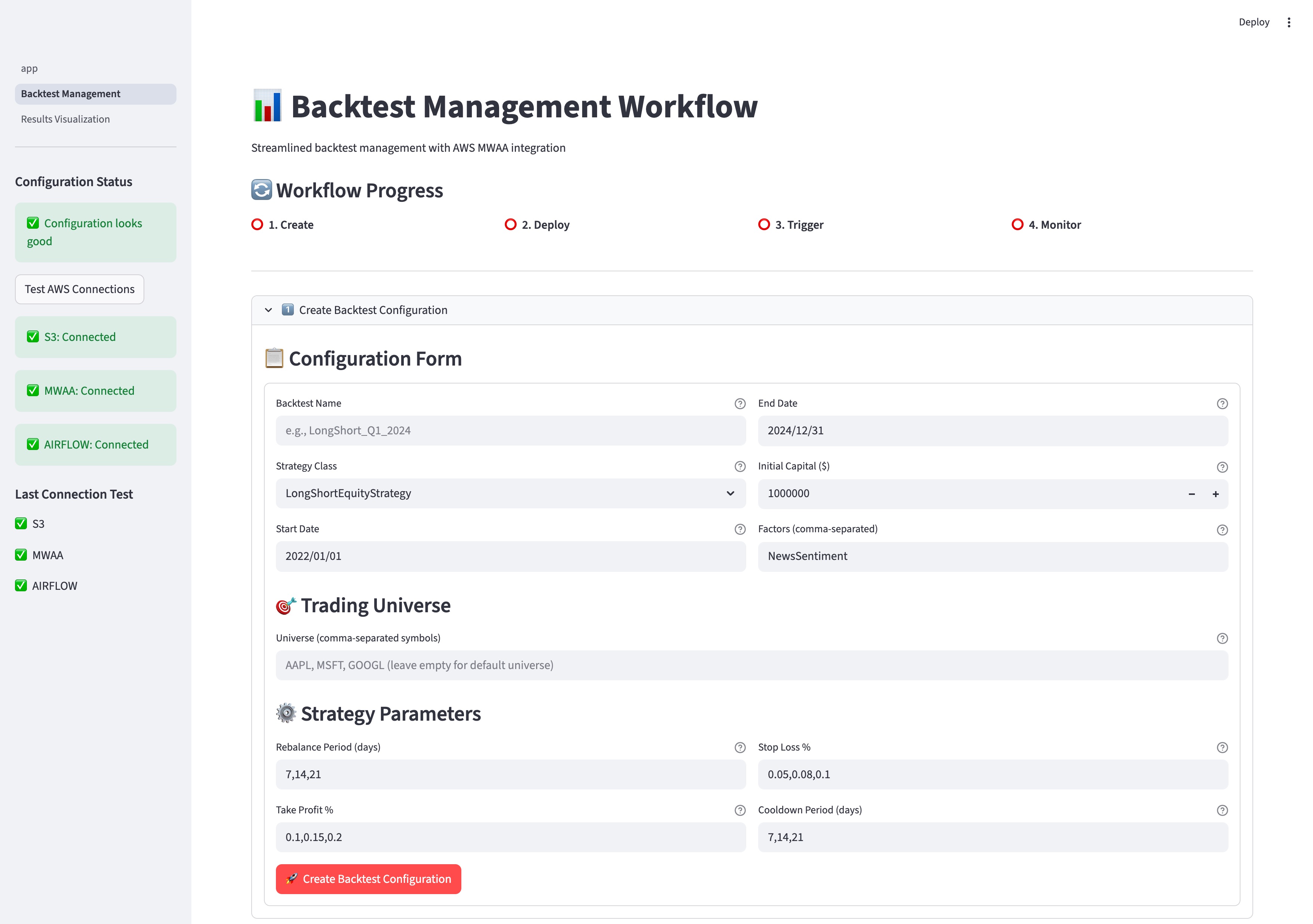
Figure 5: Backtesting management in Streamlit
Key features include:
1. Strategy Configuration: Select strategy types and define parameters through a simple form interface
2. Parameter Grid Definition: Easily set up multiple parameter combinations for optimization
3. AWS MWAA Integration: Deploy and trigger backtests with a single click
4. Real-time Monitoring: Track backtest progress and completion status
This approach abstracts away the complexity of the underlying infrastructure, allowing quant researchers to focus on strategy development rather than cloud operations.
3.4.2 Results Visualization
Backtrader’s built-in analyzers generate comprehensive backtesting performance metrics including returns, maximum drawdown, Sharpe ratio, and trade statistics. The framework stores these results in both S3 and ClickHouse, which are then visualized in the Streamlit application.
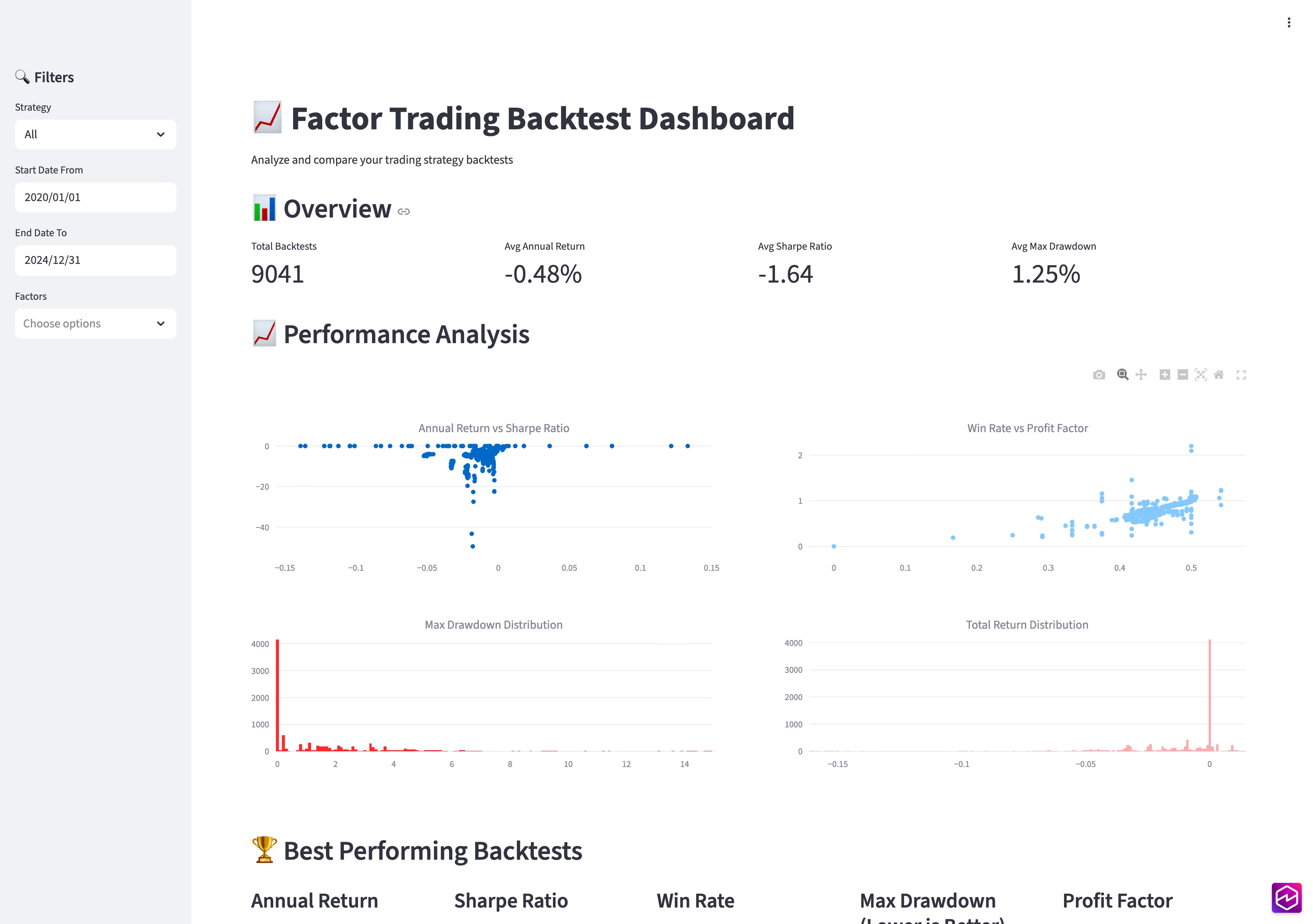
Figure 6: Backtesting visualization in Streamlit
The visualization dashboard provides:
1. Performance Overview: Compare multiple backtests across different metrics
2. Best Performers: Identify optimal parameter combinations based on various criteria
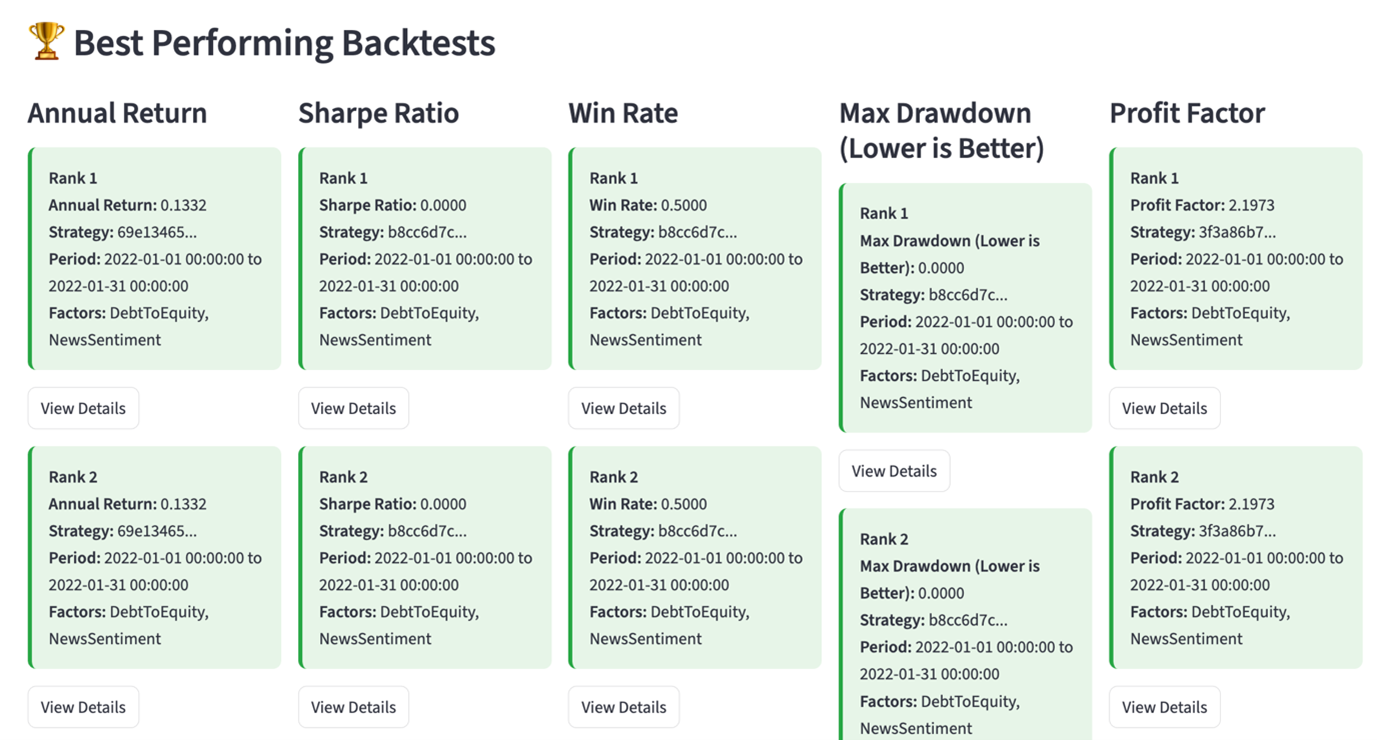 Figure 7: Best performance backtests by difference criterion
We can also dive deep into all the orders and trades of a specific backtest as below. This is very useful for us to understand the nature of the strategy and right expectation of trades after the strategy go-live.
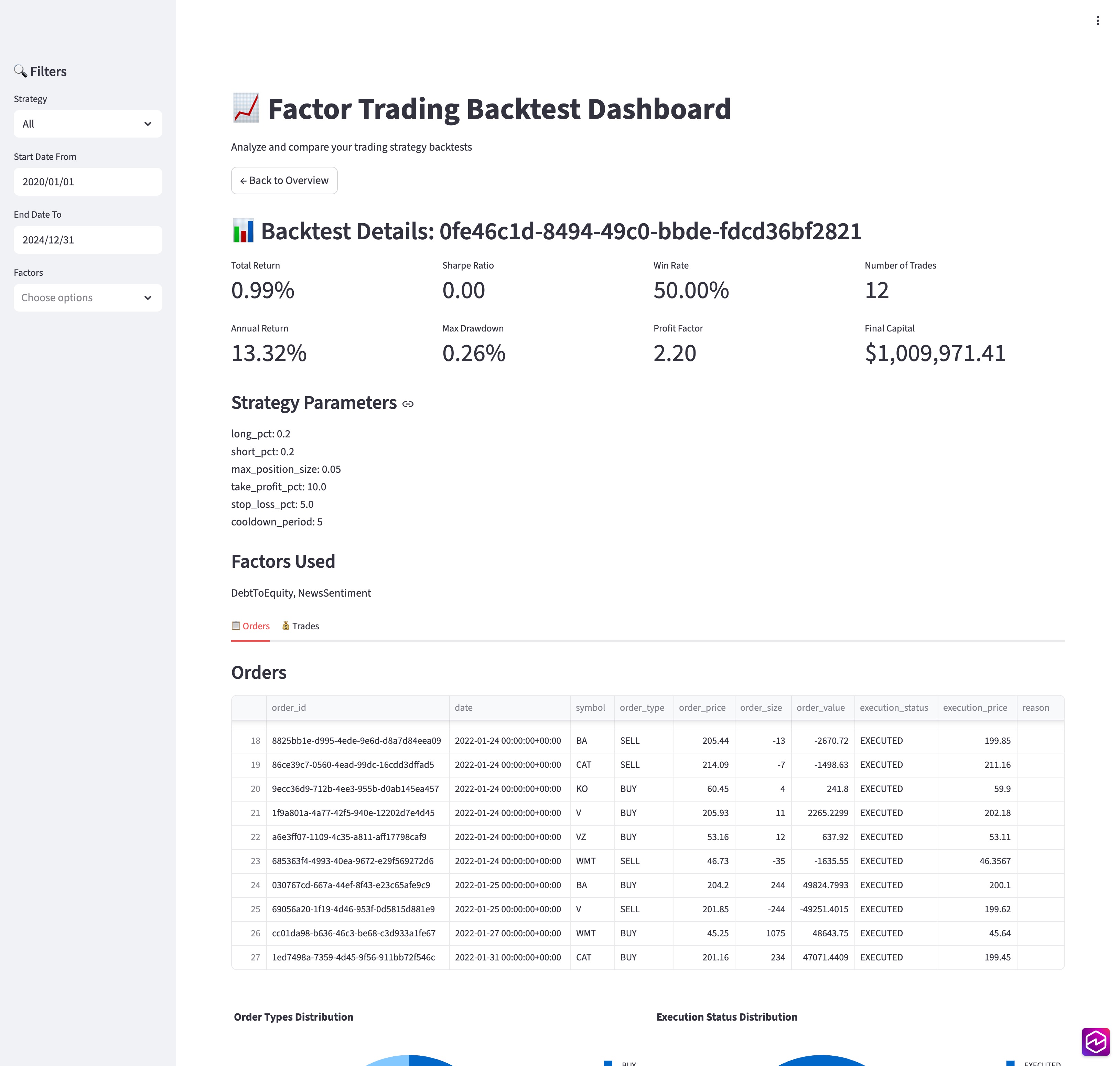
Figure 8: Backtesting performance details
This comprehensive visualization capability helps researchers quickly identify promising strategy variants and parameter combinations, significantly accelerating the strategy refinement process.
4. Deployment
Most typically, quant research will develop their own strategy following the step of Strategy Development and Backtest Framework and decide the backtest parameters and values. Here is how to deploy the solution to AWS after finishing strategy development.
Learn more details in the GitHub repository README.md.
4.1 Prerequisites
- Python 3.12
- Docker installed and running
- AWS CLI configured with appropriate permissions
- An existing Amazon Virtual Private Cloud (VPC) with both public and private subnets, where private subnets have NAT Gateway for internet access.
- ClickHouse connection accessible to backtesting AWS Batch and Visualization application on Amazon EC2
4.2 Deployment steps
1. Clone the GitHub repository:
git clone https://github.com/aws-samples/sample-tech-for-trading.git
2. Install dependencies and boostrap CDK:
3. Configure your data sources in the .env file
4. Containerize trading strategies developed
5. Deploy AWS Infrastructure, including AWS Batch and MWAA
6. Access the Airflow UI to configure your Airflow Variables and trigger your backtest DAG.
7. Configure the unified frontend application in src/frontend/.env.
8. Deploy Unified Frontend Dashboard
4.3 Accessing the Application
After deployment, access the unified frontend application at http://INSTANCE_IP:8502, which provides:
- Backtest Management Page: Create, deploy DAGs to MWAA, and monitor trading strategy backtests
- Results Visualization Page: Analyze and compare backtest results
The application provides a complete workflow from DAG deployment to backtest execution and results analysis.
4.4 Cleaning up
After evaluating the framework and to avoid unnecessary charges, navigate to your deployment folder and run:
cdk destroy --all
Or you can delete the stacks created by the CDK deploy in AWS CloudFormation.
5. Conclusion
By leveraging AWS services like MWAA and AWS Batch, we’ve addressed the key challenges of computational scale and task orchestration in quantitative strategy development. This approach dramatically reduces time-to-market for new strategies, enables testing of more strategy variants, and lowers infrastructure costs through auto-scaling. We invite you to explore our GitHub repository and start accelerating your own quant research today.