The Internet of Things on AWS – Official Blog
Deploying Small Language Models at Scale with AWS IoT Greengrass and Strands Agents
Introduction
Modern manufacturers face an increasingly complex challenge: implementing intelligent decision-making systems that respond to real-time operational data while maintaining security and performance standards. The volume of sensor data and operational complexity demands AI-powered solutions that process information locally for immediate responses while leveraging cloud resources for complex tasks.The industry is at a critical juncture where edge computing and AI converge. Small Language Models (SLMs) are lightweight enough to run on constrained GPU hardware yet powerful enough to deliver context-aware insights. Unlike Large Language Models (LLMs), SLMs fit within the power and thermal limits of industrial PCs or gateways, making them ideal for factory environments where resources are limited and reliability is paramount. For the purpose of this blog post, assume a SLM has approximately 3 to 15 billion parameters.
This blog focuses on Open Platform Communications Unified Architecture (OPC-UA) as a representative manufacturing protocol. OPC-UA servers provide standardized, real-time machine data that SLMs running at the edge can consume, enabling operators to query equipment status, interpret telemetry, or access documentation instantly—even without cloud connectivity.
AWS IoT Greengrass enables this hybrid pattern by deploying SLMs together with AWS Lambda functions directly to OPC-UA gateways. Local inference ensures responsiveness for safety-critical tasks, while the cloud handles fleet-wide analytics, multi-site optimization, or model retraining under stronger security controls.
This hybrid approach opens possibilities across industries. Automakers could run SLMs in vehicle compute units for natural voice commands and enhanced driving experience. Energy providers could process SCADA sensor data locally in substations. In gaming, SLMs could run on players’ devices to power companion AI in games. Beyond manufacturing, higher education institutions could use SLMs to provide personalized learning, proofreading, research assistance and content generation.
In this blog, we will look at how to deploy SLMs to the edge seamlessly and at scale using AWS IoT Greengrass.
Solution overview
The solution uses AWS IoT Greengrass to deploy and manage SLMs on edge devices, with Strands Agents providing local agent capabilities. The services used include:
- AWS IoT Greengrass: An open-source edge software and cloud service that lets you deploy, manage and monitor device software.
- AWS IoT Core: Service enabling you to connect IoT devices to AWS cloud.
- Amazon Simple Storage Service (S3): A highly scalable object storage which lets you to store and retrieve any amount of data.
- Strands Agents: A lightweight Python framework for running multi-agent systems using cloud and local inference.
We demonstrate the agent capabilities in the code sample using an industrial automation scenario. We provide an OPC-UA simulator which defines a factory consisting of an oven and a conveyor belt as well as maintenance runbooks as the source of the industrial data. This solution can be extended to other use cases by using other agentic tools.The following diagram shows the high-level architecture:
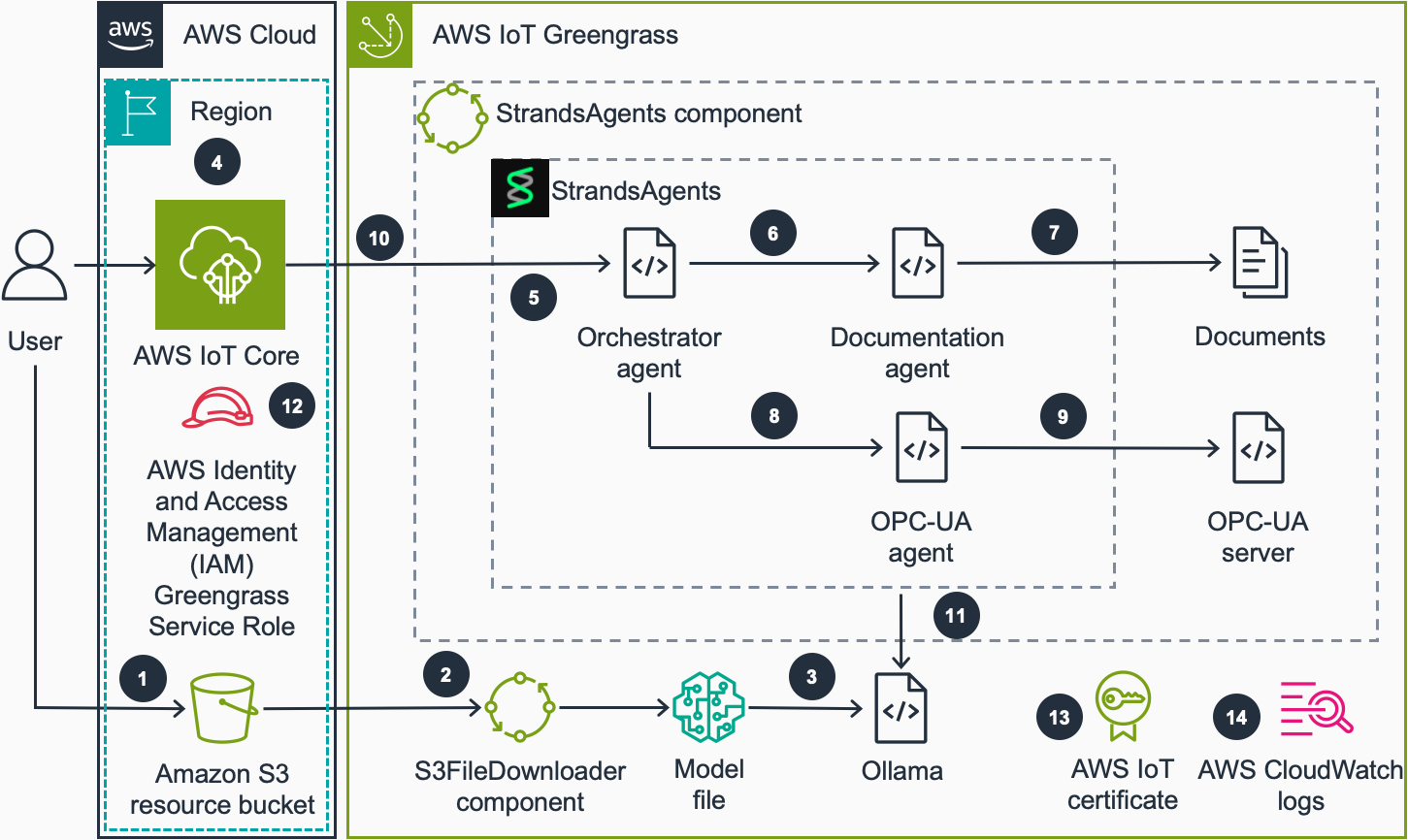
- User uploads a model file in GPT-Generated Unified Format (GGUF) format to an Amazon S3 bucket which AWS IoT Greengrass devices have access to.
- The devices in the fleet receive a file download job. S3FileDownloader component processes this job and downloads the model file to the device from the S3 bucket. The S3FileDownloader component can handle large file sizes, typically needed for SLM model files that exceed the native Greengrass component artifact size limits.
- The model file in GGUF format is loaded into Ollama when Strands Agents component makes the first call to Ollama. GGUF is a binary file format used for storing LLMs. Ollama is a software which loads the GGUF model file and runs inference. The model name is specified in the recipe.yaml file of the component.
- The user sends a query to the local agent by publishing a payload to a device specific agent topic in AWS IoT MQTT broker.
- After receiving the query, the component leverages the Strands Agents SDK‘s model-agnostic orchestration capabilities. The Orchestrator Agent perceives the query, reasons about the required information sources, and acts by calling the appropriate specialized agents (Documentation Agent, OPC-UA Agent, or both) to gather comprehensive data before formulating a response.
- If the query is related to an information that can be found in the documentation, Orchestrator Agent calls Documentation Agent.
- Documentation Agent finds the information from the provided documents and returns it to Orchestrator Agent.
- If the query is related to current or historic machine data, Orchestrator Agent will call OPC-UA Agent.
- OPC-UA Agent makes a query to the OPC-UA server depending on the user query and returns the data from server to Orchestrator Agent.
- Orchestrator Agent forms a response based on the collected information. Strands Agents component publishes the response to a device specific agent response topic in AWS IoT MQTT broker.
- The Strands Agents SDK enables the system to work with locally deployed foundation models through Ollama at the edge, while maintaining the option to switch to cloud-based models like those in Amazon Bedrock when connectivity is available.
- AWS IAM Greengrass service role provides access to the S3 resource bucket to download models to the device.
- AWS IoT certificate attached to the IoT thing allows Strands Agents component to receive and publish MQTT payloads to AWS IoT Core.
- Greengrass component logs the component operation to the local file system. Optionally, AWS CloudWatch logs can be enabled to monitor the component operation in the CloudWatch console.
Prerequisites
Before starting this walkthrough, ensure you have:
- An AWS account.
- A device running AWS IoT Greengrass and SLMs (e.g., NVIDIA Jetson Orin Nano or Amazon Elastic Compute Cloud (EC2) GPU instance). You can learn more about deploying Greengrass in Tutorial: Getting started with AWS IoT Greengrass documentation. You can use the provided template to deploy a working environment to EC2.
- Ollama installed and running on the device.
- Python 3.10+ installed on the device.
- AWS IoT Greengrass Development Kit (GDK) CLI installed.
- An SLM which supports agents and tool calling (e.g. Qwen 3).
Walkthrough
In this post, you will:
- Deploy Strands Agents as an AWS IoT Greengrass component.
- Download SLMs to edge devices.
- Test the deployed agent.
Component deployment
First, let’s deploy the StrandsAgentGreengrass component to your edge device.Clone the Strands Agents repository:
Use Greengrass Development Kit (GDK) to build and publish the component:
To publish the component, you need to modify the region and bucket values in gdk-config.json file. The recommended artifact bucket value is greengrass-artifacts. GDK will generate a bucket in greengrass-artifacts-<region>-<account-id> format, if it does not exist already. You can refer to Greengrass Development Kit CLI configuration file documentation for more information. After modifying the bucket and region values, run the following commands to build and publish the component.
The component will appear in the AWS IoT Greengrass Components Console. You can refer to Deploy your component documentation to deploy the component to your devices.
After the deployment, the component will run on the device. It consists of Strands Agents, an OPC-UA simulation server and sample documentation. Strands Agents uses Ollama server as the SLM inference engine. The component has OPC-UA and documentation tools to retrieve the simulated real-time data and sample equipment manuals to be used by the agent.
If you want to test the component in an Amazon EC2 instance, you can use IoTResources.yaml Amazon CloudFormation template to deploy a GPU instance with necessary software installed. This template also creates resources for running Greengrass. After the deployment of the stack, a Greengrass Core device will appear in the AWS IoT Greengrass console. The CloudFormation stack can be found under source/cfn folder in the repository. You can read how to deploy a CloudFormation stack in Create a stack from the CloudFormation console documentation.
Downloading the model file
The component needs a model file in GGUF format to be used by Ollama as the SLM. You need to copy the model file under /tmp/destination/ folder in the edge device. The model file name must be model.gguf, if you use the default ModelGGUFName parameter in the recipe.yaml file of the component.
If you don’t have a model file in GGUF format, you can download one from Hugging Face, for example Qwen3-1.7B-GGUF. In a real-world application, this can be a fine-tuned model which solves specific business problems for your use case.
(Optional) Use S3FileDownloader to download model files
To manage model distribution to edge devices at scale, you can use the S3FileDownloader AWS IoT Greengrass component. This component is particularly valuable for deploying large files in environments with unreliable connectivity, as it supports automatic retry and resume capabilities. Since the model files can be large, and device connectivity is not reliable in many IoT use cases, this component can help you to deploy models to your device fleets reliably.
After deploying S3FileDownloader component to your device, you can publish the following payload to things/<MyThingName>/download topic by using AWS IoT MQTT Test Client. The file will be downloaded from the Amazon S3 bucket and put into /tmp/destination/ folder in the edge device:
If you used the CloudFormation template provided in the repository, you can use the S3 bucket created by this template. Refer to the output of the CloudFormation stack deployment to view the name of the bucket.
Testing the local agent
Once the deployment is complete and the model is downloaded, we can test the agent through the AWS IoT Core MQTT Test Client. Steps:
- Subscribe to
things/<MyThingName>/#topic to view the response of the agent. - Publish a test query to the input topic
things/<MyThingName>/agent/query:
- You should receive responses on multiple topics:
- Final response topic (
things/<MyThingName>/agent/response) which contains the final response of the Orchestrator Agent:
- Final response topic (
-
- Sub-agent responses (
things/<MyThingName>/agent/subagent) which contains the response from intermediary agents such as OPC-UA Agent and Documentation Agent:
- Sub-agent responses (
The agent will process your query using the local SLM and provide responses based on both the OPC-UA simulated data and the equipment documentation stored locally.For demonstration purposes, we use the AWS IoT Core MQTT test client as a straightforward interface to communicate with the local device. In production, Strands Agents can run fully on the device itself, eliminating the need for any cloud interaction.
Monitoring the component
To monitor the component’s operation, you can connect remotely to your AWS IoT Greengrass device and check the component logs:
This will show you the real-time operation of the agent, including model loading, query processing, and response generation. You can learn more about Greengrass logging system in Monitor AWS IoT Greengrass logs documentation.
Cleaning up
Go to AWS IoT Core Greengrass console to delete the resources created in this post:
- Go to Deployments, choose the deployment that you used for deploying the component, then revise the deployment by removing the Strands Agents component.
- If you have deployed S3FileDownloader component, you can remove it from the deployment as explained in the previous step.
- Go to Components, choose the Strands Agents component and choose ‘Delete version’ to delete the component.
- If you have created S3FileDownloader component, you can delete it as explained in the previous step.
- If you deployed the CloudFormation stack to run the demo in an EC2 instance, delete the stack from AWS CloudFormation console. Note that the EC2 instance will incur hourly charges until it is stopped or terminated.
- If you don’t need the Greengrass core device, you can delete it from Core devices section of Greengrass console.
- After deleting Greengrass Core device, delete the IoT certificate attached to the core thing. To find the thing certificate, go to AWS IoT Things console, choose the IoT thing created in this guide, view the Certificates tab, choose the attached certificate, choose Actions, then choose Deactivate and Delete.
Conclusion
In this post, we showed how to run a SLM locally using Ollama integrated through Strands Agents on AWS IoT Greengrass. This workflow demonstrated how lightweight AI models can be deployed and managed on constrained hardware while benefiting from cloud integration for scale and monitoring. Using OPC-UA as our manufacturing example, we highlighted how SLMs at the edge enable operators to query equipment status, interpret telemetry, and access documentation in real time—even with limited connectivity. The hybrid model ensures critical decisions happen locally, while complex analytics and retraining are handled securely in the cloud.This architecture can be extended to create a hybrid cloud-edge AI agent system, where edge AI agents (using AWS IoT Greengrass) seamlessly integrate with cloud-based agents (using Amazon Bedrock). This enables distributed collaboration: edge agents manage real-time, low-latency processing and immediate actions, while cloud agents handle complex reasoning, data analytics, model refinement, and orchestration.
About the authors
 Ozan Cihangir is a Senior Prototyping Engineer at AWS Specialists & Partners Organization. He helps customers to build innovative solutions for their emerging technology projects in the cloud.
 Luis Orus is a senior member of the AWS Specialists & Partners Organization, where he has held multiple roles – from building high-performing teams at global scale to helping customers innovate and experiment quickly through prototyping.
 Amir Majlesi leads the EMEA prototyping team within AWS Specialists & Partners Organization. He has extensive experience in helping customers accelerate cloud adoption, expedite their path to production and foster a culture of innovation. Through rapid prototyping methodologies, Amir enables customer teams to build cloud native applications, with a focus on emerging technologies such as Generative & Agentic AI, Advanced Analytics, Serverless and IoT.
 Jaime Stewart focused his Solutions Architect Internship within AWS Specialists & Partners Organization around Edge Inference with SLMs. Jaime currently pursues a MSc in Artificial Intelligence.