AWS Messaging Blog
Adding LINE Messenger to your AWS omnichannel fallback solution
In this post, you will learn how to extend an existing omnichannel fallback solution by integrating LINE Messenger, including architecture updates, deployment steps, and testing procedures. The original solution, built with Amazon API Gateway, AWS Lambda, Amazon Simple Email Service (Amazon SES), and AWS End User Messaging, delivers messages across SMS, WhatsApp, and email with automatic fallback capabilities.
For more information about the original omnichannel fallback solution that this aims to extend to LINE, see the Enhancing Message Reach: An Omnichannel Approach Using WhatsApp, SMS, and Email with AWS.
Why LINE Messenger?
LINE is a popular messaging platform in Japan, Taiwan, and Thailand, with 181 million monthly active users across its primary markets, including 100 million in Japan alone (LY Corporation FY2025 Q3 earnings data). With an 84 percent DAU/MAU ratio (88 percent in Japan), LINE sees high daily engagement, making it a reliable channel for time-sensitive communications such as appointment reminders in healthcare, order and shipping notifications in ecommerce, and promotional campaigns in retail.
While other messaging platforms are popular in specific APAC markets (KakaoTalk in South Korea, WeChat in China, Zalo in Vietnam, Viber in the Philippines), LINE holds a strong position across Japan, Taiwan, and Thailand simultaneously, making it a high-impact addition to a multi-channel messaging strategy for those countries. By adding LINE to the omnichannel fallback solution, you can reach your audience on their preferred messaging channel in these key markets. You can use LINE as either a primary or fallback channel while maintaining the same fallback and broadcast patterns already available for other channels.
Cost note: LINE Messaging API pricing varies by country and plan. See the pricing pages for LINE Messaging API, Amazon Simple Email Service (Amazon SES), and Amazon End User Messaging for details on each channel.
Architecture overview
Adding LINE to your fallback solution means you can now cover four major messaging channels from a single API endpoint, giving you broader reach without added operational complexity. The LINE integration follows the same event-driven serverless pattern as the existing channels. The following diagram shows the key additions to the architecture.
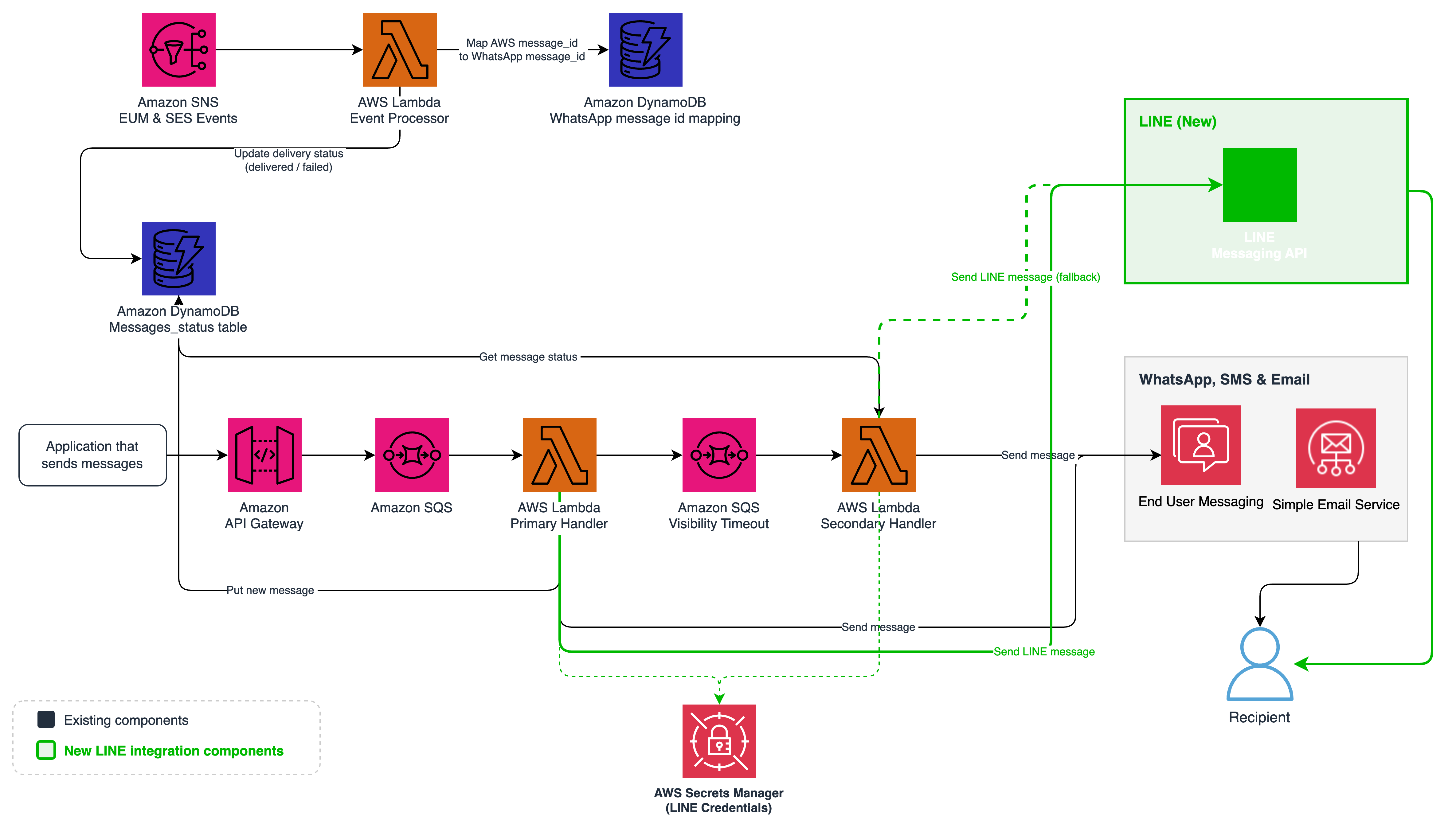
Figure 1: Updated omnichannel architecture with LINE Messenger (new components highlighted)
You can now reach LINE users with two straightforward additions to the existing architecture:
LINE Messaging API Integration – The Primary and Secondary Handler Lambda functions now include a send_line module that calls the LINE Messaging API to deliver messages using the Push Message endpoint.
AWS Secrets Manager Integration – LINE channel credentials (access token and channel secret) are stored securely in AWS Secrets Manager and retrieved by Lambda functions with caching for performance.
How LINE integration works
The LINE Messenger integration extends the existing message processing pipeline, so you get the same reliable fallback behavior that you already have for email, SMS, and WhatsApp. The following sections describe how the system handles LINE messages and fallback scenarios.
Sending a LINE message
When you send a message with LINE as the primary or fallback channel, the flow follows the same pattern as other channels with LINE-specific handling:
- API Gateway receives the request and places it in the Primary Amazon Simple Queue Service (Amazon SQS) Queue.
- The Primary Handler Lambda detects the channel as “line” and invokes the send_line module.
- The send_line module retrieves LINE credentials from Secrets Manager (cached for performance) and sends a request to the LINE Messaging API Push Message endpoint. The Push Message API sends messages to LINE users without requiring the user to message first. The request body contains a to field with the recipient’s LINE User ID (a unique identifier assigned when a user follows your LINE Official Account) and a messages array with the message objects to deliver. The module validates the recipient LINE User ID against the expected format (a capital ‘U’ followed by 32 lowercase hexadecimal characters) before invoking the LINE API. Requests with malformed recipient IDs are rejected early and don’t reach the external API.
- The Lambda function records the message status in the Amazon DynamoDB table.
- If fallback is configured, the Lambda function enqueues the message to the Fallback Queue. This happens regardless of whether the LINE API call succeeds (HTTP 200) or fails (non-200 response, timeout, or exception). DynamoDB records the message status as delivered on success or failed on failure. The Secondary Handler checks DynamoDB and sends through the fallback channel if the status isn’t delivered.
- The Secondary Handler updates the DynamoDB status to sent_fallback.
How LINE differs from other channels
| Aspect | SMS | LINE | ||
| API | Amazon SES SendEmail API | AWS End User Messaging SendTextMessage API | AWS End User Messaging Social SendWhatsAppMessage API | LINE Messaging API Push Message API |
| Authentication | IAM roles | IAM roles | IAM roles | Channel access token via Secrets Manager |
| External Message ID Mapping | Not required. SES returns the same message ID in delivery callbacks | Not required. SMS returns the same message ID in delivery callbacks. | Required. WhatsApp returns a different platform message ID in delivery webhooks that must be mapped back to the internal AWS message ID. | Not required. No delivery callbacks exist, so no message ID correlation is needed. |
| Credential Storage | IAM (automatic) | IAM (automatic) | IAM (automatic) | Secrets Manager (manual) |
| Delivery Tracking | Async via SES delivery events (SNS callback updates DynamoDB) | Async via End User Messaging events (SNS callback updates DynamoDB) | Async via End User Messaging events (SNS callback updates DynamoDB) | None. Status set to delivered immediately on 200 response from LINE API. No delivery webhook available for LINE Messaging API. |
LINE uses an external API with its own authentication rather than AWS-native IAM authentication. This means you must manage credentials through AWS Secrets Manager rather than relying on AWS Identity and Access Management (IAM)-managed authentication. For more information, see the LINE Messaging API documentation.
LINE offers two distinct messaging products for businesses, LINE Messaging API, and LINE Official Notification.
- The LINE Messaging API, which is the focus of this guide, supports two-way conversational messaging and is widely adopted across industries for use cases such as mobile ordering, loyalty programs, and customer engagement. LINE also offers LINE Official Notification (also known as LINE Notification Messages), a separate service designed for one-way transactional notifications such as shipping updates and appointment reminders, which requires business verification.
- LINE Official Notification provides per-message delivery completion events, but the LINE Messaging API doesn’t. With the Messaging API, an HTTP 200 response confirms LINE accepted the message for delivery, and this is the most granular delivery signal available.
Creating a LINE Messaging API Channel
You need a LINE Messaging API Channel to authenticate and send messages through the LINE integration. The following steps walk you through creating one:
- Sign in to the LINE Developers Console. Create a personal LINE account if you don’t have one already and download the corresponding iOS/Android/PC application. This is required to test receiving LINE messages.
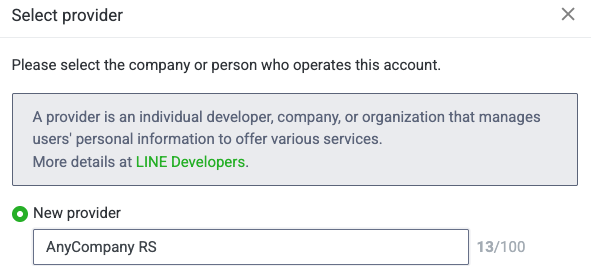
- Create a Provider (your company/org name).
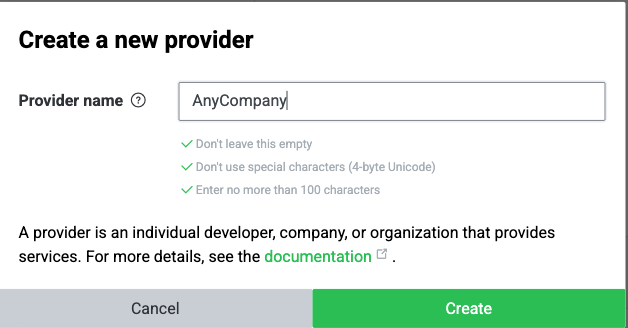
- Create a new Messaging API channel under that provider.
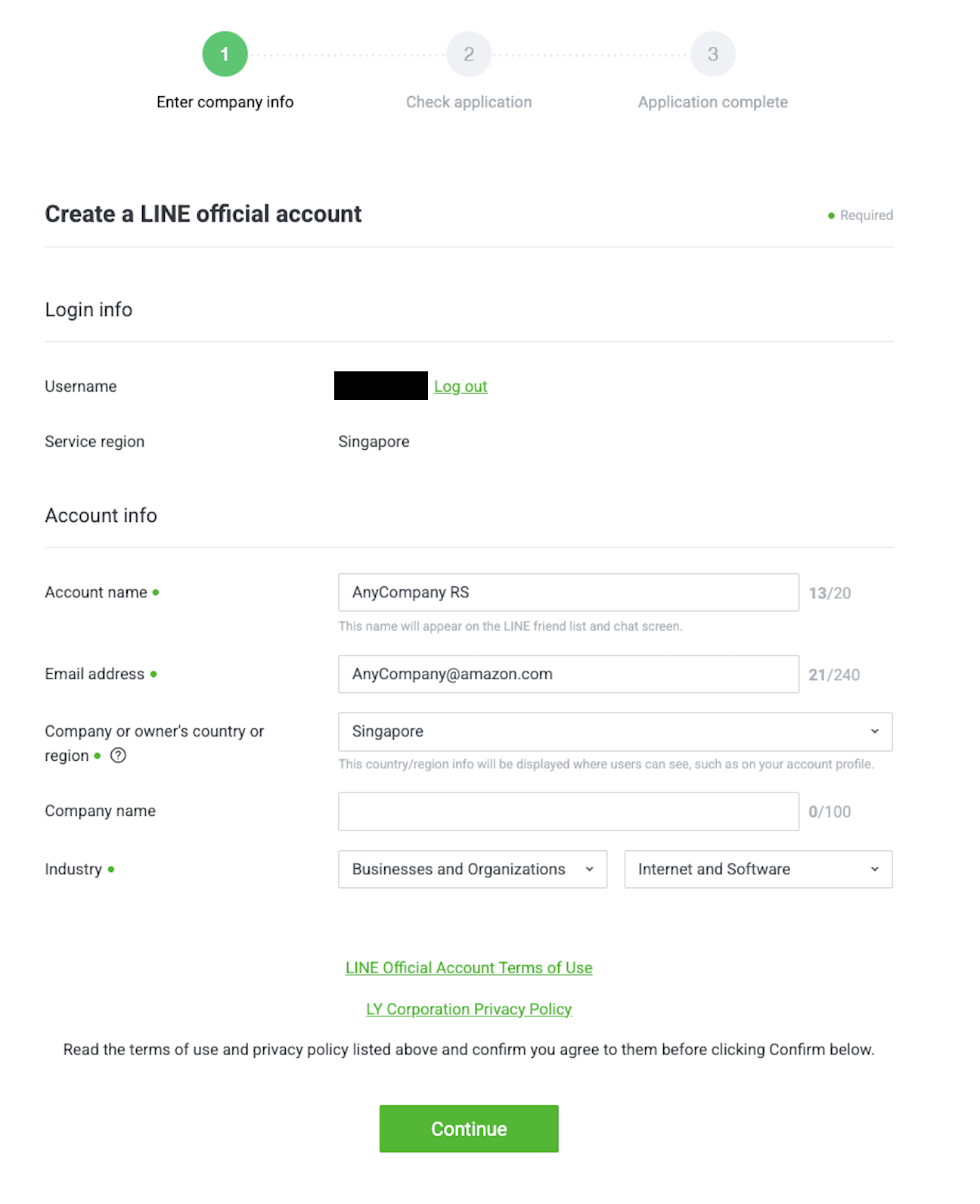
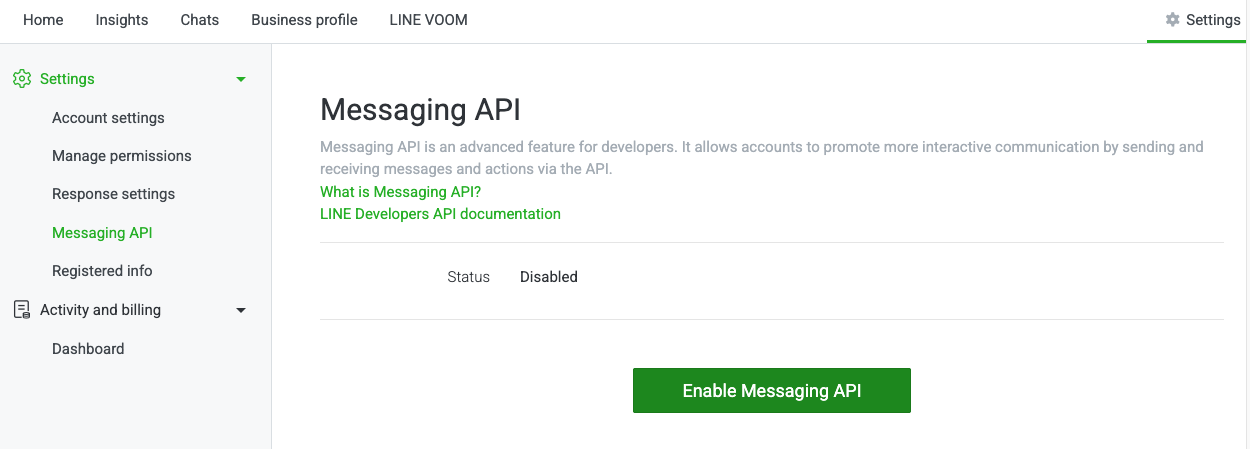
- After you create the channel, enable the Messaging API from the LINE Official Account Manager page.
- From the channel settings, note the following:
- Channel access token (Messaging API tab, then select Issue)

- Channel secret (Basic settings tab)

- Channel access token (Messaging API tab, then select Issue)
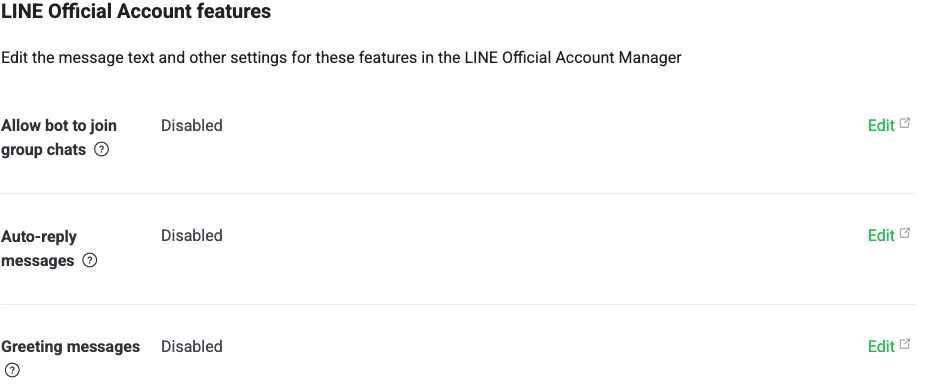
- Disable Auto-reply and Greeting messages under Messaging API settings.
Deploying and testing
The repository includes a complete deployment guide with step-by-step instructions for deploying the CDK stack, configuring LINE credentials in AWS Secrets Manager, obtaining personal LINE user IDs, and running the integration test suite. The test suite automatically detects which channels are configured and runs the applicable tests. For full deployment and testing instructions, see the Deployment Guide in the repository.
Security considerations
Before deploying this solution to production, review the following considerations and adjust for your workload and compliance obligations.
Least-privilege IAM
The Lambda execution roles in the sample scope DynamoDB, Amazon SQS, and AWS Secrets Manager permissions to specific resource ARNs. The send actions for Amazon SES (ses:SendEmail, ses:SendTemplatedEmail), SMS (sms-voice:SendTextMessage), and WhatsApp (social-messaging:SendWhatsAppMessage) are granted on resources: [“*”] in this sample for simplicity, because the specific sending identities, phone pools, and WhatsApp business accounts are left configurable. For production, scope these further where the API supports it: SES allows identity-level ARNs (for example, arn:aws:ses:region:account:identity/example.com), and End User Messaging SMS supports pool and phone-number ARNs. When adapting this code, keep resource-level scoping for everything that supports it and review the AWS Well-Architected Security Pillar and Lambda execution role guidance for production deployments.
Rotating LINE credentials
LINE channel access tokens are long-lived and are issued and rotated manually through the LINE Developers Console; there’s no programmatic rotation API. Rotate the token periodically in line with your organization’s key-rotation policy (for example, every 90 days), update the Secrets Manager secret with the new value, and force a Lambda cold start (by redeploying the stack or updating a Lambda environment variable) so the cached credentials are refreshed.
Data protection and PII retention
The solution stores message metadata and recipient identifiers (including LINE User IDs, phone numbers, and email addresses) in Amazon DynamoDB. DynamoDB uses AWS-managed encryption at rest, Secrets Manager uses AWS Key Management Service (AWS KMS), and all outbound calls to the LINE API are made over HTTPS. Point-in-time recovery is enabled on the message table.
The sample doesn’t configure a DynamoDB Time-to-Live (TTL) attribute, so records persist indefinitely. For production, add a TTL attribute (for example, expiresAt) that matches your retention policy, and review whether the RemovalPolicy.RETAIN setting on the tables is appropriate for your environment. LINE User IDs, phone numbers, and email addresses are personally identifiable information under regulations including Japan’s APPI, the EU’s GDPR, and similar laws. Assess your retention obligations, data residency requirements, and processes for handling subject access and deletion requests for the regions you serve.
Conclusion
By adding LINE Messenger to the omnichannel fallback solution, you can now reach your customers across the four messaging channels that matter most: email, SMS, WhatsApp, and LINE. The integration follows the same serverless, event-driven patterns as the existing channels, making it straightforward to deploy and maintain. LINE can serve as either a primary or fallback channel, giving you the flexibility to tailor your messaging strategy to regional preferences. As a next step, consider adding other regional messaging services to further expand your reach. You can also explore advanced LINE features such as rich messages, quick replies, and Flex Messages to create more engaging customer interactions.
Resources
- GitHub Repository
- Enhancing Message Reach: An Omnichannel Approach Using WhatsApp, SMS, and Email with AWS
- LINE Developers Documentation
- AWS CDK Documentation