AWS End User Messaging makes it possible to send SMS, MMS, push notifications, WhatsApp messages, and text to voice globally. When you send SMS, MMS, and voice messages with AWS End User Messaging, you must use a specific origination identity that supports sending these messages. Messaging options vary by country and include toll-free numbers (TFN), 10-digit long codes (US 10DLC), long codes, short codes, and sender IDs. To check a country’s available options, refer to Supported countries and regions for SMS messaging with AWS End User Messaging SMS.
This post explains how to programmatically register sender IDs, which can be used in many countries around the globe. The registration process makes it possible for businesses and organizations to send messages using an alphanumeric identifier instead of a phone number, making communications more professional and recognizable to recipients. For example, a fictitious company Example Corp could use the sender ID EXAMPLECO to send SMS. To learn more about sender ID registration, refer to Sender IDs in AWS End User Messaging SMS.
This post explores the AWS End User Messaging APIs required for programmatically registering sender IDs for the Indonesia and India. These sample scripts serve as a reference for sender ID registration in other countries. This automation approach simplifies the registration process, saving time and effort for businesses using AWS End User Messaging for their communication needs.
AWS End User Messaging APIs for sender ID registration
The AWS End User Messaging V2 API contains a set of actions that focus on sender ID registration management:
- DescribeRegistrationTypeDefinitions – Retrieves registration type details for different countries. You can use
DescribeRegistrationFieldDefinitions to view the requirements for creating, filling out, and submitting each registration type.
- CreateRegistration – Creates a new registration. The
RegistrationType field controls whether this is a registration for toll-free, 10DLC, or sender ID. This post will use a sender ID.
- DescribeRegistrationFieldDefinitions – Retrieves field requirements for a specific registration type (retrieved by
DescribeRegistrationTypeDefinitions).
- PutRegistrationFieldValue – This action must be repeated for all required fields (retrieved by
DescribeRegistrationFieldDefinitions).
- CreateRegistrationAttachment – Uploads a required attachment (for example, a letter of authorization) for registration based on country-specific requirements.
- SubmitRegistrationVersion – Submits the specified registration for review and approval. Make sure to verify all data is accurate before submitting the registration. The review process consists of the following steps:
- After your script submits the registration, the initial status appears as
CREATED and typically changes to REVIEWING within 24 hours.
- After submission, your sender ID registration can’t be modified or deleted until the third-party registrar completes their review process.
- If the status remains
CREATED for over 24 hours after you’ve submitted your registration, open a support case for assistance.
Available actions for sender ID registration
As you manage your messaging campaigns in AWS End User Messaging SMS, several APIs are available to help you handle sender ID registrations efficiently:
- CreateRegistrationVersion – Creates a new version of the registration and increases the
VersionNumber. The previous version of the registration becomes read-only. This is useful for updating registration information while maintaining historical records.
- DescribeRegistrationAttachments – Retrieves the specified registration attachments or all registration attachments associated with your AWS account. This helps in managing and reviewing documents linked to your registrations.
- DescribeRegistrationFieldValues – Retrieves the specified registration field values. You can use this API to review current registration details for a specific version.
- DescribeRegistrations – Retrieves the specified registrations and provides an overview of all your sender ID registrations, which is useful for multi-campaign management.
- DescribeRegistrationSectionDefinitions – Retrieves the specified registration section definitions. You can use
DescribeRegistrationSectionDefinitions to view the requirements for creating, filling out, and submitting each registration type. This API helps you understand the structure and requirements of different registration sections.
- DescribeRegistrationVersions – Retrieves the specified registration version. You can use this API to track changes and view historical versions of a registration.
The following are important considerations for registration:
- Most registration submissions undergo review by an independent third-party organization. This is a standard industry practice across SMS providers.
- AWS does not review your registrations. It is important to complete this registration process with the understanding that AWS merely facilitates the submission process. AWS does not participate in or influence the third-party review process.
- Each country has its own review process and timeline. Each registration is examined on a first-in/first-out basis by the registrar for each country. The registration review is conducted by external personnel unfamiliar with your company or use case. Therefore, it is crucial to provide clear and concise responses in your application.
- After submitting your registration, the status begins as
CREATED and typically transitions to REVIEWING within 24 hours
- If AWS is able to provide you with a sender ID, AWS sends you an estimated time frame required for its provisioning. In many countries, AWS can provide you with a sender ID within 2–4 weeks. However, in some countries, it can take several weeks to obtain a sender ID.
AWS End User Messaging API usage flow for sender ID registration
The API flow consists of the following steps:
- Call DescribeRegistrationTypeDefinitions to understand available registration types.
- Use CreateRegistration to initiate the registration process.
- To obtain details about the required fields, call DescribeRegistrationFieldDefinitions.
- Use PutRegistrationFieldValue multiple times to populate all required fields.
- If needed, use CreateRegistrationAttachment to upload supporting documents.
- Finally, call SubmitRegistrationVersion to submit the registration for review.
- Use DescribeRegistrations periodically to check the status of the registration.
This API flow enables a fully automated sender ID registration process for supported countries. Businesses can efficiently manage registrations across various regulatory environments and geographical locations.
Registration field format
The AWS End User Messaging API uses a specific format to define the registration fields:
- SectionPath – Represents the hierarchical location of a field within the registration form’s structure. For example,
"SectionPath": "companyInfo".
- FieldPath – The complete path to a specific field, combining the
SectionPath with the field name. For example, "FieldPath": "companyInfo.companyName".
- FieldType – Specifies the data type of the field (such as
TEXT, SELECT, or ATTACHMENT). For example, "FieldType": "TEXT".
- FieldRequirement – Indicates whether the field is
REQUIRED, OPTIONAL, or CONDITIONAL. For example, "FieldRequirement": "REQUIRED".
Understanding these attributes is crucial for effective API interaction during the registration process. They define both the structure of your API calls and the necessary data inputs.
The following code is the subset of the response of DescribeRegistrationFieldDefinitions for the United Kingdom registration type (RegistrationType):
{
            "SectionPath": "companyInfo",
            "FieldPath": "companyInfo.companyName",
            "FieldType": "TEXT",
            "FieldRequirement": "REQUIRED",
            "TextValidation": {
                "MinLength": 1,
                "MaxLength": 100,
                "Pattern": "^(?=\\s*\\S)[\\s\\S]+$"
            },
            "DisplayHints": {
                "Title": "Company name",
                "ShortDescription": "Legal name which your company is registered under.",
                "ExampleTextValue": "Example Corp"
            }
        }

     {
            "SectionPath": "senderIdInfo",
"FieldPath": "senderIdInfo.senderIdDescription",
            "FieldType": "TEXT",
            "FieldRequirement": "OPTIONAL",
            "TextValidation": {
                "MinLength": 1,
                "MaxLength": 500,
                "Pattern": "^(?=\\s*\\S)[\\s\\S]+$"
            },
            "DisplayHints": {
                "Title": "Sender ID description",
                "ShortDescription": "If it is not obvious, explain the connection between your company name and this sender ID."
            }
        }

        {
            "SectionPath": "senderIdInfo",
            "FieldPath": "senderIdInfo.letterOfAuthorization",
            "FieldType": "ATTACHMENT",
            "FieldRequirement": "CONDITIONAL",
            "DisplayHints": {
                "Title": "Letter of authorization image",
                "ShortDescription": "Image of your signed letter of authorization (LOA)"
            }
        }
        {
            "SectionPath": "messagingUseCase",
            "FieldPath": "messagingUseCase.monthlyMessageVolume",
            "FieldType": "SELECT",
            "FieldRequirement": "REQUIRED",
            "SelectValidation": {
                "MinChoices": 1,
                "MaxChoices": 1,
                "Options": [
                    "10",
                    "100",
                    "1,000",
                    "10,000",
                    "100,000",
                    "250,000",
                    "500,000",
                    "750,000",
                    "1,000,000",
                    "5,000,000",
                    "10,000,000+"
                ]
            },
            "DisplayHints": {
                "Title": "Monthly SMS volume",
                "ShortDescription": "Estimated number of SMS messages which will be sent from this sender ID each month."
            }
        }
Prerequisites
Before running either script, you must have the following:
Automate sender ID registration for Indonesia
The Indonesia registration process involves several additional requirements that vary based on your company’s location and business type. All companies must submit XL Axiata’s Letter of Authorization (LOA). Indonesian companies need additional LOAs from Telkomsel, IOH, and Smartfren, plus NIB and NPWP documents. Apply IDR9K and the company stamp to each LOA. For sample documents, refer to Indonesia sender ID registration in AWS End User Messaging SMS. Businesses operating in the money lending sector are required to provide an operating license issued by the Financial Services Authority (Otoritas Jasa Keuangan—OJK).
In this section, we break down the Python script for Indonesia registration.
Before running the registration script, you must first set the necessary variables, with your company actual data. The following is a sample file with the variables required for Indonesia local sender ID registration. Provide the correct path for LOA files (telkomsel_loa.png,ioh_loa.png, xl_axiata_loa.png, smartfren_loa.png,regulatory_licence.png, proof_of_sender_id.png, nomor_pokokWajib_pajak_document.png, and nomor_induk_berusaha_document.png).
Save the following file as indonesia_config.py:
# =============================================================================
# INDONESIA SENDER ID REGISTRATION CONFIGURATION
# =============================================================================
#AWS Region Details
# ---------------------
REGION_NAME='us-west-2'
# Registration Settings
# ---------------------
REGISTRATION_TYPE = 'ID_SENDER_ID_REGISTRATION'  # Registration type for Indonesia
REGISTRATION_NAME = 'INDONESIA_TEST_SENDER_ID'    # Name tag for this registration
# Sender ID Information
# --------------------
# The sender ID to register. Must be between 3 and 11 alphanumeric characters.
# Must contain at least one letter. Example: 'EXAMPLE'
SENDER_ID = 'DEMO'
# Company Information
# ------------------
# Legal name of your company
COMPANY_NAME = 'Example Corp'
# Legal identification number of your company (such as EIN or VAT)
# Must be alphanumeric, 1-30 characters
COMPANY_ID = '123456789'
# Full URL of your company's website
COMPANY_WEBSITE = 'https://www.example.com'
# Select the vertical which most closely aligns with your company's area of business
# Options: Agriculture, Communication, Construction, Education, Energy, Entertainment,
# Financial, Government, Healthcare, Hospitality, Insurance, Manufacturing,
# Real estate, Retail, Technology, Other
AREA_OF_BUSINESS = ['Other']
# Company Address
# ---------------
# Physical street address associated with your company
COMPANY_ADDRESS = '123 Main Street'
# City where the physical address is located
COMPANY_CITY = 'Jakarta'
# Two-digit ISO country code where the physical address is located
COUNTRY_CODE = 'ID'
# Contact Information
# ------------------
# Email address of your company's point of contact
CONTACT_EMAIL = 'johdoe@example.com'
# Phone number of your company's point of contact
CONTACT_PHONE = '+6281234567890'
# Messaging Use Case
# -----------------
# Description of your use case for sending SMS messages with this sender ID
USE_CASE_DESCRIPTION = 'For One Time Messages'
# Select the category which most closely aligns with your use case
# Options: One-time passcodes, Account or security alerts, Purchase or delivery notifications,
# Public service announcements, Polling and surveys, Info on demand, Promotions and marketing, Other
USE_CASE_CATEGORY = ['One-time passcodes']
# Estimated number of SMS messages which will be sent from this sender ID each month
# Options: 10, 100, 1,000, 10,000, 100,000, 1,000,000, 10,000,000+
MONTHLY_MESSAGE_VOLUME = ['10,000']
# At least one sample is required of an SMS message which will be sent from this sender ID
# Maximum 306 characters
MESSAGE_SAMPLE = 'Your OTP is XXX'
# Document Paths
# --------------
# Update these paths to point to your actual document files
DOCUMENT_PATHS = {
    # Letter of authorization for Telkomsel (CONDITIONAL - required if company is local to Indonesia)
    # Download, complete, and attach the LOA from AWS documentation
    'TELKOMSEL_LOA': 'telkomsel_loa.png',

    # Letter of authorization for IOH (CONDITIONAL - required if company is local to Indonesia)
    # Download, complete, and attach the LOA from AWS documentation
    'IOH_LOA': 'ioh_loa.png',

    # Letter of authorization for XL Axiata (REQUIRED for all companies)
    # Download, complete, and attach the LOA from AWS documentation
    'XL_AXIATA_LOA': 'xl_axiata.png',

    # Letter of authorization for Smartfren (CONDITIONAL - required if company is local to Indonesia)
    # Download, complete, and attach the LOA from AWS documentation
    'SMARTFREN_LOA': 'smartfren_loa.png',

    # Regulatory agency license (OPTIONAL - required only if company's area of business is money lending)
    # Provide operating license from OJK (Otoritas Jasa Keuangan)
    'REGULATORY_LICENSE': 'regulatory_license.png',
Save the following file as indonesia_senderid_registration.py:
import boto3
from typing import Dict, Union, List
import logging
import importlib.util
import argparse
import time
# Set up logging
logging.basicConfig(level=logging.INFO, format='%(asctime)s - %(levelname)s - %(message)s')
logger = logging.getLogger(__name__)
def load_config(config_file):
    """Load configuration from a Python file"""
    spec = importlib.util.spec_from_file_location("config", config_file)
    config = importlib.util.module_from_spec(spec)
    spec.loader.exec_module(config)
    return config
class EndUserMessagingRegistrationIndonesia:
    def __init__(self, config):
        self.client = boto3.client('pinpoint-sms-voice-v2',region_name=config.REGION_NAME)
        self.registration_id = None
        self.config = config
        self.max_retries = 5
        self.retry_delay = 2
    def create_registration(self) -> str:
        """Create a new Sender ID registration"""
        try:
            response = self.client.create_registration(RegistrationType=self.config.REGISTRATION_TYPE,
                                                       Tags=[{'Key': 'Name', 'Value': self.config.REGISTRATION_NAME}])
            self.registration_id = response['RegistrationId']
            logger.info(f"Registration created with ID: {self.registration_id}")
            return self.registration_id
        except Exception as e:
            logger.error(f"Failed to create registration: {str(e)}")
            raise


    def create_attachment(self, file_path: str) -> str:
        """Create and upload attachments"""
        try:
            with open(file_path, 'rb') as file:
                response = self.client.create_registration_attachment(
                    AttachmentBody=file.read()
                )
            attachment_id = response['RegistrationAttachmentId']
            logger.info(f"Created attachment with ID: {attachment_id}")
            return attachment_id
        except Exception as e:
            logger.error(f"Failed to create attachment: {str(e)}")
            raise
    def wait_for_attachment(self, attachment_id: str) -> bool:
        """Wait for attachment upload to complete"""
        for attempt in range(self.max_retries):
            try:
                response = self.client.describe_registration_attachments(
                    RegistrationAttachmentIds=[attachment_id]
                )
                status = response['RegistrationAttachments'][0]['AttachmentStatus']
                if status == 'UPLOAD_COMPLETE':
                    return True
                logger.info(f"Attachment status: {status}, waiting...")
                time.sleep(self.retry_delay)
            except Exception as e:
                logger.error(f"Error checking attachment status: {str(e)}")
                time.sleep(self.retry_delay)
        return False
def update_registration_fields(self, fields: Dict[str, Union[str, List[str], Dict[str, str]]]):
        """Update registration fields with provided values"""
        if not self.registration_id:
            raise ValueError("Registration ID not set. Create registration first.")
        for field_path, value in fields.items():
            try:
                if isinstance(value, dict) and 'attachmentId' in value:
                    self.client.put_registration_field_value(
                        RegistrationId=self.registration_id,
                        FieldPath=field_path,
                        RegistrationAttachmentId=value['attachmentId']
                    )
                elif isinstance(value, list):
                    self.client.put_registration_field_value(
                        RegistrationId=self.registration_id,
                        FieldPath=field_path,
                        SelectChoices=value
                    )
                else:
                    self.client.put_registration_field_value(
                        RegistrationId=self.registration_id,
                        FieldPath=field_path,
                        TextValue=value
                    )
                logger.info(f"Updated field: {field_path}")
            except Exception as e:
                logger.error(f"Failed to update field {field_path}: {str(e)}")
                raise
    def submit_registration(self):
        """Submit the registration for review"""
        if not self.registration_id:
            raise ValueError("Registration ID not set. Create registration first.")
        try:
            self.client.submit_registration_version(RegistrationId=self.registration_id)
            logger.info("Registration submitted successfully")
        except Exception as e:
            logger.error(f"Failed to submit registration: {str(e)}")
            raise
def main():
    parser = argparse.ArgumentParser(description='Indonesia SMS Registration Tool')
    parser.add_argument('--config', required=True, help='Path to config file')
    args = parser.parse_args()
  config = load_config(args.config)
    registration = EndUserMessagingRegistrationIndonesia(config)
    registration.create_registration()
    # Document mappings
    document_mapping = {
        'TELKOMSEL_LOA': 'idSidSpecificInfo.letterOfAuthorization1',
        'IOH_LOA': 'idSidSpecificInfo.letterOfAuthorization2',
        'XL_AXIATA_LOA': 'idSidSpecificInfo.letterOfAuthorization3',
        'SMARTFREN_LOA': 'idSidSpecificInfo.letterOfAuthorization4',
        'REGULATORY_LICENSE': 'idSidSpecificInfo.regulatoryAgencyLicense',
        'PROOF_OF_SENDER_ID': 'senderIdInfo.proofOfSenderIdConnection',
        'NOMOR_POKOK_WAJIB_PAJAK_Document': 'idSidSpecificInfo.nomorPokokWajibPajakDocument',
        'NOMOR_INDUK_BERUSAHA_DOCUMENT': 'idSidSpecificInfo.nomorIndukBerusahaDocument',
    }
    # Process documents
    document_fields = {}
    for doc_type, file_path in config.DOCUMENT_PATHS.items():
        try:
            attachment_id = registration.create_attachment(file_path)
            if registration.wait_for_attachment(attachment_id):
                if doc_type in document_mapping:
                    field_path = document_mapping[doc_type]
                    document_fields[field_path] = {'attachmentId': attachment_id}
                    logger.info(f"Successfully processed {doc_type}")
        except Exception as e:
            logger.error(f"Failed to process {doc_type}: {str(e)}")
            raise
    # Text fields
    text_fields = {
        'senderIdInfo.senderId': config.SENDER_ID,
        'companyInfo.companyId': config.COMPANY_ID,
        'companyInfo.companyName': config.COMPANY_NAME,
        'companyInfo.website': config.COMPANY_WEBSITE,
        'companyInfo.areaOfBusiness': config.AREA_OF_BUSINESS,
        'companyAddress.address1': config.COMPANY_ADDRESS,
        'companyAddress.city': config.COMPANY_CITY,
        'companyAddress.isoCountryCode': config.COUNTRY_CODE,
        'contactInfo.emailAddress': config.CONTACT_EMAIL,
        'contactInfo.phoneNumber': config.CONTACT_PHONE,
        'messagingUseCase.useCaseCategory': config.USE_CASE_CATEGORY,
        'messagingUseCase.useCaseDescription': config.USE_CASE_DESCRIPTION,
        'messagingUseCase.monthlyMessageVolume': config.MONTHLY_MESSAGE_VOLUME,
        'messagingUseCase.optInDescription': config.USE_CASE_DESCRIPTION,
        'messageSamples.messageSample1': config.MESSAGE_SAMPLE
    }
    # Combine all fields
    all_fields = {**text_fields, **document_fields}
    registration.update_registration_fields(all_fields)
    registration.submit_registration()
if __name__ == "__main__":
    main()
Run the script: python indonesia_senderid_registration.py --config indonesia_config.py
Automate sender ID registration for India
Starting April 30, 2025, AWS will offer India sender ID registration through two Regions: Asia Pacific (Mumbai) and Asia Pacific (Hyderabad).
The sender ID registration process for India differs slightly; it doesn’t require an LOA attachment and includes additional fields specific to the Indian regulatory environment.
Before running the registration script, you must first set the necessary variables with your company’s actual data. The following is a sample file with the variables required for India sender ID registration. Modify and save the file as india_config.py:
# =============================================================================
# INDIA SENDER ID REGISTRATION CONFIGURATION
# =============================================================================
#AWS Region Details
# ---------------------
REGION_NAME='ap-south-1'
# Registration Settings
# ---------------------
REGISTRATION_TYPE = 'IN_SENDER_ID_REGISTRATION'  # Registration type for India
REGISTRATION_NAME = 'INDIA_TEST_SENDERID'        # Name tag for this registration
# Sender ID Information
# --------------------
# The sender ID to register. India sender IDs must be 3-6 alphabetic characters.
# Must exactly match the sender ID registered with TRAI (Telecom Regulatory Authority of India)
SENDER_ID = 'DEMO'
# Principal Entity ID (PEID) - REQUIRED
# The PEID received after completing registration with TRAI
ENTITY_ID = '123'
# Chain IDs (India Specific) - ALL REQUIRED
# ----------------------------------------
# Provide approved chain IDs from your DLT platform after creating telemarketer chains
# Chain ID for ROUTE LEDGER TECHNOLOGIES PRIVATE LIMITED
CHAIN_ID_1 = '456'
# Chain ID for Karix Mobile Pvt Ltd
CHAIN_ID_2 = '789'
# Chain ID for Sinch Cloud Communication Services India Private Limited
CHAIN_ID_3 = '910'
# Chain ID for Infobip India Private Limited
CHAIN_ID_5 = '912'
# Company Information
# ------------------
# Legal name of your company
COMPANY_NAME = 'Example Corp'
# Legal identification number of your company (such as EIN or VAT)
# Must be alphanumeric, 1-30 characters
COMPANY_ID = '123456789'
# Full URL of your company's website
COMPANY_WEBSITE = 'https://www.example.com'
# Select the vertical which most closely aligns with your company's area of business
# Options: Agriculture, Communication, Construction, Education, Energy, Entertainment,
# Financial, Government, Healthcare, Hospitality, Insurance, Manufacturing,
# Real estate, Retail, Technology, Other
AREA_OF_BUSINESS = ['Other']
# Company Address
# ---------------
# Physical street address associated with your company
COMPANY_ADDRESS = '123 Main Street'
# City where the physical address is located
COMPANY_CITY = 'Any Town'
# Two-digit ISO country code where the physical address is located
COUNTRY_CODE = 'IN'
# Contact Information
# ------------------
# Email address of your company's point of contact
CONTACT_EMAIL = 'johdoe@example.com'
# Phone number of your company's point of contact
CONTACT_PHONE = '+12605550100'
# Messaging Use Case
# -----------------
# Description of your use case for sending SMS messages with this sender ID
USE_CASE_DESCRIPTION = 'For One Time Messages'
# Select the category which most closely aligns with your use case
# Options: One-time passcodes, Account or security alerts, Purchase or delivery notifications,
# Public service announcements, Polling and surveys, Info on demand, Other
# Note: India does not support 'Promotions and marketing' category
USE_CASE_CATEGORY = ['One-time passcodes']
# Estimated number of SMS messages which will be sent from this sender ID each month
# Options: 10, 100, 1,000, 10,000, 100,000, 1,000,000, 10,000,000+
MONTHLY_MESSAGE_VOLUME = ['10,000']
# At least one sample is required of an SMS message which will be sent from this sender ID
# Maximum 306 characters
MESSAGE_SAMPLE = 'Your OTP is XXX'
# India Specific Settings
# ----------------------
# Acknowledgement that you will specify Entity ID and Template ID when sending messages
# This is REQUIRED and must be 'Yes'
SENDING_PARAMETERS_ACKNOWLEDGMENT = ['Yes']
The following script handles the creation of the registration, updating of India-specific fields, and submission of the registration. Save the following file as india_senderid_registration.py:
import boto3
from typing import Dict, Union, List
import logging
import importlib.util
import argparse
# Set up logging
logging.basicConfig(level=logging.INFO, format='%(asctime)s - %(levelname)s - %(message)s')
logger = logging.getLogger(__name__)
def load_config(config_file):
    """Load configuration from a Python file"""
    spec = importlib.util.spec_from_file_location("config", config_file)
    config = importlib.util.module_from_spec(spec)
    spec.loader.exec_module(config)
    return config
class EndUserMessagingRegistrationIndia:
    def __init__(self, config):
        self.client = boto3.client('pinpoint-sms-voice-v2',region_name=config.REGION_NAME)
        self.registration_id = None
        self.config = config
    def create_registration(self) -> str:
        """Create a new Sender ID registration"""
        try:
            response = self.client.create_registration(RegistrationType=self.config.REGISTRATION_TYPE,
                                                       Tags=[{'Key': 'Name', 'Value': self.config.REGISTRATION_NAME}])
            self.registration_id = response['RegistrationId']
            logger.info(f"Registration created with ID: {self.registration_id}")
            return self.registration_id
        except Exception as e:
            logger.error(f"Failed to create registration: {str(e)}")
            raise
    def update_registration_fields(self, fields: Dict[str, Union[str, List[str]]]):
        """Update registration fields with provided values"""
        if not self.registration_id:
            raise ValueError("Registration ID not set. Create registration first.")
for field_path, value in fields.items():
            try:
                if isinstance(value, list):
                    self.client.put_registration_field_value(
                        RegistrationId=self.registration_id,
                        FieldPath=field_path,
                        SelectChoices=value
                    )
                else:
                    self.client.put_registration_field_value(
                        RegistrationId=self.registration_id,
                        FieldPath=field_path,
                        TextValue=value
                    )
                logger.info(f"Updated field: {field_path}")
            except Exception as e:
                logger.error(f"Failed to update field {field_path}: {str(e)}")
                raise
    def submit_registration(self):
        """Submit the registration for review"""
        if not self.registration_id:
            raise ValueError("Registration ID not set. Create registration first.")
        try:
            self.client.submit_registration_version(RegistrationId=self.registration_id)
            logger.info("Registration submitted successfully")
        except Exception as e:
            logger.error(f"Failed to submit registration: {str(e)}")
            raise
def main():
    parser = argparse.ArgumentParser(description='SMS Registration Tool')
    parser.add_argument('--config', required=True, help='Path to config file')
    args = parser.parse_args()

    config = load_config(args.config)
    registration = EndUserMessagingRegistrationIndia(config)
    registration.create_registration()
    fields = {
        'senderIdInfo.senderId': config.SENDER_ID,
        'inSidSpecificInfo.principalEntityId': config.ENTITY_ID,
        'inSidSpecificInfo.chainId1': config.CHAIN_ID_1,
        'inSidSpecificInfo.chainId2': config.CHAIN_ID_2,
        'inSidSpecificInfo.chainId3': config.CHAIN_ID_3,
        'inSidSpecificInfo.chainId5': config.CHAIN_ID_5,
        'inSidSpecificInfo.sendingParametersAcknowledgement': config.SENDING_PARAMETERS_ACKNOWLEDGMENT,
        'companyInfo.companyId': config.COMPANY_ID,
        'companyInfo.companyName': config.COMPANY_NAME,
        'companyInfo.website': config.COMPANY_WEBSITE,
        'companyInfo.areaOfBusiness': config.AREA_OF_BUSINESS,
        'companyAddress.address1': config.COMPANY_ADDRESS,
        'companyAddress.city': config.COMPANY_CITY,
        'companyAddress.isoCountryCode': config.COUNTRY_CODE,
        'contactInfo.emailAddress': config.CONTACT_EMAIL,
        'contactInfo.phoneNumber': config.CONTACT_PHONE,
        'messagingUseCase.useCaseCategory': config.USE_CASE_CATEGORY,
        'messagingUseCase.useCaseDescription': config.USE_CASE_DESCRIPTION,
        'messagingUseCase.monthlyMessageVolume': config.MONTHLY_MESSAGE_VOLUME,
        'messagingUseCase.optInDescription': config.USE_CASE_DESCRIPTION,
        'messageSamples.messageSample1': config.MESSAGE_SAMPLE
    }
    registration.update_registration_fields(fields)
    registration.submit_registration()
if __name__ == "__main__":
    main()
Run the script: python india_senderid_registration.py --config india_config.py
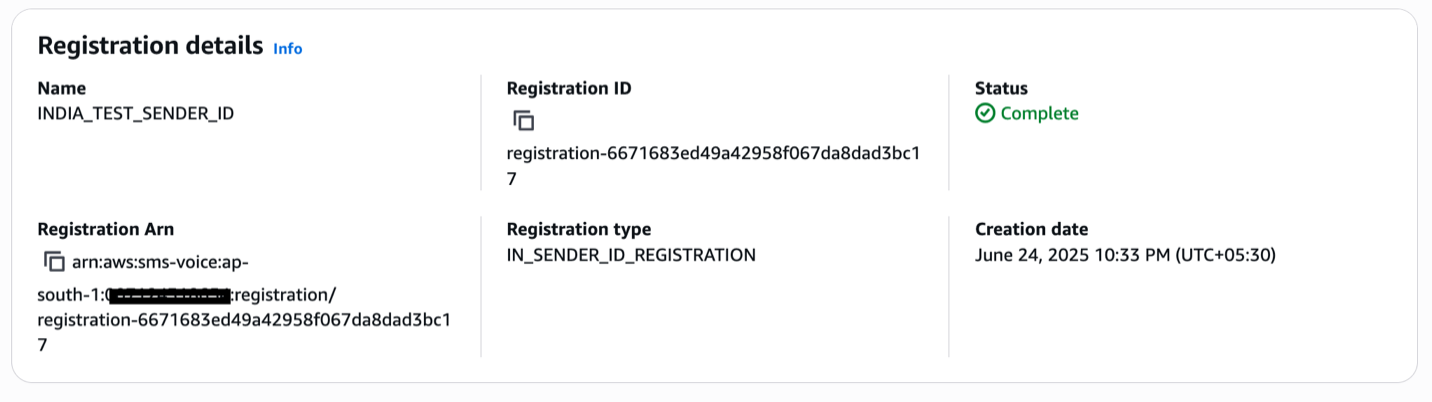
After submission, you can monitor the registration status. Upon approval, the status will show as Complete, as shown in the following screenshot.
The following screenshot shows that the registration requires updates before it can be approved.
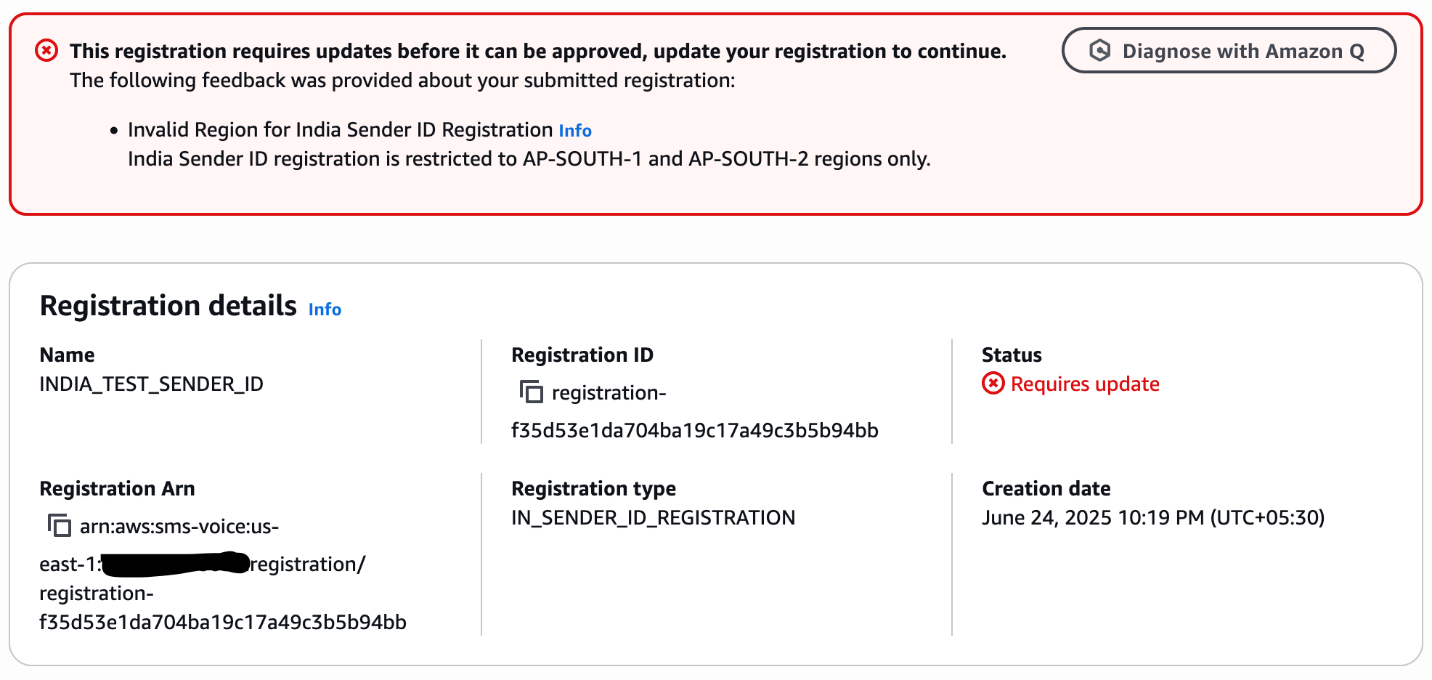
The error occurred because the registration code was run in an Region other than AP-SOUTH-1 or AP-SOUTH-2. To resolve this issue, delete the current registration and rerun the process in one of the supported Regions.
As mentioned earlier, DescribeRegistrationFieldDefinitions varies by country, because each has unique registration requirements and field specifications. You must modify this script according to your target country’s specific requirements. Refer to the API documentation for country-specific registration types and field definitions.
Check registration status
Check the status of your registration using either the AWS End User Messaging console or the DescribeRegistrations API. To use the console, choose Registrations under Configurations in the navigation pane.
The registration status for each request will initially display CREATED and will change to REVIEWING within 24 hours after submission. For more information about registration statuses, refer to Check a registration’s status in AWS End User Messaging SMS. If your registration status shows REQUIRES_UPDATES, the registration needs more information. You can edit and resubmit the request with the required information.
As noted earlier, third-party reviewers evaluate registrations. Expect 2-4 weeks for approval, and longer for sender IDs in some countries.
SMS program registrations for ISVs
Independent software vendors (ISVs) are positioned between AWS End User Messaging and the ISV’s end business customers. Though they might operate differently or offer different services, their requirements for SMS program registrations are largely the same. End business refers to your ISV customers. This is generally the entity that creates the messaging content, distributes it through your platform, and interacts with their end-users (message recipients).
SMS program registrations require end-user business information, not ISV information. This means the ISV must provide a mechanism for their end businesses to provide their information to be submitted for registration. ISVs and aggregators must provide information representing the customer entity sending messages to opted-in recipients. Amazon uses this information in accordance with all applicable obligations, and to verify the end-user is a legitimate business. Amazon will not contact the end-business user with the information provided.
Conclusion
In this post, we showed how to automate the sender ID registration process using Python scripts and AWS End User Messaging APIs. Using these APIs can significantly improve efficiency and reduce manual errors. For additional guidance, refer to automating AWS End User Messaging US Toll-Free Number registrations, Automate AWS End User Messaging US toll-free Number Registrations, How to Register a Sender ID Using APIs with AWS End User Messaging, and the AWS End User Messaging V2 API Reference.
About the authors