AWS Messaging Blog
Building a Scalable Messaging API with AWS End User Messaging and SES
Modern applications often need to send notifications across multiple channels either through email and/or SMS. However, building a reliable messaging system that manages templates, handles failures gracefully, scales, and maintains security can be challenging. Following this guide, you’ll learn how to build a template manager and messaging API using API Gateway with JWT authentication for secure access, Amazon SQS for reliable message queuing, AWS Lambda for serverless processing, AWS End User Messaging for SMS, and Amazon Simple Email Service (SES) for email.
Architecture overview
You deploy a decoupled architecture that separates message ingestion from processing, providing resilience and scalability.
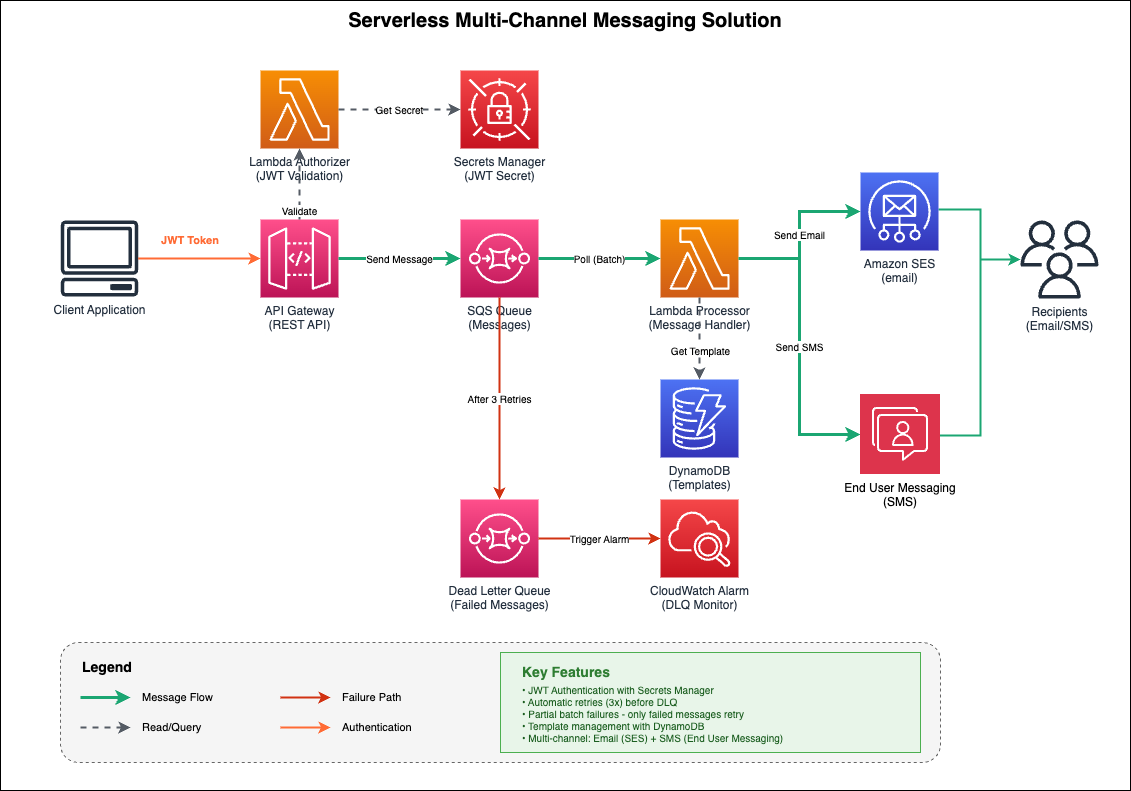
Fig. 1 Message Template Manager Architecture
Architecture flow
- Client Application sends authenticated requests with JWT tokens
- API Gateway validates requests using a Lambda Authorizer
- Lambda Authorizer retrieves the JWT secret from AWS Secrets Manager and validates the token
- API Gateway sends validated messages to the SQS Queue
- Lambda Processor polls messages from SQS in batches
- Lambda Processor retrieves message templates from DynamoDB (if needed)
- Lambda Processor sends emails through Amazon SES and SMS through AWS End User Messaging
- Failed messages (after 3 retries) move to the Dead Letter Queue
- CloudWatch Alarm triggers when messages arrive in the DLQ
If a message fails processing after three attempts, it moves to a Dead Letter Queue (DLQ) where it’s preserved for 14 days, and a CloudWatch alarm notifies you of the failure.
Key features
With this architecture, you get several important capabilities:
- JWT Authentication: Secure API access using JSON Web Tokens stored in AWS Secrets Manager
- Automatic Retries: Failed messages retry up to three times before moving to the DLQ
- Partial Batch Failures: Only failed messages retry, not the entire batch
- Template Management: Store reusable message templates in Amazon DynamoDB
- Multi-Channel Support: Send email through Amazon SES and SMS through AWS End User Messaging
- Configuration Set Support: Track delivery metrics and route events with per-message or deployment-level configuration sets
- Monitoring: CloudWatch alarms alert you when messages fail
Implementation details
1. API Gateway with JWT authorization
The API Gateway uses a Lambda authorizer to validate JWT tokens before allowing requests through:
The JWT secret is stored securely in AWS Secrets Manager and cached in the Lambda execution environment for performance.
2. SQS queue configuration
The SAM template defines two queues with appropriate settings:
The visibility timeout of 5 minutes prevents duplicate processing while giving the Lambda function enough time to complete. Messages that fail three times automatically move to the DLQ.
3. Lambda message processor
The Lambda function processes messages from SQS and sends them through the appropriate channel:
Configuration Sets for tracking and analytics:
Configuration Sets enable you to track delivery metrics, monitor costs, and route events to analytics pipelines. You can set defaults at deployment time and override them per-message:
- Deployment-level defaults: Set
SMSConfigurationSetparameter during deployment to apply to all messages - Per-message override: Include
ConfigurationSetNamein theSMSMessagepayload to use different tracking for specific messages
This flexibility lets you separate analytics by message type, campaign, or priority without requiring redeployment.
4. Template management with DynamoDB
Message templates are stored in DynamoDB for reusability:
You can update message content without redeploying code.
Template size considerations:
DynamoDB has a 400 KB limit per item, which includes all attribute names and values. For message templates, this means:
- Typical email templates (5-20 KB) fit comfortably
- SMS templates (< 1 KB) have no practical constraints
If you need to store templates larger than 400 KB, consider storing them in Amazon S3 and referencing the S3 object key in DynamoDB. This hybrid approach provides unlimited template size while maintaining fast lookups.
Prerequisites
Before deploying this solution, ensure you have the following:
- AWS End User Messaging SMS configured with a phone pool or origination identity for SMS sending
- Amazon SES configured with verified email identities (sender and recipient for sandbox mode)
- IAM permissions to create Lambda functions, API Gateway, SQS queues, DynamoDB tables, and Secrets Manager secrets
- Python 3.9 or later installed locally
- AWS SAM CLI installed (version 1.0 or later)
- AWS CLI installed and configured with your credentials
- An active AWS account with appropriate permissions
Deployment
You use AWS SAM for infrastructure as code. Deploy with these commands:
During deployment, you’ll set a JWT secret that’s stored in AWS Secrets Manager. Use a strong, random secret for production:
Usage example
Once deployed, send messages by making authenticated API requests:
Using Configuration Sets:
The example above shows optional ConfigurationSetName parameters for both email and SMS. These enable:
- Delivery tracking: Monitor delivery rates, failures, and bounce metrics
- Cost monitoring: Track spending per campaign or message type
- Event routing: Send delivery events to CloudWatch, Kinesis, or SNS for analytics
- Segmented metrics: Separate analytics by use case, priority, or customer segment
If you don’t specify a ConfigurationSetName in the request, the system uses the deployment-level default (if configured).
Monitoring and operations
CloudWatch alarms
The solution includes a CloudWatch alarm that triggers when messages arrive in the DLQ:
Handling failed messages
When messages fail, you can inspect them in the DLQ and redrive them back to the main queue after fixing the issue:
Viewing logs
Lambda automatically logs to CloudWatch Logs:
Cost considerations
For 1 million messages per month estimated costs are:
| Service | Usage | Cost |
| API Gateway | 1M requests | $3.50 |
| Amazon SQS | 1M messages | $0.40 |
| AWS Lambda | 1M invocations (128MB, 1s avg) | $2.50 |
| Amazon SES | 1M emails | $100.00 |
| AWS End User Messaging SMS | 1M SMS | $ Varies based on destination |
Note: The serverless architecture means you only pay for what you use, with no minimum fees or upfront costs.
Security best practices
This solution follows several security best practices:
- JWT Authentication: All API requests require valid JWT tokens
- Secrets Manager: JWT secrets are stored encrypted in AWS Secrets Manager
- IAM Least Privilege: Each Lambda function has only the permissions it needs
- HTTPS Only: API Gateway enforces HTTPS for all requests
- Token Caching: Authorization decisions are cached for 5 minutes to reduce latency
Clean up
To avoid incurring ongoing charges, delete the resources created by this solution when you no longer need them:
- If you configured AWS End User Messaging phone pools or origination identities for this solution, remove them from the End User Messaging console
- If you created Amazon SES email identities specifically for this solution, remove them from the SES console
- Verify that all resources (Lambda functions, API Gateway, SQS queues, DynamoDB table, Secrets Manager secret) have been removed in the AWS Management Console
- Delete the CloudFormation stack by running:
sam delete --stack-name <your-stack-name>
Conclusion
With this architecture, you can build a production-ready messaging API using AWS serverless services. The decoupled design gives you resilience through automatic retries and dead letter queues, while the serverless approach eliminates infrastructure management and scales automatically.
The complete solution is deployable through AWS SAM and includes:
- JWT authentication with AWS Secrets Manager
- Multi-channel messaging (email and SMS)
- Template management with DynamoDB
- Configuration Set support for tracking and analytics
- Comprehensive monitoring and alerting
- Automatic retry and failure handling
You can extend this architecture by adding more channels (push notifications, webhooks), implementing message scheduling, or integrating with Amazon EventBridge for event-driven workflows.
Additional resources
- Amazon SQS Developer Guide
- AWS Lambda Developer Guide
- Amazon SES Developer Guide
- AWS End User Messaging SMS Documentation
- API Gateway Lambda Authorizers
- AWS SAM Documentation
The complete source code for this solution is available in the accompanying GitHub repository, including SAM templates, Lambda functions, and deployment scripts.