AWS Messaging Blog

Establishing finops management: Integrating AWS Budgets with WhatsApp using AWS End User Messaging

Managing cloud costs effectively is a critical concern for organizations of all sizes. While AWS Budgets provides powerful tools to set spending thresholds and receive notifications, these alerts traditionally arrive through email or through AWS Management Console notifications. These traditional notification methods face several challenges when managing cloud costs:

  • Email notifications might not be seen immediately
  • Important budget alerts can get lost in crowded inboxes
  • Team members might not have immediate access to their email or the console
  • Global teams need accessible alerting mechanisms that work across time zones

Today, we’re sharing a solution that brings AWS Budgets alerts directly to your WhatsApp using AWS End User Messaging—enabling real-time cost awareness and faster response to budget thresholds wherever you are.

Overview of solution

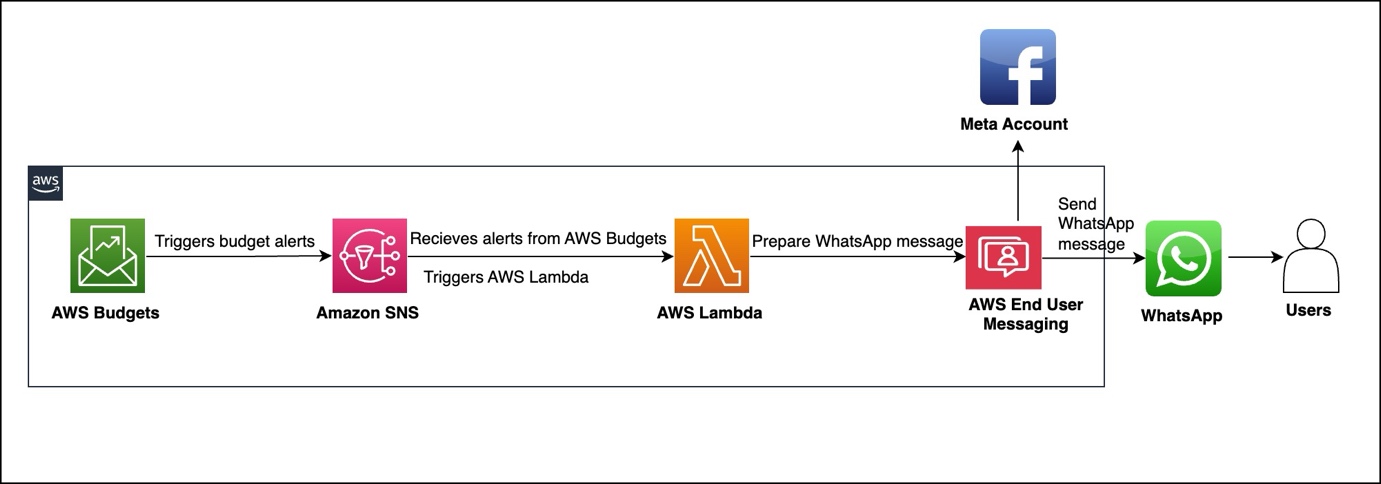
Our solution integrates AWS Budgets with WhatsApp messaging using AWS End User Messaging, AWS Lambda, and Amazon Simple Notification Service (Amazon SNS). When a budget threshold is crossed, the alert is processed and delivered as a formatted WhatsApp message to designated recipients.

The architecture, shown in the following figure, consists of four main AWS services to deliver budget alerts. AWS Budgets tracks expenses against your defined thresholds. When expenses exceed these thresholds, Amazon SNS receives an alert. An AWS Lambda function processes this alert and sends it through AWS End User Messaging to WhatsApp. Users then receive actionable budget notifications directly on their WhatsApp.
Billing and Cost Management data, which AWS Budgets uses to monitor resources, is updated at least once per day. Keep in mind that budget information and associated alerts are updated and sent according to this data refresh cadence. In a budget period,

notifications are triggered every time the notification state goes from OK to Exceeded (when the threshold is exceeded). If the budget stays in Exceeded state in the same budget period, AWS Budgets doesn’t send an additional alert.

Prerequisites

Implementation requires an AWS account with appropriate permissions for AWS CloudFormation, Lambda, Amazon SNS, and AWS Budgets. You must also have a WhatsApp Business Account integrated with AWS End User Messaging Social and the WhatsApp phone number ID from the AWS End User Messaging console. For instructions to locate this information, see View a phone number’s ID in AWS End User Messaging Social.

For more information about how to set up WhatsApp using AWS End User Messaging Social, see Automate workflows with WhatsApp using AWS End User Messaging Social.

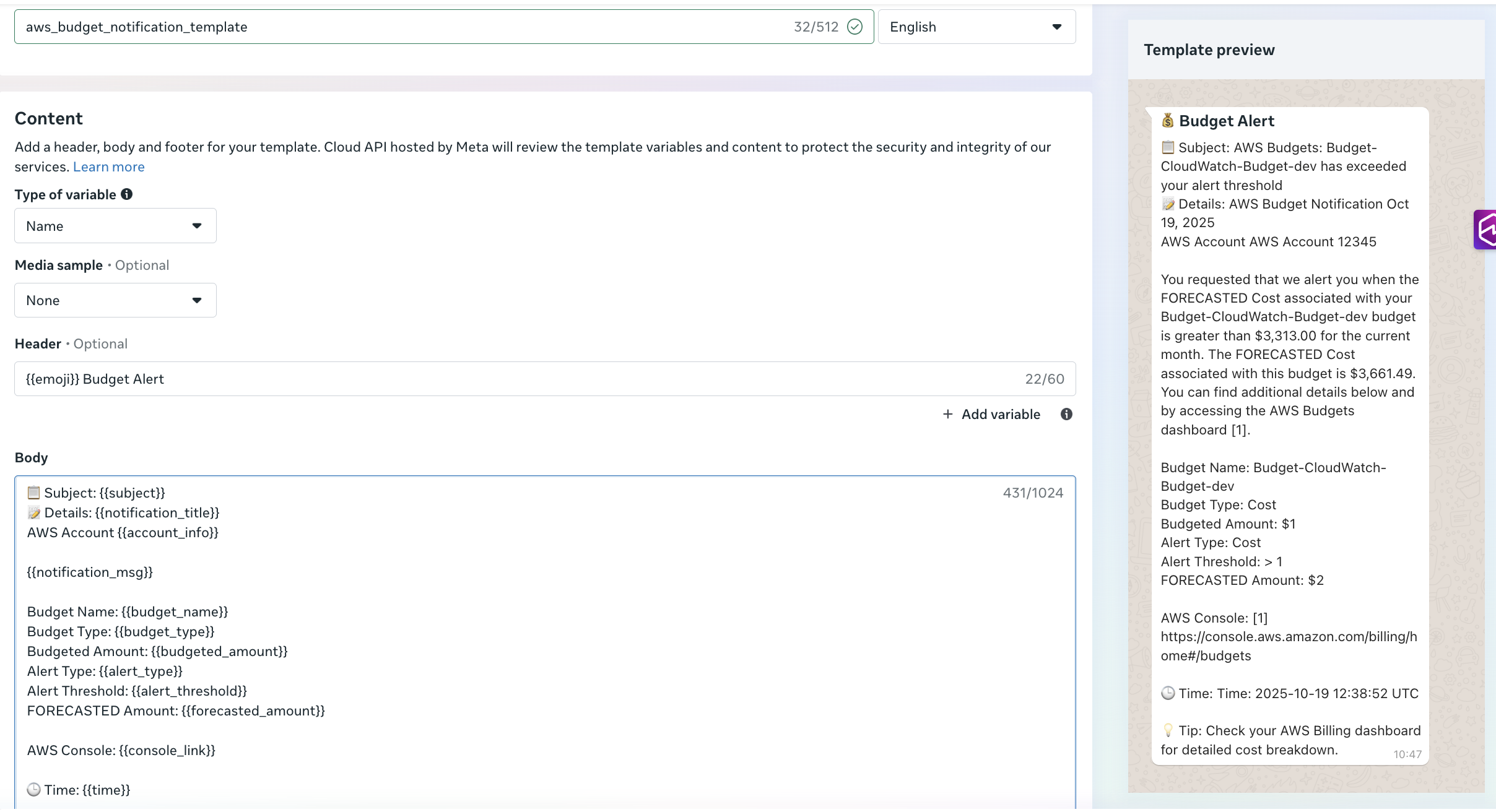
Before you deploy this solution, create an approved utility template in your Meta account named aws_budgets_notification_template(as shown in the following screenshot). Alternatively, use your preferred template name and modify the Lambda function code accordingly.
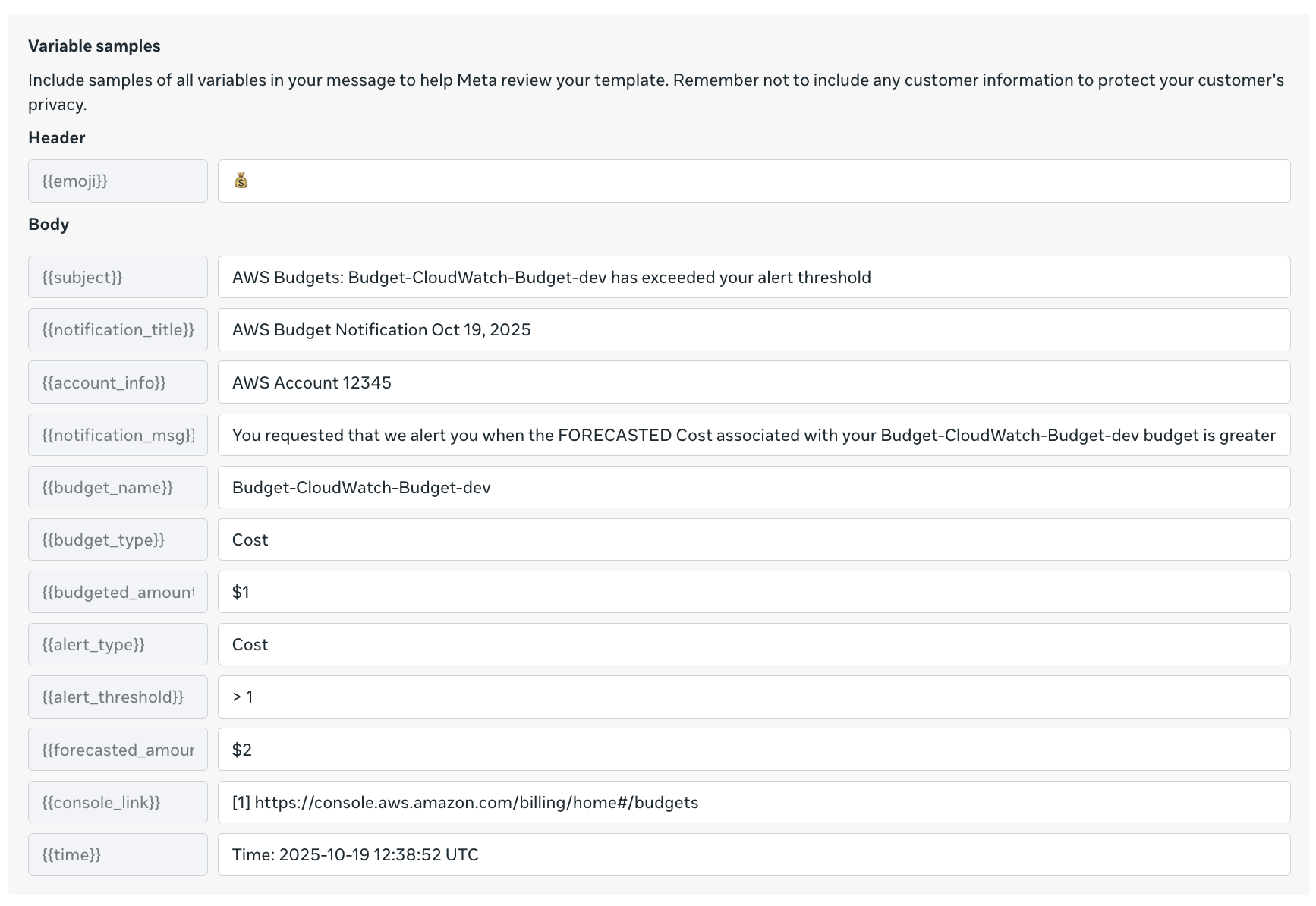
The preceding figure shows variable samples that can be used while creating a message template. You can also use the following AWS Command Line Interface (AWS CLI) command to create the messaging template-

aws socialmessaging create-whatsapp-message-template \
  --region <region> \
  --id <waba-id> \
  --template-definition "$(echo '{
    "name": "aws_budgets_notification_template",
    "language": "en",
    "category": "UTILITY",
    "parameter_format": "named",
    "components": [
      {
        "type": "HEADER",
        "format": "TEXT",
        "text": "{{emoji}} Budget Alert",
        "example": {
          "header_text_named_params": [
            {"param_name": "emoji", "example": "💰"}
          ]
        }
      },
      {
        "type": "BODY",
        "text": "Subject: {{subject}}\\nDetails: {{notification_title}}\\nAWS Account {{account_info}}\\n\\n{{notification_msg}}\\n\\nBudget Name: {{budget_name}}\\nBudget Type: {{budget_type}}\\nBudgeted Amount: {{budgeted_amount}}\\nAlert Type: {{alert_type}}\\nAlert Threshold: {{alert_threshold}}\\nFORECASTED Amount: {{forecasted_amount}}\\n\\nAWS Console: {{console_link}}\\n\\nTime: {{time}}\\n\\nTip: Check your AWS Billing Dashboard for detailed cost breakdown",
        "example": {
          "body_text_named_params": [
            {"param_name": "subject", "example": "AWS Budgets: Budget-Cloudwatch-budget-dev has exceeded your alert threshold"},
            {"param_name": "notification_title", "example": "AWS Budget Notification Oct 19, 2025"},
            {"param_name": "account_info", "example": "AWS Account 12345"},
            {"param_name": "notification_msg", "example": "You requested that we alert you when the FORECASTED Cost associated with your Budget-Cloudwatch-dev Budget is greater"},
            {"param_name": "budget_name", "example": "Budget-Cloudwatch-budget-dev"},
            {"param_name": "budget_type", "example": "Cost"},
            {"param_name": "budgeted_amount", "example": "$1"},
            {"param_name": "alert_type", "example": "Cost"},
            {"param_name": "alert_threshold", "example": "> 1"},
            {"param_name": "forecasted_amount", "example": "$2"},
            {"param_name": "console_link", "example": "https://console.aws.amazon.com/billing/home#/budgets"},
            {"param_name": "time", "example": "2025-10-19 12:38:52 UTC"}
          ]
        }
      }
    ]
  }' | base64)"

You can confirm the template approval status and type in the Meta portal.

Solution walkthrough

The core component consists of a Python-based Lambda function that processes Budget alerts and formats them for WhatsApp delivery. The function receives SNS events containing budget alerts data, extracts relevant information, formats contextual messages, and delivers notifications through AWS End User Messaging Social.The following function shows an example to parse the SNS message content:

 def process_notification(record):
"""Process SNS notification and send WhatsApp message"""
sns_message = record['Sns']
subject = sns_message.get('Subject', 'AWS Notification')
message_body = sns_message.get('Message', '')

logger.info(f"Processing notification - Subject: {subject}")
process_budget_notification(subject, message_body)

The following example demonstrates how to format alert information—including subject, details, and timestamp—and deliver the message to WhatsApp.

#Create template message with parsed values
template_name = "aws_budgets_notification_template"
template_message = {
    "name": template_name,
    "language": {
        "code": "en"
    },
    "components": [
        {
            "type": "header",
            "parameters": [{
                "type": "text",
                "parameter_name": "emoji",
                "text": "💰"
            }]
        },
        {
            "type": "body",
            "parameters": [
                {
                    "type": "text",
                    "parameter_name": "subject",
                    "text": subject
                },
                {
                    "type": "text",
                    "parameter_name": "notification_title",
                    "text": notification_title
                },
                {
                    "type": "text",
                    "parameter_name": "account_info",
                    "text": f"AWS Account {account_number}"
                },
                {
                    "type": "text",
                    "parameter_name": "notification_msg",
                    "text": notification_msg + "."
                },
                {
                    "type": "text",
                    "parameter_name": "budget_name",
                    "text": budget_details.get('Budget Name', '')
                },
                {
                    "type": "text",
                    "parameter_name": "budget_type",
                    "text": budget_details.get('Budget Type', '')
                },
                {
                    "type": "text",
                    "parameter_name": "budgeted_amount",
                    "text": budget_details.get('Budgeted Amount', '')
                },
                {
                    "type": "text",
                    "parameter_name": "alert_type",
                    "text": budget_details.get('Alert Type', '')
                },
                {
                    "type": "text",
                    "parameter_name": "alert_threshold",
                    "text": budget_details.get('Alert Threshold', '')
                },
                {
                    "type": "text",
                    "parameter_name": "forecasted_amount",
                    "text": budget_details.get('FORECASTED Amount', '')
                },
                {
                    "type": "text",
                    "parameter_name": "console_link",
                    "text": "https://console.aws.amazon.com/billing/home#/budgets"
                },
                {
                    "type": "text",
                    "parameter_name": "time",
                    "text": datetime.now().strftime('%Y-%m-%d %H:%M:%S UTC')
                }
            ]
        }
    ]
}
send_whatsapp_message(template_message)

The send_whatsapp_message function uses AWS End User Messaging Social to deliver formatted messages through the socialmessaging client, as shown in the following example:

def send_whatsapp_message(message):
  client = boto3.client('socialmessaging')
  # Get environment variables
  phone_number_id = os.environ.get('WHATSAPP_PHONE_NUMBER_ID')
  recipient = os.environ.get('ALERT_RECIPIENT')
                    
# Prepare message object
  message_object = {
"messaging_product": "whatsapp",
"recipient_type": "individual",
"to": recipient,
"type": "template",
"template": message
}
  # Send message
response = client.send_whatsapp_message(
originationPhoneNumberId=phone_number_id,
metaApiVersion="v20.0",
message=bytes(json.dumps(message_object), "utf-8")  
)

Deploying the solution

The solution uses AWS CloudFormation for infrastructure as code (IaC) deployment. The main template creates an SNS topic for alert notifications, a Lambda function for message processing, and required AWS Identity and Access Management (IAM) roles with least-privilege permissions.

The CloudFormation template requires a recipient number with an active WhatsApp account to receive alert notifications as messages. The template also requires the WhatsApp phone number ID retrieved from the AWS End User Messaging Social console, as noted in the prerequisites. The template must be deployed in the same AWS Region as AWS End User Messaging Social. See the following code:

aws cloudformation deploy \
  --template-file <> \
  --stack-name budget-eum-whatsapp-alerts \
  --parameter-overrides \
    ActualSpendThreshold= \
    AlertRecipient=<+1234567890> \
    BudgetAmount=<Budget Amount e.g. 3000> \
    Environment= \
    ForecastedSpendThreshold= \
    WhatsAppPhoneNumberId= \
  --capabilities CAPABILITY_NAMED_IAM \
  --region <EUM-region>

Testing the solution

The solution can be tested and validated using the SNS topic created by the CloudFormation stack. Use the following AWS CLI command to publish a test message to the SNS topic:

aws sns publish \
  --topic-arn arn:aws:sns:<region>:<account>:<topic-name> \
  --subject "[Test] AWS Budget Alert: Budget-Alert-EUM has exceeded 80% of your budgeted amount" \
  --message "AWS Budget Notification - Your budget has exceeded the alert threshold
AWS Account 123456789012
Budget Name: Budget-Alert-EUM
Budget Type: Cost
Budgeted Amount: $100.00
Alert Type: ACTUAL
Alert Threshold: 80%
FORECASTED Amount: $85.00
You have exceeded 80% of your budget for this period" \
  --region <region>

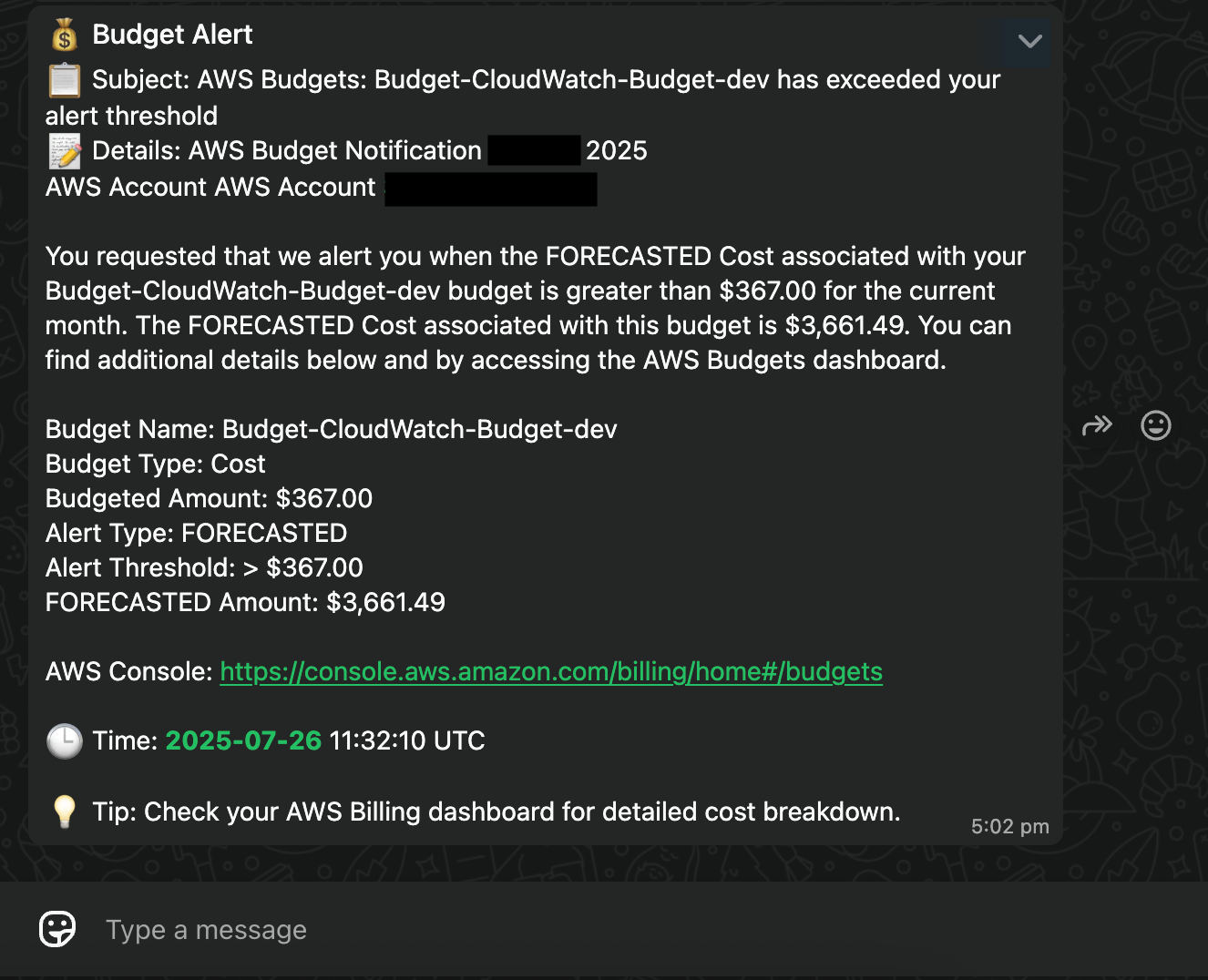
The SNS message triggers the Lambda function, which sends the alert to your configured WhatsApp recipient, as shown in the following screenshot.
Clean up

Use the following steps to clean up your resources when you no longer need this solution:

  1. Delete the CloudFormation stack deployed in this solution: budget-eum-whatsapp-alerts
  2. Delete the template in your Meta account.

Conclusion

Integrating AWS Budgets alerts with WhatsApp notifications represents a significant step forward in modern cost monitoring. By using AWS End User Messaging Social, you can send teams critical alerts through their preferred communication channel while maintaining the reliability and scalability of AWS services. The solution’s modular architecture, basic yet effective security model, and cost-effective design make it suitable for organizations of various sizes.


About the authors

Ruchikka Chaudhary

Ruchikka Chaudhary

Ruchikka is a Solutions Architect II at Amazon Web Services (AWS), focusing on worldwide public sector. She specializes in helping customers optimize their cloud infrastructure and adopt various compute based solutions. With extensive experience in AWS, she has successfully guided organizations through their digital transformation journeys, particularly in areas of high-performance computing and communication services. Beyond her technical work, she enjoys reading, sketching, and exploring the world through travel.

Preenesh Nayanasudhan

Preenesh Nayanasudhan

Preenesh Nayanasudhan is a Senior Solutions Architect with AWS supporting Global Financial Services customers. He has worked with wide range of diverse customers and witnessed firsthand how AWS technologies are making a profound difference to their business and end customers with significant expertise around Generative AI & Agentic AI

Rommel Sunga

Rommel Sunga

Rommel is a Senior Solutions Architect at AWS, based in Singapore. He specializes in AWS End User Messaging and Amazon Simple Email Service, helping customers build scalable and reliable communication solutions. With expertise in cloud-based messaging architectures, he focuses on enabling organizations to enhance their customer engagement.