Migration & Modernization
Accelerating migration assessments and planning with AWS Transform
Introduction
Migration assessment and planning is rarely a single-pass exercise. Inventory data is incomplete; assumptions shift as more stakeholders get involved, and new scenarios emerge as the strategy evolves. Traditional assessment workflows struggle with this reality because they treat each assessment as a one-shot report: collect data, run analysis, deliver a static business case, and repeat the full cycle every time an input changes. AWS Transform is purpose-built for how migration assessment and planning actually works. Using agentic AI, it generates a data-driven Total Cost of Ownership (TCO) business case in minutes from a server inventory, finding the best-fit Amazon EC2 instance for each server and producing pricing options, licensing analysis, and actionable next steps. From there, AWS Transform guides you in refining the business case through natural language chat: add missing inventory, adjust on-premises costs, model alternative AWS services, change assumptions, and explore what-if scenarios without ever re-running the full assessment. Right-sizing the migration on the way in can also help reduce costs, and the resulting output can be used to help qualify for AWS programs and incentives, such as the Migration Acceleration Program (MAP).
This post walks through what AWS Transform assessments can do today, the workflows it unlocks for migration planning, and what is coming next.
Bring the data you already have
AWS Transform assessments supports a broad set of input formats so that you can work with the data you already have, rather than running a new collection every time an assessment is needed. Supported inputs include:
- AWS Transform discovery tool exports
- RVTools exports
- AWS Migration Portfolio Assessment (MPA) imports
- AWS Migration Evaluator exports
- NetApp Data Infrastructure Insights (DII) exports
- ModelizeIT, Cloudamize, Matilda Cloud, and Device42 exports
- Configuration Management Database (CMDB) data
Many customers have discovery data from previous engagements, third-party tools, or internal CMDBs. Reusing that data shortens the time to a business case and avoids the overhead of a new collection cycle. If you need to accelerate collection from a VMware environment, you can also use the PowerCLI-based collector described in Accelerating VMware Cloud Migration with AWS Transform and PowerCLI, which generates outputs in AWS Transform-compatible formats directly from vCenter.
Interactive, chat-based assessments
Once your inventory is uploaded and the initial business case is generated, the assessment becomes a conversation rather than a static report. You can open the AWS Transform chat and ask the AI agent to adjust the inputs, add missing context, or test alternative scenarios. The agent updates the business case in place, so you can see the effect on cost, licensing, and recommendations immediately.
Three patterns come up most often in practice.
Adjusting on-premises costs. Most customers know their on-premises infrastructure has hidden costs that are not reflected in a server inventory file. Colo rent, networking, custom vendor deals, and licensing agreements all shape the real TCO. The chat lets you add these directly. For example: “My on-prem networking costs are much higher, add 200K a year to networking costs.” Or: “My data center is a colo and I pay 10M a year rent, add this to my on-prem costs.” Or: “I have a custom deal and my compute costs are much cheaper, half them.”
Modeling additional AWS services. If part of your migration plan includes services that are not EC2, you can describe them in the chat. For example: “I am going to migrate the servers svr1, srv2, and svr3 to Amazon Connect. Remove those three servers from EC2 and add 10K a month in Amazon Connect costs.” The agent removes those workloads from the EC2 model and folds the additional service cost into the overall business case.
Adding inventory that the export missed. When a server is missing from the export file, you no longer have to regenerate a new file and re-upload. You can ask the agent directly. For example: “There is a server missing from my inventory. It is called prod-server5, it runs SQL Server Standard Edition on Windows, and has 128 CPU cores and 256GB of RAM.” The agent adds the server to the assessment and updates the business case accordingly. The following image shows how you can add missing servers and model on-premises costs in a single chat prompt.
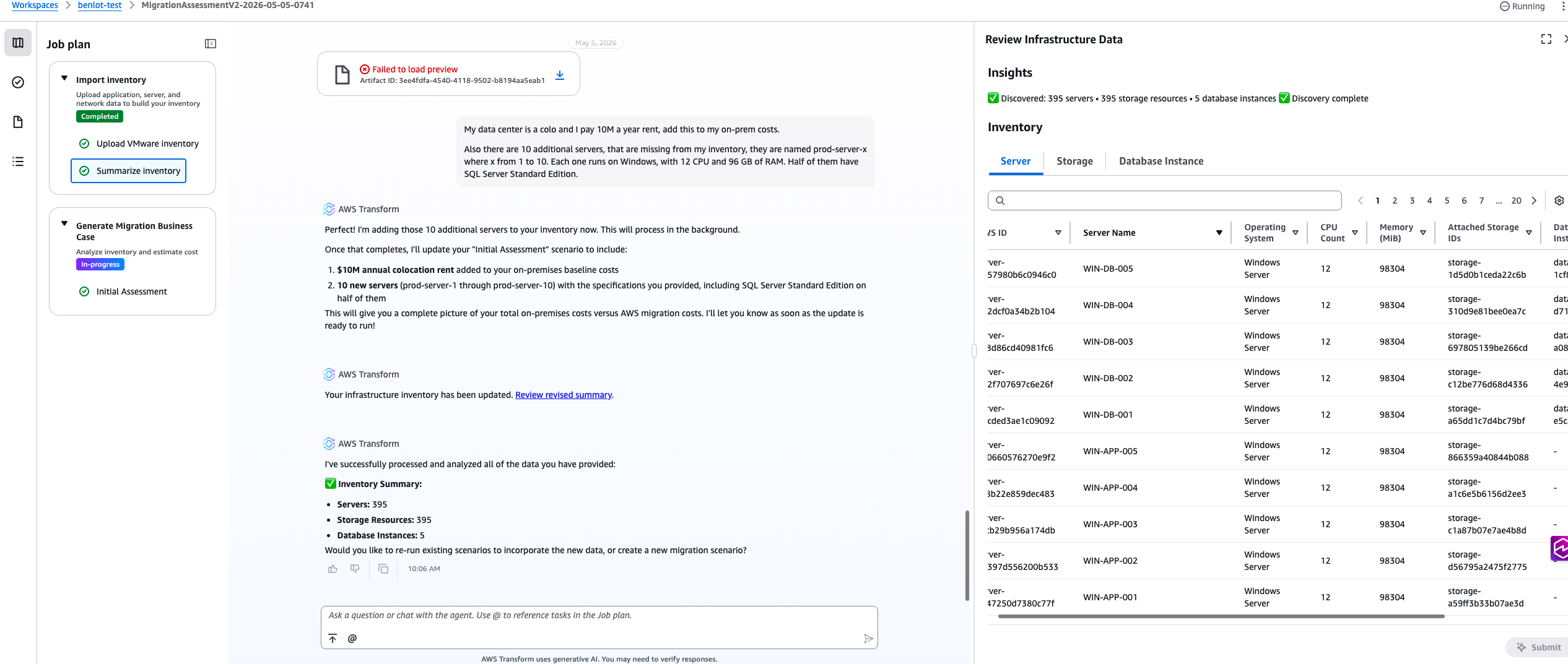
Figure 1: Using chat to add 10 missing servers and model on-premises colo costs in a single prompt
What-if scenarios
Not every assessment starts with a complete inventory. In the early stages of a migration conversation, customers often have rough estimates and directional numbers rather than a cleanly exported file. AWS Transform assessments supports estimations through chat, so you can generate a directional business case from informal descriptions.
For example: “How much would running 2000 large Linux servers with roughly 500TB of SAN storage cost? About 300 servers run MySQL. About 100 run Oracle.”
The agent generates a directional model based on reasonable defaults. From there, you can tighten the inputs as better data becomes available. This shortens the time between the first customer conversation and a useful number on the table, and it lets you engage when you are not yet ready to run a full collection. The following image illustrates this estimation workflow.
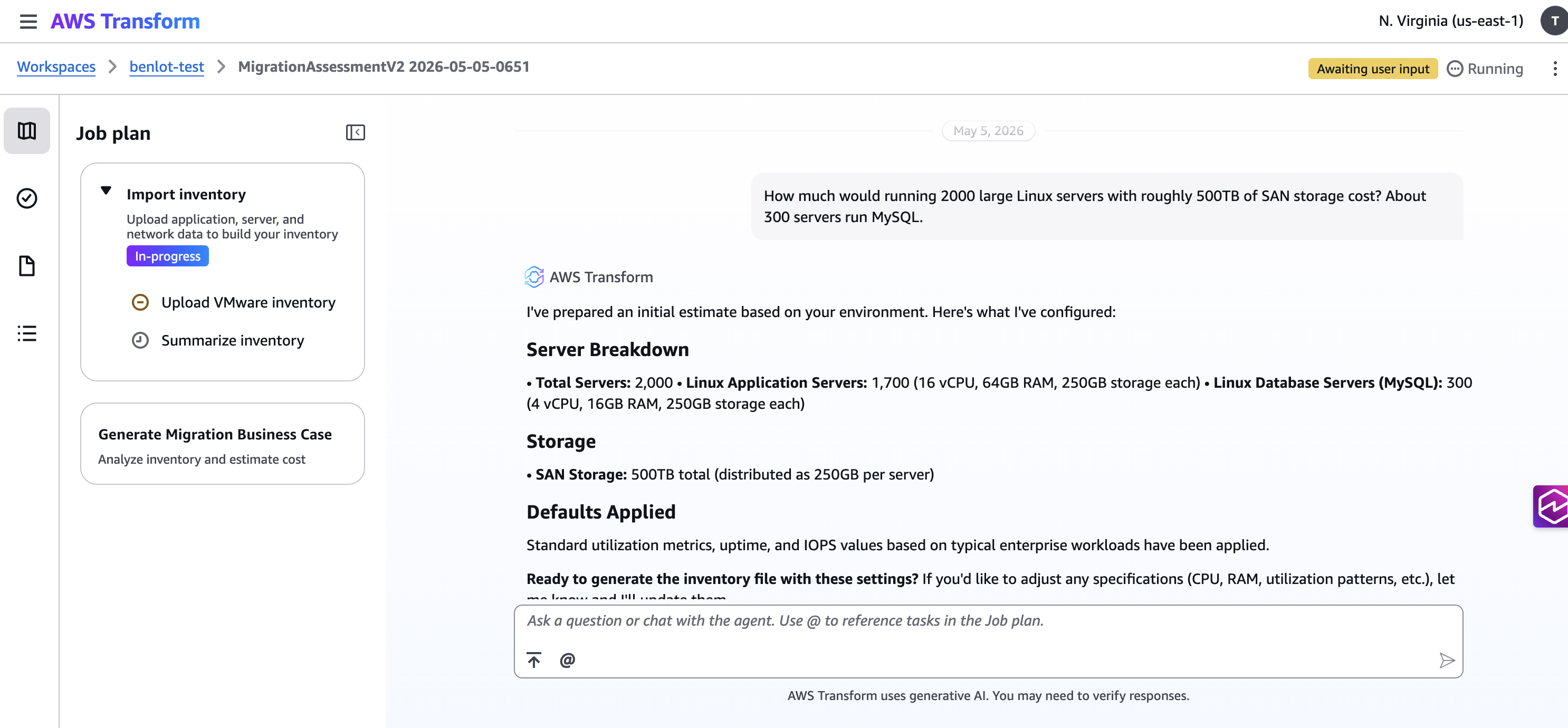
Figure 2: An estimation prompt describing 2,000 Linux servers and 500TB of storage
Customizable assumptions
Every assessment rests on assumptions: target Region, pricing model, licensing approach, utilization thresholds, tenancy, and more. AWS Transform assessments exposes those assumptions and lets you change them without leaving the assessment.
You can change the target AWS Region, toggle Microsoft Windows and SQL Server licensing between Bring Your Own License (BYOL) and License Included (LI) or even adjust utilization assumptions for right-sizing. Every change updates the business case in real time. This is particularly useful when preparing stakeholder reviews where different audiences want to see different pricing and licensing scenarios side by side.
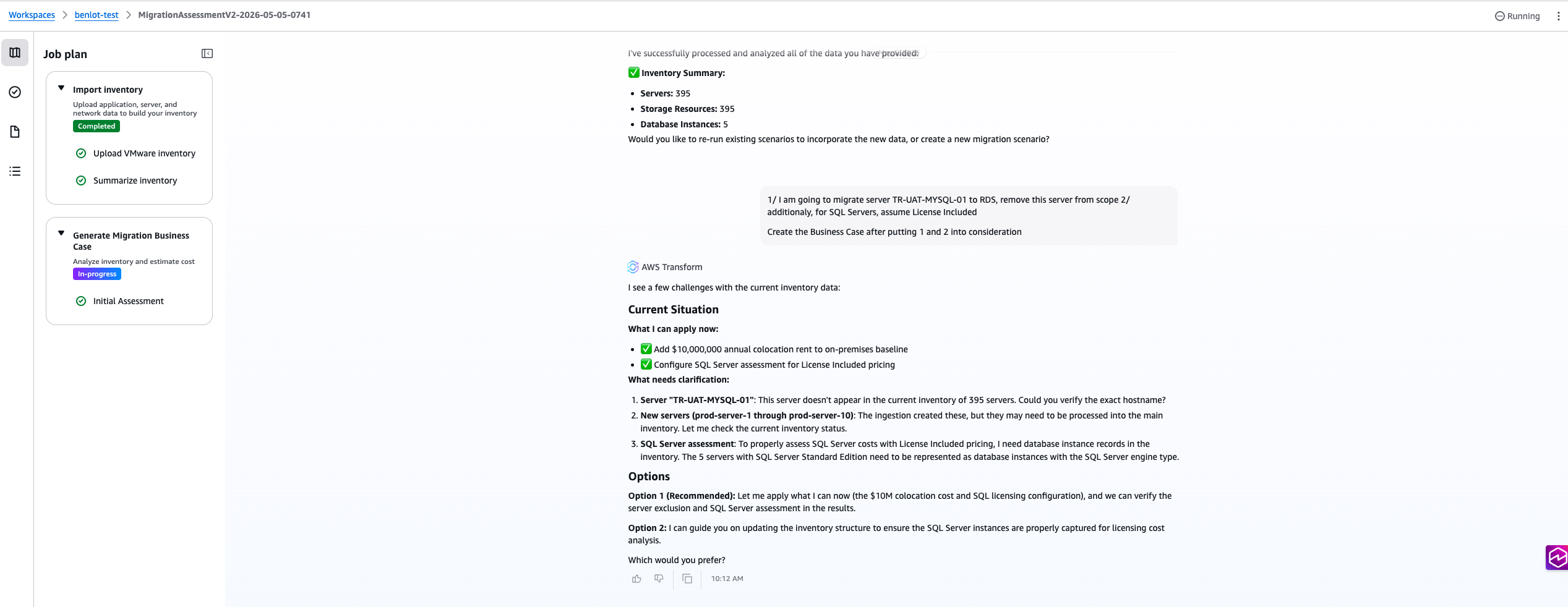
Figure 3: Removing servers from scope and switching SQL Server licensing to License Included through chat, with the business case updating in place
Broad workload coverage
AWS Transform assessments covers the workload categories that matter most in a typical enterprise migration:
- Compute: best-fit, lowest-cost Amazon EC2 instance recommendations for each server, with multiple pricing scenarios including On-Demand, Savings Plans, and Reserved Instances.
- Microsoft SQL Server: licensing edition detection, right-sizing recommendations, and cost comparison between Bring Your Own License (BYOL) and License Included models.
- Storage: detached storage modeling across Amazon Elastic Block Store (EBS), Amazon Simple Storage Service (S3), and Amazon FSx for NetApp ONTAP.
- Amazon WorkSpaces: modeling for end-user computing workloads that are candidates for Amazon WorkSpaces rather than EC2.
- On-premises pricing: richer on-premises cost modeling, including hardware refresh cycles and maintenance contracts, so the TCO comparison reflects the full cost of staying on-premises.
- VMware licensing: accounting for VMware licensing changes, including vSphere Foundation and VMware Cloud Foundation bundling.
- Sustainability: expected CO2e reduction analysis as part of the business case, consistent with the sustainability pillar of the AWS Well-Architected Framework.
- Cloud Economics business value: enrich your assessment with additional pillars of the Cloud Value Framework such as staff productivity, operational resilience, business agility.
Once the assessment is complete, AWS Transform generates a downloadable PDF business case summarizing the analysis, a detailed data export and an executive presentation. The report includes sections for compute recommendations, storage modeling, licensing scenarios, and cost comparisons, giving stakeholders ready-to-share documents for investment decisions. The following figures show sample pages from this output.
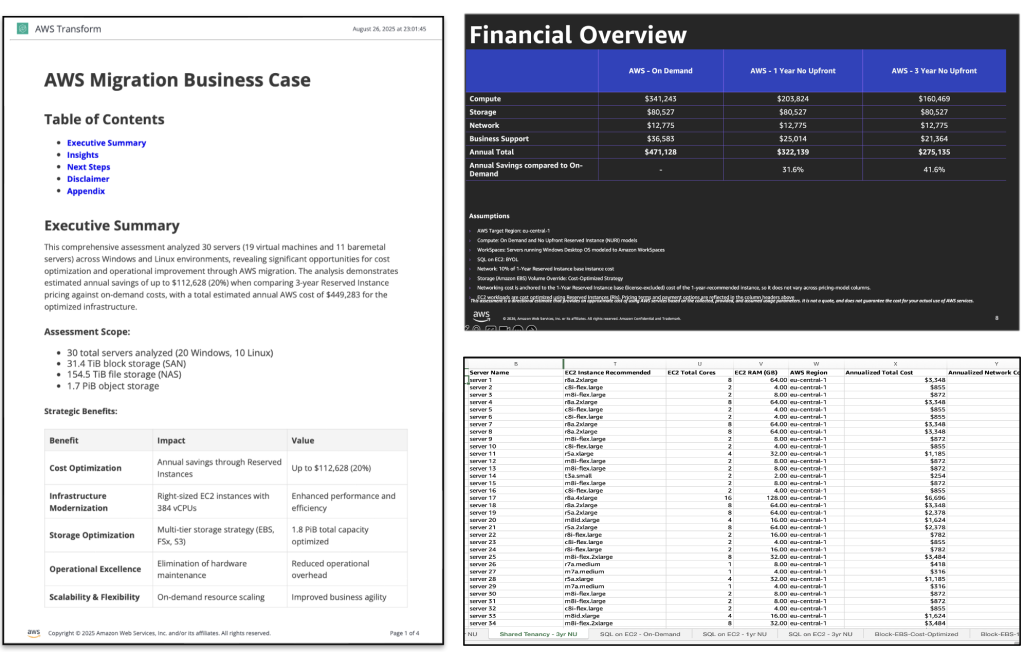
Figure 4: Business case PDF summary after uploading an inventory file, with sections for compute and storage in addition to the executive presentation
Conclusion
AWS Transform assessments turns migration planning from a static, multi-week spreadsheet exercise into an interactive workspace where the business case evolves with the conversation. You bring the data you already have, generate a directional TCO in minutes, and refine it through chat as the strategy takes shape. For organizations starting a migration conversation, that means less time waiting for the first number and more time discussing what the number means.
To learn more, visit the AWS Transform page or the user guide.
To get started with a migration assessment, access AWS Transform and upload a server inventory in any supported format, pick a target AWS Region and generate the business case. From there, use the chat to refine the inputs, adjust the assumptions, and explore scenarios until the numbers reflect the reality of your environment.