Migration & Modernization
Agile Migration Planning: Accelerate Wave Planning with AWS Transform
Planning is a critical phase of any cloud migration. You invest significant time coordinating across stakeholders and mapping dependencies to build detailed wave plans. Yet despite this effort, many plans quickly diverge from reality as infrastructure changes, applications get updated, and business priorities shift. An inaccurate plan carries real risk: a migration wave can fail due to an omitted dependency, an overlooked shared database, or a miscategorized application.
Historically, spreadsheets have been the tool for migration planning. These documents often span numerous worksheets to track dependency maps, application lists, and server specifications. The fundamental problem? As soon as a manual plan is completed, it is outdated. The challenge grows as data sources multiply. When data collected through discovery and assessment tools contradicts the data in your Configuration Management Database (CMDB), which source is correct? You spend days in reconciliation meetings, manually cross-referencing sources, and building custom tooling to merge data. By the time you finish, the infrastructure has changed again. That plan perfected over hours becomes a snapshot of a world that continues to change, and the problems follow you into execution. Emergency meetings are called when dependencies surface mid-migration, and delays compound. Manual migration planning works until it does not. By then, the project is already behind schedule.
AWS Transform changes this equation by treating migration planning as a dynamic, continuously evolving process rather than a static document. With human-in-the-loop (HITL), each AI-powered recommendation is reviewed, giving you confidence and ensuring that critical decisions always receive appropriate human oversight before an action is taken.
In this post, you will learn how to use AWS Transform to:
- Create dynamic wave plans that adapt to changing requirements
- Customize wave plans using natural language
- Move servers between move groups and rebalance wave plans
From Static Artifacts to Intelligent Planning
AWS Transform introduces an intelligent agent that automates discovery and migration planning, replacing manual data entry with an interactive planning experience that adapts as quickly as the business does, moving these artifacts beyond a static state.
One of AWS Transform’s powerful capabilities is ingesting a wide range of data. It takes in standard VMware environment technical exports like RVTools, and AWS Transform discovery tool exports. It also accepts inline input and CSV files, and can ingest and analyze unstructured content including:
- Meeting transcripts and notes
- Internal wiki pages and Markdown files
- Unstructured CMDB exports
The agent does more than just parsing these files; it understands context, allowing it to distinguish between servers running mission-critical applications and dev/test environments, based on how they are described in meeting notes and documentation.
From Servers to Applications
A wave plan is a prioritized set of move groups, where each move group contains one or more applications. Defining those applications accurately is where most plans fall short. AWS Transform uses its agentic intelligence to group servers into logical applications based on both technical and business logic. You interact with the agent using natural language to refine these groups, such as by following server naming conventions, which are available through basic virtual infrastructure inventory data, such as RVTools. When provided with environment naming conventions (e.g. PRD for Production, DEV for Development, ALP for Alpha, BTA for Beta, UAT for user acceptance testing), the agent groups the servers accordingly, combining technical discovery and business knowledge to create accurate application catalogs (Figure 1).
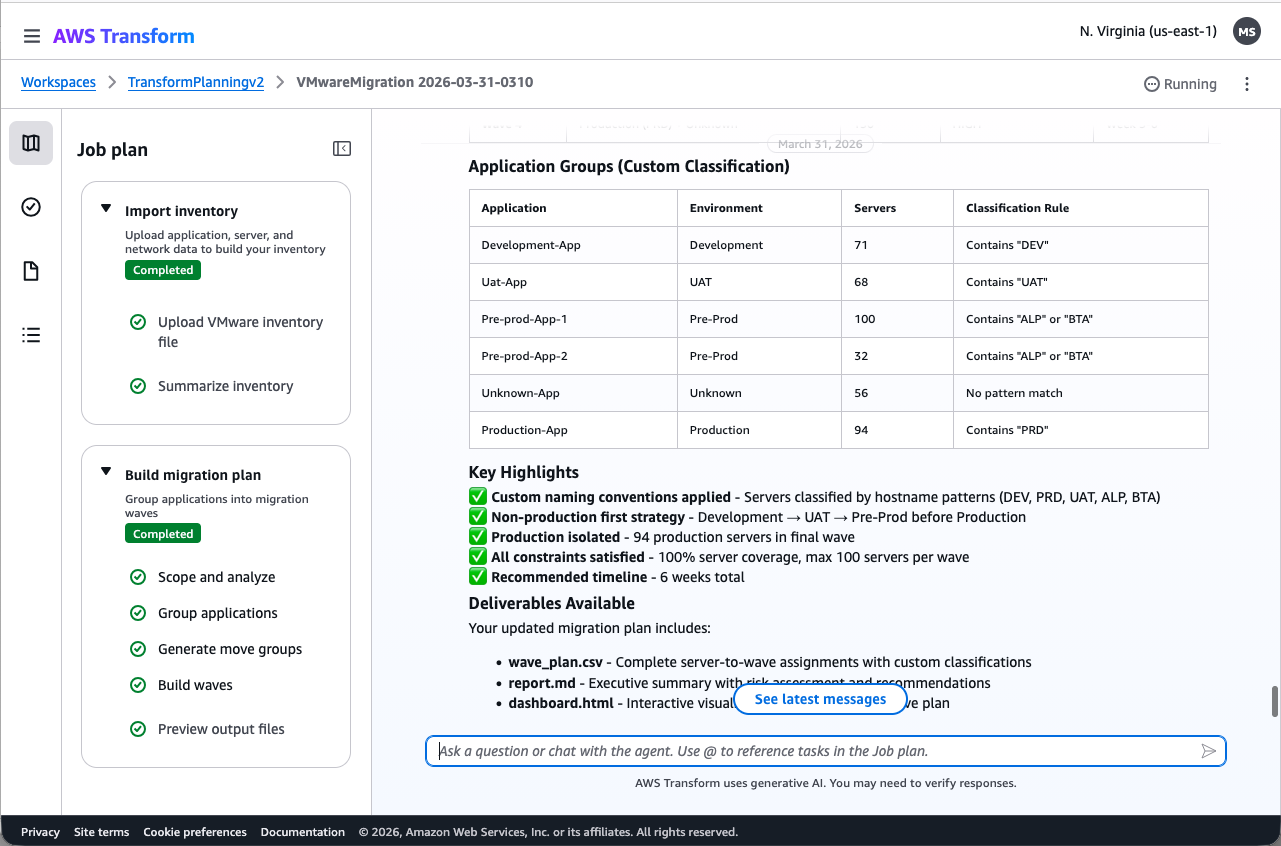
Figure 1: Application grouping after instructing the agent with proper naming conventions (PRD for Production, DEV for Development, ALP for Alpha, BTA for Beta, UAT for user acceptance testing)
Using the AWS Transform discovery tool, or other third-party discovery tools to collect network dependency data, unlocks additional capabilities. You instruct the agent to analyze this data: “Create a detailed network dependency analysis from the collected data.” The agent surfaces traffic patterns and shared database dependencies, enabling informed grouping decisions before finalizing the wave plan (Figure 2).
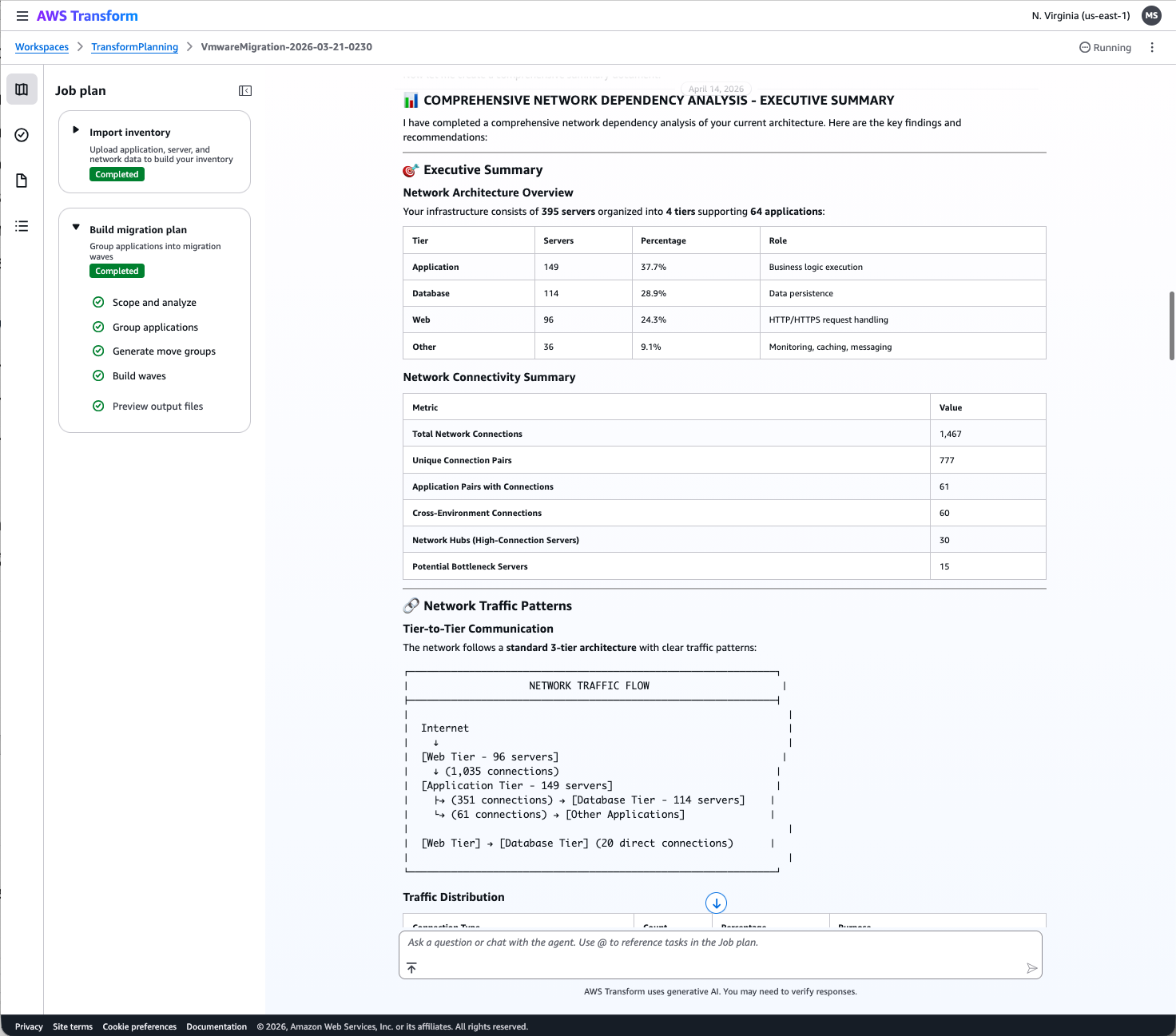
Figure 2: Comprehensive Network Dependency Analysis
Customizing Wave Plans
AWS Transform dynamically customizes and refines your wave plans by using natural language. Each wave reflects both business priorities and technical requirements, and AWS Transform understands complex commands for re-ordering your migration strategy.
Balancing Risk and Speed
If you need a faster timeline, such as a six-week data center exit, the agent can recalculate your move groups. It identifies where tasks can be run in parallel and combines similar environments to meet the deadline while considering your team’s actual work capacity (Figure 3).
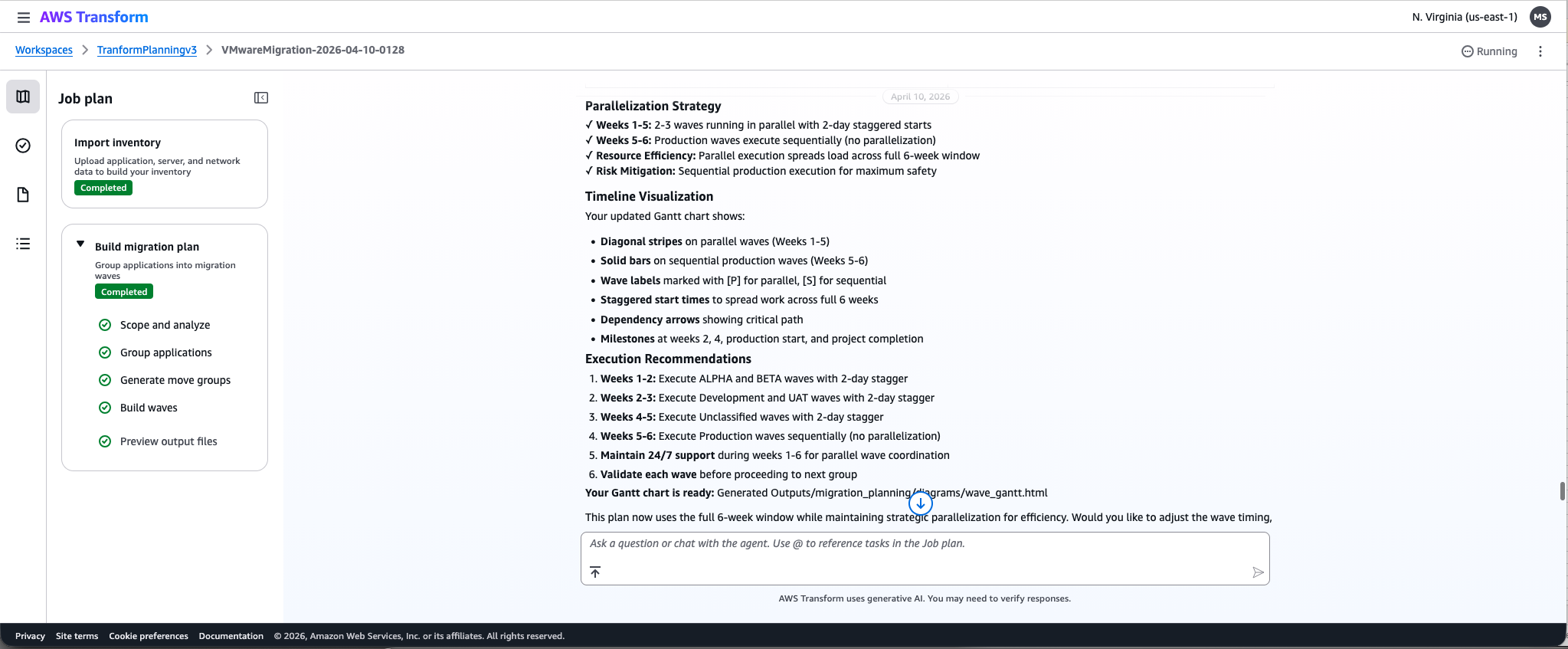
Figure 3: Recalculate move groups based on updated timelines
Business-driven Logic
Since the agent understands your unstructured data, you can make highly specific requests. For instance, you could ask the agent to “group all security-related applications to move together.” The agent scans your documentation, identifies the relevant applications, and regenerates the entire wave plan.
Moving servers between waves
Mid-migration, if specific servers need to move from one wave to another, you ask the agent to update the wave plans accordingly. In the example outlined below, the agent was instructed: “move servers with hostnames he-dev-app-01 and he-dev-app-02 from mg_0001 to mg_0002.” AWS Transform recalculated the wave plan and moved the servers to the requested move groups. No spreadsheet updates, no manual reconciliation, and no risk of human error (Figure 4).
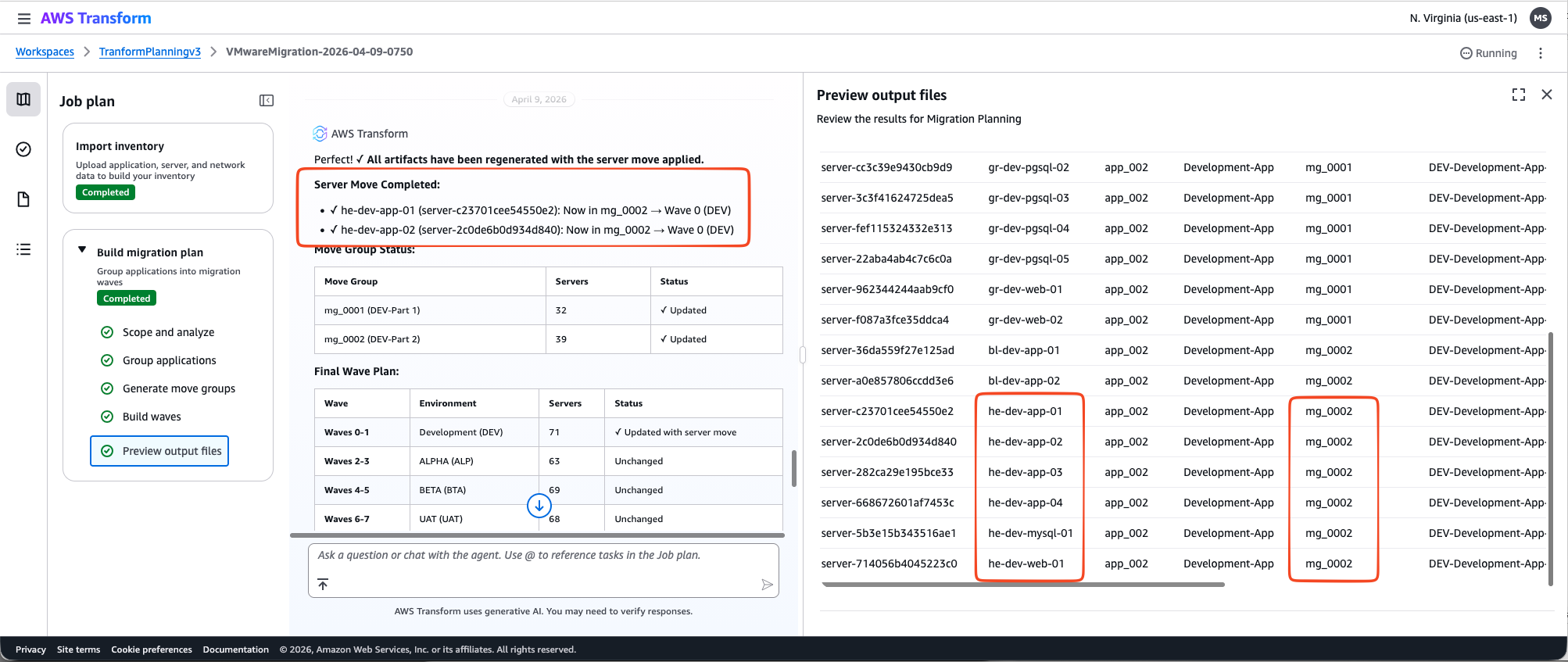
Figure 4: Moving servers between wave groups using natural language instructions
Conclusion
With AWS Transform, migration planning becomes an iterative process, and a migration plan develops into a continuously evolving strategy, not a static, point-in-time document. Whether you are planning a migration of 100 servers or 10,000, the real value of using AWS Transform for migration planning emerges when you encounter mid-flight changes: a compressed timeline, newly discovered dependencies, or shifting business priorities. It enables you to adjust and recalculate without starting from scratch. The real test of any migration plan is not whether it works today, but whether it can adapt when reality changes tomorrow. As early migration waves are completed, practical insights emerge about migration patterns and technical constraints. You can feed these learnings back into the AWS Transform agent through natural language instructions, and the agent rebalances the remaining waves accordingly, adjusting the timeline while maintaining application grouping logic and dependency relationships. To get started with dynamic wave planning in AWS Transform:
- Upload your server inventory (AWS Transform discovery tool exports, RVTools, CMDB exports, or CSV files) to AWS Transform
- Use natural language to group servers into applications and refine with your naming conventions
- Generate your first wave plan and customize it based on business priorities
AWS Transform is available at no cost to AWS customers. Try it at the AWS Transform console or contact your AWS account team to discuss how it can accelerate your migration journey.