Migration & Modernization
Consistent Code Modernization at Scale with AWS Transform Custom Knowledge Items
Introduction
AWS Transform Custom (ATX) automates code modernization at scale. What makes it different from running an AI coding assistant on each repo is that it learns. Each execution captures patterns, fixes, and edge cases as reusable knowledge, so transformations get faster and more reliable with every run.
If you’ve got hundreds of Java 8 repositories, Spring Boot 2.x apps with deprecated APIs, or x86-bound workloads that could run on AWS Graviton, this technical debt is the reason your team can’t ship faster. Doing it manually doesn’t scale: upgrading Java across hundreds of repos is repetitive work, and repetitive work at this scale invites inconsistency.
AWS Transform Custom uses agentic AI to automate these transformations. It ships with AWS-managed transformations for common scenarios and supports custom transformation definitions you build yourself. Compounding happens through knowledge items: reusable artifacts that capture patterns, fixes, and edge cases from each run so future runs can apply them automatically.
In this post, you will upgrade a sample Spring Boot project from Java 8 to 26, see how knowledge items are generated and managed, and apply that same transformation across a portfolio of repositories.
Getting Started
Let’s run a Java 8 to 26 upgrade on a real project to see how Transform Custom works in practice.
Prerequisites
- An AWS account with AWS Transform Custom access
- The ATX CLI installed and configured
- Java 8+, Java 26 and Maven installed (to build the sample project)
- Git installed
- Basic familiarity with Java and Maven
The scenario
We’re using aws-appconfig-java-sample, a Spring Boot application built on Java 8 with Maven. It relies on deprecated Java APIs and outdated framework versions, a representative modernization candidate.
Setup
Clone the repo:
git clone --depth 1 https://github.com/aws-samples/aws-appconfig-java-sample.gitMove into the directory:
cd aws-appconfig-java-sampleInstall local dependency:
mvn install:install-file \
-Dfile=./movie-service-utils/built-library/0_1_0/movie-service-utils-0.1.0.jar \
-DgroupId=com.amazonaws.samples \
-DartifactId=movie-service-utils \
-Dversion=0.1.0 \
-Dpackaging=jar
Verify it builds:
mvn clean compile -DskipTestsTransformation Definitions
A Transformation Definition (TD) is a reusable recipe that tells Transform Custom what to transform and how. It includes the source and target stacks, transformation patterns, coding standards, and any organizational knowledge you want the agent to follow. AWS provides managed TDs for common upgrades like Java version bumps. You can also build your own for whatever your organization needs.
Running a TD
There are two modes available: interactive and non-interactive. Interactive mode prompts you to confirm tool usage, review the plan, approve steps. Non-interactive (-x) runs everything without asking, which is what you would use in a CI pipeline or batch execution.
We’re running non-interactive here with -x and trusting all tools with -t. Be careful with -t; you may not want the agent triggering arbitrary tools in every context. The CLI command reference has the full list of options.
`AWS/java-version-upgrade` is the managed TD that upgrades Java projects to Java 26:
atx custom def exec -n "AWS/java-version-upgrade" -p . -c "mvn clean compile -DskipTests" -x -t -g "additionalPlanContext=The target Java version to upgrade to is Java 26"The outputs of the previous command are shown in the following images.
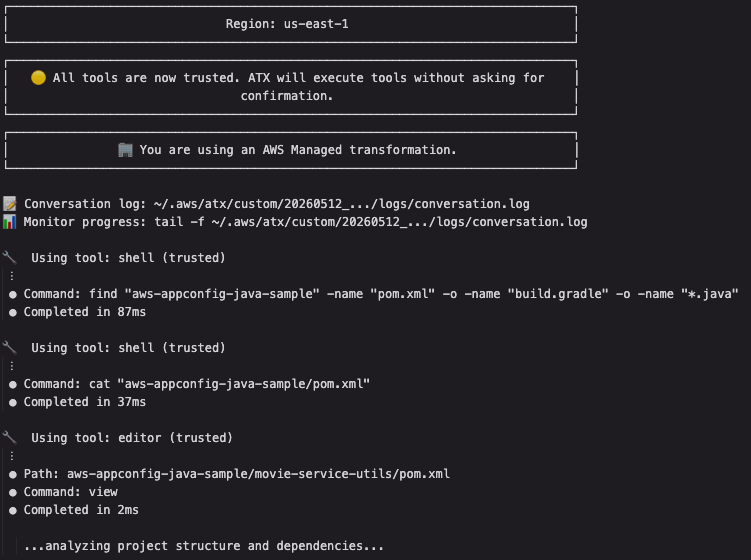
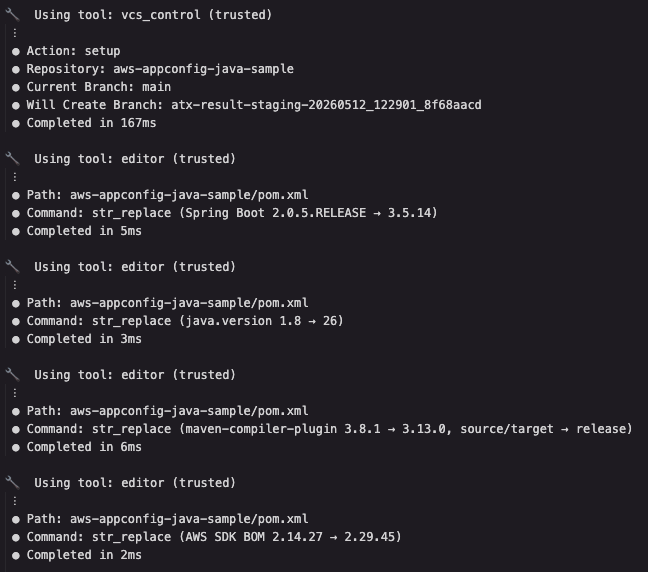
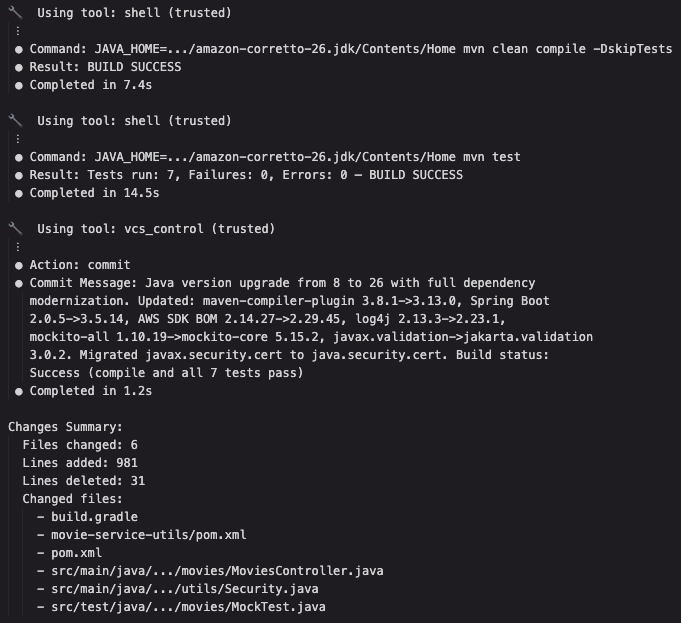
The `AWS/java-version-upgrade` TD targets Java 26 and handles the full upgrade scope: `javax.security.cert` migration, Spring Boot major version upgrade, testing dependency modernization, building tooling updates. Not just the Java version number in a POM file.
The agent analyzed the full dependency graph, applied all changes in a coordinated pass, verified both compilation and tests, then committed everything as a single atomic change. Fourteen distinct modifications, dependency upgrades, API migrations, and build tooling updates all verified together. The worklog captures what was done, what issues were encountered (Spring Boot 3.2.12 ASM incompatibility with Java 26, Mockito ByteBuddy issues), and how they were resolved.
Fourteen changes, one atomic commit, full build and test verification. But the agent didn’t just produce code changes; it also observed what worked and what didn’t. That observation is where knowledge items come from, and it’s the reason the next run on a different repo will be faster than this one.
Viewing results
Changes land on a dedicated local Git branch. Transform Custom does not push anything to remote. You get a full audit trail you can inspect with standard Git tools. The commit message details every change, and the worklog artifact captures issues encountered and how they were resolved. If you run in interactive mode (without -x), you review and amend the plan before execution starts adding validation steps, external tool checks, whatever gates you need.
To see everything the transformation changed:
git diff maindiff --git a/pom.xml b/pom.xml
--- a/pom.xml
+++ b/pom.xml
@@ -5,7 +5,7 @@
<parent>
<groupId>org.springframework.boot</groupId>
<artifactId>spring-boot-starter-parent</artifactId>
- <version>2.0.5.RELEASE</version>
+ <version>3.5.14</version>
</parent>
diff --git a/src/main/java/.../movies/MoviesController.java b/src/main/java/.../movies/MoviesController.java
--- a/src/main/java/.../movies/MoviesController.java
+++ b/src/main/java/.../movies/MoviesController.java
@@ -1,5 +1,5 @@
-import javax.validation.Valid;
+import jakarta.validation.Valid;
diff --git a/src/main/java/.../utils/Security.java b/src/main/java/.../utils/Security.java
--- a/src/main/java/.../utils/Security.java
+++ b/src/main/java/.../utils/Security.java
@@ -1,5 +1,5 @@
-import javax.security.cert.*;
+import java.security.cert.*;Three representative changes here: Spring Boot from 2.0.5.RELEASE to 3.5.14 (the agent discovered 3.2.12’s ASM doesn’t support Java 26 class format and escalated accordingly), `javax.validation.Valid` migrated to `jakarta.validation.Valid`, and `javax.security.cert` swapped for `java.security.cert`. The full diff also includes Mockito and JUnit dependency updates, Gradle build modernization, and AWS SDK BOM upgrade.
Once you’re satisfied, merge:
git checkout main
git merge <transformation-branch-name>
Improving the transformation
The first run works. The second run is where things get interesting.
References vs Knowledge Items
Transform Custom has two ways to get smarter about your code. References are documentation you provide upfront: migration guides, API specs, code samples you upload when creating a TD. They’re active immediately and fully under your control. Knowledge Items are what the system learns on its own by watching what happens during actual transformations. Transform Custom generates them asynchronously after each execution, starts them disabled, and only applies them once you review and approve.
References set the starting point. Knowledge items are where the real value compounds, and they’re the focus of the rest of this blog post.
Managing Knowledge Items
You control which knowledge items take effect. Nothing gets enabled without your approval.
List what’s been captured so far:
atx custom def list-ki -n "AWS/java-version-upgrade"The following knowledge items were generated from this same transformation run. The agent encountered these issues while upgrading the project and captured them automatically:
KI - 7f36cfd4-2926-44fa-8fa5-eb5384e65c77 - DISABLED

 Title: Mockito 5.14.2 ByteBuddy incompatible with Java 26
 Description: Mockito 5.14.2 fails to mock standard library classes like ArrayList under Java 26. Error message indicates ByteBuddy cannot modify ArrayList and related collection classes. Mockito 5.15.2 resolves the compatibility issue.
 Fix: Upgrade Mockito to 5.15.2:

 <!-- Before - ByteBuddy in Mockito 5.14.2 can't handle Java 26 -->
 <dependency>
     <groupId>org.mockito</groupId>
     <artifactId>mockito-core</artifactId>
     <version>5.14.2</version>
     <scope>test</scope>
 </dependency>

 <!-- After - Mockito 5.15.2 supports Java 26 bytecode -->
 <dependency>
     <groupId>org.mockito</groupId>
     <artifactId>mockito-core</artifactId>
     <version>5.15.2</version>
     <scope>test</scope>
 </dependency>
KI - adb1b8e6-4199-4d4d-964c-1eab5c94de1a - DISABLED
Title: Spring Boot 3.2.12 ASM lacks Java 26 class format support
Description: Spring Boot 3.2.12 uses ASM library version that cannot parse Java 26 class files (major version 70). Test execution fails with "Incompatible class format" during classpath scanning. Spring Boot 3.5.14 or newer required for Java 26 compatibility.
Fix: Upgrade Spring Boot to 3.5.14:
<!-- Before - ASM in Spring Boot 3.2.12 can't parse Java 26 classes -->
<parent>
<groupId>org.springframework.boot</groupId>
<artifactId>spring-boot-starter-parent</artifactId>
<version>3.2.12</version>
</parent>
<!-- After - Spring Boot 3.5.14 includes ASM with Java 26 support -->
<parent>
<groupId>org.springframework.boot</groupId>
<artifactId>spring-boot-starter-parent</artifactId>
<version>3.5.14</version>
</parent>Both are `DISABLED` by default. You review them before they take effect. Each description captures what changed, why it matters, the symptom, and the exact fix. These are two different categories of problems the agent encountered during the Java 26 upgrade:
- Mockito/ByteBuddy: a bytecode manipulation failure where Mockito’s bundled ByteBuddy can’t handle Java 26 class format, causing test mocks to fail at runtime.
- Spring Boot ASM: a class format parsing failure where Spring Boot’s ASM library can’t scan Java 26 bytecode during classpath scanning, breaking test execution entirely. Neither would be caught by compilation alone.
They both require running tests against the upgraded code, which is why the build verification command matters. Enable them:
atx custom def update-ki-status -n "AWS/java-version-upgrade" --id 7f36cfd4-2926-44fa-8fa5-eb5384e65c77 --status ENABLED
atx custom def update-ki-status -n "AWS/java-version-upgrade" --id adb1b8e6-4199-4d4d-964c-1eab5c94de1a --status ENABLED
Export all knowledge items to markdown if you want to review them offline:
atx custom def export-ki-markdown -n "AWS/java-version-upgrade"Exporting to markdown is useful when you want your team to review knowledge items offline or discuss which ones to enable during a sprint planning or tech debt review session. If you spot a knowledge item that’s too broad for your codebase, disable it. The next execution on a different repo may generate a more targeted version of the same fix, which you can then enable instead. Over time, you curate a set of enabled knowledge items that reflect your organization’s actual codebase patterns, not generic advice.
And these knowledge items are specific to your organization, they are not shared with other customers.
The learning loop
The value of Transform Custom comes from iteration: run, capture what the agent learns, enable it, and run again. With those two knowledge items enabled, run the same TD on a second repository:
git clone --depth 1 <second-repo-url>
cd <second-repo>
atx custom def exec -n "AWS/java-version-upgrade" -p . -c "<build-command>" -x -t
On the first repo, we passed -DskipTests as the build verification command, but the agent also ran tests independently to validate the upgrade. During that test run, it encountered two issues that it resolved iteratively:
- Mockito 5.14.2 failed to mock standard library classes‚ ByteBuddy bundled with that version can’t handle Java 26 bytecode manipulation. The agent upgraded to 5.15.2.
- Test execution failed with “Incompatible class format” during classpath scanning, the agent’s initial Spring Boot upgrade to 3.2.12 used an ASM version that can’t parse Java 26 class files (major version 70). It escalated to 3.5.14.
Transform Custom observed each of these, captured them as the knowledge items we just reviewed, and recorded the fixes. The agent solved the problems and generated reusable knowledge from the experience.
Now enable them and run on a second repo:
atx custom def update-ki-status -n "AWS/java-version-upgrade" --id 7f36cfd4-2926-44fa-8fa5-eb5384e65c77 --status ENABLED
atx custom def update-ki-status -n "AWS/java-version-upgrade" --id adb1b8e6-4199-4d4d-964c-1eab5c94de1a --status ENABLED
On subsequent repos that use Mockito 5.14.2 or Spring Boot 3.2.x targeting Java 26, Transform Custom applies the fixes proactively. Before tests even run. Mockito is upgraded to 5.15.2, and Spring Boot is bumped to 3.5.14. Tests pass, no manual intervention needed.
What required debugging and manual fixes on earlier repos becomes automatic corrections on every repo after that. Each run is faster, more reliable, and captures new edge cases for the next one.
To make this concrete: suppose you run this TD on 15 Spring Boot repos over a week. By repo 4, the Mockito upgrade is applied proactively to any project using 5.14.2. By repo 6, the Spring Boot version bump to 3.5.14 is automatic whenever the agent detects an older 3.x version targeting Java 26. By repo 10, maybe a Hibernate 6 dialect change that broke a repo with custom `@Query` annotations. Not every run will produce new knowledge items; it depends on what the agent discovers. But the ones that do get captured, you review them, enable the desired ones, and every subsequent run benefits. The fifteenth repo gets a cleaner transformation than the first, because it carries the accumulated experience of the fourteen before it.
Running at scale
This walkthrough covered two repos. At scale, you run the same TD across your entire portfolio. This is the Learn-Scale-Improve flywheel: each execution contributes new knowledge items, and every subsequent run benefits from everything the system has learned so far. By the twentieth repo, the system handles patterns automatically that required manual intervention on the first.
Running across hundreds of repos requires automation. The aws-transform-custom-samples repo has two open-source approaches:
- Bash automation: runs from your workstation with parallel execution, a progress dashboard, and automatic retries.
- Container-based execution: runs on AWS Batch + AWS Fargate for hundreds or thousands of repos. The AWS DevOps blog post walks through the setup.
Clean up
The transformation runs locally and no AWS resources are provisioned. To clean up:
cd ..
rm -rf aws-appconfig-java-sample
If you ran scaled execution with AWS Batch, follow the cleanup instructions in the container-based execution README.
Conclusion
Knowledge items accumulate across your portfolio. Each execution may generate new learnings depending on what the agent encounters, and the ones you enable make every subsequent run faster. Instead of one-off refactoring sprints, you get a continuous loop where reducing debt today directly speeds up delivery tomorrow.
Try it yourself: clone one of your own repos, run the `AWS/java-version-upgrade` TD, and review the knowledge items it generates. If you have org-specific patterns (framework migrations, coding standard enforcement, dependency swaps), create a custom TD and run it across a few repos to see the learning loop in action.
- AWS Transform Custom documentation
- AWS-managed Java upgrade TD: try it on your own codebase
- Create your own TDs for your organization’s specific patterns
- aws-transform-custom-samples: scripts and infrastructure for running at scale