Migration & Modernization
Modernize VB6 Applications at Scale with AWS Transform Custom
Estimated time to complete: 90–120 minutes
Level: Advanced (400)
Microsoft ended extended support for Visual Basic 6.0 (VB6) in 2008, yet thousands of mission-critical applications across financial services, insurance, healthcare, and manufacturing still depend on it. These applications contain decades of business logic, but maintaining them becomes more difficult each year. VB6 developers are increasingly expensive to hire as fewer remain in the workforce, unpatched vulnerabilities expose organizations to compliance failures, and monolithic architectures make it difficult to integrate AI, analytics, and cloud services.
You can address these challenges by creating custom transformation plans with AWS Transform custom.
In this post, you will learn how to modernize your VB6 applications at scale while preserving your organization’s specific business rules using AWS Transform custom’s agentic AI capabilities.
The VB6 modernization challenge
VB6 applications present unique modernization challenges that go beyond simple syntax translation. While AWS Transform for .NET provides automated porting for .NET Framework applications, VB6’s unique characteristics call for a different strategy.
VB6 modernization requires addressing fundamental architectural differences between the legacy platform and modern .NET. At the language level, VB6’s procedural and COM-based patterns must map to object-oriented C# constructs. The user interface also needs conversion from VB6 forms with ActiveX controls to modern web frameworks like Blazor or ASP.NET Core MVC. Data access patterns shift from legacy ADO and DAO to Entity Framework Core with async/await patterns, COM dependencies require replacement with .NET-native alternatives or NuGet packages, and error handling evolves from On Error Resume Next and On Error GoTo patterns to structured try-catch exception handling.
Introducing the sample application
We’ll explore AWS Transform custom using the Salmon King Seafood (SKS), a VB6 Multiple Document Interface (MDI) application that represents a typical enterprise modernization challenge. SKS is a seafood order management system with the following characteristics:
- 15+ VB6 forms including order reception, customer management, product catalog, stock management, and approval workflows.
- 3 VB6 modules (modConnection.bas, modFunctions.bas, modMain.bas) containing shared business logic and database connectivity.
- SQLite database (Orders.db) accessed through ADO data controls and data binding.
- Standard VB6 controls including MSFlexGrid, ListView, Toolbar, ImageList, ComboBox, and Control Arrays.
- MDI architecture with a main container form and child forms triggered from menus.
The application implements VB6 patterns commonly found in enterprise applications:
- Form-based UI with event handlers.
- ADO data access with data binding.
- COM-based controls.
- Procedural business logic in modules.
These elements make SKS representative of the complexity you’ll encounter in enterprise VB6 modernization.
Solution overview
You can use AWS Transform custom’s ability to learn and apply complex transformation patterns for your VB6 to C# modernization. The end-to-end process follows these stages:
- Assess your VB6 application portfolio for scope and complexity.
- Define a custom transformation with VB6-to-C# patterns, business rules, and coding standards.
- Execute transformations at scale.
- Review and iterate with feedback loops for continuous improvement.
This architecture lets you create transformation definitions once, test them, and then apply them across hundreds of applications.
Prerequisites
Before getting started, verify you have the following:
- An AWS account with AWS Transform Custom access. Visit the AWS Transform pricing page for current pricing details.
- MacOS or Linux environment with ATX CLI (Command Line Interface) installed. For detailed setup instructions, refer to the AWS Transform custom Prerequisites Guide.
- **For Windows developers**: Install WSL2 (Windows Subsystem for Linux) and run the ATX CLI from your Ubuntu or other Linux distribution. The CLI operates directly on local codebases through the `/mnt/c/`path.
- .NET 10 SDK or later for testing transformed applications.
- Visual Studio 2022+ or Visual Studio Code for code review.
- VB6 and .NET development knowledge.
- Git with valid credentials configured.
Prepare your environment
Download the Salmon King Seafood (SKS) sample application. It contains a VB6 MDI application representative of typical enterprise VB6 workloads.
Clone the repository to your local machine:
git clone https://github.com/GAPVelocityAI/SKSVB6.git cd SKSVB6
If you are using WSL2 on Windows, clone to a path accessible from both environments:
git clone https://github.com/GAPVelocityAI/SKSVB6.git /mnt/c/Projects/SKSVB6 cd <path-to-repository>
Verify the repository’s content. You will see the VB6 project file (SKS.vbp), form files (.frm/.frx), modules (.bas), and the SQLite database (Orders.db):
ls -la *.vbp *.frm *.bas *.db
Initialize the repository for transformation tracking:
git add . git commit -m "Baseline before VB6 to C# transformation"
Next, clone the repository with the reference documents. The repository contains business rules and transformation examples that we will pass to AWS Transform for context and generated code that matches your organization’s standards.
git clone -b dotnet-transform-custom https://github.com/aws-samples/dotnet-genai-samples.git
Walkthrough
The following Section walks through using the AWS Transform CLI to transform VB6 code to a modern C# project.
Step 1: Assess your VB6 application
Before creating transformation definitions, understand the scope and complexity of your VB6 portfolio. With the SKS repository cloned, launch the ATX CLI and start an assessment:
atx custom def exec -p <path-to-repository> \ -n 'AWS/early-access-comprehensive-codebase-analysis' \
-t
Parameters:
- -p: Source project path (the cloned SKS repository).
- -n: Transformation definition name.
- -t: Trust all tools involved in the transformation, preventing AWS Transform from pausing to ask for permission during execution.
AWS Transform custom requires permission to run specific actions, such as shell scripts. The –t argument in the previous command allows the tool to execute without continuously prompting the user.
The assessment analyzes the SKS project and generates a comprehensive report including: the number of forms (15+), modules (3), COM component dependencies (MSFlexGrid, ListView), database access patterns (ADO with SQLite), and estimated transformation complexity scores.
We then use this assessment report to provide additional context for AWS Transform custom when transforming our VB6 application.
Step 2: Create the VB6 to C# custom transformation definition
Now we create a custom transformation definition that captures the patterns and rules for converting VB6 to modern C#. AWS Transform custom learns from examples, documentation, and business rules you provide, then applies these patterns consistently.
Launch the interactive CLI:
atx -t
When prompted, type VB6 to C# ASP.NET Core web application migration as your transformation description. AWS Transform custom searches for existing transformations and, finding none for this specific scenario, asks if you’d like to create a custom one. Type “create a new one” to confirm.
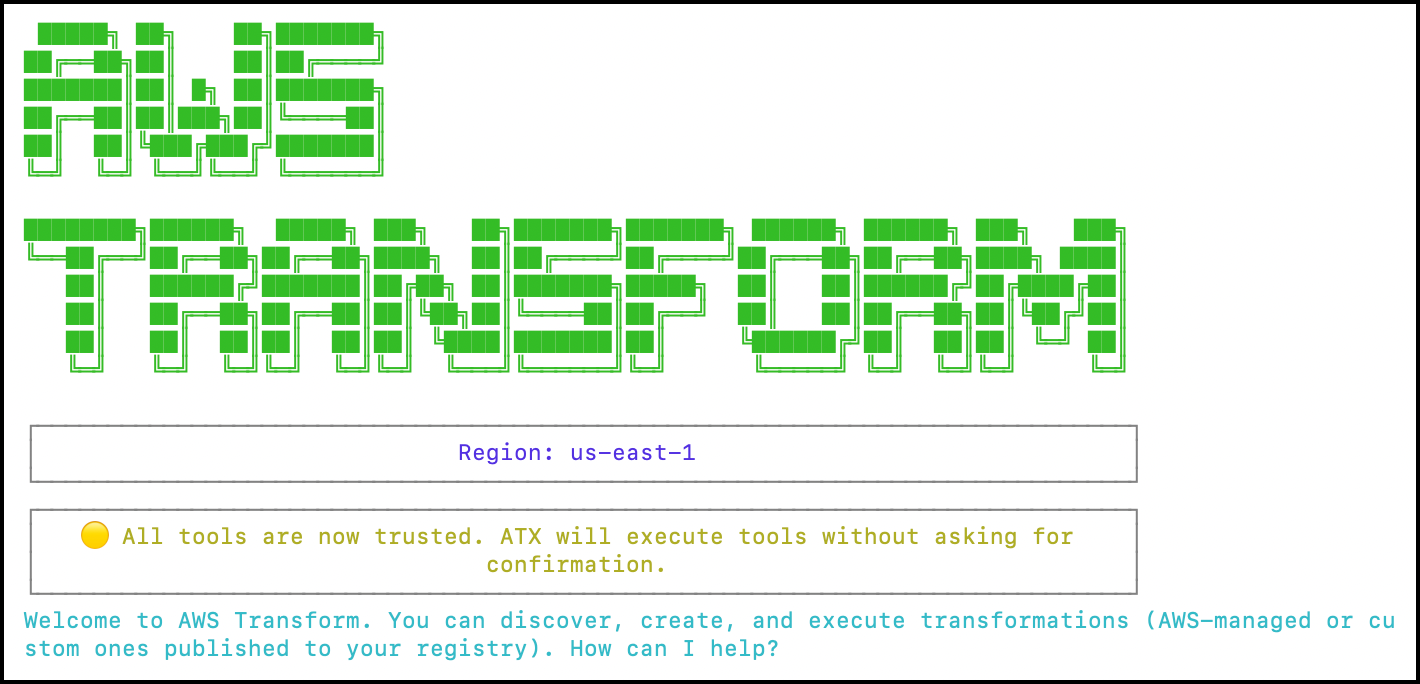
Figure 1 – Launching the atx cli.
Providing transformation context and business rules
AWS Transform custom prompts you to provide documentation, migration guides, and example code. This is where you add your organization’s specific requirements. For the SKS application, we provide context about its architecture:
I have a VB6 MDI application called Salmon King Seafood (SKS). The source code is at <path-to-repository>. It has 15+ forms including order reception, customer management, product catalog, stock management, and approval workflows. It uses 3 modules (modConnection.bas for database connectivity, modFunctions.bas for utility functions, modMain.bas for application entry point). The database is SQLite accessed through ADO data controls with data binding. Controls include MSFlexGrid, ListView, Toolbar, ImageList, and Control Arrays. Transform this to an ASP.NET Core Blazor Server application targeting .NET 10.
Customize migration patterns for your organization
To improve migration accuracy, provide organization-specific mapping rules. These are user-created markdown files you reference when prompted by AWS Transform custom, which incorporates them into the transformation plan. When prompted, reference these files alongside your VB6 source code during the interactive session:

Figure 2 – Add business rules and other context to the transformation plan.
Referencing Example Transformations
Inspect the <path-to-repository>/dotnet-genai-samples/src/Amazon.GenAI.TransformCustom/vb6-csharp-references/example-transformations.md file. When the ATX agent prompts for sample transformations, reference it as in the following example:
I have example before/after transformations at <path-to-repository>/dotnet-genai-samples/src/Amazon.GenAI.TransformCustom/vb6-csharp-references/example-transformations.md
Referencing Company Coding Standards
AWS Transform custom lets you control code generation by using your organization’s standards in the transformation.. This can include specific C# features and conventions. AWS Transform custom uses these to generate code that matches your team’s style. Inspect the <path-to-repository>/dotnet-genai-samples/src/Amazon.GenAI.TransformCustom/vb6-csharp-references/coding-standards.md file. You can create your own standards to fit your organization’s practices.
For example:
Apply the coding standards defined at <path-to-repository>/dotnet-genai-samples/src/Amazon.GenAI.TransformCustom/vb6-csharp-references/coding-standards.md.
Referencing a target architecture specification
Optionally, you can use a document describing the desired output architecture like the one located in <path-to-repository>/dotnet-genai-samples/src/Amazon.GenAI.TransformCustom/vb6-csharp-references/target-architecture.md.
AWS Transform custom reads all referenced files and uses them to generate a transformation plan that matches your organization’s patterns, conventions, and architecture
Generated transformation definition
Based on your inputs, AWS Transform custom generates a comprehensive transformation definition organized into phases, like:
- Phase 1 — Analysis: Inventory of VB6 components, identify dependencies, create a dependency graph.
- Phase 2 — Project Structure: Generate an ASP.NET Core Blazor Server project, configure NuGet packages, and set up dependency injection.
- Phase 3 — Data Layer: Convert ADO/DAO to Entity Framework Core, generate DbContext and entity models as records where appropriate.
- Phase 4 — Business Logic: Transform modules to service classes with primary constructors, convert functions to async methods.
- Phase 5 — UI Layer: Convert VB6 forms to Blazor components, transform event handlers.
- Phase 6 — Validation: Verify build success, generate unit tests, test functional equivalence.
You can apply the transformation now, review and modify it, publish it to the registry for reuse, or start a new plan. In the next step, you will publish the transformation so it can be reused at scale.
AWS Transform custom suggests a name and description for your transformation plan. You can accept it or modify it if you prefer. The transformation definition is now available for your entire team to use.
Viewing and managing your custom transformation definitions
After publishing, you can view your custom transformation definition and all available AWS-managed transformations using the interactive agent or the following CLI command:
atx custom def list

Figure 3 – List of user created custom transformation plans.
The command displays both AWS-managed transformations (prefixed with AWS/) and your custom-defined transformations. You will see your VB6-to-CSharp-Blazor-Migration transformation plan listed under your custom definitions.
Step 3: Execute the transformation
With your custom transformation definition published, you can now modernize VB6 applications. When prompted, run the transformation plan against the project. You will need to pass the path to the repository and provide a build command to build the project after the transformation.
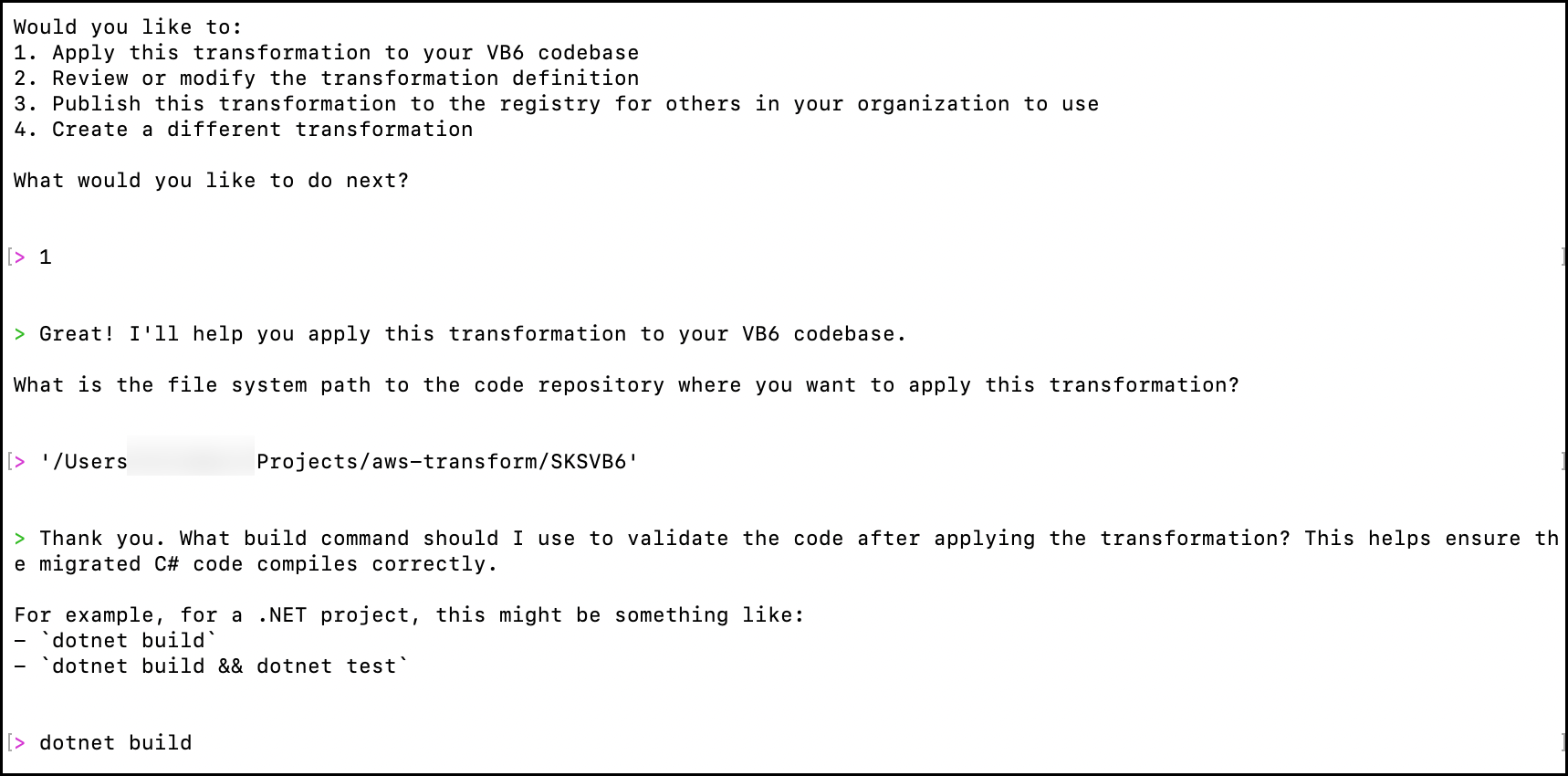
Figure 4 – Adding a build command to validate the transformation.
You can also execute the transformation plan directly in the terminal using the following command:
atx custom def exec -p <path-to-repository>\ -n 'VB6-to-CSharp-Blazor-Migration' \ -t
You will be asked if you want to provide additional context that AWS Transform custom should be aware of. This is useful if you need to provide one-off context beyond what should be included in the saved transformation definition, like code documentation from the deep code analysis.
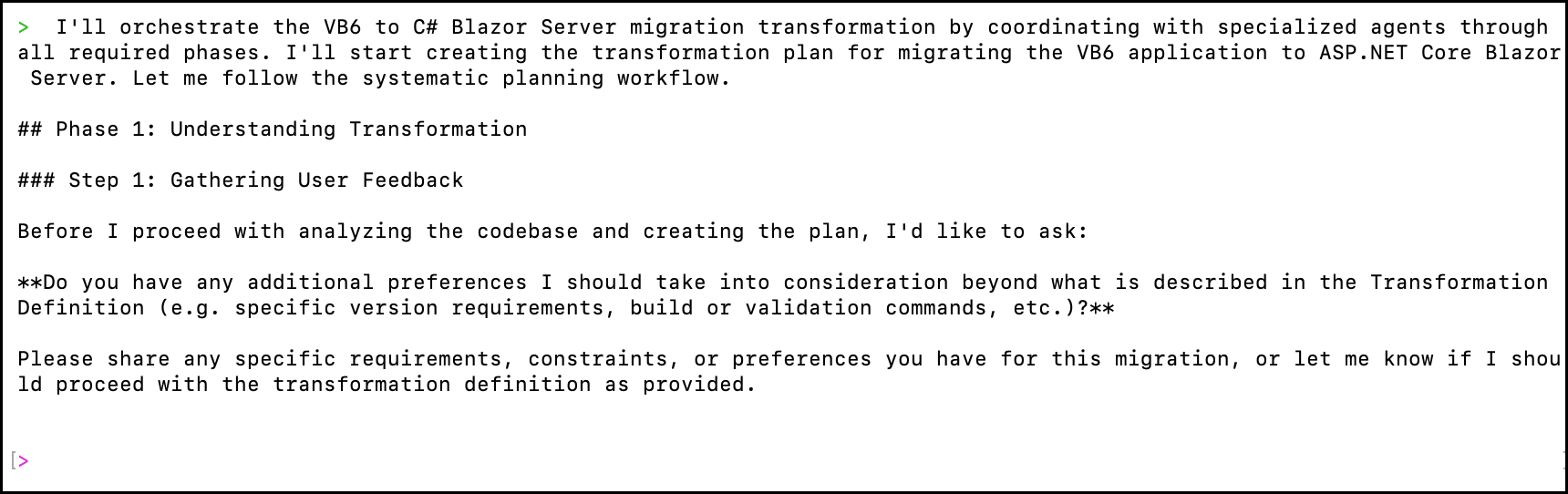
Figure 5 – Add additional context before generating the transformation plan.
After answering the prompts, AWS Transform will generate a transformation plan to execute or review and modify.
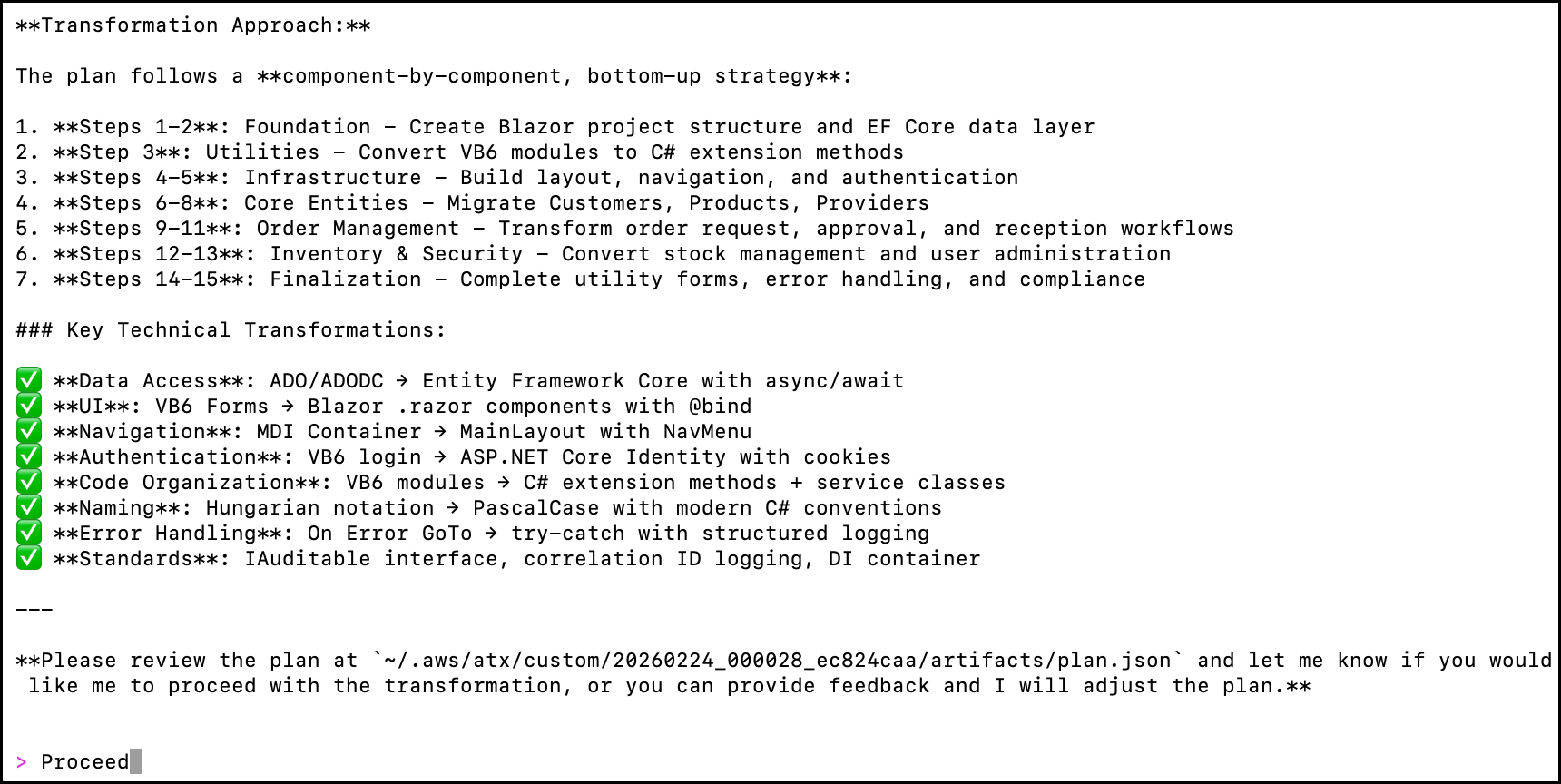
Figure 6 – Review or proceed with the transformation plan.
Proceed when satisfied with the transformation plan
The transformation agent analyzes the SKS project structure, identifies the MDI container (frmMain.frm), child forms, modules, and database patterns, then applies the transformation definition. The agent converts:
- frmMain.frm (MDI container) → Blazor MainLayout.razor with navigation menu.
- frmCustomers.frm, frmProviders.frm, etc. → Individual Blazor page components.
- modConnection.bas → SksDbContext.cs with Entity Framework Core and SQLite provider.
- modFunctions.bas → Extension method classes organized by domain.
- MSFlexGrid data grids → Blazor table components with data binding.
- ADO data controls → Entity Framework Core queries with async/await.
Step 4: Review, test, and iterate
After your transformation completes, AWS Transform custom outputs the transformed code in a new branch or directory, a transformation report, and next steps for manual remediation
Reviewing transformation results
The transformation report includes exit criteria validation including:
- Successful dotnet build with zero errors.
- All VB6 forms converted to Blazor components (e.g., frmCustomers.frm → Customers.razor, frmOrderReception.frm → OrderReception.razor).
- Data access layer using Entity Framework Core with SQLite provider and async patterns (replacing ADO/ADODC data controls).
- COM dependencies eliminated — MSFlexGrid replaced with Blazor table components; Toolbar/ImageList replaced with Blazor navigation.
- Error handling converted from On Error statements to structured try-catch exceptions.
- Modern C# features applied per specification (records, primary constructors, pattern matching).
- modConnection.bas converted to a registered Dependency Injection (DI) service with IDbContextFactory<SksDbContext>.
AWS Transform might not meet the validation criteria in a single shot. After the transformation runs, you might get a partial transformation with a summary of what was successful and what was not. See below for the transformation results.
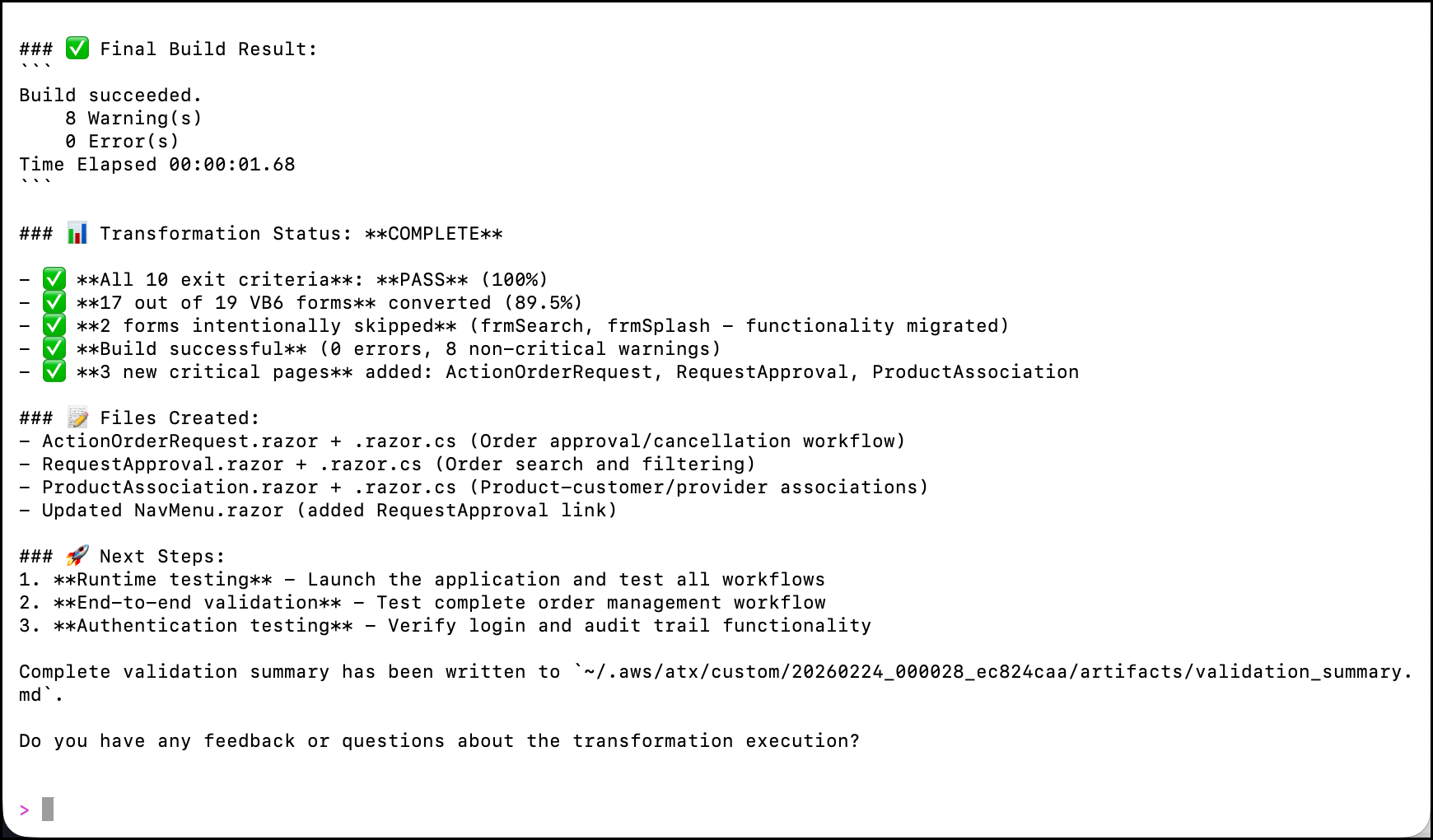
Figure 7 – Completed Transformation results.
From the feedback prompt, you can rerun the transformation to address any unmet criteria. To validate the transformed SKS application, switch to the terminal and run:
cd <path-to-your-project> dotnet build dotnet run
Navigate to https://localhost:<port> in your browser to verify the Blazor application renders the order reception, customer management, and product catalog pages correctly as shown below.
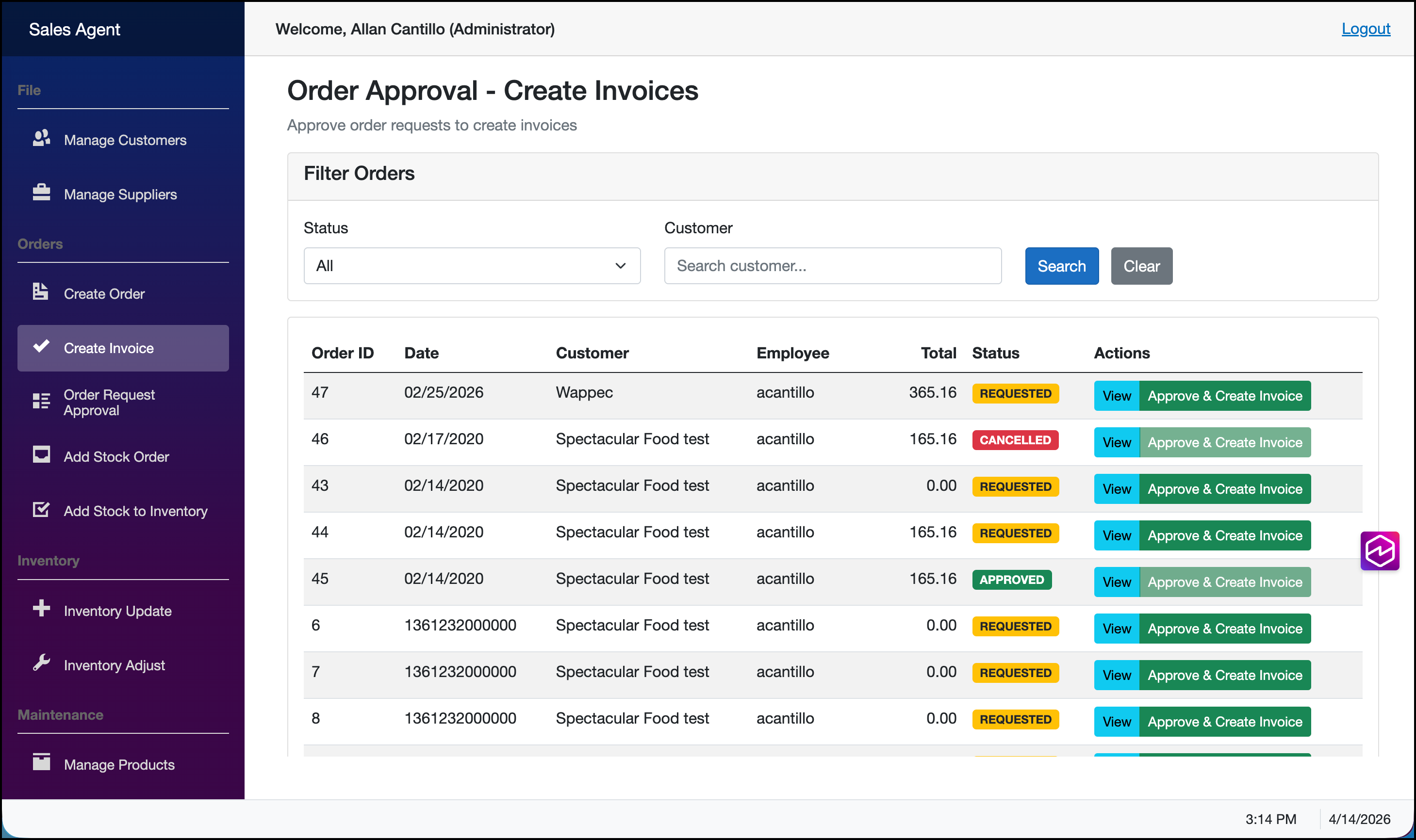
Figure 8 – Create invoice Page.
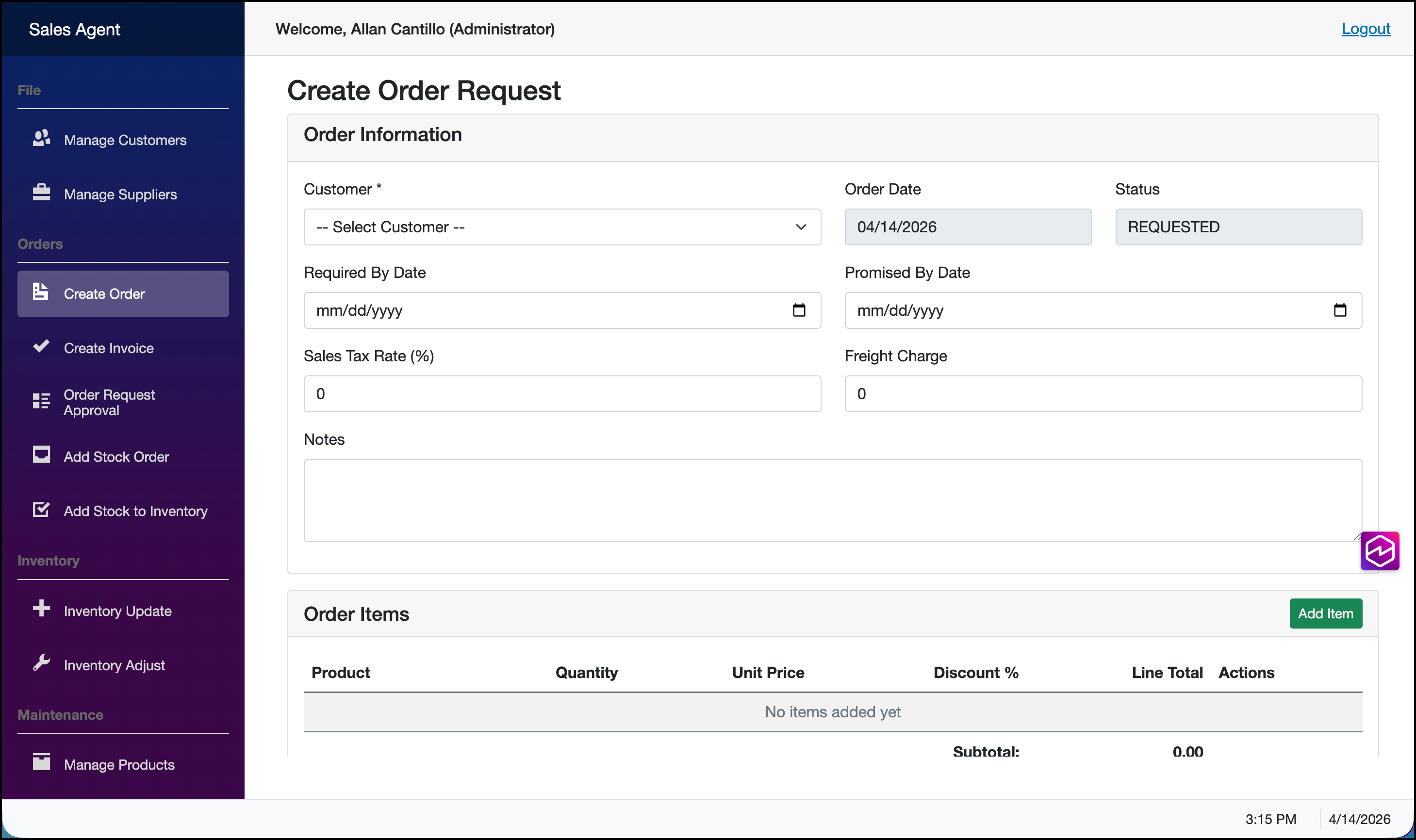
Figure 9 – Create Order Page.
If you are missing functionality, provide feedback back to the CLI to iterate on the initial transformation.
Transform Command Performance
Transform custom commands can take up to 60 minutes to complete, depending on the size of the codebase being transformed. Larger projects with extensive code files and dependencies will naturally require more processing time.
Understanding Transformation Limitations
Transform custom capabilities might not automatically transform every feature or functionality in your VB6 application. After the transformation completes, you’ll need to compare and validate the functionality between the source VB6 application and the destination C# application. For any missing features or functionality that weren’t transformed, you can use AI-powered tools like Kiro or Amazon Q Developer to help transform and port them from the source to the destination codebase.
The Importance of Unit Testing
Unit tests validate feature functionality throughout the transformation process. They help verify that the transformed code behaves identically to the original VB6 application and can quickly identify any discrepancies or regressions introduced during the transformation. Establish a test suite before the transformation. This creates a regression baseline that validates functional equivalence after transformation.
Conclusion
You can now modernize hundreds of VB6 applications systematically while preserving your organization’s institutional knowledge by using custom transformation definitions that include your organization’s specific patterns, business rules, and modern C# feature preferences.
Define your transformation once, then apply it across your entire application portfolio. This preserves institutional knowledge in reusable transformation definitions. Continuous improvement through feedback loops means each transformation becomes more refined, and modern C# features like records, primary constructors, and pattern matching apply automatically to your codebase. The modernized applications run on Linux and AWS Graviton, which can reduce infrastructure costs.
Get started with AWS Transform custom to modernize your VB6 application portfolio. Visit the AWS Transform custom Getting Started Guide for setup instructions
Additional resources