AWS Cloud Operations Blog
Adaptive sampling with AWS X-Ray to capture critical spans
Introduction
Enterprise applications using AWS X-Ray generate large volumes of distributed tracing data across multiple services. Static sampling strategies keep costs down by capturing a fixed percentage of traffic. However, they frequently miss critical data during intermittent failures or sudden latency spikes. Tracing every request for maximum visibility at scale may increase sampling costs for your organization.
Adaptive sampling helps you control and predict costs during active incidents, latency spikes, or fault conditions. It dynamically adjusts sampling behavior based on runtime conditions, enabling you to capture more relevant traces and spans when anomalies occur.
This post describes how adaptive sampling works in AWS X-Ray, walks through configuration for specific use cases, and demonstrates how to capture critical diagnostic data efficiently. By the end of this post, you will know how to create sampling rules that prioritize high-value traces by keeping sampling costs under control.
Prerequisites
- Familiarity with X-Ray concepts including traces, segments, and sampling.
- Familiarity with Amazon CloudWatch pricing for application observability.
- Enabled CloudWatch Application Signals for the supported services before proceeding.
- The root services (entry points) in an application must run on supported compute service.
- Using AWS Distro for OpenTelemetry (ADOT) Software Development Kit (SDK) for Java version 2.11.5/Python version 0.15.0 or higher.
- Integration with the ADOT SDK and executed together with either the Amazon CloudWatch Agent or the OpenTelemetry Collector.
- For viewing and querying traces, using Transaction Search is recommended.
Sampling rules vs Adaptive sampling
Static sampling and adaptive sampling can be used independently or together. Understanding this behavior is critical when designing sampling rules. The following is a brief overview of both features:
Static sampling: Traditional X-Ray sampling relies on static rules that define a fixed sampling rate, a reservoir quota, and matching conditions. Although effective for cost control, static sampling does not react to runtime anomalies and can result in missing traces during short-lived failures.
Adaptive sampling: Adaptive sampling builds on existing sampling rules and introduces dynamic behavior through two complementary mechanisms:
- Sampling Boost, which automatically increases sampling rates when the ADOT SDK detects anomalies.
- Anomaly Span Capture, which is designed to capture critical spans even when full traces are not sampled. The ADOT SDK performs anomaly detection locally per conditions configured in the application environment.
Solution Overview
X-Ray relies entirely on parent-based sampling, and the root services (first instrumented service) make the sampling decisions. Downstream services cannot override an upstream sampling decision. A sampling rule targeting a non-root service only takes effect if no upstream decision has already been made.
Let’s consider an example of an application that will be used to demonstrate the use cases in this post. For demonstration purposes, this example application is deployed on Amazon Elastic Compute Cloud (EC2) instances with an OpenTelemetry Collector. The services are configured with Application Signals feature to automatically collect metrics and traces from the applications.

Figure 1: Application connectivity flow with three services and a database.
Root service: Service A is the root service. Sampling rules configuration starts at the root service. A supported SDK version is required to enable sampling boost. Else, it cannot trigger a sampling boost.
Downstream services: Service B is a downstream service to Service A. Service C is a downstream service to Service B. They can report anomalies and trigger sampling boost at root service but cannot independently make sampling decisions. If downstream services are configured with a supported SDK version, they can trigger a sampling boost at the root service during anomalies.
Region and account constraints: In this example, all services are in the same AWS account and Region. If the downstream services span multiple AWS accounts and Regions, you can capture anomaly spans using local SDK configuration, but they cannot trigger sampling boost.
Local configuration to ADOT SDK for adaptive sampling: The following environment variable YAML Ain’t Markup Language (YAML) configuration shows the local configuration applied to the ADOT SDK for Service C:
AWS_XRAY_ADAPTIVE_SAMPLING_CONFIG="{version: 1.0, anomalyConditions: [{errorCodeRegex: \"^(500|501)$\", usage: \"both\"}, {highLatencyMs: 100, usage: \"sampling-boost\"}], anomalyCaptureLimit: {anomalyTracesPerSecond: 1}}"This configuration triggers sampling boost and anomaly span capture when the service returns HTTP 500 and 501 faults. The usage field controls whether the configuration triggers sampling boost, anomaly span capture, or both. It also triggers sampling boost when latency exceeds 100 ms.
To capture error spans during server-side issues, anomalyTracesPerSecond is configured 1. This configuration captures 1 trace per second and prevents publishing all similar error traces (cost protection).
Note: Anomaly spans are partial traces and cannot influence the sampling boost (full end-to-end trace). For more details refer to Local SDK configuration.
Sampling rule for the root service: The following JSON shows the test sampling rule that is configured for Service A. The console view is shown in figure 2 and figure 3 below.
{
  "RuleName": "test",
  "Priority": 1,
  "ReservoirSize": 0,
  "FixedRate": 0.01,
  "ServiceName": "ServiceA",
  "ServiceType": "*",
  "Host": "*",
  "HTTPMethod": "*",
  "URLPath": "*",
  "SamplingRateBoost": {
    "MaxRate": 0.80,
    "CooldownWindowMinutes": 1
  }
}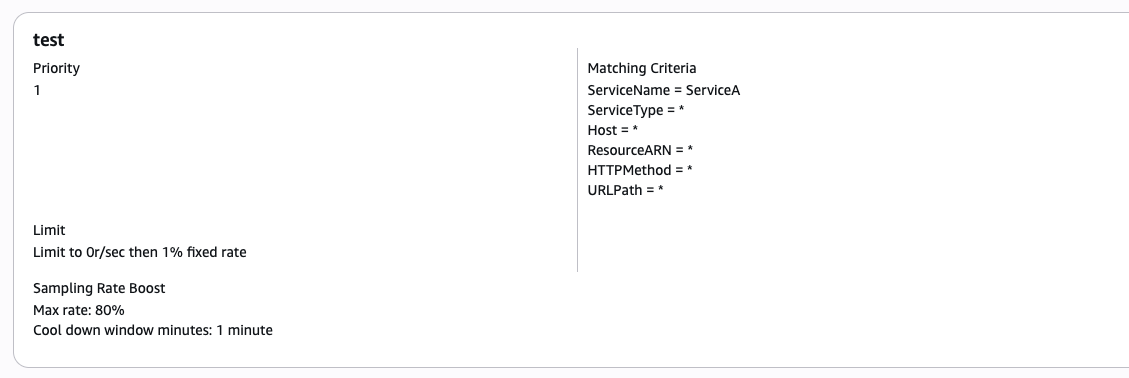
Figure 2: Console view of the adaptive sampling rule configuration
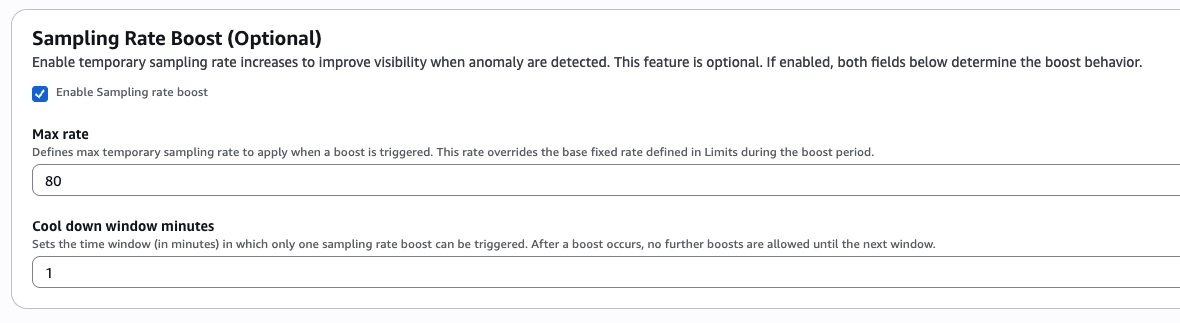
Figure 3: Console view of sampling boost configuration
This rule uses Priority 1, which means X-Ray evaluates it before any lower-priority rules. It is configured with ReservoirSize to 0 and FixedRate to 0.01 (1%). This samples 1% of all requests and provides no guaranteed minimum per second. To capture a minimum number of traces per second, you can increase the ReservoirSize value.
The ServiceName field matches this rule to Service A only. The Host, HTTPMethod and URLPath fields are set to *, which means the rule applies to all hosts and URL paths for that service. You can narrow these fields to target specific endpoints or hostnames when needed.
This rule enables SamplingRateBoost with a MaxRate of 0.80 (80%) and CooldownWindowMinutes of 1. When the boost is triggered, up to 80% of traces are sampled.
The CooldownWindowMinutes parameter controls how frequently boosts can occur. A 1-minute CooldownWindow allows continuous boosting during persistent anomalies. This setting is appropriate for critical services where complete incident visibility justifies higher costs.
You can configure the MaxRate parameter to define the upper limit for sampling during anomalies. Set this value based on your maximum acceptable cost and the level of visibility you need during incidents. For example, a MaxRate of 0.25 (25%) provides substantial coverage during anomalies without excessive costs.
This way X-Ray applies sampling rules to determine which requests to get traced. You can modify the default rule or configure additional rules (with Priority order) that determine which requests to get traced based on the properties of the service or request. For more details on sampling rules configuration, refer to Configuring sampling rules documentation.
Managing adaptive sampling for different use cases
Use case 1: Boost sampling when X-Ray detects anomalies
Use sampling boost in environments that use conservative baseline sampling and need improved visibility into recurring anomalies without increasing overall tracing cost. It dynamically increases the sampling rate when anomalies are detected. Sampling boost uses a probabilistic model that evaluates how likely it is to capture at least one anomalous trace (end-to-end trace) when anomalies repeat over a short period of time.
How it works
X-Ray observes the number of anomalies detected within an evaluation window and estimates how much the sampling rate needs to increase so that one or more anomalous requests are likely to be traced. The more frequently an anomaly occurs, the lower the sampling rate increase required to achieve this goal. Conversely, when anomalies occur infrequently, a higher sampling rate is needed to improve the likelihood of capture.
X-Ray dynamically adjusts the sampling rate toward the minimum level that provides sufficient confidence of capturing an anomalous trace, while always respecting the maximum sampling rate configured in the sampling rule. This approach balances trace coverage and cost by increasing sampling only when repeated anomalies indicate that additional trace data is likely to be valuable.
By default, the sampling boost is driven by HTTP 5XX faults observed across services in the call chain. To treat other conditions such as elevated latency as anomalies, you define those conditions through local SDK configuration.
Consider the example application with three services described earlier. The example application had no anomalies and, with the configured FixedRate of 1%, it may not capture traces every minute, as shown in the following figure 4.
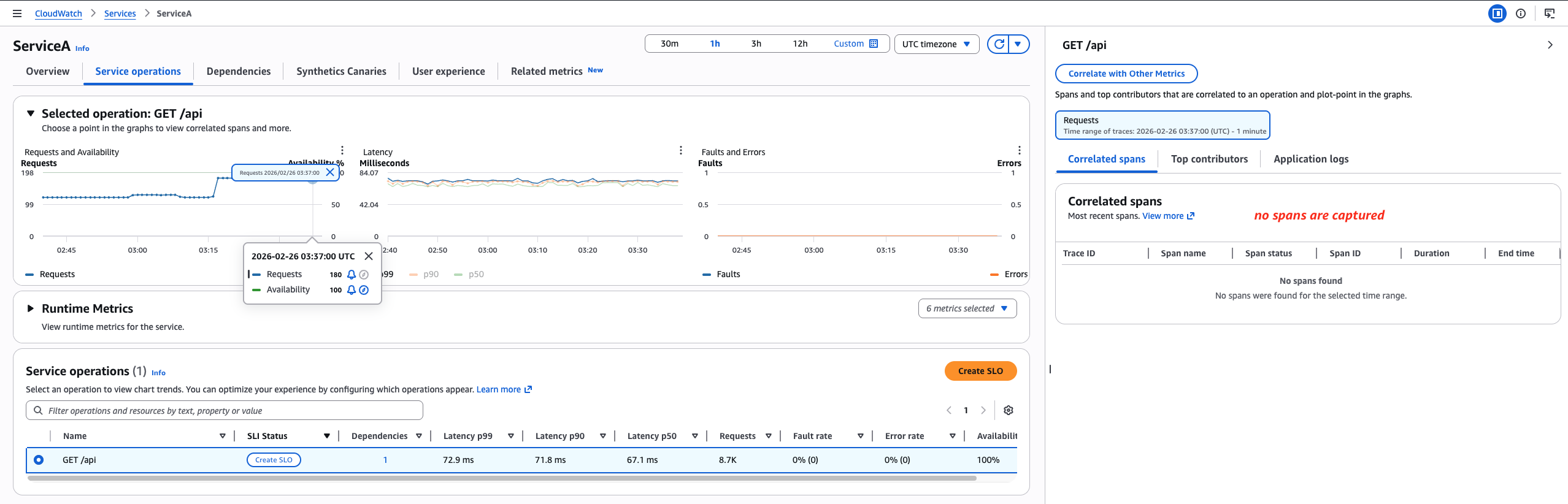
Figure 4: Spans are not captured with FixedRate of 1% and ReservoirSize 0
By default, when faults are detected under Service A, X-Ray automatically triggers the sampling boost based on the configured rule. This example generated high latency spikes at Service C to trigger the sampling boost at Service A. Because Service C is a downstream service to Service A and has the supported configuration, it can trigger the sampling boost.
Testing by generating latency spikes
This test generated 8 high latency requests per minute for the first 40 seconds, sustained over 10 minutes on Service C. The increase in latency, triggered the sampling boost at Service A to capture full traces. The following figure 5 shows X-Ray sampling traces during high latency.
aws.trace.flag.sampled = 1indicates that X-Ray captured a full trace with the sampling boost.aws.trace.flag.sampled = 0does not appear because anomaly span capture is not triggered.
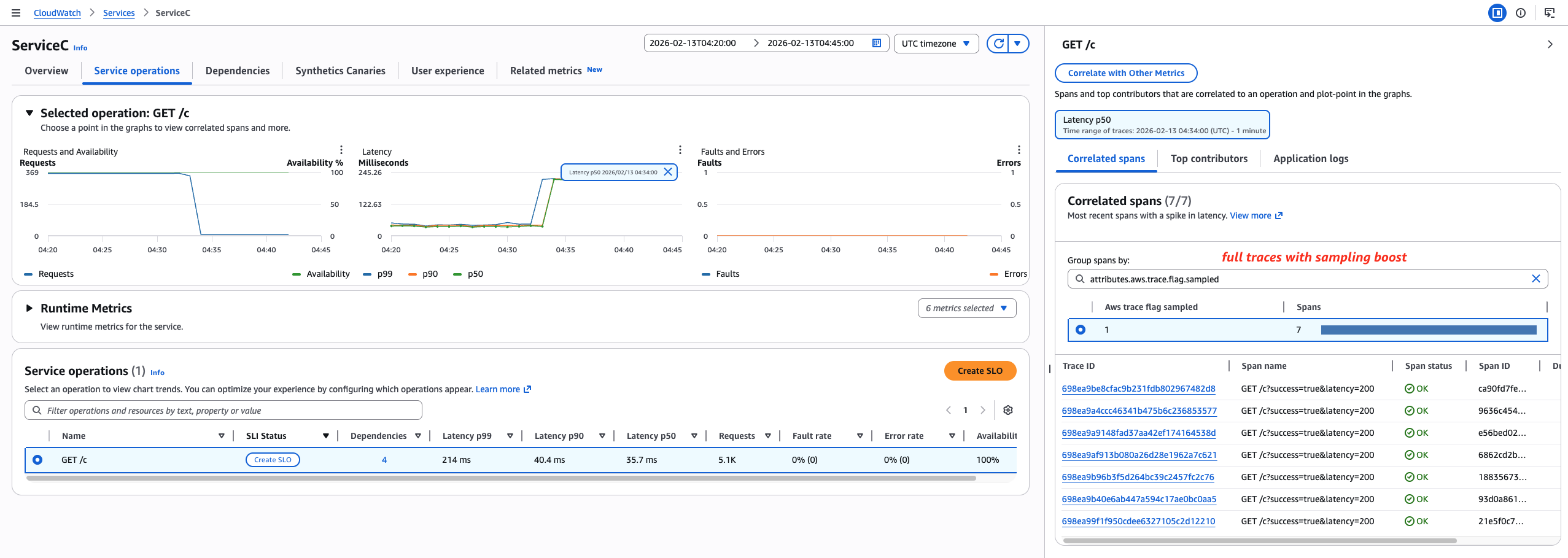
Figure 5: X-Ray sampling boost results during high latency
Key characteristics of Sampling Boost
- Configured as part of an X-Ray sampling rule.
- Boost magnitude is calculated based on the number of anomalies observed.
- Each boost is temporary and followed by a
CooldownWindowperiod. - Sampling rate is increased only as much as needed to capture at least one anomalous trace, up to a configured maximum.
- Define sampling rules per each root service to achieve more precise and predictable boost behavior.
- Because this mechanism is probability-based, sampling boost is most effective for recurring anomalies or anomalies that last longer.
Use case 2: Capture spans on demand when an anomaly condition is met
Anomaly Span Capture is a complementary capability that operates independently of X-Ray sampling rules. Unlike sampling boost, it doesn’t rely on sampling roots or parent-based sampling decisions. This mechanism is designed to record anomalies whenever they occur, based on conditions defined in local configuration.
How it works
A service can define an anomaly condition locally, such as a latency threshold being exceeded for a specific operation. When a request violates that condition, X-Ray captures the span chain for that service from the service’s root span, through the span where the high latency is observed. Although the captured trace covers a single service, it provides detailed visibility into the execution path surrounding the anomaly and may be sufficient to identify the root cause.
Using Sampling Boost and Anomaly Span Capture together
By combining sampling boost and anomaly span capture, you can lower baseline sampling rates to reduce cost, capture anomalies deterministically, and collect additional traces opportunistically when issues persist. This combination provides strong diagnostic coverage without requiring high steady-state trace volume.
Testing by generating faults
This test generated faults to trigger sampling-boost and anomaly-span-capture (usage: \”both“\). It generated 8 faults per minute for the first 40 seconds, sustained over 10 minutes at Service C. This triggered sampling boost at Service A (full traces) and anomaly span capture at Service C (partial traces). When the ADOT SDK detects an anomaly span, it emits as many spans as possible, up to the limit set by anomalyTracesPerSecond in the local configuration. The following figure 6 shows X-Ray sampling traces during faults:
aws.trace.flag.sampled = 0indicates anomaly span capture.aws.trace.flag.sampled = 1indicates that X-Ray captured a full trace with sampling boost.
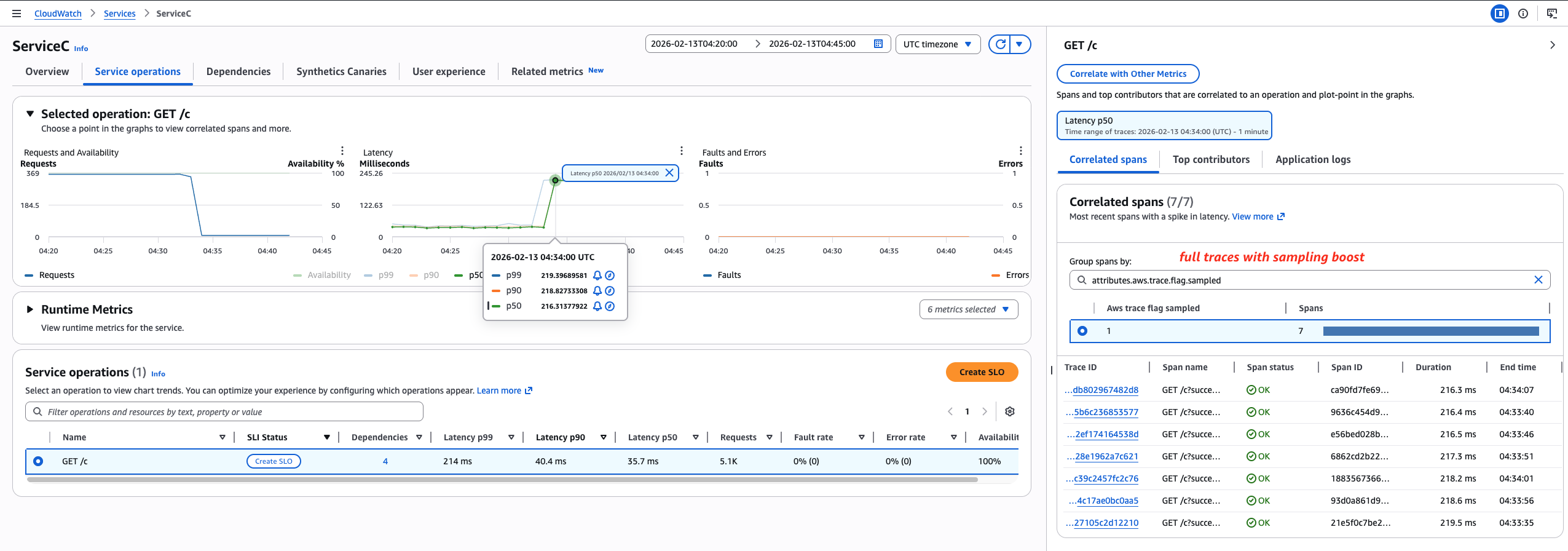
Figure 6: X-Ray sampling results showing both Sampling Boost and Anomaly Span Capture
Key characteristics of Anomaly Span Capture
- Configured locally at the SDK level using a YAML configuration file.
- Independent of sampling rules and sampling roots.
- Captures spans on demand rather than through probabilistic sampling.
- Includes all anomalous spans during an anomaly.
- Produces a partial trace scoped to one service, which provides highly actionable debugging information.
Monitoring Sampling boost
Sampling Boost respects configured maximum rates and cooldown windows, which helps maintain predictable costs. When you define a sampling rule with sampling boost enabled, X-Ray automatically emits metrics with SamplingRate as the metric name. For every rule with SamplingRateBoost enabled, this metric is emitted. During the test described earlier, sampling boost triggered twice: once during a latency spike and once during 5XX faults at Service C. The following figure shows X-Ray boosting the sampling rate to 28% during faults and up to 80% (the configured maximum) during the latency spike, designed to capture at least one trace during application issues.
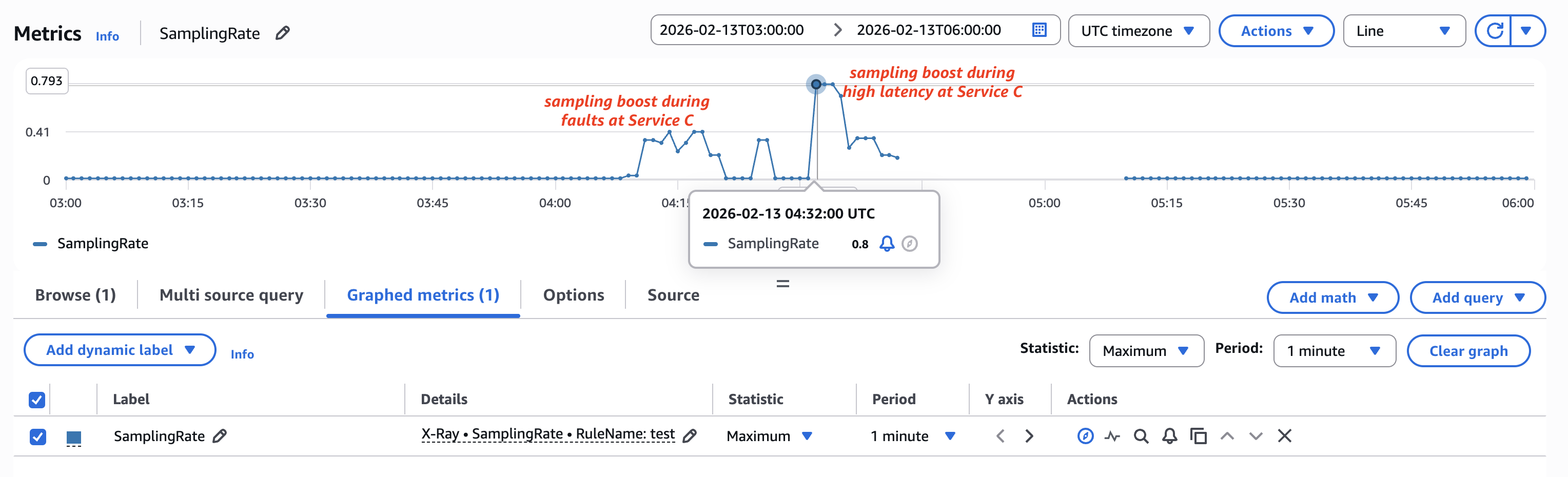
Figure 7: X-Ray SamplingRate metric showing boost during faults and latency spike for the test rule
Best Practices
Sampling rules at root services: A wildcard root service aggregates anomaly counts across all matched request paths. The calculated sampling boost satisfies the minimum requirement at an aggregate level but may not capture anomalies for each individual path. For more predictable behavior, define sampling rules per root service or per critical entry point.
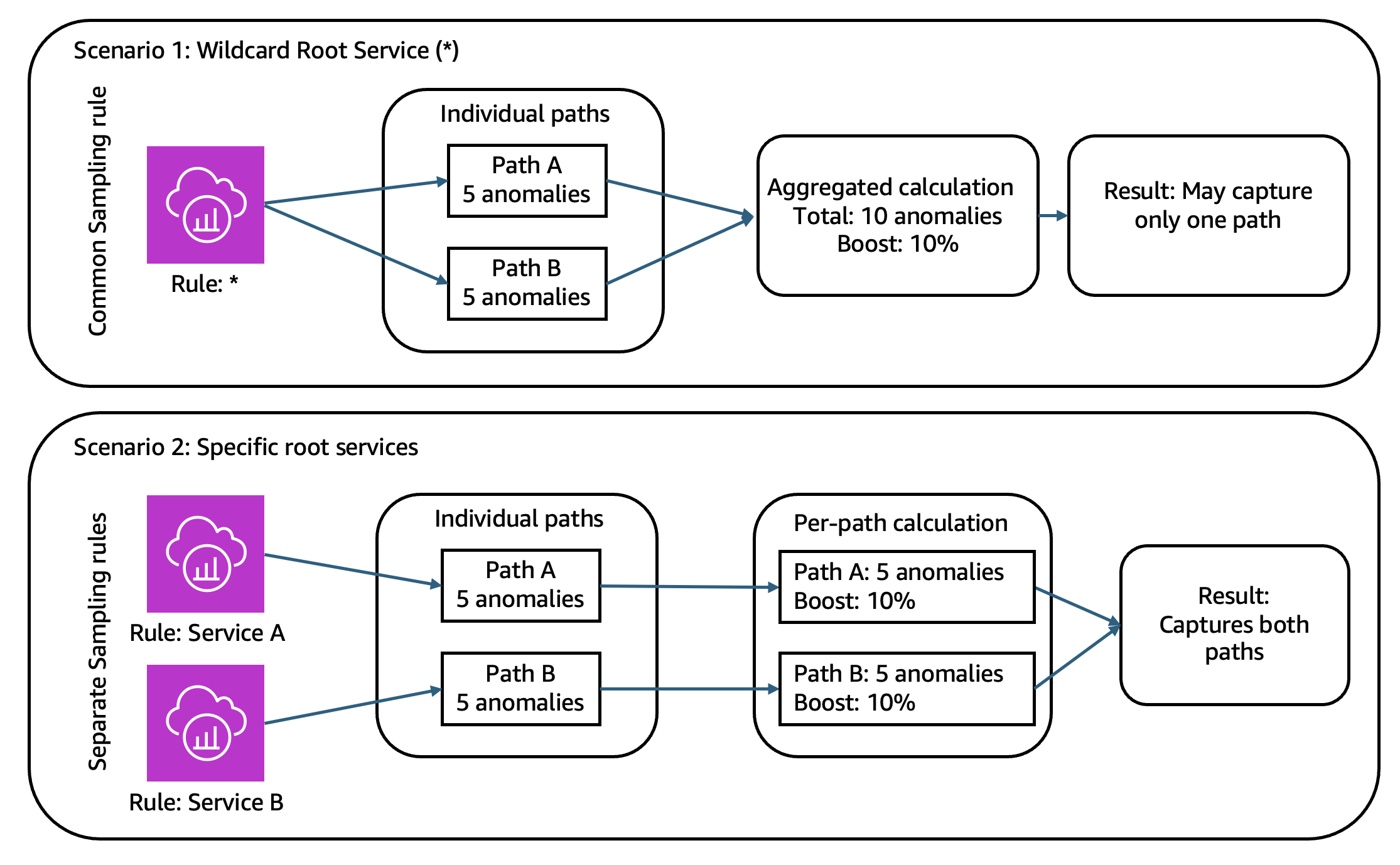
Figure 8: Aggregated sampling behavior across multiple paths
Baseline sampling rate selection: Adaptive sampling provides the largest benefit when baseline sampling rates are low. Sampling boost improves the probability of capturing repeated anomalies within a limited evaluation window, not one-off events. A low baseline rate (for example, FixedRate of 1%) benefits most from a temporary boost, while a high baseline rate (for example, FixedRate of 30%) offers limited additional benefit.
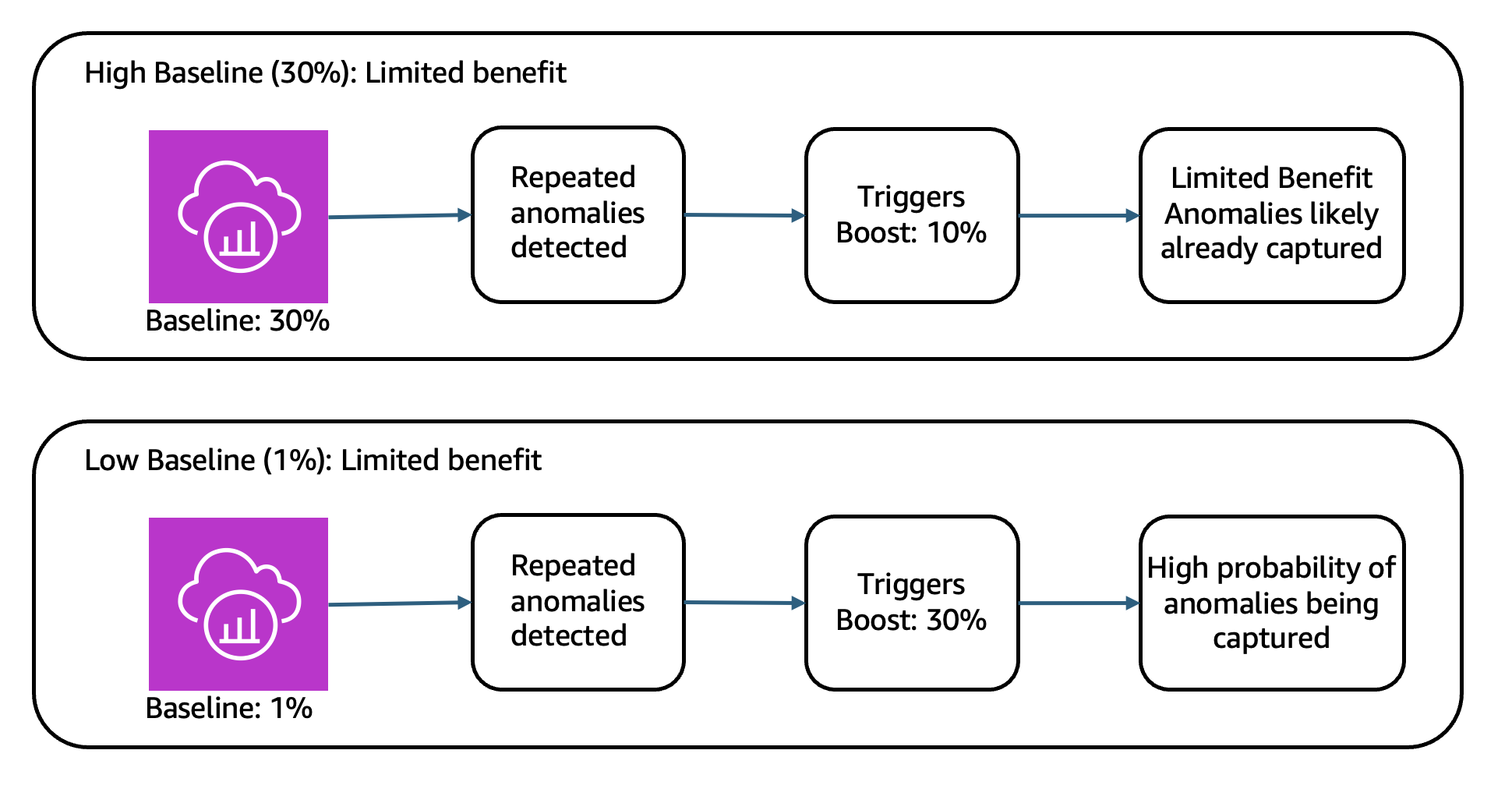
Figure 9: Sampling boost benefit for low and high baselines
Cooldown period: Sampling boost is intentionally designed to be temporary. The boost window is fixed at 1-minute by default. After the boost completes, X-Ray enters a cooldown phase using fixed, time-aligned windows rather than a rolling timer. A 10-minute cooldown prevents continuous elevated sampling during prolonged incidents, helping you maintain predictable costs.
For example, with a 10-minute CooldownWindow, if a boost ends at 1:14, no new boost can be triggered before 1:20. Configuring the CooldownWindow to one minute allows sampling boost to occur continuously during persistent anomalies.
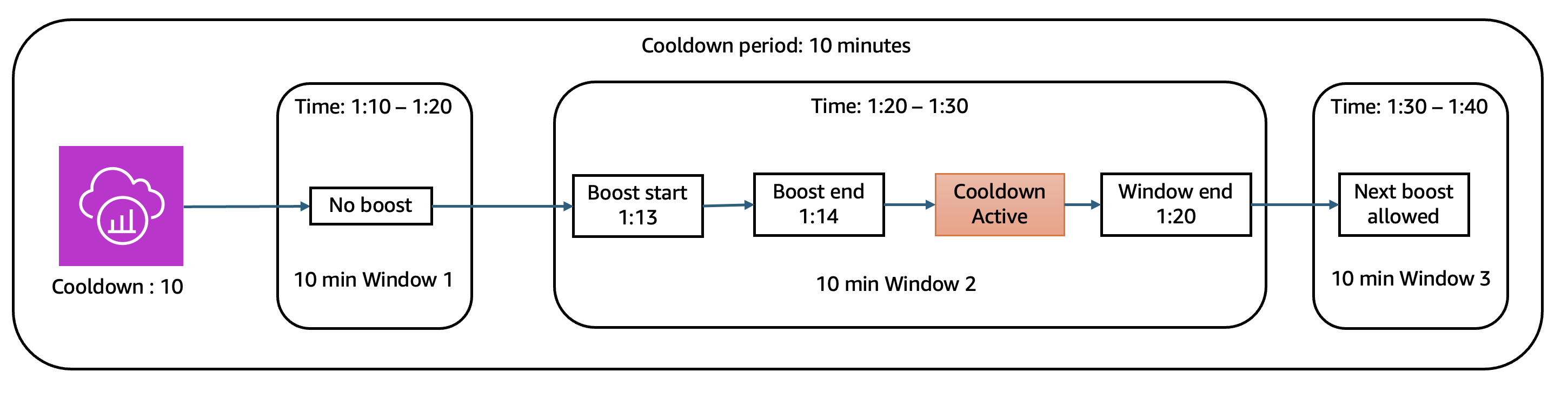
Figure 10: Time series view of cooldown period
Multi account and multi region configurations: X-Ray propagates sampling decisions to downstream services regardless of account boundaries. Anomaly signals only trigger sampling boost if they occur within the same AWS account and AWS Region as the root service sampling rule. However, if sampling boost is already active, the increased sampling rate applies to all downstream services in the same trace call chain.
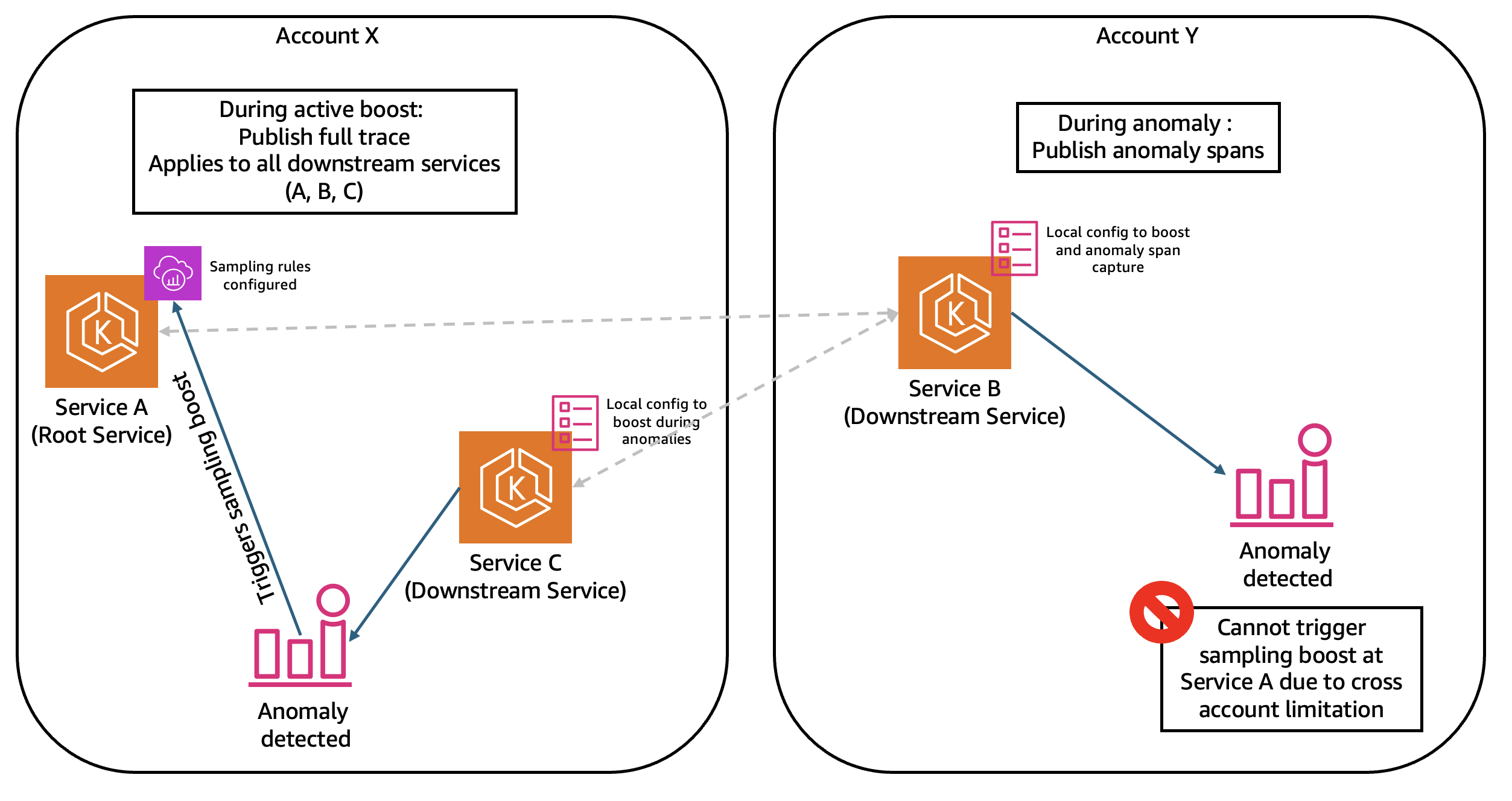
Figure 11: Multi account Sampling Boost and Anomaly Span Capture behavior
Conclusion
This post demonstrates how to configure adaptive sampling with X-Ray to capture critical spans while balancing observability depth and cost. X-Ray adaptive sampling helps you respond dynamically to runtime anomalies by combining Sampling Boost with Anomaly Span Capture. This helps collect critical diagnostic data without increasing steady-state trace volume and cost.
To learn more about X-Ray, visit the AWS X-Ray documentation. Explore Amazon CloudWatch Application Performance Monitoring to view and query traces captured. Review observability best practices for additional information. Have you implemented adaptive sampling in your environment? Share your experience in the comments below.