AWS Cloud Operations Blog
Extending AWS DevOps Agent with Skills, Model Context Protocol (MCP) Servers, Custom Agents and Connectors
AWS DevOps Agent investigates incidents, traces problems from code to cloud, and analyzes Amazon CloudWatch, AWS CloudTrail, and third-party observability tools out of the box. But every operations team carries knowledge the agent cannot reach through generic reasoning: the order you check things in when, for example, an Amazon Elastic Container Service (ECS) task won’t start; the correlation you’ve learned between two services that share a database; the threshold that’s an emergency on one workload and normal on another; and the escalation path a P1 has to follow. That knowledge lives in runbooks, wikis, Standard Operating Procedures (SOPs), and mostly in engineers’ heads.
This post is about closing that gap, and it comes in two parts. The first is breadth: why you would extend AWS DevOps Agent at all, and the three building blocks you use to do it. Those building blocks are Custom Skills, MCP Servers, Custom Agents and Connectors. The second is depth: how the community collaborates on them in the open-source aws/tools-for-devops-agent repository. We show that end to end through one real skill, the Amazon Elastic Kubernetes Service (EKS) Operations Review, and walk through how a contribution is evaluated before a pull request is created.
It’s about contributing reusable building blocks to a shared catalog, with a repeatable authoring-and-testing loop, not about standing up a single agent for one team.
Important: The tools in the aws/tools-for-devops-agent repository are provided as sample code. They aren’t intended for production use as-is. Before you use them in production, test them in a non-production environment, review their IAM permissions and security configuration against your organization’s policies, and confirm that their behavior meets your operational requirements. For terms of use, see the repository’s LICENSE file.
Part 1 – Why extend the agent, and with what
The knowledge gap
Operational expertise falls into four categories DevOps Agent can’t infer on its own:
- Investigation procedures – “When Amazon ECS tasks fail, check task definition → image pull → AWS Identity and Access Management (IAM) role → port mapping → health check.” Lives in runbooks and wikis.
- Correlation patterns – “When Service A alarms fire with Service B, it’s always the shared Amazon Relational Database Service (RDS) cluster.” Lives in engineers’ heads.
- Service-specific thresholds – “CPU above 70% on payments means trouble; above 90% on batch is normal.” Learned through experience, rarely written down.
- Escalation procedures – “If it’s P1 and customer-facing, page on-call AND notify VP Eng within 15 minutes.” Lives in SOPs and playbooks.
Generic vs. guided: a quick illustration
Take a common Amazon ECS failure: a task definition points at a non-existent image tag – a bad push or a CI/CD typo. The service can’t pull the container, and the Amazon CloudWatch alarm goes red.
| Without Custom Skill | With Custom Skill |
|---|---|
| Relies entirely on built-in Incident Root Cause Analysis (RCA) | Amazon ECS procedure taught as a skill, targeted at Incident RCA |
| Checks metrics, reviews AWS CloudTrail, examines deployment status | Timeline shows the agent loading the skill |
| Generic troubleshooting steps | Follows our structured procedure |
| Find the root cause – but without the specific details | Routes by ECS task stop reason |
| No structured decision tree | Checks the exact resources in our decision tree |
| No routing by ECS task stop reason | Routes by ECS task stop reason |
| No Amazon ECS-specific error patterns | Specific root cause + pattern across failure cycles |
| No actionable remediation beyond generic findings | Actionable fixes |
Same agent. The difference is the encoded expertise.
The building blocks
An Agent Space is the deployed environment where DevOps Agent runs. It holds the agent’s skills, tools, and the cloud source (the AWS account it’s connected to and reads from). Agent types are the built-in roles the agent takes on: On-demand, Incident Triage, Incident RCA, Incident Mitigation, Incident UI, and Release testing. When you create a skill, you choose which agent types can use it. For details, see DevOps Agent Skills. use_aws is the agent’s built-in, read-only tool for calling standard AWS APIs. When you need data-plane access that use_aws can’t provide, you add an MCP server.
| Building block | What it is | Reach for it when |
|---|---|---|
| Custom Skill | Knowledge and reasoning the agent loads at runtime. It follows the open Agent Skills spec. Uploaded skills contain Markdown, PDFs, images, and data files, with no scripts or code. (With Sandbox – in-preview – skills can also include executable code) | Bounded scope (a few calls + a pattern match), auto-triggers from investigation context, enhances multiple built-in agents, small context budget. |
| Custom MCP Server | A deployable server that exposes data-plane tools the agent calls over Streamable HTTP. It authenticates with OAuth 2.0, an API key or token, custom header secrets, or AWS Signature Version 4 (SigV4). | You need data-plane access beyond use_aws – query in-Amazon VPC resources like Amazon RDS, or expose safe, allowlisted operations. |
| Custom Agent | A configured agent with its own prompt, curated tools, skills, and memory. | Three or more capabilities need dedicated context, the work produces artifacts (tables, dashboards), or it’s a long-running, account-wide, scheduled, or multi-step workflow. |
| Connector | The definition of a partner-hosted MCP server that customers add to their Agent Space. It holds no code, just a connector.yaml file, a logo, and a setup guide. The partner runs and maintains the server. The first published connector is Honeycomb, with more following soon. | You want the agent to use a third-party tool (observability, ticketing, CI/CD) that the vendor already hosts as an MCP server, and you don’t want to deploy or run your own. If you need to build and host the server yourself, use a Custom MCP Server instead. |
They compose. A Skill (reasoning) plus an MCP server (data access) is the gold standard – for example, Amazon EKS data-plane diagnostics, while a control-plane-only skill needs no MCP. Wrap both in a Custom Agent when the work is scheduled, multi-step, or artifact-producing.
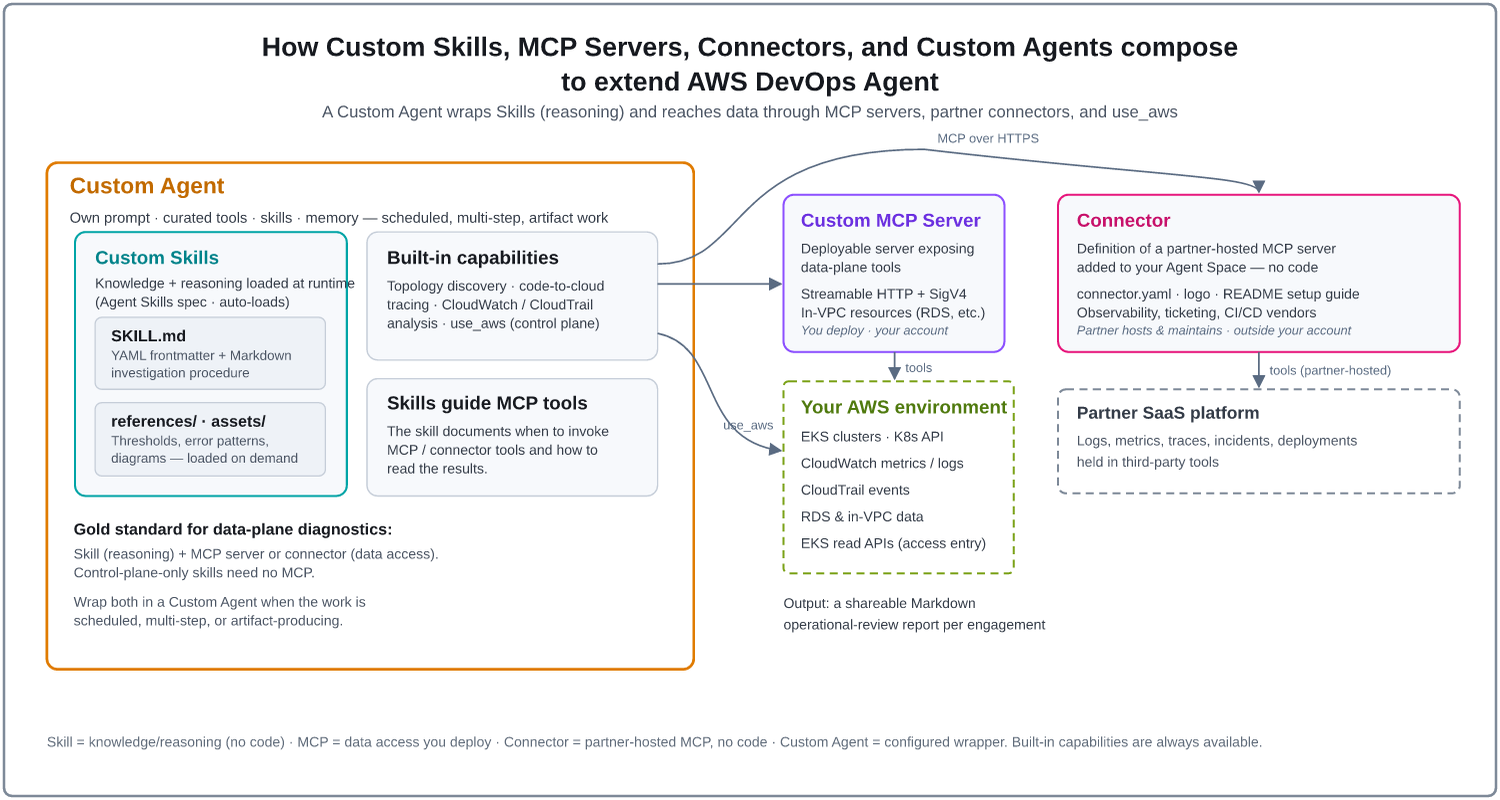
Anatomy of a skill
A skill is a directory of Markdown and reference materials: a required SKILL.md with YAML frontmatter and investigation instructions, plus optional references/ and assets/ loaded on demand. The frontmatter description drives activation, so you write it from the agent’s point of view, and you target specific agent types rather than defaulting to all agents. The companion post walks through how to author a skill that activates reliably, covering the frontmatter, progressive disclosure, decision trees, and reference materials. See Best practices for writing AWS DevOps Agent Skills.
Part 2 – Collaborating in the open: the repo, a use case, and the eval loop
The open-source catalog
aws.github.io/tools-for-devops-agent is the home of an open-source catalog of tools that extend AWS DevOps Agent beyond its built-in capabilities, for incident response, root-cause analysis, and operational reviews. It organizes everything into five categories that map directly onto the building blocks from Part 1. As of publication time, the catalog has 42 skills, 6 MCP servers, 9 custom agents and 1 connector, and it is growing steadily. The domains are containers, databases, analytics and big data, AI/ML, networking, storage, security, cost optimization, and operations and resilience.
| Category | What it is | What it gives the agent |
|---|---|---|
| Skills | Structured instruction sets following the open Agent Skills spec and the DevOps Agent skills guidance. Uploaded to your Agent Space. | Teaches the agent what to do – investigation procedures, best practices, and org-specific knowledge that auto-load when relevant and compose across a workflow. |
| Custom Agents | Pre-built agent configurations (system prompt + tool and skill assignments). Run on demand or on a schedule. | Purpose-built workflows – periodic health reports, configuration audits, trend analysis, multi-step orchestration, cross-tool correlation. |
| MCP Servers | Deployable Model Context Protocol servers, deployed to your AWS account and registered with your Agent Space. | Gives the agent the ability to act – custom tools for deep diagnostics like node-log collection, DNS resolution probing, and database health checks, beyond standard AWS APIs. |
| Connectors | Definitions of partner-hosted MCP servers (a connector.yaml, a logo, and a setup guide, no code). |
Gives the agent access to third-party tools, such as observability, ticketing, and CI/CD platforms, without you deploying or running a server. |
| CloudFormation Templates | Infrastructure-as-code for the AWS IAM permissions and resources skills require. | Provisions the access a skill or agent needs, consistently and repeatably. |
The division of labor is the theme of the whole post: skills teach the agent what to do, MCP servers let it act, and custom agents wrap both into a repeatable workflow. Each MCP server documents its own security model, such as AWS IAM scoping, tool allowlists, and read-only constraints, which define the operations the server exposes to the agent (Review these controls against your organization’s policies before you deploy). Skills can be paired with a server to guide when and how to call its tools.
How the catalog is organized
Each category is a browsable catalog, and every entry ships as a self-contained directory with its own README, prerequisites, and deployment guide. The three entry types follow consistent structures.
A skill – SKILL.md, references/, and assets/ are what the agent reads at runtime; everything else supports development, testing, and docs:
skills/<skill-name>/
├── SKILL.md        # Main instructions + frontmatter (required)
├── README.md       # Prerequisites, deployment, sample prompts
├── CHANGELOG.md    # Version history
├── evals/          # Evaluation queries and benchmarks
├── assets/         # Images, diagrams, data files (optional)
└── references/     # Supplementary reference docs (optional)
A custom agent – the SYSTEM_PROMPT.md is what you paste into the DevOps Agent web app when you create the agent; the README is the full setup walkthrough:
custom-agents/<agent-name>/
├── SYSTEM_PROMPT.md  # The system prompt to paste into the agent config
├── README.md         # Prerequisites, creation steps, execution guide
└── CHANGELOG.md      # Version history
An MCP server – deployment artifacts (AWS Serverless Application Model (SAM) template or AWS Cloud Development Kit (CDK) app) provision the infrastructure in your account; after deployment the server exposes an MCP-compatible endpoint the agent connects to:
mcp/<server-name>/
├── README.md       # Prerequisites, deployment, registration guide
├── template.yaml   # AWS SAM template (or cdk.json for AWS CDK servers)
├── src/            # Server source code
├── tests/          # Unit and integration tests
└── docs/           # Architecture and design docs (optional)
A connector – holds no code. connector.yaml defines the partner-hosted MCP server that customers add to their Agent Space; the partner runs and maintains the server itself:
connectors/<connector-name>/
├── connector.yaml  # Connector definition, validated against schema/v1 (required)
├── logo.svg        # Logo shown in the DevOps Agent console (required)
├── logo-dark.svg   # Logo variant for dark themes (optional)
└── README.md       # Setup guide for customers
Example use case: an Amazon EKS Operations Review skill
The Amazon EKS Operations Review skill is a good example of a “gold-standard,” service-specific skill because it is genuinely comprehensive, deep enough that it warranted extra reviewers on the way in.
What it does, end to end:
- Discovers the Amazon EKS clusters in the account.
- Collects cluster configuration, Kubernetes resources, node groups, add-ons, networking, security posture, and workloads.
- Gathers signal history – roughly seven days of Amazon CloudWatch metrics, control-plane logs, and AWS CloudTrail events.
- Analyzes all of it against the Amazon EKS Best Practices Guide – 288 core checks across 9 pillars (Operations, Resilience, Security, Scalability, Performance, Observability, Networking, Cost, and Control Plane), with PASS/FAIL/NA grading.
- Produces a shareable Markdown report per cluster.
It targets the right agent types – an on-demand mode for interactive reviews and a scheduled mode for proactive runs – and it needs Amazon EKS read APIs plus Kubernetes API access via an Amazon EKS access entry. Because it reads real cluster state, it’s exactly the kind of skill where the reasoning (the skill) and the data access (permissions, and optionally an MCP server) come together: instead of generic findings, a reviewer gets a structured, best-practices-aligned operational review they can hand to a team.
Roadmap: the open PRs are the live view of what’s coming. New skills, agents, and MCP servers land in the open – the repo’s open pull requests are the roadmap for what’s in flight next.
Prerequisites
To deploy and test tools, you need the following:
- Agent Space: An AWS DevOps Agent Space with your target AWS account added as a cloud source.
- GitHub connection (optional): A GitHub account connected to your Agent Space, if you want to import skills directly from the repository. You can also upload a skill as a zip file or create one in the Operator Web App..
- Deployment tooling: The AWS SAM CLI or the AWS CDK, depending on the server, if you plan to deploy an MCP server.
- Permissions: AWS IAM permissions to create the resources each tool lists in its README.
Cost considerations
Skills and custom agents don’t deploy infrastructure, but the agent work they trigger is billed. AWS DevOps Agent charges for each second the agent actively works, with no charge while idle. This includes the investigations and chat sessions that run during functional evals, because each eval iteration runs real tasks in an Agent Space. For current rates, see AWS DevOps Agent pricing
MCP servers deploy billable infrastructure in your account, such as AWS Lambda functions, Amazon API Gateway endpoints, or VPC networking resources. Check each server’s README for the resources it creates, use the AWS Pricing Calculator to estimate cost before you deploy. Connectors are hosted by the partner, so any charges for the partner’s service are set by that partner.
Deploying from the catalog
Every tool installs the same way, whatever its type. You choose it, follow the steps in its README, and confirm it works. This assumes you already have an Agent Space with your target AWS account wired up as a cloud source:
- Skills – pick one from the Skills Catalog, follow its README to upload it to your Agent Space, then try one of its sample prompts through the Chat capability of AWS DevOps Agent; the agent activates the skill automatically from the context of your request. Upload several and it activates whichever are relevant.
- Custom agents – pick one from the Custom Agents Catalog, paste its SYSTEM_PROMPT.md and assign the listed tools and skills, then execute it on demand from the web app and confirm it produces the expected artifact.
- MCP servers – pick one, deploy its infrastructure (AWS CDK or AWS SAM), register the endpoint with your Agent Space (endpoint URL, auth method, tool selection), then confirm the agent discovers and invokes its tools from a usage example.
Contributing back
The contribution model is simple: adapt an existing runbook or skill to the Agent Skills spec, test it in DevOps Agent, and open a PR. The skills, agents, and servers already in the repo double as templates – they demonstrate how to structure a SKILL.md, write a system prompt that composes skills into a workflow, and design an MCP server’s security model, AWS IAM scoping, and registration flow.
Found a bug or hit an issue? Because this is a community repository, the supported channel for bugs and feedback is a GitHub issue. Log it directly on the repo at github.com/aws/tools-for-devops-agent/issues, and the maintainers and the community track and respond there. If a tool doesn’t behave the way its README says, that’s the place to start.
How we evaluate skills
A skill isn’t considered done when it reads well. It’s done when it has been evaluated. Our evaluation strategy grades a contribution in three increasing depths before it’s allowed in:
- Structure – static checks on the SKILL.md frontmatter and body: the file exists, the YAML is valid, name and description are present, the name format matches its directory, field lengths are within limits, and the body stays under the length budget. No LLM and no AWS calls, so it’s the fastest signal and runs first.
- Best practices – LLM-judged checks against the spec’s authoring guidance: description quality, progressive disclosure, procedures over declarations, documented gotchas, templates, step-by-step guidance, and validation loops. Run across multiple iterations so cross-iteration consistency is visible.
- Functional – the skill’s own evals/evals.json, which is written by the skill’s author, run against a real DevOps Agent space, once with the skill and once without. It compares trigger behavior, output quality, runtime, and consistency, then weighs those dimensions into a plain-language verdict. A fresh Agent Space is provisioned per iteration, the skill uploaded, the task run, and the space cleaned up afterward.
The heart of the functional testing is the `evals/evals.json` file, where a contributor declares what “good” looks like. Each eval has a prompt, a task_type (chat or investigation), and a should_trigger flag. Positive evals add an expected_output (chat) or expected_root_cause (investigation), plus an optional assertions array of individually graded checks – LLM-judged statements or local regex matches. Negative evals (should_trigger: false) make the trigger check the only check, so you can prove the skill doesn’t fire on unrelated questions. A trimmed shape:
{
  "skill_name": "aws-eks-operations-review",
  "evals": [
    {
      "id": "eks-node-not-ready",
      "task_type": "investigation",
      "prompt": "Investigate why node ip-10-0-1-23 went NotReady",
      "should_trigger": true,
      "expected_root_cause": "Kubelet stopped reporting due to disk pressure",
      "assertions": [
        "The summary names the specific node that went NotReady",
        { "text": "The kubelet condition is quoted",
          "evaluator": "regex", "pattern": "DiskPressure|MemoryPressure" }
      ]
    },
    {
      "id": "eks-operational-review",
      "task_type": "chat",
      "prompt": "Run an operational review on my Amazon EKS clusters",
      "should_trigger": false
    }
  ]
}
The evaluation contract includes these reporting rules:
- `skipped` means *unknown*, not *satisfied*. A test that never applied (for example, no references/ or assets/ files) or whose dependency failed, is scored outside the fraction – never quietly credited.
- Consistency across iterations is reported, so a verdict that flips between runs is visible rather than hidden inside a single pass rate.
- Every run writes a versioned JSON report under the skill’s own evals/ directory, so a PR carries its own evidence.
The workflow, start to finish
- Identify the opportunity – a recurring incident type or a runbook that isn’t encoded yet.
- Author the skill – convert the runbook to SKILL.md with a strong, agent-facing description; target the right agent types; add reference materials.
- Add an MCP server if the skill needs data-plane access beyond use_aws; wrap the whole thing in a Custom Agent if the work is scheduled, multi-step, or artifact-producing.
- Open a PR against aws/tools-for-devops-agent. Reviewers check both the domain correctness and the maintainer/spec perspective.
Cleaning up
To avoid ongoing charges, remove the resources you created while following this post:
- Skills: In your Agent Space, deactivate or delete the skills you uploaded.
- Custom agents: Delete the custom agents you created, along with any schedules attached to them.
- MCP servers: Remove each server’s registration from your Agent Space, then delete its stack. For AWS SAM servers, run sam delete. For AWS CDK servers, run cdk destroy.
- IAM policies: If you deployed the skill IAM policies template, delete the devops-agent-skill-policies AWS CloudFormation stack.
- Agent Space: If you created an Agent Space only for this walkthrough, delete it.
Conclusion
AWS DevOps Agent becomes far more useful when it carries your team’s operational knowledge. Skills teach the agent what to do, MCP servers and connectors give it the data it needs, and custom agents turn both into a repeatable workflow. The open-source catalog lets you start from tested building blocks instead of from a blank page.
As a next step, pick one recurring incident type your team handles, deploy a matching skill from the catalog, and compare the agent’s investigation with and without it.
To get started, browse the AWS DevOps Agent Tools catalog. If you have a runbook worth sharing, adapt it to the Agent Skills spec, add evals, and open a pull request on the aws/tools-for-devops-agent repository.