Networking & Content Delivery
Announcing AWS Global Accelerator Support in AWS Load Balancer Controller for Kubernetes
We recently announced that the AWS Load Balancer Controller now supports AWS Global Accelerator through a new declarative Kubernetes API. This integration brings the power of AWS’s global network infrastructure directly into your Kubernetes workflows, enabling improved application performance by up to 60% for users worldwide, all without leaving your Kubernetes environment.
AWS Global Accelerator is a networking service that improves the performance of applications for end users by routing traffic through AWS’s private global network backbone, bypassing the unpredictability of the public internet. It delivers up to 60% performance improvement by leveraging AWS’s global network, provides two static anycast IP addresses that serve as a fixed entry point to your applications, enables automatic failover to healthy endpoints in under 30 seconds, and gives you precise control over traffic distribution across AWS regions and endpoints. This post looks at how you can integrate this important new service to get the most out of it.
The problem we’ve solved
Until now, configuring AWS Global Accelerator for Kubernetes applications required additional steps through the AWS Management Console, AWS CLI, or AWS CloudFormation templates. This approach created operational overhead by introducing a separate management plane outside of Kubernetes. Manual changes could diverge from your infrastructure-as-code definitions, leading to configuration drift. Coordinating accelerator configuration with Kubernetes deployments added complexity to already intricate workflows, and accelerator status was not reflected in Kubernetes resources, limiting visibility into the state of your infrastructure.
Introducing the AWS Global Accelerator Controller
The new AWS Global Accelerator Controller, part of the AWS Load Balancer Controller, solves these challenges by bringing Global Accelerator management natively into Kubernetes. Using a Custom Resource Definition (CRD), you can now declaratively manage your entire Global Accelerator configuration alongside your other Kubernetes resources — enabling GitOps practices for global traffic management.
Here’s how you can make the AWS Global Accelerator Controller work best for your configuration:
Prerequisites
Before getting started, ensure your environment meets the following requirements. The AWS Global Accelerator Controller requires Kubernetes v1.19+, AWS Load Balancer Controller v2.17.0+, and is only available in the commercial AWS partition (not GovCloud or China). You’ll also need to configure additional IAM permissions for Global Accelerator resource management by attaching a dedicated policy (via IAM Roles for Service Accounts (IRSA) or worker node roles) alongside your existing LBC permissions. Learn more https://kubernetes-sigs.github.io/aws-load-balancer-controller/v3.1/guide/globalaccelerator/installation/#kubernetes-cluster-requirements
High level Architecture diagram
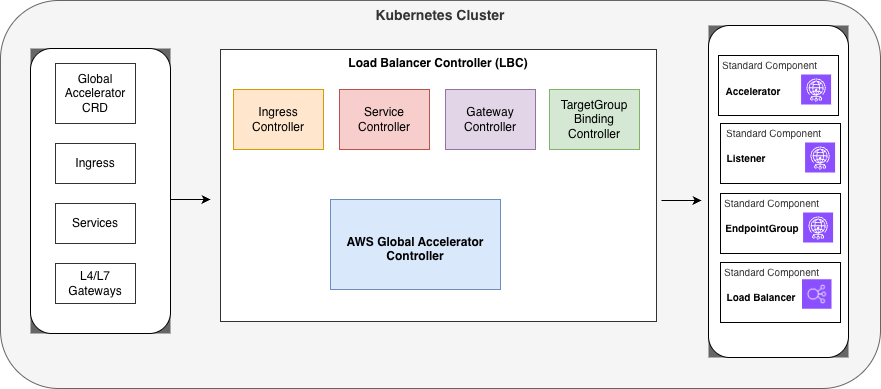
High level Architecture diagram
When you define Global Accelerator resources using the Custom Resource Definition (CRD) shown on the left side of the diagram, the AGA Controller watches these custom resources and translates them into actual AWS Global Accelerator configurations. The controller works alongside other specialized controllers in the Load Balancer Controller (LBC) suite, including the Ingress Controller, Service Controller, Gateway Controller, and TargetGroup Binding Controller, each handling different aspects of load balancing and traffic management.
The AWS Global Accelerator Controller’s primary responsibility is to reconcile the desired state defined in your Kubernetes manifest with the actual state of Global Accelerator resources: Accelerators (which provide static IP addresses for global traffic entry points), Listeners (which define the ports and protocols for incoming connections), EndpointGroups (which specify the AWS regions and health check configurations), and Load Balancers (which serve as the actual endpoints receiving the accelerated traffic).
The controller continuously ensures that any changes to these custom resources are reflected in the AWS Global Accelerator configuration, handling the creation, updates, and deletion of accelerators and their associated components.
Key Features of the Global Accelerator Controller
-
CRD Design
The controller uses a single GlobalAccelerator resource to manage the complete AWS Global Accelerator hierarchy — accelerators, listeners, endpoint groups, and endpoints — all in one place. This design keeps configuration centralized while providing granular control over every layer of the stack.
apiVersion: aga.k8s.aws/v1beta1 kind: GlobalAccelerator metadata: name: web-app-accelerator namespace: production spec: name: "web-app-accelerator" ipAddressType: IPV4 listeners: - protocol: TCP portRanges: - fromPort: 80 toPort: 80 - fromPort: 443 toPort: 443 endpointGroups: - endpoints: - type: Ingress name: web-app-ingress -
Automatic Endpoint Discovery
One of the most powerful features of the controller is automatic endpoint discovery. The controller can automatically discover load balancers from your existing Kubernetes resources – including Network Load Balancers (NLBs) from Service type LoadBalancer, Application Load Balancers (ALBs) from Ingress resources, and both ALBs and NLBs from Gateway API resources.
For simple use cases, the controller can also auto-configure listener protocols and port ranges by inspecting the referenced Ingress resource, reducing the amount of configuration you need to write.
apiVersion: aga.k8s.aws/v1beta1 kind: GlobalAccelerator metadata: name: autodiscovery-accelerator spec: name: "autodiscovery-accelerator" listeners: - endpointGroups: - endpoints: - type: Ingress name: web-ingress weight: 200 -
Full Lifecycle Management
The controller manages the complete lifecycle of your Global Accelerator resources. It provisions new accelerators from CRD specifications, updates the CRD status with the current state and ARNs from AWS resources, modifies existing configurations when the CRD changes, and cleans up AWS resources when the CRD is deleted. This ensures your Kubernetes state and AWS resources remain in sync at all times. The following diagram depicts these interactions.
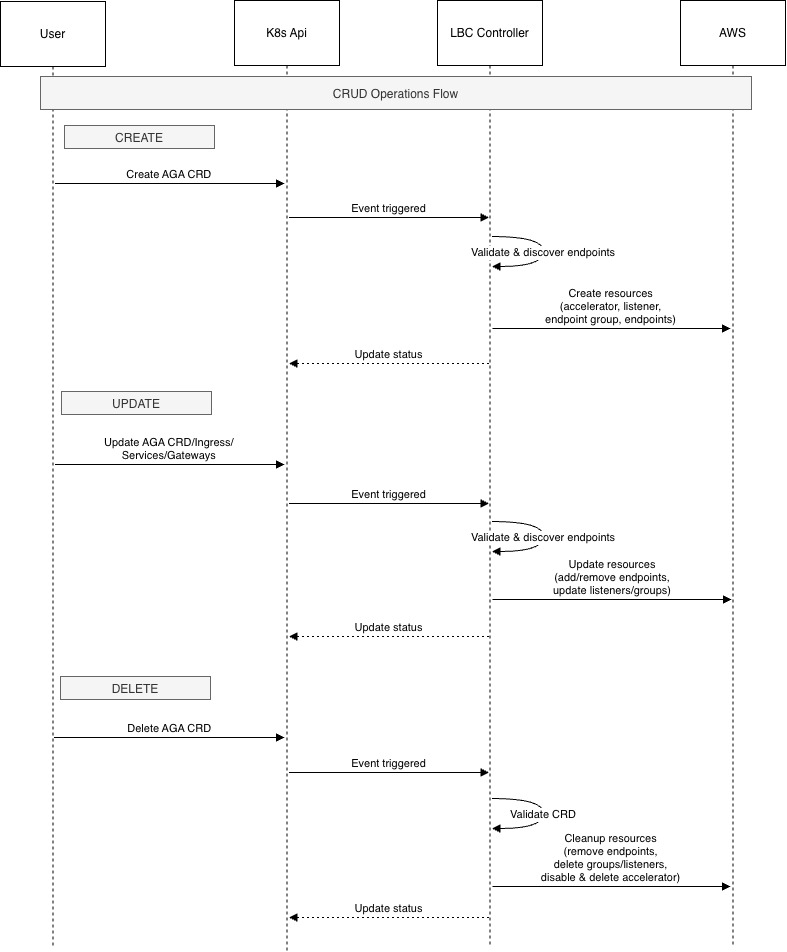
Sequence during CRUD operations
-
Multi-Region Support
While auto-discovery works within the same AWS Region, you can manually configure endpoints in other AWS Regions for true multi-region deployments. By specifying endpoint ARNs directly in the CRD, you can distribute traffic across AWS Regions and build resilient, globally distributed architectures.
For example:apiVersion: aga.k8s.aws/v1beta1 kind: GlobalAccelerator metadata: name: cross-region-accelerator namespace: default spec: name: cross-region-accelerator ipAddressType: IPV4 listeners: - protocol: TCP portRanges: - fromPort: 443 toPort: 443 endpointGroups: - endpoints: - type: Service name: local-service - region: us-west-2 trafficDialPercentage: 50 endpoints: - type: EndpointID endpointID: >- arn:aws:elasticloadbalancing:us-west-2:123456789012:loadbalancer/app/remote-lb/1234567890123456 weight: 128 -
Advanced Traffic Management
The controller supports sophisticated traffic management capabilities. You can control traffic distribution across endpoints using weights — for example, configuring a 2:1 traffic ratio between two endpoints. Port overrides allow you to map listener ports to different Global Accelerator endpoint ports, and client affinity using SOURCE_IP ensures that users are consistently routed to the same endpoint, which is essential for stateful applications.
apiVersion: aga.k8s.aws/v1beta1 kind: GlobalAccelerator metadata: name: port-override-accelerator namespace: default spec: name: port-override-accelerator ipAddressType: IPV4 listeners: - protocol: TCP portRanges: - fromPort: 80 toPort: 80 - fromPort: 443 toPort: 443 clientAffinity: SOURCE_IP endpointGroups: - portOverrides: - listenerPort: 80 endpointPort: 8080 - listenerPort: 443 endpointPort: 8443 endpoints: - type: Service name: backend-service -
Bring Your Own IP (BYOIP) Support
For organizations with their own IP address ranges, the controller supports Bring Your Own IP (BYOIP). You can specify custom IP addresses directly in the CRD spec, giving you full control over the static entry points to your applications.
apiVersion: aga.k8s.aws/v1beta1 kind: GlobalAccelerator metadata: name: byoip-accelerator namespace: default spec: name: byoip-accelerator ipAddressType: IPV4 ipAddresses: - 198.51.100.10 listeners: - protocol: TCP portRanges: - fromPort: 443 toPort: 443 endpointGroups: - endpoints: - type: Ingress name: secure-ingress -
Comprehensive Status Reporting
The controller keeps your CRD status up to date with real-time information from AWS, including the accelerator’s ARN, DNS name, deployment status, and assigned IP addresses. You can retrieve the status using the following command:
kubectl get globalaccelerator <accelerator-crd-name> -o yaml
(replace the accelerator-crd-name with your crd name)

status:
   acceleratorARN: arn:aws:globalaccelerator::123456789012:accelerator/abc123
   dnsName: a1234567890abcdef.awsglobalaccelerator.com
   status: DEPLOYED
   ipSets:
     - ipAddresses:
         - "192.0.2.1"
         - "192.0.2.2"
       ipAddressFamily: IPv4
Common AWS Global Accelerator Controller scenarios
Application Performance
For applications with a geographically distributed user base, the AWS Global Accelerator Controller makes it straightforward to route traffic through AWS’s global network. By referencing your existing Ingress resource in a GlobalAccelerator CRD, you can reduce latency for users worldwide without changing your application code — making it ideal for latency-sensitive workloads. Here’s an example that accelerates traffic to a single ingress resource: https://kubernetes-sigs.github.io/aws-load-balancer-controller/latest/guide/globalaccelerator/examples/#single-ingress-acceleration
Multi-Region Failover
The controller supports automatic failover between AWS Regions. You can configure your primary region to receive 100% of traffic while a failover region sits at 0%, ready to absorb traffic automatically if the primary region becomes unhealthy. This pattern provides high availability with minimal operational effort. See this multi-region failover example: https://kubernetes-sigs.github.io/aws-load-balancer-controller/latest/guide/globalaccelerator/examples/#multi-region-automatic-failover
Blue-Green Deployments
Endpoint weights enable gradual traffic shifts between application versions. By assigning a higher weight to your blue environment and a lower weight to green, you can incrementally roll out new versions and monitor their behavior before completing the cutover — reducing deployment risk without requiring additional infrastructure. See this blue-green deployment example: https://kubernetes-sigs.github.io/aws-load-balancer-controller/latest/guide/globalaccelerator/examples/#multi-region-automatic-failover
Pricing
AWS Global Accelerator pricing has three components: a fixed hourly fee of $0.025 per accelerator (approximately $18/month), a Data Transfer-Premium (DT-Premium) fee per GB that varies by source AWS Region, destination edge location, and standard public IPv4 address charges. You are only charged DT-Premium on the dominant direction of traffic (inbound or outbound) each hour, not both. The DT-Premium fee is in addition to standard EC2 Data Transfer Out fees. There are no upfront commitments. For full pricing details and regional rates, visit the AWS Global Accelerator pricing page: https://aws.amazon.com/global-accelerator/pricing/
Getting Started
To get started, follow the Installation Guide and explore the examples repository for common deployment patterns. If you encounter issues or have feature requests, open an issue on GitHub. We welcome contributions from the community — visit the AWS Load Balancer Controller GitHub to get involved.
Current Limitations
There are two current limitations to be aware of. First, IP addresses specified via BYOIP cannot be updated after accelerator creation. To change IP addresses, you must create a new accelerator. Second, auto-discovery currently works only within the same AWS Region as the controller. For cross-region configurations, use manual endpoint registration with ARNs.
Conclusion
The AWS Global Accelerator Controller brings the full power of AWS’s global network directly into your Kubernetes workflows. By managing Global Accelerator resources declaratively through Kubernetes CRDs, you can improve application performance for global users, simplify operational workflows, maintain configuration consistency, and enable GitOps practices for global traffic management. We encourage you to try the new AWS Global Accelerator Controller and share your feedback with us.

Jaiganesh Girinathan
Jaiganesh Girinathan is a Principal Edge Specialist Solutions Architect focused on content delivery networks and edge computing capabilities with AWS. He has worked with several media customers globally over the last two decades, helping organizations modernize & scale their platforms. He is passionate about building solutions to address key customer needs. Outside of work, you can usually find Jaiganesh star gazing!

Shraddha Bang
Shraddha Bang is a Software Development Engineer on the AWS Elastic Load Balancing team. She specializes in developing customer-facing surfaces such as the AWS Console, CloudFormation, and Kubernetes controllers to improve cloud-native networking. When she isn’t coding, she likes to travel, explore new cities, and dive into history and architecture.