Networking & Content Delivery
Best practices for securing your IPv6 infrastructure on AWS using VPC Block Public Access
Organizations often struggle with how to secure IPv6 network and application infrastructure on AWS based on what type of IPv6 addresses they are using. In this post, I cover the best practices and considerations for securing private IPv6 resources while maintaining the flexibility to adjust connectivity models as your infrastructure evolves. I also cover how you can control the internet advertisement status for IPv6 prefixes where applicable, and how to secure traffic even if you choose IPv6 addresses that are routed on the internet.
Prerequisites
You should be familiar with basic networking constructs on AWS including Amazon Virtual Private Cloud (VPC), subnets, Internet Gateways (IGW), and Egress-only Internet Gateways (EIGW). Because this post discusses IPv6, you should know the basics of how IPv6 works, including the differences between Global Unicast IPv6 Addresses (GUA) and Unique Local IPv6 Addresses (ULA). I recommend reading the post Understanding IPv6 addressing on AWS and designing a scalable addressing plan. You should also know how to configure Amazon VPC IP Address Manager (IPAM) and create top-level and Regional pools within IPAM.
I also assume you’re familiar with basic VPC security constructs like security groups, network access control lists (NACLs), and VPC Block Public Access (BPA). Because these controls can apply to any of the different approaches discussed in this post, I will not focus on those constructs in detail but highlight where they can be used in any architecture.
IPv6 addressing on AWS
AWS defines public IP addresses as those advertised on the internet from AWS. Private IP addresses are not and cannot be advertised on the internet from AWS. You can associate multiple IPv6 prefixes with your VPCs, both private and public. For example, you can associate with your VPC only private, only public, or both private and public IPv6 addresses.
AWS provides multiple options for IPv6 addressing, including Amazon-provided IPv6 prefixes, private IPv6 GUA, and Unique Local Addresses (ULA). If you own IPv6 addresses already, you also have the option to Bring Your Own IPv6 (BYOIPv6) and manage that address space with IPAM. For an overview of the IPv6 address types available on AWS, you can review the blog post Understanding IPv6 addressing on AWS and designing a scalable addressing plan.
Private and public subnets with VPC Block Public Access (BPA)
Public subnets in IPv6, like in IPv4, are subnets that have a default route to the IGW. Similarly, private subnets in IPv6 have an IPv6 default route to the EIGW. While you can use these route-based controls by themselves to allow or block public internet access, routability is only one layer of a defense-in-depth focused security approach.
VPC Block Public Access (BPA) is a declarative control that allows you to secure your VPCs by blocking internet traffic. When active, VPC BPA supersedes any existing network controls that would expose traffic to the internet, including through an attached internet gateway (IGW) or egress-only internet gateway (EIGW). You can configure VPC BPA in bidirectional block mode, which will block all ingress and egress VPC traffic, or you can choose to block only ingress traffic to your VPC while allowing egress traffic from NAT gateways and EIGWs.
For use cases where you need one-off bidirectional access, or want to allow egress-only traffic, for example, in a centralized egress VPC, you can take advantage of VPC BPA’s granular exclusions at the VPC or subnet level. For a step-by-step walkthrough of how VPC BPA works, you can review the blog post Enhancing VPC Security with Amazon VPC Block Public Access.
IPv6 addressing configuration options and security controls
1. BYOIPv6 GUA in advertisable and non-advertisable VPC IPAM pools
In VPC IPAM, you can configure your BYOIPv6 GUA prefixes in advertisable or non-advertisable pools. This flexibility lets you control internet reachability at the pool level. The pool settings can’t be overridden by the prefix-level settings, and you cannot change the pool-level settings after pool creation. A prefix configured in a non-advertisable pool always has the status withdrawn, and cannot be advertised.
Therefore, I recommend working with advertisable pools with BYOIPv6 GUA. Prefixes in an advertisable pool are by default withdrawn. You can explicitly control their advertisement status, and keep them withdrawn, or decide to advertise them in the future.
1a. BYOIPv6 GUA advertised with VPC BPA
If you choose to advertise your BYOIPv6 prefix, the addresses in that prefix will become routed on the internet. To block reachability, you can use VPC BPA. Using VPC BPA you can block both ingress and egress traffic to your resources with IPv6 addresses. As a result, even though the VPC in Figure 1 has both an IGW and EIGW attached with routes to each of them, no traffic will be allowed in or out of the VPC. This approach lets you declaratively control internet reachability, while maintaining flexibility to address future workloads needs.
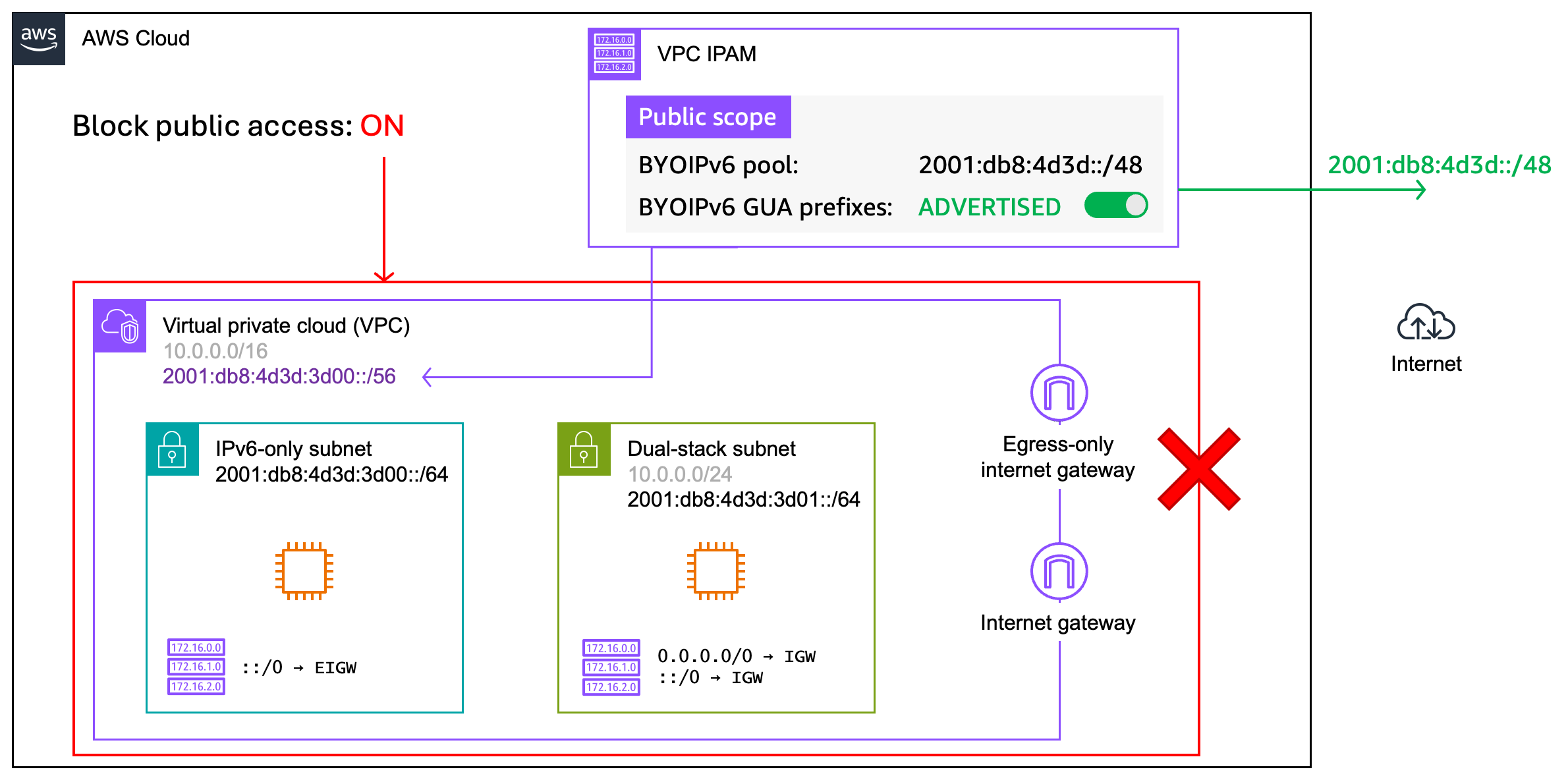
Figure 1: BYOIPv6 GUA advertised with VPC BPA and attached IGW, EIGW
You can further secure your VPC by using Service Control Policies (SCPs) in AWS Organizations to prevent IGW or EIGW attachments to a VPC. Figure 2 illustrates this layered approach using both VPC Block Public Access and SCPs.
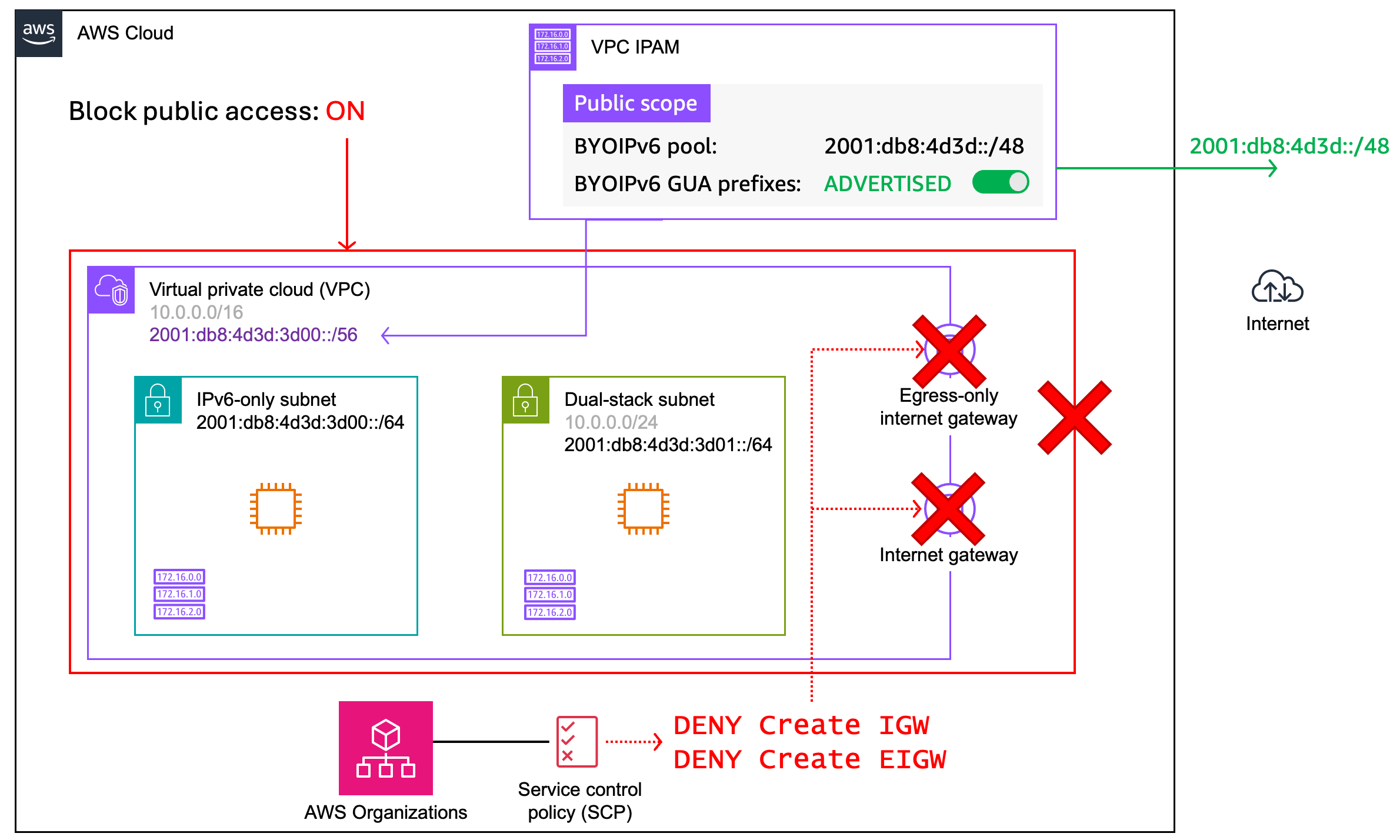
Figure 2: BYOIPv6 GUA advertised with VPC BPA and SCPs configured
Combining these fundamental routing controls with VPC BPA, as well as basic controls such as security groups, allows you to prevent inadvertent exposure to the internet, even while advertising your GUA prefixes. For an example policy, see Example SCPs for Amazon Virtual Private Cloud (Amazon VPC).
Using VPC BPA lets you easily move from blocking bidirectional traffic to only blocking ingress traffic, or creating exclusions for individual subnets if your workload needs change. Subnet exclusions also allow you to maintain both private and public subnets with your BYOIPv6 GUA prefixes in the same VPC. These exclusions offer you the flexibility to shift your security posture in the future as needed.
1b. BYOIPv6 GUA withdrawn
You control if BYOIPv6 GUA prefixes are advertised, therefore you can choose to keep the GUA prefixes in the default withdrawn state. Using BYOIPv6 GUA lets you address your environments with globally unique addresses that are not advertised by AWS. This approach, shown in Figure 3, provides you with a simplified security posture, while preserving the option for you to advertise these prefixes in the future. However, using withdrawn IPv6 prefixes should not be your only security control. Consider a defense-in-depth security strategy to mitigate the various risks beyond IP reachability.
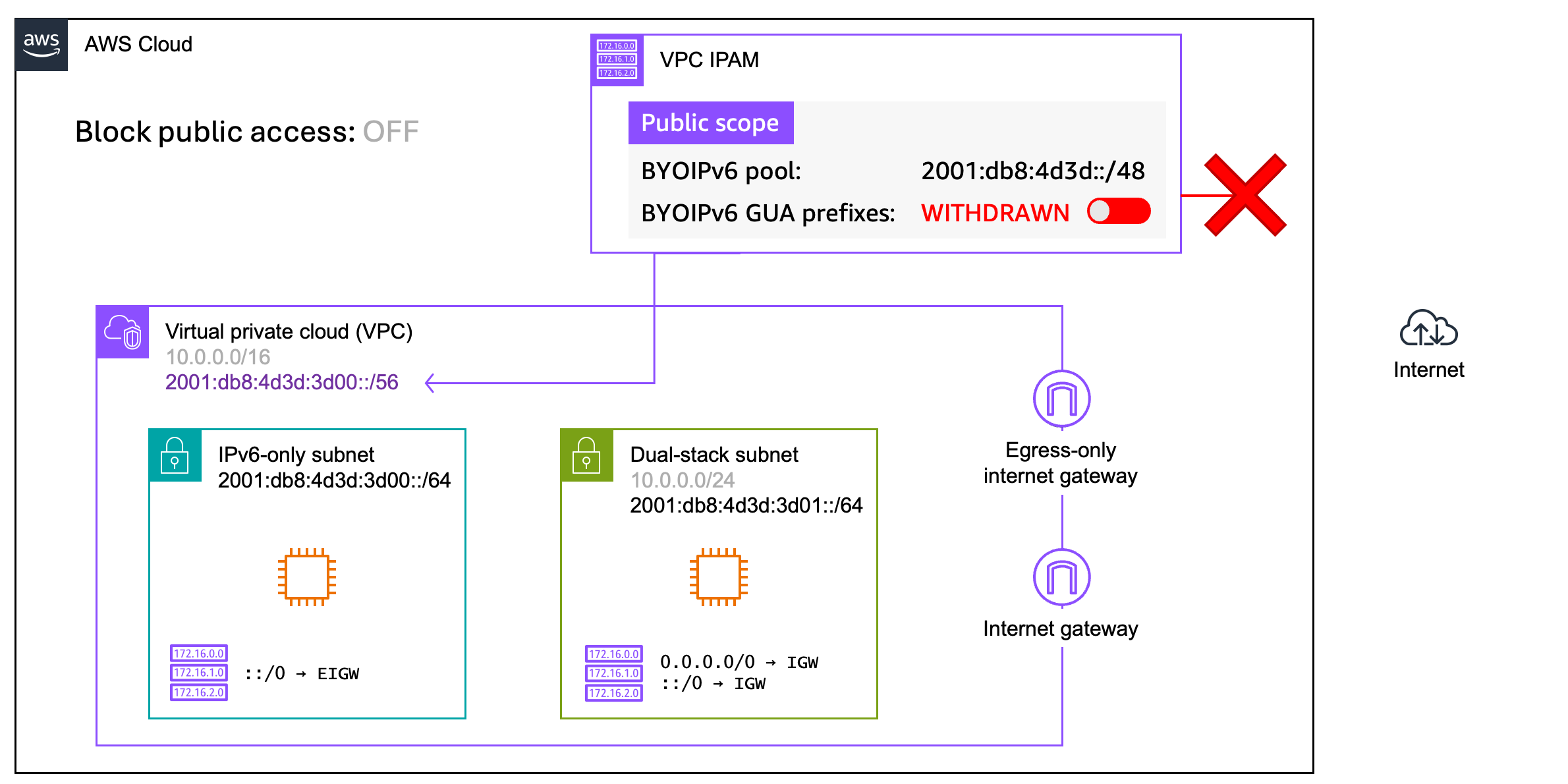
Figure 3: BYOIPv6 GUA withdrawn
With the GUA prefixes withdrawn, your IPv6 resources will not be accessible on the internet, even if you have an internet gateway or egress-only internet gateway attached to the VPC, and valid routes in route tables. You must verify that you have the right operational controls in place to prevent accidentally advertising these prefixes. You can also choose to apply the same SCPs to prevent IGW and EIGW attachments, and configure VPC BPA, as additional preventative measures (Figure 4).
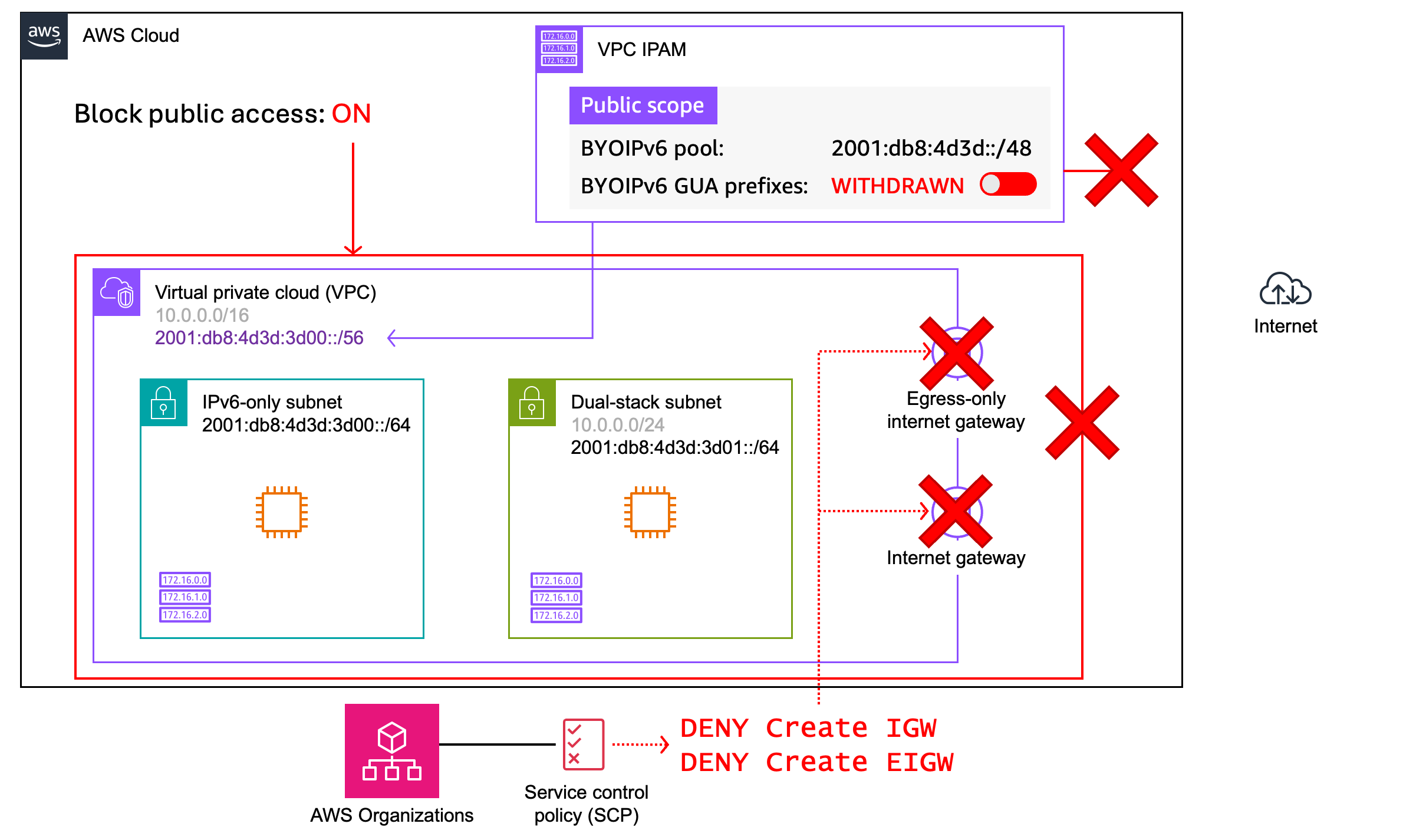
Figure 4: BYOIPv6 GUA withdrawn with VPC BPA and SCPs configured
In the event you inadvertently change the prefixes to Advertised, having VPC BPA and SCPs configured will prevent the resources in your VPC from accessing or being accessed from the internet. As with the previous option, because your GUA addresses are globally unique, you still have the flexibility to modify or remove these controls if your requirements change in the long term.
2. Amazon-provided GUA with VPC BPA
Amazon-provided GUA addresses are always advertised on the internet and are considered public addresses by default. To use these AWS managed GUA addresses as private addresses, you can use VPC Block Public Access to maintain strict access controls while allowing for future flexibility. With this approach shown in Figure 5, you don’t need to own or manage your own IPv6 GUA addresses – AWS provides and manages them for you.
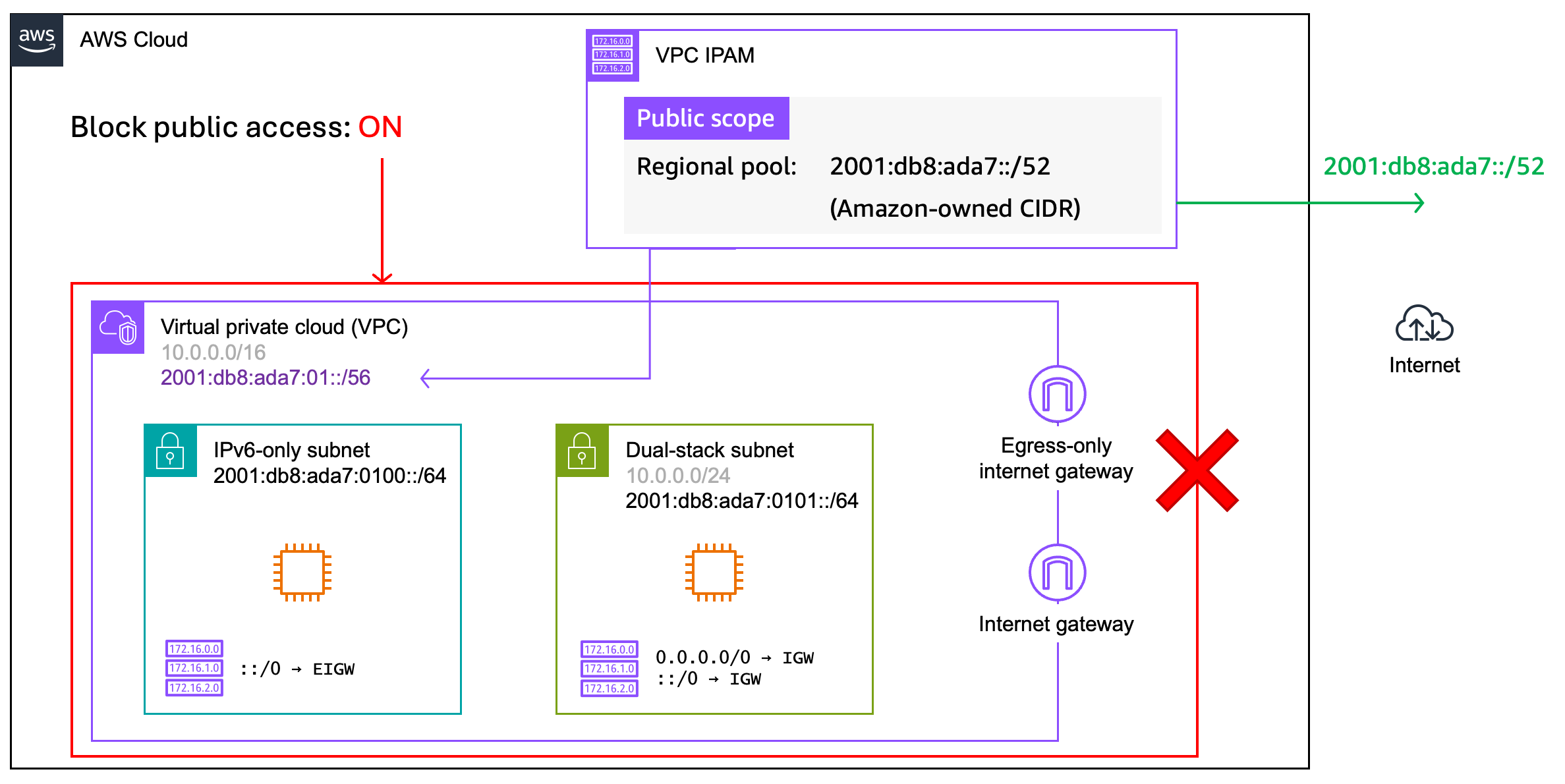
Figure 5: Amazon-provided GUA prefixes with VPC BPA
When creating this pool in IPAM, you will specify EC2 as the service and then select “Amazon-owned” as the source of the prefixes in the pool. You can also specify the size of the prefix to provision to the pool, which will provide you with a block of contiguous IPv6 prefixes. IPAM allows you to request a prefix between /40 (or 65,536 /56 prefixes) and /52 (or 16 /56 prefixes) by default, and you can request a limit increase for additional contiguous prefixes as needed.
Because these addresses are public by default, I recommend you first enable VPC Block Public Access at the account or VPC level, along with any desired SCPs to block IGW or EIGW attachments. Proactively implementing these controls will allow you to safely provision Amazon-provided IPv6 prefix blocks to your VPC and subnets without the risk of public access.
3. Private GUA
Unlike BYOIPv6, where you could control public access by advertising or withdrawing routes, private IPv6 GUA prefixes are considered private IP addresses and cannot be advertised by AWS. Figure 6 shows the configuration:
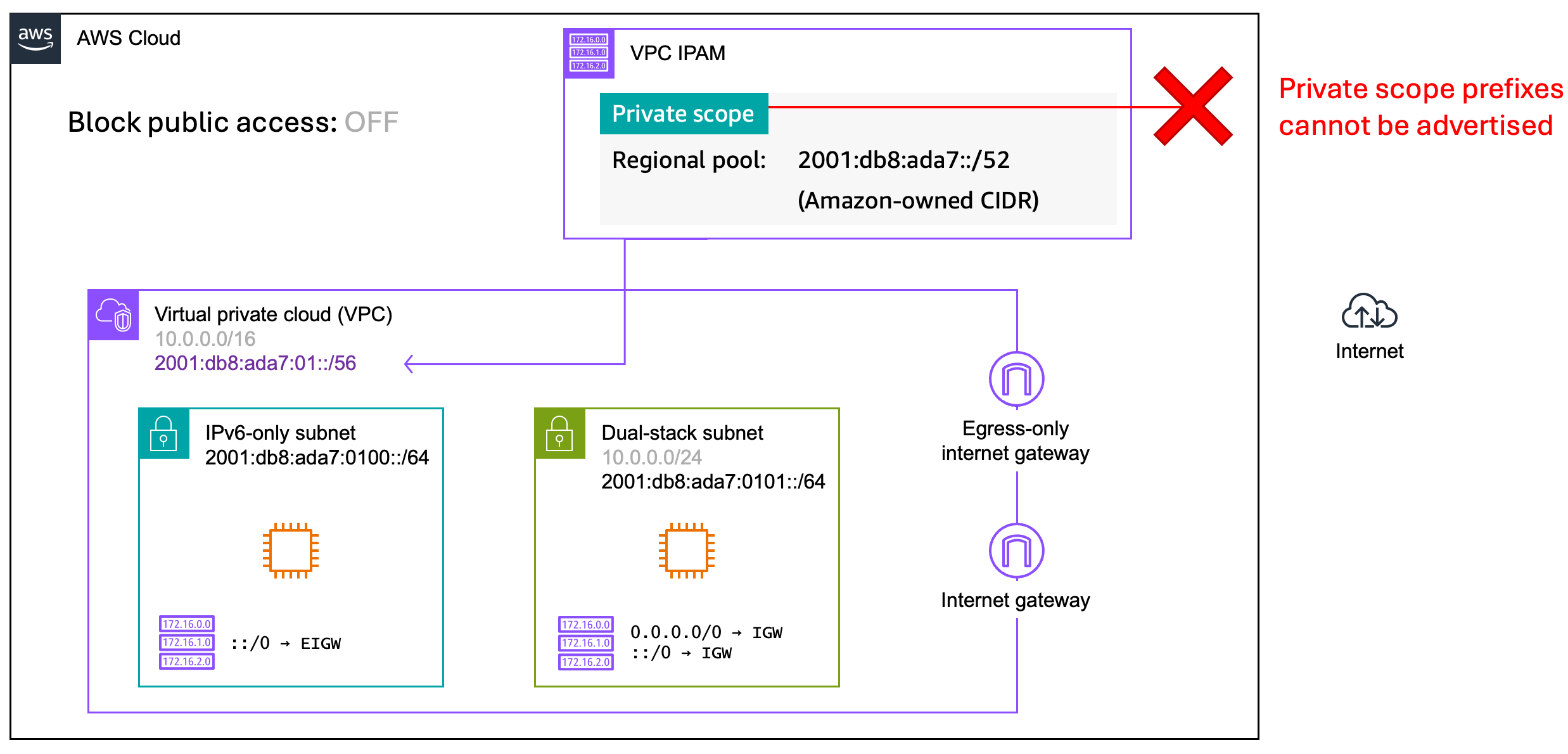
Figure 6: Private GUA in a VPC
Using private GUA for your VPC is an irreversible decision as private GUA prefixes cannot be converted to publicly-advertised ranges. If your requirements change and you need to allow internet access for resources in that VPC, you will need to add a secondary routable IPv6 prefix to the VPC. Alternatively, you can route traffic to another VPC with a publicly routable IPv6 prefix through AWS Transit Gateway or AWS Cloud WAN. Both of these will also require you to use an EC2-based router appliance to perform IPv6-to-IPv6 Network Prefix Translation (NPTv6). The appliance will translate the non-routable IPv6 address in the private GUA VPC to a routable GUA address on the appliance before sending the traffic to its destination. For an example architecture using AWS Transit Gateway, refer to the blog post Centralizing outbound Internet traffic for dual stack IPv4 and IPv6 VPCs.
4. Unique Local Addressing (ULA)
You can also consider ULA prefixes for your VPCs. Like the private GUA addresses discussed previously, ULA addresses are provisioned through an IPAM pool in the private scope. Additionally, while you can attach an IGW or EIGW to a VPC provisioned with a ULA prefix (Figure 7), this will not provide IPv6 internet connectivity from the VPC.
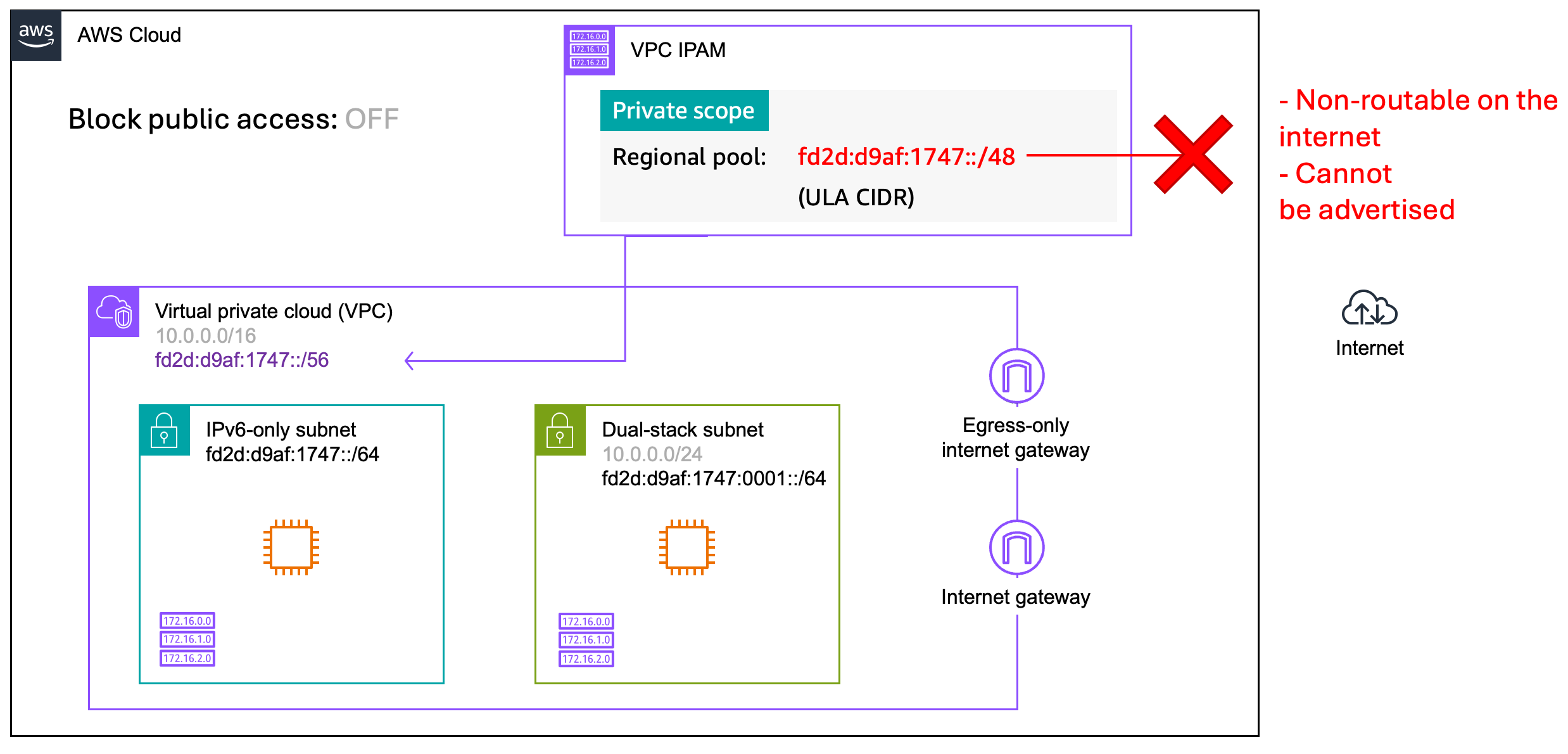
Figure 7: ULA in a VPC
The same considerations behind private GUA apply to VPCs provisioned with ULA. You cannot convert a VPC provisioned with a ULA prefix to a GUA prefix. If you require public IPv6 connectivity within a ULA VPC, you will need to use the same methods such as NPTv6 described under private GUA.
Traffic inspection
For VPCs that have a mix of private and public IPv6 space, you may decide to use AWS Network Firewall or AWS Gateway Load Balancer with third-party appliances in a VPC for traffic inspection. If you plan to use VPC BPA as an additional control, you will need to create a bidirectional or egress-only exclusion in VPC BPA for those inspection subnets. This will allow traffic to pass through your firewall to and from internet destinations. Additionally, you will need to validate that your firewall policy blocks any unwanted inbound or outbound traffic to and from your IPv6 resources. Figure 8 illustrates an egress-only configuration with AWS Network Firewall, using the BYOIPv6 GUA advertised with VPC BPA architecture that I discussed previously as a base.
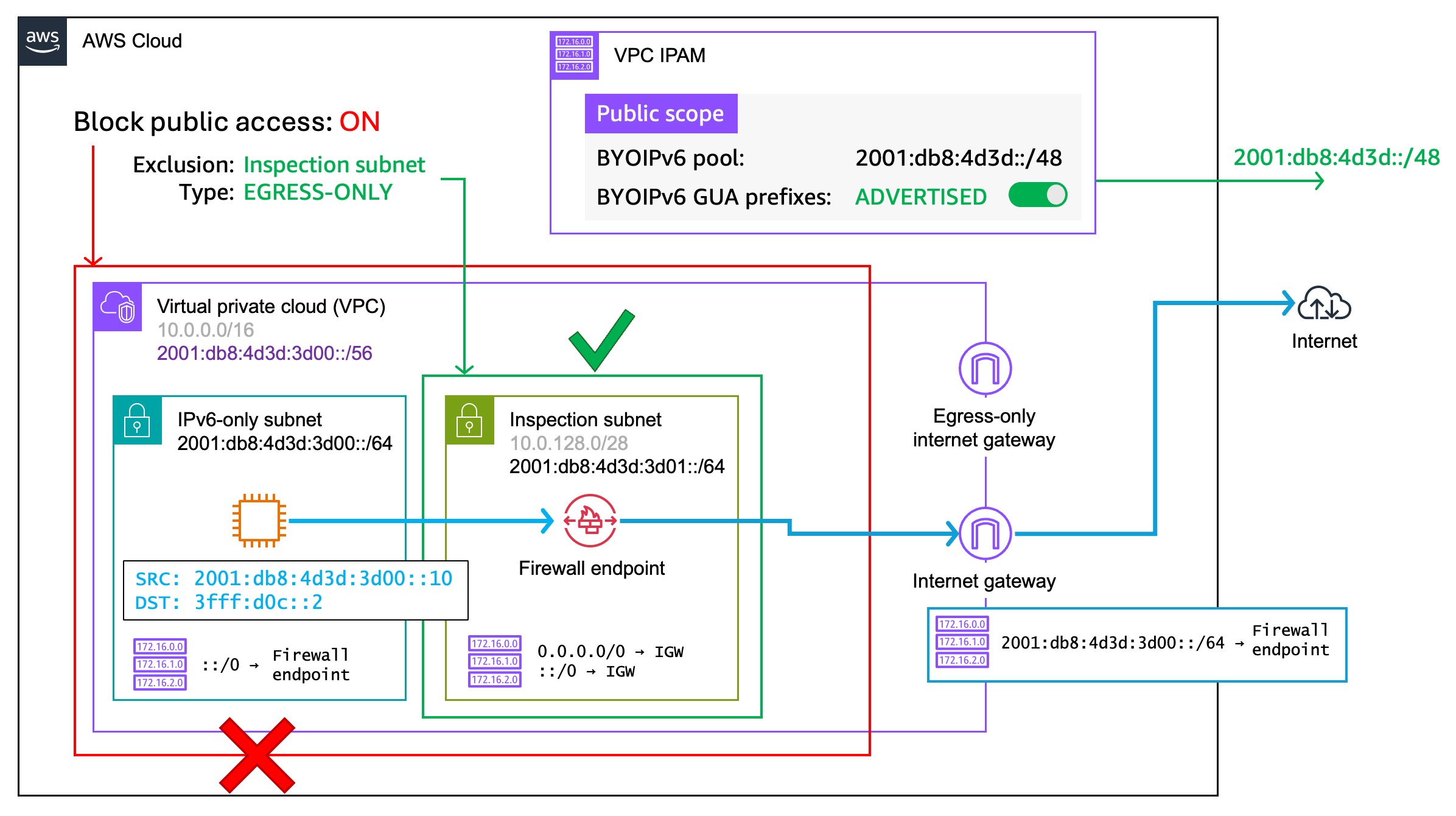
Figure 8: Creating exclusions in VPC BPA
Note that this approach requires using an internet gateway, even if the traffic flow is egress-only. This allows you to associate an ingress route table to the IGW, which is required to maintain symmetric traffic flows through the firewall endpoint in both directions. To learn more about inspection architectures with IPv6, refer to the blog post Design and build IPv6 internet inspection architectures on AWS.
Best practices
As your organization evolves over time, so might your connectivity requirements for VPCs. If you’re considering IPv6 and have a requirement for private address space, I recommend using BYOIPv6 GUA alongside VPC BPA. The combination of route advertisement control and VPC BPA, along with the additional controls provided by SCPs and route tables, provides you with layers of control and the ability to create exclusions or change connectivity models as needed. Amazon-provided GUA with VPC BPA offers an operationally simpler approach with similar flexibility, with the tradeoff that you won’t be able to control prefix advertisements. Private GUA and ULA should be considered last, keeping in mind the caveats I discussed earlier, unless you have a strict organizational mandate to use them.
Additional considerations
- You can use security groups and NACLs to restrict outbound and inbound traffic to and from your resources in a VPC, regardless of which approach you choose for private IPv6 space. For a refresher on best practices for security groups, refer to Control traffic to your AWS resources using security groups.
- Regardless of which approach you choose when implementing IPv6 in your VPCs, remember that internet connectivity is only one security consideration. Be sure to implement the proper security controls appropriate to your workload to provide additional defense in depth. For example, consider VPC flow logs for monitoring, and VPC Encryption Controls to enforce encryption in transit within and across your VPCs.
Conclusion
In this post I covered different approaches for implementing IPv6 private addressing in your VPCs, reviewing the benefits and tradeoffs for each. I walked through how you can use VPC Block Public Access along with other controls such as route advertisement for BYOIPv6 addressing to create private IPv6 environments. Need additional guidance for your particular use case? Reach out to your Technical Account Manager (TAM) or Solutions Architect (SA) to get started. If you have questions about this post, start a new thread on AWS re:Post or contact AWS Support.
About the authors

Dave DeRicco
Dave DeRicco is a Senior Networking Specialist Technical Account Manager (STAM) on the AWS Enterprise Support team. He helps enterprise customers architect, operate, and manage their global cloud networks. Dave is a public speaker at AWS events and an open source contributor with a particular interest in infrastructure as code. When not chasing after his kids or making a mess in the kitchen, you’ll catch Dave exploring new places with a coffee in one hand and a book in the other.

Alexandra Huides
Alexandra Huides is a Principal Networking Specialist Solutions Architect for Strategic Accounts at Amazon Web Services. She focuses on helping customers build and develop networking architectures for highly scalable and resilient AWS environments. Alex is also a public speaker for AWS, and is helping customers adopt IPv6. Outside work, she loves sailing, especially catamarans, traveling, discovering new cultures, and reading.