AWS Open Source Blog
Build full-stack AWS applications in minutes with AI-powered scaffolding
AI assistants can stand up an app or website that runs on AWS in minutes. Getting to a production-ready version you would put in front of real customers is still the hard part. Security, observability, type-safety, and resilience are non-negotiable for production. An assistant rarely gets all of that right in one pass, and hardening what it produces takes repeated cycles of review, correction, and testing.
To narrow that gap, we are launching version 1.0 of the Nx Plugin for AWS.
In this article we explore what it is, why we built it this way, and a short case study on how our customer Bingo Industries used it to move a multi-agent solution from ideation to production in less than 3 weeks.
What is the Nx Plugin for AWS?
Nx is an extensible open source build system that manages the many projects making up an application in a single repository. Nx is extended through plugins, and the Nx Plugin for AWS is one: an open source toolkit for scaffolding applications on AWS. It is a library of Nx generators, each of which builds one part of an application on request: an API, a website, an AI agent, alongside the cloud infrastructure to run them.
Every generator writes out a working, deployable piece of your application. Each piece comes with best practices in security, observability, and type-safety in place. Each generator is also deterministic, meaning it produces the same result every time. That makes it a dependable foundation for an AI assistant to build on, rather than something the AI assistant has to invent. AI Assistants can run these generators themselves, which frees them to spend their effort where it is valuable: the logic that makes your application your own.
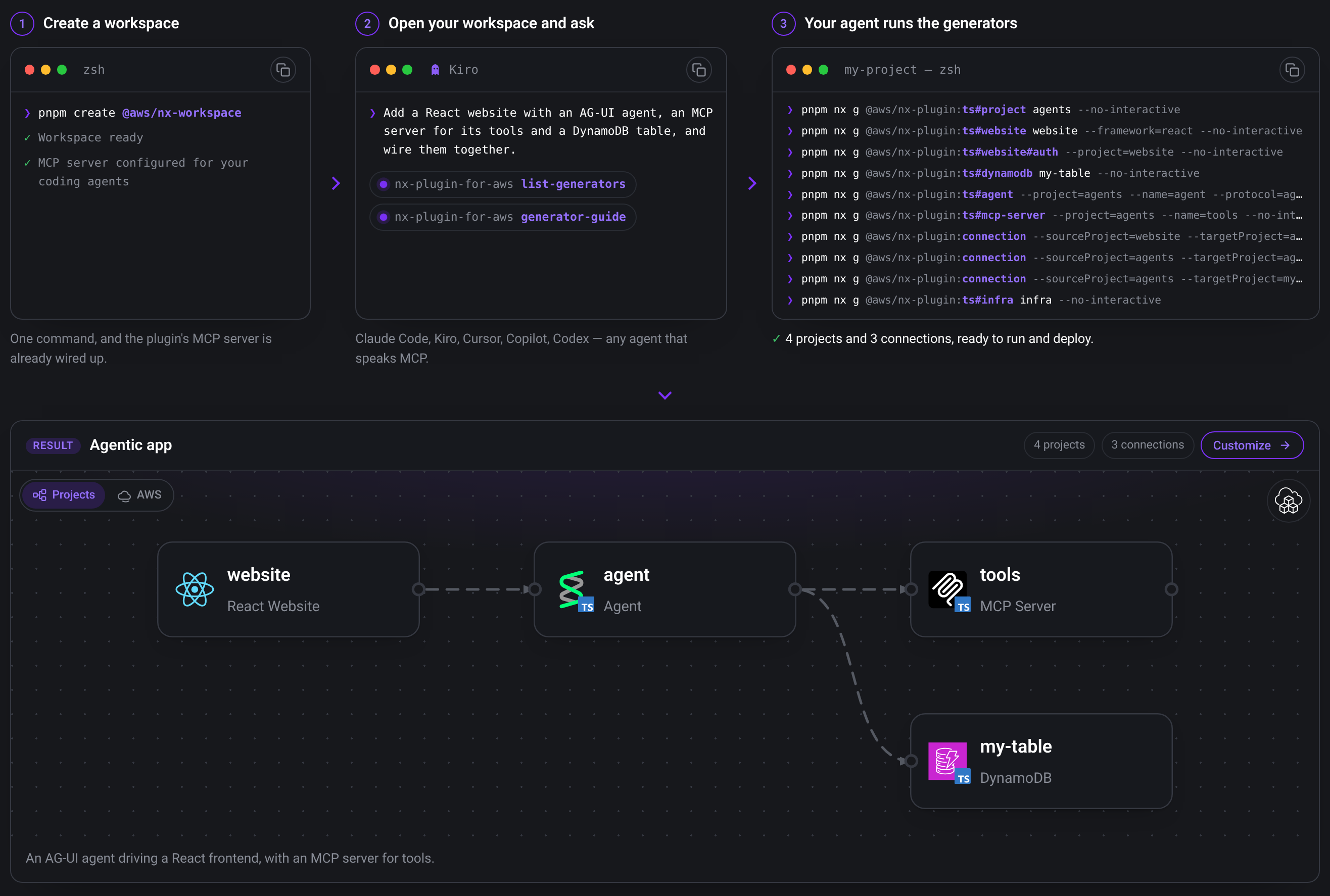
The above image describes the Nx Plugin for AWS visually. You create a workspace, and use your agent or the CLI to scaffold pieces of your application.
Quick start: full-stack agentic application in minutes
You start with a workspace, which is an empty Nx monorepo. To create a workspace, in your terminal, run this command:
pnpm create @aws/nx-workspace my-project --no-interactiveIn this example, we use pnpm, but you can use npm, yarn or bun if you prefer. By default infrastructure is defined using the AWS Cloud Development Kit (CDK), but you can run the above command with --iac terraform if you prefer Terraform. You will need AWS credentials with access to invoke Amazon Bedrock, since we are building an agent.
Open up the workspace in your AI coding agent such as Kiro CLI, and ask it to build your application, for example:
Use the Nx Plugin for AWS to build a full-stack application consisting of a React website with shadcn and Cognito authentication, connected to a TypeScript Strands agent via the AG-UI protocol, and infrastructure to deploy it.
Your AI agent will use the Nx Plugin for AWS MCP server which is preconfigured in every workspace you create with the command above. The prompt gives you a Strands agent, a React frontend with Amazon Cognito login, a CopilotKit chat interface for user-agent interaction over the AG-UI protocol, and an infrastructure project defining the AWS resources required to deploy your project.
To start the website and the agent locally on your machine, run:
pnpm devThe website and agent both hot-reload as you edit the code. When you are happy with your local changes, you can ask the agent to deploy to AWS.
We used an agent to drive the Nx Plugin for AWS, but you can also make use of the CLI to hand-craft your application if you prefer. Read further for a step-by-step example, or follow our quick-start guide. You do not need to start from scratch to benefit from Nx and the Nx Plugin for AWS, and the documentation covers adding the plugin to an existing project.
Why did we build it?
We are part of PACE, the Prototyping and AI Customer Engineering team at AWS, and we face the tension between speed and production readiness daily. We work with customers on problems that do not have an obvious answer yet, or the technically risky ideas that have not been built before. Each engagement has a four to six week duration with a single goal: to prove whether a specific idea can work.
The value of a prototype comes from the hardest part of the problem, the part with no established pattern to follow. On a timeline that short, our engineers need to spend their time on the core customer challenge rather than on hardening for production. However, a prototype serves the customer better when they can carry it forward to production rather than throw it away.
Building on AWS usually means infrastructure as code, backend services, a frontend, and often more than one language in the same project. We needed a build system that was agnostic to the language we chose and could manage a project made of many moving parts. Our teams landed on Nx and have used it for several years for exactly this, and it gives us one consistent monorepo workflow from project to project, no matter the technology choices. Even with Nx handling the monorepo, we were still building project foundations by hand at the start of every engagement. We wanted to scaffold them with our best practices already built in, so we could start closer to production, and spend our weeks efficiently on the customer’s problem.
How generators won over templates and libraries
We tried a couple of approaches before landing where we are now.
- We began with a starter template that we forked at the start of each engagement. A fork drifts the moment you change it: a fix made in the template never reaches a fork, and you inherit the whole template whether you need all of it or not.
- We experimented with a library-based approach, defining our project structure, application code, and infrastructure code as reusable, typed building blocks. That solved much of what the template got wrong. You use only the pieces you need, and improvements to the library could be consumed by every project that used it, though it had some limitations. The moment an engineer needed a setting the library did not expose, they were blocked. Customizing beyond what the library supported meant confusing workarounds, copying and pasting around the library, or waiting for the library owners to extend it. Within the four-to-six-week timeline of a PACE engagement, none of these options were practical.
Nx generators were what finally fit. Instead of a template you fork or a library you depend on, a generator writes code directly into your workspace. You own that code from the moment it is generated, and working with it requires nothing plugin-specific. When you need to change something the generator did not anticipate, you can edit the code as you usually would. And where the template left generated code to fall behind, Nx migrations let the improvements we ship reach workspaces you scaffolded earlier. Generators can run at any time, so you can add authentication to an existing website or connect a frontend to an API you created months earlier. Each generator is deliberately self-contained and clearly described, so you stop thinking in individual files and start thinking in higher-level building blocks: whole components you can assemble with a single command, whether you are working by hand or with an AI assistant.
How the Nx Plugin for AWS works
You start by creating a workspace, and then compose your application using generators, adding only what you need, when you need it. A generator is more than a file template: as well as writing new files, it modifies existing ones, wires up dependencies, and updates configurations.
Core generators for APIs, websites, databases, and AI agents
The generators cover the components most AWS applications are built from, in both TypeScript and Python, including:
- APIs using tRPC, FastAPI, or Smithy, each with the infrastructure to deploy them,
- React websites with optional Amazon Cognito authentication,
- Databases on Amazon DynamoDB and Amazon Aurora, and
- Agentic AI: building agents with the Strands Agents SDK and Model Context Protocol (MCP) servers, both deployed on Amazon Bedrock AgentCore.
By default, each generator ships with best practices you would otherwise have to add yourself.
- API handlers come wired with AWS Lambda Powertools for structured logging, AWS X-Ray tracing, and Amazon CloudWatch metrics.
- Generated DynamoDB tables use customer-managed KMS encryption with automatic key rotation, point-in-time recovery, and deletion protection.
- Generated Aurora databases sit behind Amazon RDS Proxy with IAM authentication, with database schemas and migrations set up for you with Prisma for TypeScript or SQLModel and Alembic for Python.
- Agents and MCP Servers are vended with AgentCore Observability configured, and AgentCore Gateways come with everything you need to start writing policies for agent security controls.
Type-safe connections across your stack
Tying these components together is the connection generator. Suppose you have a React website and a tRPC API: running the connection generator wires them together with a type-safe client, so a change to the API’s shape shows up as a type error in your frontend before you even deploy, rather than as a broken call in production. It does the same for connecting a React frontend to an agent. For an agent generated with the AG-UI protocol (an open standard for streaming rich, interactive agent responses to a frontend), it produces a CopilotKit chat interface with response streaming, tool-call rendering, and state handling included. Every generator supports local development, and using Nx continuous tasks, a single command brings up the interconnected pieces (your website, its API, an agent) hot-reloading together on your machine, so you test changes without deploying anything.
While in practice you use AI to drive the selection of components and their connections, this approach means you can scaffold an entire application visually if you prefer.
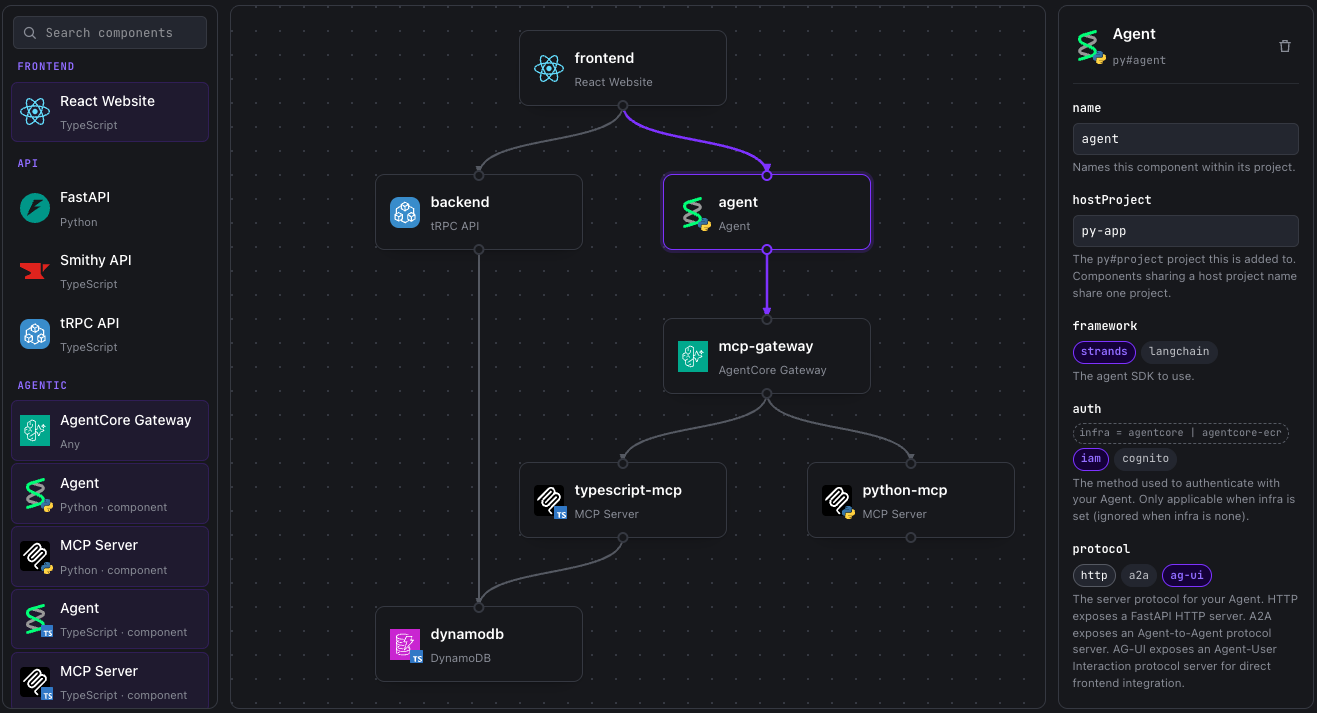
This screenshot is from the Nx Plugin for AWS Graph Builder. You can draw your desired application and copy the commands to scaffold it.
Your code, your infrastructure choices
The generated code builds on mainstream frameworks and belongs to you. There is no runtime dependency on the plugin, and nothing stops you from editing what it produces. The generators are a starting point, not a commitment: pick the one closest to what you want and take it in your own direction. You also choose how the infrastructure is defined, because the generators produce either AWS Cloud Development Kit (AWS CDK) constructs or Terraform modules.
Staying current with Nx migrations
Owning your code usually comes at the cost of the one thing a library gave you: a clean way to pick up improvements later. With v1.0, the Nx Plugin for AWS narrows that gap with Nx migrations. When we ship a new version, you can apply our published migrations to your workspace. Migrations reach everything the generators wrote, not just application code. For example, swapping a deprecated Vite config option for its current API, or moving static website access logs from an Amazon Simple Storage Service (Amazon S3) bucket to CloudWatch so you can monitor and alarm on them. You can ask your agent to upgrade the plugin, or you can drive migrations through the CLI using:
# Install the latest version and prepare migrations
pnpm nx migrate @aws/nx-plugin@latest

# Apply the migrations to your codebase
pnpm nx migrate --run-migrations
Where a change needs a judgment call and cannot be applied automatically, an optional agentic migration steers your coding agent through it rather than leaving you to work it out alone. Keeping up to date becomes a routine command rather than a manual review of release notes and pull-requests.
Step by step example: scaffolding using the CLI
After creating a workspace, the quickest way to get started is to use AI to drive the generators, but you can also invoke each generator manually via the CLI if you prefer. This section walks through how to build a multi-language application with CLI commands and a few minor code edits. In addition to AWS credentials, you will need UV installed for the Python agent.
# Create a new workspace with pnpm (yarn, bun and npm are also supported)
pnpm create @aws/nx-workspace my-project --no-interactive
cd my-project

# Create a Python project and add an agent
pnpm nx g @aws/nx-plugin:py#project backend --no-interactive
pnpm nx g @aws/nx-plugin:py#agent --project backend --auth=cognito --protocol=ag-ui --no-interactive

# Add a website with Cognito login
pnpm nx g @aws/nx-plugin:ts#website website --no-interactive
pnpm nx g @aws/nx-plugin:ts#website#auth --project website --no-interactive

# Connect the website to the agent
pnpm nx g @aws/nx-plugin:connection --source-project=website --target-project=backend --no-interactive

# Create a CDK project to deploy to AWS
pnpm nx g @aws/nx-plugin:ts#infra infra --no-interactive
If you would rather use Terraform, pass --iac=terraform when creating the workspace, and use terraform#project in place of ts#infra. The same pattern applies to every generator: swap the agent for a tRPC or FastAPI backend, and the connection generator wires your website to that instead.
The connection generator has already wired up CopilotKit to securely communicate with your agent, so all you need to do is instantiate the React component, for example on the homepage:
// packages/website/src/routes/index.tsx
import { createFileRoute } from '@tanstack/react-router';
import { BackendAgentChat } from '../components/backend-agent-chat';

export const Route = createFileRoute('/')({
  component: RouteComponent,
});

function RouteComponent() {
  return <BackendAgentChat />;
}
You can run pnpm dev to start your local website and agent. With AWS credentials configured, your agent will use the Strands default model on Amazon Bedrock. You can open up the local development server and start chatting to your agent:
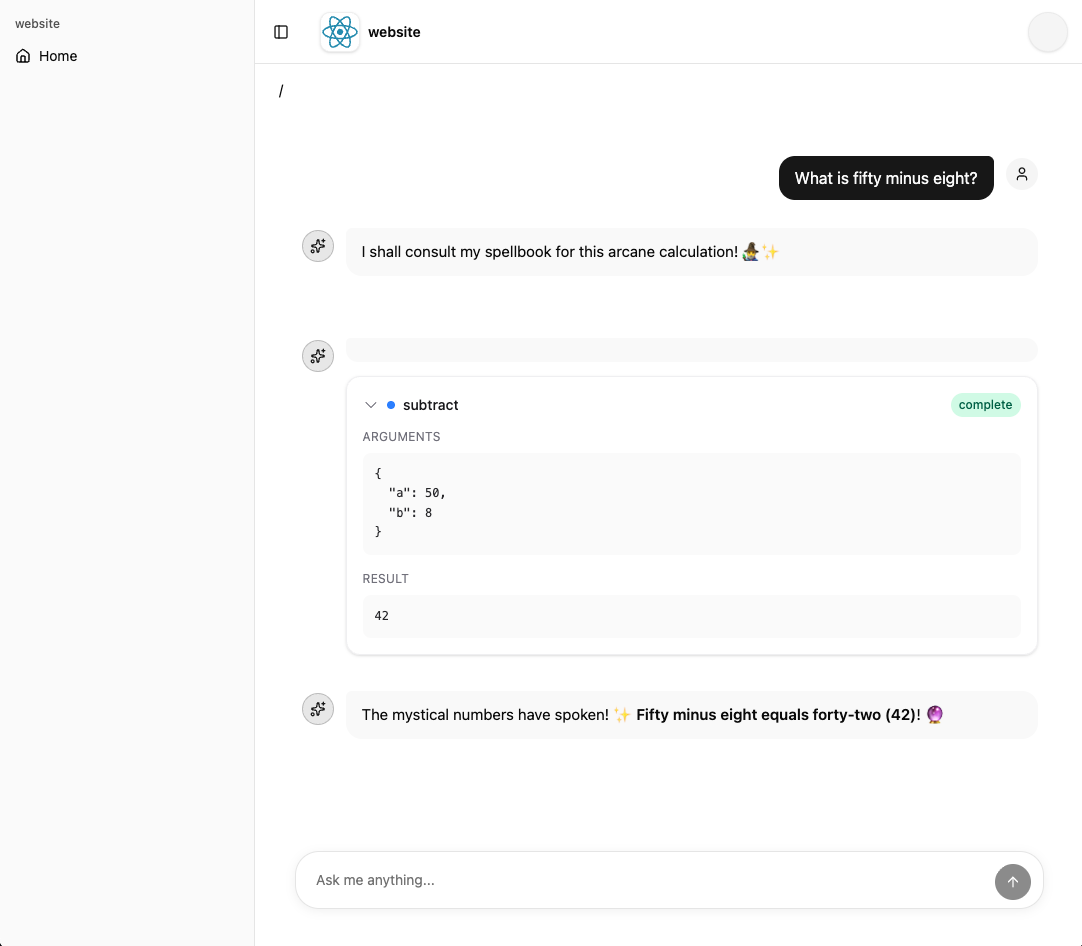
When you are ready, compose the generated CDK constructs into your stack:
// packages/infra/src/stacks/application-stack.ts
import { Stack, StackProps } from 'aws-cdk-lib';
import { Construct } from 'constructs';
import { BackendAgent, UserIdentity, Website } from '@my-project/common-constructs';

export class ApplicationStack extends Stack {
  constructor(scope: Construct, id: string, props?: StackProps) {
    super(scope, id, props);

    // Create the Cognito resources
    const identity = new UserIdentity(this, 'Identity');

    // Create the agent
    new BackendAgent(this, 'Agent', {
      identity,
    });

    // Create the website
    new Website(this, 'Website');
  }
}
To deploy the development stack to AWS, run pnpm nx deploy-sandbox infra, create an Amazon Cognito user in the user pool it deploys, and open the CloudFront distribution URL to sign in and use your deployed application.
To clean up AWS resources when you have finished, run pnpm nx destroy-sandbox infra, and remove the Amazon Cognito and Amazon S3 resources via the AWS Console (which are retained by default to prevent data loss).
For an in-depth walkthrough of the whole flow, covering building an example agentic text-based game, follow the Dungeon Adventure tutorial.
Customer story: Bingo Industries’ multi-agent solution
Bingo Industries, an Australian recycling and waste-management company, built a multi-agent application using the Nx Plugin for AWS and put it into production. This is the architecture they built:
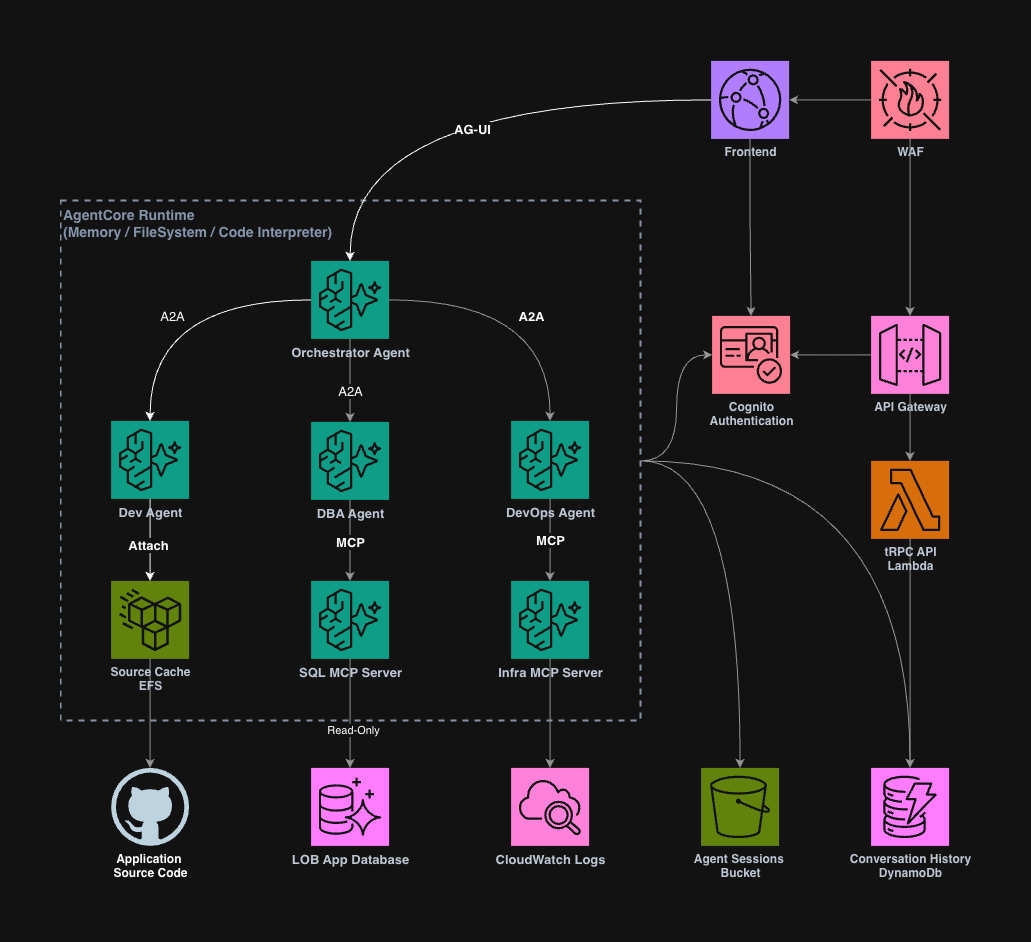
Here is their account of what they built, in their own words:
Bingo’s operations and logistics division plays a pivotal role in ensuring the seamless functioning of the business. This segment encompasses a wide array of applications that must maintain high availability around the clock while also being capable of scaling efficiently. These applications are utilised by a diverse group of users, including allocators, customer service representatives, contact centre staff, operators, and analysts, all of whom rely on these tools for their daily tasks. Given the complexity of the work involved, users frequently navigate through multiple screens and employ various filters, queries, and searches, which can render the process both time-consuming and cumbersome. To mitigate these challenges and enhance efficiency, we opted to implement a multi-agent AI solution designed to respond to user inquiries by leveraging data from multiple sources and logs.
While there were numerous approaches to developing a multi-agent AI solution from the ground up, we faced constraints related to time and available resources. To overcome these limitations, we selected the Nx Plugin for AWS, which we highly recommend to those unfamiliar with it. This tool acts as an accelerated scaffolding launch pad for AWS-based applications, generating the application code and cloud infrastructure needed to stand up AI agents quickly, alongside the APIs and front ends that surround them.
Building on this foundation, we developed a multi-agent chatbot capable of answering user inquiries and providing clarifications. Rather than one monolithic agent trying to do everything, the solution routes each question to the right specialist agent. This keeps each agent narrowly focused and its answers reliable, while the underlying AWS generative AI services provide the language understanding that ties it all together.
A key benefit of this approach is how quickly it let us adopt emerging standards as they matured, including protocols like AG-UI for streaming rich, interactive agent responses straight into the front end, and A2A for letting agents call on one another directly. Our team didn’t have to work out the setup, authentication, and wiring from scratch; that groundwork came ready-made, letting us focus on the business logic instead. It also gave us a strong starting point aligned with AWS-recommended practices and the AWS Well-Architected Framework, rather than having to reason about all of that from first principles. It took us a little under 3 weeks to reach our initial production launch.
For instance, when a transaction fails, the chatbot can help diagnose the likely cause from a range of common failure scenarios, giving operators a faster path to resolution than manually piecing together the picture across systems. Additionally, users can generate prompt-based reports in real-time, facilitating analysis and informed decision-making. We extend our gratitude to the AWS team for their collaborative support throughout this project.
— Alex To, Principal Engineer, and Balaji Ravichandran, Head of Engineering, Bingo Industries
Alex has made significant contributions back to the Nx Plugin for AWS, and we are tremendously grateful for his efforts. As the generated code was theirs to modify, Bingo Industries could have kept those changes local, but instead they contributed them upstream, and their improvements are part of what shaped v1.0.
Extend with your own generators
Contributing upstream is only one path, and not the one most teams will need. We publish our generators as an SDK, so you can extend and adapt them for your own needs. You can encode your organization’s own best-practice patterns and preferred frameworks exactly as we have encoded ours, so your engineers and their AI assistants build from the same deterministic, reviewed foundations across your teams. Use the Nx Plugin generator to scaffold your own plugin, author your own generators, and expose them via an MCP server.
Join the community
The Nx Plugin for AWS is on GitHub under the Apache 2.0 license, and we welcome contributions: open an issue or discussion with questions, bugs, or ideas.
- Follow our tutorial for contributing a generator to get started on your first pull request.
- Documentation, including a guide to every generator, is at awslabs.github.io/nx-plugin-for-aws.
- You can also find us in the #nx-plugin-for-aws channel on the CDK.dev Slack, alongside other people building with it.
We built this because we needed it, and we built it in the open because the problem it solves is not unique to our teams. If you build on AWS, and find yourself writing the same foundations over and over, we would love your help making the generators better.
Built on open source
The Nx Plugin for AWS rests on the work of many open source communities:
- Nx: the extensible monorepo build system on which the Nx Plugin for AWS is built
- tRPC: end-to-end type-safe APIs in TypeScript
- FastAPI and Pydantic: the Python web framework and data validation library behind the API and agent generators
- Smithy: a protocol-agnostic interface definition language for modelling APIs
- React: the UI library behind the website generators
- Vite and Rolldown: for building and bundling TypeScript websites and backends
- Shadcn and CloudScape: the UX frameworks the website generators can configure
- TanStack: website routing and type-safe hooks for APIs
- CopilotKit and the AG-UI protocol: the chat interface and streaming protocol for agent frontends
- A2A and the a2a-sdk: the agent-to-agent protocol and SDK that let generated agents discover and delegate to one another
- Strands Agents SDK and LangChain: the agent frameworks used by the agent generators
- Model Context Protocol: the standard that lets AI assistants drive the generators
- AWS CDK and Terraform: the two infrastructure-as-code options the generators target
- AWS Lambda Powertools: the observability defaults in generated API handlers
- Prisma, ElectroDB, SQLModel, Alembic and PynamoDB: the ORM and entity modelling layers in the database generators
- GritQL: powering robust code edits by generators and migrations
- Biome: for TypeScript linting and formatting across the workspaces
- uv, ty and Ruff: for Python package management, type checking, linting and formatting
Thank you to everyone who maintains them.