AWS Open Source Blog
Deploying cloud-based engineering workbenches with the Virtual Engineering Workbench on AWS
Introduction
Organizations in automotive, manufacturing, and embedded systems increasingly rely on cloud-based development environments to reduce hardware dependency and accelerate software delivery. As vehicle architectures shift toward software-defined platforms, engineering teams need access to specialized toolchains, virtual hardware models, and simulation environments that are consistent across sites and reproducible across projects. Provisioning these environments manually remains a common bottleneck: setup times measured in days, configuration drift between developers, and limited access to shared validation infrastructure.
The Virtual Engineering Workbench (VEW) is an open source platform that addresses these challenges. It provides a self-service web portal where platform engineers define, build, and publish pre-configured development environments, and developers provision them on demand. VEW runs on AWS serverless services and is deployed entirely through AWS CDK. The source code is available on GitHub at awslabs/virtual-engineering-workbench under the Apache License 2.0 license.
This post describes the VEW architecture, walks through deploying the platform in a fresh AWS account, and shows how to create and launch a workbench end to end. Readers should have working knowledge of AWS CDK, AWS Lambda, and Amazon DynamoDB. The deployment requires approximately 60 minutes and an AWS account with administrator access.
VEW was developed in collaboration with automotive manufacturers and suppliers to support software-defined vehicle programs. Previous blog posts describe deployments at Stellantis and Schaeffler AG, covering use cases from AUTOSAR ECU development to RISC-V virtual prototyping. A technical deep-dive into the serverless architecture is also available. With the open source release, any organization can deploy and customize VEW for their own workflows.
Architecture overview
VEW is a serverless application organized as a set of bounded contexts following hexagonal architecture with Domain-Driven Design patterns. Each bounded context (projects, packaging, publishing, provisioning, authorization) is an independent service with its own Amazon API Gateway endpoint, AWS Lambda functions, and Amazon DynamoDB table. Cross-context communication uses Amazon EventBridge. The frontend is a React application built with the Cloudscape Design System and served through Amazon CloudFront.

Deployment modes
VEW supports public and private deployment. In public mode, Amazon CloudFront with Lambda@Edge and Amazon S3 serve the frontend, and Amazon API Gateway endpoints are publicly accessible.
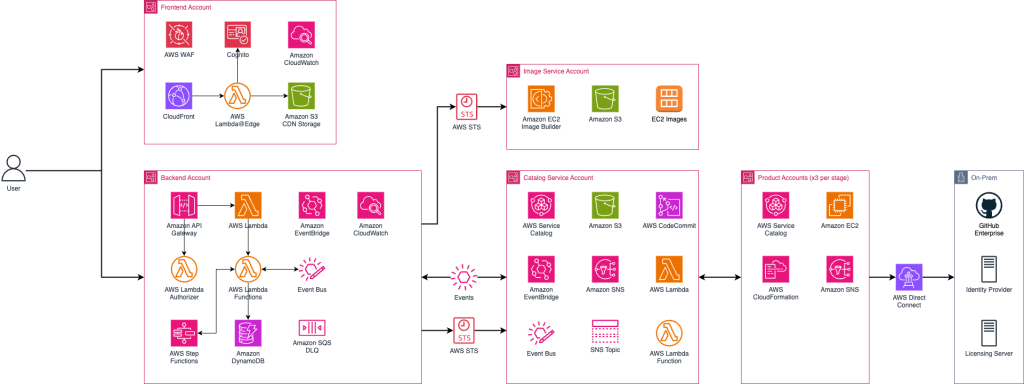
In private mode, an Application Load Balancer inside an Amazon VPC replaces Amazon CloudFront, and API traffic routes through VPC endpoints. This mode is intended for organizations that require the platform to remain within a corporate network.
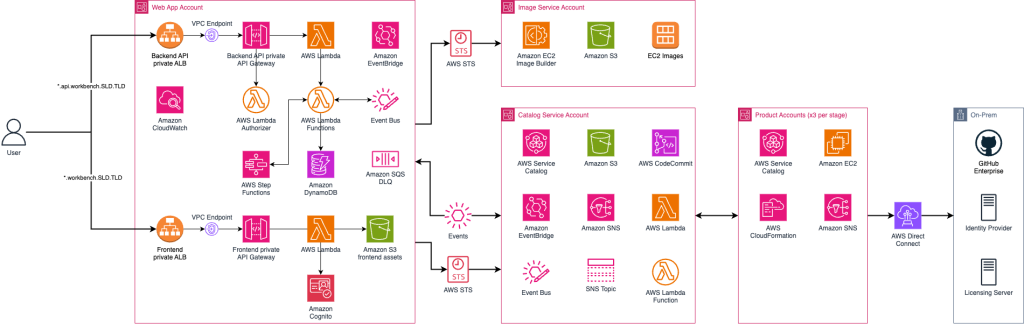
Both modes share the same security controls: IAM authorization on every API endpoint, JWT validation via Lambda@Edge, AWS WAF with managed rule groups, AWS KMS encryption for artifacts, and Cedar-based fine-grained authorization through Amazon Verified Permissions.
Backend architecture
The backend is organized as independent bounded contexts, each with its own Amazon API Gateway endpoint, AWS Lambda functions, and Amazon DynamoDB table. Amazon EventBridge handles cross-context events. This diagram describes the structure.
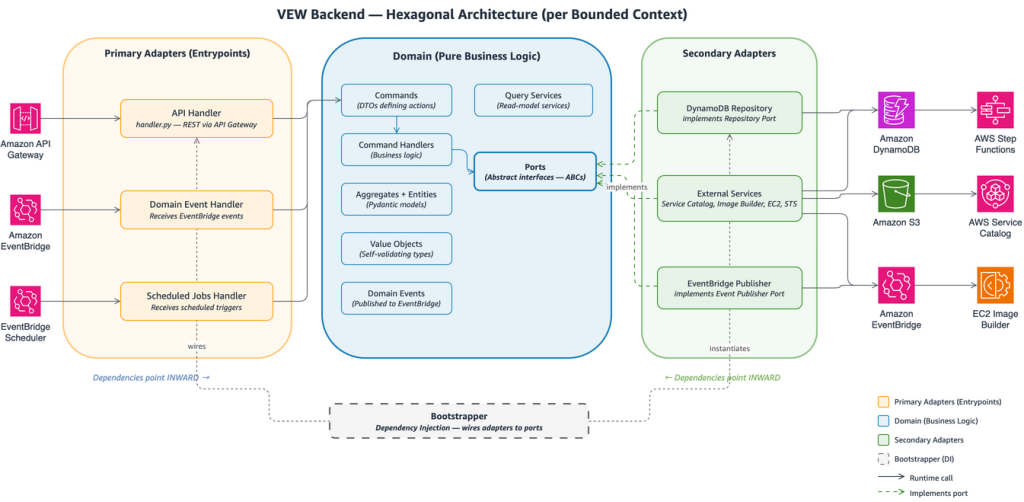
Dependencies always point inward: domain logic has no imports from adapters or entrypoints. Automated fitness function tests enforce this rule and bounded context isolation on every build. For background on this pattern, see Building hexagonal architectures on AWS in the AWS Prescriptive Guidance library.
How VEW works
VEW organizes the workflow into three stages: packaging, publishing, and provisioning. Each stage maps to a bounded context in the backend and a corresponding section in the web portal.
Packaging
Product contributors define what goes into a workbench image. A component represents a single installation or configuration step—for example, installing a compiler toolchain or configuring a build system. Components include a build script and an optional test script, and are automatically tested before they can be released. One or more components are assembled into a recipe, which defines the ordered list of software for a product. VEW maps these to Amazon EC2 Image Builder resources. Running a pipeline produces a tested, versioned Amazon Machine Image (AMI).
Publishing
Product contributors wrap an AMI into a product by creating an AWS CloudFormation template that defines the instance type, storage, networking, and security groups. They publish the product to an AWS Service Catalog portfolio and shares the AMIs to the appropriate target AWS accounts and region, making it available in the portal catalog for authorized users.
Provisioning
Platform users browse the catalog, select a product, and launch it. VEW provisions the underlying Amazon EC2 instance through AWS Service Catalog. Developers connect to running workbenches through the browser using Amazon DCV for a full remote desktop, or via SSH. The portal supports start, stop, and terminate operations for cost control.
Deploying VEW
This section walks through deploying VEW in a fresh AWS account. The deployment is handled by a single interactive script.
Prerequisites
You need an AWS account that is part of an AWS Organization, with administrator access configured through the AWS CLI. The following tools must be installed locally:
- AWS CLI v2, AWS CDK v2, Python 3.13+, Node.js 24+, Yarn 4.x, Docker, and jq.
- Optionally: OIDC client credentials from a corporate identity provider for federated login. If omitted, VEW creates Amazon Cognito-native users.
- Optionally: TLS certificates in AWS Certificate Manager for custom domain names.
The script prompts for the AWS account ID, deployment region, organization and application prefixes (used in resource naming), and an admin email address. It then executes 10 phases in sequence: prerequisite validation, configuration patching, CDK bootstrap, prerequisite resource creation (SSM parameters, VPC, service-linked roles), identity federation setup, frontend infrastructure deployment (Amazon Cognito, Amazon CloudFront, Amazon S3, AWS WAF), backend infrastructure deployment (AWS Lambda, Amazon API Gateway, Amazon DynamoDB, Amazon EventBridge), frontend build and upload, database seeding with an admin user, and optional spoke account bootstrap.
The full deployment takes approximately 60 minutes.
Configuration file
For non-interactive or repeatable deployments, copy the sample configuration file and pass it to the script:
The script saves the configuration after the first run, so subsequent deployments reuse the same parameters automatically.
Post-deployment
When the script completes, it outputs the Amazon CloudFront URL for the web application, admin credentials, and (if OIDC was not configured) the aws cognito-idp admin-create-user command for creating additional users. DNS records for custom domains must be created manually.
Spoke account setup
VEW provisions workbenches in spoke accounts, separate from the main platform account. This provides workload isolation, independent cost tracking, and least-privilege access. The deploy script can bootstrap a spoke account as its final phase. Alternatively, deploy the bootstrap template manually in the spoke account:
Note: this template must be deployed in the spoke account, not the main platform account.
Getting started with your first workbench
With VEW deployed and a spoke account onboarded, the next step is to create a project, build an image, publish a product, and launch a workbench. The examples folder in the repository provides step-by-step guides for each stage of this workflow.
Upcoming blog posts will cover product management in depth—packaging components and recipes, publishing versioned products to the catalog—and walk through a real-world use case: provisioning a development workbench alongside a virtual target for software-in-the-loop validation.
Extending VEW
Each bounded context follows the same directory structure: domain logic at the center (commands, handlers, events, models, ports), adapters around it (Amazon DynamoDB repositories, external service integrations), and entrypoints at the edge (AWS Lambda handlers, Amazon EventBridge consumers). Adding a new capability means creating a new bounded context, implementing the three layers, adding a CDK stack, and registering it in the CDK app entry point. The backend README provides a full walkthrough with code examples.
Automated fitness function tests enforce two rules on every build: no bounded context may import from another bounded context, and no domain layer may import from adapters or entry-points.
Cleaning up
To avoid ongoing charges, destroy the deployed stacks:
If resource retention is enabled in backend/infra/config.py (recommended for production), Amazon DynamoDB tables and Amazon S3 buckets are retained on stack deletion and must be deleted manually from the AWS Management Console.
Conclusion
This post introduced the Virtual Engineering Workbench, an open source platform for delivering pre-configured, cloud-based development environments through a self-service portal. We covered the serverless architecture, the packaging-publishing-provisioning workflow, and a demonstrated a complete deployment in a fresh AWS account.
The source code, documentation, and deployment instructions are available at github.com/aws-labs/virtual-engineering-workbench. Contributions, feature requests, and bug reports are welcome through GitHub Issues and Pull Requests.