AWS Open Source Blog
Governing AI Assets at Scale with MCP Gateway and Registry
Enterprises that onboard AI assets (MCP servers, agents, skills, and multi-step workflows) need to govern these assets and make them discoverable without blocking innovation. Central IT maintains a list of approved MCP servers and skills for the organization. Each line of business also publishes its own assets to its team, and often to the wider organization. The open source MCP Gateway and Registry (Apache 2.0) addresses both needs, with a focus on security and observability.
This resembles the enterprise data catalogs and software catalogs that organizations already maintain, with one important difference: the consumers are not only human users (developers and knowledge workers) but also AI agents. That includes off-the-shelf coding agents such as Claude Code, Codex, and Kiro, and custom agents that discover AI assets at runtime. The catalog serves both audiences: a UI for humans and a programmatic, machine-readable surface for AI agents. MCP Gateway and Registry provides a React-based UI with fine-grained access control and admin tooling, and the AI Registry Tools MCP server, which lets AI agents list and semantically search AI assets through a standard MCP interface.
MCP Gateway and Registry manages three primary categories of AI assets, each with a distinct role:
- MCP servers (tools and capabilities). Developers and agents connect to one gateway URL. Central IT curates the catalog, applies authentication and authorization at the gateway, and records an audit log entry for each tool call.
- AI agents (autonomous services). Agents register, find other agents through semantic search, and communicate peer-to-peer over the A2A protocol. The registry handles discovery and access control; the agents talk directly.
- Agent skills (instruction sets such as SKILL.md files hosted on GitHub, GitLab, or Bitbucket). AI coding assistants discover and use these skills through the registry API. The registry applies access control and security scanning at registration time.
Beyond these built-in types, the registry supports custom entities: an organization can define any asset type it wants to centralize and offer as approved to its users, such as workflows, policies, or even prompt templates. An administrator defines a schema for the entity’s fields, and authorized users register entities that follow that schema.
The registry also includes an MCP Gateway: a way to centrally route requests to MCP servers. Routing every agent-to-MCP-server connection through one central gateway gives enterprises three benefits they would otherwise build themselves: simpler network plumbing, because users connect to the gateway rather than to each MCP server end-to-end from a corporate laptop; fine-grained access control, because the gateway enforces it at tool-invocation time and can deny a payroll user calling an HR-specific tool; and an audit trail that records which user called which tool, with which parameters, and when.
The MCP Gateway is optional. Teams that already operate their own ingress and policy layer can disable it and use their own gateway if they so prefer, running the registry in registry-only mode. This keeps the registry’s discovery, governance, and security scanning, and routes tool calls through teams’ existing infrastructure.
Large enterprises rarely have one registry. They may run one per line of business, alongside agents that live inside SaaS platforms such as Workday and assets pulled from public registries like the Anthropic MCP Registry or GoDaddy ANS. The registry federates with other instances of itself, with public third-party registries, and with the AWS-managed registry, Amazon Bedrock AgentCore. A federated asset appears alongside locally registered assets and inherits the same access control, audit logging, and security scanning. Federation gives central IT and platform teams a single view across the AI assets in the organization, and still lets individual teams run their own registries when they need to.
MCP Gateway and Registry covers three areas that teams otherwise assemble themselves:
- Supply-chain security. The registry scans each AI asset at registration time using open source Cisco AI Defense scanners. See the AWS Machine Learning blog Securing AI agents: How AWS and Cisco AI Defense scale MCP and A2A deployments.
- Identity. The registry integrates with Microsoft Entra ID, Okta, Auth0, Amazon Cognito, Keycloak, and PingFederate, where user and agent identities already live. Authentication and authorization use the same source of truth as the rest of the enterprise.
- Observability. OpenTelemetry traces and metrics flow into the observability backend the customer already runs (Splunk, Datadog, New Relic, Honeycomb, Grafana Cloud, or others), with no separate stack to maintain.
The registry also exposes webhooks for integration with existing business systems. For example, when a new MCP server is registered, a webhook can validate the tool descriptions and schemas against business rules before the registration persists.
MCP Gateway and Registry supports several deployment options. Customers running an agentic-AI platform on Kubernetes can deploy to Amazon Elastic Kubernetes Service (Amazon EKS) using the provided Helm charts. Teams that prefer serverless can deploy to Amazon Elastic Container Service (Amazon ECS) Fargate using the included Terraform configuration. Both paths include multi-AZ high availability and auto-scaling for production load. For testing and development, the registry also runs on a single Amazon Elastic Compute Cloud (Amazon EC2) instance, or on a laptop via Docker Compose. Data lives in MongoDB Community Edition or Amazon DocumentDB (the ECS Terraform path defaults to Amazon DocumentDB). Customers can also point the registry at an existing MongoDB Atlas cluster.
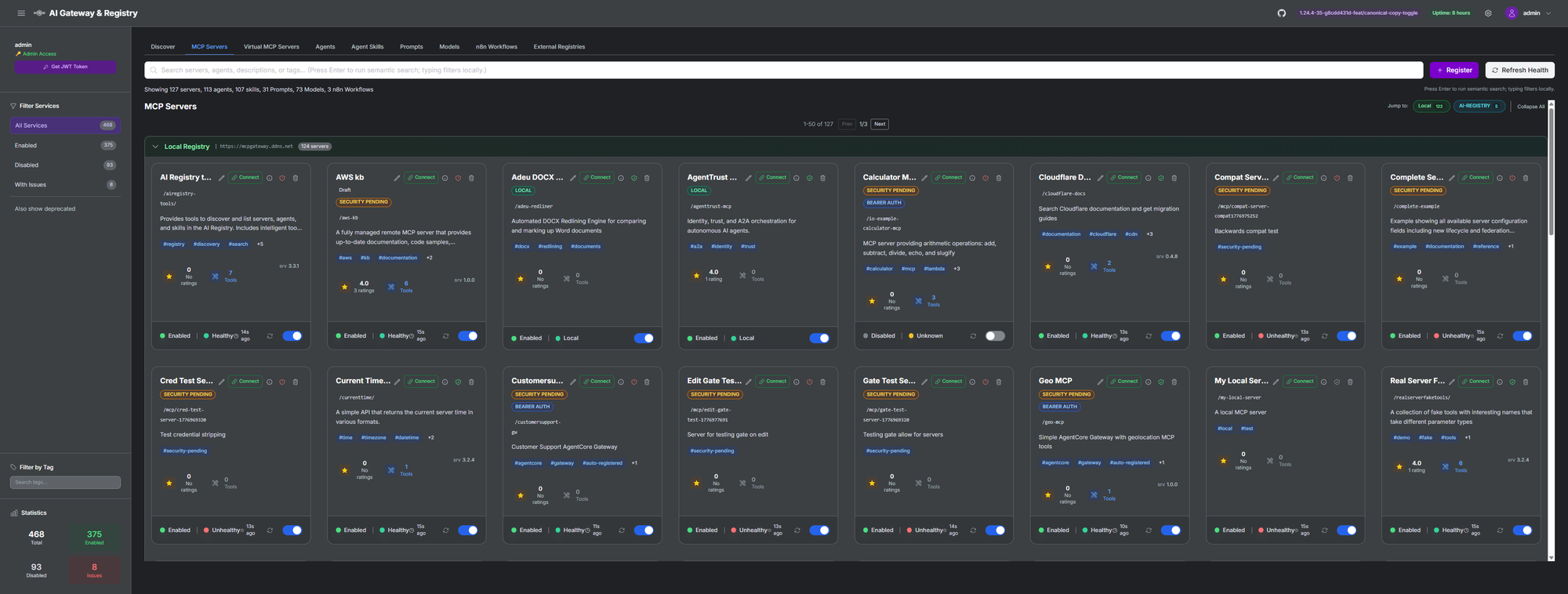
Figure 1: Landing page of MCP Gateway and Registry, showing the unified catalog of AI assets. Alongside the built-in MCP servers, agents, and skills, the tab row includes custom entity types an admin has defined, such as Prompts, Models, and n8n Workflows.
Architecture
The registry runs as a containerized stack: NGINX as the reverse proxy gateway, FastAPI for the registry API, and MongoDB or Amazon DocumentDB for storage. Authentication plugs into your existing identity provider.
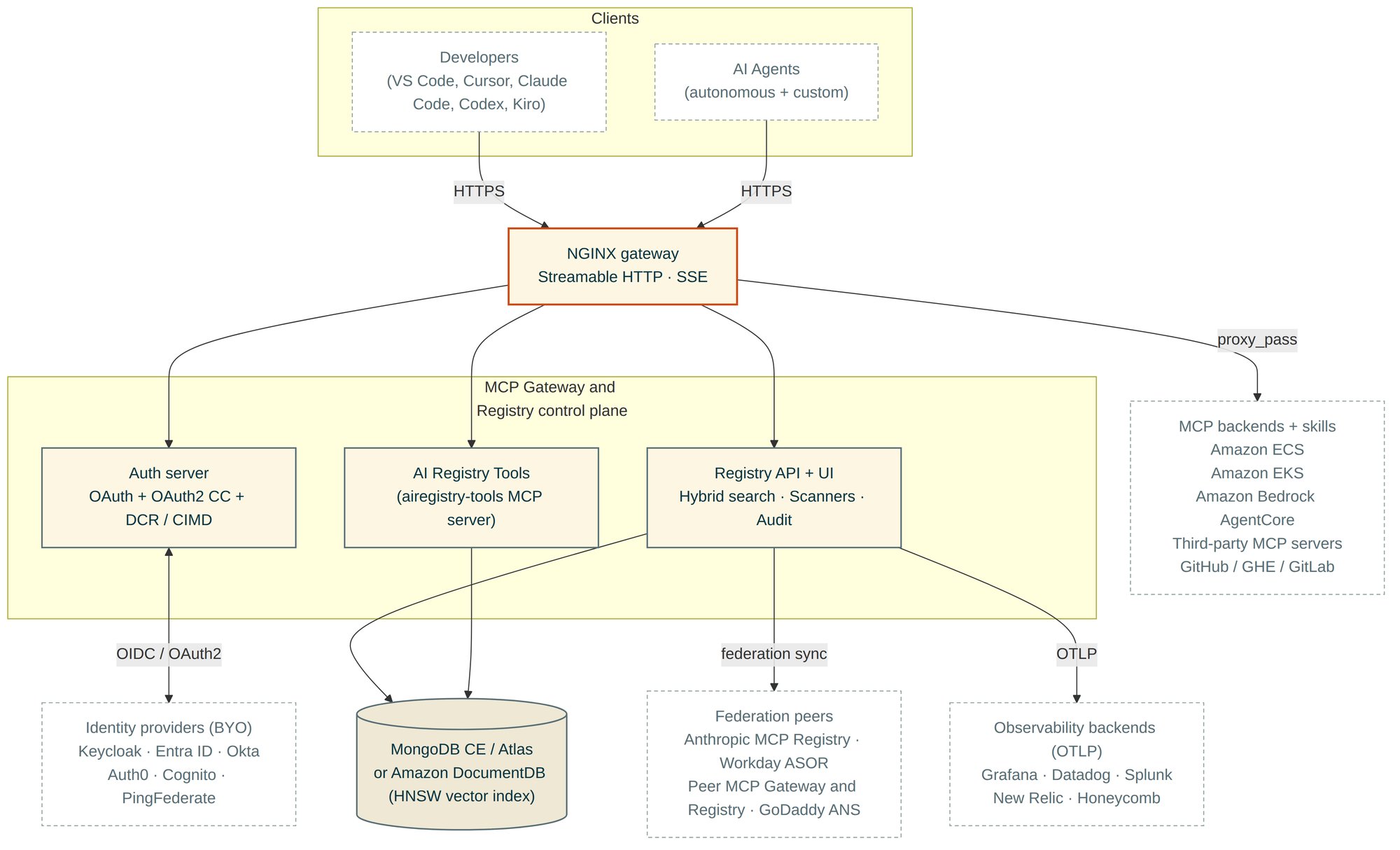
Figure 2: Reference architecture. Clients (humans and AI agents) reach the registry through one NGINX entry point. The auth server brokers OIDC/OAuth2 to the customer’s existing IdP. The registry API and AI Registry Tools MCP server share one storage tier (Amazon DocumentDB with HNSW vector search in production, MongoDB Community Edition or Atlas elsewhere) and one search pipeline (vector plus lexical, fused with Reciprocal Rank Fusion (RRF)). NGINX proxy_pass reaches MCP servers in ECS, EKS, Bedrock AgentCore, and third-party hosts. The registry federates with the Anthropic MCP Registry, Workday ASOR, peer registry instances, and GoDaddy ANS for identity verification. Audit, traces, and metrics ship over OTLP to whatever observability backend the customer already runs.
The gateway authenticates two populations concurrently: humans (session/OAuth) and machines (OAuth2 Client Credentials). The gateway supports OAuth Dynamic Client Registration (DCR) so AI coding assistants such as Claude Code, Codex CLI, Claude.ai Custom Connectors, and Kiro CLI register themselves and connect with one command on Keycloak today. Client ID Metadata Document (CIMD) support is next, which extends the same flow to Microsoft Entra ID and other IdPs that do not support DCR. Scopes define permissions at the tool, method, and team level.
MCP Gateway and Registry supports Streamable HTTP and SSE transports for remote MCP servers, and local MCP servers for stdio integrations. Local support is registration-only: the registry stores the launch recipe and metadata so local servers are discoverable, and the stdio process runs on the developer’s machine.
The registry implements a hybrid search algorithm for AI assets. A vector pipeline (Hierarchical Navigable Small World (HNSW) on Amazon DocumentDB, application-level cosine similarity on MongoDB Community Edition) runs in parallel with a keyword-boosted lexical pipeline (regex matching across path, name, description, tags, metadata, and tool definitions). RRF combines the two ranked lists. The same fusion technique appears in Elasticsearch, OpenSearch, and MongoDB Atlas. This way, semantic similarity and exact name matching reinforce each other instead of one signal drowning out the other. Storage uses MongoDB Community Edition for development and Amazon DocumentDB for production. See the Hybrid Search Architecture.
How an enterprise is using this in production
“The MCP Gateway and Registry repo gave us the foundation to bring AI tool discovery and governance to enterprise scale. At Expedia Group, we layered server quality grading, automated skill sync, and org-wide discoverability directly on top of it — capabilities that would have taken weeks to build from scratch. The clean architecture made plugging in our own security and governance requirements straightforward, and this, without ever forking the core. The authenticated backend APIs also let us integrate the catalog directly into our application and agentic workflows, so teams can programmatically discover and consume capabilities without leaving their existing toolchains. Today we’re running hundreds of MCP servers, tools, and skills alongside tens of agents in a searchable, graded, and centralized catalog our teams can trust. Our engineers went from asking ‘which MCP servers or skills exist?’ to finding, vetting, and consuming the right AI capabilities in minutes. It’s become the connective tissue for how we discover, govern, and operationalize AI capabilities across the company.”
— Rolland Mewanou, Distinguished Software Developer, Expedia Group (AI Platform Team)
What the registry delivers
Governance and access control
MCP Gateway and Registry authenticates users through enterprise SSO (Keycloak, Microsoft Entra ID, Okta, Auth0, Amazon Cognito). On top of authentication, the registry applies fine-grained, scope-based access control. An admin maps identity-provider groups to scopes, and each scope lists exactly which AI assets, methods, and individual tools a group can reach. The same model covers both populations: human users (who authenticate with OAuth2 PKCE and carry their IdP group membership) and agents (which authenticate machine-to-machine and carry scopes assigned to their identity).
The registry enforces these scopes at discovery and listing time, not only at invocation time. Two users in different lines of business, querying the same registry, see different sets of assets. A developer in the finance group sees only the MCP servers, agents, and skills that finance has been granted, such as a ledger-query server and a forecasting agent, while a developer in the HR group sees the HR assets instead, and neither sees the other’s. A platform admin in a broad scope sees every server, agent, and skill. The same applies to agents: an agent’s machine identity determines which servers and peer agents it can discover and list, so an agent scoped to one line of business does not see assets that belong to another. Discovery and authorization use one source of truth, so an asset a caller cannot use does not appear in their results in the first place.
The audit log records who did what, when, and where, which teams can use as evidence in SOC 2 and GDPR audits. A registration gate calls an external admission-control endpoint to approve or deny new registrations before they persist.
Supply chain security with Cisco AI Defense
Third-party MCP servers, A2A agents, and skills are vectors for malicious tool definitions, data exfiltration, and prompt injection. The registry runs three open source scanners from Cisco AI Defense on each asset at registration time:
- MCP Scanner connects to MCP servers, fetches tool definitions, and analyzes them with YARA pattern matching, LLM-based analysis, or Cisco proprietary analyzers.
- A2A Scanner checks A2A specification compliance and runs heuristic threat detection on agent cards.
- Skill Scanner inspects SKILL.md files for prompt injection patterns, credential exposure, and unsafe instructions.
If a scan finds critical or high-severity issues, the registry disables the asset and tags it security-pending. Administrators see color-coded shield icons in the UI, trigger rescans through the API, and run periodic sweeps across the catalog. Assets that pass the scan remain available to developers and agents. The registry runs this scan on each registration, with no manual review queue.
Discovery
Discovery is often a weak point for internal AI portals: developers cannot find the right tool, agents cannot select the right peer, and users fall back to hardcoded URLs. Search quality is therefore a focus. The registry uses hybrid search with RRF scoring, which combines semantic vector retrieval with keyword matching. RRF avoids the dominant-modality bias of additive scoring: when a query matches strongly in one modality and weakly in another, results stay balanced instead of one signal drowning out the other. Admin APIs detect and reindex assets with missing embeddings, which helps keep search results relevant as the catalog grows.
Consumers reach the catalog two ways, and both are first-class.
The registry ships with a built-in MCP server, the AI Registry Tools MCP server (airegistry-tools), so AI coding assistants and agents interface with the registry through the standard MCP protocol with no registry-specific integration code. They point their MCP client at one URL and call its tools. The server exposes tools to search the registry (search_registry for hybrid search and intelligent_tool_finder for natural-language tool discovery) and to list its contents (list_services, list_agents, list_skills, and get_skill_content). A coding assistant can discover the right MCP server, agent, or skill at runtime and connect to it, without a human curating a list first.
For agents and applications that prefer a direct integration, the full registry functionality is also available through a REST API. The API is documented as an OpenAPI specification. To make adoption straightforward, the project provides a reference Python client implementation, api/registry_client.py, and a command-line tool, api/registry_management.py, for registering, listing, searching, and managing assets from scripts and pipelines.
Operations and observability
The registry uses OpenTelemetry as its single instrumentation surface. The registry emits traces and metrics in OTLP and forwards them to any OTLP-compatible collector, so the registry plugs into the customer’s existing observability backend instead of requiring a new one. The Amazon ECS reference deployment ships pre-configured Grafana dashboards for teams that want a turnkey setup, and any OTLP backend works the same way: Datadog, New Relic, Honeycomb, Splunk, Grafana Cloud, or a self-hosted Prometheus and Grafana stack.
The instrumentation covers two surfaces. The first is every HTTP API endpoint the registry exposes, with request rate, latency percentiles, error rate, and status codes. The second is the core registry and AI Registry Tools MCP server signals: registrations, search query throughput and latency, security scans, federation sync events, and gateway tool invocations. MCP server version routing supports rollback and deprecation lifecycles. Logs rotate into MongoDB, and an admin API can retrieve them. Every pull request runs against 4,000+ unit and integration tests.
External registry federation
A registry that does not federate becomes another silo. The registry pulls assets from external registries and syncs assets between its own instances:
- Anthropic MCP Registry import and API compatibility. The registry implements the Anthropic MCP Registry REST API specification in both directions. One CLI command imports MCP servers from Anthropic’s public registry; imported entries appear with purple ANTHROPIC tags, are searchable alongside locally registered servers, and receive the same security scanning and access control as any other registered asset. In the other direction, any Anthropic-API-compatible client can point at this registry as its backend for discovery, server listings, and metadata, with no client-side changes.
- Workday Agent System of Record (ASOR). The registry federates with Workday ASOR to import AI agents registered in a customer’s Workday tenant. Agents pulled from ASOR appear with an orange ASOR tag, are searchable alongside locally registered agents, and receive the same access control, audit logging, and security scanning as any other registered asset.
- Peer-to-peer federation. Multiple MCP Gateway Registry instances sync assets bidirectionally. Central IT can aggregate visibility across line-of-business registries, or teams inherit from a central hub. Sync modes include all, whitelist, and tag-filter. Federation uses static-token authentication, Fernet-encrypted credential storage, and generation-based orphan detection. Synced items appear read-only and show the source registry.
- GitHub, GitLab, and Bitbucket skill ingestion. The registry fetches SKILL.md files from GitHub, GitLab, and Bitbucket repositories. It rewrites GitLab
/-/raw/paths to the GitLab API v4, rewrites GitHub Enterprise raw paths to its REST API, injects the right auth headers per host, and applies pagination caps to keep ingestion bounded. - Virtual MCP servers. Teams can aggregate tools from multiple backend MCP servers into one virtual endpoint. Clients connect to one URL that presents a curated, access-controlled view of capabilities from any combination of registered backends, with tool aliasing to resolve naming conflicts and per-tool scope-based access control.
Performance at scale
A registry that slows down as the catalog grows does not get adopted. The registry optimizes lookup and listing across thousands of MCP servers, agents, and skills. Listing endpoints return results in a single round trip instead of issuing one database call per item, so listing latency does not increase with each added item. Users with restricted access fetch only the assets they are entitled to, not the full catalog filtered down in memory. The latest-scan lookup uses a database index designed for the access pattern, so security status loads quickly regardless of catalog size. The dashboard fetches its data once per session and shares it across the UI, so opening more panels or switching tabs does not multiply backend load.
The registry ships with a public, reproducible performance harness so customers can measure these results on their own deployments. Two scripts cover the two questions teams care about:
- Search quality. scripts/evaluate_search.py and scripts/benchmark_search.py run a ground-truth query set against the registry’s /api/search/semantic endpoint and report NDCG@10.
- API latency at concurrent load. The tests/stress/ harness bulk-registers 100, 500, or 1,000 servers, agents, and skills against a running registry, then measures steady-state per-request latency for every list endpoint and concurrent semantic-search latency at 1, 10, and 100 parallel users.
Integration with AI coding assistants
AI coding assistants such as Claude Code, Codex, Cursor, and Kiro speak the MCP protocol, so they connect to the registry the same way any MCP client does: through one gateway URL. The assistant points at the registry’s built-in AI Registry Tools MCP server and gains the search and listing tools described above, so a developer can ask the assistant to find an MCP server, agent, or skill and connect to it, without copying URLs or hand-editing config.
The connection carries the developer’s own identity. When the gateway uses an identity provider such as Keycloak, the assistant runs an OAuth login in the browser, the developer logs in as themselves, and the assistant receives a token scoped to that developer’s groups. The fine-grained access control described earlier then applies: the assistant sees and can call only the assets the developer’s groups allow. Calls are attributable to a specific person in the audit log, rather than to a shared service token.
There are two ways to provide the OAuth client the assistant needs to start that login. With a pre-registered public client id, an operator registers one client and the registry advertises its id, which works across identity providers and avoids client sprawl. With Dynamic Client Registration (DCR), the assistant registers itself at connect time against Keycloak, with no pre-provisioning. (Upcoming) Client ID Metadata Document (CIMD) support, which extends the same zero-touch flow to Microsoft Entra ID and other providers, is on the roadmap.
Claude Code
Add the registry’s tools server to Claude Code with one command, then complete the browser login when prompted:
Codex
Once connected, the assistant lists and searches the catalog through the AI Registry Tools MCP server, and the developer works entirely in natural language: “find an MCP server that can query our data warehouse,” or “what skills are available for incident response.” The registry returns only the assets that the developer’s identity is allowed to see.
For the full set of supported assistants, identity providers, and connection methods, see the AI Coding Assistants Setup Guide and the one-command integration guide.
Amazon Bedrock AgentCore integration
This integration shows how open source software, AWS managed services, and partner products compose into one governed control plane. The registry (Apache 2.0) federates with Amazon Bedrock AgentCore, scans assets with Cisco AI Defense, optionally verifies agent identity through GoDaddy ANS, and authenticates users through the identity provider the enterprise already runs. Customers keep their existing IdP, observability stack, and security tooling, and the registry adds governance, discovery, and audit across all of them.
There are two levels of integration with Amazon Bedrock AgentCore: bulk import of individual AgentCore resources, and continuous federation from AgentCore registries.
Bulk scanner and auto-registration: The CLI scans an AWS account, discovers all READY AgentCore Gateways and Agent Runtimes, and registers them in one command. Gateways register as MCP servers. Runtimes register as MCP servers or A2A agents depending on their protocol. The scanner writes a token-refresh manifest, and a companion sidecar process keeps OAuth2 egress tokens up to date.
AWS Agent Registry federation: For continuous synchronization, the registry federates directly with one or more AgentCore registries. The gateway periodically syncs records, transforming AgentCore descriptors (MCP, A2A, CUSTOM, AGENT_SKILLS) into native registry assets. Teams configure this through the Settings UI, the API, or a single environment variable (AWS_REGISTRY_FEDERATION_ENABLED=true). Cross-account and cross-region access works via IAM role assumption. Removing a federated registry automatically deregisters all its synced assets.
| AgentCore descriptor type | Registry asset type |
|---|---|
| MCP | MCP Server |
| A2A | A2A Agent |
| CUSTOM | A2A Agent |
| AGENT_SKILLS | Agent Skill |
Once federated, AgentCore assets appear alongside locally registered assets in the UI, semantic search, and API responses, with the same access control, audit logging, and security scanning as any other registered asset.
See the AgentCore Operations Guide and the AWS Agent Registry Federation Guide.
Agent identity verification with GoDaddy ANS (Optional)
The registry integrates with GoDaddy’s Agent Name Service (ANS), which provides PKI-based trust verification for agents and MCP servers. ANS uses domain-ownership proof through PKI certificates to verify identity. The integration follows a bring-your-own-ANS-ID model: the agent owner registers with ANS independently and links the ANS Agent ID to the registry entry. The registry verifies the identity through the ANS API and shows a clickable trust badge on agent cards. A background scheduler re-verifies every 6 hours with circuit breaker protection. See the ANS Integration Guide and the demo video.
Deploy on AWS
Amazon EKS (Kubernetes)
Helm charts in charts/ deploy the full stack: registry, auth server, NGINX gateway, MongoDB, and Keycloak.
For EKS cluster provisioning, the AWS AI/ML on Amazon EKS blueprints provide a tested starting point. The Helm Charts README covers identity provider integration, federation, and observability.
Amazon ECS (Fargate)
A Claude Code skill walks through the full ECS Fargate deployment for you. It checks the required IAM permissions, bootstraps the toolchain (uv, AWS CLI, Terraform), configures terraform.tfvars, and runs the two-stage terraform apply. The Terraform stack provisions ECS Fargate with multi-AZ architecture, an Application Load Balancer with HTTPS termination via ACM, auto-scaling on CPU and memory, CloudWatch monitoring, Amazon DocumentDB for storage, and Keycloak on RDS Aurora PostgreSQL.
See the Terraform (AWS ECS) install skill.
Amazon EC2
To run the full stack on a single EC2 instance, the Complete Setup Guide covers it from a fresh instance: prerequisites, cloning and configuration, Keycloak setup, starting the services, storage backend, and verification.
Local development on macOS
To get the stack operational in about 15 minutes on a Mac, use the macOS setup skill. It clones the repository, installs the services, configures Keycloak, and verifies the full stack.
See it in action
- AWS Show and Tell: platform walkthrough and live demo
- Custom entity types: defining schema-driven catalog types at runtime
- AI coding assistant integration: connecting a coding assistant to the registry
- Dynamic tool discovery: agents discovering and invoking tools at runtime
Workshop
The AWS Workshop Studio lab (“Securing AI Agent Ecosystems with MCP Gateway and Registry”) walks through deployment, authentication, access control, and security scanning on AWS.
Community and roadmap
The project launched in May 2025. As of June 2026 the team ships a release every two weeks, with release notes in the repository. The codebase is Apache 2.0, with code review by core maintainers and a contributor community.
The next few releases group into three themes:
- Token mint audit and observability (1.24.7). Audit events and OpenTelemetry metrics for token minting at the signing point, admin notifications when a newer stable release is available, a CDK-based deployment option alongside the existing Helm and Terraform paths, and ECS secrets moved into AWS Secrets Manager.
- Coding-assistant OAuth integration (1.25.0). Client ID Metadata Document (CIMD) support, both publishing a CIMD for the AI Registry Tools MCP client and accepting a CIMD URL as a client ID, plus RFC 8707 resource-parameter enforcement and RFC 8693 token exchange.
- A2A gateway and Registry Copilot (1.27.0). Reverse-proxy gateway support for A2A agents, and an embedded AI chat assistant for registry operations, discovery, and agent design.
Get started
- Try it on a laptop in 5 minutes. Clone the GitHub repository, copy .env.example to .env, and run
./build_and_run.sh --prebuilt. The full stack comes up from pre-built Docker images, so there is no build step. - Deploy it on AWS. For Kubernetes, use the Helm charts under charts/ on Amazon EKS. For serverless, use the Terraform configuration in terraform/aws-ecs/ on Amazon ECS Fargate.
- Walk through it with a guided lab. The AWS Workshop Studio lab covers deployment, authentication, access control, and security scanning end-to-end.
- Engage with the community. Report bugs and request features by opening an issue, and contribute fixes or new capabilities by submitting a pull request.
If you build something with this, such as internal MCP server catalogs, a federated agent registry, or a custom security-scan policy, we want to hear about it. Open an issue and tell us how you are using it.