AWS Open Source Blog
Open Protocols with the Strands Agents SDK
If you are building AI agents, you have likely encountered a growing list of protocol acronyms—MCP, A2A, UTCP, AG-UI, and x402—that can feel overwhelming. The open source community has converged on several complementary protocols. An AI agent is only as useful as the systems it can reach: internal tools and data, the external APIs your workflows depend on, other agents that own specialized tasks, and the humans who review results and act. For most teams, wiring these pieces together has meant hand-rolled adapters and bespoke orchestration code that multiplies every time you add a new agent, tool, or front-end. Open agent protocols address this by defining standard boundaries between the major parts of an agentic system, with shared integration patterns for tool access, agent-to-agent collaboration, user interaction, and machine-native payments. Each component integrates through a protocol-defined interface instead of knowing the implementation details of every other one.
In this post, we’ll explore how these protocols work together using Strands Agents SDK as an example implementation, though the patterns apply to any agent framework.
Strands SDK is an open source, Apache 2.0-licensed SDK for building AI agents. The SDK is model-driven: the model drives the agent loop, while developers guide behavior through tools, prompts, and runtime configuration. By adopting emerging open standards rather than proprietary protocols, Strands enables agents to evolve as the ecosystem changes.
To keep the discussion concrete, we will use a running example throughout this post to understand how Strands Agents implements these protocols: Pantry, a grocery delivery concierge. When a customer places a grocery order, Pantry coordinates the entire fulfillment flow such as checking inventory, finding substitutions for out-of-stock items, charging the customer, scheduling delivery, and streaming live status updates back to the customer’s application. As we introduce each protocol, we will show how it fits into Pantry’s architecture, so you can see not just what each one does, but how they work together in a real system.
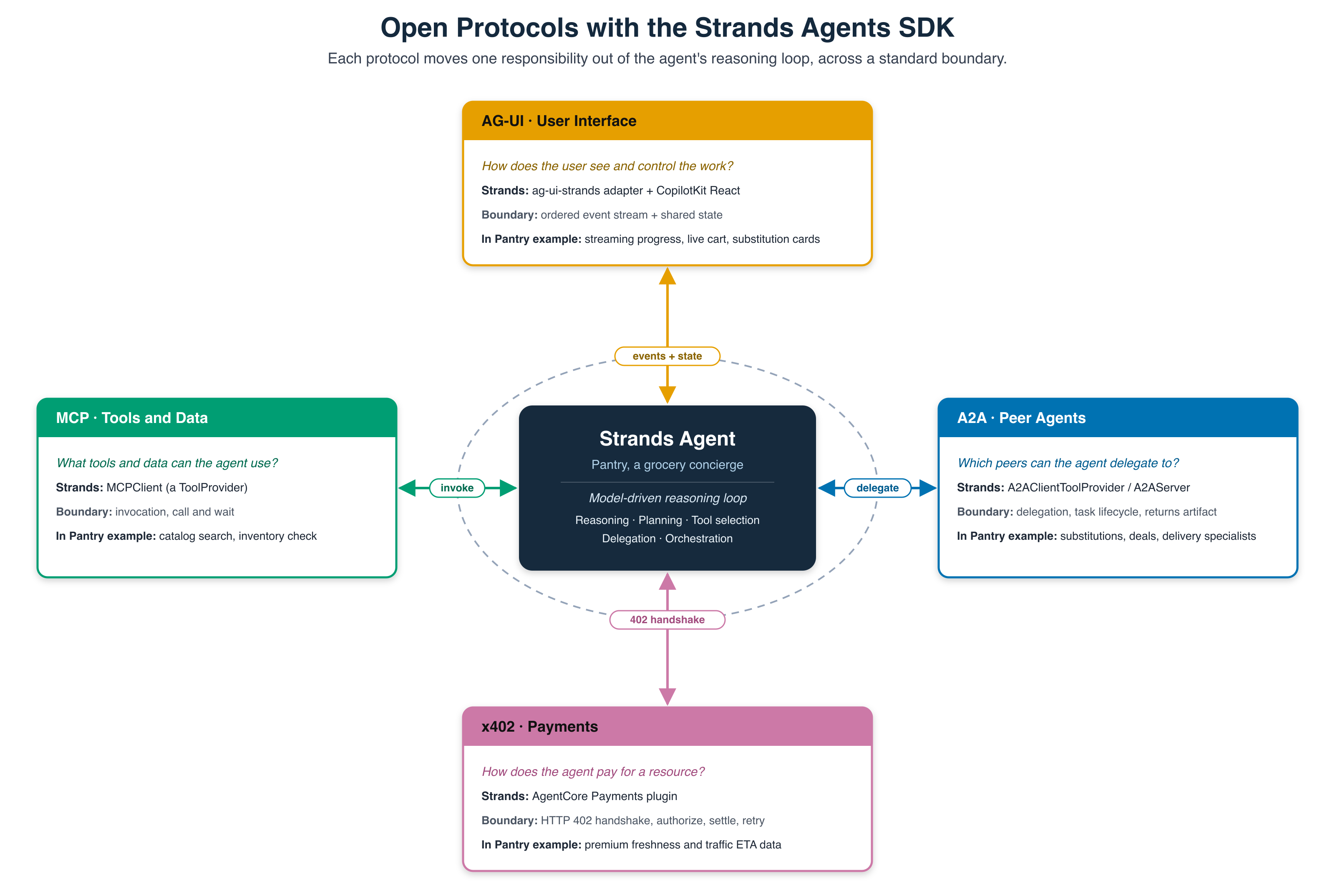
Model Context Protocol (MCP): Tools and Context
An agent on its own can only think but not act. The moment it needs to check a price, read inventory, look up a preference, or call a fulfillment API, it must reach into someone else’s system. MCP is the contract that governs that crossing.
From the agent’s point of view, MCP answers a single question. What tools, data, or context can I use? For Pantry, that means the model can ask “what oat milk is under $5?” or “is this brand in stock?” and get an answer back, without anyone hand-writing code inside the agent that knows how this particular catalog’s API works. The catalog shows up to the agent as a tool it can call, and MCP handles the boundary to the catalog’s own system. A catalog tool has structured inputs and outputs, such as a query, a price cap, a product ID, and an in-stock flag, and that is exactly the shape MCP is built for.
How Strands integrates MCP
MCP support is built directly into Strands and ships as a default dependency, making it straightforward to connect agents to external tools and services exposed by MCP servers. The SDK exposes a single object, MCPClient, which implements the ToolProvider interface, which is an object that produces a whole set of callable tools on demand, rather than being a single tool itself. The Agent constructor’s tools argument accepts a mixed list: individual tools, such as your local @tool functions, alongside tool providers like an MCPClient. You drop the client into that same list, and Strands registers both sources the same way.
Connecting Pantry to a catalog over MCP
In the Pantry example, the grocery catalog is exposed through an MCP server. The server provides two tools: one to search the catalog and another to check inventory.
# catalog_server.py
from mcp.server.fastmcp import FastMCP

mcp = FastMCP("pantry-catalog")

@mcp.tool(description="Search the grocery catalog under a price cap.")
def search_catalog(query: str, max_price: float) -> list[dict]:
    catalog = [
        {"sku": "OAT-001", "name": "Oatly Oat Milk 1L",      "price": 4.49},
        {"sku": "OAT-002", "name": "Store Brand Oat Milk 1L", "price": 2.99},
        {"sku": "MLK-010", "name": "Whole Milk 1L",           "price": 1.89},
    ]
    return [
        item for item in catalog
        if query.lower() in item["name"].lower()
        and item["price"] <= max_price
    ]

@mcp.tool(description="Check whether a SKU is in stock at the user's store.")
def check_inventory(sku: str) -> dict:
    out_of_stock = {"OAT-001"}
    return {
        "sku": sku,
        "in_stock": sku not in out_of_stock,
        "qty": 0 if sku in out_of_stock else 12,
    }

if __name__ == "__main__":
    mcp.run(transport="stdio")
What each step does:
- FastMCP(“pantry-catalog”) creates and names the MCP server, and the @mcp.tool(…) decorator registers each Python function as an MCP tool.
- The function signature defines the tool contract: search_catalog(query: str, max_price: float) accepts a string query and a floating-point price limit. The description tells the model when to use the tool, which matters because it becomes part of the model’s decision-making context.
- The function bodies are ordinary Python. In this example, the catalog is hardcoded to keep the walkthrough focused. In a production application, the same tool contract could call a product database, inventory API, or enterprise service.
- The final line starts the MCP server using the stdio transport. With stdio, the server reads JSON-RPC messages from standard input and writes responses to standard output. This makes it easy to run the MCP server as a local subprocess during development.
Next, Pantry connects to the catalog server through MCPClient.
# pantry_agent.py
from mcp import StdioServerParameters, stdio_client
from strands import Agent
from strands.tools.mcp import MCPClient

catalog_client = MCPClient(
    lambda: stdio_client(
        StdioServerParameters(command="python", args=["catalog_server.py"])
    )
)

pantry = Agent(
    system_prompt="You are Pantry, a grocery concierge.",
    tools=[catalog_client],   # MCPClient is a ToolProvider
)

pantry("Find me oat milk under $5 and tell me if your top pick is in stock.")
The MCPClient constructor receives a factory function. In this case, the factory is a lambda that knows how to start the catalog server as a subprocess and open the stdio connection to it. This factory-based design is useful because Strands can establish or re-establish the MCP connection when needed. Instead of receiving a single already-open connection, MCPClient receives the recipe for creating one. That makes reconnect behavior cleaner and also gives developers a natural place to refresh credentials when connecting to secured MCP servers.
This pattern enables an MCP server as simply a provider of capabilities. Pantry can consume tools from an MCP server, and in a larger architecture, Pantry itself could expose capabilities for other systems to use.
Agent2Agent (A2A): Peers and Delegation
MCP gives Pantry access to external capabilities such as catalog search and inventory checks. These capabilities perform well-defined operations: search for products that match a constraint, check whether a product ID is available, or return structured data from a backend system. However, many parts of a grocery order require more than calling a capability and receiving a result. They require decisions.
If a shopper’s preferred oat milk is out of stock, Pantry needs to find the best alternative. That decision may depend on the shopper’s price cap, dietary preferences, brand preferences, past behavior, and what is currently available in the store. The right answer may also require a follow-up question, such as: “Almond milk is the closest match under your price cap. Is that an acceptable substitution?”. This is different from calling a tool. A substitution workflow involves judgment, may take more than one turn, and may be better owned by a dedicated specialist. The same pattern appears in other parts of the grocery workflow, such as finding the best deal or selecting a delivery window.
Pantry could expose each of these workflows as another MCP tool, but a tool and a specialist agent are not the same abstraction. Calling a tool over MCP is invocation: Pantry stays in control, calls a capability, waits for the result, and continues the workflow. This fits bounded operations with clear inputs and outputs, such as catalog search or an inventory check, but a substitution decision isn’t bounded. The specialist agent may need time, may ask clarifying questions, and may call its own tools before returning a recommendation. That’s delegation where Pantry hands a portion of the work to a peer that reasons independently and returns the outcome of its reasoning. The key distinction is ownership: with invocation the caller owns the work, with delegation the receiving agent owns the task. This is where MCP ends and A2A begins.
This is the boundary Agent2Agent (A2A) is designed for. A2A communication allows Pantry to discover, delegate to, and collaborate with specialist agents through a standard interface. The substitution specialist can be implemented by another team, use a different model, or run on a different agent framework. If it supports the A2A protocol, Pantry can work with it as a peer.
How Strands exposes and consumes A2A agents
Strands supports both sides of the A2A pattern. You can expose a Strands agent as an A2A server, and you can consume remote agents in three ways depending on how much control you need:
| Abstraction | Decision model | When to use it |
|---|---|---|
| A2AAgent | Code-driven | Use when you already know which remote agent to call. It can be used as a node in a Strands Graph, or wrapped as a tool. |
| A2AClientToolProvider | Model-driven | Use when the model should decide at runtime which specialist agent to delegate to. This is useful for orchestrators that route work across multiple agents. |
| Raw a2a-sdk | Protocol-driven | Use when you need direct access to A2A protocol behavior that is not exposed by the higher-level Strands abstractions. |
All three options use the same underlying A2A client capabilities. This means you can start with a higher-level abstraction and move lower only when you need more control, without changing the overall architecture.
Exposing a substitutions specialist over A2A
In Pantry, substitutions are a good example of work that should be delegated to a specialist agent. The substitutions agent owns the decision of which replacement item best fits the shopper’s constraints.
# substitutions_server.py
from strands import Agent
from strands.multiagent.a2a import A2AServer

substitutions = Agent(
    name="Substitutions Agent",
    description="Suggests a replacement when a grocery item is out of stock.",
    system_prompt=(
        "You are a grocery substitutions specialist. "
        "Given an out-of-stock item and a price cap, "
        "propose the closest in-stock alternative under that cap."
    ),
)

A2AServer(agent=substitutions, port=9001).serve()
This file defines a standard Strands agent and publishes it as an A2A server.
The name and description fields are especially important in an A2A setting. For a local agent, these fields may be mostly descriptive. For an A2A agent, they become part of the agent’s public contract. They are published in the agent card and help other agents determine whether this specialist is the right peer for a task.
The system_prompt defines the agent’s internal behavior, but it is not exposed to other agents. Consistent with A2A’s opacity, peers see the card, messages, task state, and artifacts, not the specialist’s private instructions.
The A2AServer wrapper handles the protocol boundary. When serve() runs, it publishes the agent card at /.well-known/agent-card.json, exposes the A2A JSON-RPC endpoints for sending and streaming messages, and makes the agent available to remote peers.
Orchestrating A2A peers from Pantry
Pantry may have access to several specialist agents: one for substitutions, one for deals, and one for delivery scheduling. In this case, the routing decision should happen at runtime. Pantry should inspect the user’s request and decide which specialist to call.
That is the use case for A2AClientToolProvider.
# pantry_orchestrator.py
from strands import Agent
from strands_tools.a2a_client import A2AClientToolProvider

provider = A2AClientToolProvider(
    known_agent_urls=[
        "http://127.0.0.1:9001",   # substitutions
        "http://127.0.0.1:9002",   # deals
        "http://127.0.0.1:9003",   # delivery slots
    ]
)

pantry = Agent(
    system_prompt=(
        "You are Pantry, a grocery concierge. "
        "Delegate to specialist agents when a request needs substitutions, "
        "deals, or delivery scheduling."
    ),
    tools=provider.tools,
)

pantry("Oatly Oat Milk is out of stock. Find me a replacement under $4.49.")
A2AClientToolProvider is given the base URLs for known peer agents. From those URLs, it can fetch each agent’s card and learn what capabilities each peer exposes. The provider then gives Pantry tools for discovery and messaging. This is similar to the MCPClient pattern from the MCP section, but the abstraction is different. MCPClient exposes remote tools. A2AClientToolProvider exposes the ability to discover and delegate to remote agents.
By passing provider.tools into the Pantry agent, the model can inspect available peers and decide which one to use. There is no hardcoded routing table that maps “out of stock” to the substitutions agent. The model reads the request, considers the available agent cards, and delegates to the best-fit specialist.
At runtime, the flow looks like this:
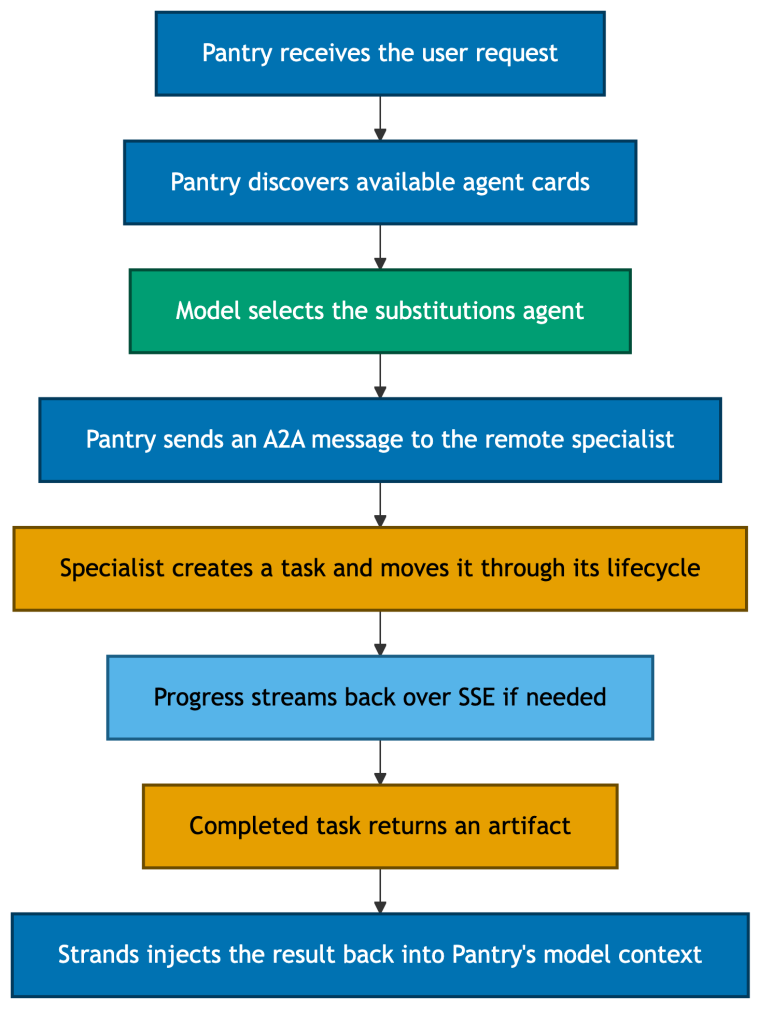
The remote agent does not just return a value; it owns a task, moves it through a lifecycle, and returns an artifact. Strands handles the protocol translation at the boundary. A2A messages and artifacts are converted into Strands content blocks, so the application code on both sides can remain in Strands terms.
This is the same design pattern as the MCP integration, applied one level higher. With MCP, a remote tool can look like a local tool. With A2A, a remote agent can look like a local agent. In both cases, the protocol boundary lets developers focus on system design rather than custom integration code.
Agent-User Interaction (AG-UI): Streaming to the User
MCP connects Pantry to tools and A2A connects it to peer agents. The next boundary is the user interface, where the shopper sees progress, reviews choices, and acts, and it is different because agents do not behave like request-response services. In a conventional web application the browser sends a request, the backend computes a complete response, and the UI renders it once the server is done. Agentic workflows do not fit into that model.
A single Pantry interaction may span multiple model calls, MCP tool calls, and A2A delegations over several seconds, producing partial text and tool results along the way, so a good experience shows that progression as it happens rather than a spinner followed by a wall of text. The interface state is also shared and bidirectional: the cart, running total, delivery slot, and substitution choices evolve as Pantry works, and the shopper can change them too by removing an item, adjusting a quantity, or rejecting a substitution.
One way to support this is a WebSocket connection with a custom event format. That works for a single application, but it reintroduces the integration problem the moment another agent or front-end appears. Each front-end must understand each agent’s event stream, and each agent needs custom logic for each interface.
AG-UI removes that per-pairing work by defining a standard, typed event vocabulary for agent-to-UI communication: progress, messages, tool calls, state updates, and UI actions. Because the events are typed, the front-end can do more than print text; it can render the agent’s work as a live, interactive experience while staying synchronized in real time.
How Strands integrates AG-UI
The Strands integration for AG-UI focuses on translation. A Strands agent already emits a stream of internal runtime events as it works. The AG-UI integration converts those Strands events into AG-UI events that a compatible front-end, such as a CopilotKit React application, can consume and render.
You do not need to write this translation layer by hand. The CopilotKit scaffold can generate the backend and front-end pieces together: a backend that translates Strands events into AG-UI events, and a front-end that renders those events in the user experience.
At a high level, the integration maps Strands runtime events into AG-UI event families:
| Strands stream event | AG-UI event family | What the UI can do |
|---|---|---|
| Run start and run end | Lifecycle events, such as RUN_STARTED and RUN_FINISHED | Show and clear the agent’s active or “thinking” state. |
| Text delta | Text message events, such as TEXT_MESSAGE_START, TEXT_MESSAGE_CONTENT, and TEXT_MESSAGE_END | Stream text into the chat experience. |
| Tool call | Tool-call events, such as TOOL_CALL_START, TOOL_CALL_ARGS, and TOOL_CALL_END | Show progress, such as “checking inventory,” or render a custom component. |
| State change | State events, such as STATE_SNAPSHOT and STATE_DELTA | Update shared UI state, such as the cart and running total. |
Two parts of this mapping are especially important.
First, tool calls are represented as a sequence of events rather than one large event. The UI can respond as soon as the tool call starts, update as arguments become available, and then render the completed result.
Second, AG-UI supports both state snapshots and state deltas. A STATE_SNAPSHOT provides the full state object. A STATE_DELTA provides only what changed, typically as a JSON Patch. This is what makes the interface feel live. If Pantry replaces an out-of-stock item with an approved substitute, the UI can update that single cart line instead of re-rendering the entire cart. Snapshots are still useful when a client joins late or needs to recover the full state after falling out of sync.
AG-UI support is provided through ag-ui-strands, a community-maintained package developed in collaboration with the AWS Strands team. While not part of the core SDK, it follows the same integration patterns and is tested against Strands releases. It is listed as a Strands community integration, that means it is not owned or supported by the core Strands team.
With AG-UI in place, Pantry can expose its work as a live user experience. The shopper can see progress, review substitutions, update the cart, and stay synchronized with the agent as the order evolves.
Building a front-end for Pantry
To build a Pantry front-end, start from the CopilotKit scaffold, which generates a complete project: a Python backend for Strands and a React front-end for CopilotKit, already connected through AG-UI.
npx copilotkit create -f aws-strands-pyThe scaffold creates both sides of the application. The backend runs the Pantry agent and emits AG-UI events. The front-end consumes those events and renders the shopper experience.
On the backend, the scaffold wraps the Strands agent with the ag-ui-strands adapter and exposes it through an HTTP endpoint. The exact generated code may evolve because the package is still pre-1.0, but the structure looks like this:
# app.py — generated by the scaffold; simplified to show the shape
from strands import Agent
from ag_ui_strands import StrandsAgent, create_strands_app

pantry = Agent(
    system_prompt=(
        "You are Pantry, a grocery concierge. "
        "Maintain the shopper's cart and running total in shared state."
    ),
    # tools=[catalog_client, ...]   # MCP tools and A2A peers from earlier sections
)

app = create_strands_app(StrandsAgent(pantry))
The adapter consumes the agent’s stream and emits the AG-UI event stream the front-end understands, so you do not hand-code that translation yourself.
Because the backend is still a standard Strands agent, the capabilities from the earlier sections plug in the same way. Pantry can use MCP tools for catalog and inventory access, A2A peers for delegated specialist work, and AG-UI for the shopper-facing experience. It is the same agent architecture, now exposed through a live interface.
This is where AG-UI differs from MCP and A2A. MCP centers on a client-server session for tools. A2A centers on task lifecycle for delegated work. AG-UI centers on an ordered event stream and a shared state object between the agent and the user interface. There is no separate long-lived protocol session to manage in application code. The front-end sends the user request and current state to the backend. The backend runs the Strands agent and streams AG-UI events back over HTTP. The front-end consumes those events in order and updates the interface.
With AG-UI, Pantry can face the shopper directly, showing progress, tool activity, shared-state updates, and task-specific components while the workflow is still running.
x402: Premium Data Access
MCP connects Pantry to tools, A2A connects it to peer agents, and AG-UI connects it to the shopper-facing application. The final boundary is premium data — live signals like traffic congestion and weather that can sharpen a delivery ETA from “sometime this afternoon” to “3:42 PM.” This boundary is different because the data isn’t free. Premium APIs charge per request, gating access behind an HTTP 402 paywall. Your agent needs a way to pay automatically, stay within budget, and retry — without you writing payment-negotiation logic into every API call.
x402 is an open standard for HTTP-native payments. When your agent encounters a 402 Payment Required response, the x402 protocol flow negotiates payment terms, processes the micropayment using pre-configured payment instruments, and retries the request. Amazon Bedrock AgentCore Payments handles the x402 protocol implementation—including credential management, spending limits, retries, and compliance—so agents can treat paid APIs like any other HTTP endpoint.
First, Pantry makes an ordinary HTTP request to a paid endpoint. If payment is required, the server returns a 402 Payment Required response with terms such as the amount, token, network, and recipient. Pantry then authorizes payment for those exact terms and retries the request with the payment payload attached. The resource server forwards that payload to a facilitator. The facilitator verifies the authorization and settles the payment. After settlement is confirmed, the resource server returns the requested resource.
How Strands reaches x402
x402 is not built into the Strands SDK in the same way as MCP or A2A. Instead, Strands can reach x402-enabled services through payment-aware tools or through managed payment infrastructure.
On AWS, x402 payment support is provided through the AgentCore Payments plugin (bedrock-agentcore[strands-agents]), a community-maintained package that leverages Amazon Bedrock AgentCore payments. While not part of the core Strands SDK, it integrates as a standard Strands plugin — hooking into the agent’s tool lifecycle to intercept HTTP 402 responses, process micropayments, and retry requests automatically. It is listed as a Strands community integration, which means it is not owned or supported by the core Strands team, but it follows the SDK’s plugin patterns and supports both x402 v1 and v2 payment protocols.
Paying for a resource with Pantry
Pantry can use a Strands payment plugin alongside ordinary Strands tools. The agent still makes HTTP requests through a normal tool, but the plugin handles the x402 payment handshake when a paid endpoint returns 402 Payment Required.
from strands import Agent
from strands_tools import http_request
from bedrock_agentcore.payments.integrations.config import AgentCorePaymentsPluginConfig
from bedrock_agentcore.payments.integrations.strands.plugin import AgentCorePaymentsPlugin

config = AgentCorePaymentsPluginConfig(
    payment_manager_arn="arn:aws:bedrock-agentcore:us-west-2:<account-id>:payment-manager/<payment-manager-id>",
    user_id="<user-id>",
    payment_instrument_id="<payment-instrument-id>",
    payment_session_id="<payment-session-id>",
    region="us-west-2",
)

plugin = AgentCorePaymentsPlugin(config=config)

pantry = Agent(
    system_prompt="You are Pantry, a grocery concierge that can access paid services.",
    tools=[http_request],
    plugins=[plugin],
)

pantry("Get the premium freshness forecast for my produce order.")
The http_request tool is an ordinary HTTP tool. It does not need to know about payment by itself. Payment behavior is added through the plugin.
The plugin configuration references managed payment resources rather than embedding secrets in the code. The payment_manager_arn identifies the managed payment configuration. The payment_instrument_id identifies the funding source. The payment_session_id scopes a related payment session. The user_id attributes the payment activity to a specific user, which is important for payments limits, auditing, and governance.
At runtime, the agent asks for a paid resource in natural language. If the HTTP endpoint responds with 402 Payment Required, the payment plugin handles the x402 handshake. It authorizes the payment through the managed payment infrastructure, retries the request, and returns the paid resource to the agent.
From Pantry’s perspective, the workflow remains simple. The agent asks for the data it needs. The payment infrastructure handles the payment boundary.
Discovery and guardrails
Payment capability becomes more powerful when agents can discover paid services dynamically. In an agent architecture, discovery and payment can work together.
MCP can expose paid services as tools. For example, a marketplace or catalog of pay-per-use APIs can appear to the agent through an MCP server. The agent discovers what it can call through MCP, and x402 handles what it costs and how payment is authorized.
A2A can also participate in the same pattern. One agent may delegate work to another agent, and the delegated interaction may require payment. In that case, A2A carries the collaboration, while x402 handles the payment step.
This shows how the protocols compose. MCP answers: what tools can the agent use? A2A answers: which peer agents can the agent ask for help? AG-UI answers: how does the user see and control the workflow? x402 answers: how does the agent pay for a resource when payment is required?
Because x402 moves real money, guardrails are essential. A paying agent needs clear limits on what it can spend, who it can spend on behalf of, and how long that authority lasts. A managed payment approach can enforce controls such as per-session payments limits, expiration windows, identity-based authorization, and audit logging.
These controls are especially important because agents may read untrusted content. A prompt injection attack that causes an agent to call an expensive paid resource is not just a quality issue; it can become a financial loss. Payments limits and payment-session scoping help contain that risk.
Where this leaves Pantry
With x402, Pantry can complete the final boundary in the agent architecture. MCP gives Pantry access to tools and data, such as catalog search, inventory checks, and backend services. A2A lets Pantry delegate judgment-oriented work to peer agents, such as substitutions, deals, and delivery scheduling. AG-UI turns Pantry’s work into a live shopper experience, with streaming progress, shared state, and interactive components. x402 gives Pantry a way to pay for resources programmatically, while keeping custody and settlement outside the agent loop.
The common pattern across all four protocols is separation of concerns. Each protocol moves a responsibility out of the agent and into infrastructure designed for that responsibility. Tools belong behind MCP servers. Peer collaboration belongs behind A2A. User interaction belongs behind AG-UI clients. Payment belongs behind x402-compatible payment infrastructure. What remains inside the agent is the work agents are best suited for: reasoning, planning, tool selection, delegation, and orchestration.
Conclusion
The protocols covered in this post solve different problems, but they follow the same architectural pattern. MCP, A2A, AG-UI, and x402 each move a specific responsibility out of the agent’s reasoning loop and across a standard boundary to infrastructure designed for that responsibility.
MCP standardizes how agents access tools and context. A2A standardizes how agents delegate work to peer agents. AG-UI standardizes how agents stream progress, state, and interaction to user interfaces. x402 standardizes how agents pay for resources over HTTP.
Together, these protocols address the integration problem that agentic systems face as they scale. Instead of wiring every application directly to every tool, agent, interface, and payment endpoint, each side integrates once against a shared protocol.
This is also why Strands Agents does not try to own every boundary. Strands is a model-driven SDK: the model drives the agent loop, and developers shape behavior through tools, prompts, and runtime configuration. At the edges, Strands adopts open standards rather than introducing proprietary protocol layers. MCP and A2A are supported directly in the SDK. AG-UI and x402 are reached through complementary integrations, packages, and managed services. In each case, the developer experience stays in Strands terms while the protocol handles the boundary crossing. This helps agents evolve as models, vendors, frameworks, and deployment environments change.
The protocol landscape will continue to evolve. New standards will emerge, and existing ones will gain extensions. UTCP, for example, is another emerging approach to tool access that this post did not cover in depth, and x402 is already expanding into adjacent patterns such as agent-to-agent payments.
The durable skill is not memorizing every protocol acronym. It is understanding what concern each protocol removes from the agent and where that concern should live instead. Once you view protocols as boundaries rather than features, each new standard becomes easier to place in the architecture.
Protocol Resources
Check out the resources below and contribute to the open source protocols.