AWS Physical AI Blog
Physical AI for autonomous fleet operations: multi-robot task planning on AWS
The International Federation of Robotics counts more than five million industrial robots at work worldwide, and nearly half of the almost 250,000 professional service robots shipped in 2025 were for transport and logistics. When a site runs several kinds of robot, the challenge shifts from individual robots to coordinating them. Standards such as VDA 5050 define how a fleet controller talks to mobile robots, but none of them decides which robot should do each part of a goal, or what to do when one stops answering. Today that logic is written by hand for each site.
An AI agent can read a goal in plain language and work out who does what. Robotics operations teams raise three concerns before handing it that job:
- Latency: an agent in the cloud is too far away to run a robot’s control loop.
- Connectivity: if the network drops, the robot must stop in a known state instead of carrying on unsupervised.
- Authority: a model must never restart a robot that a person stopped.
This post shows a pattern that answers all three. A planner agent built with Strands Agents runs on Amazon Bedrock AgentCore Runtime and assigns the work, and AWS IoT Core carries its requests to the site. Each robot runs its skills locally, so the control loop never crosses the network. It also enforces five safety rules that no command from the cloud can override, so the robot holds still when the planner goes quiet and only an operator’s signed command can resume it.
We run the pattern on a small example site with two real SO-101 arms, a ROS 2 arm on mock hardware and a simulated yard with a humanoid and three walkers. A walker that drops off the network holds while its patrol is reassigned, a kick that misses is reported as not done, and a stopped robot stays stopped until a person signs its release. We also ran the robot side on a driver that follows the Model Hardware Standard (MHS), now in research preview, and the robot-side rules held. The key code is shown inline as an example to build from, by hand or with a coding agent. The series builds on Building intelligent physical AI: from edge to cloud.
The site and the shift
The example site has three areas, each with one or more zones. A zone is a named place where robots stand, and the planner gives a task only to a robot in the right zone:
- Packing cell (zones black-parts and blue-parts): Two SO-101 arms, each picking parts from its own marked spot and placing them in one shared bin.
- Inspection cell (zone inspection-cell): A ROS 2 arm that holds a part up to a camera. Here it runs on ros2_control‘s mock hardware.
- Yard (zones dock, yard-lane and yard-bin): Simulated in MuJoCo through the open-source Strands Robots library, with a Unitree G1 humanoid and three small Pollen Robotics Microduck walkers. It has a dock (the yellow pad), a lane (the pale strip with a blue checkpoint post) and a bin (the green walled area).
Each yard job is a trained skill with a site name: guarding the dock is the G1 walking onto the pad, patrolling is a Microduck walking past the checkpoint, and delivering the part is a Microduck kicking a red ball into the bin. They are simple on purpose; a more useful skill plugs in the same way.
The shift starts with one goal, written in plain language:
Start the morning shift.
In the inspection cell, show the part to the camera.
In the yard, guard the dock, patrol the yard lane, and kick the yard part into the yard bin.
Unload the truck.
Robots may work at the same time.
No robot can unload a truck; Step 4 shows how the planner handles it. The packing cell joins the goal in Step 7.
Solution overview
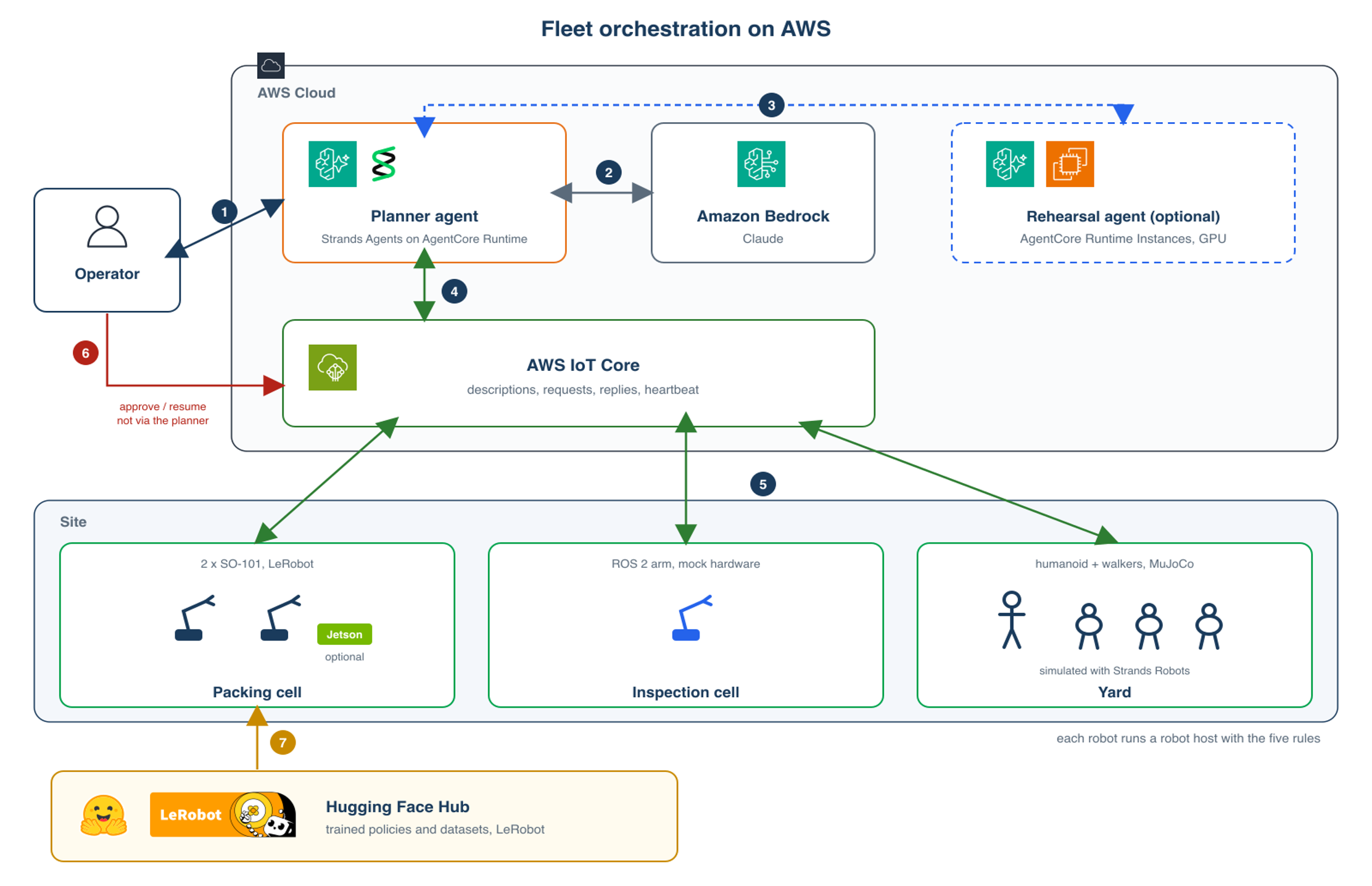
Figure 1. A planner agent on AgentCore Runtime orchestrating robot hosts through AWS IoT Core.
- The operator sends one goal to the planner agent on AgentCore Runtime.
- The planner, built with Strands Agents, reasons over the goal with Claude Sonnet 5.5 on Amazon Bedrock.
- Optionally, the planner sends its plan to a rehearsal agent on AgentCore Runtime Instances, which plays it on a GPU first. In our tests on an NVIDIA L40S, rehearsal caught a sprint that would have ended off the dock, and agreed with the site on all 18 steps of 12 plans. Model weights can load at start-up from the Hugging Face Hub or Amazon Simple Storage Service (Amazon S3), so the image stays small. AgentCore Runtime V2 accepts container images up to 10 GB, and we started a 9.8 GB one on a microVM runtime. This post doesn’t cover rehearsal further.
- The planner communicates with the site through AWS IoT Core. Each robot publishes its description once when it connects, and the planner sends commands by name.
- Each robot runs a robot host, the robot-side layer we built for robots that don’t have an MHS driver yet. It enforces the safety rules, runs the robot’s skills locally, and reports what happened.
- The operator approves physical work and resumes any stopped robot with a signed command that doesn’t go through the planner.
- Each SO-101 robot host loads its trained LeRobot policy from the Hugging Face Hub at start-up.
Three design choices went into this solution:
- Robots describe themselves: Each robot publishes a description of its zone and its skills, including what each skill does. This lets the planner allocate work by what a robot can do and where it is located.
- Skills run on the robot, not over the network: The planner names a skill, and the robot runs its trained policy at the policy’s own rate. When we drove a 50 Hz walking skill from the planner instead, one network round trip per control step, it managed 5.7 steps a second through IoT Core.
- Finished is not completed: Every skill ends with a check on the robot and the planner reports what the checks measured.
The planner can sit above an existing fleet manager. If you run Open-RMF or a VDA 5050 fleet manager for mobile robots, the planner turns one goal into the tasks each fleet gets, and the fleet manager keeps the dispatch and traffic control it already owns. We haven’t tested that integration.
Prerequisites
To build this pattern, you’ll need:
- An AWS account in the US West (Oregon) Region (us-west-2), with permissions to use the following services:
- Amazon Bedrock, with access to Anthropic’s Claude Sonnet 5.5 (we used the us.anthropic.claude-sonnet-5-5 inference profile)
- Amazon Bedrock AgentCore, with the AWS Identity and Access Management (IAM) permissions to create an agent runtime and an execution role for it, and to deploy with the AgentCore CLI, which uses AWS CDK
- AWS IoT Core, with IAM permissions to connect, publish (including retained messages), subscribe, receive, and read retained messages on your site’s topics
- Python 3.12
- Docker, to run the ROS 2 inspection arm
- Node.js 20.12 or later, uv, and the AgentCore CLI
- Two SO-101 robot arms (optional)
Step 1: Build the planner
The planner is a Strands agent with eight tools: list robots, describe one, run a skill, run a sequence, move joints, read a skill’s status, wait for a skill, and stop a robot. Each sends one request over AWS IoT Core, and none resumes a robot. Here is one tool, shortened:
from strands import Agent, tool

@tool
def run_skill(device: str, skill: str) -> str:
    """Start one of the robot's own skills ON the robot.
    Returns at once; poll skill_status.

    Args:
        device: the robot id.
        skill: a skill the robot lists.
    """
    return json.dumps(call(device, "skill", name=skill))

agent = Agent(model="us.anthropic.claude-sonnet-5-5", system_prompt=SYSTEM,
              tools=fleet.tools())
reply = agent(goal)
The planner’s behavior in Steps 4 to 6 comes from a short system prompt. These are its key lines:
Map each part of the goal to a robot in the right zone that offers the skill.
If a robot stops answering mid-task its outcome is UNKNOWN: say so, then reassign to a
robot in the SAME zone that offers the skill, or report it undone.
A finished skill may report a check (its postcondition): if check.ok is false the task
is NOT done; say what the check saw.
You can e-stop; you cannot resume: only a human operator can.
Report what no robot can do. Report only what the tools said.
On AgentCore Runtime, the entrypoint, main.py, hands each goal to plan(), which builds that agent and returns its report:
from bedrock_agentcore.runtime import BedrockAgentCoreApp
from planner import plan

app = BedrockAgentCoreApp()

@app.entrypoint
def invoke(payload, context=None):
    return plan(payload["prompt"])
Deploy it with the AgentCore CLI, passing the planner’s role (shown below) and the IoT Core endpoint. The CLI packages the code and waits until the runtime is ready:
agentcore create --name FleetPlanner --template empty
cd FleetPlanner
agentcore add runtime --name fleet_planner --language python --protocol HTTP \
    --network-mode PUBLIC --role-arn "$PLANNER_ROLE_ARN" \
    --environment-variables "{\"AWS_REGION\": \"us-west-2\", \"IOT_ENDPOINT\": \"$IOT_ENDPOINT\"}"
cp main.py planner.py iotlink.py pyproject.toml app/fleet_planner/
agentcore deploy
We use AgentCore Runtime V2, which starts each session from a post-start-up snapshot. That’s safe because plan() opens its IoT Core connection per goal. The CLI can’t set the platform version yet, so add this to agentcore/cdk/lib/cdk-stack.ts (importing CfnResource from aws-cdk-lib):
for (const c of this.node.findAll())
  if (c instanceof CfnResource && c.cfnResourceType === 'AWS::BedrockAgentCore::Runtime')
    c.addPropertyOverride('PlatformVersion', 'V2');
Logs and metrics go to Amazon CloudWatch and appear in AgentCore Observability.
The runtime role is explicitly denied publishing a resume or an approval. An explicit deny overrides any allow, so no later grant can give the planner either:
{
  "Sid": "NoResumeNoApproval",
  "Effect": "Deny",
  "Action": "iot:Publish",
  "Resource": [
    "arn:aws:iot:<region>:<account>:topic/site/*/rpc/resume",
    "arn:aws:iot:<region>:<account>:topic/site/*/approval"
  ]
}
Step 2: Robots describe themselves
Each robot publishes its description (name, zone and skills) once, as a retained message that IoT Core delivers to any client that subscribes later. A Last Will clears it if the connection drops. IoT Core doesn’t deliver retained messages to wildcard subscriptions, so the planner reads descriptions through the IoT data API and uses lifecycle events to see disconnects. All other traffic is requests and replies, the planner’s heartbeat, and the operator’s signed approvals.
A skill is a trained policy, a time limit, a one-line description and a check. Here is the G1’s, using the holosoma walking policy:
skills = {"walk": {"policy": "holosoma?vx=0.5",   # the trained walking policy
                   "seconds": 4.0,                # stopped after 4 s, whatever happens
                   "does": "walk about 1.7 m onto the dock pad and stand guard there",
                   "check": dock_check}}          # measured on the robot: on the pad?
The description matters, because the planner matches goals to it. When it said only “walk forward about 1.7 m and stop”, the planner refused to guard the dock.
Every robot uses the same robot host. Only the body changes: ros2_control for the inspection arm, LeRobot for the SO-101 arms. All five robots were on the fleet as soon as the planner connected:
duck-1   zone yard-bin         skills ['kick', 'turn', 'walk']
duck-2   zone yard-lane        skills ['kick', 'turn', 'walk']
duck-3   zone yard-lane        skills ['kick', 'turn', 'walk']
g1-1     zone dock             skills ['walk']
ros-arm  zone inspection-cell  skills ['inspect', 'present']
Step 3: The five rules, live
These five rules are the contract for the robot side, whatever implements it. Our robot host enforces them in code:
- A target outside a joint’s limits is refused, never clamped.
- A stop command latches so that every motion is refused until the robot is resumed.
- Only the operator’s signed resume command releases a stopped robot.
- The robot holds still if the planner’s heartbeat, sent every 0.5 seconds as a dead-man’s switch separate from the robot descriptions, stops for 1.5 seconds.
- Every skill is bounded in time and runs on the robot.
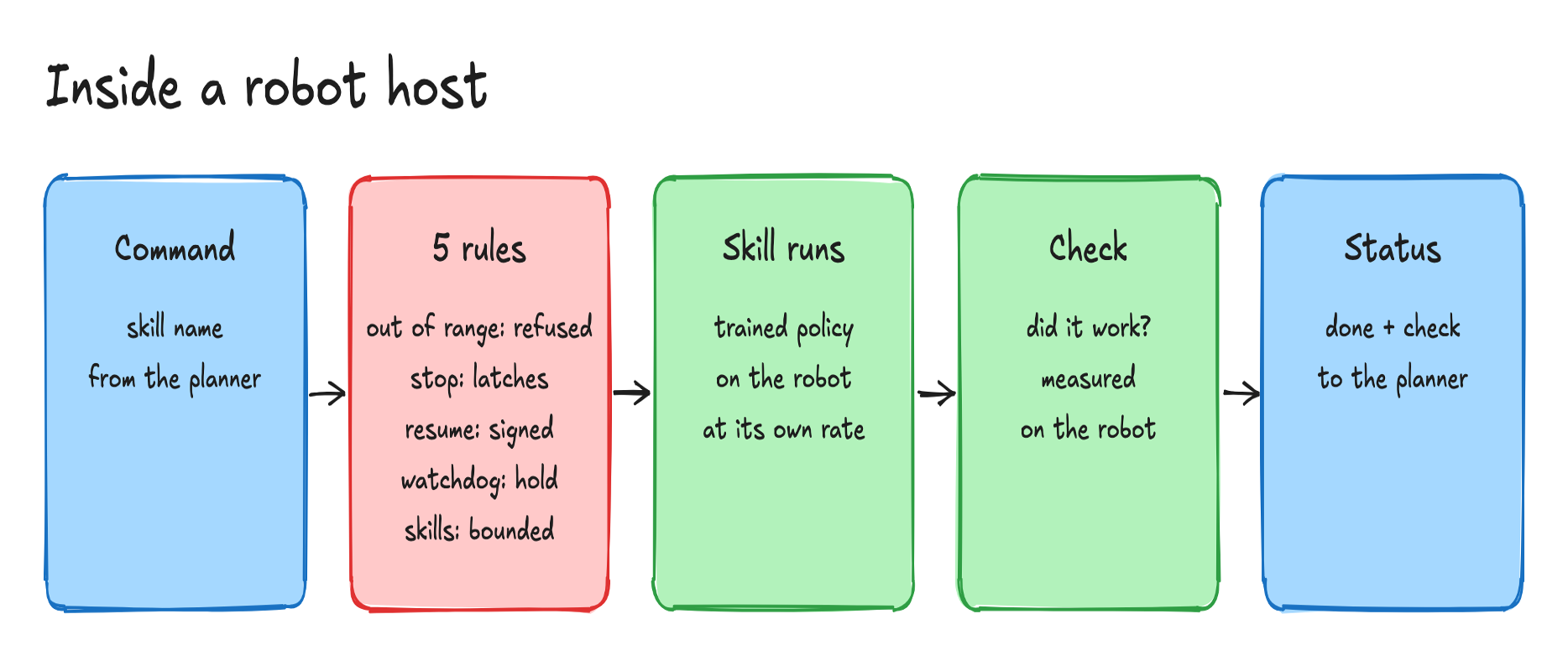
Figure 2. Inside a robot host, a command passes the five rules, the skill’s trained policy runs on the robot, and the robot checks the outcome before it reports.
We checked each rule over the network. If a command would move a walker’s hip past its limit, the robot responded “outside its range [-0.4363, 0.5236]; refused, nothing moved”.
Rule 1 also covers what a policy commands. Each yard skill has a joint range measured from its normal runs, plus a margin. When we dispatched a walking policy trained in a different simulator, it commanded joints outside that range; the robot stopped it mid-walk, and the planner reported the patrol as not done.
A stop was acknowledged in 0.30 seconds, and the next skill was refused. Two locks keep the planner from undoing a stop. The planner’s role is denied the resume topic (Step 1), which you can confirm with the IAM policy simulator, and the robot accepts a resume only with the operator’s signature, tied to that robot and that stop:
# the operator, outside the planner: sign this robot and this stop
epoch = call("duck-3", "epoch")["epoch"]   # new for every stop: no signature replays
sig = key.sign(f"duck-3:{epoch}".encode()).hex()
call("duck-3", "resume", operator="operator", signature=sig)

# the robot host: raises InvalidSignature unless the operator signed this stop
Ed25519PublicKey.from_public_bytes(self.operator_key).verify(
    bytes.fromhex(signature), f"{self.name}:{self.epoch}".encode())
With heartbeats stopped during a 4-second walk, the walker held after 0.14 meters. These are software rules, so keep each robot’s hardware emergency stop.
Step 4: Run the morning shift
A single call sends the goal to the planner’s runtime and returns when the shift is finished:
agentcore = boto3.client(
    "bedrock-agentcore",
    config=Config(read_timeout=900, retries={"total_max_attempts": 1}))
r = agentcore.invoke_agent_runtime(
    agentRuntimeArn=PLANNER_ARN,
    runtimeSessionId=f"shift-{uuid.uuid4().hex}",
    payload=json.dumps({"prompt": GOAL}).encode())
print(json.loads(r["response"].read())["reply"])
With boto3’s default retries, a goal that runs longer than a minute is sent a second time, and every robot gets its work twice. Set total_max_attempts to 1, because it counts the first attempt, while max_attempts set to 1 still allows one retry.
The planner read each skill’s description and started the work in parallel:
| Part of the goal | Robot (zone) | Skill | What the robot’s check measured |
|---|---|---|---|
| Show the part to the camera | ros-arm (inspection-cell) | present | joints at the present pose, read from ROS’s own /joint_states |
| Guard the dock | g1-1 (dock) | walk | standing on the dock pad |
| Patrol the yard lane | duck-2 (yard-lane) | walk | advanced 0.38 m along the lane |
| Kick the yard part into the yard bin | duck-1 (yard-bin) | kick | the part came to rest in the bin (it entered 0.89 s after the kick started) |
| Unload the truck | none | none | not completed |
For the truck, the planner said “No robot in the fleet has an unload skill.” It reported the task as not done. The planner took about 16 seconds from the goal to its report.
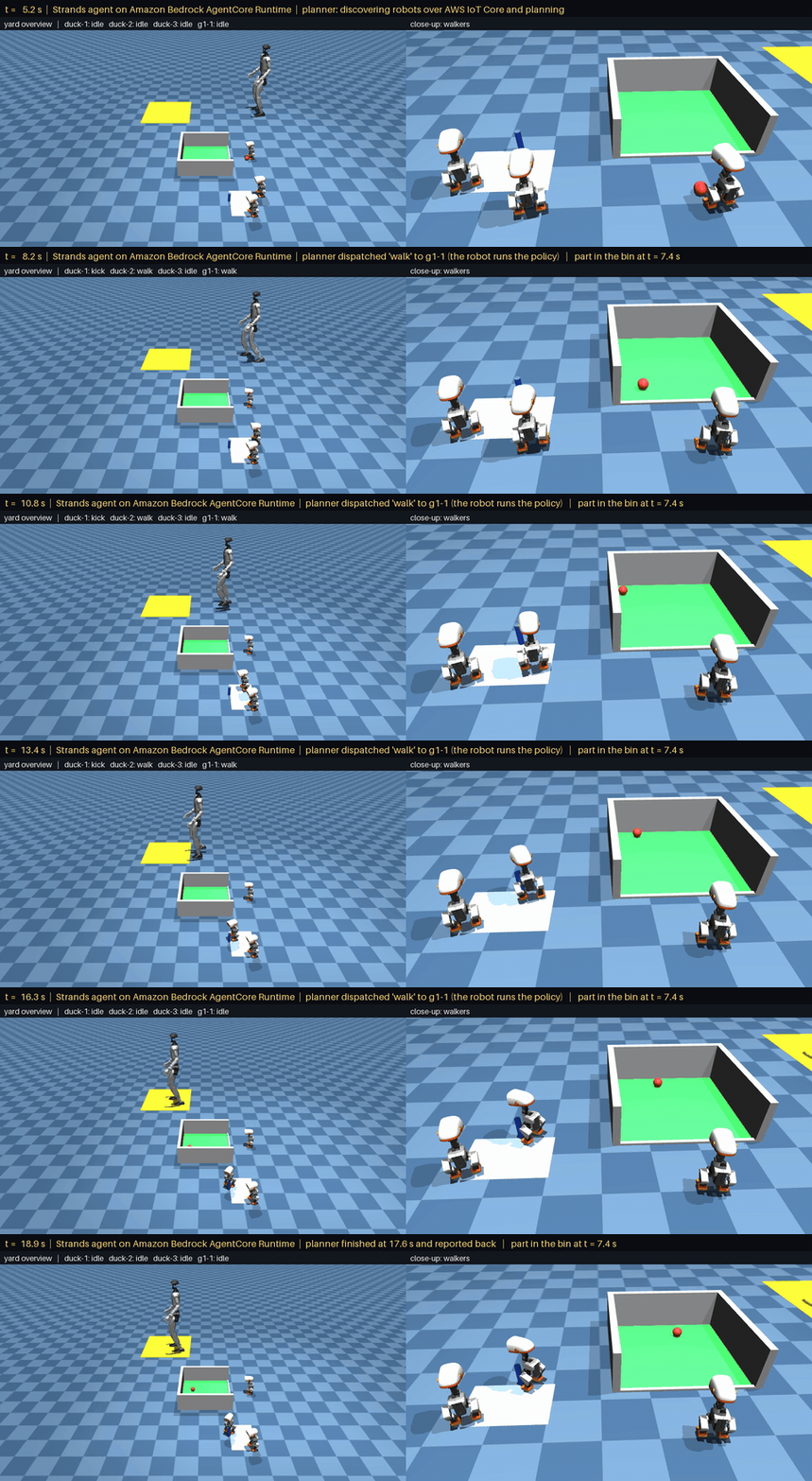
Figure 3. A real-time simulation of a shift. The banner names each step as the planner takes it. The G1 walks onto the yellow dock pad, a walker patrols the lane, and duck-1 kicks the red part into the green bin.
We built the table from the robots’ checks, because in the same run the model’s summary opened with “Three of the four tasks are done” and then listed all four as done.
Step 5: Finished is not completed
A skill can run to its end without achieving its purpose. In a separate test, we moved the red part off its spot and then started the kick directly on duck-1. The kick ran to completion, and the robot’s check failed. The part never entered the bin, and it came to rest outside it. That check is what the planner reads, and its instructions say that a task whose check failed is not done, however the skill ended.
Step 6: A robot drops off the network
In a second run, the patrolling walker loses its network connection one second into its walk. Its watchdog holds it 0.10 meters in. The planner reports the outcome as unknown and reassigns the patrol to the other walker in the zone, which walks 0.40 meters and passes its check: “duck-2 stopped answering after I started its walk, so its outcome is unknown. I reassigned the patrol to duck-3, which is in the same zone.”
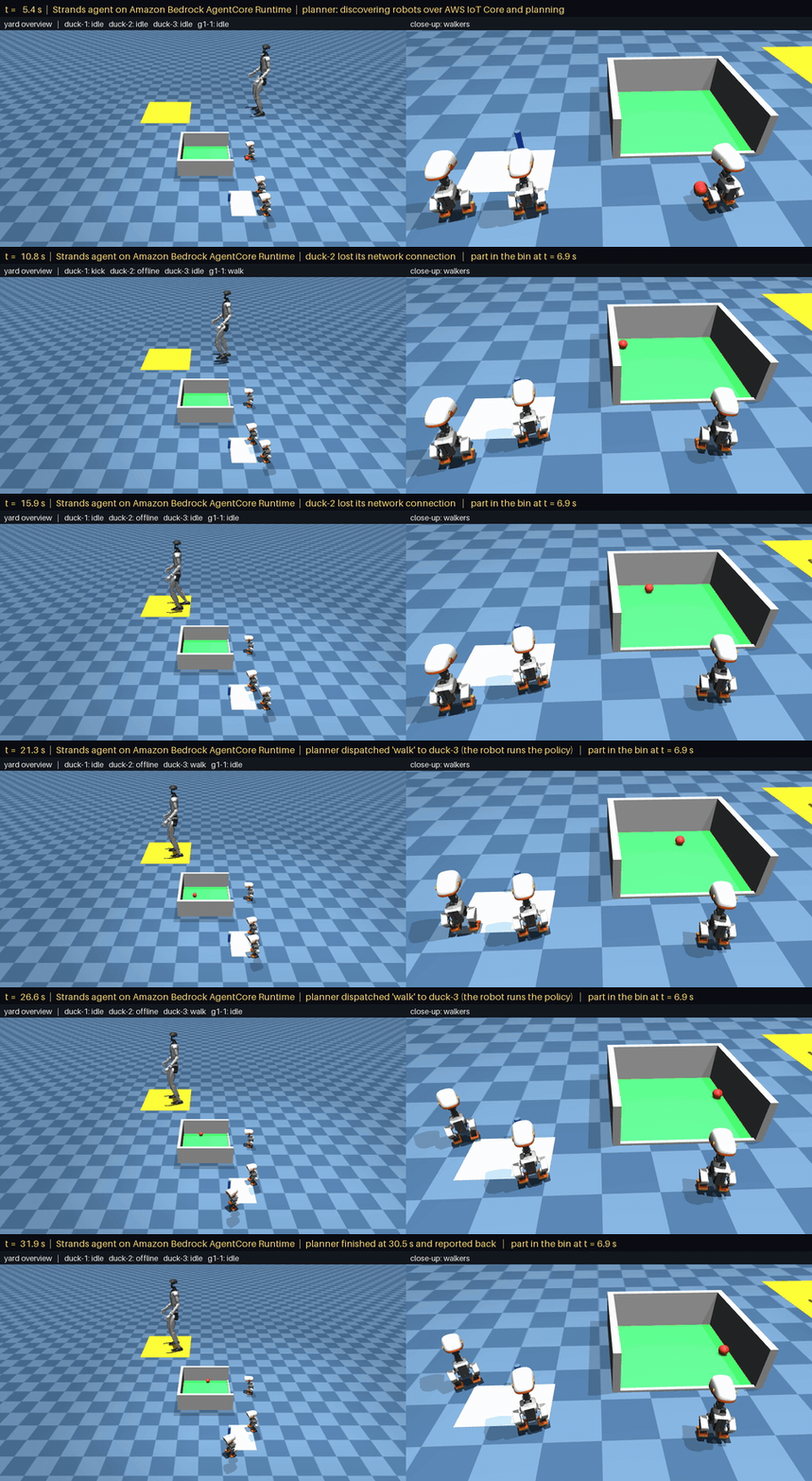
Figure 4. A walker drops off the network mid-patrol (simulation, real time). It holds, and the planner hands the patrol to the other walker in its zone.
The hold makes reassignment safe. In an earlier version, a walker that lost its link finished the patrol on its own while the planner sent it to a second walker, so the lane was patrolled twice. The planner also reassigns only within a zone, because a skill acts where its robot stands.
Step 7: The same pattern on real arms
The packing cell is the same robot host with a LeRobot SO-101 body and one skill, pick. The skill is an Action Chunking with Transformers (ACT) policy that was trained on that arm’s own demonstrations and runs on the robot host at 30 Hz. With the arms on the fleet, the goal gains one line: “In the packing cell, pack one black part and one blue part; the two arms share one bin, so only one arm at a time.”
Arm 1 learned its pick from 97 teleoperated demonstrations and arm 2 from 65, recorded with a leader arm, including demonstrations that start with parts already in the bin, so a non-empty bin is a normal start. We recorded the demonstrations as LeRobot datasets on the Hugging Face Hub (arm 1 dataset, arm 2 dataset) and trained LeRobot’s ACT policy for 30,000 steps on an Amazon Elastic Compute Cloud (Amazon EC2) G6e instance (NVIDIA L40S). Each robot host loads its checkpoint from the Hugging Face Hub at start-up (arm 1 checkpoint, arm 2 checkpoint).
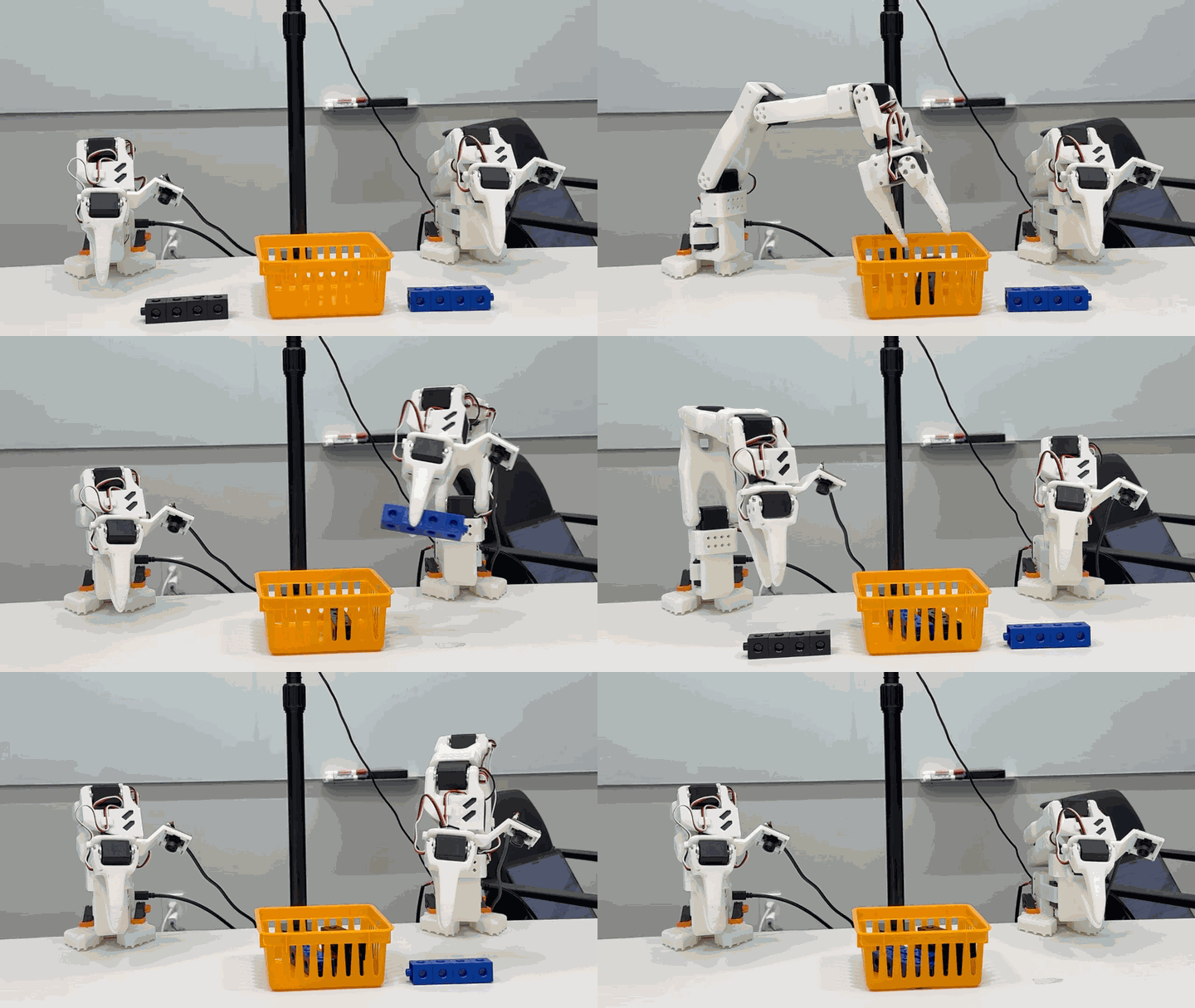
Figure 5. Two SO-101 arms, each running its own ACT pick policy on its robot host, take turns packing black and blue parts into one shared orange bin. Real hardware, sped up.
Unlike a yard skill, a pick waits for a person. The arm answers at once that it is awaiting approval and does nothing until the operator sends, from outside the planner, a signed approval that names the robot, the request and the decision. Because a person can take minutes, the approval is asynchronous: the planner polls the skill’s status until the pick runs and its check reports, so a slow approval is never mistaken for a failed pick. The arm host also refuses raw joint moves from the planner, so every arm motion goes through an approved pick.
The hardware taught us three things simulation didn’t:
- The shared bin has to be in the goal. No robot knows another robot shares its bin. Without “only one arm at a time”, the planner ran both arms at once.
- Each arm learns one fixed spot. The policies pick reliably only from their marked spot, which is why each arm has its own zone.
- A policy’s own outputs need their own range check. Up to half of each arm’s demonstrations sit just past the calibrated range, because the arm rests on its end stop. So the robot host refuses any policy output outside the range its demonstrations used, plus 5 degrees, and the arm holds. The planner’s commands are checked against the calibrated range.
Where the Model Hardware Standard fits
The Model Hardware Standard (MHS), now in a limited research preview, standardizes the layer that our robot host fills in this post. An MHS driver describes a device in a standard way, lets an agent discover it, and exposes the device’s skills along with the limits it enforces, and the Strands team has announced native MHS support in Strands Robots. MHS doesn’t replace the planner, which still decides which robot does what. A robot with an MHS driver needs to enforce the same five rules from Step 3. It can then join the same fleet without a robot host of its own, and the planner calls it through MHS instead of through this post’s tools. MHS also gives the planner discovery tools that narrow a large fleet down to the robots a goal needs, by location, zone or work cell, so the same planner code and the same drivers keep working as the fleet grows.
We tested this in the research preview, end to end on AWS. A simulated yard walker ran an MHS driver and connected to AWS IoT Core with its own X.509 certificate. A Strands planner on AgentCore Runtime, with its certificate kept in AWS Secrets Manager, found the walker through MHS, ran its patrol, and reported what the walker measured.
In that test, a forged resume was refused and only the operator’s signed resume released the walker, so the signature check from Step 3 carries over unchanged. The other lock, the deny on the planner’s role, depends on how MHS traffic maps onto IoT Core topics, and Part 2 covers how to keep it.
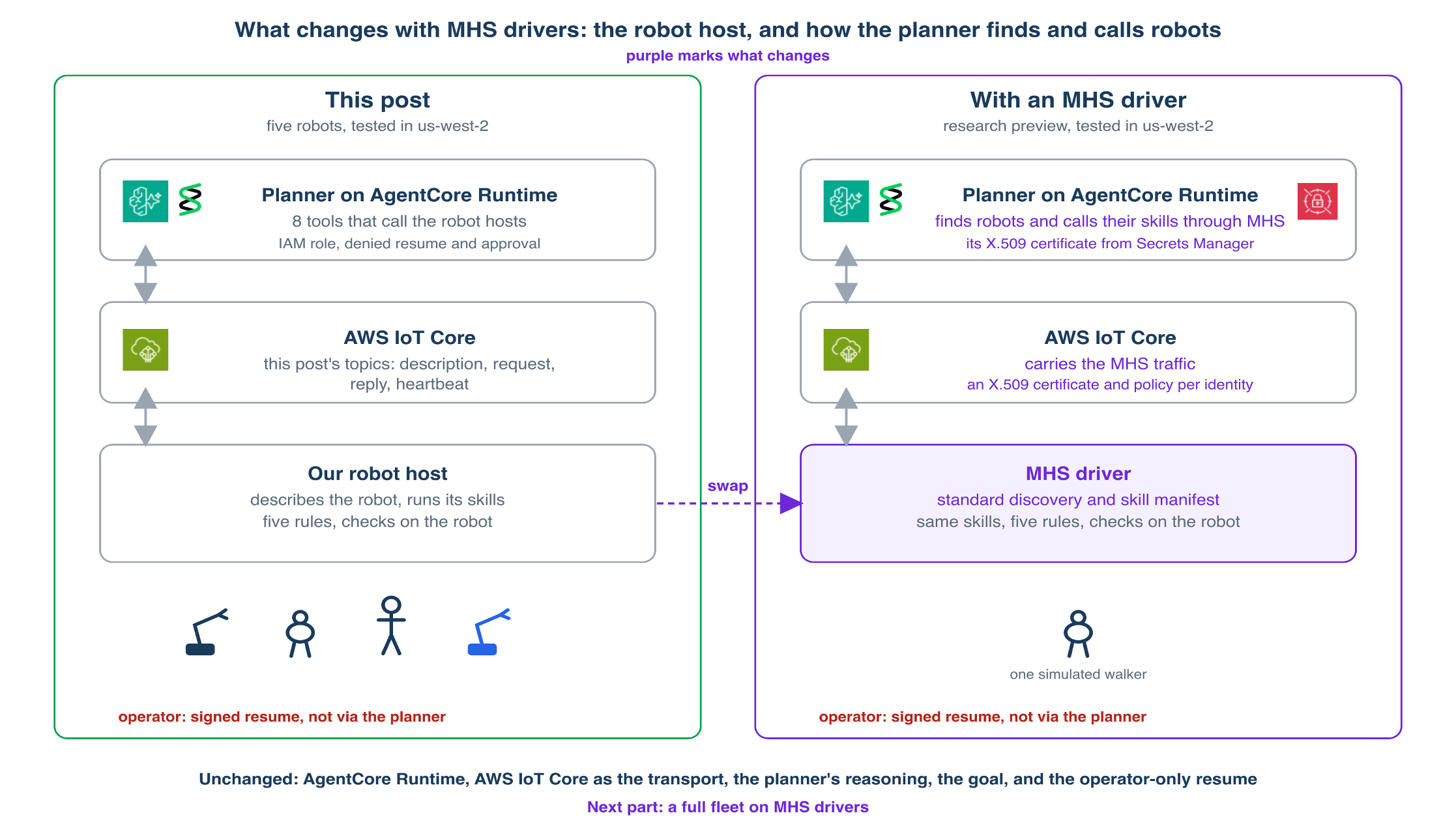
Figure 6. With MHS drivers, the robot host and the way the planner finds and calls robots change. Left, our robot host. Right, the MHS stack we tested in the research preview.
Security considerations
- The examples sign IoT Core requests with IAM credentials for brevity, so the explicit deny limits only the planner, and the operator’s signature is what protects a stopped robot. In production, give each robot its own X.509 certificate from fleet provisioning and connect with its thing name as the client ID, so one IoT policy using ${iot:Connection.Thing.ThingName} keeps it to its own topics. Make the operator’s principal the only one allowed to resume or approve.
- Trust only what IoT Core enforces. Take a caller’s identity from its client ID in the topic, never from the message body, and treat what robots report, skill descriptions included, as untrusted input to the model.
- Treat a policy update like a firmware update: pin each robot to a fixed checkpoint commit and check its hash before loading, keep checkpoints in an organization you control, deliver new policies as signed updates (for example with AWS IoT Jobs and code signing), and roll them out gradually.
- Keep the planner’s tool set small and allow its role only the rpcs it calls. Its tools are the whole of what the model can do. Scope the role’s trust policy to the planner’s runtime, and its model permissions to the model it uses.
- Add approval to any skill that moves real hardware, and keep approval and resume outside the agent. The operator signs both with a key that stays off the robots, ideally in AWS Key Management Service (AWS KMS) or a hardware token, with one key per operator and its fingerprint recorded on every approval and resume.
- Turn on AWS IoT logging and record each request’s client ID, because CloudTrail doesn’t log MQTT publishes.
- Keep each robot’s hardware emergency stop. The stop in this post is a software stop.
For the full checklist, see Security best practices in AWS IoT Core.
Clean up
To avoid ongoing charges, run agentcore remove all --yes and then agentcore deploy --yes in the project to delete the planner’s runtime, then delete the planner’s IAM role, which you created yourself.
Conclusion
The pattern answers latency, connectivity and authority by splitting the work. The planner on AgentCore Runtime decides who does what. Each robot keeps everything that has to be fast or safe, from its control loop to the check that says whether the work got done, and only a person can resume a stopped robot. Whatever runs on the robot, whether a robot host like ours or an MHS driver, has to meet the five rules from Step 3.
The most important lesson is to report what the robots measured. In Step 4 the model’s own summary miscounted the finished tasks while the table built from the robots’ checks was right, and in Step 3 the robot stopped a walking policy that hadn’t transferred from another simulator. Those checks hold whatever a policy’s origin, whether it was trained with LeRobot, NVIDIA Isaac Lab or NVIDIA GR00T.
Part 2 takes the pattern to a full fleet on MHS drivers, including how to keep the deny on the planner’s role.
Where to go from here
- The Physical AI Toolchain on AWS covers the stages before this one, which are simulation, data generation, training and evaluation.
- See how Strands Agents and LeRobot take a policy from the Hub to hardware: From the Hugging Face Hub to robot hardware with Strands Agents and LeRobot.
- Read Anthropic’s Model Hardware Standard announcement, and apply for the research preview at modelhardwarestandard.com.
Acknowledgements: Thanks to Max Rattray, Rui Cardoso and Yin Song for their review and contributions.