AWS Security Blog
Understanding IAM for Managed AWS MCP Servers
As AI agents become part of your development workflows on Amazon Web Services (AWS), you want them to work with your existing AWS Identity and Access Management (IAM) permissions, not force you to build a separate permissions model. At the same time, you need the flexibility to apply different governance controls when an AI agent makes an API call compared to when a developer does it directly. In this post, we show you how to use new standardized IAM context keys for AWS-managed remote Model Context Protocol (MCP) servers, a simplified authorization model that works like the AWS CLI and SDKs you already use, and upcoming VPC endpoint support for network perimeter controls.
Overview
At re:Invent 2025, we launched four AWS-managed remote MCP servers (AWS, EKS, ECS, and SageMaker) in preview. AWS hosts and manages remote MCP servers, removing the need for local installation and maintenance while providing automatic updates, resiliency, scalability, and complete audit logging through AWS CloudTrail. For example, with the AWS MCP Server you can access AWS documentation and execute calls to over 15,000 AWS APIs, helping AI agents perform multi-step tasks like setting up VPCs or configuring Amazon CloudWatch alarms.
We heard from customers that, as AI agents become more integrated into dev workflows, you want these workflows to work with existing AWS permissions without having to reconfigure IAM policies or create separate permissions models for AI. At the same time, you want the flexibility to apply different governance controls for AI actions compared to direct human actions. We recently introduced two standardized IAM context keys (aws:ViaAWSMCPService and aws:CalledViaAWSMCP) that give you this control. These context keys work consistently across all AWS-managed remote MCP servers, so you can implement defense-in-depth security, maintain detailed audit trails, and meet compliance requirements by differentiating between calls using AI solutions and human-initiated actions. In addition, we heard from customers the need to simplify the authorization model. Starting soon, you will no longer need to separate MCP-specific IAM actions (such asaws-mcp:InvokeMCP) to interact with AWS-managed MCP servers. This aligns with how AWS Command Line Interface (AWS CLI) and AWS SDKs work today, reducing configuration overhead, while your existing IAM policies continue to control what actions can be performed. Looking ahead, we’re adding VPC endpoint support for AWS-managed MCP servers so you can connect directly from your VPC, providing enhanced security through two-stage authorization and network perimeter controls for customers who need to enforce identity and network perimeters.
Using IAM to differentiate between human-driven and AI-driven actions
To give you fine-grained control over AI solutions using MCP servers, we’ve introduced two standardized IAM context keys. These keys work consistently across all AWS-managed MCP servers:
- aws:ViaAWSMCPService (boolean): Set to true when the request comes through an AWS-managed MCP server. Use this to allow or deny all MCP-initiated actions.
- aws:CalledViaAWSMCP (string, single valued): Contains the service principal name of the MCP server (for example,
aws-mcp.amazonaws.com,eks-mcp.amazonaws.com, andecs-mcp.amazonaws.com). Use this to allow or deny actions from specific MCP servers. This context key value will include more MCP servers when new MCP servers are available, allowing you to configure fined grained access to your AWS resources through IAM and SCP policies.
For organizations that want to completely disable MCP server access across their organization or specific organizational units, you can use a service control policy (SCP) to deny all or some actions when accessed through MCP servers:
In another example, you can allow AI agents using AWS MCP Server to read Amazon Simple Storage Service (Amazon S3) buckets but deny delete operations. The AWS MCP Server provides the aws___call_aws tool, which can execute any AWS API operation, including Amazon S3 operations:
You can also restrict access to specific AWS-managed MCP servers. For example, allow EKS operations only when called through the EKS MCP server, not through the AWS MCP server:
Understanding the changes for public endpoint authorization
Based on feedback, we’re simplifying the authorization model to work like the AWS CLI and SDKs you already use. Moving forward, the MCP server adds the standardized IAM context keys (aws:ViaAWSMCPService and aws:CalledViaAWSMCP) to your request and forwards it to the downstream AWS service. The MCP server will still authenticate your request using SigV4 as before. Now, the downstream service performs the authorization check using your existing IAM policies, which can reference these context keys for fine-grained control. This means your AI agents work with your existing AWS credentials and service-level permissions, eliminating the need for separate MCP-specific IAM actions and reducing configuration overhead. The following diagram illustrates how this simplified authorization flow works:
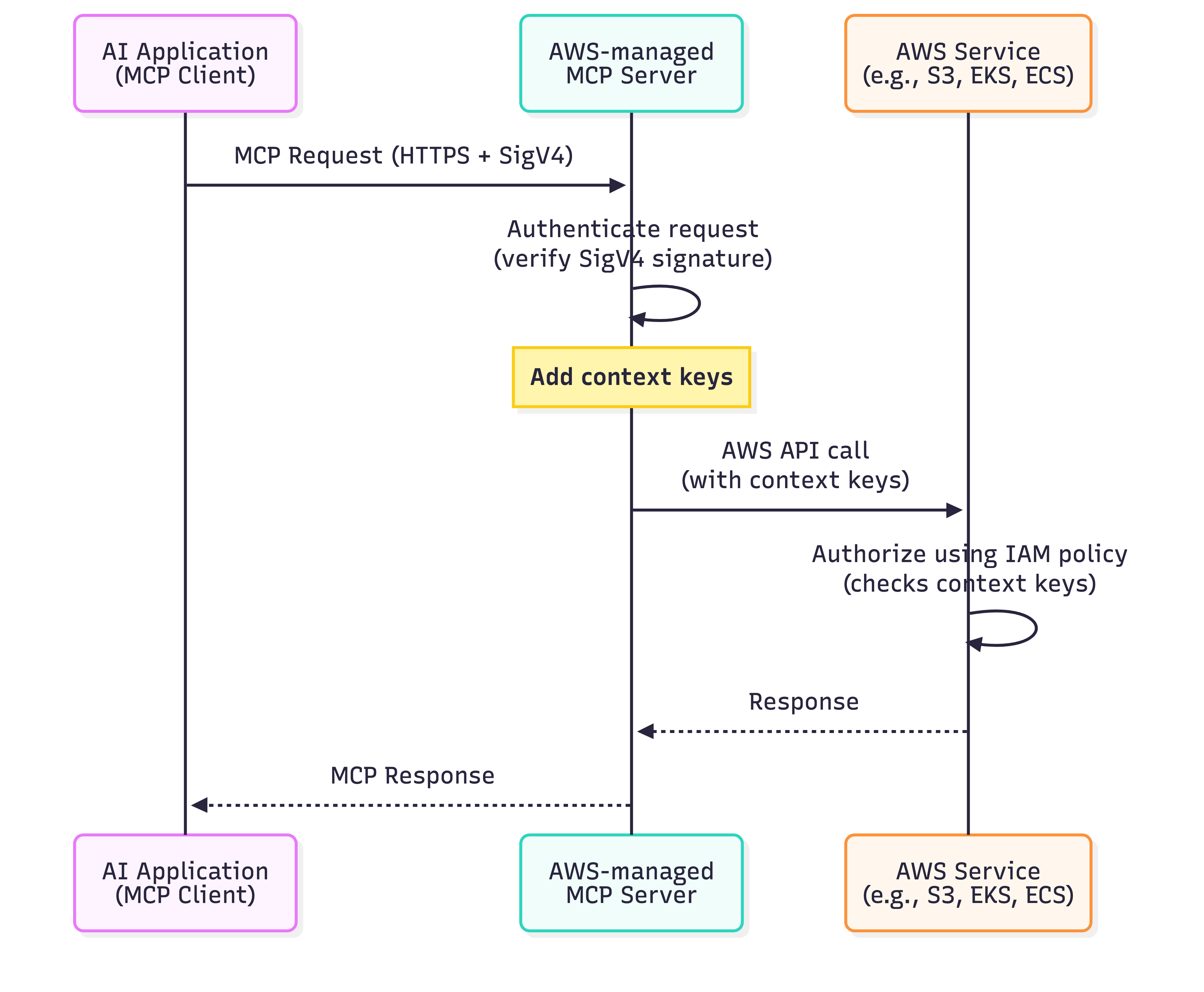
Figure 1: Authorization flow for managed MCP servers.
Using IAM with MCP servers and VPC endpoints
We also heard from customers in regulated industries who need additional network-level controls for AI agent access. Customers in industries like financial services and healthcare require private network communication to meet compliance mandates. To meet these requirements, AWS will also add VPC endpoint support for AWS-managed MCP servers in the future. You can use VPC endpoints to keep all AI agent traffic within your private network, eliminating exposure through the public internet. When you configure a VPC endpoint, the MCP server performs an authorization check at the VPC endpoint level before forwarding requests to downstream AWS services. This creates a defense-in-depth approach where you control access at both the network perimeter (VPC endpoint) and the service level (IAM policies). You can combine VPC endpoints with the aws:ViaAWSMCPService and aws:CalledViaAWSMCP context keys to implement layered security controls that meet your organization’s specific governance and compliance requirements. Additional details on context keys and example patterns will be available when support for VPC endpoints is launched.
Things to consider
When implementing IAM authorization for MCP servers, you need to make decisions about deployment patterns, policy design, and operational practices. Here are key considerations to help you choose the right approach for your organization.
- Designing IAM policies: Only give access that is needed, and refine policies and remove unused access over time. Use context keys to differentiate calls using AI solutions from direct developer actions.
- Security and compliance: VPC endpoints help meet requirements for private network communication in regulated industries.
- Getting started: Start with the deployment pattern that matches your current needs. Begin with restrictive IAM policies and relax them as you understand your AI agents’ requirements. Monitor CloudTrail logs to see what actions your AI agents perform and use the data to refine your policies over time.
Conclusion
You now have the control to govern AI agent access to your AWS resources through AWS-managed MCP Server using the same IAM policies and tools you already trust. The standardized IAM context keys (aws:ViaAWSMCPService and aws:CalledViaAWSMCP) are available across all AWS-managed MCP servers, giving you fine-grained control to differentiate calls using AI solutions from direct developer actions at the service level. In upcoming releases, AWS managed MCP servers will work without separate IAM actions over public endpoints and simplify your IAM policy management. We will also provide support for VPC endpoints with enhanced security through two-stage authorization and network perimeter controls for customers who need additional access restrictions. See the documentation for your specific AWS-managed MCP server to confirm whether it supports the new public endpoint authorization model and VPC endpoints. Whether you’re building AI coding assistants or agentic applications, start implementing these controls today to secure your AI workflows while maintaining the flexibility to define access rules that match your organization’s security posture.