AWS Security Blog
Using AWS WAF to apply mitigations for PHP2Shell RCE vulnerabilities (CVE-2026-109618 and CVE-2026-109619)
October 23, 2026-2: The PHP project disclosed CVE-2026-115560, a separate remote code execution issue that the October 21 releases don’t fix. It affects only applications with an uncommon configuration that keeps session upload progress enabled. The PHP2Shell_BODY rule in the PHP application managed rule group, version 2.4 and later, already blocks POST requests that carry a PHP session ID and the session upload progress field (PHP_SESSION_UPLOAD_PROGRESS). This helps mitigate CVE-2026-115560 until PHP releases a fix, and no rule group update is needed. PHP recommends setting session.upload_progress.enabled=0 until its next regular bugfix release. If you applied this setting for CVE-2026-109619, keep it in place.
October 23, 2026: We updated this post for version 2.4 of the AWS WAF PHP application managed rule group, which adds the PHP2Shell_BODY_Extended rule for CVE-2026-109618, and AWS made it the default version. AWS is continuously updating the AWS WAF PHP managed rule group to add protection for both CVE-2026-109618 and CVE-2026-109619. If you use the default version, you will be automatically protected without any action on your part. If you have pinned a specific version, update to the latest version to receive this protection. For the latest version and details on the rules added, see the AWS Managed Rules changelog and subscribe to the AWS Managed Rules SNS topic (both linked below). Patching is the only complete fix, and you should upgrade PHP as your first priority.
October 22, 2026: We updated this post to add the AWS WAF PHP application managed rule group. Version 2.3 of the rule group adds the PHP2Shell_BODY rule for CVE-2026-109619, and AWS made it the default version.
On October 21, 2026, the PHP project released emergency fixes for two critical remote code execution (RCE) vulnerabilities in the PHP core runtime, tracked as CVE-2026-109618 and CVE-2026-109619 and collectively named PHP2Shell. Both are rated 9.2 (Critical) under CVSS v4.0, and both allow an unauthenticated attacker to run code on a vulnerable server. The fixed releases are PHP 8.5.12, 8.4.27, 8.3.36, and 8.2.35.
Patching is the only complete fix, and you should upgrade PHP as your first priority. But patching a fleet takes time: you need to inventory where PHP runs, schedule maintenance windows and test applications against the new builds. This post shows you how to use AWS Web Application Firewall (AWS WAF) to help reduce your exposure during that window. The AWS WAF PHP application managed rule group includes rules for both vulnerabilities: PHP2Shell_BODY for CVE-2026-109619 and PHP2Shell_BODY_Extended for CVE-2026-109618. AWS continues to release new versions of this rule group as detection improves. Track them in the AWS Managed Rules changelog, or subscribe to the AWS Managed Rules SNS topic to get notified. If your protection pack (web ACL) uses this rule group at the default version, these rules are already active. This post shows you how to confirm that and how to add the rule group if you don’t use it yet. It also covers the custom rules that still add defense in depth. It also explains where AWS WAF protection ends, so you don’t develop a false sense of safety. For how Amazon threat intelligence detected PHP2Shell exploitation before public disclosure, see Amazon Threat Intelligence identifies PHP2Shell exploitation prior to public disclosure in MadPot. For AWS service status and patching guidance, see AWS Security Bulletin 2026-143-AWS.
IMPORTANT: Patching is the only complete fix, and you should upgrade PHP as your first priority.
The vulnerabilities in brief
Both PHP2Shell vulnerabilities are unauthenticated RCE issues rooted in how PHP handles multipart/form-data request processing (the request format browsers use for file uploads) before your application code runs, which is why the AWS WAF rules in this post focus on multipart traffic, request body size, and the session upload progress field. At a high level, CVE-2026-109618 corrupts memory when PHP runs out of memory mid-request, and CVE-2026-109619 lets one request leave behind stale data that a later request on the same worker process reuses. For the root-cause analysis, affected versions, and PHP’s own guidance, see the official PHP advisories and release announcement:
- CVE-2026-109618 (out-of-memory corruption) – PHP advisory GHSA-w8hw-w9fx-j79w
- CVE-2026-109619 (stale global state) – PHP advisory GHSA-6wmf-4rv5-p3rp
- PHP security release announcement, October 21, 2026
Where AWS WAF fits in your response
AWS WAF is a defense-in-depth control in this situation, not a replacement for the PHP upgrade. The PHP advisories are explicit: updating to a patched release is the only complete mitigation. One of the two vulnerabilities is largely outside the reach of any web application firewall, as explained later. Treat the managed rules and the custom rules in this post as mitigating controls that help reduce exposure while you patch, then remove them or keep them as supporting controls after you’ve patched.
AWS WAF inspects HTTP requests at the edge. It doesn’t parse the internal structure of a multipart body, and it has no visibility into PHP worker memory or server-side configuration. The following table maps each attack element to whether AWS WAF can help mitigate it.
|
Attack element |
AWS WAF coverage |
|
Request patterns that match CVE-2026-109618 |
Yes. The |
|
Request patterns that match CVE-2026-109619 |
Yes. The |
|
Session upload progress field in a multipart POST ( |
Yes. The |
|
Multipart upload path ( |
Yes, if the application has no legitimate multipart uploads. Block |
|
Out-of-memory condition from an oversized body |
Partial. |
|
Repeated attempts against the same worker (the reused PHP process that handles many requests) |
Partial. A rate-based rule reduces the volume an exploit needs, but it doesn’t stop a single successful request. |
|
|
No. This is a server configuration setting ( |
|
Invalid or deprecated INI diagnostics as a consumer (warnings PHP raises when applying bad configuration settings) |
No. This path runs server-side, not over client HTTP. |
Where an application does not accept multipart uploads, an edge rule that blocks multipart/form-data removes the multipart out-of-memory path that works against any application, plus the session-upload-progress trigger, which is a defense-in-depth control during the patch window.
If your application does use multipart uploads, AWS WAF reduces risk but does not close the vulnerability, because header amplification (a few kilobytes of part headers that expand into far more memory inside PHP) stays within size limits and the firewall cannot parse the headers inside individual body parts. In that case, prioritize the PHP upgrade and apply the server-side mitigations described later.
Start with the AWS WAF PHP application managed rule group
The PHP application managed rule group (AWSManagedRulesPHPRuleSet) contains rules that block request patterns associated with the exploitation of vulnerabilities specific to PHP. PHP2Shell_BODY inspects the request body for requests that match CVE-2026-109619 and is in version 2.3 and later. PHP2Shell_BODY_Extended inspects the request body for requests that match CVE-2026-109618 and is in version 2.4 and later. The default action of both rules is Block. The AWS WAF documentation notes that this rule group contains a virtual patch for CVE-2026-109618 and CVE-2026-109619, and that you can add it to your protection pack (web ACL) to help protect your application against exploitation attempts until your application is patched. The rule group uses 100 web ACL capacity units (WCUs). Like the other AWS managed baseline and use-case rule groups, it has no charge beyond standard AWS WAF pricing.
For the latest version and details on the rules added, see the AWS Managed Rules changelog and subscribe to the AWS Managed Rules SNS topic.
What you need to do depends on how your web ACL uses the rule group:
- You use the default version. Both
PHP2Shell_BODYandPHP2Shell_BODY_Extendedare already active. Confirm that you haven’t overridden the whole rule group to Count, and review your AWS WAF logs for matches. - You pin a static version.
Version_2.3hasPHP2Shell_BODYbut notPHP2Shell_BODY_Extended, andVersion_2.2and earlier have neither. Change the version to Version_2.4 or later. We recommend that you use the default version. - You don’t use the rule group yet. Add it to the web ACL in front of each PHP workload, as shown in the following example.
To add the rule group in the AWS WAF console, open your protection pack (web ACL), choose Manage rules, and then do the following, as shown in Figure 1:
- Choose Add rule.
- Select AWS-managed rule group.
- Choose Next.
- Under Free, choose PHP application.
- For Version, keep Default (recommended). If you need to pin a version, choose Version_2.4 or later.
- Under Rule overrides, confirm that PHP2Shell_BODY and PHP2Shell_BODY_Extended are listed. To review matches before they block, set both to Count.
- Choose Add rule.
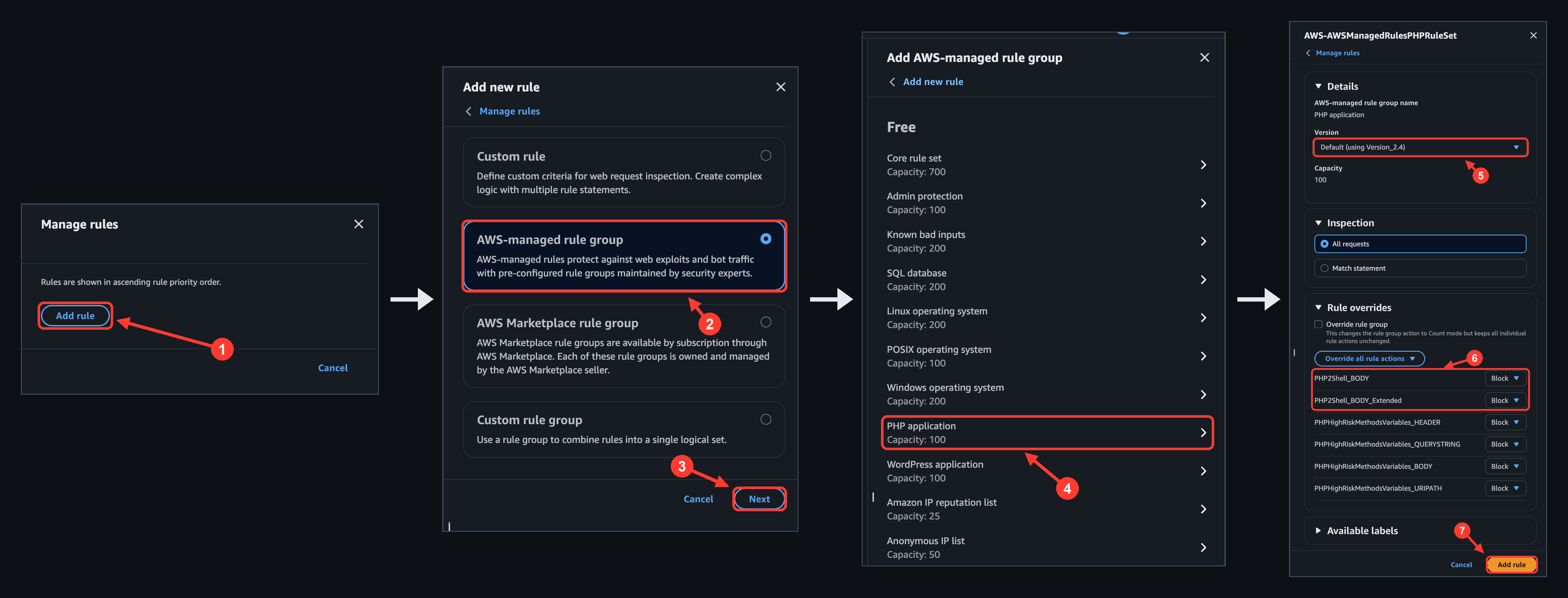
Figure 1: Adding the PHP application managed rule group in the AWS WAF console.
If you prefer to work programmatically, run the following commands to see the current default version and the version that a web ACL uses. Both commands are read-only.
For web ACLs associated with Amazon CloudFront, use --scope CLOUDFRONT and the US East (N. Virginia) Region. A rule without a Version field uses the default version.
The following rule adds the rule group at the default version. The RuleActionOverrides entry sets PHP2Shell_BODY and PHP2Shell_BODY_Extended to Count so you can review their matches before they block. Remove the override when you’re satisfied. Given how quickly exploitation followed disclosure, measure that review period in hours, not days. If you need to pin the rule group, add a Version field set to Version_2.4 or later to the ManagedRuleGroupStatement. We recommend the default version.
If PHP2Shell_BODY or PHP2Shell_BODY_Extended matches legitimate requests, keep the rule in Count and add a label-based exception after the rule group. The rule group adds the labels awswaf:managed:aws:php-app:PHP2Shell_Body and awswaf:managed:aws:php-app:PHP2Shell_Body_Extended to requests that match either rule, and the following rule blocks those requests everywhere except one path. Requests to the excluded path aren’t protected by this rule, so keep the exception as narrow as you can and patch that application first. Labels are case sensitive: confirm the label name in the rule group’s available labels (the DescribeManagedRuleGroup API) before you deploy. For the full pattern, see Creating exceptions in the AWS WAF best practices guide.
You can also return a web ACL to Version_2.2 while you tune, but that version includes neither PHP2Shell_BODY nor PHP2Shell_BODY_Extended. Treat a rollback as removing the CVE-2026-109619 and CVE-2026-109618 protection, and prefer the Count override and exception.
PHP2Shell_BODY and PHP2Shell_BODY_Extended inspect the request body only up to the web ACL body inspection limit. Both use the Continue oversize option, so they don’t inspect content beyond that limit. Pair them with a body size rule such as SizeRestrictions_BODY in the Core rule set (AWSManagedRulesCommonRuleSet), which blocks request bodies over 8 KB. If you set that rule to Count because of upload paths, use a label-based exception scoped to those paths instead. That keeps the rule in Block everywhere else. For the limit on each resource type, see Request body inspection limits later in this post.
Additional WAF Rules to consider
The managed rule groups cover two of the rules in this section. PHP2Shell_BODY in the PHP application rule group covers CVE-2026-109619, the same CVE as the custom rule later in this post. SizeRestrictions_BODY in the Core rule set caps request bodies at 8 KB, which covers body content beyond the inspection limit. For CVE-2026-109618 itself, the PHP application rule group includes PHP2Shell_BODY_Extended (version 2.4 or later). No AWS managed rule group blocks all multipart requests or rate-limits POST requests, so those two rules remain custom. Use them where they fit your application.
The following rules are in AWS WAF JSON format. Add each one to the protection pack (web ACL) associated with the CloudFront distribution, Application Load Balancer, or API Gateway stage in front of your PHP workloads. Adjust the priorities to fit your web ACL. The AWS WAF best practices guide describes a recommended rule order, with managed rule groups before the label-based exceptions that depend on them.
IMPORTANT: Before you change anything, turn on AWS WAF logging so you can see what each rule matches. Start every rule in Count mode, confirm it doesn’t match legitimate traffic, then switch to Block.
Request body inspection limits
The body inspection limit depends on the resource that the web ACL protects. On Application Load Balancer and AWS AppSync, the limit is a fixed 8 KB. On CloudFront, API Gateway, Amazon Cognito, App Runner, Verified Access, and Amazon Bedrock AgentCore Gateway, the default is 16 KB, and you can raise it up to 64 KB through the web ACL AssociationConfig, as shown in the following example. AWS WAF treats any part of the body beyond the limit as oversize. Choose a limit that fits the rules you deploy, because a body size rule can only enforce a cap up to the inspected size.
Custom rule for CVE-2026-109619 (if you can’t use the managed rule group)
Use this custom rule if you would prefer to use a custom rule instead of a managed rule group. It targets CVE-2026-109619 and blocks a request only when all three conditions in its AndStatement are true at once:
- The method is exactly
POST, matched on the HTTP method with no transformation. - A PHP session identifier is present (the nested
OrStatement, so either sub-condition satisfies this leg):
PHPSESSIDappears as a cookie key (exact match on the key, scanning all cookies), orPHPSESSIDappears anywhere in the request body (contains match).
- The body contains
PHP_SESSION_UPLOAD_PROGRESS, the form field that activates PHP’s session upload progress feature.
Pair the rule with session.upload_progress.enabled=0 on the server, which turns the feature off. The following rule has its action set to Count. Change it to Block after you confirm it doesn’t match legitimate traffic.
Block multipart requests when the application has no uploads
NOTE: This rule, in Block mode, breaks applications that require file uploads. If your application doesn’t require file uploads, blocking
removes the multipart out-of-memory path that works against any application for both CVEs at the edge.
AWS WAF inspects a single named header in full, with no 8 KB header limit, so matching the Content-Type header is reliable.
Cap the request body size
Capping body size reduces the out-of-memory condition behind CVE-2026-109618 and the stale state it can leave behind. It also covers request bodies larger than the inspection limit, which body-inspecting rules such as PHP2Shell_BODY and PHP2Shell_BODY_Extended evaluate only in part. If you use the Core rule set, its SizeRestrictions_BODY rule blocks bodies over 8 KB by default. Use the following custom rule when you need a different threshold or don’t use the Core rule set. It uses OversizeHandling: MATCH with a size constraint so that any body larger than the threshold is blocked, including bodies that exceed the inspection limit. To enforce a cap of N bytes, the web ACL body inspection limit must be at least N.
Note that you can’t cap the numeric Content-Length with a size constraint, because the constraint measures the length of the header value string, not the number it contains. If your application has legitimate large uploads, scope this rule to non-upload paths with an AndStatement on the URI path, or it will break those uploads.
NOTE: If a specific managed rule breaks legitimate traffic, override that rule to Count rather than disabling the whole group.
Rate-limit repeated attempts
A rate-based rule on POST requests limits how many requests one IP address can send. That lowers the chance of triggering either vulnerability through volume. It also makes the stale-state path harder, because that path needs a producer request and a consumer request to land on the same worker. Set the limit from your normal per-IP POST rate; 100 requests per 60 seconds is a starting point. This rule complements a server setting of pm.max_requests=1, which recycles the worker on each request.
Server-side mitigations that complement AWS WAF
These host and runtime changes address the parts of CVE-2026-109619 that sit below the HTTP layer a WAF inspects, so they fall outside its scope by design. Apply them alongside the AWS WAF rules as the host and runtime layer of your defense.
- Upgrade PHP to 8.5.12, 8.4.27, 8.3.36, or 8.2.35. This is the only complete fix for CVE-2026-109618 and CVE-2026-109619. These releases don’t fix CVE-2026-115560; see the session.upload_progress.enabled bullet. PHP 8.1 and earlier are no longer supported upstream, so check with your distribution or long-term support vendor for a backported fix, or plan a move to a supported branch.
- Address CVE-2026-109618 at the PHP level. Set
memory_limit=-1in a way applications can’t override, such asphp_admin_valuein the FPM pool or Apache configuration, and check that no pool, directory, or application setting puts a finite limit back. Keeppost_max_sizelow (8M where the application accepts no uploads, 32M where it does), and keepupload_max_filesizebelowpost_max_size. Use a container or cgroup limit as an availability boundary, notRLIMIT_ASorRLIMIT_DATA, which can cause the vulnerable allocation failure. - Set
fatal_error_backtraces=0on PHP 8.5 and restart every worker. This disables the setting that stores crash-trace state across a request, one of the confirmed ways the vulnerability is triggered. - Set
session.upload_progress.enabled=0and restart every worker. This turns off the upload-tracking feature that’s the other confirmed trigger. Keep it off after you patch: it is also PHP’s mitigation for CVE-2026-115560, which the October 21 releases don’t fix. - Prefer
php.ini, FPM pool, or server startup configuration over per-request INI overrides (settings applied per request through.htaccess,php_value, or FastCGIPHP_VALUE). Remove obsolete directives so they don’t raise diagnostic warnings. - Eliminate fatal errors and execution timeouts on attacker-reachable routes, including upload, import, error-page, shutdown, serialization, and extension paths.
- Set
pm.max_requests=1if performance allows, so each worker process is recycled after one request, which breaks the link between the request that plants stale data and a later request that would reuse it. - Turn on error logging (
log_errors=On, a workingerror_log,error_reporting=E_ALL) and review your Apache, FPM, or proxy logs for repeated warnings, deprecations, fatal errors, and timeouts on attacker-controlled routes. The absence of errors is not proof of safety.
Getting started
Complete the following steps to get started:
- Inventory where PHP runs and which versions and server APIs (mod_php, FPM, FrankenPHP, LSAPI) are in use. Identify any public endpoint that accepts a request body.
- Check the web ACL in front of each PHP workload. If it uses the PHP application rule group at the default version,
PHP2Shell_BODYandPHP2Shell_BODY_Extendedare already active. If it pins a static version, change it toVersion_2.4or later, or remove the Version field to use the default version. - Add the PHP application rule group and the Core rule set where they’re missing. Then decide whether each application uses multipart uploads, which determines whether you can add the rule that blocks multipart requests.
- Add the applicable custom rules in Count mode. Raise the body inspection limit on CloudFront or API Gateway if a rule needs it.
- Watch the sampled requests and Amazon CloudWatch metrics for each rule. Confirm that legitimate uploads and large JSON POSTs aren’t matched.
- Switch the rules to Block after the metrics are clean. Test the custom rules with a benign
multipart/form-dataPOST, an oversized body, and a POST request that has aPHPSESSIDcookie andPHP_SESSION_UPLOAD_PROGRESSin the body. After you switch to Block, expect a 403 response and the matching rule metric. - In parallel, apply the PHP upgrade and the configuration mitigations. Remove or retain the AWS WAF rules as supporting controls after your fleet is patched.
Conclusion
The PHP2Shell vulnerabilities—CVE-2026-109618 and CVE-2026-109619—are unauthenticated RCE vulnerabilities that reach PHP before your application code runs. AWS WAF gives you a way to help narrow the attack surface during the patch window. Turn on the PHP application managed rule group at the default version (or version 2.4 or later if you pin) and the Core rule set. Then add the custom controls that fit your application: block multipart requests where no uploads are expected, cap request body size, and rate-limit repeated attempts. These mitigating controls can help reduce exposure, but they don’t close the vulnerabilities. Upgrade PHP to a fixed release, apply the server configuration changes (including session.upload_progress.enabled=0, which also covers CVE-2026-115560 until PHP releases a fix), and treat AWS WAF as the edge layer that supports those fixes rather than the fix itself.
To learn more, see the PHP application managed rule group and the AWS Managed Rules changelog, managed rule group versioning, the web ACL body inspection limit, oversize request component handling, and the AWS re:Post article on handling oversize HTTP request bodies. For tuning and exceptions, see the AWS WAF best practices guide. For the vulnerability details, see the PHP advisories GHSA-w8hw-w9fx-j79w and GHSA-6wmf-4rv5-p3rp, and the PHP session upload progress manual.