AWS Physical AI Blog
Building Spatial Simulations with Generative Agents Using Amazon Bedrock AgentCore
Introduction
Organizations across urban planning, emergency management, and defense need to model how populations move and behave in spatial environments. Whether simulating an evacuation, modeling resource competition, or analyzing urban migration patterns, understanding human behavior at scale is critical. Traditional agent-based models rely on hardcoded rules that produce predictable, unrealistic behavior. Generative AI changes this equation. Foundation model (FM)-powered agents – specifically large language models (LLMs) – can reason about their environment, weigh trade-offs, and make context-aware decisions. These emergent behaviors more closely resemble real human decision-making.
In this post, we demonstrate how to build a spatial agent-based simulation using Strands Agents and Amazon Bedrock AgentCore. The system runs a Sugarscape simulation where AI agents gather resources, compete, and survive in a grid world. The framework is scenario-driven and extensible. We also demonstrate a predator-prey scenario and describe how to swap Amazon Bedrock foundation models for custom geospatial reasoning models hosted on Amazon SageMaker.
Solution overview
The solution uses a three-layer architecture that separates simulation orchestration from agent decision-making and world state management.

Figure 1: Solution architecture
As shown in Figure 1, the workflow proceeds in five steps:
- The user invokes the simulation orchestrator on Amazon Bedrock AgentCore Runtime with scenario parameters (agent count, turn count, scenario type).
- A SimulationRunner (pure Python, no LLM) calls Model Context Protocol (MCP) tools through Amazon Bedrock AgentCore Gateway to initialize the grid world and spawn agents in Amazon DynamoDB.
- For each turn, a Strands Agent fetches agent views via AgentCore Gateway and queries a foundation model (or a custom Amazon SageMaker-hosted model) for structured move decisions.
- The world service (AWS Lambda) validates moves, resolves conflicts, and atomically applies the turn to Amazon DynamoDB.
- The system records turn-by-turn snapshots to Amazon DynamoDB for real-time monitoring and saves final results to Amazon S3 for visualization and analysis.
A key design decision: we use the LLM only for agent move decisions, not for orchestration. The SimulationRunner is deterministic Python code, which keeps simulations reproducible, debuggable, and cost-effective. You can swap the reasoning model (from a general-purpose foundation model to a domain-specific fine-tuned model) without changing any orchestration logic.
Prerequisites
To follow the walkthrough presented in this post, you need:
- An AWS account with access to Amazon Bedrock, Amazon Bedrock AgentCore, Amazon DynamoDB, Amazon S3, and AWS Lambda.
- AWS Command Line Interface v2 installed and configured with appropriate AWS Identity and Access Management (IAM) permissions for the services listed above.
- Python 3.12 or later.
- uv for Python dependency management.
- Node.js 20.x or later (required by the AWS Cloud Development Kit (AWS CDK)).
- AWS CDK v2.120.0 or later (npm install -g aws-cdk).
- Docker installed and running (required for building AWS Lambda container images).
With those prerequisites in place, clone the GitHub repository[AC1] [CJ2] and deploy the infrastructure:
git clone sample-spatial-simulation-agentcore
cd sample-spatial-simulation-agentcore
uv sync
uv run geosim deploy
Example use case: Sugarscape
Sugarscape is a classic agent-based model (Epstein & Axtell, 1996 (Wikipedia)) where agents with varying attributes move through a grid world competing for resources. Each agent has three key attributes:
- Vision (1-6 cells): how far the agent can see
- Metabolism (1-4 sugar per turn): how much energy the agent consumes
- Sugar reserves: current energy level (the agent dies if this reaches zero)
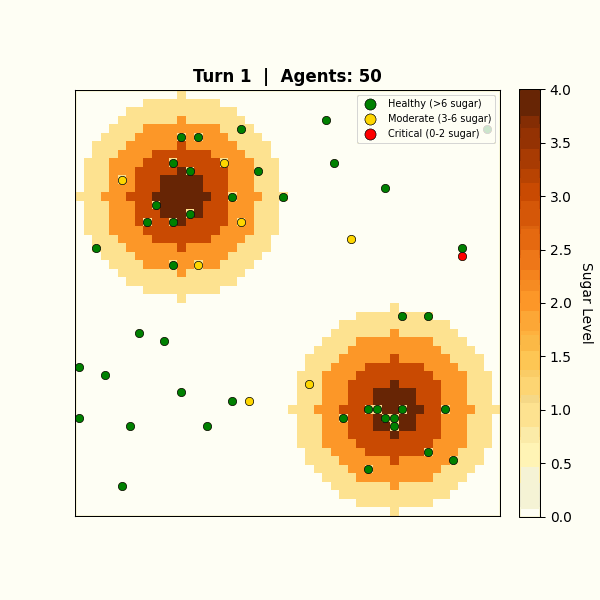
Figure 2: Sugarscape grid with two resource peaks and 50 agents
Without generative AI, agents follow deterministic rules: move to the cell with the highest visible sugar. LLM-powered agents reason differently. They weigh survival urgency against competition from nearby agents and consider long-term positioning. They also make inconsistent, sometimes irrational choices under pressure, just as real organisms do. This non-determinism is a feature, not a limitation. LLMs can weigh qualitative trade-offs that are difficult to express as fixed rules, producing more varied and context-sensitive decisions.
The framework supports multiple scenarios through a pluggable scenario abstraction. Each scenario defines its own world generation, agent types, turn mechanics, and termination conditions. In addition to Sugarscape, the codebase includes a predator-prey scenario where prey agents forage for grass while predator agents hunt prey, demonstrating how the same infrastructure supports fundamentally different behavioral dynamics.
Building the simulation agent with Strands
The system uses Strands Agents to power the LLM reasoning layer. Strands gives us three things that matter here. First, structured output with Pydantic models so the runner can parse decisions programmatically. Second, model abstraction: swap from Amazon Bedrock to Amazon SageMaker by changing one constructor. Third, a path to multi-agent architectures. Strands supports workflows and an agents-as-tools pattern, so this single-agent design can grow into a multi-agent orchestrator where specialized population agents handle different agent types or regions of the grid.
A SimulationRunner orchestrates the simulation loop, and for each turn, creates Strands Agent instances that reason about agent decisions using structured output.
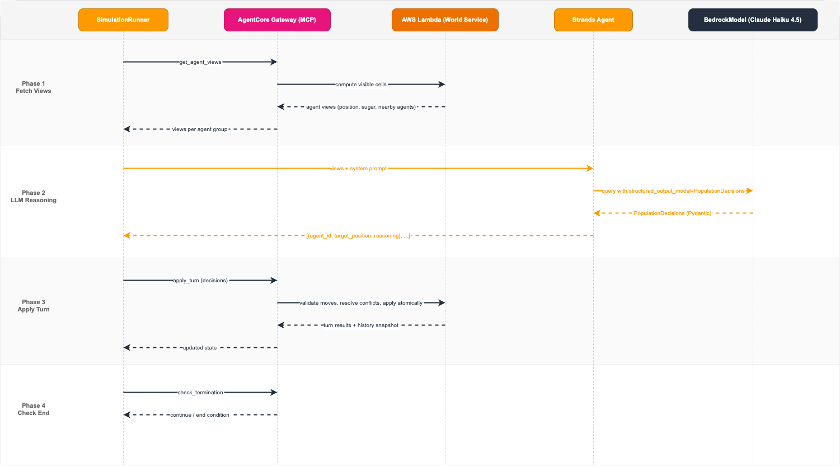
Figure 3: Agent flow: SimulationRunner delegates to Strands Agent, which receives agent views and returns structured decisions
Each population agent manages a group of simulation agents. The runner fetches what each agent can see via MCP, then passes those views to a Strands Agent with a system prompt defining survival strategy. The agent returns structured decisions using Pydantic models:
# Structured output models — this is what the LLM actually produces (from models.py)
from pydantic import BaseModel, Field


class AgentDecision(BaseModel):
    agent_id: str = Field(description="Agent ID (e.g. agent_0)")
    target_position: list[int] = Field(
        min_length=2, max_length=2, description="Target [row, col]"
    )
    reasoning: str = Field(description="Brief reasoning for the move")


class PopulationDecisions(BaseModel):
    decisions: list[AgentDecision] = Field(
        description="Move decisions for all agents in the group"
    )

# The runner passes each group's view to a Strands Agent and gets typed decisions back (from runner.py)
from strands import Agent
from strands.models import BedrockModel

population_model = BedrockModel(
    model_id=settings.population_model_id,
    temperature=0.8,
)

population_agent = Agent(
    model=population_model,
    system_prompt=system_prompt,
)

result = population_agent(
    turn_prompt,
    structured_output_model=PopulationDecisions,
)

decisions: list[AgentDecision] = result.structured_output.decisions
The system prompt guides the LLM toward survival-aware reasoning: rush to resources when sugar is low, target high-value cells within vision range, and avoid cells that nearby agents are closer to. The LLM returns a PopulationDecisions Pydantic model containing each agent’s target position and reasoning.
To keep wall-clock time roughly constant as agent count grows, the runner processes agent groups in parallel using concurrent threads.
From Amazon Bedrock to Amazon SageMaker: custom geospatial reasoning models
By default, the simulation uses Amazon Bedrock foundation models (Claude Haiku 4.5) for agent reasoning. The model already understands spatial concepts, resource trade-offs, and competitive dynamics without fine-tuning.
A simulation with 50 agents running for 200 turns generates around 1,000 LLM calls (agents are batched into groups of 10 per call). At that scale, the per-call latency and cost of a large foundation model add up. A smaller, fine-tuned model that has learned the domain-specific reasoning patterns could deliver comparable decision quality at a fraction of the cost and latency. Amazon SageMaker gives you a place to host that model.
The architecture makes the reasoning model a configuration choice, not a code change. In _process_group_llm (in runner.py), the Strands Agent is constructed with only a model and a system prompt:
population_agent = Agent(
model=self._population_model,
system_prompt=system_prompt,
)

result = population_agent(
prompt,
structured_output_model=PopulationDecisions,
)
Because the agent has no tools or external dependencies, swapping the underlying model is a clean substitution. The Strands SDK supports model classes for both Amazon Bedrock and Amazon SageMaker:
from strands.models import BedrockModel, SageMakerModel
# Option 1: General-purpose foundation model on Amazon Bedrock
model = BedrockModel(model_id="us.anthropic.claude-haiku-4-5-20251001-v1:0")

# Option 2: Distilled reasoning model on Amazon SageMaker
model = SageMakerModel(endpoint_name="geospatial-reasoning-v2")
Since you configure the model ID via environment variable (POPULATION_MODEL_ID), switching between Amazon Bedrock and Amazon SageMaker requires no code changes. Update the configuration in the AgentCore Runtime deployment and redeploy.
The practical workflow looks like this: prototype with an Amazon Bedrock foundation model to validate agent behavior, collect the structured decision data from simulation runs, then distill that knowledge into a smaller custom model. Deploy the distilled model to an Amazon SageMaker endpoint and point the simulation at it.
Orchestration, tools, world service, and visualization all remain identical, but each decision is faster and cheaper. For organizations with data-privacy requirements, Amazon SageMaker also allows training and deploying models entirely within a VPC.
Scaling tools with AgentCore Gateway
Building a local agent works well for development and testing. To run simulations at scale in production, the world service (spatial logic, state management, and turn execution) needs to be accessible as secure, scalable APIs.
Amazon Bedrock AgentCore Gateway solves this. AgentCore Gateway exposes world-service operations as MCP-compatible tools with IAM authentication built in, and a single AWS Lambda function can serve multiple tools without deploying separate endpoints per operation.
Standardizing on MCP is also a forward-looking choice. In the current design, the runner calls tools deterministically. A natural next step hands those same MCP tools directly to an orchestrator agent, giving it control over world events: the rate of time progression, large-scale triggers like droughts or resource surges, and when to accelerate or slow the simulation. That shift moves the architecture from a deterministic simulation with LLM-powered agents toward an LLM-driven emergent sandbox where a reasoning engine replaces the logic engine. Because the system already standardizes on MCP, this extension requires no infrastructure changes. Only the set of tools the agent can call needs to change.
An important distinction in this architecture: the LLM does not choose which tools to call. The SimulationRunner is deterministic Python code that calls world-service operations in a fixed sequence each turn. The LLM’s only job is reasoning about agent decisions.
The separation is deliberate: it keeps simulations reproducible (the same tool sequence runs every time), cost-effective (the LLM only runs where judgment matters), and debuggable (you can trace exactly which MCP call failed without LLM non-determinism in the loop). For more complex simulations where the environment itself needs to adapt (dynamic weather systems, multi-faction diplomacy, emergent economic markets), you can hand those same MCP tools to an orchestrator agent and let the LLM drive the simulation loop itself.
Under the hood, the runner calls tools directly via MCP using call_tool_sync (in runner.py):
def _call_mcp(self, tool_name: str, arguments: dict[str, Any]) -> dict[str, Any]:
result = self._mcp.call_tool_sync(
tool_use_id=f"{tool_name}-{uuid.uuid4().hex[:12]}",
name=f"{self._settings.tool_prefix}{tool_name}",
arguments=arguments,
)
# Parse and validate the response
...
Each turn follows the same deterministic sequence: fetch what agents can see (get_agent_views), pass those views to the LLM for structured decisions, apply the results (apply_turn), and check if the simulation should end (check_termination). AgentCore Gateway exposes these world-service operations as MCP-compatible APIs, acting as a centralized hub. The full set of operations:
- initialize_world: create the grid with terrain and resource peaks
- spawn_agents: create agents with randomized attributes
- get_agent_views: compute each agent’s visible surroundings
- apply_turn: validate moves, execute them atomically, and record history
- check_termination: evaluate end conditions
- save_results: persist results to Amazon S3
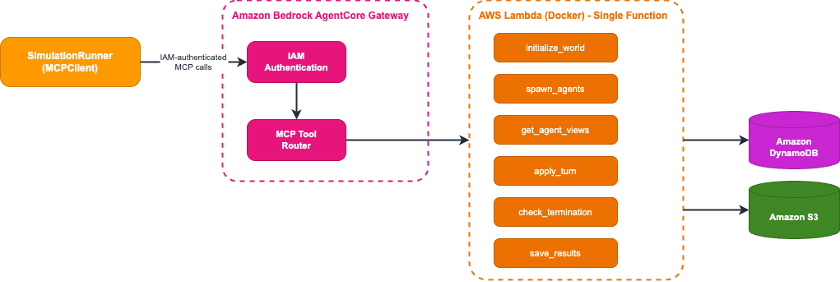
Figure 4: Updated architecture with AgentCore Gateway between agents and the AWS Lambda world service
The tool implementations run on AWS Lambda (Docker image). The function handles spatial logic: computing vision-radius views, validating moves against terrain and distance constraints, and executing turns atomically using Amazon DynamoDB. Each turn records a full snapshot to a history table, enabling real-time progress monitoring and post-simulation analysis.
A deterministic baseline like this makes it straightforward to evaluate LLM decision quality. Once you trust the agent reasoning, you can hand orchestration control to the LLM itself, giving it access to the same MCP tools the runner currently calls in a fixed sequence.
Connecting the runner to AgentCore Gateway uses IAM authentication via the MCP proxy (from app.py):
from mcp_proxy_for_aws.client import aws_iam_streamablehttp_client
from strands.tools.mcp import MCPClient

mcp_client = MCPClient(
    lambda: aws_iam_streamablehttp_client(
        endpoint=settings.agentcore_gateway_url,
        aws_region=settings.aws_region,
        aws_service="bedrock-agentcore",
    )
)
AgentCore Gateway automatically exposes your registered AWS Lambda functions as a centralized MCP-compatible hub, with IAM-based authentication and authorization built in.
Deploying to AgentCore Runtime
With tools scaled through AgentCore Gateway, the final step is deploying the agent itself. Amazon Bedrock AgentCore Runtime is a managed container service that runs your agents on AWS-managed infrastructure with automatic scaling and built-in monitoring.
AgentCore Runtime fits simulation workloads for two reasons. First, a 50-agent Sugarscape run takes 15+ minutes, which exceeds the maximum AWS Lambda timeout. Self-managed Amazon Elastic Container Service (Amazon ECS) requires writing scaling, health checks, and deployment pipelines from scratch. Runtime handles all of that. Second, the pricing model matches agentic workloads: you pay only for active CPU consumption at per-second increments. Agentic workloads frequently spend most of their wall-clock time in I/O wait (LLM inference, MCP tool calls): each call takes seconds, while orchestration compute between calls takes hundreds of milliseconds. With pre-allocated compute, you pay for idle CPU during those waits. With AgentCore Runtime, I/O wait time incurs no CPU charges.
To deploy to AgentCore Runtime, adapt your agent code to use the BedrockAgentCoreApp framework. The core of the entrypoint looks like this (from app.py, simplified):
from bedrock_agentcore.runtime import BedrockAgentCoreApp

app = BedrockAgentCoreApp()
runner = create_runner()

@app.entrypoint
def invoke(payload):
request = SimulationRequest(**payload)
yield from runner.run_streaming(request)
The run_streaming method yields structured events: status updates during initialization, per-turn metrics (population counts, Gini coefficient, resource statistics), and a final result with the complete simulation summary.
Deploy using the provided AWS CDK stack, which handles building the Docker container, pushing it to Amazon Elastic Container Registry (Amazon ECR), and creating the runtime endpoint.
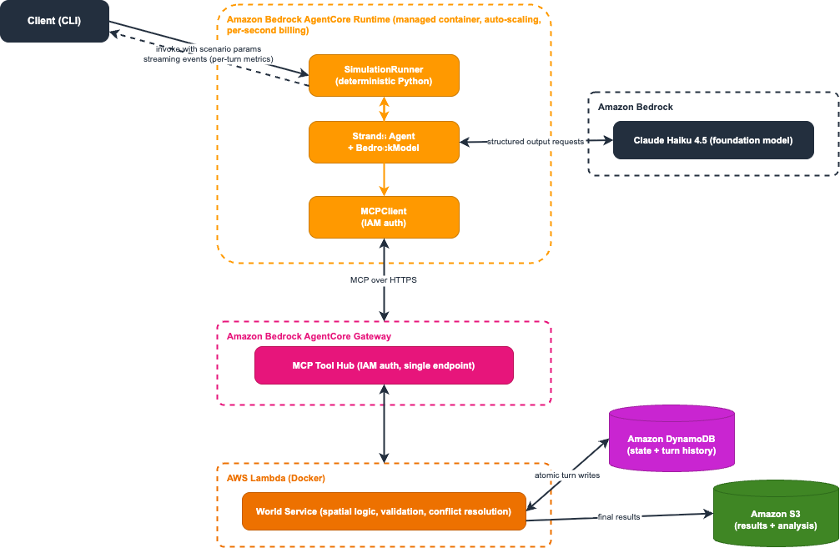
Figure 5: Complete architecture with AgentCore Runtime wrapping the full system
Running the simulation
With the infrastructure deployed, invoke the orchestrator to run a simulation:
uv run geosim run -s sugarscape --agents 50 --turns 200
The CLI polls Amazon DynamoDB for real-time turn-by-turn progress while AgentCore Runtime processes the simulation:
============================================================
  Simulation Launch
============================================================
Session ID: sim-a3b2c1d4-1774560950-cc3f4711...
Simulation ID: sugarscape-a3b2c1d4
Parameters: scenario=sugarscape, agents=50, max_turns=200
Invoking orchestrator runtime...
Polling DynamoDB for real-time progress...
[12s] Turn 1 | Agents: 50 | Deaths: 0 | Gathered: 142 | Gini: 0.124 | Avg Sugar: 12.3
[28s] Turn 10 | Agents: 47 | Deaths: 3 | Gathered: 98 | Gini: 0.312 | Avg Sugar: 8.7
[145s] Turn 50 | Agents: 31 | Deaths: 2 | Gathered: 64 | Gini: 0.487 | Avg Sugar: 5.2
...
[892s] Turn 142 | Agents: 0 | Deaths: 3 | Gathered: 0 | Gini: 0.000 | Avg Sugar: 0.0
Simulation terminated: all_agents_dead

To analyze: uv run geosim analyze sugarscape-a3b2c1d4
A sample agent decision from the LLM shows the layered reasoning:
“Agent_14: Sugar at 3, metabolism 2, one turn from starvation. Cell [12,15] has 6 sugar within vision range. Avoided [11,14] despite 8 sugar due to agent_22 being closer. Moving to [12,15] for guaranteed survival.”
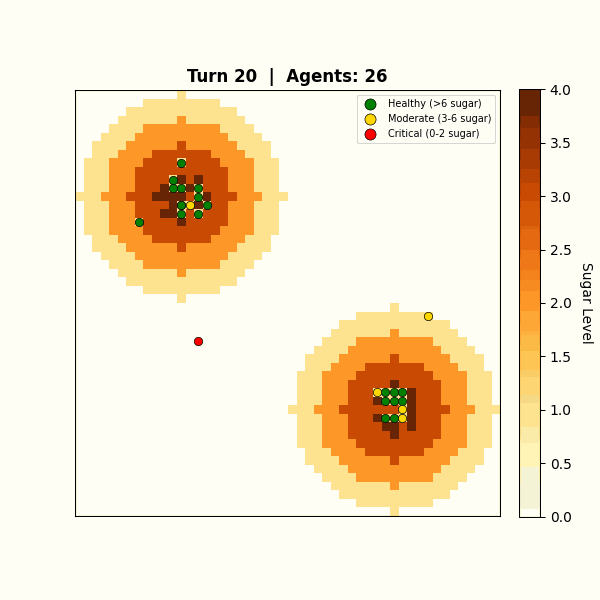
Figure 6: Emergent behavior: agents cluster around resource peaks
Agents naturally cluster around resource peaks and develop competitive strategies. All of this emerges from individual LLM reasoning, not hardcoded rules. The Gini coefficient (a 0-to-1 scale where 0 means all agents hold equal resources and 1 means one agent holds everything) tracks wealth inequality in real time, showing how resource competition drives emergent social stratification.
Testing and validation
After deploying the infrastructure, run the built-in end-to-end test to verify the full pipeline:
uv run geosim test
A successful test confirms that AgentCore Runtime, AgentCore Gateway, the AWS Lambda world service, and Amazon DynamoDB are all correctly connected. Expected output for a passing test:
Running end-to-end test (scenario=sugarscape, agents=5, turns=3)...
Turn 1 | Agents: 5 | Deaths: 0 | Gathered: 18
Turn 2 | Agents: 5 | Deaths: 0 | Gathered: 14
Turn 3 | Agents: 4 | Deaths: 1 | Gathered: 11
Test passed. Simulation completed successfully.
Common issues:
- Model access not enabled: If the test fails with a model invocation error, verify you have enabled access to us.anthropic.claude-haiku-4-5-20251001-v1:0 in the Amazon Bedrock console for your Region.
- AgentCore Gateway timeout: If MCP tool calls time out, check that the AWS Lambda function deployed successfully and the AgentCore Gateway is pointing to the correct function ARN.
- IAM permissions: If authentication fails, confirm the credentials configured in your AWS CLI have permissions for Amazon Bedrock, Amazon Bedrock AgentCore, Amazon DynamoDB, Amazon S3, and AWS Lambda.
Clean up
The AWS CDK stack creates the following resources: Amazon DynamoDB tables, Amazon S3 buckets, AWS Lambda functions, an AgentCore Gateway, and an AgentCore Runtime. To remove all resources and avoid ongoing charges:
uv run geosim destroy
Note: Amazon S3 buckets that contain simulation results must be emptied before cdk destroy can delete them. If the destroy command fails, empty the results bucket manually via the Amazon S3 console or aws s3 rm s3://BUCKET_NAME –recursive, then re-run the destroy command.
Conclusion
In this post, we built a spatial simulation where LLM-powered agents reason about survival, competition, and resource gathering on a grid world, using Strands Agents for decisions and Amazon Bedrock AgentCore for production deployment.
Because orchestration and reasoning are separate layers, adding a new scenario (evacuation modeling, urban migration, predator-prey dynamics) requires new configuration and prompts, not new infrastructure. Swap in a distilled Amazon SageMaker model for cost, scale the world service independently, or extend the MCP tools to give the LLM control over the simulation itself.
Get started with the GitHub repository, or join us at GEOINT 2026 for a hands-on workshop.