账户安全是云安全的重中之重。本文中将着重讨论一类账户安全场景:当发现有未知请求反复尝试登录IAM用户或IAM Identity Center用户,这代表该用户的用户名、Identity Center的登录URL已经泄露,这时应当提供一种机制,在一定次数的失败后自动移除该用户的权限并进行锁定,并随后由管理员对登录用户名和/或登录URL进行重置。在一些合规框架下,您可能会看到有类似的密码策略要求,这些要求目前需要通过自定义方案进行实现。在本文中,我们将描述如何基于上一篇的内容,详细描述如何对异常密码尝试的事件进行自动化处理,以及提供一个可以快速部署的架构和示例代码。
关于密码策略
密码策略是控制台用户在创建或更改密码时必须遵守的要求,属于账户级别的设置。密码策略可以帮助增强账户安全性,这些好处可能包括:
- 杜绝极容易暴力破解的弱密码
- 减少攻击窗口
- 防止重用历史密码
在一些合规框架下,其安全标准会明确要求配置密码策略。例如,PCI-DSS 4.0的8.3章节要求密码长度至少12位、密码必须同时包含字母和数字、密码轮换周期不得超过90天、10次登录失败后将用户自动锁定等要求。目前IAM用户密码策略和Identity Center内置IdP密码策略主要包括密码长度、密码复杂度、首次登录需重置密码、禁止重用历史密码等功能。IAM用户和Identity Center目前均不支持自动锁定用户。因此,用户仍需通过自定义应用来自动完成锁定用户的要求。
如果对控制台访问控制有更高的要求,Amazon Web Services还提供了Private Console Access功能。该功能允许用户通过 VPC 端点私密访问 AWS 管理控制台,无需流量经过公共互联网。对于对网络访问有严格要求的用户来说,此功能可以减少控制台用户暴露的风险,无需担忧来自公网的访问。关于Private Console Access功能的更多细节,可以参考此链接。
架构描述
接下来我们介绍一个可以用于自动统计用户密码验证失败次数并将该用户进行锁定的方案。该方案中将复用前一篇博客中描述的登录事件通知架构,并增加一些额外的规则和无服务器服务来提供基于事件驱动的用户锁定功能。
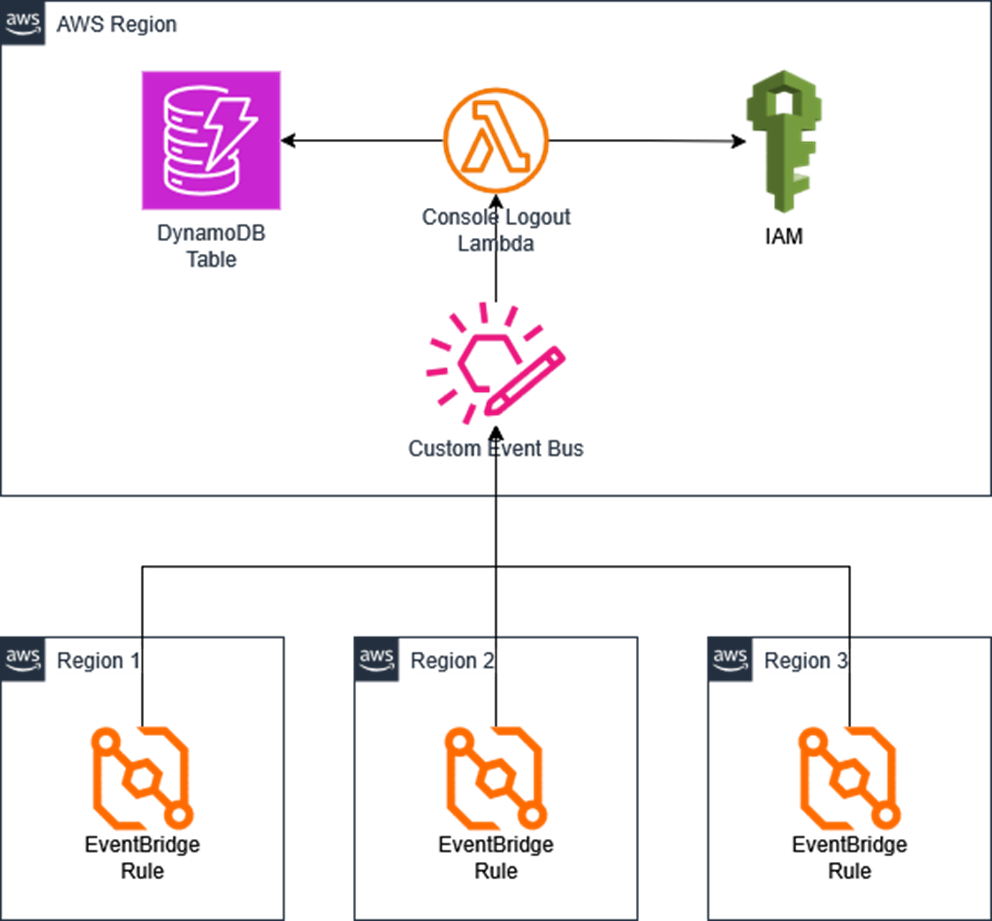
该方案的架构图如下:
其中复用上一篇中的组件包括:
- 在多个区域内事先部署的用于转发登录事件的EventBridge规则;
- 在中心区域部署的用于汇总登录事件的自定义Event Bus。
在接下来的部署方法中,我们会创建如下的无服务器资源:
- EventBridge规则:用于从自定义EventBus中转发登录事件到Lambda函数;
- DynamoDB表:用于记录登录失败的用户ID和失败次数等信息;
- Lambda函数:用于处理登录事件、更新DynamoDB中的计数,以及如有必要,禁用该用户的权限。
以下为示例Lambda函数代码:
```
import json
import boto3
import os
from datetime import datetime, timedelta


iam = boto3.client('iam')
idc = boto3.client('identitystore')
sso_admin = boto3.client('sso-admin')
ddb = boto3.client('dynamodb')
ddb_table = 'console-lockout'
threshold = 5 # maximum password attampt before lockout
time_delta = 60 # Dynamodb expire time in minutes
deny_policy_arn = 'arn:aws:iam::aws:policy/AWSDenyAll'


def lambda_handler(event, context):
    print(event)

    # check account number
    account = boto3.client('sts').get_caller_identity()['Account']
    if event['account'] != account:
        print('Ignore because event account {} is not the same as current account {}'.format(event['account'], account))
        return {
            'statusCode': 200,
            'body': json.dumps('Ignore because event account {} is not the same as current account {}'.format(event['account'], account))
        }

    # for IAM User
    if event['detail']['userIdentity']['type'] == 'IAMUser':
        event_time = event['detail']['eventTime']
        user_name = event['detail']['userIdentity']['userName']
        result = event['detail']['responseElements']
        dt = datetime.fromisoformat(event_time.replace('Z', '+00:00'))
        expire_time = int((dt + timedelta(minutes=time_delta)).timestamp())

        # check if event is password authentication
        try:
            result = result['ConsoleLogin']
        except:
            print('Ignore because event {} is not password authentication'.format(result))
            return {
                'statusCode': 200,
                'body': json.dumps('Ignore because event {} is not ConsoleLogin'.format(result))
            }

        # check if userName is valid
        if user_name == 'HIDDEN_DUE_TO_SECURITY_REASONS':
            print('Ignore because username is HIDDEN_DUE_TO_SECURITY_REASONS')
            return {
                'statusCode': 200,
                'body': json.dumps('Ignore because username is HIDDEN_DUE_TO_SECURITY_REASONS')
            }
        try:
            user_arn = iam.get_user(UserName=user_name)['User']['Arn']
        except Exception as e:
            print(e)
            return {
                'statusCode': 500,
                'body': json.dumps(str(e))
            }

        # for login failure
        if result == 'Failure':
            response = ddb.query(
                TableName=ddb_table,
                KeyConditionExpression='#u = :val',
                ExpressionAttributeNames={'#u': 'user'},
                ExpressionAttributeValues={':val': {'S': user_arn}}
            )
            # if record does not exist, create new record
            if len(response['Items']) == 0:
                count = 1
            else:
                # increase counter
                count = int(response['Items'][0]['count']['N'])
                count = count + 1
            ddb.put_item(
                    TableName = ddb_table,
                    Item = {
                        'user': {'S': user_arn},
                        'identityStore': {'S': 'IAM'},
                        'count': {'N': str(count)},
                        'time': {'S': event_time},
                        'userName': {'S': user_name},
                        'expire': {'N': str(expire_time)}
                    }
                )

            # check if count reaches threshold, if so disable the user
            if count >= threshold:
                iam.attach_user_policy(
                    UserName = user_name,
                    PolicyArn = deny_policy_arn
                )
                # iam.delete_login_profile(UserName=user_name) # optionally, you can disable the user from signing into the console

        # for login success
        elif result == 'Success':
            # reset counter to 0
            ddb.put_item(
                TableName = ddb_table,
                Item = {
                    'user': {'S': user_arn},
                    'identityStore': {'S': 'IAM'},
                    'count': {'N': '0'},
                    'time': {'S': event_time},
                    'userName': {'S': user_name}
                }
            )

    elif event['detail']['userIdentity']['type'] == 'IdentityCenterUser':
        event_time = event['detail']['eventTime']
        user_id = event['detail']['userIdentity']['onBehalfOf']['userId']
        identity_store_id = event['detail']['userIdentity']['onBehalfOf']['identityStoreArn'].split('/')[-1]
        event_name = event['detail']['eventName']
        credential_type = event['detail']['additionalEventData']['CredentialType']
        dt = datetime.fromisoformat(event_time.replace('Z', '+00:00'))
        expire_time = int((dt + timedelta(minutes=time_delta)).timestamp())

        # check if event type is CredentialVerification
        try:
            result = event['detail']['serviceEventDetails']['CredentialVerification']
        except:
            print('Ignore because event {} is not CredentialVerification'.format(event['detail']['serviceEventDetails']))
            return {
                'statusCode': 200,
                'body': json.dumps('Ignore because event {} is not CredentialVerification'.format(event['detail']['serviceEventDetails']))
                }
        # check if credential type is password
        if credential_type != 'PASSWORD':
            print('Ignore because credential type {} is not password'.format(credential_type))
            return {
                'statusCode': 200,
                'body': json.dumps('Ignore because credential type {} is not password'.format(credential_type))
            }

        # check if userId is valid
        try:
            user_name = idc.describe_user(
                IdentityStoreId=identity_store_id,
                UserId=user_id
            )['UserName']
        except Exception as e:
            print(e)
            return {
                'statusCode': 500,
                'body': json.dumps(str(e))
            }

        # for login failure
        if result == 'Failure':
            response = ddb.query(
                TableName=ddb_table,
                KeyConditionExpression='#u = :val',
                ExpressionAttributeNames={'#u': 'user'},
                ExpressionAttributeValues={':val': {'S': user_id}}
            )
            # if record does not exist, create new record
            if len(response['Items']) == 0:
                count = 1
            else:
                # increase counter
                count = int(response['Items'][0]['count']['N'])
                count = count + 1
            ddb.put_item(
                TableName = ddb_table,
                Item = {
                    'user': {'S': user_id},
                    'identityStore': {'S': identity_store_id},
                    'count': {'N': str(count)},
                    'time': {'S': event_time},
                    'userName': {'S': user_name},
                    'expire': {'N': str(expire_time)}

                }
            )
            # check if count reaches threshold, if so remove all permission sets and groups associations from the user
            if count >= threshold:
                # check the idc instance arn for this identity store
                for i in sso_admin.list_instances()['Instances']:
                    if i['IdentityStoreId'] == identity_store_id:
                        sso_instance_arn = i['InstanceArn']
                        break
                # remove all permission sets associations
                assignments = sso_admin.list_account_assignments_for_principal(
                    InstanceArn=sso_instance_arn,
                    PrincipalType='USER',
                    PrincipalId=user_id)['AccountAssignments']
                for a in assignments:
                    sso_admin.delete_account_assignment(
                        InstanceArn=sso_instance_arn,
                        TargetId=a['AccountId'],
                        TargetType='AWS_ACCOUNT',
                        PermissionSetArn=a['PermissionSetArn'],
                        PrincipalType='USER',
                        PrincipalId=user_id
                    )
                # remove all groups associations
                memberships = idc.list_group_memberships_for_member(
                    IdentityStoreId=identity_store_id,
                    MemberId={'UserId': user_id}
                )['GroupMemberships']
                for m in memberships:
                    idc.delete_group_membership(
                        IdentityStoreId=identity_store_id,
                        MembershipId=m['MembershipId']
                    )

        # for login success
        elif result == 'Success':
            # reset counter to 0
            ddb.put_item(
                TableName = ddb_table,
                Item = {
                    'user': {'S': user_id},
                    'identityStore': {'S': identity_store_id},
                    'count': {'N': '0'},
                    'time': {'S': event_time},
                    'userName': {'S': user_name}
                }
            )
    else:
        print('Ignore because userIdentity type is {}'.format(event['detail']['userIdentity']['type']))
        return {
            'statusCode': 200,
            'body': json.dumps('Ignore because userIdentity type is {}'.format(event['detail']['userIdentity']['type']))
        }


    return {
        'statusCode': 200,
        'body': json.dumps('OK!')
    }
```
该示例代码主要逻辑如下:
- 首先,检查事件类型和关键字段,忽略非密码错误类事件。对于IAM用户事件,事件类型必须为”ConsoleLogin”;对于Identity Center用户事件,事件类型必须为”CredentialVerification”,并且凭证类型为”PASSWORD”。;
- 如果事件认定为密码认证成功,则重置DynamoDB中该用户的错误计数;
- 如果事件认定为密码错误,从DynamoDB获取该用户的错误计数,并且将新的计数写入DynamoDB。每个用户的错误计数将包含一个TTL时间,超过TTL则删除该记录,等同于将计数清空;
- 如果计数超过阈值,则对该用户进行锁定。对于IAM用户,给这个用户附加一个”DenyAll”策略(这个操作需要确保该用户没有达到可以附加的IAM Policy上限;也可以选择通过delete_login_profile完全关闭用户的控制台登录权限);对于Identity Center用户,取消其关联的所有权限集和组权限(Identity Center用户无法通过API直接禁止登录,但可以通过这种方式使其在Access Portal中无法获得任何账号的控制台权限)。需要注意的是,这些操作会影响当前用户的正常使用,应该结合实际情况决定如何处理用户的权限。
您可能注意到,示例代码仅提供了锁定用户的逻辑,该用户在遭到锁定后会失去所有AWS权限,并且并不会自动解锁。在部署此代码前,您应该详细评估这类处理方法对生产环境和用户的影响。通常来说,不同企业也可能有不同的要求。这些自定义需求都可以通过简单修改示例代码来实现。DynamoDB是一种NoSQL数据库,可以方便地定义一些额外的字段,来快速实现这些需求。
部署方法
在前篇中,我们已经部署了自定义Event Bus和EventBridge规则部分。接下来的步骤只需要手动部署DynamoDB表格、Lambda函数以及新的EventBridge规则。
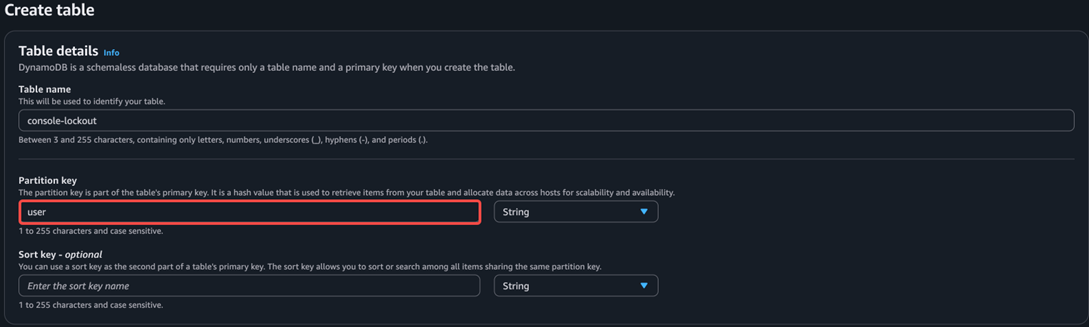
首先,在主区域创建一个DynamoDB表格,表名为”console-lockout”(与Lambda函数中的变量相对应)。该表格的分区键为”username”(与Lambda函数中的变量相对应,请注意不要设置任何排序键):
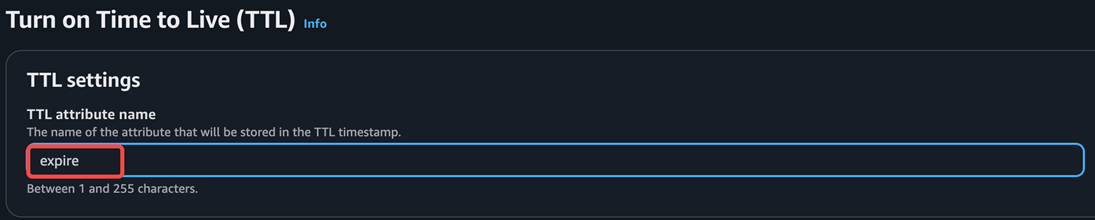
如果需要TTL功能,创建表格后在该表格的页面,在右上方的操作菜单主打开TTL,TTL键为”expire”:
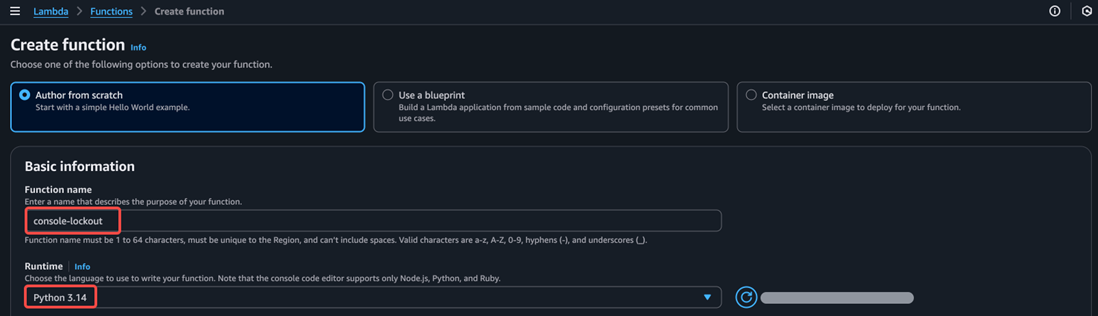
接下来,创建一个Lambda函数,运行时为Python:
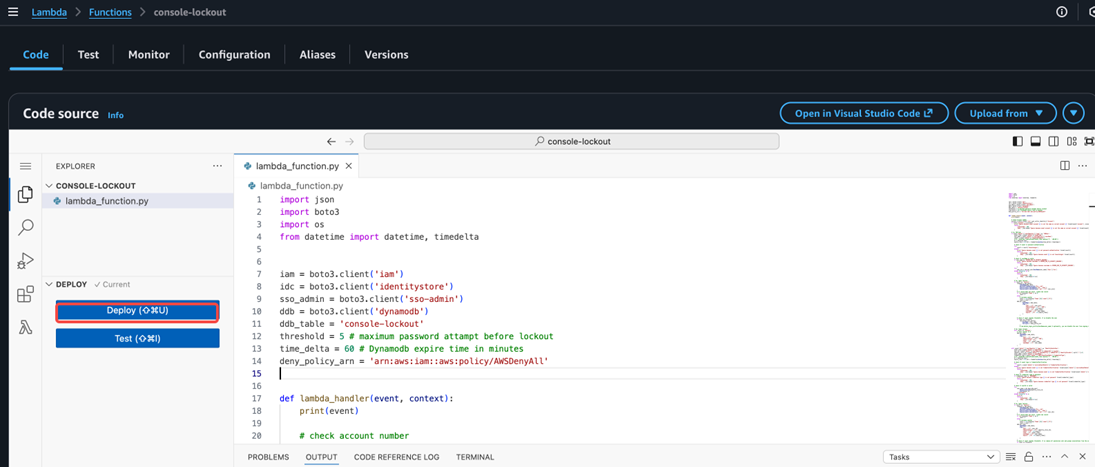
创建函数后在”代码”页面中将复制黏贴之前提供的示例代码,并点击部署:
最后,在EventBridge控制台中,找到自定义event bus:
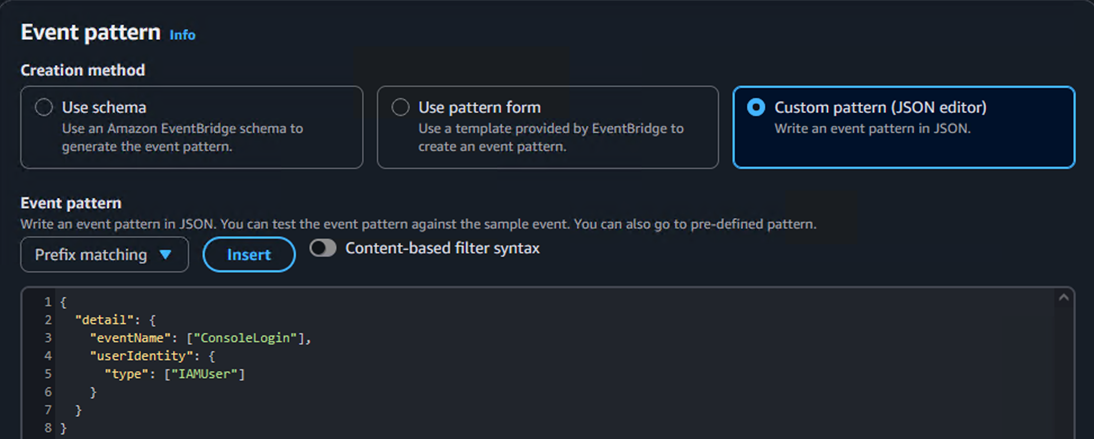
接下来添加两条规则到这个event bus,其中IAM用户事件的规则为:
```
{
  "detail": {
    "eventName": ["ConsoleLogin"],
    "userIdentity": {
      "type": ["IAMUser"]
    }
  }
}
```
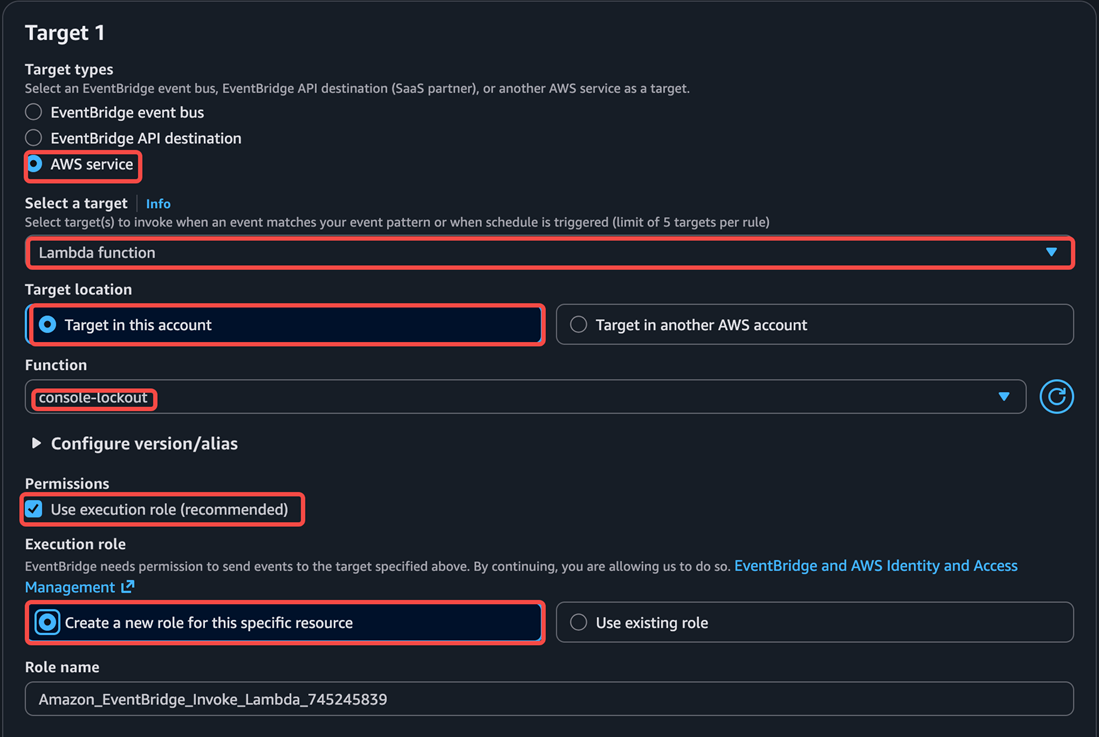
将这个规则的目标设置为之前创建的Lambda 函数:
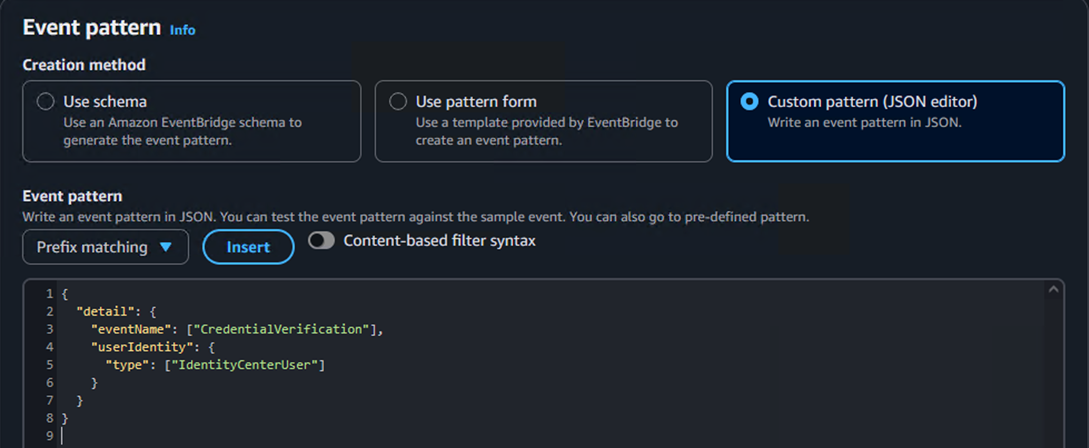
同样的,再创建一条identity Center的事件规则,同样将目标设置为该Lambda函数:
```
{
  "detail": {
    "eventName": ["CredentialVerification"],
    "userIdentity": {
      "type": ["IdentityCenterUser"]
    }
  }
}
```
在部署完成后,您可以尝试使用IAM用户或者Identity Center用户进行登录。默认在5次密码输入错误(不包括MFA错误)后,该用户将被禁用所有权限。
总结
在这篇文章中,我们向您介绍了如何通过自定义应用实现密码重试锁定用户的逻辑。通常来说这种解决方案需要结合企业自身的密码策略来决定。您可以在此方案架构基础之上进行灵活的自定义来满足各种账户安全的需求。
*前述特定亚马逊云科技生成式人工智能相关的服务目前在亚马逊云科技海外区域可用。亚马逊云科技中国区域相关云服务由西云数据和光环新网运营,具体信息以中国区域官网为准。
本篇作者
AWS 架构师中心: 云端创新的引领者
探索 AWS 架构师中心,获取经实战验证的最佳实践与架构指南,助您高效构建安全、可靠的云上应用

|
 |