文旅行业存在大量需要精准抽取的文本内容,且近似文本占比极高。以酒店合同报价为例,它是OTA(在线旅游代理)平台的核心运营环节之一。OTA需要对接数以万计的酒店,但是绝大多数酒店不提供标准化的在线接口,报价信息通常以Word、Excel、PDF等非结构附件形式提供,包含房型说明、基础价格、促销政策、附加条款等多元内容。OTA收到后需要人工解析、校验后录入业务系统。然而,大型酒店集团的合同及报价单附件往往长达数十页,文本体量庞大且信息密度不均。不同酒店的文本还存在表述近似,但细节差异显著的问题。跟客户体验息息相关的促销规则、限制条款、时间约束等关键信息的精准抽取显得尤为重要。
长期以来,文旅行业对上述文本信息的抽取解析工作主要依赖人工手动处理,这种模式严重受制于行业专家的知识积累与经验沉淀,新员工需要经过长期的训练、试错才能胜任。随着LLM与AI Agent技术的发展,行业内开始尝试采用Agent实现信息抽取的自动化,但是实际应用中仍面临诸多挑战,效果并不理想。本文针对文旅行业近似文本占比高、更新频率快的特点,借鉴机器学习中Optimizer、Step等思想,赋予智能体学习的能力,开发了一套自学习、可进化的多Agents系统,在实际应用中取得了较为满意的效果。
1 需求分析
在线旅游代理商(OTA)一般跟酒店集团签约,酒店集团往往包括全国数十家到数百家酒店,每家酒店又包含不同档次的房型、价格设置等条款,所以一份合同及报价单附件通常高达几十页至数百页不等。使用大语言模型或Agent进行信息提取存在以下几个关键挑战:
- 大文档处理受限:对于数十页的大文本,单次模型调用的上下文窗口难以容纳完整文档,分段处理又容易丢失全局的关联信息。
- 语义规则复杂:价格信息常伴随自然语言描述的业务规则,如”提前14天预订享8折”、”连住三晚免一晚”,涉及时间条件、数量条件、组合优惠等多种逻辑。
- 处理逻辑多元:单份合同中包含房型信息、基础价格、促销政策、附加条款等多种内容类型,需要不同的提取和计算逻辑。
- 变化持续发生:酒店价格受季节、活动等因素影响持续调整,报价单格式和规则表述方式也在不断更新变化。
- Agent开发与维护成本高:由于处理逻辑多元,往往需要针对不同内容类型开发多个专用Agent,随着业务场景扩展,Agent数量不断增加,开发工作量大、协调逻辑复杂、后期维护成本持续攀升。
1.1 功能需求
通过对当前现状的分析,可以概括一下在功能方面的需求主要包括:
1、结构化抽取与生成。
能从合同与报价文本中精准提取目标信息,自动生成格式合规、可直接接入OTA业务系统的CSV文件,核心字段抽取准确率≥95%,减少人工二次整理成本。
2、全文本一次性处理。
能对整个合同和报价附件文本进行整体处理和解析,一次性完整处理文本并保留全局关联信息,避免人工拼接碎片化结果。
3、知识自动积累。
系统能越用越聪明,能实现行业知识的自动积累,且支持跨任务复用,逐步降低人工干预的频次。
4、人力节约与优化。
借助大语言模型的能力实现自动化的信息抽取,大幅减少人工解析、校验、规则调整的工作量,降低对行业专家手动介入的依赖。
1.2 非功能需求
- 性能可靠:支持数十页大型酒店合同处理,无上下文丢失;核心字段抽取准确率≥95%,校验环节错误识别率≥98%,保障业务数据可用性。
- 功能易用:无需复杂配置,支持本地调试与生产环境无缝切换,用户仅需上传输入文件即可获取结果,降低操作门槛。
- 部署维护简单:使用无服务器部署,无需关注底层基础设施运维;能够模块化架构支持子Agent独立升级,减少维护工作量。
- 经济性:复用现有模型与计算资源,无额外硬件投入;自动化处理与低维护成本降低整体运营开支,且随系统自学习进化,长期人力成本持续下降。
2 方案设计
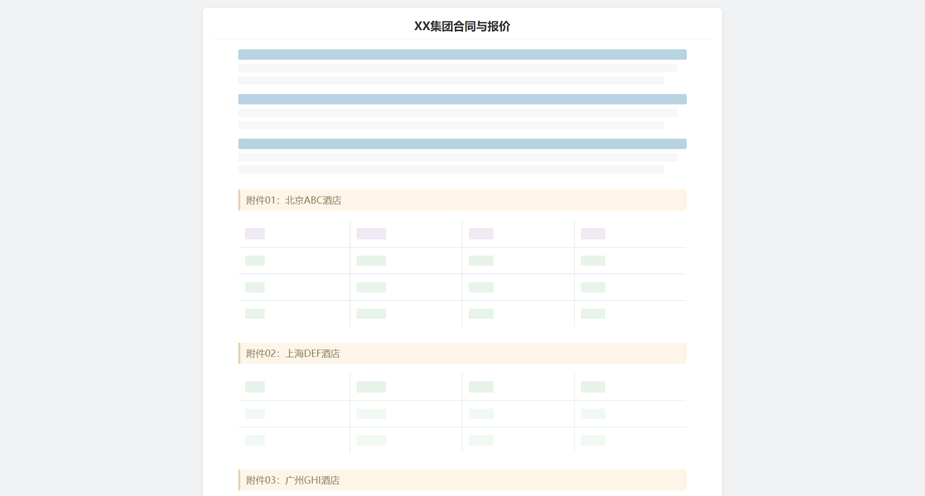
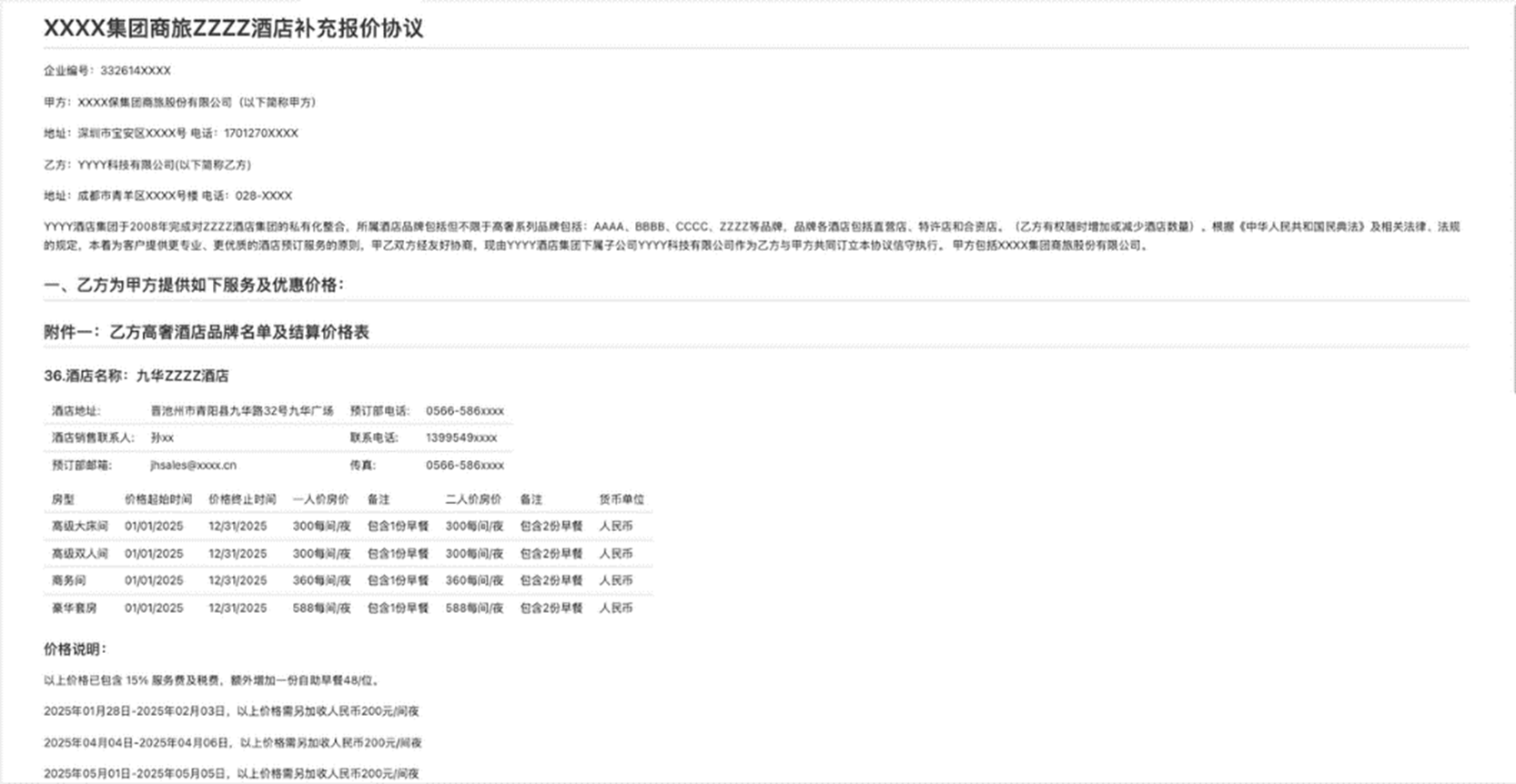
从业务角度看,在深入分析了多个长文本的合同及报价后,我们发现每份文档中“合同”部分都不是太长,在1-2页之内;但是“报价”部分会是一个长长的附件,一般以表格的形式列出集团下每个城市的不同酒店的报价信息,模式如下:
图1:合同与报价附件样式抽象
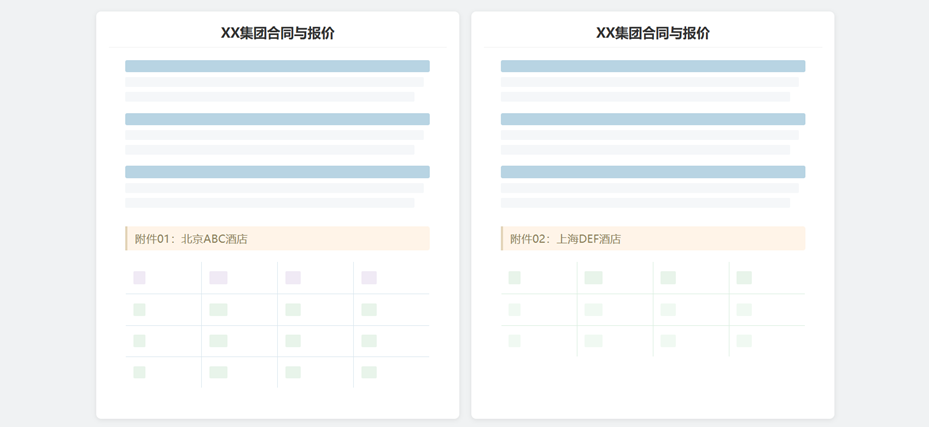
鉴于把一份数十页的文本直接交给LLM处理会导致上下文爆炸,我们就按不同酒店将大合同切分成数十个小合同,每个小合同包括:公共的合同部分,加上一个附件。这样的小合同即保留了大合同的公共信息,又降低了文本的长度,使得信息抽取变得更可行。形式如下:
图2:将大合同拆分成多个小合同
从开发角度看,传统开发过程要求开发者自行构建会话管理、状态持久化、资源隔离等底层基础设施,导致大量工程资源被消耗在非核心业务逻辑上。Amazon Bedrock AgentCore是亚马逊在AWS re:Invent 2025和AWS Summit New York 2025上发布的企业级AI Agent基础设施服务套件。AgentCore通过其Runtime、Memory、 Observability、Gateway等核心模块,为传统开发困境提供了系统性解决方案。
- AgentCore Runtime作为托管式无服务器执行环境,实现了Agent运行时的完全抽象化。其核心创新在于提供了会话级隔离(session-level isolation)机制,确保每个用户交互在独立的计算沙箱中执行,从根本上消除了多租户场景下的数据泄露风险。
- AgentCore Memory则针对Agent上下文管理的核心难题提供了双层记忆架构。短期记忆(short-term memory)基于命名空间隔离的加密存储,实现会话内状态的高效持久化,确保 Agent在多轮对话中保持上下文连贯性。长期记忆(long-term memory)采用语义检索策略,自动从历史交互中提取结构化知识,构建用户画像和领域知识图谱。开发者无需关注底层向量数据库配置、索引优化等复杂细节。而且Memory支持增量策略更新,新增的语义策略可自动应用于后续事件,保证了系统的可演化性。
对于小合同的信息抽取,非常适合部署在AgentCore中,一方面通过Runtime可以并发多个任务同步抽取,提高处理速度、运行效率和安全性;另一方面,通过Memory可以很好的支持Agent的自学习机制,让它越用越智能。同时,基于AgentCore,开发团队可以更好的将精力聚焦于业务逻辑设计和模型优化,而非基础设施运维,从而加速创新周期并降低总体拥有成本(TCO)。
2.1 技术架构
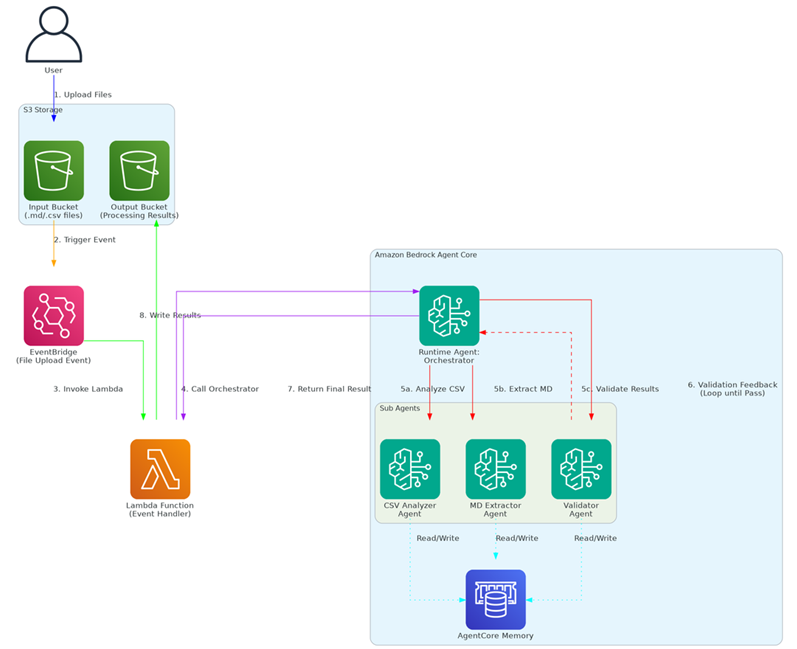
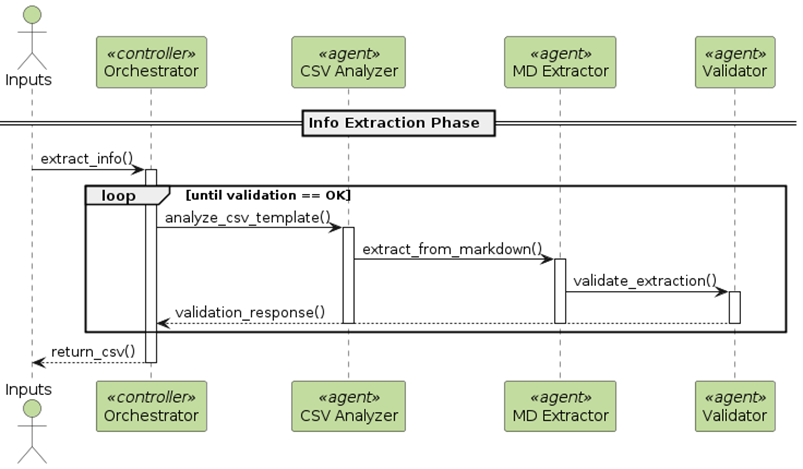
按照用户需求,整个项目设计成一个无服务器架构。(1)用户上传Markdown格式的大合同和希望导出的CSV模板文件到S3桶,触发EventBridge事件,会调用一个Lambda 处理后续操作。(2)Lambda首先将大合同切分成若干个小合同Markdown,然后并发调用Bedrock AgentCore中的Runtime Agent: Orchestrator,实现信息抽取。(3)Orchestrator会分析传入的Markdown和CSV,依次调用Runtime中的子Agents:CSV Analyzer Agent, MD Extractor Agent和Validator Agent等,Validator会将抽取结果返回给 Orchestrator,以判断是否抽取成功,如果不行则循环上面的处理。(4)如果 Orchestrator判断抽取成功,可以正常结束循环,就把抽取结果返回给Lambda,Lambda 将最终结果写入S3中。
图3:技术架构
3个子Agents(CSV Analyzer Agent, MD Extractor Agent和Validator Agent)在抽取过程中还会分别跟AgentCore Memory作交互,一方面取出前次处理所积累的业务经验,提高本次的处理效率;另一方面也将本次处理所获得的新经验和不足存储在Memory中,以便后面复用。
2.2 核心概念
在这个技术架构中有两个核心概念,使得多Agents具备可学习和自进化的功能。一个是ReAct,另一个是SCOPE,下面分别描述:
- ReAct
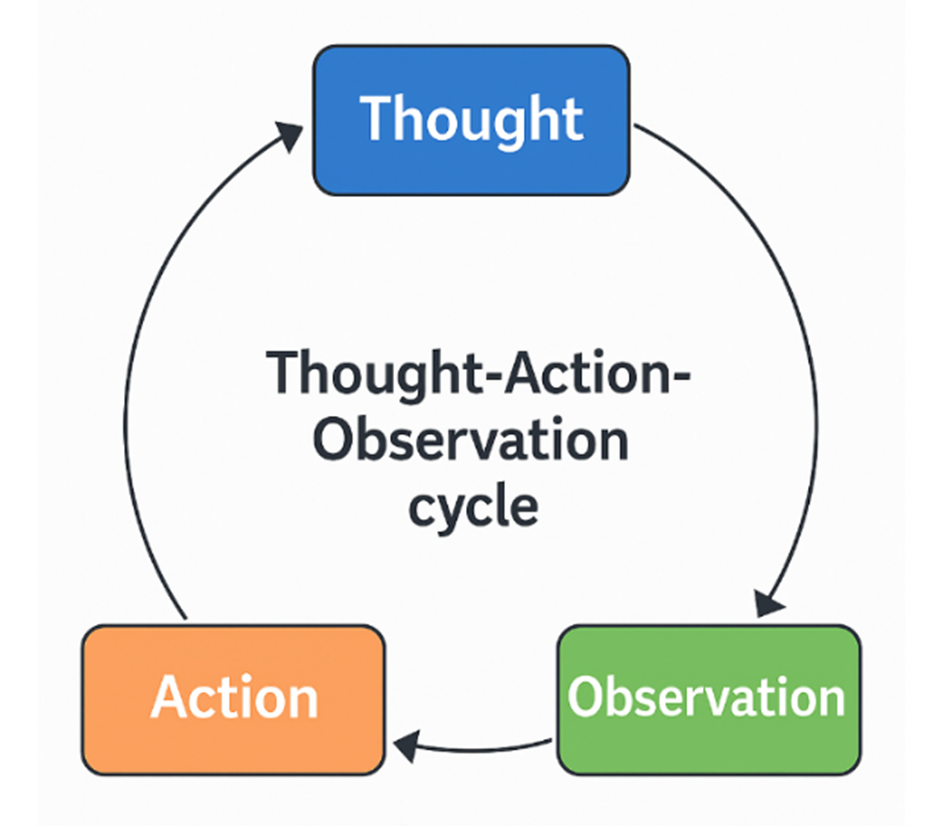
技术架构中的主Agent(Orchestrator)被设计成一个ReAct范式。ReAct将大语言模型的思维推理(Reasoning)与任务执行行动(Acting)紧密结合,让模型在解决任务时交替生成推理轨迹(Thought)和具体行动指令(Action),并通过执行这些行动获得观察结果(Observation),将新的信息反馈回推理流程中,从而形成一个闭环的认知-行动循环。
这个循环推动子Agents迭代的进行信息抽取,并且每一次迭代都会去总结经验和发现不足,使得整个信息抽取任务更精准、也更具鲁棒性。
图4:Orchestrator Agent的ReAct循环
- SCOPE
SCOPE(Self-evolving Context Optimization via Prompt Evolution)是一种针对AI Agent的提示词进化方案。传统的Agent通常依赖静态提示(Static prompt)来处理任务,但当环境上下文丰富且不断变化时,这些静态提示缺乏有效管理机制,导致Agent在错误纠正(Corrective Failures)或行为增强(Enhancement Failures)中反复失败。SCOPE 的核心思想是将上下文管理视为一个在线优化问题,让智能体能够 从自身执行轨迹中学习并自动“进化”提示,而不是仅依赖由人工预定义的提示策略。
SCOPE使用双流机制(平衡即时误差解决的战术特异性与长期原则进化的战略通用性)和视角驱动探索(最大化策略覆盖)优化上下文管理,实验表明其在HLE基准测试中无需人工干预即可将任务成功率从14.23%提升至38.64%。其在线提示优化机制如下:
其中:
- θt表示智能体在步骤 ? 时的提示(Prompt)。
- θbase是初始固定的基础提示。
- 表示“战略记忆”(Strategic Memory):长期、跨任务通用的指导原则集合。
- 表示“战术记忆”(Tactical Memory):针对当前任务的即时策略或纠正规则。
- ⊕表示“提示拼接/合成操作”——将不同来源的指导规则整合进最终提示中,以影响下一个执行步骤的语言模型行为。
3 技术实现
在将合同与报价文本拆分成小合同后,就可以调用AgentCore Runtime中的Agents进行信息抽取了。典型的小合同的样例与需要导出的CSV模板如下:
图5:拆分后的小合同样例
图6:需要导出的CSV模板样例
3.1 整体流程
在AgentCore中,小合同的信息的抽取首先进入主Agent Orchestrator,它会分析任务、对任务的处理进行规划、按需要调用各个子Agent、再观察Agents的执行效果,决定任务是否完成,如果没有完成,再根据执行情况调整计划,再次执行;直到抽取任务完成。多Agents的交互时序流程如下图所示。
图7:多Agents交互时序图
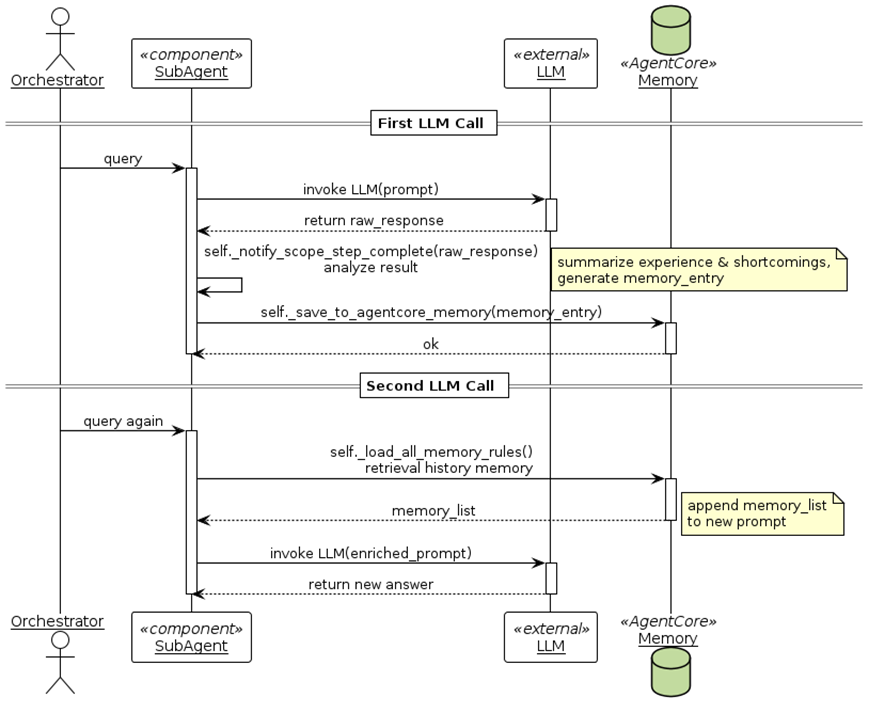
各个子Agent在处理过程中会借鉴机器学习中Optimizer、Step等思想,通过SCOPE实现自我学习,同时将学习到的经验存储在AgentCore Memory中,以供下一轮抽取时复用,实现自我进化。具体流程如下:
图8:子Agent处理时序图
子Agent在LLM调用后,会通过self._notify_scope_step_complete()方法分析Prompt、task_description、error和LLM返回的raw_response,总结经验和不足,再将分析结果和改进思路通过self._save_to_agentcore_memory(memory_entry)写入AgentCore Memory;在下一次再调用LLM时,会通过self._load_all_memory_rules()方法从 Memory中检索相关经验,以memory_list的形式补充到Prompt中,以便有效利用前面的经验。
下面给出技术实现过程中各部分的关键代码。
3.2 Orchestrator
Orchestrator是信息抽取的主Agent,采用ReAct范式开发。
"""Create the main orchestrator agent with Info-Extraction-Expert pattern"""

system_prompt = """You are a professional data extraction expert in the travel and tourism industry, internally designated as Info-Extraction-Expert.
Your objective: Automatically complete the extraction of target information from original text with minimal human intervention, extracting content exactly as it appears without modifying words or semantics, and passing validation.

You must strictly follow this 5-step closed loop:

1. **Plan** - Break down user requirements into subtasks ①~④, output as Markdown list:
   ① CSV template analysis (analyze_csv_template)
   ② Data extraction (extract_from_markdown)
   ③ Data validation (validate_extraction)
   ④ Output writing (write_output_csv)

2. **Act** - Call tools in sequence:
   - step1_result = analyze_csv_template(csv_path="...")
   - step2_result = extract_from_markdown(md_path="...", csv_analysis_result=step1_result, react_guidelines=...)
   - step3_result = validate_extraction(extracted_data=step2_result, csv_analysis_result=step1_result)
   - step4_result = write_output_csv(extracted_data=step2_result, output_path="...")

   CRITICAL: step1_result must be passed completely to subsequent tools, do not modify or reconstruct!
   Save each tool's complete output to observation variable.

3. **Reflect** - Analyze observation:
   If validation shows FAILED/ERROR/is_valid=false:
   Write a ≤150 word "critique" in evaluator tone, identifying root cause and fix direction;
   Call store_memory(key="last_error", value="critique text").

   If all PASSED/is_valid=true:
   Write a ≤100 word "success experience";
   Call store_memory(key="last_success", value="success experience").

4. **Re-Plan** - Based on reflection text, modify only necessary subtasks in original Plan, generate new ①~④ list;
   Must reference fix keywords mentioned in memory.
   Call retrieve_memory(key="last_error") to get previous error information.

5. **Loop** - Return to step 2, maximum 4 iterations; if still failing after 4 rounds, output "Manual intervention required" and stop.

CRITICAL PRINCIPLES:
- Each iteration must complete full Plan -> Act -> Reflect -> Re-Plan cycle
- Use react_guidelines parameter to pass learned experience from errors
- Save each tool's results as variables and pass to next tool
- Maintain extraction fidelity, do not modify original text format or add/remove semantics, even if original text has irregularities, extract as-is
- Focus on extraction task itself, do not attempt to correct or standardize data
- Focus on solving specific validation failure problems

Available tools:
- analyze_csv_template: Analyze CSV template structure
- extract_from_markdown: Extract data from markdown
- validate_extraction: Validate extraction results
- write_output_csv: Write CSV file
- store_memory/retrieve_memory: Store and retrieve long-term memory"""

return Agent(
    name="Info-Extraction-Expert Orchestrator",
    model=self.model,
    tools=[
        self.analyze_csv_template,
        self.extract_from_markdown,
        self.validate_extraction,
        self.write_output_csv,
        self.store_memory,
        self.retrieve_memory
    ],
    system_prompt=system_prompt
)
3.3 CSV Analyzer Agent
CSV Analyzer Agent负责分析输入的CSV模板,以了解需要抽取的信息详情,包括需要抽取哪些字段、字段的类型、字段的要求等。
# Create sub-agent for CSV analysis (using original seventh.py prompt)
base_prompt = """You are a CSV structure analyzer for a KEYWORD EXTRACTION system.

CRITICAL CONTEXT: This is an EXTRACTION tool, NOT a formatting/standardization tool.
The system will extract data EXACTLY as it appears in source documents without modification.

Your job is to:
1. Analyze CSV template files to understand their structure
2. Identify column names and their data requirements
3. Provide clear specifications for WHAT to extract (not HOW to format it)
4. Clean column names by removing explanatory text while staying close to original names
5. Emphasize FAITHFUL extraction over format compliance

IMPORTANT PRINCIPLES:
- Specifications should describe WHAT content to look for, not the exact format required
- Extracted data will preserve original text format from the source
- Do NOT require format standardization (e.g., dates, prices, units)
- Focus on identifying the correct semantic content to extract

Column name cleaning examples:
- "Product Name (required)" -> "Product Name"
- "Price (in USD)" -> "Price"  (but extraction keeps original format like "$199.99" or "199.99")
- "Release Date - YYYY-MM-DD" -> "Release Date"  (but extraction keeps original format)
- "Rating (1-5 stars)" -> "Rating"  (but extraction keeps text like "4.5 stars")

Analyze the CSV template carefully and provide specifications focusing on CONTENT identification."""

csv_analyzer = Agent(
    name="CSV Analyzer",
    model=self.model,
    system_prompt=base_prompt + self._load_all_memory_rules("csv_analyzer")
)

prompt = f"""Analyze the CSV template at: {csv_path}

The CSV has {len(headers)} columns with original names: {', '.join(headers)}
{last_rows_text}

CRITICAL TASKS:
1. Clean the column names by removing explanatory text (parentheses, brackets, after dashes/colons) while preserving core meaning
2. Determine if the last rows shown above are SAMPLE DATA (example/demonstration data) or just EMPTY ROWS
3. Provide your analysis in this exact format at the START of your response:

   CLEANED_COLUMNS: [Column1, Column2, Column3, ...]
   HAS_SAMPLE_DATA: yes/no

4. Then provide detailed specifications for each field including:
   - Inferred data types (string, number, date, etc.)
   - Any constraints or patterns you observe
   - Specific extraction instructions

Be thorough and specific."""

response = csv_analyzer(prompt)

# Parse response
response_str = str(response)

# Extract cleaned columns
cleaned_columns = headers  # Default fallback
for line in response_str.split('\n'):
    if line.strip().startswith('CLEANED_COLUMNS:'):
        columns_text = line.split('CLEANED_COLUMNS:')[1].strip()
        columns_text = columns_text.strip('[]')
        cleaned = [col.strip().strip('"').strip("'") for col in columns_text.split(',')]
        if len(cleaned) == len(headers):
            cleaned_columns = cleaned
        break

# Extract sample data flag
has_sample_data = False
for line in response_str.split('\n'):
    line_stripped = line.strip().replace('**', '').replace('*', '')
    if 'HAS_SAMPLE_DATA' in line_stripped:
        if ':' in line_stripped:
            answer = line_stripped.split(':')[1].strip().lower()
        else:
            answer = line_stripped.lower()
        if 'yes' in answer:
            has_sample_data = True
        break

result = {
    'columns': cleaned_columns,
    'has_sample_data': has_sample_data,
    'sample_data': last_rows if has_sample_data else [],
    'agent_analysis': response_str[:1500] + "..." if len(response_str) > 1500 else response_str
}

# Notify SCOPE (run in sync context)
if self.scope_optimizer:
    try:
        import asyncio
        loop = asyncio.new_event_loop()
        asyncio.set_event_loop(loop)
        loop.run_until_complete(self._notify_scope_step_complete(
            agent_name="csv_analyzer",
            agent_role="CSV template structure analyzer",
            task_description=f"Analyze CSV template structure at {csv_path}",
            model_output=str(response),
            current_prompt=csv_analyzer.system_prompt
        ))
        loop.close()
    except Exception:
        pass

return result
3.4 MD Extractor Agent
MD Extractor Agent负责根据CSV模板的要求从Markdown中抽取信息。
# Create MD extractor sub-agent (using original seventh.py prompt)
base_prompt = """You are a data extraction specialist. Your job is to:
1. Read markdown content carefully
2. Extract data EXACTLY as it appears in the source text (keyword extraction)
3. DO NOT modify, reformat, or standardize the extracted content
4. DO NOT add units, currency symbols, or any text not present in the original
5. Structure extracted data to match CSV columns exactly
6. Handle missing data gracefully with empty strings

CRITICAL PRINCIPLES:
- This is EXTRACTION, not generation or formatting
- Extract keywords and values FAITHFULLY from the original text
- Preserve the original text format (e.g., if source says "$199.99", keep it; if source says "199.99", keep it)
- Do NOT apply common sense transformations (e.g., don't convert "4.5 stars" to "4.5" unless specifications explicitly require it)

CRITICAL: Return ONLY a valid JSON object where keys exactly match CSV column names.
Do not include any explanation, only the JSON."""

# Build complete system prompt (including SCOPE Memory rules)
system_prompt = base_prompt + self._load_all_memory_rules("md_extractor")

# Add main Agent's Reflexion Guidelines (if available)
if react_guidelines:
    system_prompt += f"\n\nREFLEXION GUIDELINES (From current task analysis):\n"
    system_prompt += "Apply these specific corrections for this iteration:\n"
    for i, guideline in enumerate(react_guidelines, 1):
        system_prompt += f"{i}. {guideline}\n"

md_extractor = Agent(
    name="MD Extractor",
    model=self.model,
    system_prompt=system_prompt
)

columns_str = ", ".join(csv_analysis_result.get('columns', []))
agent_analysis = csv_analysis_result.get('agent_analysis', '')

prompt = f"""Extract data from this markdown content according to CSV specifications.

CSV Field Specifications:
{agent_analysis}
{few_shot_section}

EXTRACTION INSTRUCTIONS:
1. Extract keywords/values EXACTLY as they appear in the source text
2. Return ONLY a valid JSON object where keys exactly match CSV column names: {columns_str}
3. Use empty string "" for missing data
4. Ensure all {len(csv_analysis_result.get('columns', []))} column names are present as keys

Markdown Content:
{md_content}

CRITICAL: Your response must contain ONLY valid JSON, no explanations."""

response = md_extractor(prompt)
response_str = str(response)

# Notify SCOPE (run in sync context)
if self.scope_optimizer:
    try:
        import asyncio
        loop = asyncio.new_event_loop()
        asyncio.set_event_loop(loop)
        loop.run_until_complete(self._notify_scope_step_complete(
            agent_name="md_extractor",
            agent_role="Data extraction specialist",
            task_description=f"Extract data from {md_path} into CSV format",
            model_output=response_str,
            current_prompt=md_extractor.system_prompt + "\n\n" + prompt
        ))
        loop.close()
    except Exception:
        pass

return {
    'status': 'success',
    'extracted_data': response_str,
    'md_path': md_path
}
3.5 Validator Agent
Validator Agent负责对MD Extractor Agent抽取出的信息进行校验,校验得到的信息能否满足CSV模板的要求。
# Create validator sub-agent (using original seventh.py prompt)
base_prompt = """You are a data validation expert for an EXTRACTION system (not a generation system).

IMPORTANT: This system extracts keywords from source text FAITHFULLY without modification.
Do NOT reject extractions based on format preferences or standardization expectations.

Your validation criteria:
1. Verify all required CSV columns are present as keys
2. Check that values are non-empty (not placeholder like "TBD", "TODO", "N/A")
3. Verify JSON format is valid
4. Ensure data appears to be genuinely extracted (not made up)

FORBIDDEN validation criteria (DO NOT check these):
- Specific format requirements (e.g., date format, price format, units)
- Standardization expectations (e.g., "$199.99" vs "199.99")
- Common sense transformations (e.g., "4.5 stars" should be "4.5")
- Data type strictness (extracted text may include descriptive words)

Respond in this format:
VALID: true/false
ERRORS (if any):
- [Field name]: [Specific issue - only missing data or placeholder values]"""

validator = Agent(
    name="Validator",
    model=self.model,
    system_prompt=base_prompt + self._load_all_memory_rules("validator")
)

columns_str = ", ".join(csv_analysis_result.get('columns', []))
agent_analysis = csv_analysis_result.get('agent_analysis', '')

prompt = f"""Validate the extracted data against CSV specifications.

CSV Field Specifications:
{agent_analysis}
{sample_data_section}

CSV Columns Required: {columns_str}

Extracted Data to Validate:
{extracted_data}

Validate according to the criteria and respond in the required format."""

response = validator(prompt)
response_str = str(response)

# Parse validation result
response_lower = response_str.lower()
is_valid = 'valid: true' in response_lower or 'validation passed' in response_lower

# Extract errors
errors = []
if not is_valid:
    lines = response_str.split('\n')
    for line in lines:
        line = line.strip()
        if line.startswith('-') or 'error' in line.lower() or 'missing' in line.lower():
            if line and line != '-':
                errors.append(line)

# Notify SCOPE (run in sync context)
error_obj = Exception(f"Validation failed: {'; '.join(errors)}") if not is_valid else None
if self.scope_optimizer:
    try:
        import asyncio
        loop = asyncio.new_event_loop()
        asyncio.set_event_loop(loop)
        loop.run_until_complete(self._notify_scope_step_complete(
            agent_name="validator",
            agent_role="Data validation expert",
            task_description="Validate extracted data against CSV template requirements",
            model_output=response_str,
            error=error_obj,
            current_prompt=validator.system_prompt + "\n\n" + prompt
        ))
        loop.close()
    except Exception:
        pass

return {
    'status': 'success',
    'is_valid': is_valid,
    'errors': errors,
    'validation_response': response_str
}
4 运行分析
下面列举一些项目在开发和上线运行过程中的数据,以便分析和验证设计的有效性。
4.1 从失败中学习
通过分析运行过程的中间数据,可以看到Agent会从失败的处理中分析不足,探索新的解决思路、学习到新的经验。
| |
Error |
ReAct Guidelines |
Tactical Guidelines |
| 1st round |
– 客户报送日期: Empty value (required field marked with *)
– 签约对象: Empty value (required field marked with *)
– 是否代结算: Empty value (required field marked with *)
|
1. Focus on mandatory fields marked with asterisks
2. Search comprehensively for 客户报送日期, 签约对象, 是否代结算
3. Extract all available information even if not explicitly labeled
4. Use template sample values as reference patterns
|
1. When extracting dates, standardize to YYYY-MM-DD format regardless of source format (e.g. ’01/01/2025′ → ‘2025-01-01’). If ambiguous M/D order, prefer local convention. |
| 2nd round |
Validation PASSED successfully but CSV writing FAILED due to JSON parsing error. The extracted data JSON format contains formatting issues that prevent proper CSV conversion. The issue appears to be with JSON structure – likely extra characters or improper escaping. Need to ensure clean JSON format before writing to CSV file. |
1. Focus on mandatory fields marked with asterisks
2. Search comprehensively for required fields
3. Extract all available information
4. Ensure clean JSON format without extra characters
5. Output valid JSON syntax for CSV conversion
|
1. When extracting from tables: 1) Prefer earliest/default prices when multiple time periods exist 2) Default to first-listed room type when multiple options present 3) Parse ‘X每间/夜’ format to extract base price
2. When extracting dates, standardize to YYYY-MM-DD format regardless of source format (e.g. ’01/01/2025′ → ‘2025-01-01’). If ambiguous M/D order, prefer local convention.
|
| 3rd round |
The extracted data is valid. All required CSV columns are present as keys, all values are non-empty (no placeholder values like “TBD”, “TODO”, “N/A”), the JSON format is valid, and the data appears to be genuinely extracted from source material. |
|
1. When extracting from tables: 1) Prefer earliest/default prices when multiple time periods exist 2) Default to first-listed room type when multiple options present 3) Parse ‘X每间/夜’ format to extract base price
2. When extracting dates, standardize to YYYY-MM-DD format regardless of source format (e.g. ’01/01/2025′ → ‘2025-01-01’). If ambiguous M/D order, prefer local convention.
3. When extracting hotel group names (酒店类型-酒店集团), check parent company ownership and consolidation history in text for indirect mentions (e.g., ‘X acquired Y’ implies X is the group name).
|
表1:Agent从Error中学习
4.2 学习到的经验
查看AgentCore Memeory,可以看到各个Agent在处理过程中学到的业务经验,这些经验的积累使得Agent越来越智能。
| Agent |
Type |
学习到的 Guidelines |
| CSV Analyzer Agent |
TACTICAL |
When column names contain CJK characters, verify UTF-8 encoding preservation and handle potential multi-byte character boundaries. Map common CJK business terminology variants. |
| MD Extractor Agent |
TACTICAL |
When extracting hotel group names (酒店类型-酒店集团), check parent company ownership and consolidation history in text for indirect mentions (e.g., ‘X acquired Y’ implies X is the group name). |
| When extracting from tables: 1) Prefer earliest/default prices when multiple time periods exist 2) Default to first-listed room type when multiple options present 3) Parse ‘X每间/夜’ format to extract base price |
| When extracting dates, standardize to YYYY-MM-DD format regardless of source format (e.g. ’01/01/2025′ → ‘2025-01-01’). If ambiguous M/D order, prefer local convention. |
| Validator Agent |
TACTICAL |
When ‘酒店类型’ is ‘国内集团’ or ‘国际集团’, verify ‘酒店类型-酒店集团’ is non-empty. When empty, flag as invalid. |
| When validating 服务费 and 收取方式, check for non-empty values if 是否代结算 is ‘是’. These fields become required in代结算 cases per template specifications. |
| When validating required fields (marked with *), strictly enforce non-empty values for 客户报送日期, 签约对象, and 是否代结算 regardless of other validation criteria. |
表2:Agents学习到的Guidelines
4.3 消融实验
为了验证Agents学习到的Guidelines是否真的有效、是否真的能够有助于后面的信息抽取,在开发阶段我们进行了多项实验。
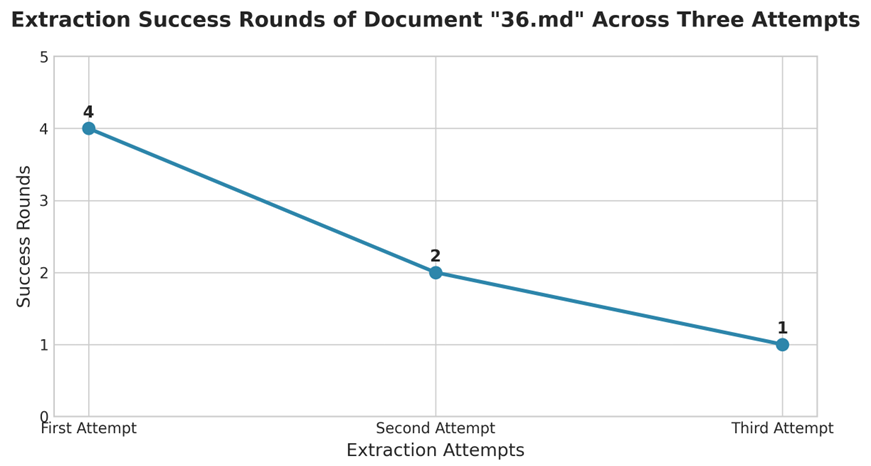
首先,我们清除所有AgentCore Memory,随机取出一份小合同36.md,运行3次,分别考查每一次需要经过几轮抽取可以获得满足需要的输出。发现第一次需要4轮,第2次由于使用了前面的经验用了2轮,第3次1次提取成功。
图9:同一文档多次抽取对比图
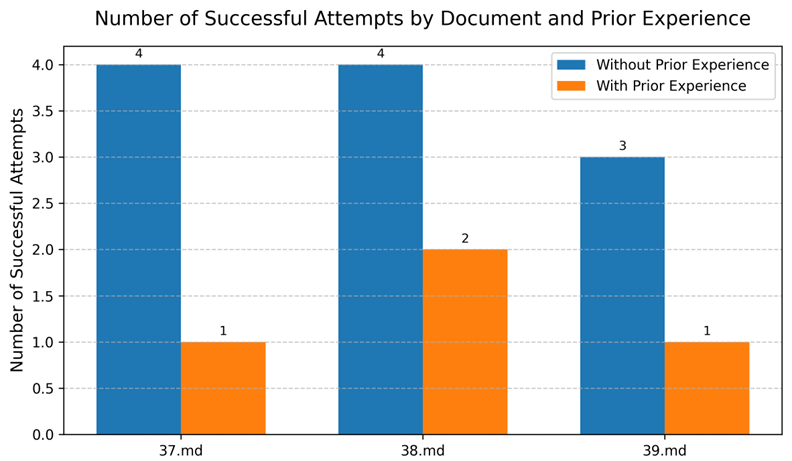
其次,我们随机取出三份小合同37.md、38.md和39.md,依次清除所有AgentCore Memory后考查其获得满足需要输出的抽取轮数;再跟它们在他们在有充足先验经验条件下成功抽取的轮数做比较。可以看出对于不同的Markdown,Agents学习到的经验都可以有效的复用,提升处理效率。
图10:不同文档有无先验经验抽取对比图
4.4 最终输出
以第3章中图5的Markdown文本和图6的CSV模板作为输入,多Agents系统的最终输出效果如下:
图11:系统输出样例
5 应用场景
本文以文旅行业的OTA酒店合同报价单处理为场景,介绍了如何基于Bedrock AgentCore 构建一个自学习、可进化的多Agents系统。通过使用ReAct范式和SCOPE机制使Agents具备了从历史处理经验中学习并自主适应变化的能力;利用AgentCore Memory记忆机制解决了经验积累问题;结合AgentCore Runtime实现了多Agents的快速部署与动态编排,降低了开发与维护成本,提升了整体系统的运营效率和经济性。
这一方案的核心价值不仅在于提升了报价单处理的自动化程度,更在于改变了系统与业务变化之间的关系——从”被动响应、人工适配”转向”主动学习、自主进化”。随着处理经验的积累,系统对新格式和新规则的适应能力将持续增强,人工干预的频率逐步降低。
该方案的架构思路同样适用于其他文档处理场景,如保险合同解析、供应链报价处理、招投标文件审核等。如果你正在面临类似的业务挑战,欢迎参考本文的实现思路,也期待与同行交流探讨。
参考文献
*前述特定亚马逊云科技生成式人工智能相关的服务目前在亚马逊云科技海外区域可用。亚马逊云科技中国区域相关云服务由西云数据和光环新网运营,具体信息以中国区域官网为准。
本篇作者
AWS 架构师中心: 云端创新的引领者
探索 AWS 架构师中心,获取经实战验证的最佳实践与架构指南,助您高效构建安全、可靠的云上应用

|
 |