AWS Database Blog
Category: RDS for SQL Server
From bottlenecks to breakthroughs: Dutchie’s database migration journey
Dutchie, a leading technology platform serving the cannabis industry, manages critical operations for thousands of dispensaries across multiple states, processing millions of transactions annually. In this post, we explore how Dutchie successfully navigated the challenges of migrating mission-critical workloads to Amazon RDS for SQL Server in preparation for 4/20 week in 2025.
Essential tools for monitoring and optimizing Amazon RDS for SQL Server
In this post, we demonstrate how you can implement a comprehensive monitoring strategy for Amazon RDS for SQL Server by combining AWS native tools with SQL Server diagnostic utilities. We explore AWS services including AWS Trusted Advisor, Amazon CloudWatch Database Insights, Enhanced Monitoring, and Amazon RDS events, alongside native SQL Server tools such as Query Store, Dynamic Management Views (DMVs), and Extended Events. By implementing these monitoring capabilities, you can identify potential bottlenecks before they impact your applications, optimize resource utilization, and maintain consistent database performance as your business scales.
Trigger AWS Lambda functions from Amazon RDS for SQL Server database events
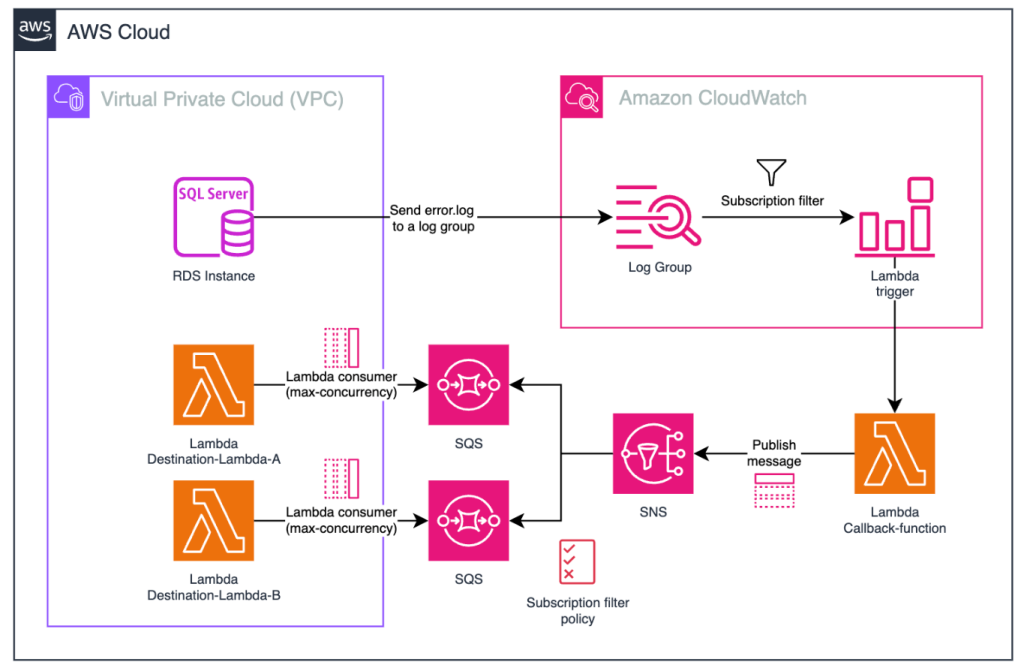
The ability to invoke Lambda functions in response to Amazon RDS for SQL Server database events enables powerful use cases such as triggering automated workflows, sending real-time notifications, calling external APIs, and orchestrating complex business processes. In this post, we demonstrate how to enable this integration by using Amazon CloudWatch subscription filters, Amazon SQS, and Amazon SNS to invoke Lambda functions from RDS for SQL Server stored procedures, helping you build responsive, data-driven applications.
Control database name visibility in Amazon RDS for SQL Server instances
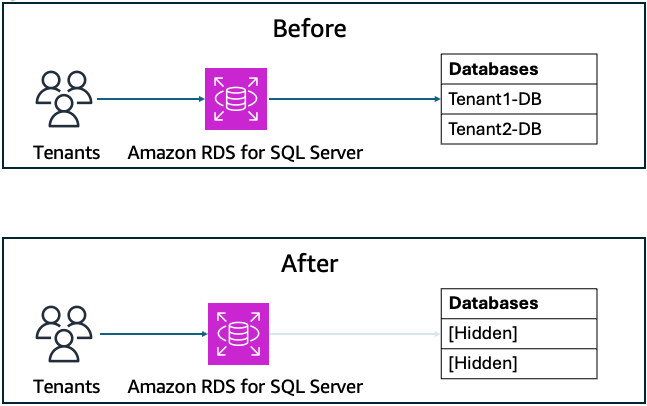
In Amazon Relational Database Service (Amazon RDS) for SQL Server, database visibility is configured using a dedicated stored procedure. In this post, we demonstrate tenant isolation at the visibility level, preventing tenants from seeing database names belonging to other customers while maintaining their access to their own resources. This solution addresses an important architectural consideration in multi-tenant SQL Server environments where database names might reveal tenant information. By using the Amazon RDS for SQL Server custom stored procedure msdb.dbo.rds_manage_view_db_permission, users can effectively control database visibility on a per-login basis while maintaining full application functionality.
Configure Optimize CPU on Amazon RDS for SQL Server
Amazon Relational Database Service (Amazon RDS) for SQL Server now offers the Optimize CPU feature, which enabled control over vCPU allocation through core count modification setting. SQL Server licensing costs can consume a significant portion of your database budget, especially when you’re paying for vCPUs that aren’t fully utilized. This post demonstrates how to implement the Optimize CPU feature to potentially reduce licensing costs while maintaining performance for both new and existing Amazon RDS instances, along with performance benchmarking results and cost implications.
Create a SQL Server Developer Edition instance on Amazon RDS for SQL Server
In this post, we show you how to create and deploy SQL Server Developer Edition on Amazon RDS.
Configure additional storage volumes with Amazon RDS for SQL Server
With the introduction of the additional storage volume feature, you can now attach up to three additional storage volumes to your Amazon RDS for SQL Server instances. By using this feature, you can distribute your data and log files across multiple volumes. This enhancement offers more granular control over storage configuration and performance optimization. In this post, you will learn about the following scenarios: Adding a new storage volume, Scaling an existing storage volume, Restoring a database on an additional storage volume, and Deleting a storage volume.

Exploring Optimize CPU feature on Amazon RDS for SQL Server
Amazon RDS for SQL Server now supports the Optimize CPU feature. With the Optimize CPU feature you can define the number of vCPUs when you launch new instances or when modifying existing database instances. This feature also provides a detailed billing breakdown of RDS infrastructure costs, and licensing costs for SQL Server and Windows OS. It is available starting from the 7th Generation instance class. In this post, we explore how to use the Optimize CPU feature with Amazon RDS for SQL Server.
Optimize database performance using resource governor on Amazon RDS for SQL Server
You can now use resource governor with Amazon RDS for SQL Server to optimize your database performance by controlling how compute resources are allocated across different workloads. This post shows you how to optimize your database performance using resource governor on Amazon RDS for SQL Server. We walk you through the step-by-step process of enabling and configuring the feature, including how to set up resource pools, create workload groups, and implement classifier functions for effective resource management.
Implement high availability in Amazon RDS for SQL Server Web Edition using block-level replication
Amazon RDS for SQL Server has enhanced SQL Server 2022 Web Edition by introducing high availability through block-level replication in Multi-AZ deployments. With this release, you can quickly set up and maintain highly available databases while significantly reducing operational overhead. In this post, we discuss the benefits of block-level replication and how to get started. For more information, see Licensing Microsoft SQL Server on Amazon RDS.