AWS Big Data Blog
Using Amazon SageMaker Unified Studio Identity center (IDC) and IAM-based domains together
Amazon SageMaker Unified Studio now offers two domain configurations: Amazon SageMaker Unified Studio Identity Center(IDC)-based domains with comprehensive governance features, and Amazon SageMaker Unified Studio IAM-based domains with enhanced developer productivity tools.
In this post, we demonstrate how you can use both of these domain configurations of Amazon SageMaker Unified Studio using AWS Identity and Access Management (IAM) role reuse and attribute-based access control.
How authentication works in each configuration
Amazon SageMaker Unified Studio IDC-based domains authenticate users through AWS Identity and Access Management (IAM) Identity Center with Single Sign-On, preserving individual user identities throughout their sessions. These domains excel in governance with identity-based authorization, fine-grained access controls between users, and comprehensive catalog management featuring formal Publisher/Subscriber (Pub/Sub) data sharing workflows with approval processes—ideal for enterprise environments requiring strong identity management, compliance tracking, and identity-based audit trails.
Amazon SageMaker Unified Studio IAM-based domains authenticate through federated AWS Identity and Access Management (IAM) roles where all users accessing a project share the same role permissions. These domains prioritize developer productivity with modern tools including new serverless Notebooks, Athena Spark integration, the improved interface with vertical navigation, and built-in AI assistance, designed for development teams that need streamlined access and advanced analytics capabilities.
This solution facilitates organizations that are already using IDC-based domains to preserve their existing governance frameworks established in IDC-based domains while unlocking modern development capabilities for their teams through IAM-based domains. If you prefer to use the newly launched IAM-based domains, you can continue to do as well. The choice depends on your company’s needs.
Please note that at the time of writing this blog, IAM-based domains do not support Trusted identity propagation. This solution uses the project execution role to configure data access.
The challenge
Imagine a data steward (Sam) uses the IDC-based domain to define data access policies, manage the data catalog, and approve subscription requests to verify compliance and proper data governance.
On the other hand, a data engineer (Sarah), wants to use IDC-based domain for governance features such as SageMaker catalog and IAM-based domain for the new serverless Notebook to build data pipelines, perform advanced analytics, and accelerate development cycles. Sarah will request access to the data through IDC-based domain, and once access is approved by Sam, Sarah can access this data in serverless notebook available in IAM-based domain.
Solution overview
The integration leverages IAM role reuse, AWS Lake Formation Attribute-Based Access Control (ABAC) and Amazon SageMaker Catalog pub-sub model to automatically carry permissions from the IDC-based domain to the new IAM-based domain. When properly configured, data subscriptions managed through the IDC-based domain’s Pub/Sub model become immediately accessible in IAM-based domain projects, providing a unified data access experience.
The solution we will implement in the post involves creating an IAM-based domain project that is similar to your IDC consumer project (eg same team members, use case) , configuring execution roles, and enabling role reuse. This approach maintains the familiar subscription workflow while extending benefits to the IAM-based domain.The following diagram shows the high-level architecture of how this approach works.
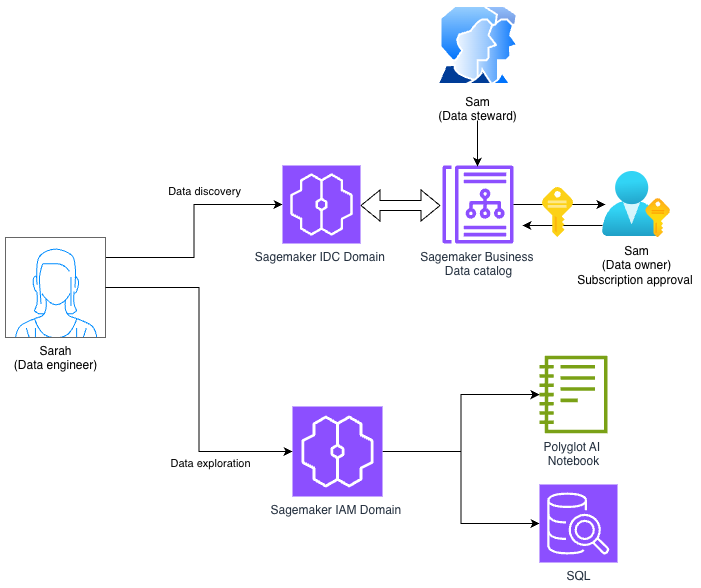
The solution architecture consists of:
- Existing IDC-based domain: Contains producer and consumer projects with established data sharing via Pub/Sub model
- IAM-based domain: New projects with federated and execution roles configured for modern development tools
- IAM Identity Center: Manages federated access and permission sets
- Attribute-Based Access Control: Tags on execution roles enable automatic permission inheritance
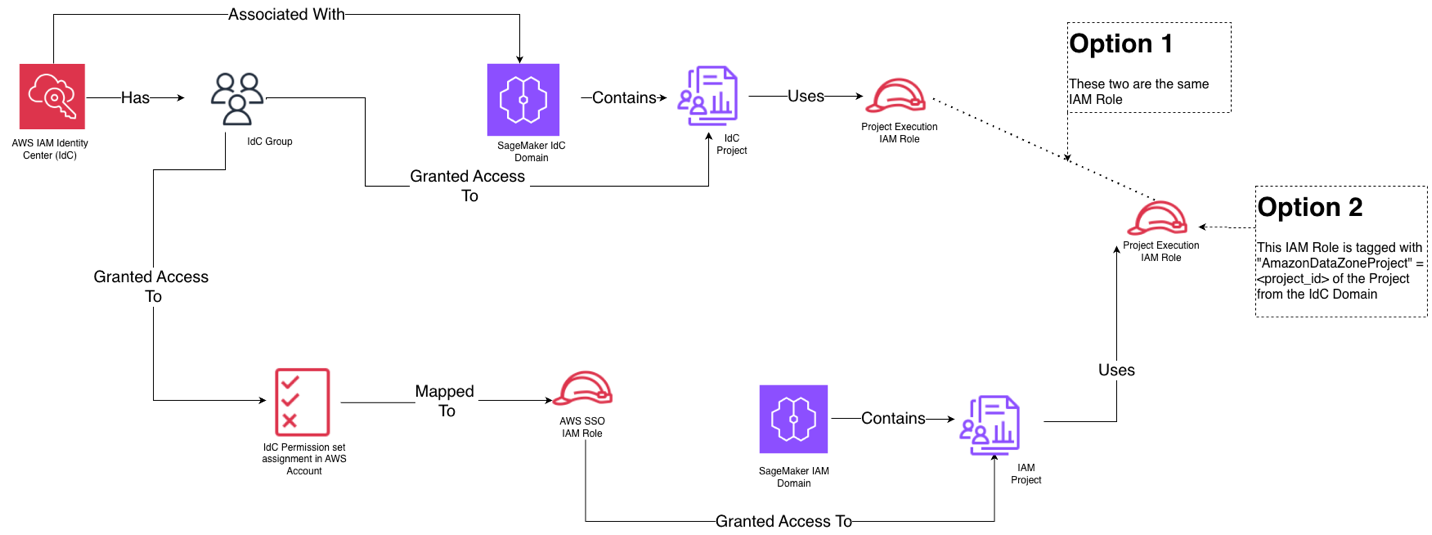
The solution provides 2 options: Option 1: IDC-Based Domain project role reuse provides the simplest integration path by directly reusing the existing consumer project IAM role from your IDC-based domain as the execution role in the IAM-based domain. The primary benefits include simplified setup requiring only policy changes (covered later in the blog), reduced administrative overhead with one less role to manage and lower risk of misconfiguration since you’re leveraging proven, existing roles. Choose Option 1 when you want the fastest implementation path, your organization prefers minimal role proliferation, you have well-established IDC-based domain roles that already have data access permissions, or your team has limited IAM expertise and wants to avoid complex tagging configurations.
Option 2: Creating a new execution role for the IAM-based domain project and use attribute-based access control (ABAC) through tagging with the IDC-based domain project ID. The key benefits include enhanced auditability with two distinct roles (one for IDC-based domain, one for IAM-based domain), clear separation showing which domain generated each request in CloudTrail logs, greater flexibility to customize permissions specific to IAM-based domain needs without affecting IDC-based domain operations, and better security isolation between the two domain types. The `AmazonDatazoneProject` tag enables attribute based access control, while maintaining distinct role identities. Choose Option 2 when: your organization requires detailed audit trails distinguishing between domain types, compliance policies mandate separation of concerns between governance and development environments, you want to track and attribute costs separately for each domain, or you need to provide evidence showing which domain (governance vs. development) accessed specific data resources for compliance reporting.
Here is the high-level view of how the identity and domain entities map to each other for both options:
Prerequisites
To follow along with this post, you should have:
- An AWS account with Amazon SageMaker Unified Studio IDC-based domain already configured
- Existing producer and consumer projects in the Amazon SageMaker Unified Studio IDC-based domain
- Data assets published and subscribed through the Pub/Sub model
- Administrative access to Amazon IAM Identity Center
- Familiarity with Amazon SageMaker Unified Studio concepts including projects, environments, and IAM roles
- Amazon SageMaker Unified Studio IAM-based domain created as an administrator
For this demonstration, we use a simplified setup with a sales producer project and a marketing consumer project that subscribes to these tables.
Understanding the current IDC-based domain setup
Our starting point includes a well-established Amazon SageMaker Unified Studio IDC-based domain structure:
Sales Producer Project
- Contains a database with pipeline and sales tables
- Managed by Sam, the data steward who creates and publishes data assets
- Has its own project IAM role
Marketing Consumer Project
- Managed by Sarah, the data engineer who subscribes to published data via IDC domain project
- Has its own project IAM role
- Successfully queries subscribed data through the IDC-based domain interface
Each project has an associated IAM role that governs access to data assets, and the Pub/Sub model manages subscription workflows and permissions.
Setting up federated role through permission sets
Federated roles through permission sets are used to authenticate and provide users with console access to IAM-based domains through AWS IAM Identity Center, where all users within a project share the same role permissions. When you assign a permission set, IAM Identity Center creates corresponding IAM Identity Center-controlled IAM role in AWS account, and attaches the policies specified in the permission set to that role.
IAM-based SMUS domains enable streamlined access to modern development tools (serverless Notebooks, Athena Spark, AI assistance) while maintaining governance, automatically propagating permissions across domains without requiring duplicate access approvals, and simplifying team member onboarding.You can use any IAM role to access IAM-based domain. For this post, we will use federated role option using AWS IAM Identity Center (IDC).
Grant access to Data engineer group for IAM-based domains in Identity Center
1) Set up federated role in AWS IAM Identity Center
Navigate to IAM Identity Center (IDC) in the AWS Management Console, then complete the following steps:
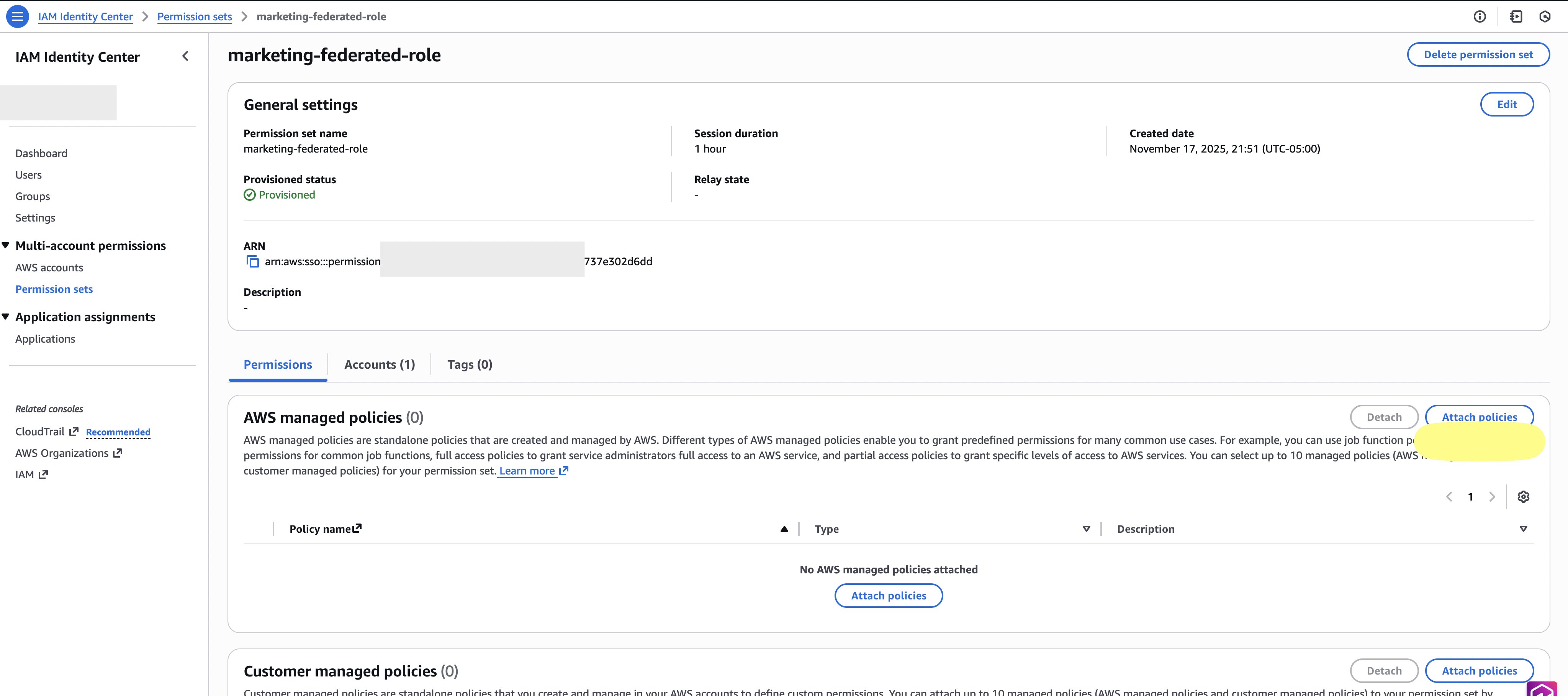
- Go to permission set section in IDC. Create a new permission set called
Marketing-federated-roleand select Attach Policy.
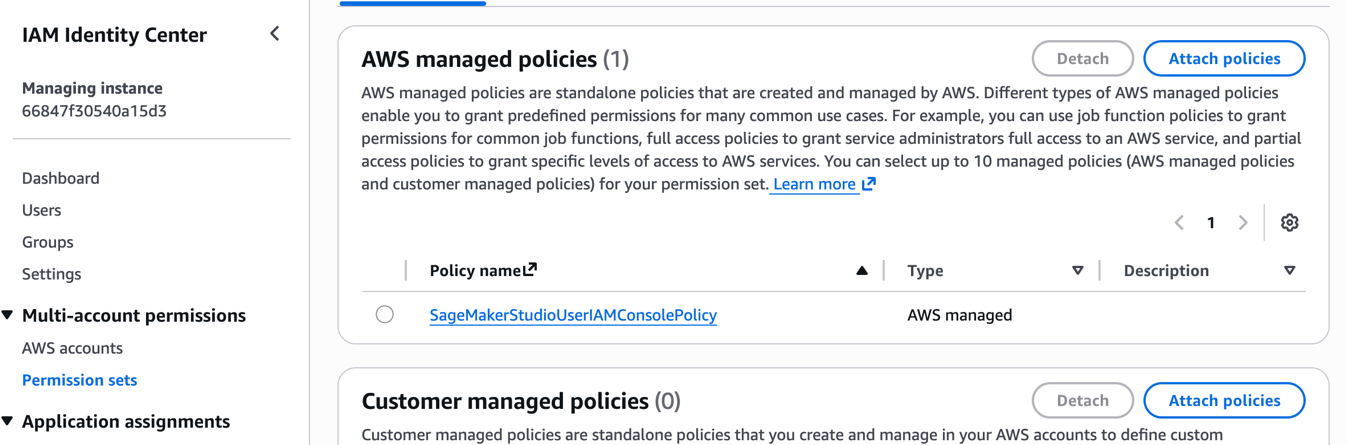
- Search for SageMakerStudioUserIAMConsolePolicy in the existing policy name from list and select
SageMakerStudioUserIAMConsolePolicyfrom the list. Note that the managed policySageMakerStudioUserIAMConsolePolicymust be attached or have the same permissions added via another policy to be able to access projects in a SageMaker IAM domain.
- Go to the AWS account section of IDC.
- Assign the created permission set to your AWS account.
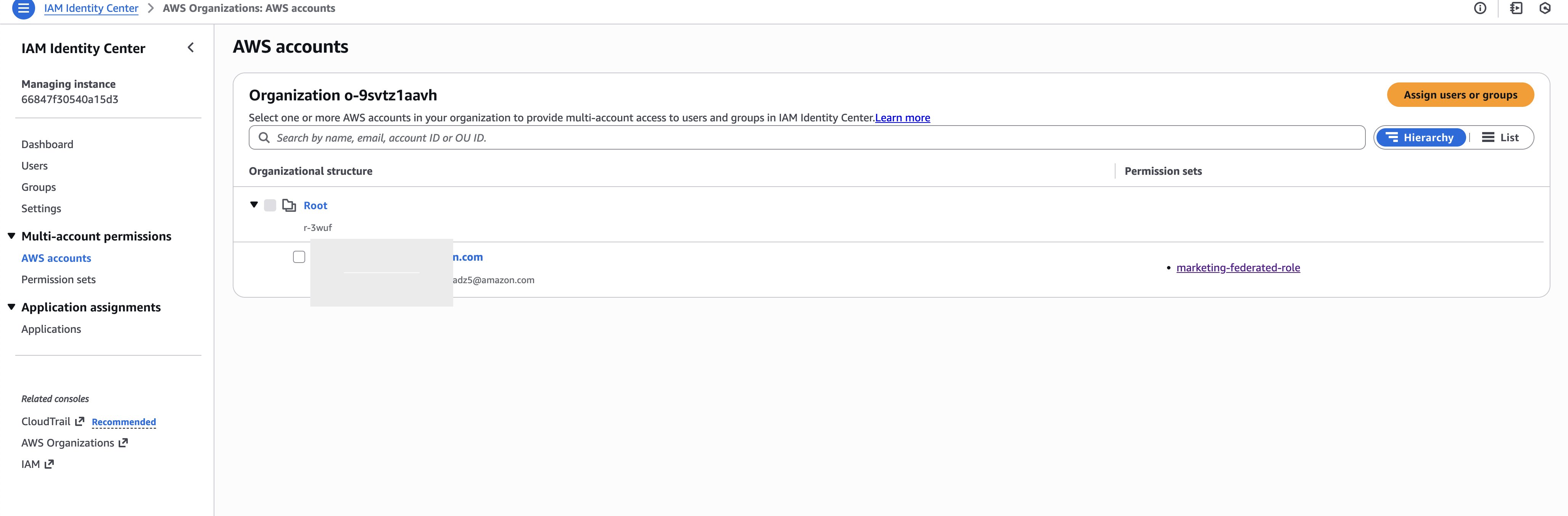
- For this post we assigned the permission set to marketing group, As a best practice, you should setup and grant access to groups rather than individual users.
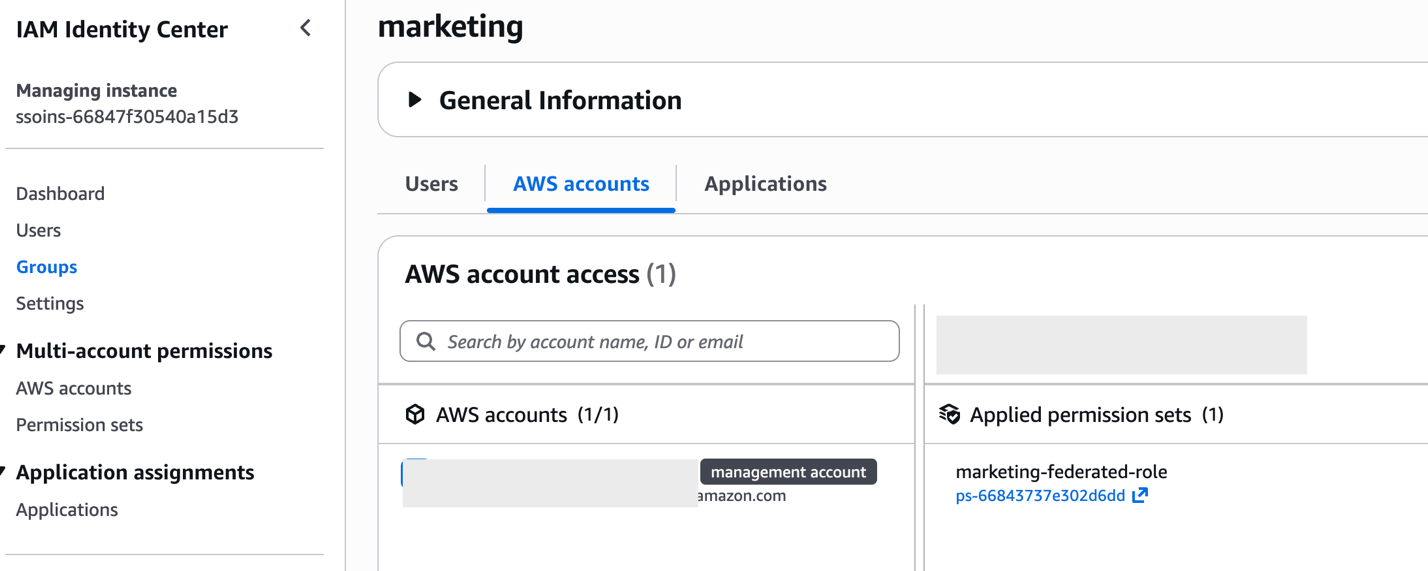
- Add Sarah to marketing group.
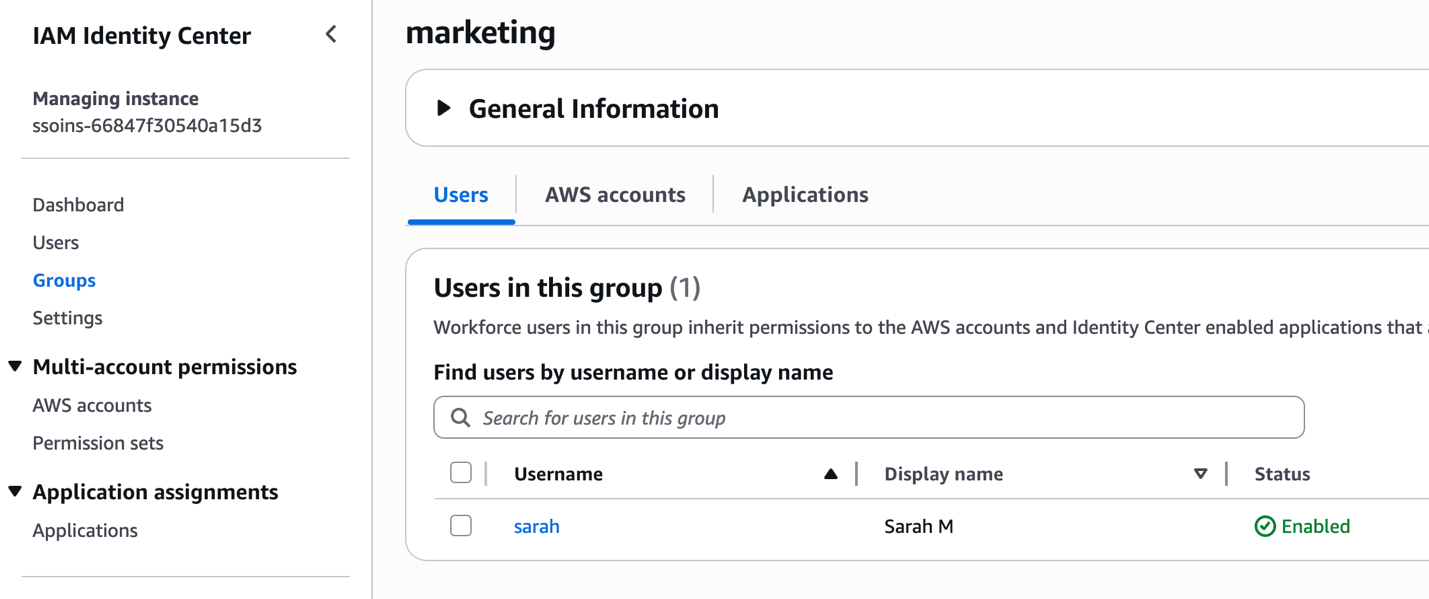
This creates a federated role that Sarah can use to access the IAM-based domain. The federated role appears as an IAM role within your account and serves as the entry point for console access.
Setting up IAM-based domain execution role
There are 2 options to setup execution role for IAM-based domain project. The execution role has a one-to-one mapping with the federated role.
Option 1 – IDC-based domain Project Role reuse
Instead of creating a new execution role and tagging it, you can configure the IAM-based domain project to directly reuse the consumer project IAM role from the IDC-based domain as the execution role. This option only needs policy changes to the consumer project IAM role. To find the IDC-based domain consumer project IAM role:
- Navigate to the Amazon SageMaker Unified Studio IDC-based domain portal.
- Open the Marketing Consumer Project.
- Copy the project role ARN from the project overview page.
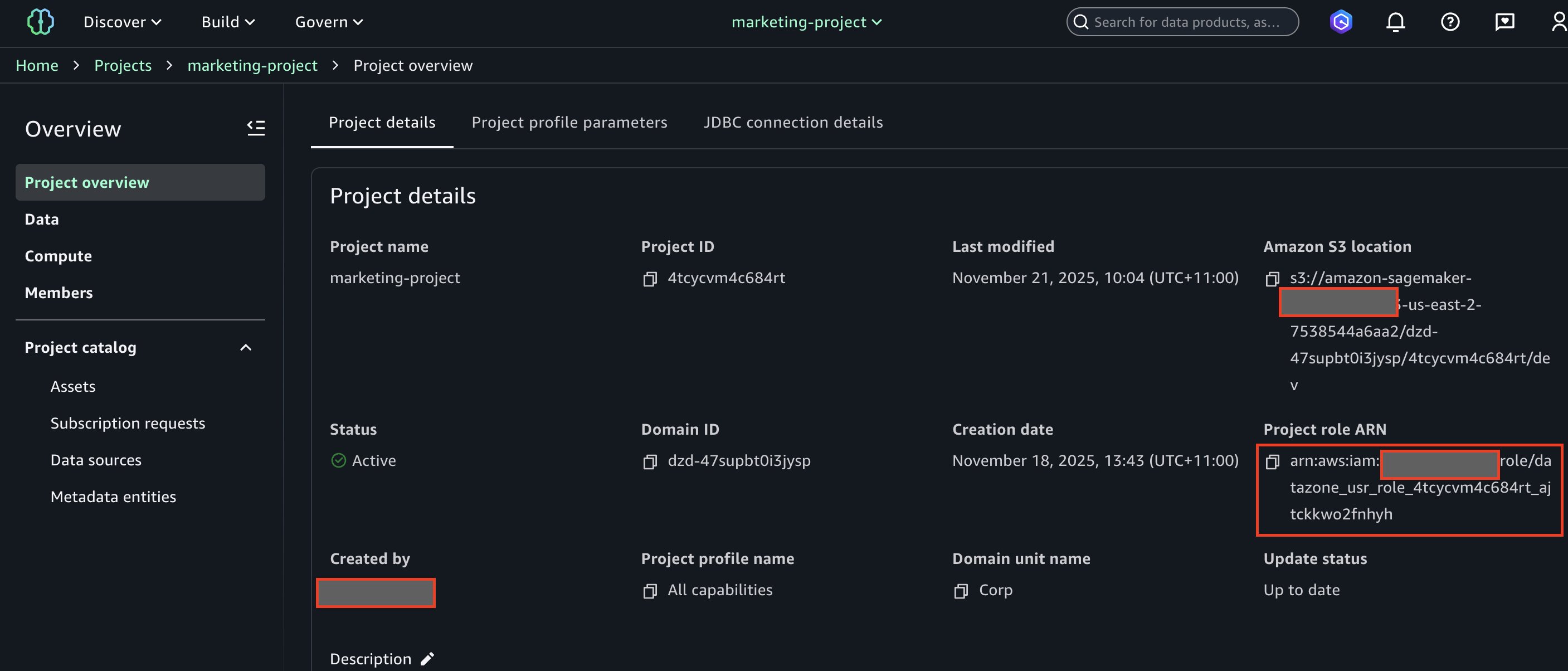
- You will need to modify this execution role’s policy with detailed instructions provided later in the blog.
Setting up IAM-based domain project for option 1
To create an IAM-based domain project that will integrate with your existing IDC-based domain permissions, complete the following steps:
- Log in to the AWS Console using IAM-based domain administrator.
- Navigate to Amazon SageMaker page within console.
- Choose Open.
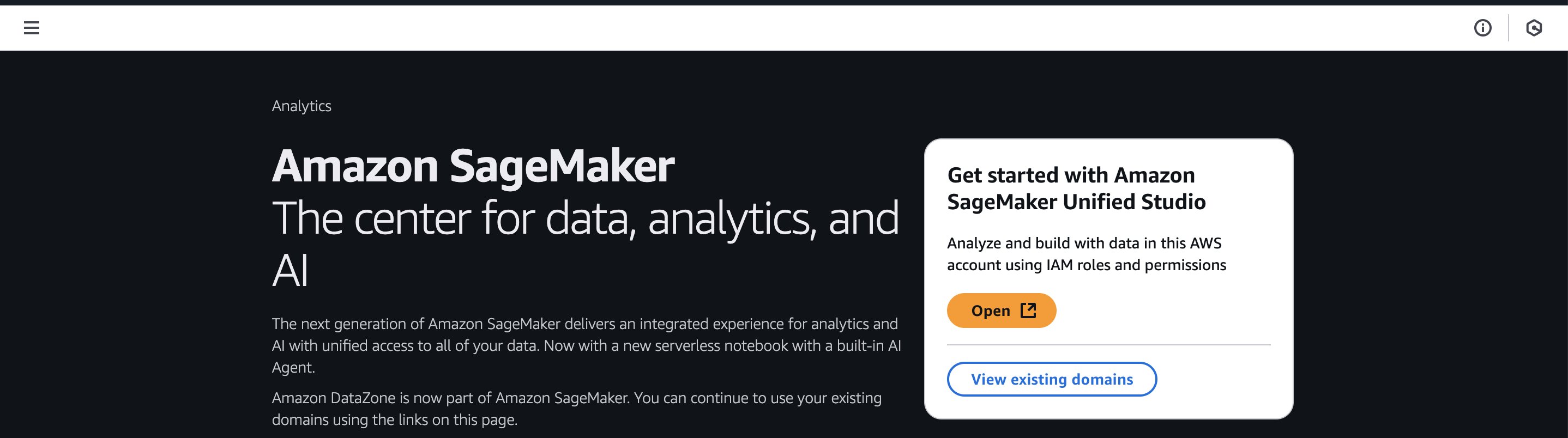
- Once logged in to IAM-based domain as admin, choose Manage projects.
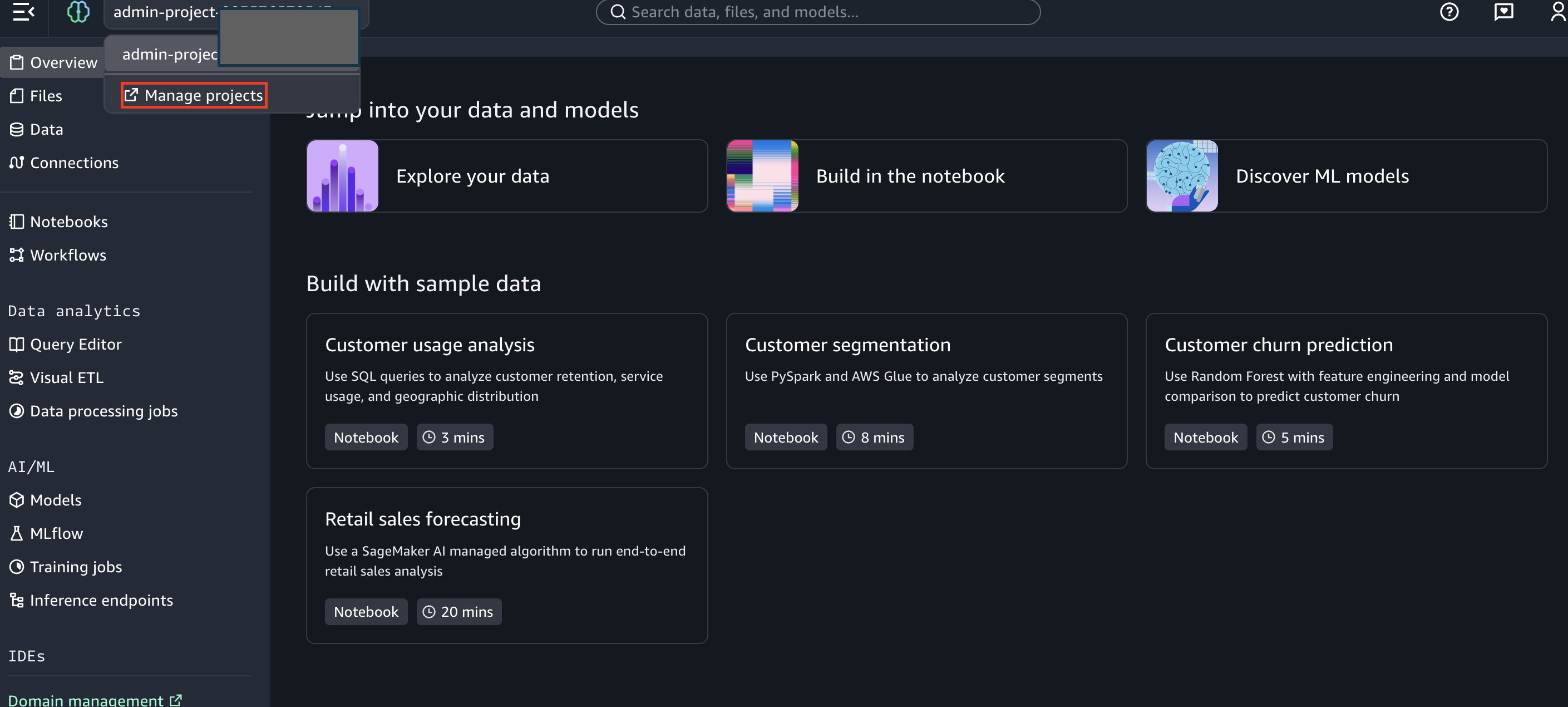
- Next, click on Create Project.

- Enter project name as “Marketing Consumer Project”.
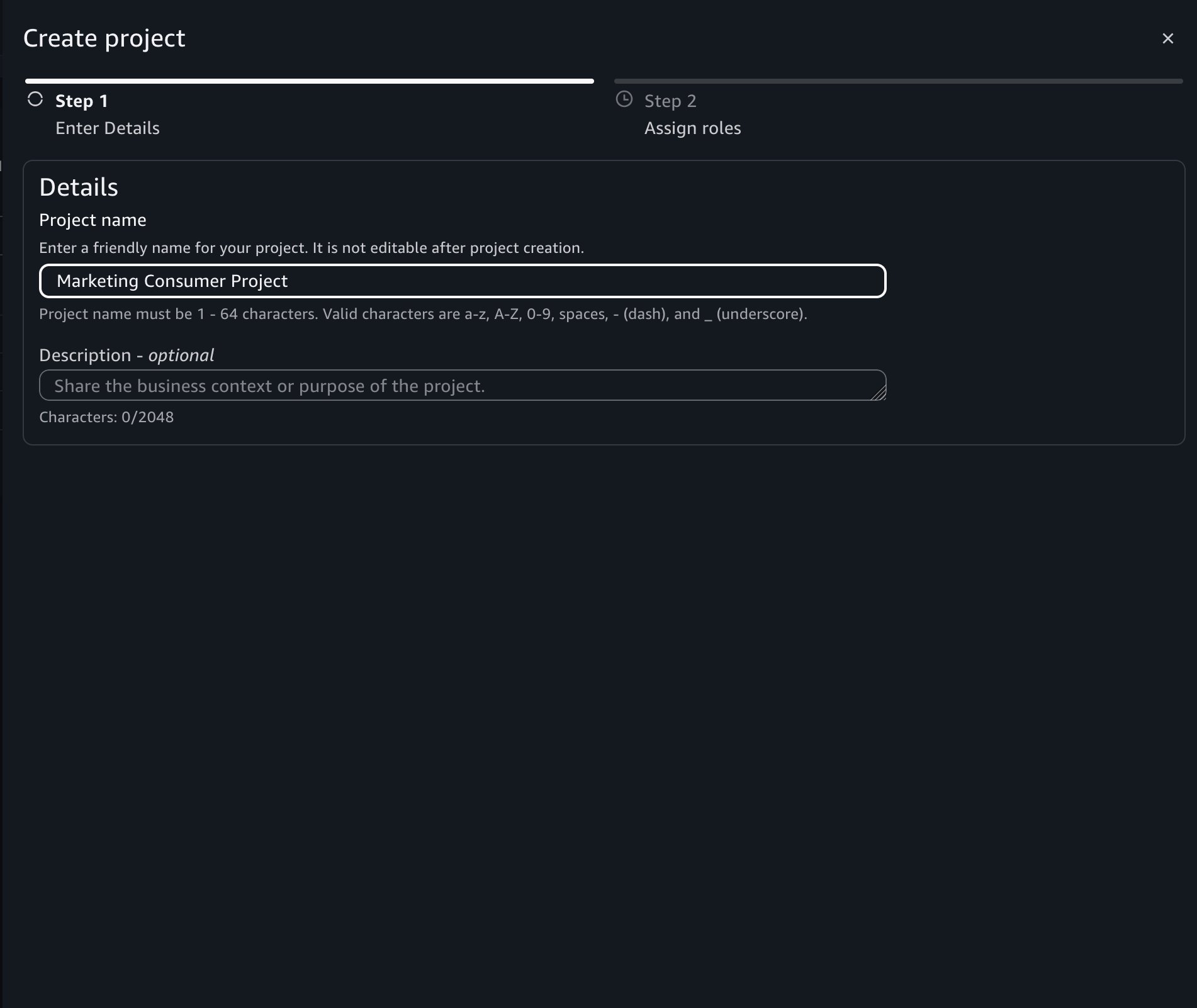
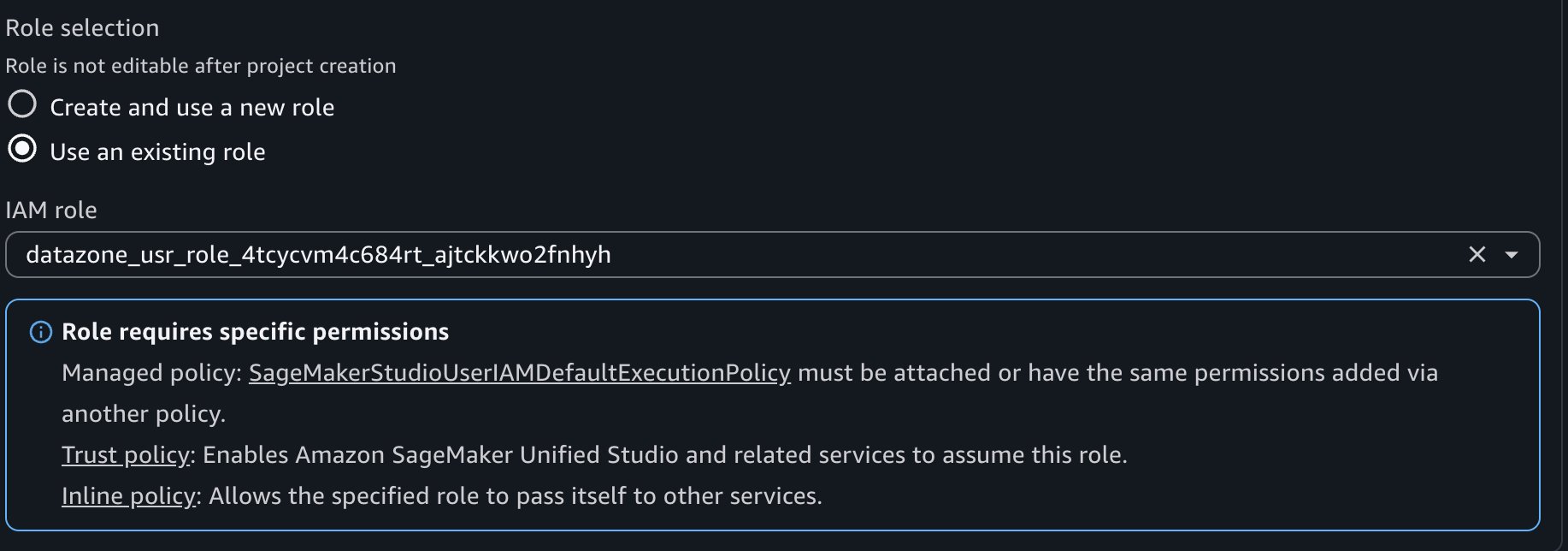
- During project creation, select the following crucial roles and then choose Create Project:
- Project IAM Role: The marketing federated role created in IAM Identity Center above. This is the role in the member account that has a role name with suffix
AWSReservedSSO. - Project Role: – Choose project role for data engineer, copied from option 1.
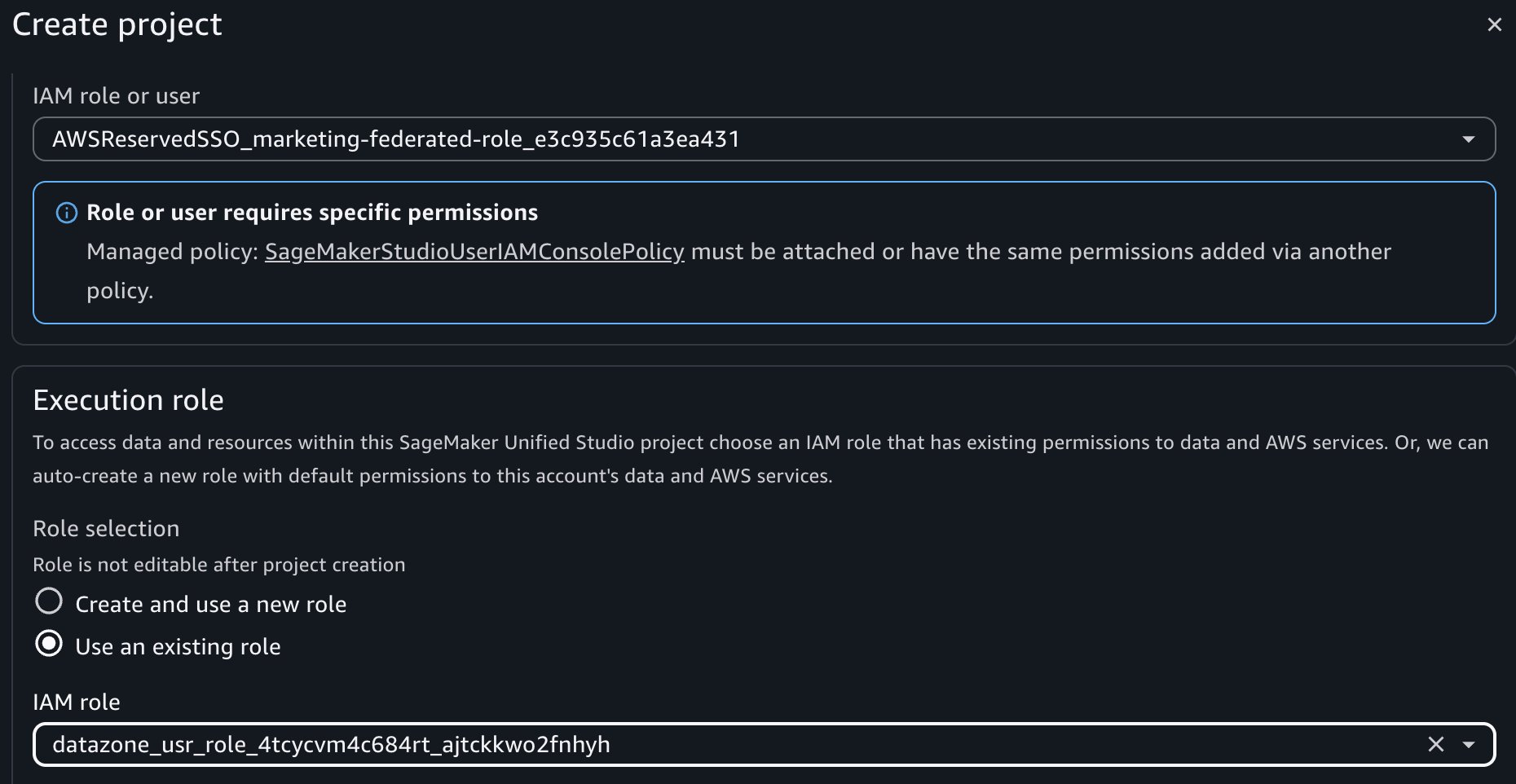
- Make policy changes to this project role as per the instruction on the SMUS UI page.
Option 2 – Bring your own execution role.
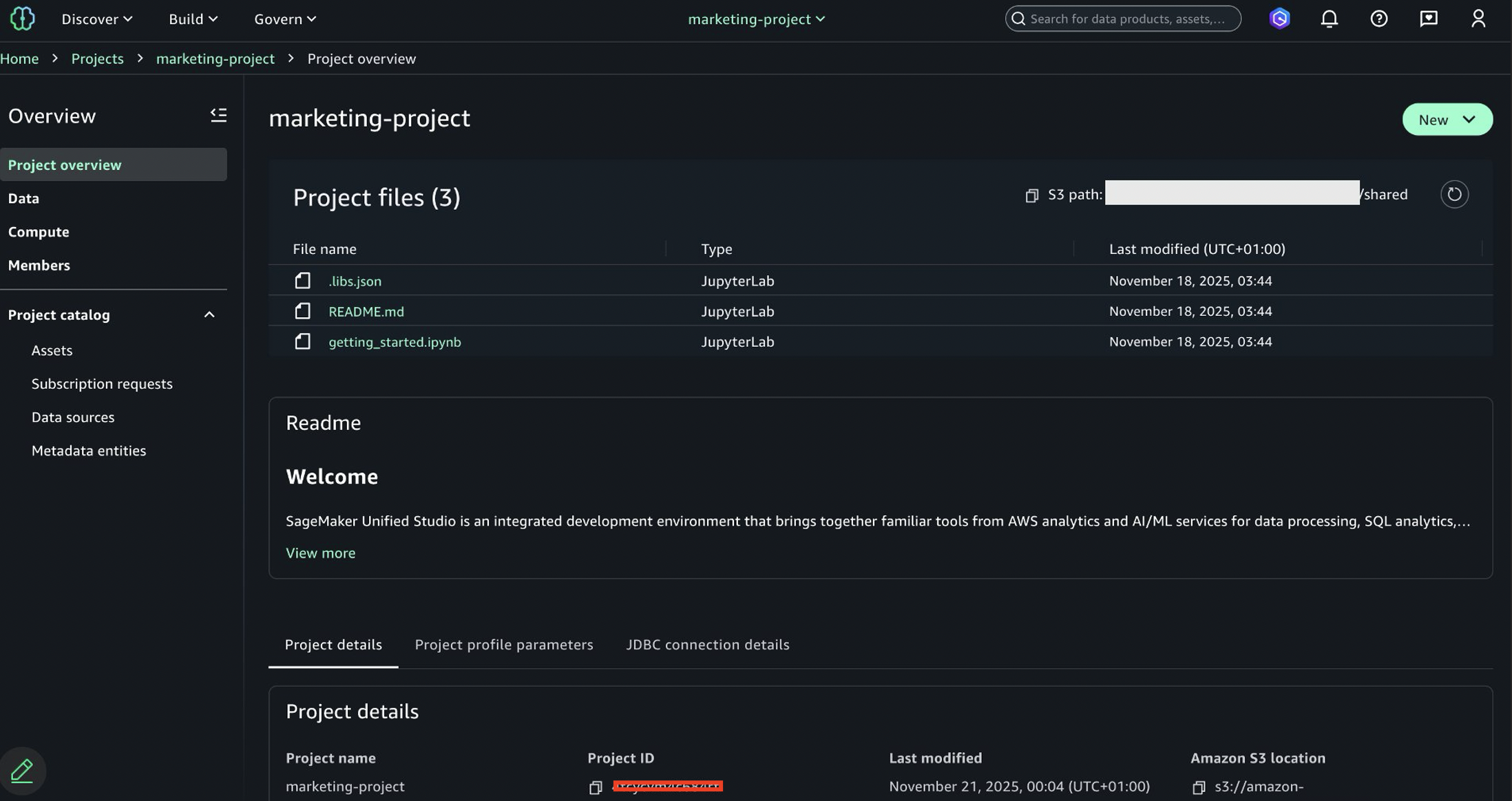
To create an IAM-based domain project that will integrate with your existing IDC-based domain permissions., you must tag the execution role for permission propagation. Amazon SageMaker Catalog and AWS Lake Formation use attribute-based access control, which means permissions can be inherited based on resource tags. For this option, you will need consumer project ID.To find the IDC-based domain consumer project ID:
- Navigate to the Amazon SageMaker Unified Studio IDC-based domain portal.
- Open the Marketing Consumer Project.
- Copy the project ID from the project details.
Setting up IAM-based domain project for option 2
Complete the following steps:
- Create another project with name “Marketing Consumer Project 2” in the IAM-based domain while logged in as admin.
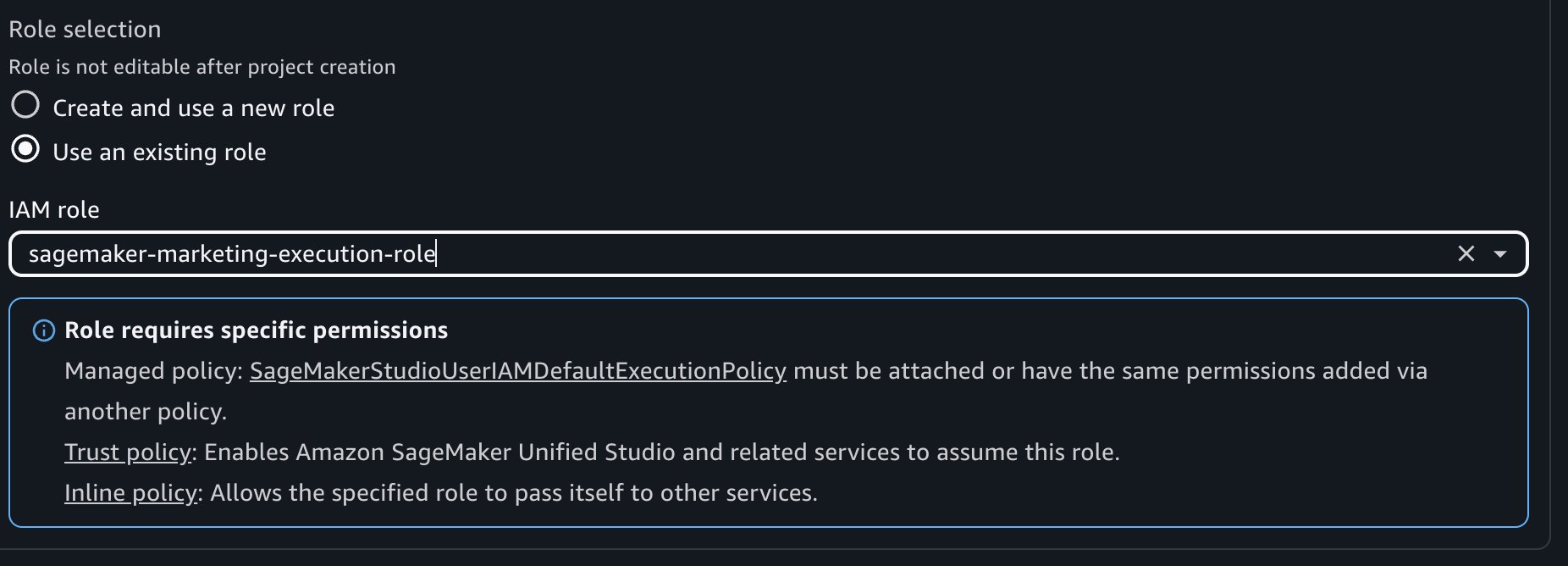
- During project creation, select the following roles:
- Federated Role: The marketing federated role created in IAM Identity Center above.
- Execution Role: – Choose execution role from option 2.
- Make policy changes to this execution role as per the instruction.
- Next, navigate to the IAM console and locate the execution role created for your IAM-based domain consumer project.
- Add the following tag, this step relies on ABAC policies with
projectIdfor subscriptions.
- Key:
AmazonDatazoneProject - Value: The project ID from your Amazon SageMaker Unified Studio IDC-based domain consumer project
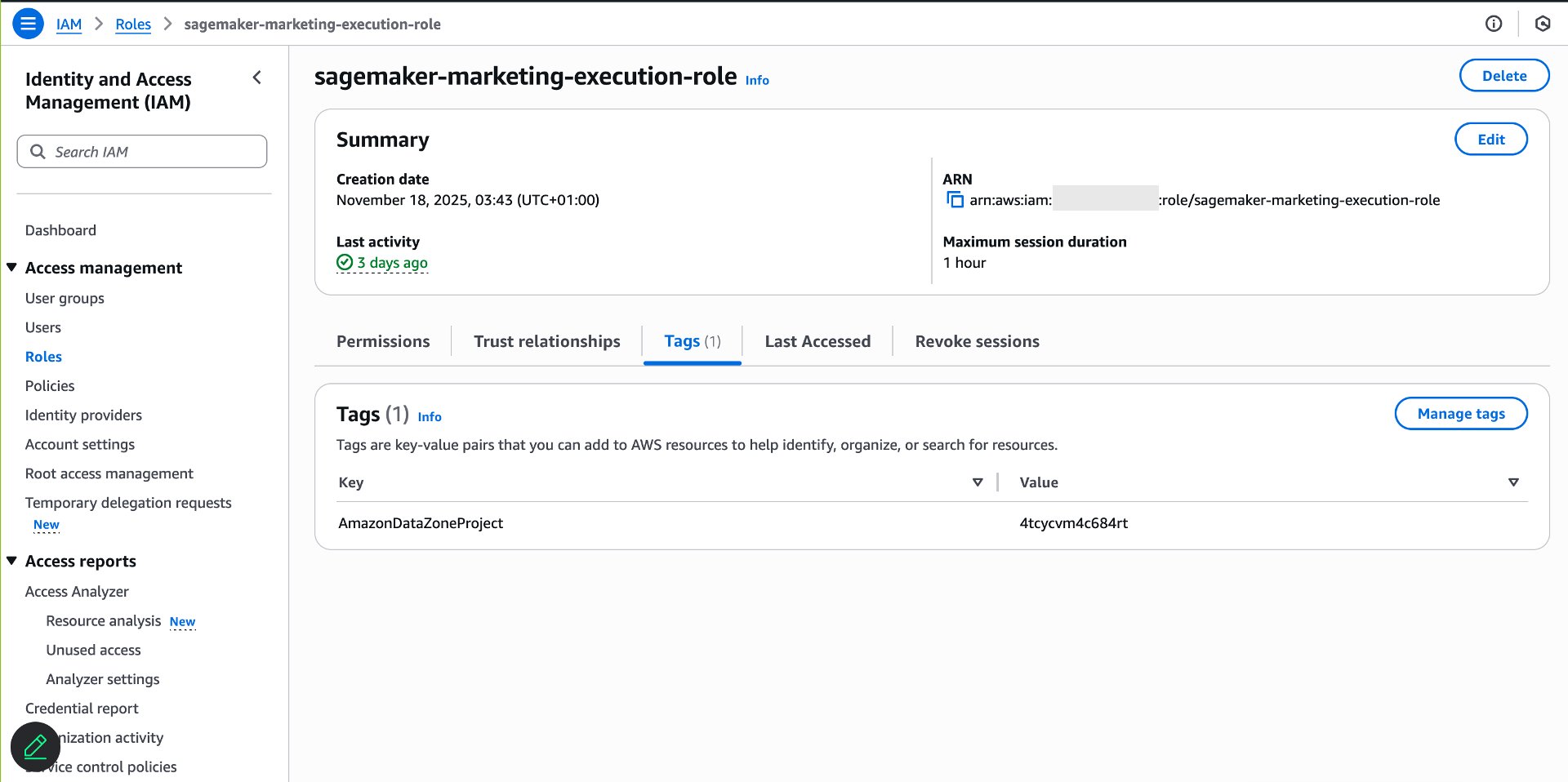
This tag configuration results in data access grant from IDC-based domain consumer project to the IAM-based domain project execution role.
Verify data access in the IAM-based domain
After tagging the execution role, verify that permissions are set up correctly.Complete the following steps:
- Use the SSO URL to log into the SSO Identity Center as Sarah.
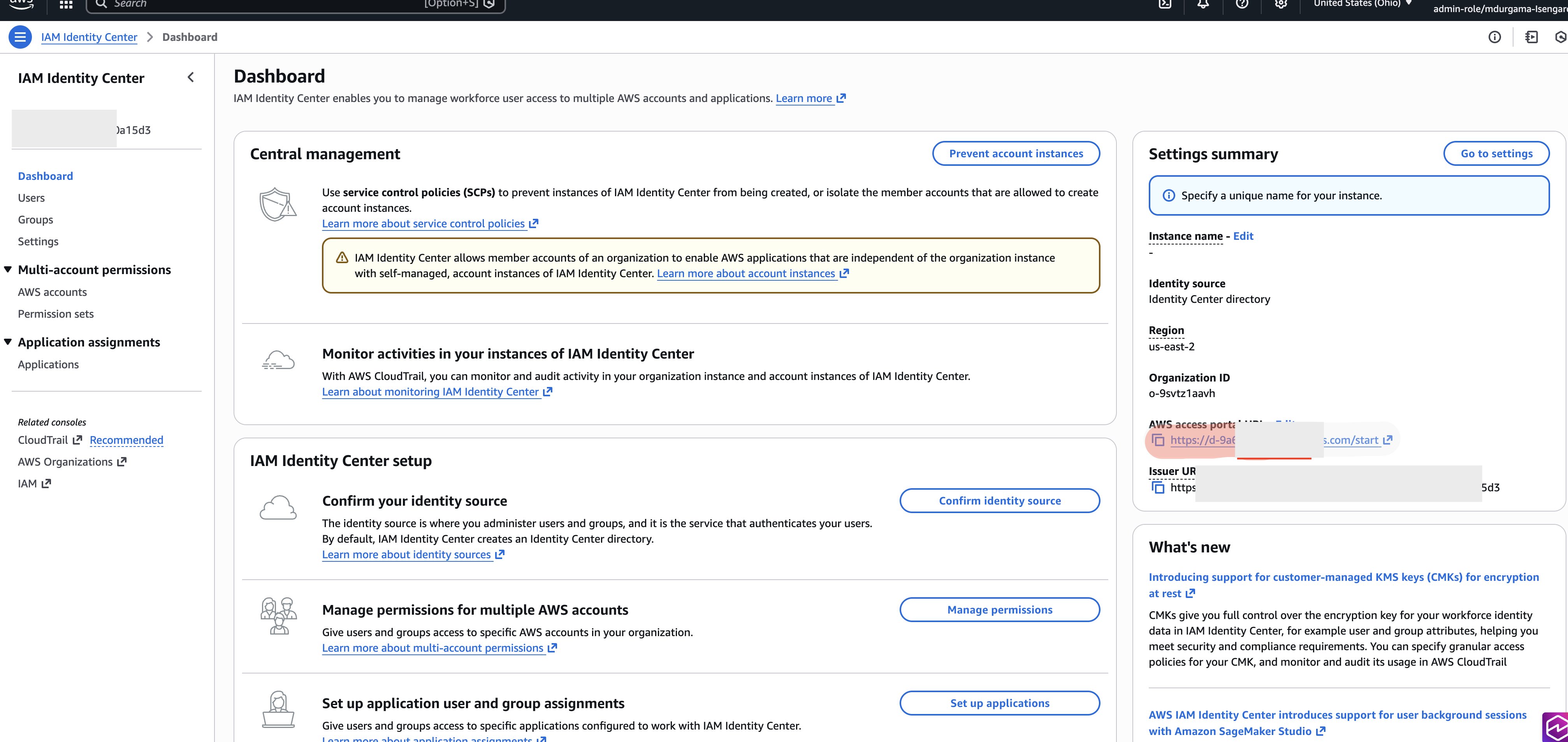
- Open the AWS console using federated role created earlier in setting federated role section.
- Navigate to Amazon SageMaker.
- Choose Amazon SageMaker Unified Studio IAM-based domain option (this will show up if project is already created with federated role).
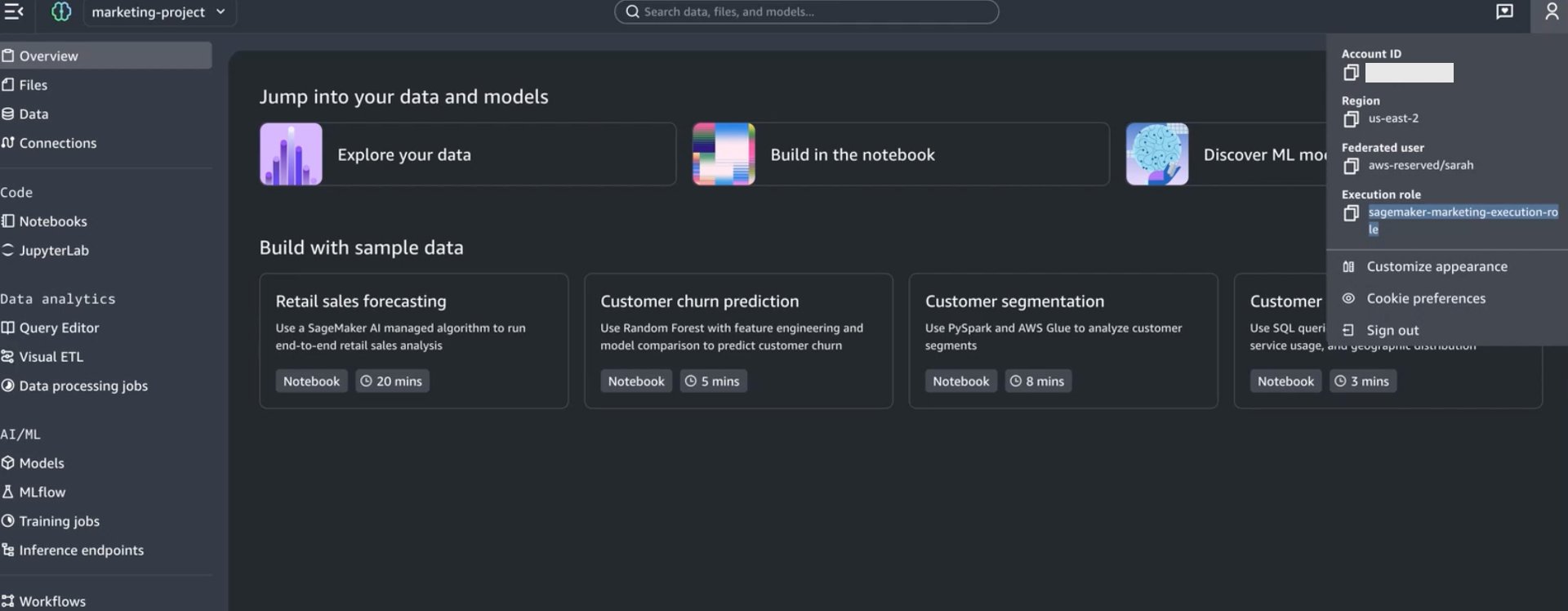
- In the Amazon SageMaker Unified Studio IAM-based domain project, navigate to the Data tab. If you created 2 projects with both option 1 and option 2 execution role, then 2 projects will show up and you can login to either to validate data access.
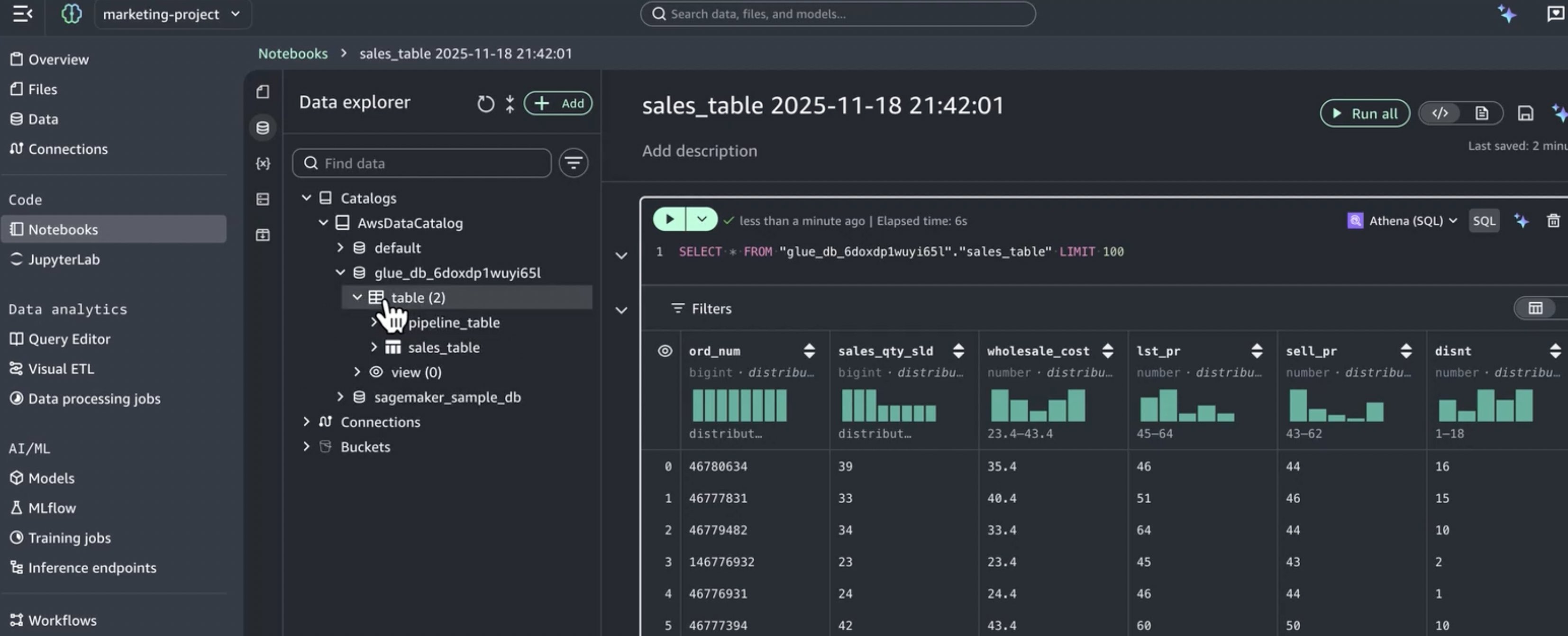
- Verify that the consumer database and subscribed tables appear.
Create and use the new serverless notebooks
With permissions properly configured, you can now use IAM-based domain capabilities like serverless Notebooks. Complete the following steps:
- In the Amazon SageMaker Unified Studio IAM-based domain project, select a table from the Data tab.
- Choose Create notebook.
- The Notebook opens with Athena SQL as the default cell type.
- Write and run queries against your subscribed data.
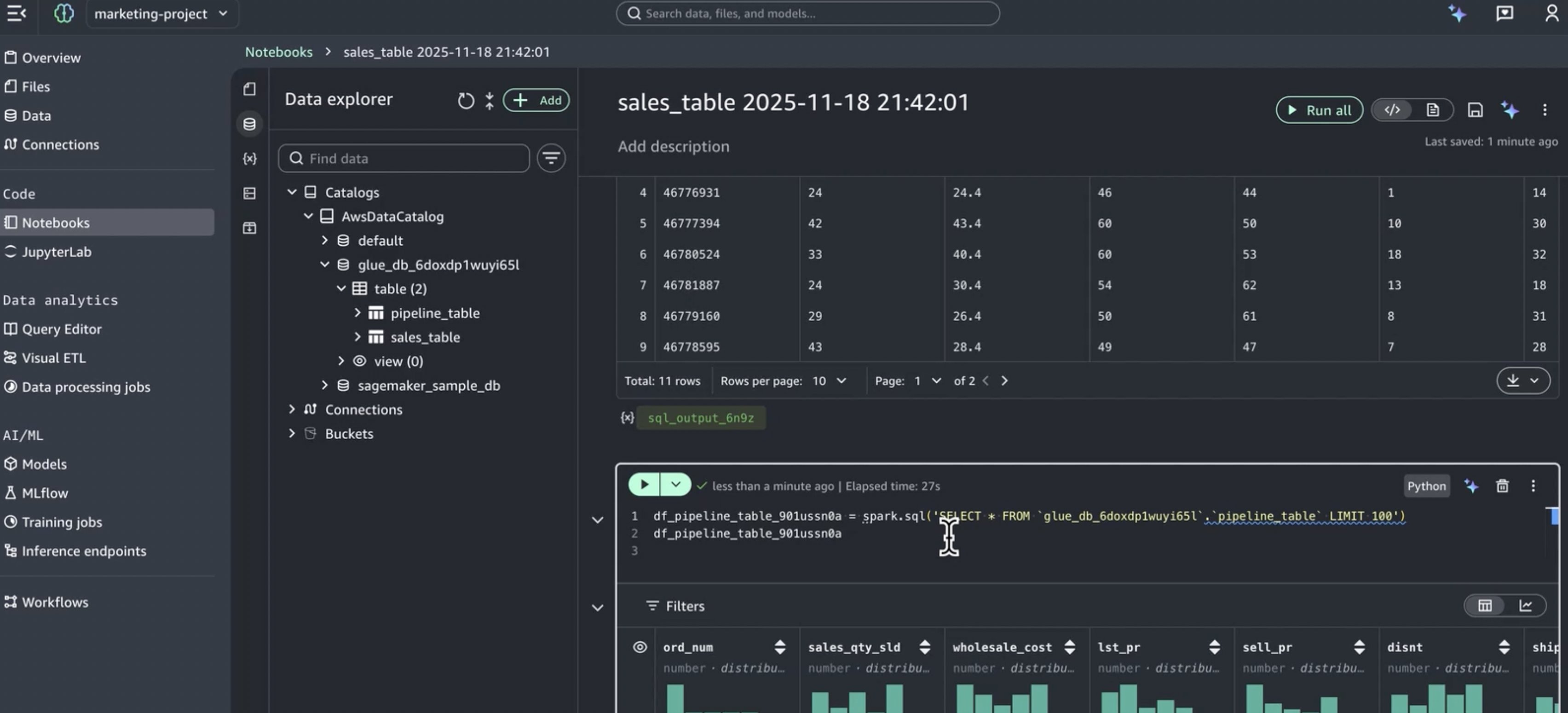
The notebook runs with the execution role’s permissions, which now include access to all data subscribed through the IDC-based domain.
Key benefits of this integration
This integration approach delivers several important advantages:
Preserve existing investments
- Continue using IDC-based domain governance and catalogs.
- Maintain established Pub/Sub workflows.
- No migration required for existing data assets.
Get modern capabilities
- Provide developers with the new serverless Notebooks.
- Access Athena Spark for advanced analytics.
- Provides improved user experience and navigation.
Simplified permission management
- Single subscription workflow manages access across both domains.
- Consistent data access via role reuse and attribute-based access control.
- No duplicate access requests or approvals needed.
Unified data experience
- Developers access all subscribed data from one interface.
- Consistent data catalog across domains.
- Simplified onboarding for new team members.
Cleanup
Complete the following steps to delete the resources you created:
- Delete the serverless Notebooks created in the IAM-based domain projects.
- Delete the IAM-based domain projects (Marketing Consumer Project and Marketing Consumer Project 2).
- Remove the permission set assignment from marketing group in IAM Identity Center.
- Delete the Marketing-federated-role permission set in IAM Identity Center.
- Remove the tags (AmazonDatazoneProject) from the execution role (if using Option 2).
- Delete the execution role created for the IAM-based domain (if using Option 2 and not reusing the IDC-based domain project role).
- Revert any policy changes made to the IDC-based domain consumer project IAM role (if using Option 1).
- If you do not need the IAM-based domain anymore, delete it.
- If you created any test data subscriptions in the IDC-based domain, remove them.
Conclusion
In this post, we demonstrated how to access Amazon SageMaker Unified Studio IDC-based domain with the new IAM-based domain using role reuse and attribute-based access control. This setup offers data engineers the best of both worlds: access to specialized modern development tools—including the new serverless Notebooks, Athena Spark integration, and built-in AI assistance , while maintaining proper governance that includes comprehensive catalog management and robust security controls established in the IDC-based domain.You can now confidently adopt Amazon SageMaker Unified Studio IAM-based domain capabilities knowing their established data governance, subscription workflows, and access controls remain intact and continue to function as expected.
Ready to get started with Amazon SageMaker Unified Studio and unlock the power of integrated governance and modern development tools for your organization? Visit the Amazon SageMaker Unified Studio documentation to learn more and begin your implementation today.