AWS Storage Blog
Increase application availability: Configure Linux iSCSI multipath with ALUA for Amazon FSx for NetApp ONTAP
When you run production workloads on block storage attached using iSCSI, relying on a single network path between your compute and storage creates an unacceptable single point of failure. For example, if the only path between your Amazon Elastic Compute Cloud (Amazon EC2) instance and your Amazon FSx for NetApp ONTAP file system fails because of a network interruption or a storage node failover, your application can lose access to its data. This can mean lost in-flight transactions or application downtime.
iSCSI multipathing solves this by establishing multiple network paths to the same logical unit number (LUN). The Linux device-mapper-multipath (DM-Multipath) subsystem aggregates these paths into a single block device, providing redundancy and continuous availability across both paths, one to each storage node in the file system’s high availability (HA) pair. But multipathing alone is not enough; you need the paths to be intelligent about which storage node actually owns the LUN.This is where Asymmetric Logical Unit Access (ALUA) comes in. ALUA is a SCSI standard that allows a storage array to communicate path preferences to the host. In an FSx for ONTAP HA pair, only one node owns a given LUN at any time. The owning node serves I/O directly; this is the active/optimized path. The partner node can also serve the same LUN, but it must proxy the I/O across the cluster interconnect, the private HA link between the two nodes; this is the active/non-optimized path. The solution is to combine DM-Multipath with ALUA-aware path selection so the host sends I/O to the node that currently owns the LUN and fails over automatically when ownership changes.
In this post, we show how this fits together on FSx for ONTAP. You will learn how to:
- Configure DM-Multipath on Linux with the correct settings for NetApp ONTAP.
- Establish redundant iSCSI sessions to both nodes of an FSx for ONTAP HA pair.
- Validate that ALUA priorities are correctly reported.
- Set up persistent mounts that survive reboots.
- Test failover resilience.
Solution overview
FSx for ONTAP deploys storage in HA pairs. Each HA pair consists of exactly two storage nodes (Node 1 and Node 2) that share access to the same underlying storage aggregates. For iSCSI, each node exposes one or more iSCSI logical interfaces (LIFs)—network endpoints that your EC2 instances connect to.
LUN ownership and path priorities
Every LUN in ONTAP is owned by one node in the HA pair at any given time. This owning node serves read and write I/O directly from its file server. The partner node can also present the same LUN to hosts, but any I/O arriving on the partner node must traverse the cluster interconnect to reach the owning node. In ALUA terms, the LIFs on each node form a Target Port Group (TPG), and the array advertises each TPG’s access state—Active/Optimized for the owning node and Active/Non-optimized for the partner node—so the host knows which paths to prefer. The following table summarizes these paths.
| Path Type | TPG State | ALUA Priority | Description |
| Direct to owning node | Active/Optimized | 50 | I/O served locally, lowest latency |
| Via partner node | Active/Non-optimized | 10 | I/O proxied across interconnect |
Architecture diagram
Figure 1 illustrates the solution architecture.
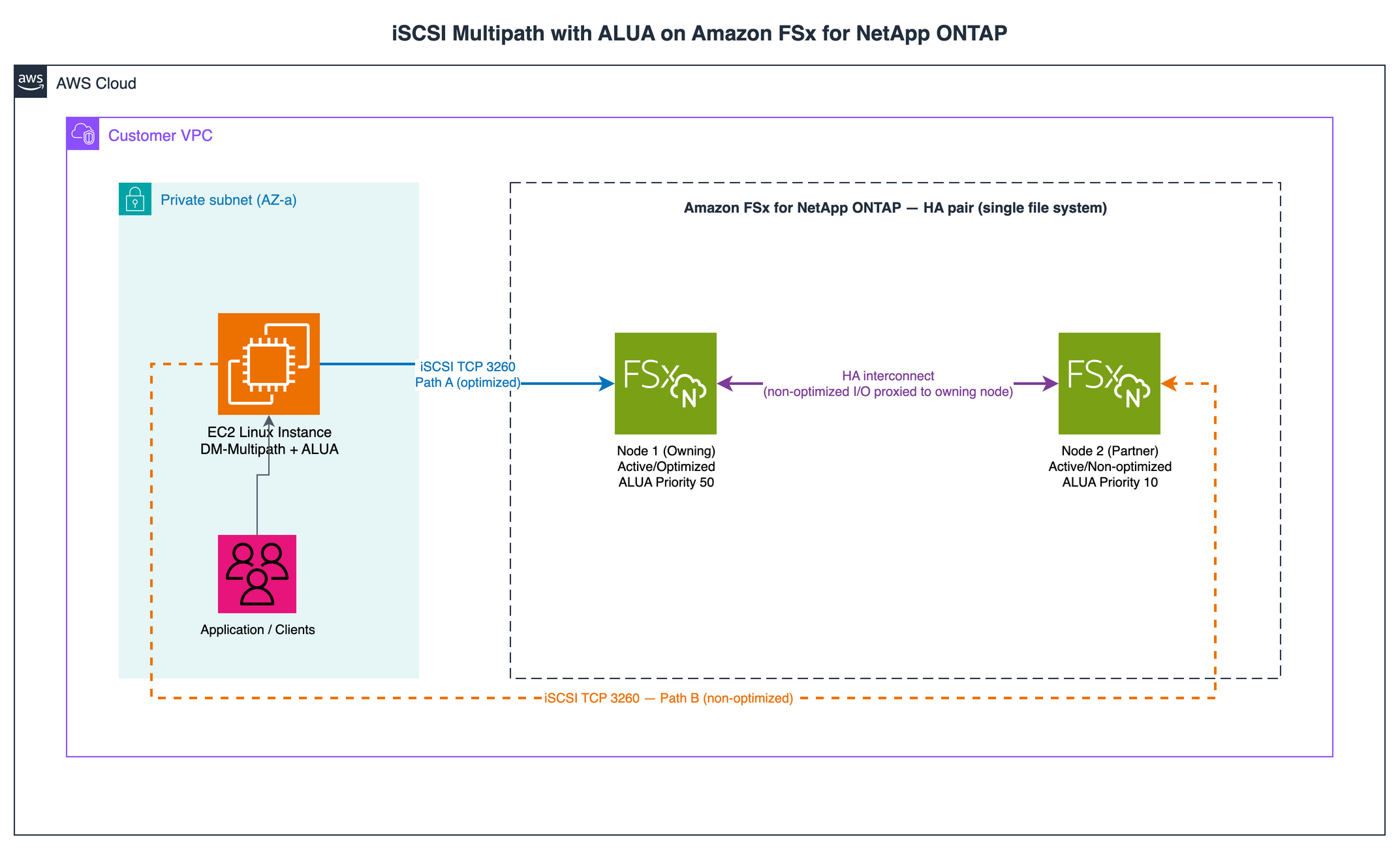 Figure 1: End-to-end architecture. An EC2 Linux instance in the VPC maintains two iSCSI sessions (TCP 3260) to the FSx for NetApp ONTAP HA pair, an optimized path to the owning node, and a non-optimized path to the partner node.
The preceding Figure 1 shows how the components connect inside your virtual private cloud (VPC). Figure 2 illustrates a look inside the data path itself—how DM-Multipath and ALUA select between the optimized and non-optimized paths to the node that owns the LUN.
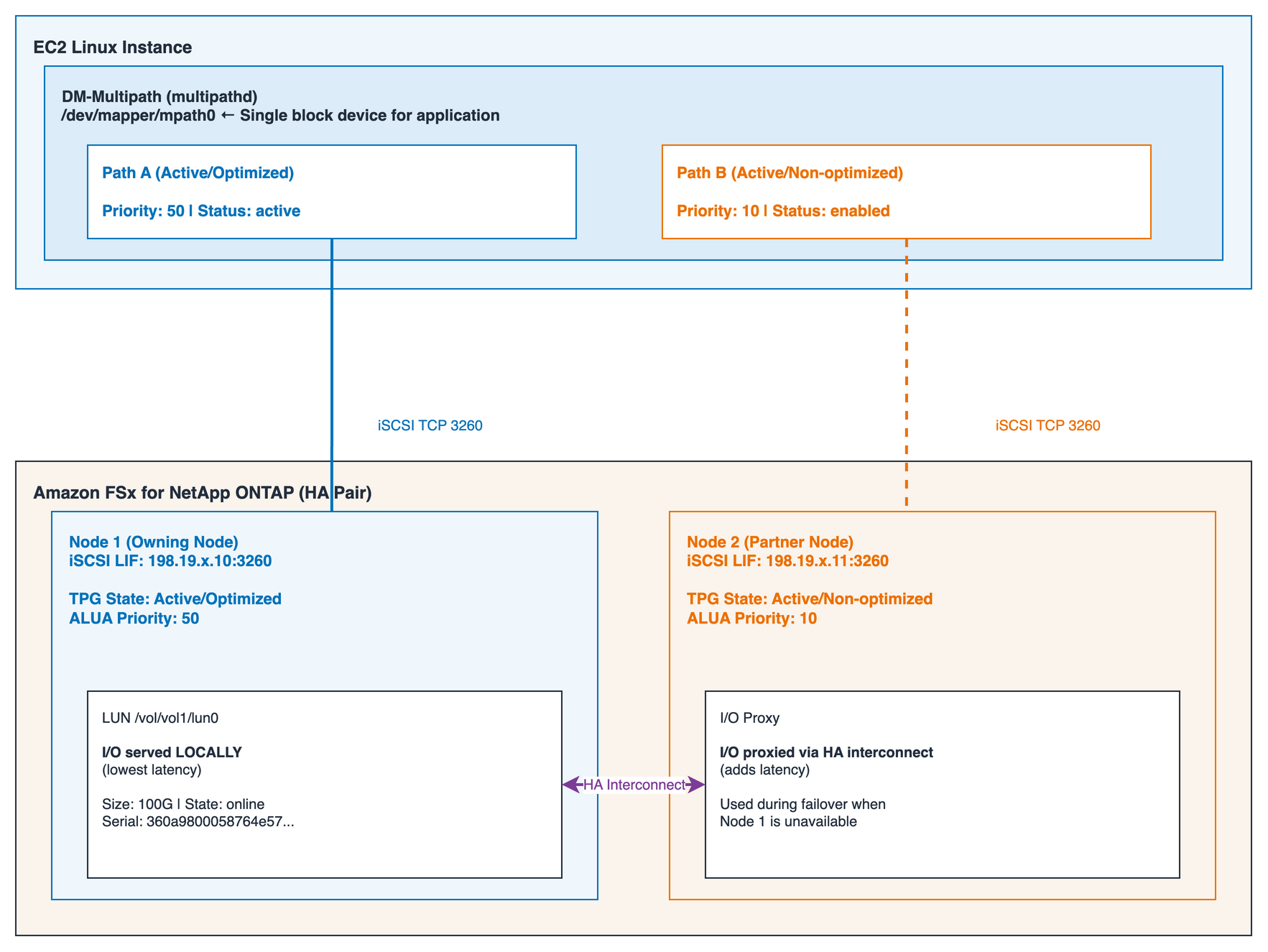 Figure 2: Logical view of ALUA path selection. The EC2 instance maintains iSCSI sessions to both nodes; all I/O flows through the optimized path (Node 1). If Node 1 fails, I/O transitions to Node 2.
During failover
When the owning node becomes unavailable (planned maintenance, throughput capacity change, or unexpected failure), the partner node takes over ownership of the LUN. The formerly non-optimized paths become active/optimized; DM-Multipath detects the priority change and reroutes all I/O. When the original node becomes available, priorities revert automatically. Figure 3 illustrates the failover sequence with ALUA.
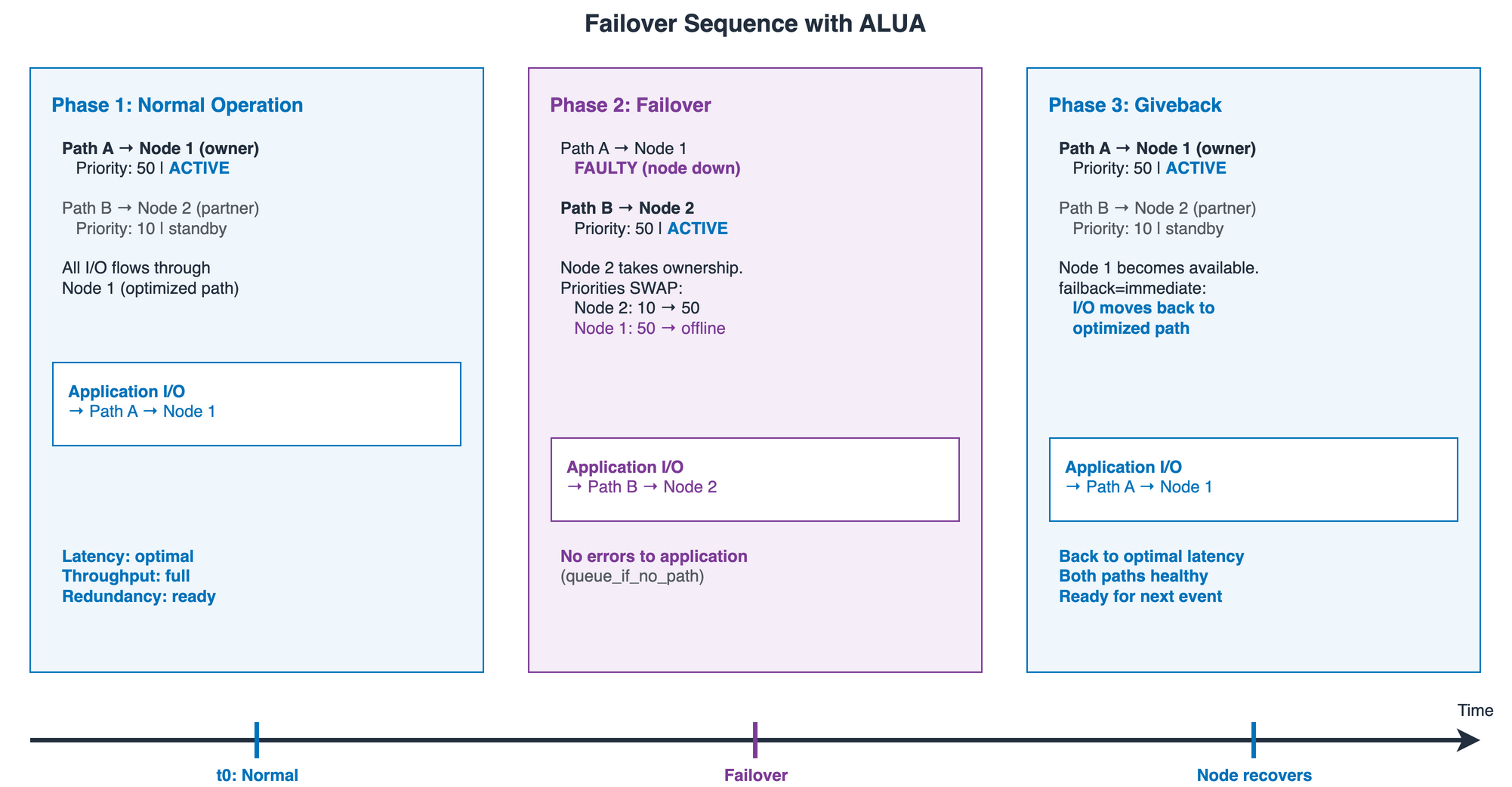 Figure 3: Failover sequence showing how ALUA priorities swap during node takeover and giveback.
Prerequisites
To implement this solution, you need the following prerequisites:
- An FSx for ONTAP file system with at least one iSCSI LUN created and mapped to an initiator group (igroup) with ostype linux containing your EC2 instance’s IQN, and the LUN mapped to that igroup. For more information about mounting ISCSI LUNs to Linux instance, see Provisioning iSCSI for Linux.
- A Linux EC2 instance (Amazon Linux 2023, RHEL 8+, or Ubuntu 22.04+) in the same VPC as your FSx file system.
- Required packages: iscsi-initiator-utils, device-mapper-multipath (RHEL/AL2023) or open-iscsi, multipath-tools (Ubuntu).
- Security group rules allowing TCP port 3260 from Amazon EC2 to both iSCSI LIF IP addresses.
- The iSCSI LIF IP addresses for both nodes (find using the FSx for ONTAP console or ONTAP CLI: network interface show -data-protocol iscsi).
Step 1: Configure multipath.conf for ONTAP
The multipath configuration is the most critical component. An incorrect configuration can lead to I/O hangs during failover or paths that never recover, resulting in loss of availability for your application. Enable and start multipathd with the following commands:
Create or replace /etc/multipath.conf:
The preceding code uses the following key parameters:
- path_grouping_policy = group_by_prio – Groups paths by ALUA priority (optimized prio=50 in one group, non-optimized prio=10 in another).
- hardware_handler = “1 alua” – Enables the ALUA handler to read TPG states from the storage array.
- prio = alua – Uses ALUA-reported priorities to rank paths.
- failback = immediate – When higher-priority path recovers, immediately switch back to it.
- fast_io_fail_tmo = 5 – Fail I/O on a path after 5 seconds, triggering fast failover.
- no_path_retry = queue – If all paths fail, queue I/O rather than returning errors.
- dev_loss_tmo = “infinity” – Never remove a SCSI device, even during extended failover.
Set iSCSI replacement timeout to 5 seconds (default 120 is too slow):
Step 2: Discover targets and establish iSCSI sessions
Run iSCSI discovery against each LIF IP (both nodes):
You should see two sessions, one to each iSCSI LIF. If you only see one, verify your security group allows TCP 3260 to both LIF IPs.
Step 3: Validate multipath operation
Check multipath topology:sudo multipath -llThe following code is an example of the expected output showing correct ALUA path grouping:
Verify the following:
- Two path groups with different priorities (50 and 10).
- The status=active group has prio=50 (optimized path to owning node).
- The status=enabled group has prio=10 (non-optimized path to partner).
- All paths show active ready running.
- Hardware handler shows “1 alua”.
Step 4: Configure persistent mount
The alias gives the device a stable, human-readable name (/dev/mapper/ontap_lun0) that stays constant across reboots, and the _netdev,nofail fstab options confirm the mount is attempted only after the network and iSCSI sessions are up, so a transient path outage can’t block your instance from booting.Add a multipath alias in /etc/multipath.conf:
Create an fstab entry:/dev/mapper/ontap_lun0 /mnt/iscsi xfs _netdev,nofail 0 0 Note the following key mount options:
- _netdev – Tells the system this device requires network. Mount attempted only after network/iSCSI are up.
- nofail – Prevents boot failure if device is temporarily unavailable.
Step 5: Test failover resilience
Before running production workloads, test that I/O continues during a storage failover. A straightforward method is a throughput capacity change using the AWS Command Line Interface (AWS CLI):
Monitor multipath status in real time during the failover:watch -n1 'sudo multipath -ll'The expected behavior is that I/O pauses briefly during failover, typically within seconds, governed by your fast_io_fail_tmo and replacement_timeout settings rather than a fixed guarantee, then resumes automatically. No errors are returned to the application. The failback=immediate setting confirms traffic returns to the optimized path after the original node recovers.
Common misconfigurations and fixes
The following table provides some key troubleshooting tips.
| Issue | Symptom | Root Cause | Fix |
| DM-Multipath not installed | LUN appears as /dev/sd* only | Package missing | dnf install device-mapper-multipath |
| Wrong ostype in igroup | All paths prio=0 | igroup set to windows/vmware | igroup modify -ostype linux |
| Only one target discovered | Single path group | Discovery run on one LIF only | Run discovery on both LIF IPs |
replacement_timeout=120 |
I/O hangs at 2 minutes during failover | Default iSCSI timeout too long | Set to 5 in iscsid.conf |
/etc/fstab uses /dev/sda |
Mount fails after reboot | Device names not stable | Use /dev/mapper/<alias> |
| SG missing TCP 3260 | Discovery times out | Firewall blocks iSCSI | Add TCP 3260 inbound rule |
| multipathd not enabled | No multipath after reboot | Service not started on boot | systemctl enable multipathd |
| Missing hardware_handler alua | All paths same priority | Cannot read TPG states | Add hardware_handler “1 alua” to /etc/multipath.conf |
Conclusion
Configuring iSCSI multipath with ALUA for FSx for ONTAP is essential for production workloads that require high availability. With the combination of DM-Multipath with ALUA-aware path prioritization, your applications experience failovers that are transparent to clients during planned maintenance events and unplanned failures. Key takeaways include:
- Establish iSCSI sessions to both nodes in the HA pair.
- Use the NetApp-recommended multipath.conf with hardware_handler “1 alua” and prio alua.
- Set aggressive timeouts (fast_io_fail_tmo=5, replacement_timeout=5) for rapid failover.
- Test failover before running production workloads.
- Use multipath device aliases in /etc/fstab with _netdev,nofail for persistent mounts.
With this configuration in place, your applications follow best practices for highly available block storage and benefit from continuous I/O availability across FSx for ONTAP maintenance operations.
References
To learn more, see the following: