AWS Thai Blog
AgentCore in Action Part4: ควบคุมสิทธิ์การใช้งาน Tools ด้วย AgentCore Policy
AgentCore in Action Series
ซีรีส์นี้จะพาคุณไปทำความเข้าใจวิธีการรัน AI agents อย่างมีประสิทธิภาพด้วย Amazon Bedrock AgentCore โดยครอบคลุมตั้งแต่การ deploy, scale ไปจนถึงการรักษาความปลอดภัยตามมาตรฐาน enterprise โดยไม่ต้องกังวลเรื่อง infrastructure management
AgentCore in Action: การสร้างและจัดการ AI Agents จาก Deploy ถึง Scale
- Part 1: การ Host MCP Servers ด้วย AgentCore Runtime
- Part 2: การจัดการ MCP Servers หลายตัวด้วย AgentCore Gateway
- Part 3: ทำความเข้าใจ AgentCore Identity
- Part 4: ควบคุมสิทธิ์การใช้งาน Tools ด้วย AgentCore Policy (บทความนี้)
Part 4: ควบคุมสิทธิ์การใช้งาน Tools ด้วย AgentCore Policy
ใน Part 1 ได้ deploy MCP servers บน AgentCore Runtime, Part 2 รวมหลาย MCP servers เข้าด้วยกันผ่าน Gateway และ Part 3 ได้อธิบายว่า AgentCore Identity จัดการ authentication อย่างไร
แต่ยังมีคำถามสำคัญที่ยังไม่ได้ตอบ: เมื่อ user ผ่าน authentication แล้ว จะควบคุมอย่างไรว่า user คนไหนเข้าถึง tool ไหนได้บ้าง? หรือจำกัดได้หรือไม่ว่า tool นั้นเข้าถึงข้อมูลอะไรได้?
ตัวอย่างเช่น Gateway มี DynamoDB reader tool ที่อ่านได้ทั้ง mcp-games และ mcp-movies table แต่ต้องการให้ทีม Gaming เข้าถึงเฉพาะ mcp-games และทีม Entertainment เข้าถึงเฉพาะ mcp-movies
AgentCore Policy เข้ามาตอบโจทย์นี้ โดยเพิ่ม fine-grained authorization layer ที่ทำงานอยู่ระหว่าง Gateway กับ backend targets
AgentCore Policy คืออะไร?
AgentCore Policy คือ authorization service ที่ใช้ Cedar ซึ่งเป็น open-source policy language จาก AWS ในการควบคุมการเข้าถึง tools บน Gateway
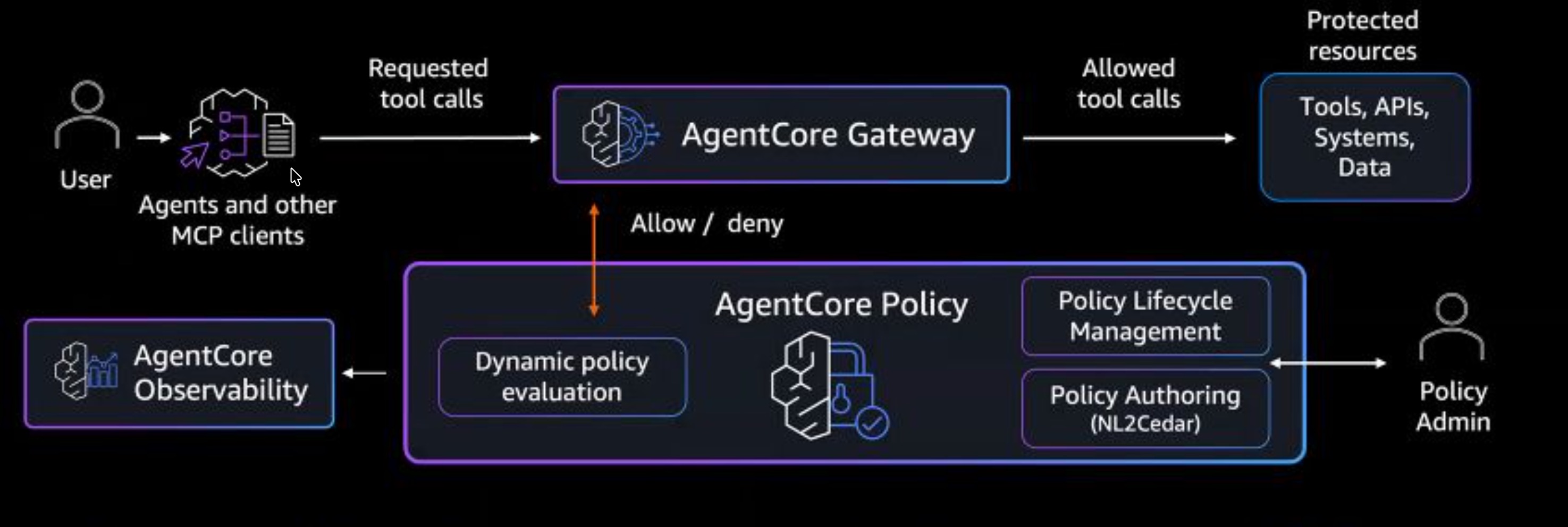
สามารถมองว่า Policy เป็นเหมือน “security guard” ที่ยืนอยู่หน้า Gateway คอย check ทุก request ก่อนที่จะปล่อยให้ผ่านไปถึง tool
หลักการทำงาน
- Default deny – ถ้าไม่มี policy อนุญาต request จะถูก deny ทุกครั้ง
- Deterministic – ผลลัพธ์จาก policy เป็นที่แน่นอนเสมอ ไม่เหมือน LLM ที่อาจให้ผลลัพธ์ต่างกันในแต่ละครั้ง
- Evaluate ก่อน execute – Policy ตรวจสอบ request ก่อนที่ tool จะทำงาน ถ้า deny แล้ว Lambda หรือ MCP server จะไม่ถูกเรียกเลย
- อยู่นอก agent code – Policy ถูกจัดการที่ Gateway level ไม่ต้องแก้ code ของ agent หรือ tools
ส่วนประกอบหลัก
- Policy Engine – Container ที่เก็บ Cedar policies ทั้งหมด เชื่อมต่อกับ Gateway
- Cedar Policy – กฎที่กำหนดว่าใคร (principal) ทำอะไร (action) กับอะไร (resource) ภายใต้เงื่อนไขใด (condition)
- Enforcement Mode –
LOG_ONLY(ประเมินแต่ไม่บล็อก) หรือENFORCE(บล็อกจริง)
Cedar Policy Structure
Cedar policy ประกอบด้วย 3 ส่วนหลัก:
permit(
  principal,                    // ใคร - user/role ที่เรียก
  action == AgentCore::Action::"tool_name",  // ทำอะไร - tool ที่เรียกใช้
  resource == AgentCore::Gateway::"gateway-arn"  // กับอะไร - Gateway ไหน
)
when {
  context.input.parameter == "value"   // เงื่อนไข - ค่า parameter ที่ส่งมา
};
Policy ทราบ Tool Arguments ได้อย่างไร?
เมื่อ Kiro เรียก tool ผ่าน Gateway เช่น list_items(table_name="mcp-games") จะถูกส่งเป็น MCP request:
{
  "jsonrpc": "2.0",
  "method": "tools/call",
  "params": {
    "name": "lambda-dynamoDB-reader___list_items",
    "arguments": {
      "table_name": "mcp-games"
    }
  }
}
Policy Engine จะ map arguments เข้าไปใน context.input โดยอัตโนมัติ ทำให้ Cedar สามารถตรวจสอบค่า parameter ได้:
context.input.table_name→"mcp-games"
ดังนั้น Policy สามารถตัดสินใจได้จาก ค่าที่ user ส่งมา ไม่ใช่แค่ว่า user เป็นใคร
What We’ll Build
บทความนี้จะสาธิตการใช้ AgentCore Policy 2 รูปแบบ:
- Tool Masking – ซ่อน tools ที่ไม่ต้องการให้เห็น (จาก 5 tools เหลือ 2)
- Fine-Grained Access Control – จำกัดให้เข้าถึงเฉพาะ
mcp-gamestable เท่านั้น
Architecture
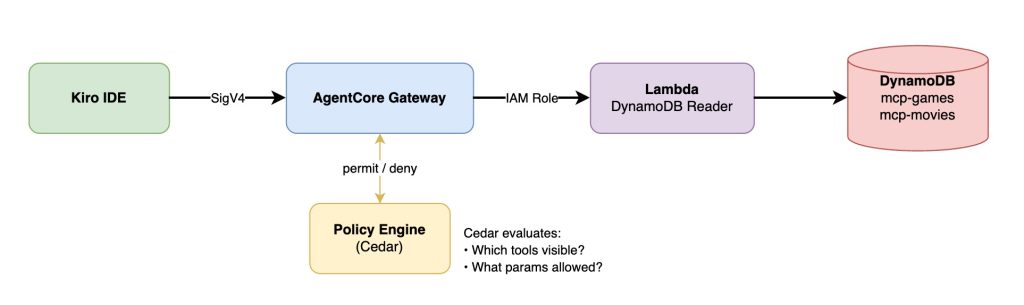
Starting Point (จาก Part 2)
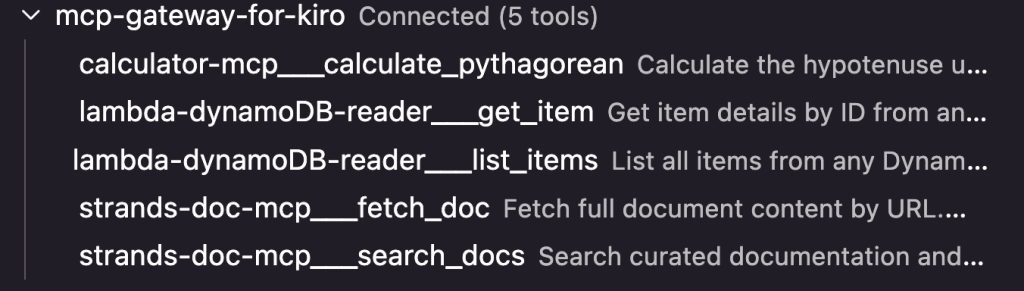
ปัจจุบัน Gateway มี 3 targets, 5 tools:
| Target | Tools | Type |
|---|---|---|
| calculator-mcp | calculate_pythagorean |
MCP Runtime |
| strands-doc-mcp | search_docs, fetch_doc |
MCP Runtime |
| lambda-dynamoDB-reader | list_items, get_item |
Lambda |
ก่อน apply policy ใน Kiro จะเห็น tools ทั้ง 5 ตัว:
Step 1: สร้าง Policy Engine
สร้าง Policy Engine ที่จะเก็บ Cedar policies:
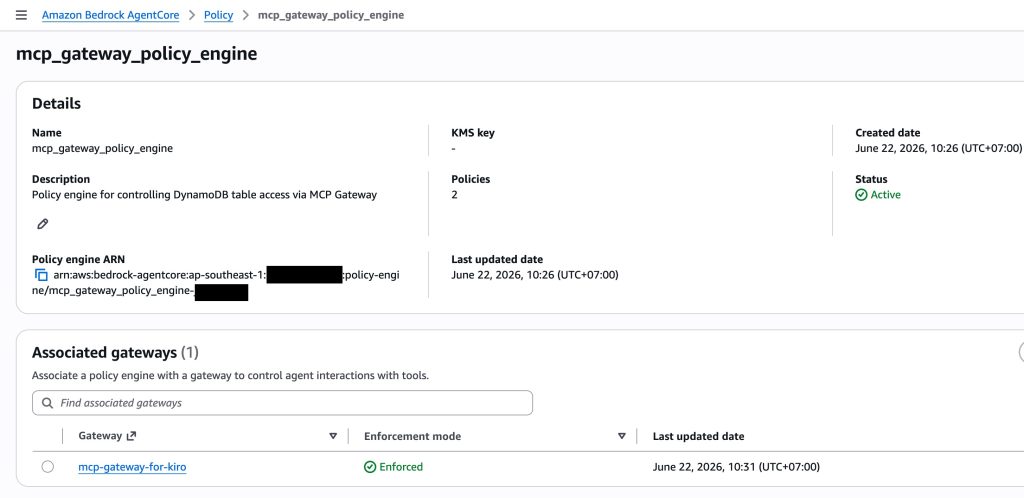
aws bedrock-agentcore-control create-policy-engine \
  --name mcp_gateway_policy_engine \
  --description "Policy engine for controlling DynamoDB table access" \
  --region ap-southeast-1
Step 2: เพิ่ม IAM Permissions ให้ Gateway Role
Gateway service role ต้องมี permissions สำหรับ Policy Engine เพิ่มเติม เช่น bedrock-agentcore:GetPolicyEngine, AuthorizeAction และ PartiallyAuthorizeActions เป็นต้น
หมายเหตุ: Permissions เหล่านี้ไม่ได้รวมอยู่ใน default Gateway role จำเป็นต้องเพิ่มเองก่อนที่จะ attach Policy Engine
Step 3: Attach Policy Engine เข้ากับ Gateway
aws bedrock-agentcore-control update-gateway \
  --gateway-identifier mcp-gateway-for-kiro-xxxxxxxxxx \
  --name mcp-gateway-for-kiro \
  --role-arn arn:aws:iam::012345678901:role/service-role/GatewayServiceRole \
  --protocol-type MCP \
  --authorizer-type AWS_IAM \
  --policy-engine-configuration arn=arn:aws:bedrock-agentcore:ap-southeast-1:012345678901:policy-engine/mcp_gateway_policy_engine-xxxxxxxxxx,mode=ENFORCE
เมื่อ attach แล้วด้วย mode=ENFORCE ทุก tool call จะถูก evaluate โดย Policy Engine ถ้าไม่มี policy ที่ permit ไว้ ทุก request จะถูก deny
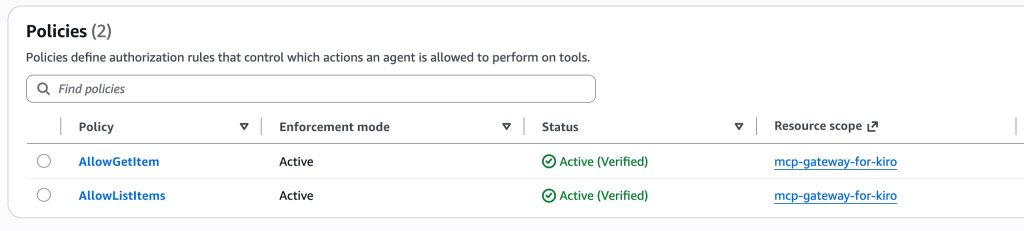
Demo 1: Tool Masking — ซ่อน Tools ที่ไม่ต้องการ
สมมติว่าต้องการให้ user เห็นและใช้ได้เฉพาะ DynamoDB tools เท่านั้น ไม่ต้องเห็น Calculator หรือ Strands Docs
วิธีทำคือ สร้าง permit เฉพาะ tools ที่ต้องการให้เข้าถึง tools ที่ไม่มี permit จะถูกซ่อนจาก tools/list โดยอัตโนมัติ
Cedar Policies สำหรับ Demo 1
Policy: AllowListItems
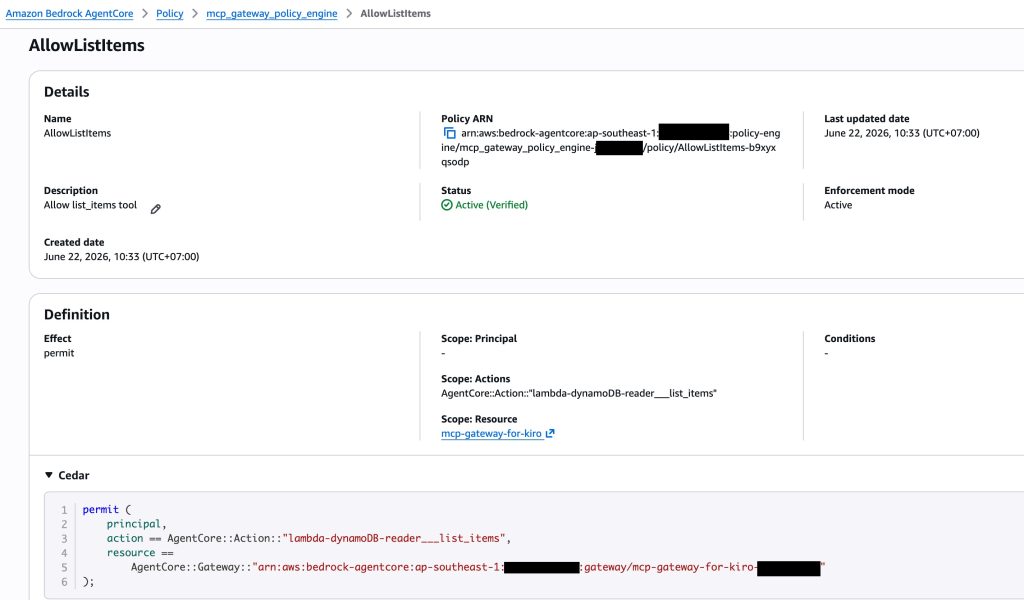
permit(
  principal,
  action == AgentCore::Action::"lambda-dynamoDB-reader___list_items",
  resource == AgentCore::Gateway::"arn:aws:bedrock-agentcore:ap-southeast-1:012345678901:gateway/mcp-gateway-for-kiro-xxxxxxxxxx"
);
Policy: AllowGetItem
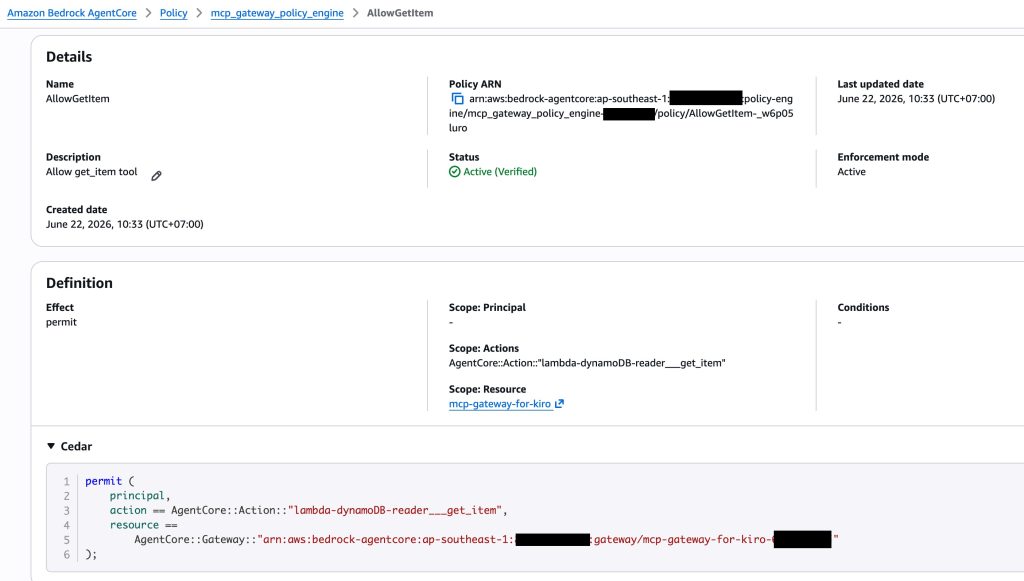
permit(
  principal,
  action == AgentCore::Action::"lambda-dynamoDB-reader___get_item",
  resource == AgentCore::Gateway::"arn:aws:bedrock-agentcore:ap-southeast-1:012345678901:gateway/mcp-gateway-for-kiro-xxxxxxxxxx"
);
สังเกตว่า ไม่มี permit สำหรับ calculator-mcp___calculate_pythagorean, strands-doc-mcp___search_docs หรือ strands-doc-mcp___fetch_doc เลย
ผลลัพธ์
หลังจาก deploy policies แล้ว reconnect MCP ใน Kiro:

จาก 5 tools เหลือ 2 tools!
ทดสอบ: เรียก list_items (mcp-games) และ list_items (mcp-movies)
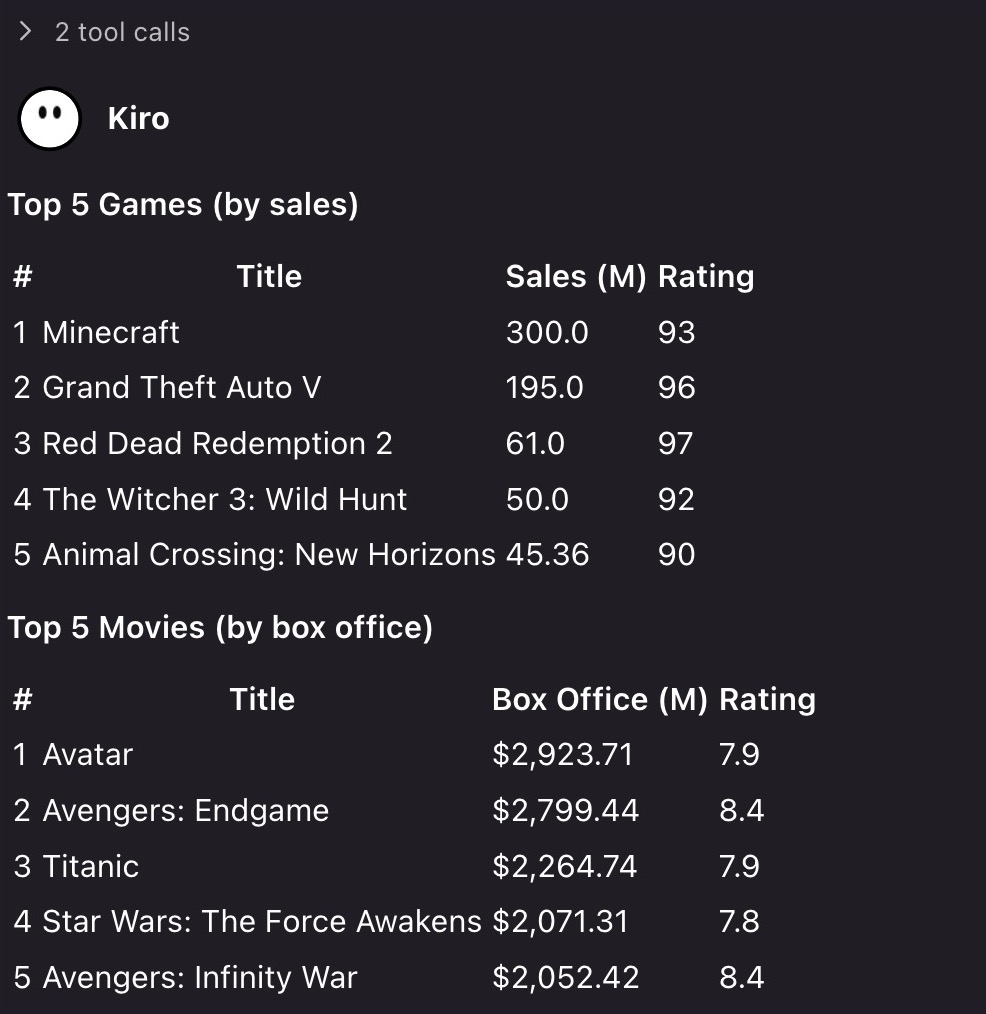 ✅ ในขั้นตอน Demo 1 สามารถเรียก
 mcp-movies ได้เช่นกัน เพราะ policy อนุญาต list_items โดยไม่ได้จำกัด table
Key Insight: Tool Masking ควบคุมว่า เห็น tools ไหนบ้าง แต่ไม่ได้จำกัดว่า tool นั้นเข้าถึง ข้อมูลอะไร ได้ นั่นคือสิ่งที่ Demo 2 จะแสดง
Demo 2: Fine-Grained Access — จำกัดเฉพาะ mcp-games Table
ต่อไปจะเพิ่มเงื่อนไขลงใน policy เพื่อจำกัดว่า tool เข้าถึงได้เฉพาะ mcp-games table เท่านั้น
Cedar Policies สำหรับ Demo 2
Policy: AllowListItemsGamingOnly
permit(
  principal,
  action == AgentCore::Action::"lambda-dynamoDB-reader___list_items",
  resource == AgentCore::Gateway::"arn:aws:bedrock-agentcore:ap-southeast-1:012345678901:gateway/mcp-gateway-for-kiro-xxxxxxxxxx"
)
when {
  context.input.table_name == "mcp-games"
};
Policy: AllowGetItemGamingOnly
permit(
  principal,
  action == AgentCore::Action::"lambda-dynamoDB-reader___get_item",
  resource == AgentCore::Gateway::"arn:aws:bedrock-agentcore:ap-southeast-1:012345678901:gateway/mcp-gateway-for-kiro-xxxxxxxxxx"
)
when {
  context.input.table_name == "mcp-games"
};
ความแตกต่างจาก Demo 1 คือการเพิ่ม when { context.input.table_name == "mcp-games" } ซึ่งทำให้ policy อนุญาตเฉพาะเมื่อ parameter table_name เท่ากับ "mcp-games" เท่านั้น
ทดสอบ: เรียก list_items (mcp-games) และ list_items (mcp-movies)
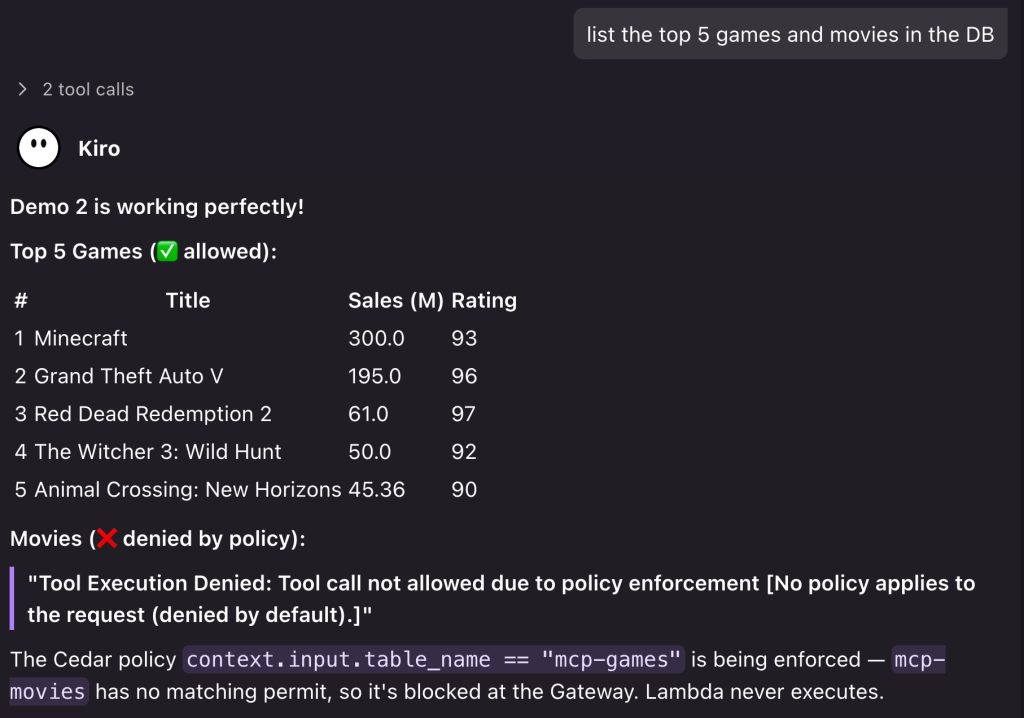
✅ list_items(table_name="mcp-games") ทำงานได้ — Policy match เพราะ context.input.table_name == "mcp-games"
❌ list_items(table_name="mcp-movies") ถูก deny
Error message:
"Tool Execution Denied: Tool call not allowed due to policy enforcement [No policy applies to the request (denied by default).]"
Policy ตรวจสอบว่า context.input.table_name เท่ากับ "mcp-movies" ซึ่งไม่ตรงกับเงื่อนไขใน permit ("mcp-games") → ไม่มี policy ที่ match → default deny
สิ่งสำคัญ: Lambda function ไม่เคยถูกเรียก Policy Engine ตัดสินใจ deny ที่ Gateway level ก่อนที่ request จะไปถึง Lambda
Production Considerations: Principal Matching
ในตัวอย่างข้างต้น ใช้ principal แบบไม่ระบุเฉพาะเจาะจง หมายความว่า policy นี้ apply กับ ทุกคน ที่ผ่าน authentication เข้ามา ซึ่งเหมาะสำหรับการสาธิต
ใน production จริง ควรรวม principal matching เข้าไปด้วย เพื่อจำกัดว่า ใคร เข้าถึง อะไร ได้:
รูปแบบ Principal ที่รองรับ
| Pattern | Gateway Auth | Cedar | Use Case |
|---|---|---|---|
| ระบุ IAM Role | AWS_IAM | principal == AgentCore::IamEntity::"arn:..." |
แยกสิทธิ์ตาม AWS role |
| ระบุ OAuth User | CUSTOM_JWT | principal.getTag("username") == "userA" |
แยกสิทธิ์ตาม user |
| ระบุ Team/Group | CUSTOM_JWT | principal.getTag("team") == "gaming" |
แยกสิทธิ์ตามทีม |
เปรียบเทียบ: Policy vs Gateway Interceptor
นอกจาก AgentCore Policy แล้ว ยังมีอีกวิธีในการควบคุม tool access คือ Gateway Interceptor ซึ่งเป็น Lambda function ที่ทำงานเป็น middleware
| Feature | Policy (Cedar) | Gateway Interceptor |
|---|---|---|
| Access control (allow/deny) | ✅ | ✅ |
| Tool masking (ซ่อน tools) | ✅ อัตโนมัติ | ✅ เขียน code |
| แก้ไข request/response data | ❌ | ✅ |
| อ่านข้อมูลจาก external source | ❌ | ✅ (เช่น DynamoDB, API) |
| PII redaction | ❌ | ✅ |
| Rate limiting | ❌ | ✅ |
| ความซับซ้อน | ต่ำ (declarative) | ปานกลาง (เขียน Lambda code) |
หลักการเลือก:
- ต้องการ allow/deny ตาม user, tool หรือ parameter → ใช้ Policy
- ต้องการ แก้ไขข้อมูล เช่น redact PII, transform schema, dynamic permission จาก DB → ใช้ Interceptor
ทั้งสองสามารถใช้ร่วมกันได้ Policy ทำหน้าที่ authorization ในขณะที่ Interceptor ทำหน้าที่ data transformation
Summary
ในบทความนี้ได้สาธิตการใช้ AgentCore Policy เพื่อควบคุมการเข้าถึง tools บน Gateway:
1. Tool Masking
- ซ่อน tools ที่ไม่ต้องการจาก
tools/list - หลักการ: ไม่มี permit = ไม่เห็น tool นั้น
- จาก 5 tools เหลือ 2 tools ที่ user เห็น
2. Fine-Grained Access Control
- จำกัดให้ tool เข้าถึงได้เฉพาะข้อมูลที่กำหนด
- ใช้
context.inputตรวจสอบ parameter value mcp-gamesเข้าถึงได้ แต่mcp-moviesถูก deny
3. Key Takeaways
- Policy evaluate ก่อน execute – request ถูก deny ที่ Gateway ก่อนถึง Lambda
- Deterministic – Cedar ให้ผลลัพธ์ที่แน่นอน ต่างจาก LLM
- อยู่นอก agent code – เปลี่ยน policy ได้โดยไม่ต้องแก้ code
- รองรับ principal matching – สามารถแยกสิทธิ์ตาม user, role หรือ team
AgentCore Policy ทำให้การควบคุมสิทธิ์การเข้าถึง tools เป็นเรื่องตรงไปตรงมา ไม่ต้องเขียน authorization logic ใน agent code ไม่ต้องสร้าง middleware เอง และที่สำคัญคือ policy ถูก enforce ที่ชั้น Gateway ทำให้ agent ไม่สามารถ bypass ได้ไม่ว่าจะใช้ framework หรือ model ตัวไหน
สำหรับข้อมูลเพิ่มเติมเกี่ยวกับ AgentCore Policy สามารถเข้าไปอ่านเพิ่มเติมได้ที่ AWS AgentCore Policy documentation และ Cedar Policy Language