AWS Architecture Blog
Publishing LMS courses with a Kiro SCORM pipeline
Publishing a Shareable Content Object Reference Model (SCORM) course to a learning management system (LMS) is rarely as straightforward as writing the course. The LMS needs SCORM packages to adhere to a standard format for successful import and launch. Producing one by hand means restructuring slides into modules and hand-editing SCORM manifests. The packaging mechanics pull authors away from developing the course content itself.
This post shows how to use Kiro, an agentic AI with an integrated development environment (IDE) and a CLI, to automate the conversion of raw training material into compliant SCORM packages. Testing with a small course included in the sample produced a SCORM package in a few minutes.
Solution overview
Kiro structures course content and guides the author through the publishing workflow. Figure 1 shows the end-to-end pipeline from raw material to upload-ready package.
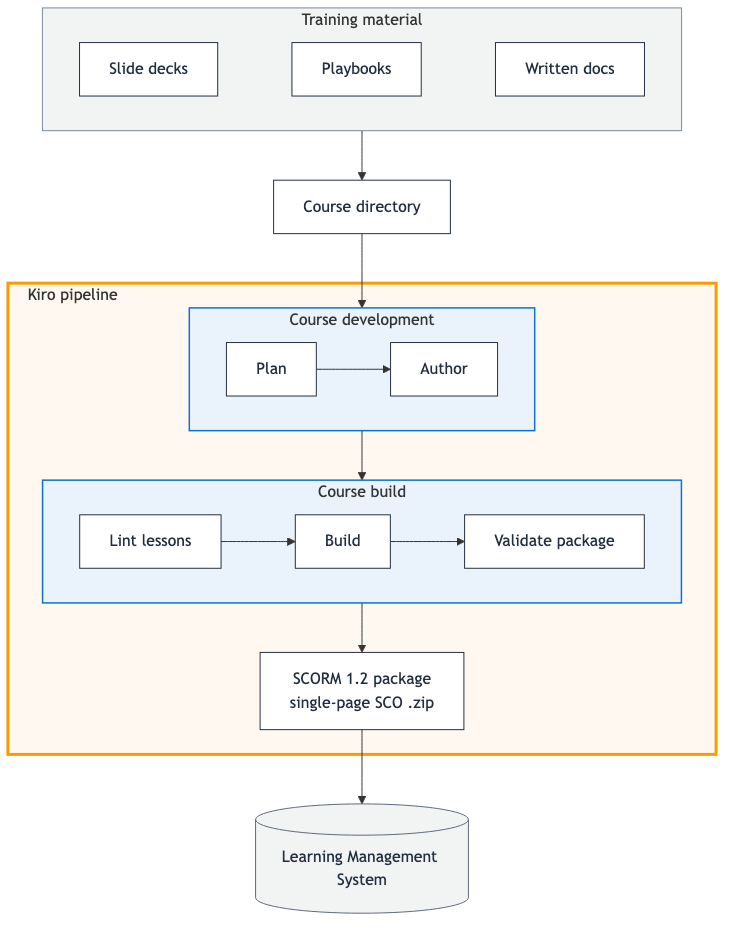
Figure 1: Kiro course publishing pipeline overview
An author places raw training material (slide decks, playbooks, and written docs) in a course folder, and Kiro runs two pipeline stages. Course Development includes planning and authoring lessons. Course Build includes linting the lessons, building the SCORM package, and validating the SCORM package. The output is a SCORM 1.2 .zip ready to upload to your LMS. You drive the whole pipeline from a Kiro conversation. Start by loading your material into a course folder, ask Kiro to build the course, and it hands back the upload-ready .zip file.
The Kiro building blocks this pipeline uses
Kiro is an agentic AI available as an IDE and a CLI (kiro-cli). This pipeline is built from three Kiro primitives:
- Steering – Markdown files that give Kiro persistent context (
.kiro/steering/) about your workspace. Steering loads automatically.alwaysfiles load in every session,fileMatchfiles load when you touch files they govern, andmanualfiles load on demand. - Specs – Specifications (
.kiro/specs/) that formalize the development process for features or bug fixes. - Hooks – Automated triggers (
.kiro/hooks/) that run prompts or shell commands when events occur in the IDE, such as creating a file, saving a file, or ending a session.
The LMS content publishing pipeline
The following sections walk through the steps a course goes through and the parts that carry them out.
How a course gets built
For a new course, Kiro works through six steps with you in conversation:
- Add source material to
courses/<name>/(slide decks, Word, PDFs, playbooks, Markdown docs). - Plan – Kiro reads the source and creates the
course.yamlmanifest. - Author – Kiro converts the source into a
lesson.mdper module. - Lint – Check the authored lessons for structural problems such as missing frontmatter, broken image paths, or a knowledge check with no correct answer.
- Build – Render the lessons into one
index.htmland compress the SCORM package. - Validate – Confirm the .zip file is a well-formed SCORM 1.2 package before it goes to the LMS.
The course manifest
Each course starts as a single manifest, course.yaml, that declares its modules, source material, and SCORM build configuration. Kiro creates the manifest at step 2, after you upload your source content and ask it to build a course.
A few notable settings you can customize:
min_page_dwell_secondssets the minimum time a learner must spend on a page before the Next button unlocks.target_duration_minutessets each module’s expected completion time, shown to learners on the course home page.total_duration_minutessets the course-level expected completion time, shown to learners and reported to the LMS.passing_scoresets the score a learner must reach for the LMS to mark the course complete (written into the SCORM manifest as the mastery score).
Steering is where the pipeline’s knowledge lives
Steering is where this pipeline keeps everything Kiro needs to know. Steering files hold three kinds of knowledge:
- Lessons learned – The SCORM knowledge accumulated from actually building and running courses.
- Authoring conventions – How to break source material into modules and lessons, plus writing-style guidance so each
lesson.mdreads as polished, learner-facing content. - The repository contract – The uniform
courses/<name>/layout every course follows, so the same shared scripts work for every course.
Each steering file loads in one of the three modes from earlier: always, fileMatch, or manual. Every session picks up only the guidance it needs. The steering files in the sample repository are listed in the following example, grouped by their inclusion mode:
Hooks automate the repetitive steps
Hooks run automatically as Kiro or the author works, so common checks don’t depend on someone remembering a command:
- Lint on save – Editing any
lesson.mdorcourse.yamlre-lints that course immediately. - Validate on package creation – A new SCORM .zip file appearing under
scorm/dist/is validated the moment it’s built. - Steering reflection – After each turn, Kiro proposes updates to the steering guidance to capture best practices worth keeping for future course development.
Spec-driven development of new features
The repo includes a feature spec kept as a reference for how the pipeline was built. The page-dwell-gating spec added the feature that enforces a minimum time a learner must spend on a page before proceeding. After you understand the pipeline, you can extend it the same way, using the spec-driven development process in Kiro.
Walkthrough: Building a course
The following walkthrough takes you from an empty repo to an upload-ready SCORM package.
Prerequisites
- Access to Kiro (IDE or
kiro-cli). Node.js20+, Python 3.11+, and thezipcommand, with permission to install package dependencies (Kiro installs the project’snpmandpippackages during setup).- Raw training material to convert (slide decks, playbooks, and written docs).
Open the repo
Open the repository in Kiro. The workspace steering under .kiro/steering/ loads automatically, so Kiro already knows the pipeline commands, the repo layout, and the SCORM constraints.
Build the sample course
Building a course is a single prompt. In the Kiro chat panel, enter:
“Build the sample course.”
Kiro runs lint, build, and validate, and replies with the path to the upload-ready .zip file: courses/sample-course/scorm/dist/sample-course.zip.
Turn your own material into a course
For a new course, add your source material to courses/<name>/ and enter the following prompt:
“Plan and build a course from
<name>.”
Kiro walks through planning course.yaml, authoring one lesson.md per module, and packaging.
Verify before you publish
You’ve already seen Kiro lint, build, and validate the package, and an included test checks the course’s progress tracking. The last check is a visual one. Serve the built course locally over HTTP to see it for yourself before uploading:
This serves the full built course locally. Figure 2 shows the course home page as a learner would see it.
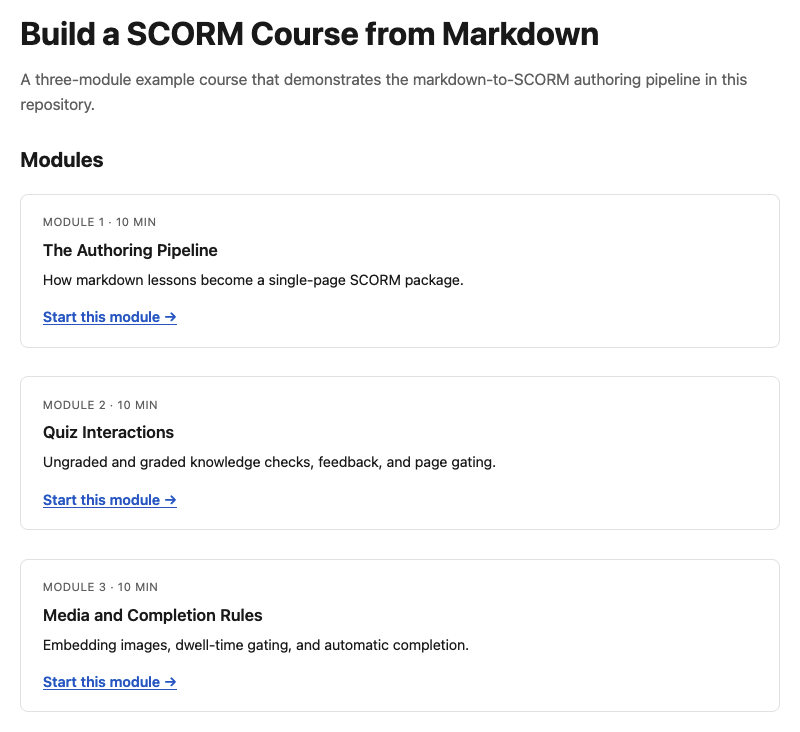
Figure 2: Local preview of the sample course home page
The home page displays the course title, a short description, and a card for each module showing its number, estimated duration, a brief summary, and a link to start.
The final step is to upload the .zip file to your SCORM 1.2-compliant LMS to confirm end to end. Learning management systems vary. If you run into an issue, ask Kiro to help you troubleshoot it and learn the specifics of your LMS.
Cleaning up
There are no cloud resources to tear down because the pipeline runs entirely as local scripts and a Kiro session against your own repository. If you built the bundled sample course only to try the pipeline, you can safely delete courses/sample-course/scorm/dist/ and courses/sample-course/scorm/build/. Both are build output.
Conclusion
In this post, you saw how to turn raw training material into LMS-ready SCORM packages with Kiro. Authors stay focused on the course while Kiro handles the packaging. Because the pipeline lives in the repo as Steering, Specs, and Hooks, that expertise is version-controlled and reusable across every course and team.
To get started, clone the aws-samples repository, drop your source material into a course folder, and ask Kiro to build the course. To learn more, explore Kiro.