AWS Cloud Financial Management
Introducing AI-Powered Cost Investigations For Cost Anomalies
Today, we are introducing AI-powered cost investigation, a new capability in AWS Cost Anomaly Detection (CAD) and the AWS FinOps Agent. When a cost anomaly fires, you can now get a plain-language root cause analysis in minutes and continue the investigation conversationally to drill into specific resources or identities, compare to past anomalies, or set the direction of follow-up analysis.
Why AI-powered cost investigation
Cost anomalies are a daily reality for cloud teams. Cost Anomaly Detection already monitors your AWS costs around the clock and alerts you when spending deviates from your normal pattern. In 2024, we enhanced CAD with multi-dimensional root cause analysis, surfacing up to ten root causes per anomaly across the service, account, region, and usage type dimensions. That answers the what: which dimensions drove the change.
For straightforward anomalies, the what is often sufficient to distinguish planned activity from unexpected changes and to guide the next step. For complex anomalies, the next questions can take hours or, at times, days to answer: why did this happen, who did it, where exactly (down to the specific resource), and when exactly (down to the minute the event fired).
Today, getting from “something changed” to “here is exactly what happened” requires correlating data across multiple sources. Practitioners use AWS Cost Explorer to slice the cost data, the AWS Cost and Usage Report for line-level detail, AWS CloudTrail for the API calls and the AWS Identity and Access Management (IAM) principals behind the change, Amazon CloudWatch for resource-level metrics, and ad-hoc conversations with the engineering teams that own the workload. Each source has its own format and view, and stitching them together to identify the resource, the deployment, the identity, and the timeline that explain a single cost change can take hours or days. The work often spans the FinOps team that received the alert and the engineering team that owns the workload, in part because cost data and audit logs require different expertise: many FinOps practitioners are deeply versed in cost data but less familiar with CloudTrail event analysis. For organizations with hundreds of accounts, the work scales linearly with anomaly volume, while the number of specialists does not.
AI-powered cost investigation is designed to close that gap. Where CAD identifies what changed, the new capability discovers why: the deployment, scaling event, configuration change, or other action behind the cost change.
How it works
When Cost Anomaly Detection flags an unexpected cost change, you can investigate the root cause from three places:
- The Investigate with Amazon Q button on the anomaly detail page in the CAD console
- A natural-language question to the AWS FinOps Agent, which can also be triggered automatically by the FinOps Agent to investigate anomalies as they are detected, posting the analysis back as part of an automated workflow
- An Amazon Q conversation about your AWS costs: when Q determines a question is best answered by an investigation, it invokes the skill automatically and surfaces the analysis as part of the conversation, without you having to ask for it explicitly
All three paths invoke the same capability, so the analysis is consistent regardless of where you start. The capability classifies the change in plain language as either usage-driven (more resources or more activity at the same per-unit price, such as a deployment scaling up or a new workload starting) or rate-driven (similar usage at a different per-unit price, such as an AWS Savings Plans reallocation, a tiered pricing reset). It explains which one is in play and walks through the cause.
For usage-driven changes, the capability correlates with CloudTrail to attribute the change to specific API calls and the identities that made them. For rate-driven changes, the trigger is typically a billing event rather than an API call, so the capability focuses on the cost composition itself, explaining what shifted in pricing or applied discounts.
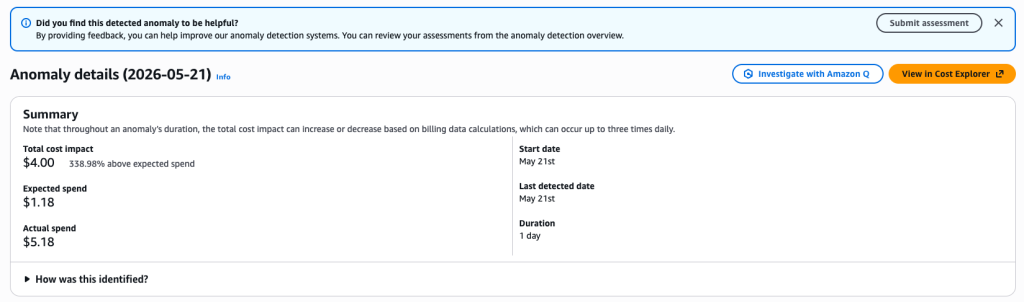
Figure 1: The “Investigate with Amazon Q” button on a Cost Anomaly Detection anomaly detail page.
What an investigation answers
Every investigation is built around five fundamental questions about a cost change: what changed, when it changed, where it changed, who or what triggered it, and why it happened. The skill goes beyond the surface dimensions and asks “what caused that?” until it reaches a human or automated action, or hits a data gap and clearly says so.
The format adapts to the anomaly. A simple anomaly with one cause produces a concise narrative. A complex anomaly with multiple independent causes produces a per-cause breakdown with a synthesis at the end. The output may include references to the CloudTrail events behind the conclusion, and an honest statement of any gap in the data when the evidence does not support a definitive answer.
Covering these questions matters because a cost change is rarely useful as a number alone. Engineers need to know which resource, which deployment, and which identity. FinOps practitioners need the cost framing. Finance needs the timeline and magnitude. By answering all five dimensions in plain language, the same investigation works for every audience.
Continuing the investigation
The initial analysis is just the start. Because the investigation runs inside Amazon Q, you can ask follow-up questions in the same conversation to drill deeper, broaden the lens, or change direction. For example:
- “Break down the cost increase by service and region.”
- “Is the cost concentrated in a single account or spread across the organization?”
- “How does this anomaly compare to recent cost changes in this account?”
Amazon Q maintains the conversation context, so each follow-up builds on the prior analysis without losing the original anomaly framing. This turns a single investigation into a structured exploration of patterns, identities, and trends.
Cross-account investigation
Cost anomalies in enterprise environments often originate in linked accounts within an AWS organization. Cost Explorer aggregates billing data at the payer level, but CloudTrail event data is scoped to the account where the API call was made. To bridge that gap, the skill automatically discovers your organization-wide CloudTrail trail, a single trail that captures events from every account in the organization, and queries the Amazon CloudWatch Logs location where the trail’s events are stored.
If your organization does not have an organization-wide trail with CloudWatch Logs delivery configured, the skill completes the investigation with the data it has and tells you what to enable for a fuller answer. You do not need to configure anything inside Cost Anomaly Detection or the cost investigation skill itself; once the trail exists, the skill discovers and uses it automatically.
Honest about what it can and cannot prove
The skill grounds every conclusion in a specific data point: a AWS Cost Explorer figure, a CloudTrail event, a usage change in a particular account. When the evidence does not add up to a definitive root cause, the skill tells you that directly, names what remains uncertain, and points to the data source you would need to close the gap. The capability is designed to ground every conclusion in specific data points and to flag uncertainty rather than fabricate. It prefers an honest “here is what I can confirm and here is what I cannot” over a confident-sounding answer that might be wrong.
Example walkthrough
Consider a scenario where Maya, a FinOps lead at a software company, opens her email and sees a Cost Anomaly Detection alert: an unexpected increase in her organization’s Amazon Relational Database Service (RDS) spend that started the previous day. She has 45 minutes before a planning meeting and needs to know whether this is a real problem or planned activity.
Step 1: Click Investigate with Amazon Q
Maya opens the anomaly in the CAD console and clicks Investigate with Amazon Q. Amazon Q opens with a contextualized prompt and begins the investigation immediately.
Step 2: Read the investigation
Within minutes, Amazon Q returns a structured analysis. Amazon RDS usage in us-east-1 grew sharply over the previous 24-hour period and accounts for the majority of the cost increase. The activity originated in a development account inside Maya’s organization (111122223333), where the IAM role rds-platform-deploy scaled an RDS cluster up at the start of the deviation. The investigation traces the chain to a scheduled load test that was provisioned but never torn down: the instances are still running.
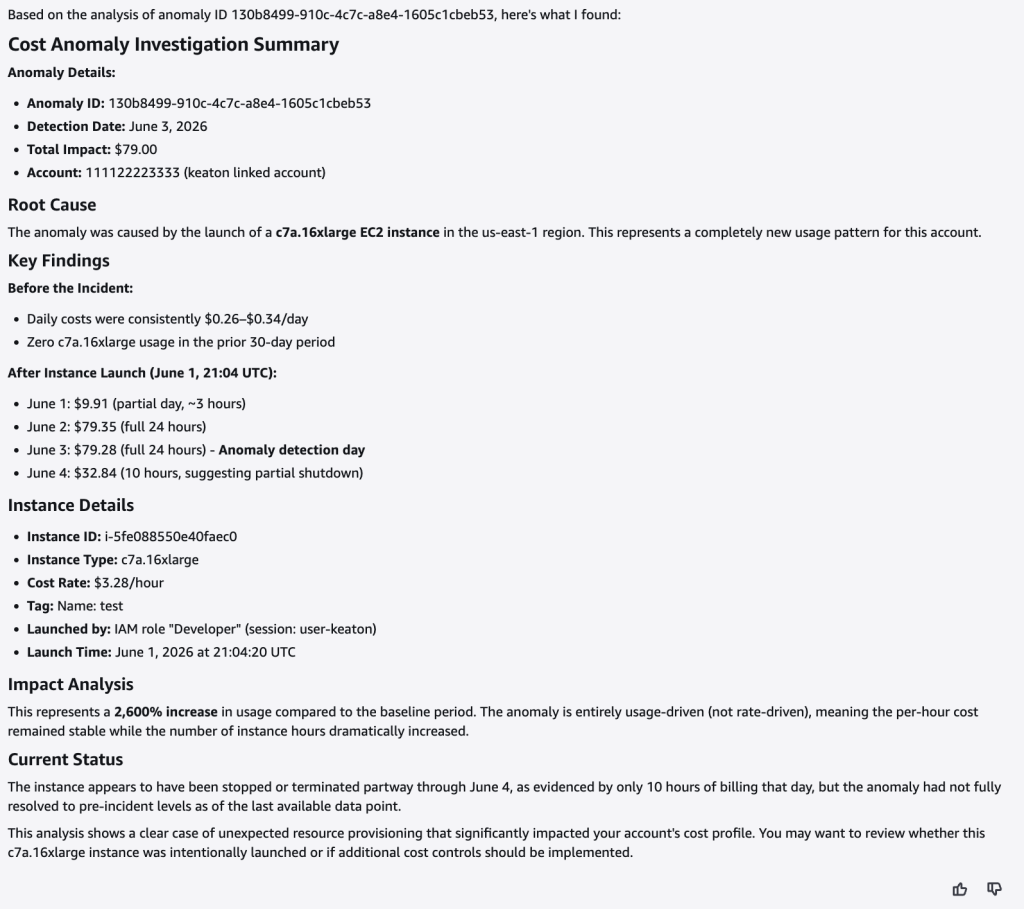
Figure 2: An example cost anomaly investigation result from Amazon Q.
Step 3: Ask a follow-up
Before handing off, Maya asks Amazon Q a follow-up: “How does this compare to the account’s normal RDS spend?” Q reports that the current daily RDS cost is approximately 12x the typical daily spend for this account over the past 90 days. Maya now has both the immediate root cause and a clear sense of magnitude to attach to the hand-off.
Step 4: Hand off and resolve
Maya forwards the investigation summary to the platform team owner, including the IAM role, the deployment time, and the recurring pattern. Within 15 minutes, the engineer replies on Slack: “That’s our load test, we forgot to tear it down. Decommissioning now, and we will add a tag-based timeout so it does not happen again.” Total time from alert to resolved action: about 20 minutes.
Getting started with AI-Powered Cost Investigations For Cost Anomalies
AI-powered cost investigation is available starting today, at no additional charge, for customers using AWS Cost Anomaly Detection. Cross-account investigations query CloudWatch Logs Insights at standard rates; see the new Cost Investigation user guide for details. The Investigate with Amazon Q button appears automatically on anomaly detail pages in the CAD console for any account with Amazon Q Developer access. Cross-account investigation works automatically for organizations with an organization-wide CloudTrail trail configured to deliver events to CloudWatch Logs; if you do not have one configured, the CloudTrail documentation explains how to enable it.
The same investigation skill is available in the AWS FinOps Agent, so cost investigation can run wherever your team already works.
Conclusion
Cost surprises are a daily reality for cloud teams, and the time it takes to understand them often determines whether the change can still be acted on. Building on the multi-dimensional root cause analysis that Cost Anomaly Detection has provided since 2024, AI-powered cost investigation closes the gap from what changed to why, delivering a plain-language root cause analysis in minutes and a conversational interface to keep digging. To start using it, visit the AWS Cost Anomaly Detection documentation.