AWS Cloud Financial Management
Introducing Target Coverage in Savings Plans Purchase Analyzer
Starting today, you can specify a Savings Plans coverage percentage of your On-Demand spend and receive the hourly commitment needed to achieve that level directly in the Savings Plans Purchase Analyzer in the AWS Billing and Cost Management Console. With Target Coverage, you can model different coverage scenarios, exclude expiring Savings Plans to plan for upcoming renewals, and run separate analyses to compare the savings impact of incremental coverage steps, such as 80% versus 90%.
Why should you start using Target Coverage?
Savings Plan coverage percentage is commonly used by organizations to plan, track, and report on their Savings Plans strategy across Chief Financial Officer (CFO) reviews, FinOps planning, and cost management dashboards. Choosing the right coverage level is critical because it determines how much spend benefits from committed discounts versus how much flexibility you retain to respond to changing workloads and business needs. You can set a coverage target that leaves room to rightsize instances and clean up idle resources before committing further. By incrementally increasing coverage alongside your optimization efforts, you grow your Efficiency Score and total savings over time. Target Coverage lets you model each of those incremental purchases as you optimize your environment and want to commit to that optimized set of workloads.
Target Coverage lets you start directly from your coverage goal. You select your Savings Plan type, including Compute Savings Plans, Database Savings Plans, EC2 Instance Savings Plans, or Amazon SageMaker Savings Plans, enter your target percentage, and receive the hourly commitment needed to achieve that level in a single simulation run. The result reflects your actual historical usage and your active Savings Plans inventory and sharing preferences, giving you a purchase-ready commitment you can bring to your finance team with confidence.
What can you do with Target Coverage?
Target Coverage introduces a new Analysis type in Savings Plans Purchase Analyzer, complementing the existing Recommended and Custom modes. Along with your coverage target, you can configure your term (1-year or 3-year), payment option (All upfront, Partial upfront, or No upfront), and lookback period to tailor the analysis to your specific needs.
Specify a coverage target: As shown in Figure 1, enter a whole number coverage percentage between 10% and 100%, such as 90%, and Target Coverage calculates the exact hourly commitment needed to achieve that level. The result accounts for coverage already provided by your existing active Savings Plans, so the analyzer returns only the incremental commitment needed to bridge the gap to your target.
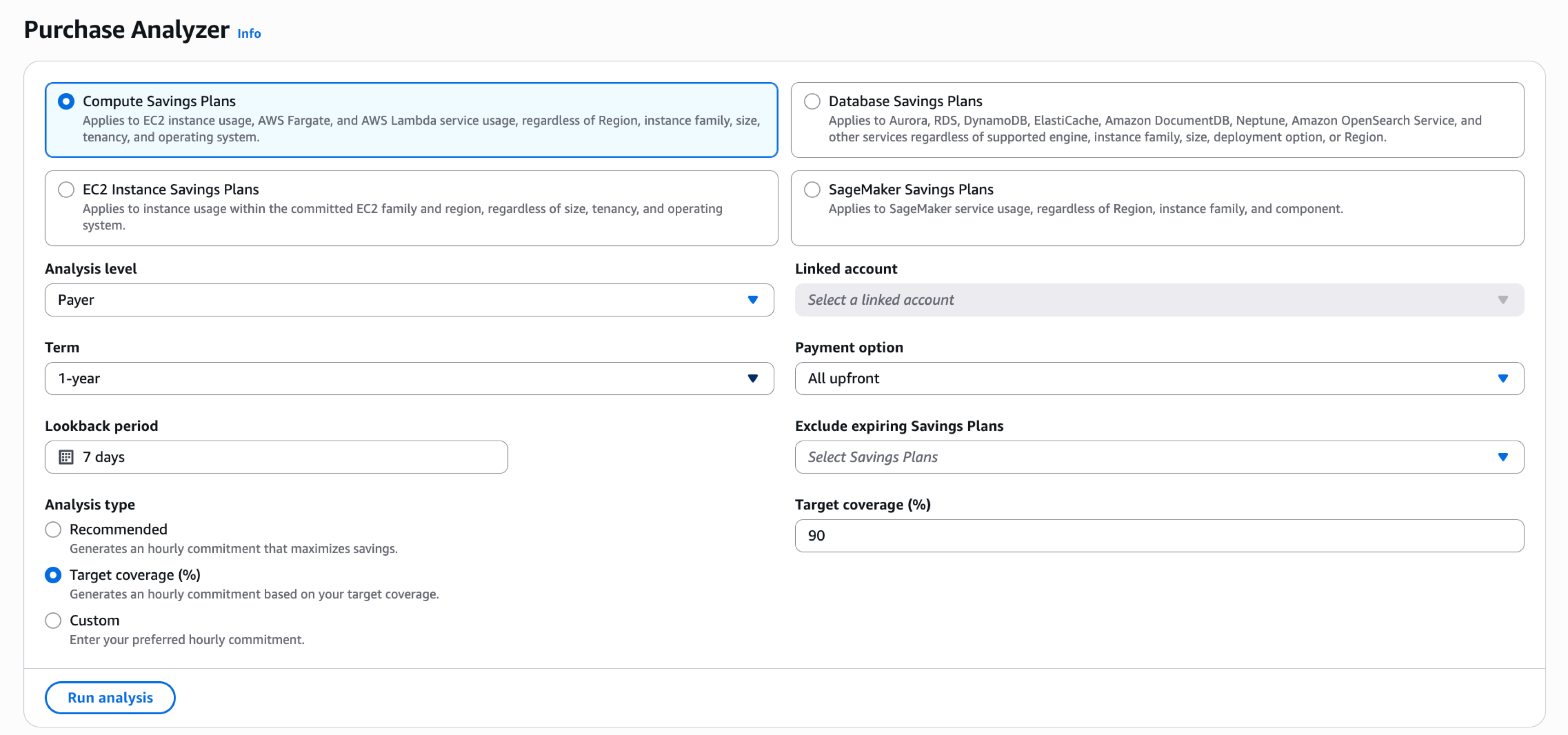
Figure 1. Screenshot of Target Coverage input in Savings Plans Purchase Analyzer
Exclude expiring Savings Plans and adjust your lookback period: You can select Savings Plans expiring within the next 90 days to exclude from the analysis, so you can see how your coverage will change as those plans expire and determine the new commitment needed to maintain your target. You can also adjust the lookback period to match your current usage pattern. For example, if you recently migrated workloads or experienced a seasonal shift, a shorter lookback period sizes your commitment to recent demand. Together, these controls let you plan renewals and new purchases against a usage baseline that reflects where your environment is today.
View your results: Your results are displayed in interactive coverage, cost, and utilization charts using hourly data, as shown in Figure 2. The coverage chart shows your current coverage, your estimated coverage after the Savings Plan purchase, and a Target Coverage reference line, giving you a clear view of how your commitment performs across different usage patterns, including weekly peaks and troughs, before you make a purchase.
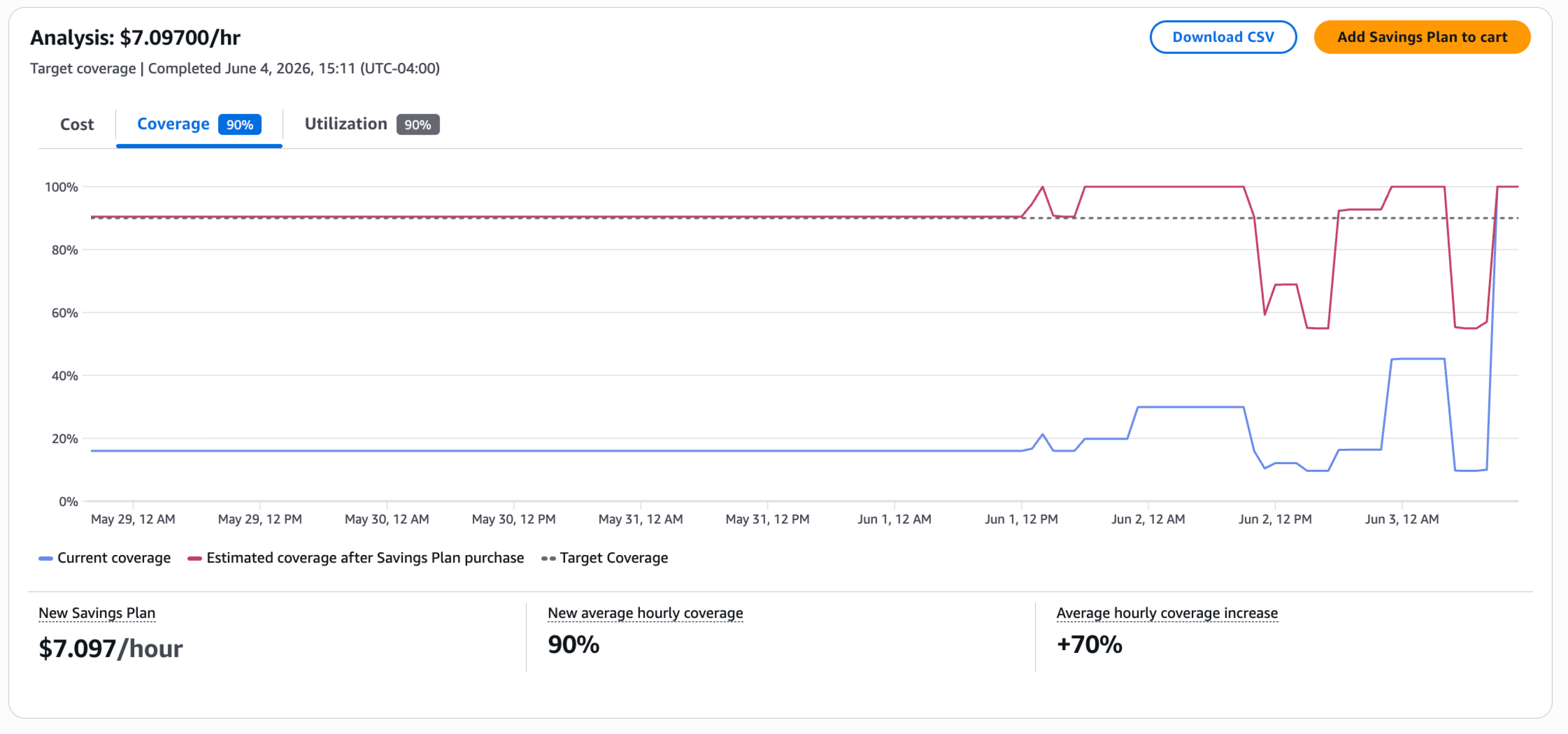
Figure 2. Interactive cost, coverage, and utilization charts in Savings Plans Purchase Analyzer
Explore incremental coverage steps: After running an analysis, you can record the results, update your coverage target, and run the analysis again to explore different commitment levels. For example, you can record the commitment and savings at 80%, then rerun at 90% to evaluate whether the additional savings justify the higher commitment.
How does Target Coverage fit with other Purchase Analyzer modes?
Savings Plans Purchase Analyzer offers three analysis types, each starting from a different input, designed to work together to support your full purchasing workflow.
- Recommended: AWS analyzes your historical usage and recommends the commitment that maximizes your cost savings. Use this as a starting point when your usage is steady and you want the highest possible savings.
- Target Coverage: You specify a desired coverage percentage, and the analyzer calculates the hourly commitment needed to achieve it. Use this when your organization has a coverage target defined by your FinOps policy or finance team.
- Custom: You specify a dollar-per-hour commitment and the analyzer shows the resulting coverage, cost, and utilization. Use this when you have a specific budget in mind and want to understand its impact.
A common workflow is to start with Recommended to see the commitment that maximizes savings, refine it using Target Coverage to match your organization’s coverage goal, and then fine-tune with Custom to land on a budget-friendly number. You can switch between modes at any time without losing your other parameter selections.
How can you get started?
You can access Target Coverage in the AWS Billing and Cost Management Console by navigating to the Savings Plans Purchase Analyzer and selecting Target Coverage as your analysis type.
After running your analysis, you can click Add Savings Plan to cart to add the commitment directly to your purchase cart, export the results as a CSV to share with your team, or use the Purchase Analyzer API to integrate Target Coverage into automated workflows.
Target Coverage is available at no additional cost in all AWS Regions where Savings Plans Purchase Analyzer is supported. For more information, see the AWS Savings Plans page.
Conclusion
Target Coverage in Savings Plans Purchase Analyzer enables you to go directly from a target percentage of On-Demand spend you want covered by Savings Plans to a purchase-ready commitment. Whether you are planning a new purchase, preparing for a renewal, or evaluating the return of each additional percentage point of coverage, Target Coverage gives you the precision and confidence to make informed Savings Plans decisions faster. Get started today in the AWS Billing and Cost Management Console.