AWS Cloud Financial Management
Measuring EC2 Nitro Enclave Usage for Billing and Metering Purposes
Introduction:
In this blog, we show you how to implement granular usage tracking and cost allocation for AWS Nitro Enclaves across multiple clients on Amazon Elastic Compute Cloud (EC2) instances. Our solution enables precise resource monitoring in multi-tenant environments and provides detailed billing reports per client. This empowers organizations to efficiently manage the billing for Nitro Enclave resources in complex, multi-client scenarios.
What is an AWS Nitro Enclave?
AWS Nitro Enclaves are isolated compute environments that run alongside Amazon EC2 instances, designed for processing sensitive data with maximum security. These highly-constrained virtual machines operate without persistent storage or network access, communicating only with their parent instance through secure local channels. A common use case is Payment Card Industry Data Security Standard (PCI DSS) compliant payment processing, where sensitive data remains protected even from root users, significantly reducing security risks and compliance scope.
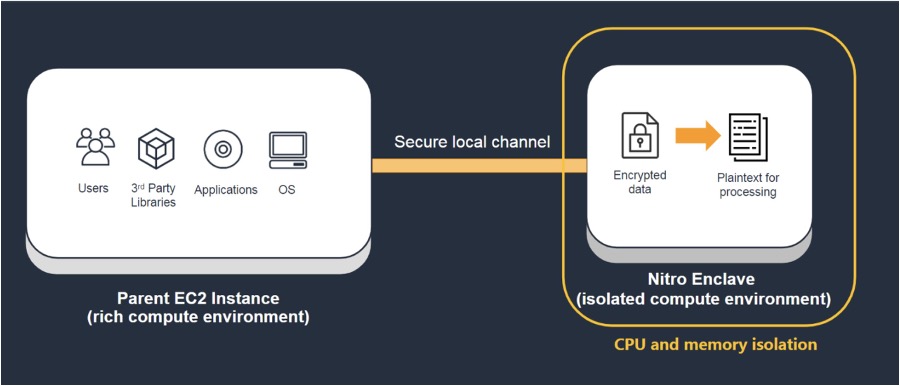
Figure 1 – How Nitro Enclaves interact and communicate with parent Amazon EC2 instance
The challenges of monitoring and allocating AWS Nitro Enclaves costs
There is no out-of-the-box tool or metric available to calculate the start and stop times for each client’s enclave. This limitation makes it difficult to accurately track and allocate costs for individual client enclaves. In this solution, we demonstrate how to measure the usage by tracking the enclave ID, duration, memory, and CPU usage per client.
Architecture
The solution uses Amazon CloudWatch for log collection from a fleet of Amazon EC2 instances running AWS Nitro Enclaves and AWS Lambda function to process the logs and extract usage data. Here’s a high-level architecture of the solution:
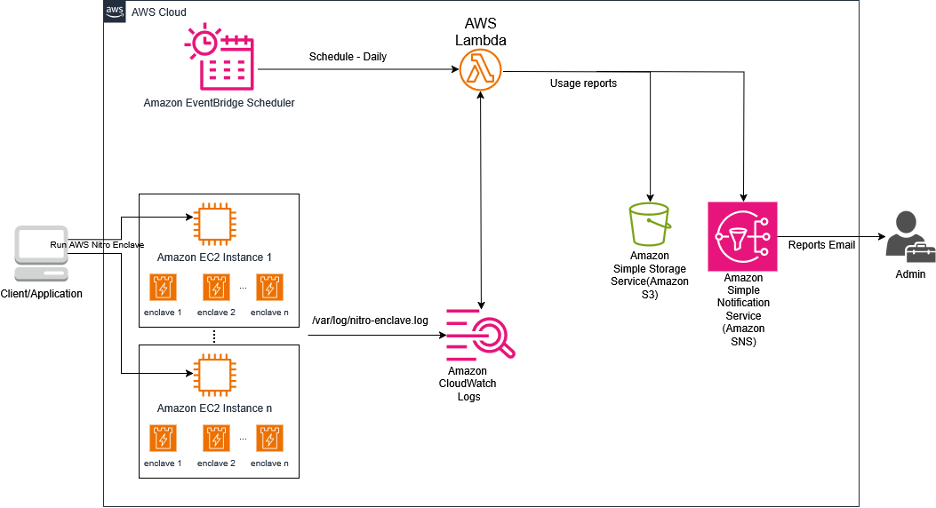
Figure 2 – Architecture diagram showcases the workflow of using Cloudwatch Logs and Lambda to generate usage report for Nitro Enclaves
Solution Overview
When AWS Nitro Enclaves are initiated on Amazon EC2 instances, each Nitro Enclave gets a unique enclave ID. The nitro-enclave.log file automatically records the enclave ID, start/stop times, allocated memory, and CPU resources.
The solution works through three main phases:
1. Data Collection
- We run Amazon CloudWatch Logs agent on the Amazon EC2 instance to capture enclave logs which are located at /var/log/nitro_enclaves/nitro_enclave.log and upload them to Amazon CloudWatch Logs Group
- The Amazon CloudWatch agent is configured to continuously collect logs containing crucial information about enclave operations
2. Data Processing
- AWS EventBridge periodically triggers a Lambda function to parse the Nitro Enclave usage data from CloudWatch Log group
- The Lambda function extracts key data points including:
- Process IDs: Unique identifiers for the processes running the enclaves
- Enclave IDs: Specific identifiers for each enclave instance
- Start times: When each enclave was initiated
- End times: When each enclave was terminated
- Running duration: The total time each enclave was active
- Allocated resources (CPU and Memory)
- The function compiles this data into a structured CSV report
3. Report Distribution
- The Lambda function saves the processed Enclave usage report file in an Amazon S3 bucket
- Triggers an Amazon SNS notification to email your administrator/Billing team with a pre-signed S3 URL for accessing the usage reports
Walkthrough
Step 1: Pre-requisites
- An AWS account with permissions to create and manage Amazon EC2 instances, AWS Identity and Access Management (IAM) roles, Amazon CloudWatch, Amazon S3 buckets, and AWS Lambda
- Amazon EC2 instances running Nitro Enclaves on them (For this blog post we use the Hello Enclave example on Linux)
- Install nitro-cli package by following Install Nitro Enclaves CLI documentation and configure the allocator.yaml described in the documentation.
- Create a CloudWatch log group:
- Navigate to CloudWatch in the AWS Console
- Select ‘Log groups’ from the left panel
- Click ‘Create log group’ in the top right
- Fill in the required details and click ‘Create’
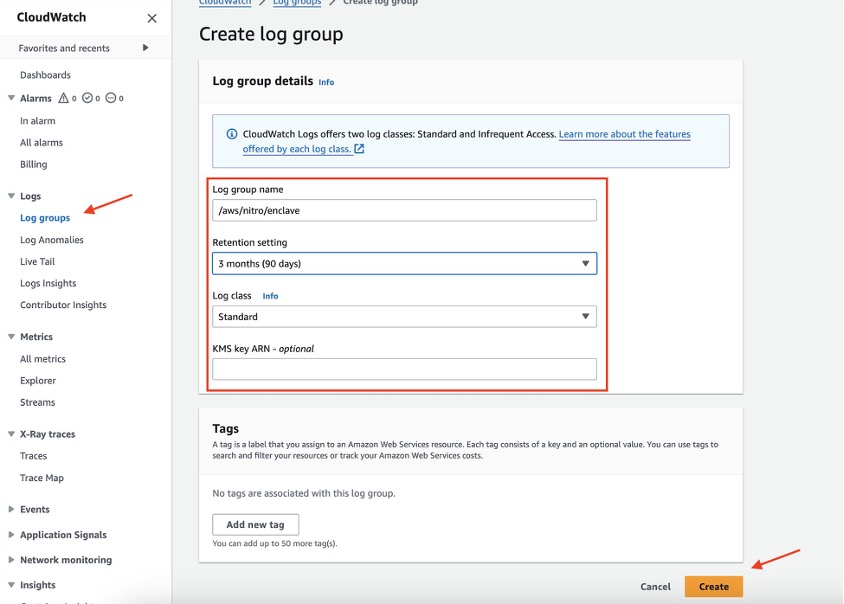
Figure 3 – Create Log Group to store Nitro Enclave Logs
- Installing and configuring the Cloudwatch agent
- Create IAM role and attach it to the instance for the necessary permission we need to collect the logs and send it to CloudWatch log group
- Install the CloudWatch agent on your instance and configure the CloudWatch agent config file to collect data from Nitro Enclave log and port it to the destination log group. As you can see below, we collect the logs from /var/log/nitro_enclaves/nitro_enclaves.log and send it to log group named /aws/nitro/enclave and log stream {instance_id}
Here is the sample configuration file we are using:
Step 2: Deploy the Solution
- Download the AWS CloudFormation template from the github-repository
- Launch the template with these parameters:
- Number of weeks to analyze logs (e.g., 4 weeks)
- Your email address for notifications
Sample Output
The sample report demonstrates the execution metrics of multiple AWS Nitro Enclaves across various Amazon EC2 instances. The report provides detailed resource allocation data per enclave, including CPU, memory utilization, and total runtime duration. Organizations can leverage these granular metrics for precise customer billing and cost allocation.
Example: PID : 3516 , InstanceId i-057969283de196fb7 , memory_mib : 512, cpu_count : 2, encalve_name : test1, Duration : 17:24:25 hrs

Figure 4 – Sample Output
Solution Cost
Based on the service usage patterns detailed below, we’ve conducted a cost analysis using the AWS Pricing Calculator. This breakdown provides a clear view of the expected expenses for implementing this solution.
AWS Services Usage:
- Amazon EventBridge: Daily trigger (30 invocations per month)
- AWS Lambda: 30 executions per month
- Amazon CloudWatch Logs Insights: Scanning 30GB of data monthly
- Amazon Simple Notification Service (SNS): 30 email notifications per month
- Amazon S3: Storing a 7KB file daily
Total Monthly Cost: $0.35 (rounded to nearest cent)
Clean up
Delete the CloudFormation stack which was created. Also, you need to delete Amazon EC2 instances, S3 bucket, and CloudWatch Log Group if it was created separately to test this solution.
Summary
AWS Nitro Enclaves provide robust security for sensitive workloads, including personally identifiable information (PII) and customer data processing applications. When operating Nitro Enclaves in a multi-tenant environment, accurate usage tracking and billing allocation become crucial. This post demonstrates a scalable solution for measuring and billing Nitro Enclave usage across multiple clients. While we’ve presented one approach, you can adapt this solution to meet your specific business requirements.