AWS Cloud Financial Management
Tokenomics for coding agents: benchmark cost and quality on your own code
Agentic coding assistants have moved from pilots to daily tooling, and the cost of running them at scale is now a real budget line. In active use, an assistant such as Claude Code, Codex, Cursor, or Kiro runs models against a real repository many times a day. Each run sends a large, growing transcript to a model and consumes tokens that land on a bill. As usage scales from a handful of developers to a whole engineering org, model inference for coding becomes a line item that you have to account for.
This raises a cost-management question: which model to use for a given task, and what that choice costs over a quarter. A common default is to pick the strongest available model, because it is hard to predict which model will resolve a given issue, and the strongest one feels like the safe choice. Multiplied across many developers and many tickets, that default produces spend that was never an explicit decision.
The Tokenomics post lists model selection under its Save pillar as one lever on that spend. This post shows how to quantify it. You measure what your coding work costs across the models, harnesses, and hosting paths available to you, turn the measurements into a cost-and-quality frontier, and put that frontier in front of developers before they choose a model.
That frontier is specific to your code and your tasks, which is why no public leaderboard or vendor benchmark is source of truth for it. You build it in your own environment, you own it, and you refresh it as new models are released or the mix of your work changes.
The approach is backed by open-source code under the MIT No Attribution license (MIT-0) at aws-samples/sample-agentic-coding-harness-benchmarks. It is sample code for demonstration and learning, so review the scripts, configurations, and AWS Identity and Access Management (IAM) permissions before running it anywhere sensitive. permissions before running it anywhere sensitive.
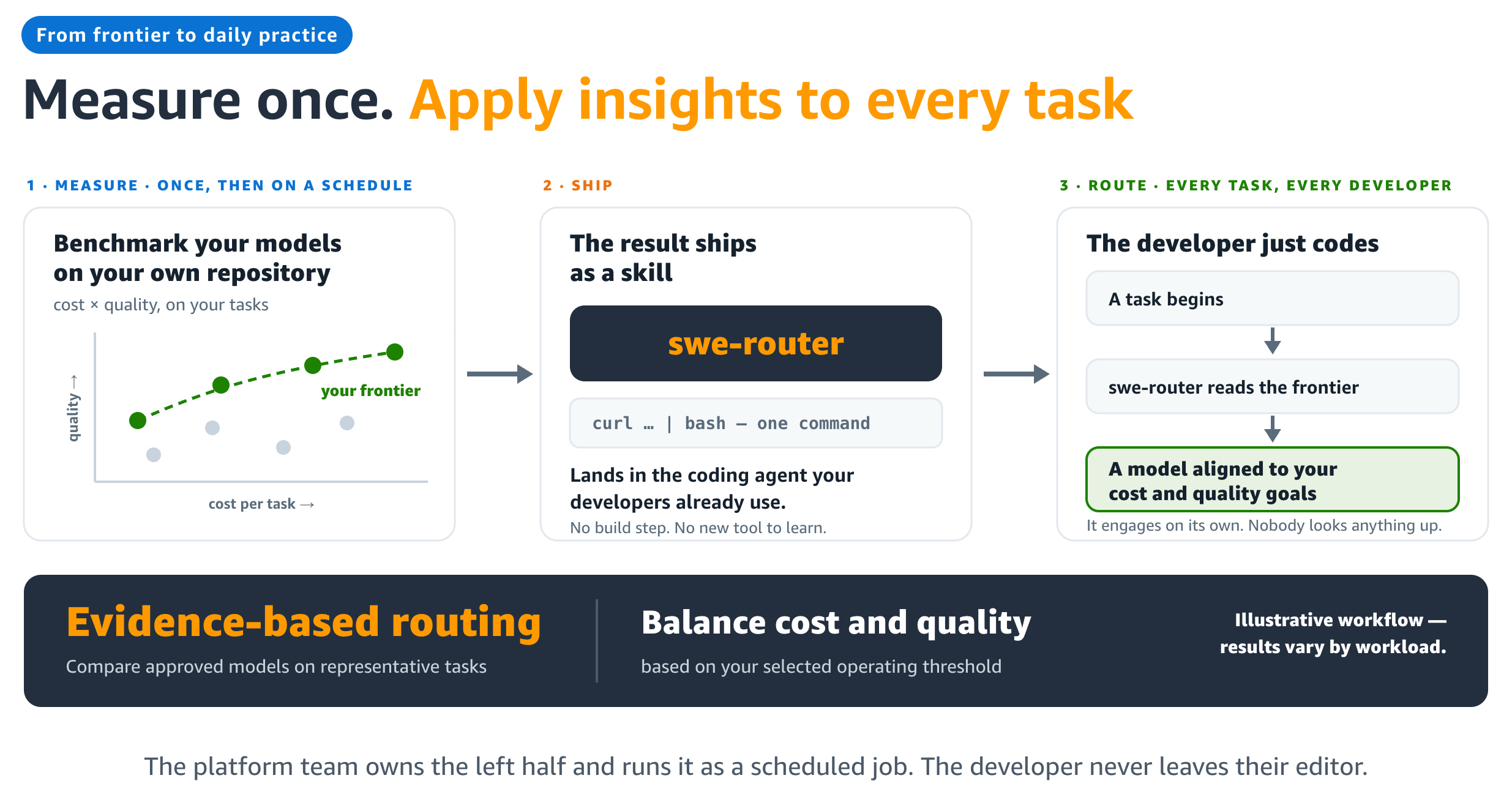
Figure 1. A platform team benchmarks its approved models on its own repositories once a week. The result ships to every developer’s assistant, which reads it before each task.
What a leaderboard score leaves out
Two obvious places to compare models are a provider benchmark and a public leaderboard. A provider benchmark measures how a model does on public tasks. Public leaderboards go stale as models get tuned toward the well-known test sets, so a strong score there says little about how a model handles long work in a private repository. Neither one prices your own code, and your code is what the bill is charged against.
What a task costs comes down to how the model drives it: how many turns it takes, how much context it re-reads each turn, and whether its prompt cache hits. Two models can sit two points apart on the board and still differ eightfold in what it costs to close the same task in your repository.
How agentic coding changes the cost math
Pricing guidance drawn from non-agentic workloads assumes a low input-to-output token ratio, say around 5:1 across a few multi-turn interactions. Agentic coding is different. A coding agent replays its whole growing transcript as fresh input on every turn. It reads large files, calls tools, and emits a small patch, then repeats this across tens or even hundreds of turns, often spread across subagents. Over a run like that, the ratio might reach a few hundred to one. The exact figure varies by repository, task, and harness, but public data on agentic-coding workloads reports similarly high ratios, so the broad pattern is not unique to one setup.
This skew has two consequences for how you price coding work.
Pricing by output token understates the bill. If you treat output tokens as four times the cost of input tokens, an input-heavy workload looks cheap even though it consumes the machine’s full capacity for reading prompts. A coding task that runs 98% input tokens is not a cheap task.
On a self-hosted GPU, cost is a function of time, not tokens. A GPU instance has no per-token bill, so the unit of cost is GPU time:
run_cost = GPU-seconds x $/second
To price a run, take the sum of the tokens the server processed, including cache reads and writes, and divide by the instance’s measured throughput. This charges the bill against work completed and makes no assumption about how input and output should be priced. Prompt caching is already reflected in the result: it raises throughput, which lowers GPU-seconds. When the server reuses a cached prefix, it skips the prefill compute for those tokens and reads their key-value state back from GPU memory. The run still counts the tokens, but the server gets through them faster, so throughput rises and GPU-seconds fall. For this to hold, measure throughput on the workload you are pricing: a cache-heavy run processes tokens faster than a cold benchmark, and a cold number will overprice it.
Measuring the three levers
Three choices decide what a coding task costs: which model does the work, which harness drives it, and where the model runs. A harness is the coding agent itself, the tool that reads the repository, plans the change, calls tools, and writes the code.
These three factors multiply rather than add, so measuring one in isolation leaves you guessing about the other two. The benchmark holds everything else fixed and varies one lever at a time.
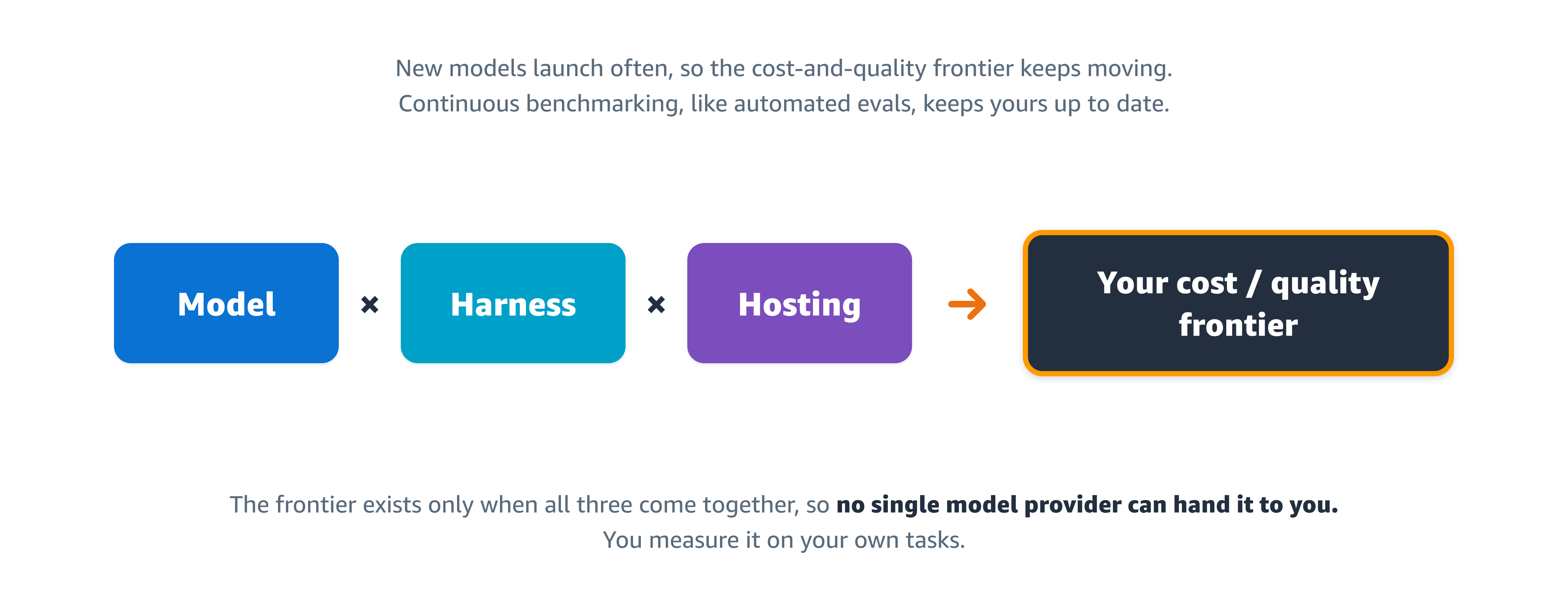
Figure 2. The model, the harness, and where it runs multiply together into a cost-and-quality frontier. Because that frontier depends on all three on your own tasks, no single provider can hand it to you.
Each run repeats the same steps: clone the target repository at a pinned commit or tag (the release before the fix shipped, so the defect is really there), drive the harness through the task, record tokens, turns, and latency, score the resulting artifacts against a rubric with an independent judge, then delete the clone. Tasks come from closed issues in real repositories. One command runs a model over a whole task set:
--provider sets where the model runs, --model sets the model, and --agent sets the harness. Repeat per combination, and the chart generators build the frontier.
Lever 1: the model
Here is a sample run that covers 19 models over 21 tasks in one repository, with the harness and the judge held fixed. Six models land on the cost-and-quality frontier; ordered by cost per task shows where the money goes. Model names are given as classes, with parameter counts and either a dense architecture or mixture of experts (MoE), because that is what determines the hardware a model needs.
| Model class | Quality | Cost per task | What the step buys |
|---|---|---|---|
| Open MoE, 35B total / 3B active | 59.2 | $0.26 | Baseline |
| Open dense, 31B | 59.7 | $0.87 | +0.5 for +$0.61 |
| Open dense, 27B | 78.5 | $1.47 | +18.8 for +$0.60 |
| Open MoE, 2.8T | 79.2 | $4.33 | +0.7 for +$2.86 |
| Open MoE, 743B | 80.1 | $7.04 | +0.9 for +$2.71 |
| Closed frontier, current generation | 82.8 | $11.95 | +2.7 for +$4.91 |
(actual model names replaced by indicative placeholders)
The step up to the 27B open dense model buys 18.8 points of quality for 60 cents, the best value on the frontier. Every model above it adds only 4.3 more points for about $10.48 per task. Standardizing on the top model therefore costs roughly 8× the 27B option, and only pays off when those last 4.3 points genuinely matter.
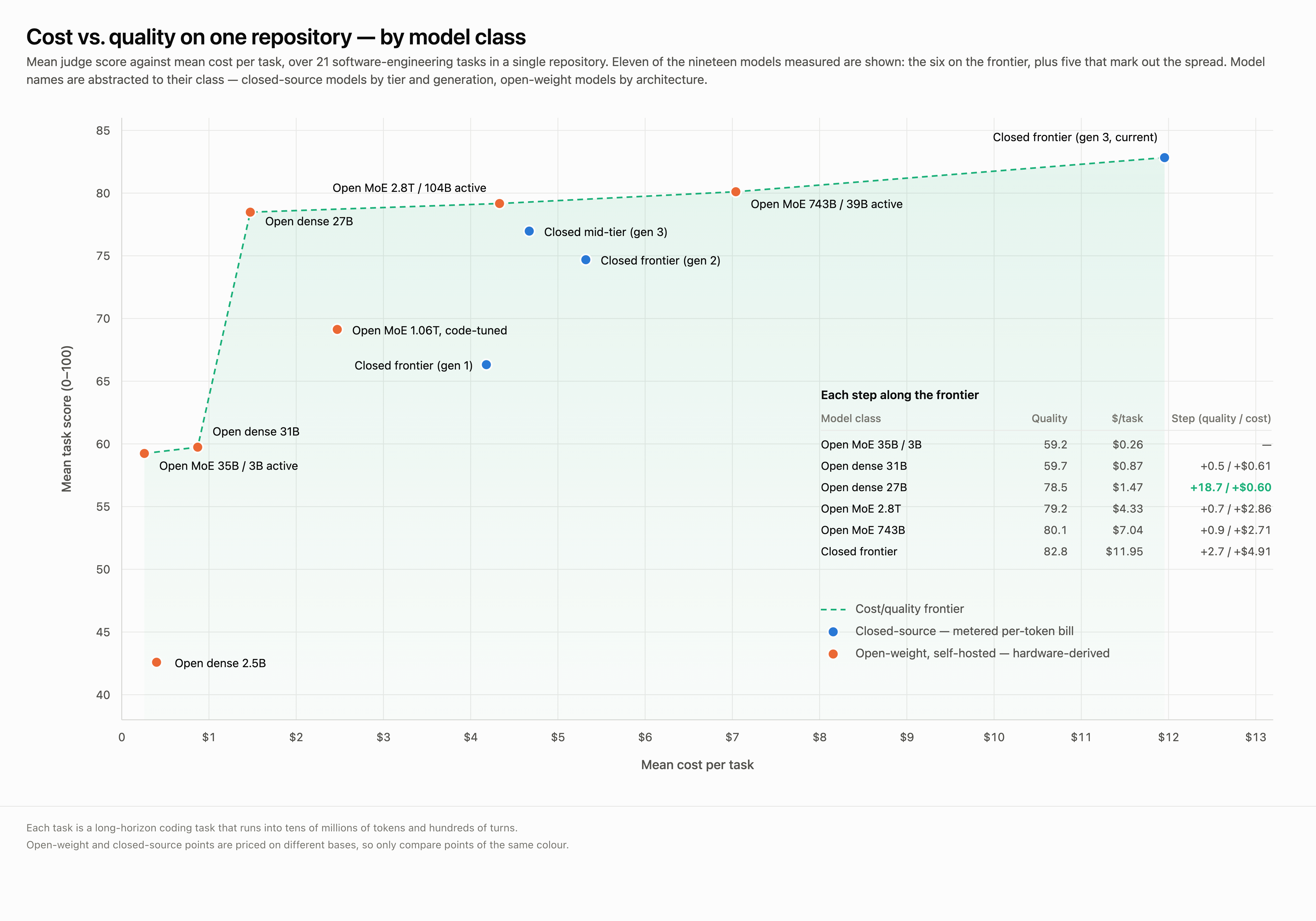
Figure 3. The frontier over 21 tasks in one repository. Model names are abstracted to class; every score and cost is measured. Closed-source points carry a metered per-token bill and open-weight points are priced from the GPU’s hourly rate divided by measured throughput, so compare within a color rather than across.
Lever 2: the harness
The harness is a second lever, and in these runs it produced the larger and more consistent saving.
We ran 12 models on the same tasks, with the same hosting, under a lighter harness and a heavier one. The lighter harness cost less and used fewer tokens for every model, usually finished sooner, and gave up nothing in score. The gap can be wide: one model cost about $8 per task under the lighter harness and about $24 under the heavier one.
The heavier harness spawns subagents, which inflated token counts, dollar cost, and wall-clock time without a matching gain in quality. Comparing a single model across the two harnesses is a fair cost comparison, because the hosting basis, the same per-token or GPU-time rate, is identical in both runs, so nothing but the harness changes.
Lever 3: where the model runs
The same model can be reached three ways, with the harness, tasks, and scoring held identical across all of them so that only the hosting location varies. An operations team needs to know which path to use, and at what volume self-hosting is worth its fixed cost.
- On Amazon Bedrock, native. You pay per token with no infrastructure to run. This is the path for benchmarking frontier models from labs such as OpenAI and Anthropic.
- On Amazon Bedrock, through a proxy. This reaches the open-weight models on Amazon Bedrock’s OpenAI-compatible endpoint. You still pay per token; the only extra component is a proxy, that translates between the two API shapes so the harness does not change.
- Self-hosted on Amazon EC2. A GPU instance running vLLM, an open-source inference server. You pay a fixed hourly rate instead of per token, which suits data-sovereignty requirements, air-gapped environments, and sustained high volume.
Whichever path you start on, a reasonable default is to begin with a managed, per-token path and move to a self-hosted GPU only once your token volume crosses the point where fixed hardware is cheaper. The two cost bases are not the same currency. Amazon Bedrock invoice meters per token. Self-hosted figure is derived from GPU-seconds, and the instance costs the same whether or not you send it work.
Putting the frontier in front of developers
The frontier only helps if it reaches developers inside the coding assistant they already use, at the moment they choose a model, so it ships as a skill, swe-router, that installs into the coding assistant and consults the frontier before each task. It estimates the cost of getting the change wrong and sets a quality floor from that estimate. It then selects the cheapest measured model that is reuired minimum for the issue. The one required configuration step is editing the skill’s model list to the models your team can has access to.
This is an example of what a developer would see as they start work on a new task and prompt their coding assistant:
The skill prints that and stops. The developer switches model or does not, and the work begins.
We ran every evaluated task in our 21-task benchmark through the router. Since every model had already been measured on every task, we could check the router’s picks against real results: for each decision, we looked up what the model it chose scored and the cost on that task.
| Router | Top model on everything | |
|---|---|---|
| Total cost, 21 tasks | $138.84 | $251.04 |
| Mean task score | 78.84 | 82.83 |
Routing came out 44.7% cheaper for 4.8% lower mean quality. Those figures are ground truth for this benchmark (methodology and raw results are in the repository under `benchmarks/`), not for your repositories or your coding tasks. That is why we recommend you run the benchmark in your own environment: to build a cost-and-quality frontier you own, and to refresh it as new models ship or the mix of your task’s change.
Benchmarking your own repositories
Nothing in the harness is tied to the repository used in these runs, and the open-source repository is built to run in your own environment. It’s preconfigured with a set of Claude Code skills that take you from a bare instance to a first result quickly.
- Setup-machine detects the instance, reports the dependencies it is missing, and installs them, adding the vLLM and GPU tooling only when a GPU is present.
- Benchmark runs one model end to end on real coding tasks, under any supported harness and hosting path, then scores the results with the judge.
- Throughput measures a self-hosted model’s sustainable throughput on a given Amazon EC2 GPU instance and derives a cost per token and per task from the instance’s hourly rate.
These, along with the onboard-benchmark (a first-run guide for setting the benchmark up on your own gateway, private repositories, and dataset), live under .claude/skills in the repository.
Alongside the runners, the repository includes the parts you would otherwise build yourself. They covers the task sets, the judge and its rubric, the chart generators, the proxy configuration for open-weight models on Amazon Bedrock, and serving guides for 17 open-weight models (each with the exact launch command, context window, tool-call parser, and matching hardware). It supports five harnesses and all three hosting paths and documents its methodology and any relevant caveats.
Three practices matter when you run this on your own code:
- Pin every commit or tag. Otherwise, a later run clones different code and the comparison is void.
- Write problem statements from real tickets, detailed enough to act on without you in the room. A vague statement measures your prose instead of the model’s ability.
- Change one lever at a time. Run your model list under one harness, re-run the shortlist under a second, then check whether a different hosting path moves the cost.
The harness excludes running artifacts from version control, so private code never lands in a commit. You can start with five tasks from your own closed issues and two models you already pay for.
Re-running on a schedule
Models ship frequently, and a new version or a price change can change the model that is best for your deployment. Re-run the benchmark on a weekly or monthly cadence against a pinned task set, so the frontier your developers see reflects current models and prices. The benchmark script is stateless and self-contained, so it fits in a CI/CD pipeline or a scheduled job. Store each run’s metrics.json output with a timestamp. That history lets you diff the frontier when a model is released, or a price change warrants re-evaluation.
Conclusion
This post shows you how to measure agentic coding costs in your own repositories. For the model and the harness, it presented benchmark data. For the hosting path, it presented the pricing methodology, so you can compare a metered per-token bill against a fixed GPU hourly rate on your own numbers. Those measurements map to the pillars in the Tokenomics post:
- Visibility and attribution: measure cost per task on your own repositories, across all three levers, so you can see where the spend is.
- Optimization: build the frontier and read its step function, then check the harness and the hosting path before you conclude the model is the problem.
- Governance: put the frontier in developers’ assistants, so the choice happens before the task rather than in a monthly review.
- ROI and value: re-run the benchmark on a schedule, because models are released frequently and the frontier moves, so you spend stays tied to the quality you expect.
To get started, clone aws-samples/sample-agentic-coding-harness-benchmarks, run five tasks from your own closed issues against two models you already pay for, and read the resulting frontier.