AWS Cloud Financial Management
Getting started with Tokenomics on AWS
If you’re trying to make sense of your AI token bill, you’re not alone. At the FinOps Foundation conference in San Diego earlier this year, a phrase came up that many of us hadn’t heard before: Tokenomics. Token + Economics. The Foundation didn’t just mention it in passing. They announced it as a whole new domain under the Linux Foundation, signaling that managing AI costs is now as critical as managing your cloud infrastructure costs.
Following that announcement, customers across the world started asking the same question: What should our tokenomics strategy be?
Tokens are the currency models work in. Every model takes tokens as input and produces tokens as output, and those tokens can come from anywhere: a person typing a prompt, an application making a call, or another AI agent talking to your model through an MCP server. In this blog, we focus on the tokens generated by AI coding tools and AI solutions. If you’re a FinOps practitioner trying to get ahead of AI spend, you need a framework to work from. That’s what this blog is for.
We’re going to use the AWS Cloud Financial Management (CFM) pillars you may already know, See, Save, Run, and Plan, but with a tokenomics lens. They will be Visibility & Attribution, Optimization, Governance, and Value/ROI. We have created a landing page going deeper into these subjects on the Tokenomics CFM Tips page.
What kind of AI are we talking about?
Your AI costs come from one of two categories:
- Productivity AI: coding assistants such as Kiro, Claude Code. This is AI that helps people build and develop faster.
- Solutions AI: chatbots, customer-facing applications built on Amazon Bedrock, GPU workloads, Amazon Bedrock Agents. This is AI that generates revenue or solves customer problems.
Both can increase cost if not managed well, and both have slightly different considerations when it comes to optimization. The concepts covered below apply to both.
I. See (Visibility & Attribution): How to see your Tokenomics spend?
How can you optimise what you can’t see? How can you set guardrails if you don’t know what’s happening? Visibility is the foundation, just as it is in traditional FinOps.
Cost allocation is important because token usage varies significantly by prompt, model, and user. Infrastructure is complex, with lots of components and lots of users with different goals. Metrics have also increased, with dimensions like model version, prompt type, token count, temperature, and inference endpoint, all of which need tracking. Here are four steps to establish visibility.
1. Activate IAM principal allocation in CUR 2.0
With AWS Identity and Access Management (IAM) principal allocation in AWS Cost and Usage Report 2.0 (CUR 2.0) and AWS Cost Explorer, you can attribute Amazon Bedrock model inference costs by IAM Principal (i.e. user, role, team, or application). Select the checkbox in your Amazon Data Exports configuration. Once activated, you can access not just the model ID in your cost data, but the IAM Principal that accessed Bedrock and the tags associated with it.
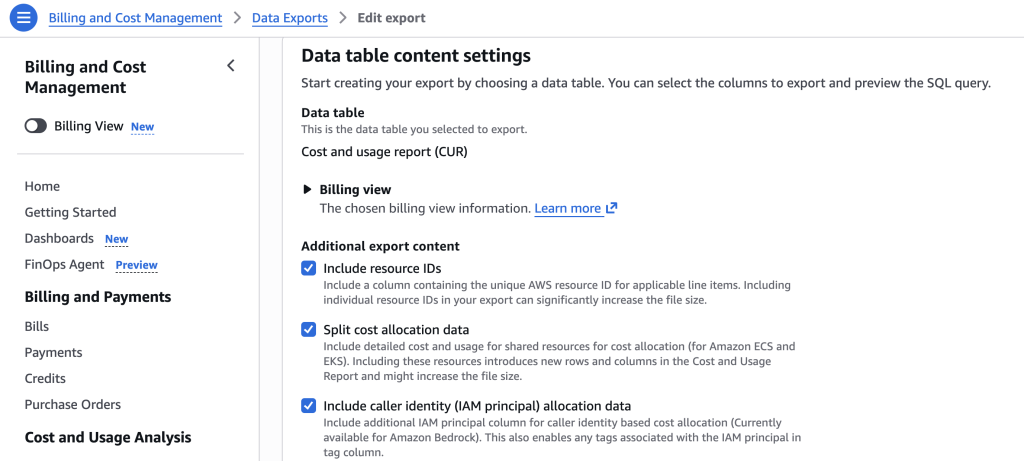
Figure 1: Data Exports CUR 2.0 tick box for adding IAM principal data.
This means you can attribute spend per team, per project, or per application. Previously, model ID was the only identifier. With this feature enabled, you will get data for IAM Principals, which works for both application roles and per-assistant tools like Claude Code.
Here’s what the query looks like:
SELECT split(line_item_iam_principal, '/') [2] as role,
resource_tags ['user_project'] as user_project_tag,
product_usagetype,
sum(line_item_unblended_cost) as spend
FROM "cur2"."cur2"
WHERE (
line_item_product_code LIKE '%Bedrock%'
OR product ['product_name'] LIKE '%Bedrock%'
)
GROUP BY 1, 2, 3
Important: You also need to activate the cost allocation tag for IAM principal. There’s a walkthrough video of Bedrock IAM data to help with setup.
2. Use tagging on the AI workload
If you just want to focus on the workload itself and break Amazon Bedrock spend by team, application, environment, or cost center. Then you can use one of these three options:
- Application inference profiles — Use these for the bedrock-runtime APIs (InvokeModel / Converse). You create a tagged profile per workload and call it in place of the model ID, so every token is attributed to a team, app, or project. Best when you need per-request detail. The limitation is that a profile is tied to a single model, so lots of models means lots of profiles to manage.
- Amazon Bedrock Projects — Use these for the Responses and Chat Completions APIs on the bedrock-mantle endpoint. You set a Project ID once on your client and every request is attributed to it, and because a Project is not tied to a model, one Project can span many models (no per-model sprawl). The limitation is that it only delivers aggregated spend to Amazon Cost Explorer and CUR 2.0 at per-usage-type-per-day grain, so there’s no per-prompt cost detail.
- Amazon Bedrock Workspaces — The same underlying resource as Projects, but for the Anthropic-compatible Messages API on bedrock-mantle. You reference a Workspace with the anthropic-workspace-id header and the tags flow through to Cost Explorer and CUR the same way. Same limitation as Projects: aggregated, per-usage-type-per-day, no per-request cost.
3. Turn on Amazon Bedrock invocation logs
With Amazon Bedrock model invocation logging you can collect the full request data, response data, and metadata associated with supported calls performed in your account in a Region. It’s a native Amazon Bedrock setting where you can push logs to Amazon Simple Storage Solution or Amazon CloudWatch. Each record includes the prompt, the response, token counts, the model, the stop reason, the account, and the IAM role.
We have a Sample Bedrock Data Lake solution that you can deploy to start gathering this data today! Please note that this solution will incur costs and should always be tested before deploying into accounts to ensure it follows your company’s security guidelines.
Why does this matter? Because you can combine invocation logs with the IAM principal data from your CUR to get token-level cost allocation per day. That’s the prompt, the cost, and who did it; all joined together.
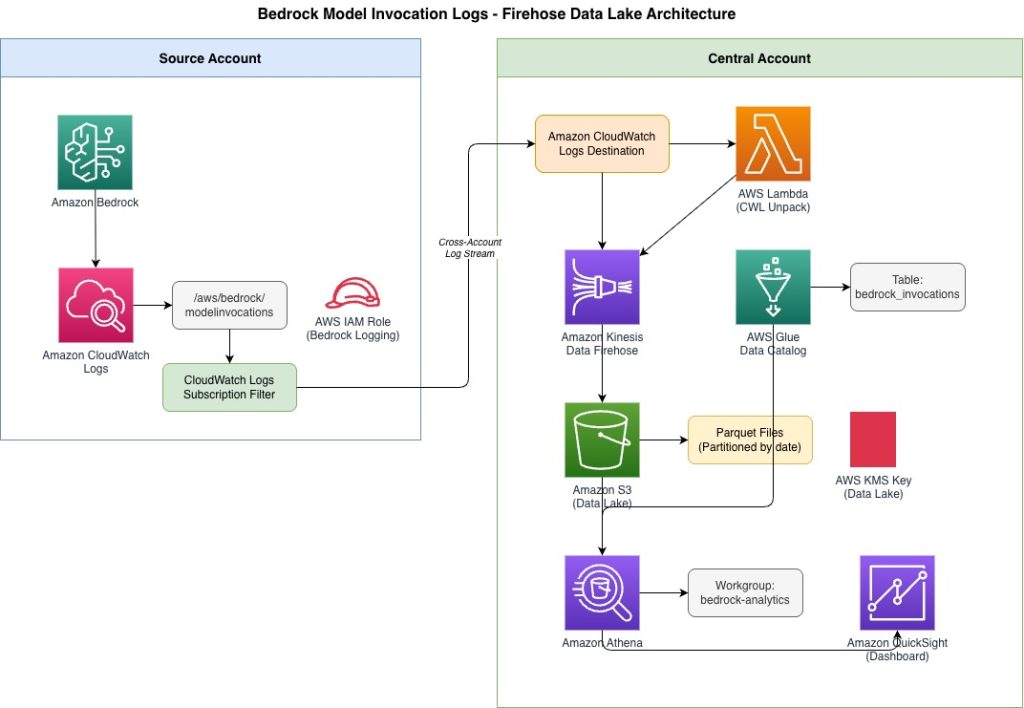
Figure 2: Architecture of Bedrock Data Lake solution
4. Start using visibility solutions
We have three solutions available today:
- CUDOS dashboards: Under the AI/ML tab, there’s already a rich set of data for your Amazon Bedrock and AI/ML services.
- Kiro usage dashboard: A new dashboard for understanding who’s using Kiro, what they’re using it for, and licensing information.
- Amazon Bedrock invocation log solution: A sample solution that visualizes your invocation logs so you can see who’s using what and how many tokens they’re consuming.
All of these are deployable with Amazon QuickSight.
Takeaway: The action here is simple. Activate IAM principal tags in CUR 2.0, turn on those invocation logs, and start using a visibility solution.
II. Save (Optimization): Where are the Tokenomics optimization levers?
Now that you can see the data, how do you optimize it?
If you think about the traditional FinOps levers, commitments, idle resources, modernization, consolidation, they don’t map neatly to AI. Who’s going to commit to 1 or 3 years of Amazon Bedrock use when the service is evolving so fast? What idle resources exist when you’re charged based on consumption?
You need a new set of levers based on how tokens actually flow: input tokens → foundational model → output tokens. There are optimization opportunities at every stage.
How cost optimized is your agentic assistant?
We ran the same Haiku 4.5 coding task across different tools and the costs were wildly different: 1 cent on Kiro vs 7 cents on Claude Code (Agent Cost Bench results). That’s 7x more for the same job. Before you even think about prompt engineering, make sure the tool is right.
Input prompt optimization
- Talk like a computer, not a person. A vague, conversational prompt might use ~85 tokens. A structured, directive prompt for the same task? ~38 tokens. That’s a 55% reduction just by changing how you write the prompt. See more in this article about not saying Hey to your AI. Use sections, be direct, and drop the filler. Amazon Bedrock has native prompt optimisation built in to help with this.
- Only activate the MCPs and tools you need. Every MCP server or skill you install adds to the context window. “There’s an MCP for that” is great, but if you’ve got 8 of them loaded and you only need 3, you’re paying for context you’re not using. Worse, when the cache expires, it reloads everything.
- Manage your context windows. In multi-turn conversations, each turn adds to the context. Turn 1 might cost 500 tokens. Turning 10 costs 5,000 tokens for the same question. Two patterns help: a sliding window (keep only the last N turns) or progressive summarization (compress older turns into a summary).
How to optimize your Model selection?
Think of this like right-sizing compute. You wouldn’t run every workload on the biggest instance. The same applies here:
- Small/fast models: classification, simple routing, quick tasks
- Mid-tier models: reasoning, analysis, most business use cases
- Frontier models: complex multi-step code generation, research
Use Amazon Bedrock model evaluation to test whether a cheaper model gives you acceptable quality for each use case.
Output token optimization
Don’t forget the output side. Output tokens are roughly 3x more expensive than input tokens. Restrict max_tokens where you can. Use structured output formats. Instruct the model to be concise.
Prompt caching
Think of this like Amazon CloudFront for AI. Prompt caching stores frequently used context so it doesn’t get reprocessed on every call. With a 5-minute TTL on exact matches, this can reduce costs by up to 90% and latency by up to 85%. If you’re running applications where users send similar system prompts repeatedly, this is a big win.
III. Run (Governance): how do you protect without blocking?
You don’t want to be the team that says “no” to every AI experiment. But you also don’t want to wake up to a surprise bill because someone left a runaway agent loop running over the weekend. Establishing governance that balances controls with access will ensure freedom within guardrails.
Set thresholds with AWS Budgets
AWS Budgets let’s you set cost thresholds per service, per account, or per tag. It now supports billing views, which makes it easier to scope budgets to specific AI workloads. Set alerts before you hit 80%, so you have time to react.
Catch spikes with Cost Anomaly Detection
AWS Cost Anomaly Detection spots unexpected cost changes automatically. It’s your safety net for the “someone deployed something and forgot about it” scenario.
Restrict access with Service Control Policies
Service Control Policies (SCPs) can restrict Amazon Bedrock access at the organizational unit level. For sandbox environments, you can limit which models are available, preventing developers from accidentally using expensive frontier models for testing.
What about AWS AI Gateways?
There are a couple of solutions available to you today to manage controls of your AI usage:
- LiteLLM: Open source, gives you per-team spend visibility and budget controls across models
- Claude Apps Gateway: AWS-managed option specifically for Claude on Amazon Bedrock
- Dogwood: Supports token budget caps, can block runaway agent loops, and uses an open-source policy language for AgentCore Gateway
Pick the right level of governance for each environment. Production workloads need tighter controls than experimental sandboxes.
IV. Plan (Value/ROI): How do you prove the value of AI?
Optimizing token spend is meaningful when connected to a measurable business outcome. As a starting point consider the cost of your use case and align it to a business outcome. Understanding the cost per outcome will help you prioritize which AI projects to support and which ones to stop.
Challenges with ROI for AI Applications?
Three challenges keep coming up:
- The numerator problem. The cost of AI isn’t just the token bill. It’s the engineering time to build, the data preparation, the testing, the monitoring, and the related services (storage, gateways, orchestration, reporting, and data transfer) . These are easy to overlook.
- The denominator problem. How do you measure what AI gives you? “We spend $500 in AI per coding bug resolved” is a proxy. Is customer satisfaction up? Are software sales increasing?
- The moving target. The technology keeps changing. The ROI model you built 6 months ago might not apply to the tools available today.
Are we asking the right questions?
“Our sprints are 30% faster.” Great. But is the code better? “I can get the answer faster.” But is the answer accurate? “We’re getting 20% fewer support tickets.” But what happens with the spare time? What organizations are trying, and why it’s often not working:
- Time savings = cost savings. Sounds logical, but people aren’t let go. They do other work. “We saved 1,000 hours but costs didn’t go down.”
- Efficiency metrics. “We’re 50% more efficient but profits are flat.” Efficiency doesn’t automatically translate to dollars.
- Revenue attribution. “AI helped, but so did 10 other things.” Isolating AI’s contribution can be difficult.
What actually works with ROI for AI?
Start with a straightforward question: what is the actual problem you’re solving? Use the five whys to get to the root benefit. And critically, build measurability into your solutions from the start and establish a baseline, not as an afterthought.
Here’s a real example from Amazon Finance. Quick Flows scaled the Sales Finance team from analyzing a handful of deals to monitoring 500+ strategic engagements in minutes. Amazon Bedrock-powered AI reduced variance analysis from 15 minutes to 1 minute, saving an estimated 14,000 hours and reducing manual processing time by 40% (source: Amazon Finance internal results, 2026).
What should you do next to create your Tokenomics Strategy?
Tokenomics is a new domain, but the framework is familiar. See, Save, Run, Plan. With each pillar, there are practical actions you can take today:
- See (Visibility & Attribution): Activate IAM principal tags in CUR 2.0. Turn on Amazon Bedrock invocation logs. Deploy a visibility solution.
- Save (Optimization): Right-size your models, structure your prompts, manage your context windows, and activate prompt caching.
- Run (Governance): Set budgets, activate anomaly detection, use Service Control Policies for sandbox environments, and explore gateway options.
- Plan: Start every AI project by defining the problem it solves and how you’ll measure success.
Pick one pillar that’s most relevant for you customers right now and start there. The most important step is the first one.