AWS News Blog
Amazon OpenSearch Service improves vector database performance and cost with GPU acceleration and auto-optimization

|
Today we’re announcing serverless GPU acceleration and auto-optimization for vector index in Amazon OpenSearch Service that helps you build large-scale vector databases faster with lower costs and automatically optimize vector indexes for optimal trade-offs between search quality, speed, and cost.
Here are the new capabilities introduced today:
- GPU acceleration – You can build vector databases up to 10 times faster at a quarter of the indexing cost when compared to non-GPU acceleration, and you can create billion-scale vector databases in under an hour. With significant gains in cost saving and speed, you get an advantage in time-to-market, innovation velocity, and adoption of vector search at scale.
- Auto-optimization – You can find the best balance between search latency, quality, and memory requirements for your vector field without needing vector expertise. This optimization helps you achieve better cost-savings and recall rates when compared to default index configurations, while manual index tuning can take weeks to complete.
You can use these capabilities to build vector databases faster and more cost-effectively on OpenSearch Service. You can use them to power generative AI applications, search product catalogs and knowledge bases, and more. You can enable GPU acceleration and auto-optimization when you create a new OpenSearch domain or collection, as well as update an existing domain or collection.
Let’s go through how it works!
GPU acceleration for vector index
When you enable GPU acceleration on your OpenSearch Service domain or Serverless collection, OpenSearch Service automatically detects opportunities to accelerate your vector indexing workloads. This acceleration helps build the vector data structures in your OpenSearch Service domain or Serverless collection.
You don’t need to provision the GPU instances, manage their usage or pay for idle time. OpenSearch Service securely isolates your accelerated workloads to your domain’s or collection’s Amazon Virtual Private Cloud (Amazon VPC) within your account. You pay only for useful processing through the OpenSearch Compute Units (OCU) – Vector Acceleration pricing.
To enable GPU acceleration, go to the OpenSearch Service console and choose Enable GPU Acceleration in the Advanced features section when you create or update your OpenSearch Service domain or Serverless collection.
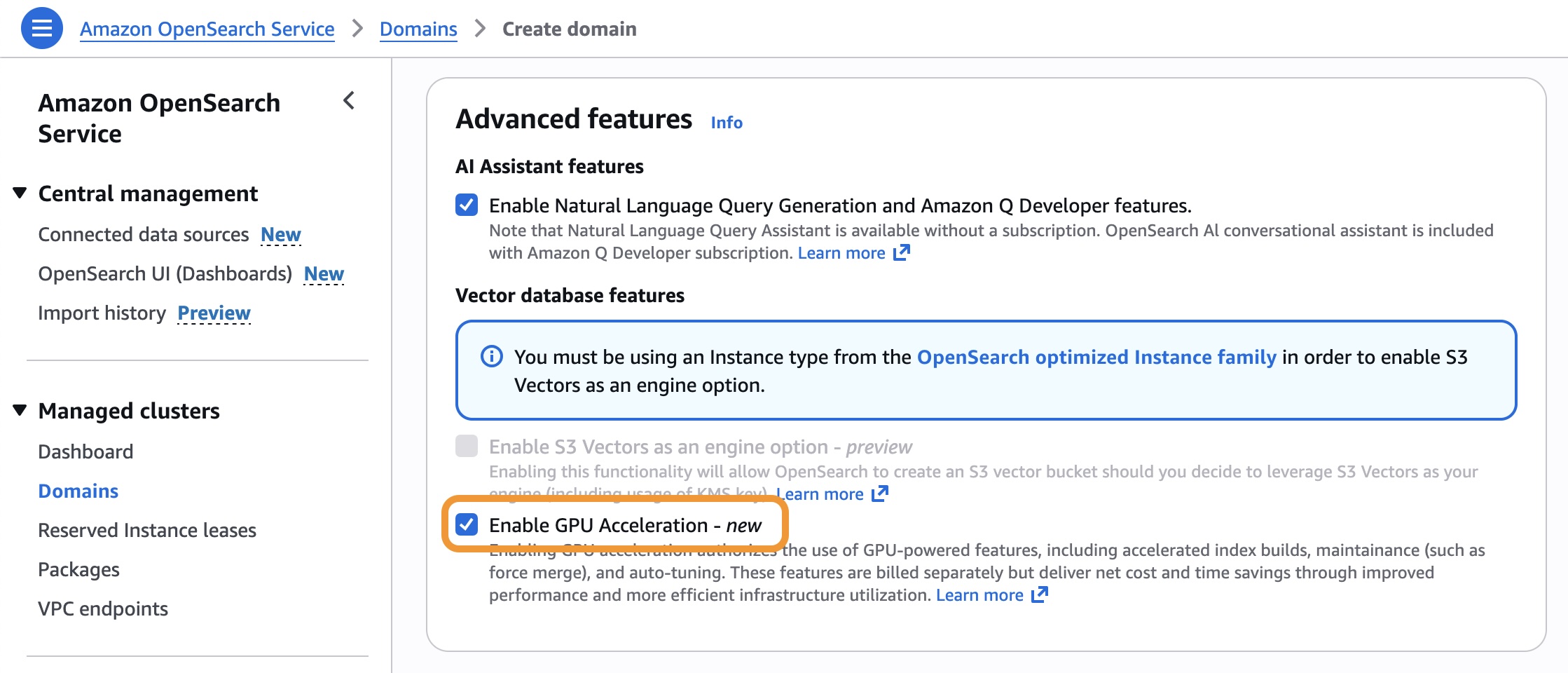
You can use the following AWS Command Line Interface (AWS CLI) command to enable GPU acceleration for an existing OpenSearch Service domain.
$ aws opensearch update-domain-config \
    --domain-name my-domain \
    --aiml-options '{"ServerlessVectorAcceleration": {"Enabled": true}}'
You can create a vector index optimized for GPU processing. This example index stores 768-dimensional vectors for text embeddings by enabling index.knn.remote_index_build.enabled.
PUT my-vector-index
{
    "settings": {
        "index.knn": true,
        "index.knn.remote_index_build.enabled": true
    },
    "mappings": {
        "properties": {
        "vector_field": {
        "type": "knn_vector",
        "dimension": 768,
      },
      "text": {
        "type": "text"
      }
    }
  }
}
Now you can add vector data and optimize your index using standard OpenSearch Service operations using the bulk API. The GPU acceleration is automatically applied to indexing and force-merge operations.
POST my-vector-index/_bulk
{"index": {"_id": "1"}}
{"vector_field": [0.1, 0.2, 0.3, ...], "text": "Sample document 1"}
{"index": {"_id": "2"}}
{"vector_field": [0.4, 0.5, 0.6, ...], "text": "Sample document 2"}
We ran index build benchmarks and observed speed gains from GPU acceleration ranging between 6.4 to 13.8 times. Stay tuned for more benchmarks and further details in upcoming posts.
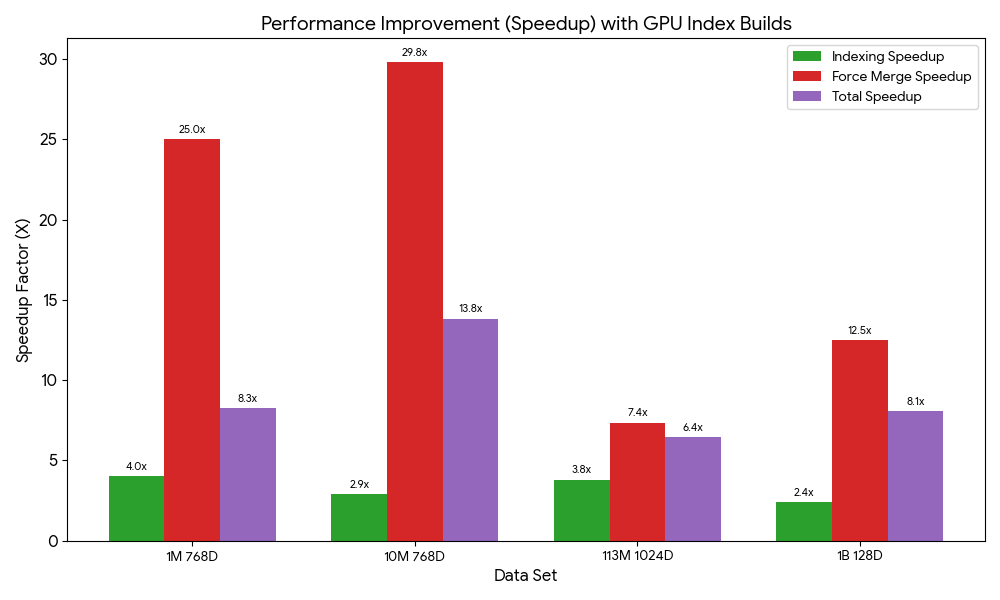
To learn more, visit GPU acceleration for vector indexing in the Amazon OpenSearch Service Developer Guide.
Auto-optimizing vector databases
You can use the new vector ingestion feature to ingest documents from Amazon Simple Storage Service (Amazon S3), generate vector embeddings, optimize indexes automatically, and build large-scale vector indexes in minutes. During the ingestion, auto-optimization generates recommendations based on your vector fields and indexes of your OpenSearch Service domain or Serverless collection. You can choose one of these recommendations to quickly ingest and index your vector dataset instead of manually configuring these mappings.
To get started, choose Vector ingestion under the Ingestion menu in the left navigation pane of OpenSearch Service console.
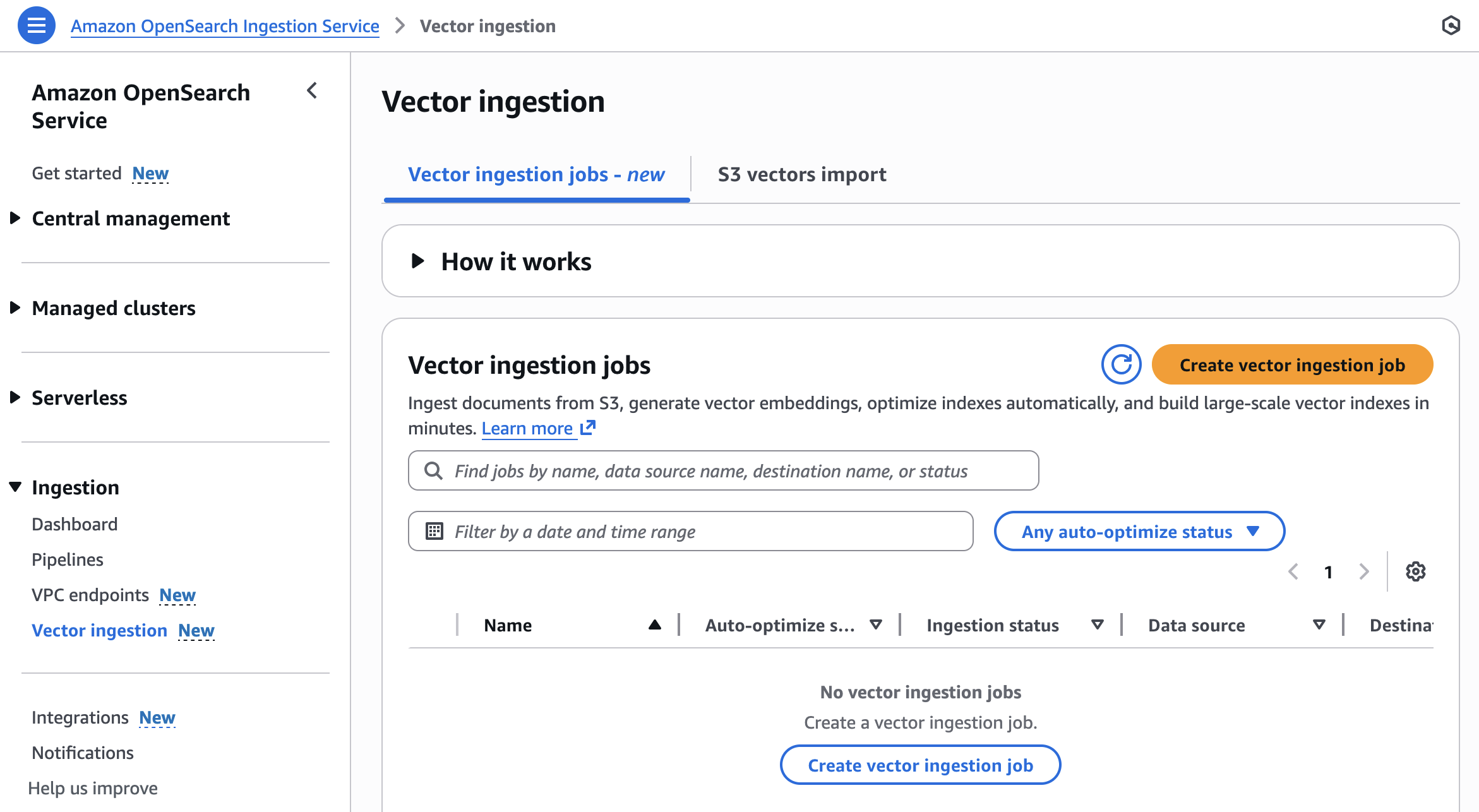
You can create a new vector ingestion job with the following steps:
- Prepare dataset – Prepare OpenSearch Service parquet documents in an S3 bucket and choose a domain or collection for your destination.
- Configure index and automate optimizations – Auto-optimize your vector fields or manually configure them.
- Ingest and accelerate indexing – Use OpenSearch ingestion pipelines to load data from Amazon S3 into OpenSearch Service. Build large vector indexes up to 10 times faster at a quarter of the cost.
In Step 2, configure your vector index with auto-optimize vector field. Auto-optimize is currently limited to one vector field. Further index mappings can be input after the auto-optimization job has completed.
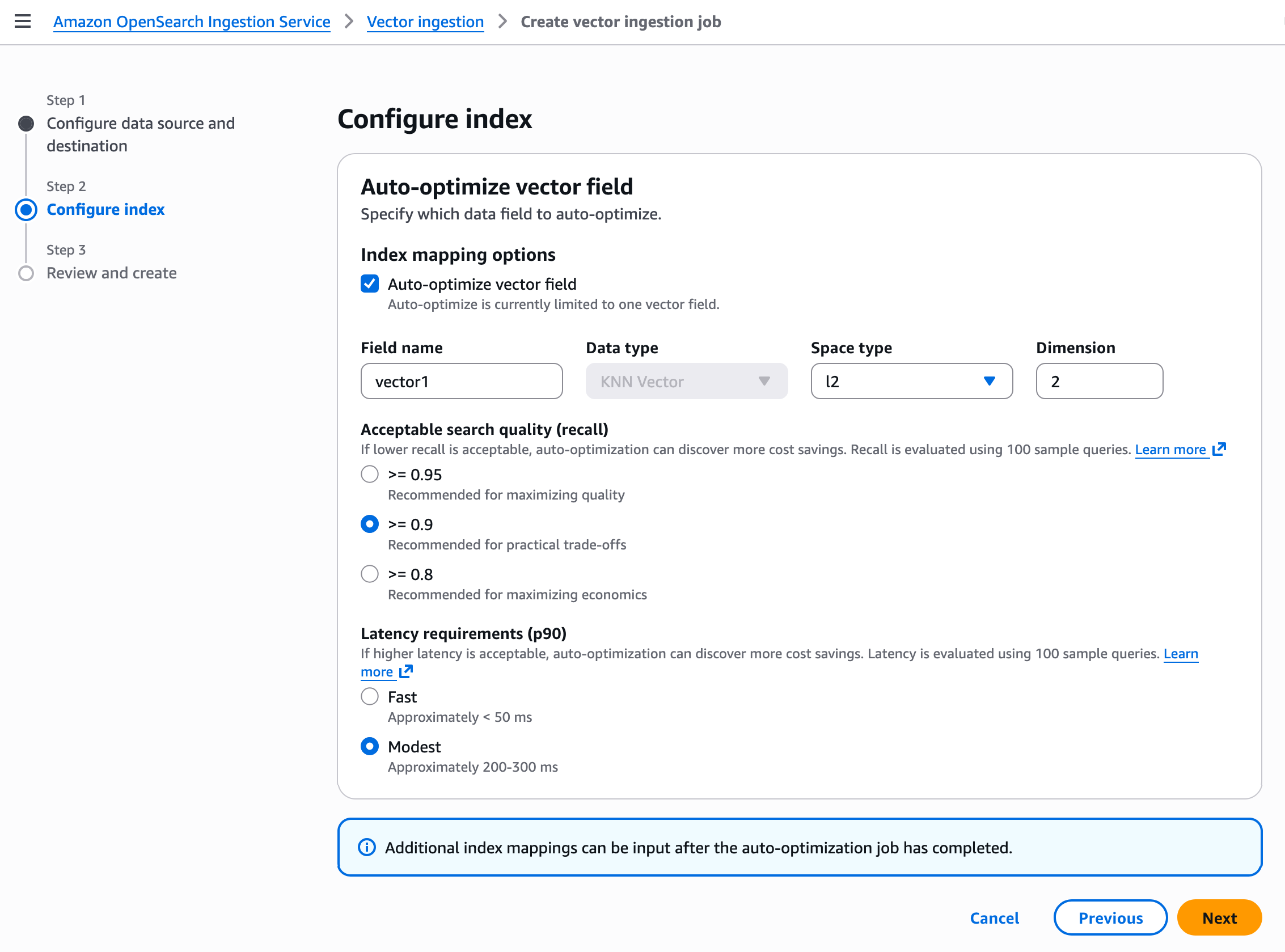
Your vector field optimization settings depend on your use case. For example, if you need high search quality (recall rate) and don’t need faster responses, then choose Modest for the Latency requirements (p90) and more than or equal to 0.9 for the Acceptable search quality (recall). When you create a job, it starts to ingest vector data and auto-optimize vector index. The processing time depends on the vector dimensionality.
To learn more, visit Auto-optimize vector index in the OpenSearch Service Developer Guide.
Now available
GPU acceleration in Amazon OpenSearch Service is now available in the US East (N. Virginia), US West (Oregon), Asia Pacific (Sydney), Asia Pacific (Tokyo), and Europe (Ireland) Regions. Auto-optimization in OpenSearch Service is now available in the US East (Ohio), US East (N. Virginia), US West (Oregon), Asia Pacific (Mumbai), Asia Pacific (Singapore), Asia Pacific (Sydney), Asia Pacific (Tokyo), Europe (Frankfurt), and Europe (Ireland) Regions.
OpenSearch Service separately charges for used OCU – Vector Acceleration only to index your vector databases. For more information, visitOpenSearch Service pricing page.
Give it a try and send feedback to the AWS re:Post for Amazon OpenSearch Service or through your usual AWS Support contacts.
— Channy