AWS Big Data Blog
Amazon MSK Service 101: How many partitions does an Amazon MSK topic need?
Customers new to Amazon Managed Streaming for Apache Kafka (Amazon MSK) often ask how many partitions their topics need. Choosing the right partition count is one of the most impactful architectural decisions you make, because it directly affects throughput, scalability, and operational complexity.
In Apache Kafka, a topic is the fundamental unit for categorizing data streams, but to achieve high scalability and performance, Kafka divides topics into smaller, independent units called partitions.
In this post, we provide practical guidance for determining the ideal partition count for your use case.
Understanding Kafka partitions
- Parallelism – Within a consumer group, each partition can be read by only one consumer at a time. Each partition maps to a dedicated log file in storage on the broker, and Kafka manages these logs through separate processing threads. This architecture allows more partitions to support more consumers processing data in parallel, with each partition’s log being independently managed for read and write operations.
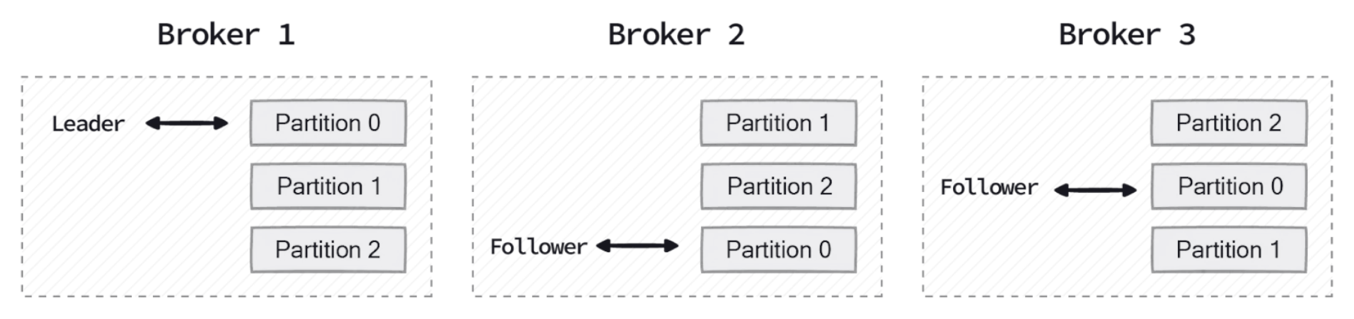
Figure 1: Partition replicas distributed across a three-broker cluster
The following diagram illustrates how producers append new records to the end of a partition log, while consumers read sequentially from their current offset position.

Figure 2: Producer writes and consumer offset positions in two partition logs
- Throughput – Producers and consumers can read and write data in parallel across partitions, increasing overall throughput.
- Scalability – Partitions allow Kafka to spread data and load across multiple brokers instead of concentrating it on a single node.
However, increasing partitions comes with trade-offs. Each partition adds metadata overhead, consumes memory, and requires file handles on the broker. While more partitions improve throughput and parallelism, they also increase the operational burden on the cluster. Too many partitions can lead to longer leader election times during broker failures, increased end-to-end latency, and higher memory consumption for both producers and consumers managing connections to multiple partitions.
Trade-offs when choosing partition count
Choosing a partition count is a balancing act between parallelism and resource utilization.
Benefits of more partitions
Using more partitions can significantly improve throughput by allowing Kafka to distribute read and write traffic across more brokers. This is particularly useful for high-volume ingestion pipelines and real-time analytics workloads. More partitions also allow consumer groups to scale horizontally, because the maximum number of active consumers in a group is limited by the number of partitions. In addition, choosing a partition count that is evenly divisible by the number of brokers helps provide balanced leadership and replica distribution, reducing the risk of uneven load.
Operational costs of more partitions
However, higher partition counts also come with costs. When a broker fails or undergoes maintenance, Kafka must perform recovery operations for each affected partition. During recovery, Kafka elects new leaders for partitions that were hosted on the unavailable broker and replicates data from the remaining in-sync replicas to newly assigned brokers. This process involves copying partition data across the network to restore the replication factor, which can be resource intensive. As the number of partitions increases, these recovery operations take longer because each partition requires its own leader election and data replication cycle.
You might encounter clusters with very high partition counts that experience extended recovery times during rolling upgrades, even when overall traffic volumes are modest. Amazon MSK Express brokers address this challenge by recovering 90x faster and providing 180x faster elasticity when scaling out clusters. This significantly reduces the operational impact of high partition counts during maintenance windows and failure scenarios.
Infrastructure cost implications
Beyond operational complexity, more partitions can directly increase infrastructure costs. Amazon MSK publishes partition-per-broker limits that vary by instance type. When the total partition count (including replicas) exceeds what the current broker fleet can support, you must add brokers to stay within recommended limits, even if throughput alone does not warrant the additional capacity.
Amazon MSK partition-per-broker guidelines
Amazon MSK publishes recommended partition-per-broker guidelines to help you operate clusters reliably. These values are strict limits. Exceeding them can lead to operational challenges, particularly during broker replacement or rolling upgrades, and can block cluster operations such as configuration updates or scaling down.
Express brokers support up to 5x more partitions per broker compared to Standard brokers. For example, the largest Standard broker (kafka.m7g.16xlarge) supports a recommended maximum of 4,000 partitions per broker. The equivalent Express broker (express.m7g.16xlarge) supports up to 20,000 recommended partitions per broker. This higher partition density means partition-bound workloads can be hosted on fewer brokers, improving price-performance by up to 50% for such workloads.
We recommend setting Amazon CloudWatch alarms on PartitionCount per-broker metrics to proactively monitor your partition distribution. When an alarm triggers, evaluate your partition strategy and consider rebalancing partitions across brokers, consolidating topics, or scaling out your cluster to stay within recommended limits. For detailed guidance, see Right-size your cluster: Number of partitions per Standard broker and Express broker partition quota.
Practical guidance for choosing a partition count
There is no single formula that works for every Kafka workload. In practice, you typically combine several considerations when sizing partitions.
- Start with throughput requirements – The first step is to determine your per-partition throughput capacity, which then informs how many partitions you need.
For Express brokers, use the per-broker throughput capacity as the primary means for sizing your cluster. Express brokers feature a fully managed storage layer, so you do not need to separately account for storage I/O constraints. The published per-broker limits represent the effective capacity available to your workload.
For Standard brokers, the achievable throughput depends on additional factors beyond the broker instance size. These factors include provisioned EBS storage throughput, the number of consumer groups reading from the broker, and how much data is served from memory versus disk. Storage I/O is consumed when producers write, when data replicates between brokers, and when consumers read data that is not in memory. For this reason, validate the effective per-partition throughput for Standard brokers through load testing in your environment.
Once you know your per-partition throughput, calculate the required number of partitions: Number of partitions = Peak throughput of the topic ÷ Throughput per partition
For example, if a topic must handle 40 MB/sec at peak and your testing shows each partition can sustain 5 MB/sec, you would need: 40 ÷ 5 = 8 partitions. Always validate these assumptions with load testing, as actual throughput varies based on your workload characteristics. For initial sizing estimates, refer to the Amazon MSK Sizing and Pricing worksheet and the Amazon MSK Best Practices documentation.
- Consider your consumer parallelism needs – If you know the number of consumers required during peak processing times, use that as your partition count. We don’t recommend having more active consumers in a consumer group than partitions. For example, if you have 5 partitions, only 5 consumers can actively process data. Additional consumers remain idle. These idle consumers still maintain active TCP connections to the brokers, sending frequent heartbeats and group coordination requests. This might result in unnecessary overhead on broker resources and contribute to high CPU usage despite low egress traffic.
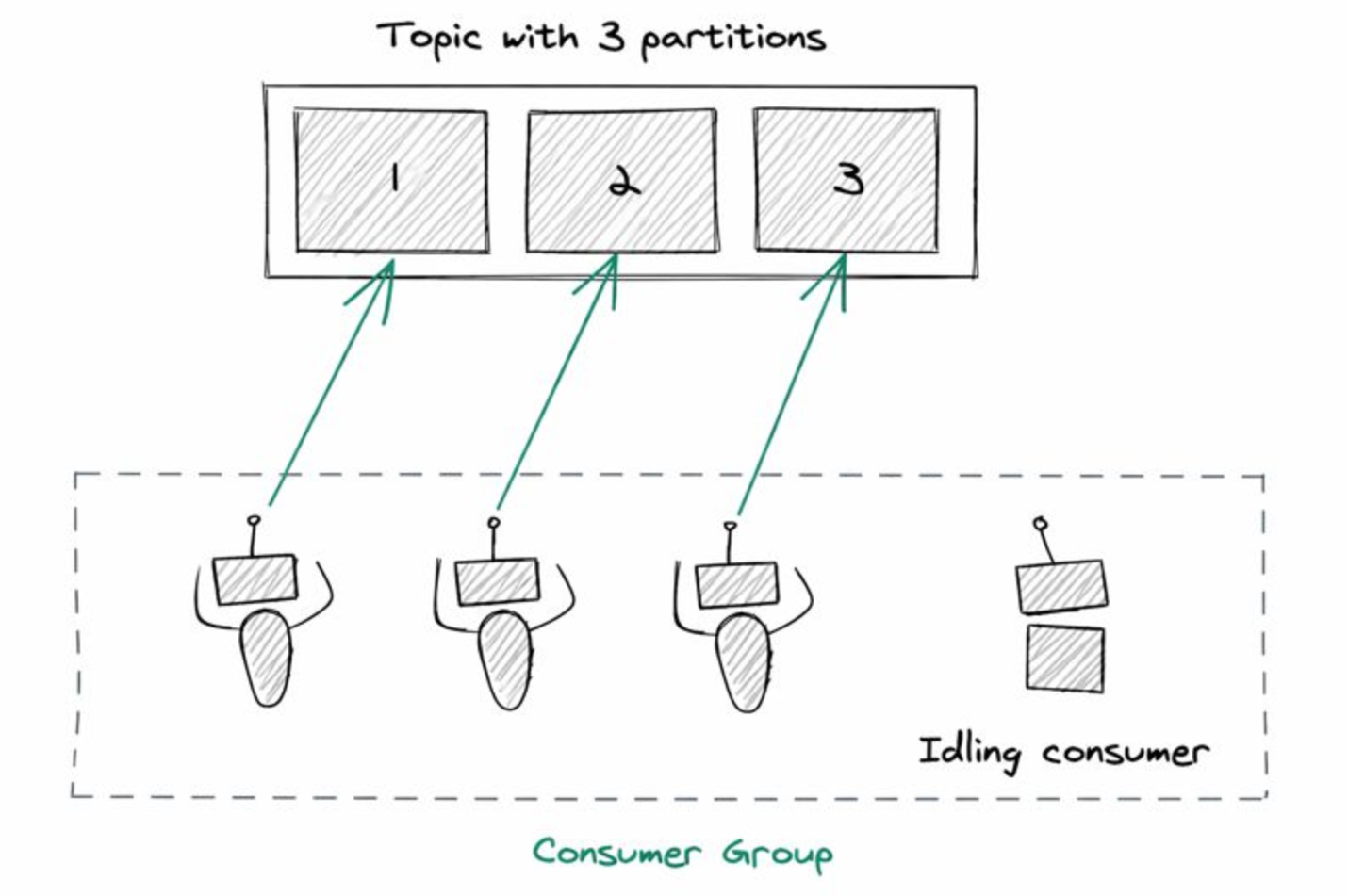
Figure 3: Idle consumers when a consumer group has more consumers than partitions
- Producer throughput and partition keys – When sizing partitions, consider producer-side throughput in addition to consumer parallelism. If producers generate data faster than a single partition can handle, additional partitions can help distribute write traffic across brokers. Partition keys also play a critical role. Poorly distributed or low-cardinality keys can create hot partitions and limit throughput. In such cases, increasing the number of partitions alone does not improve throughput unless records are evenly distributed.
- Plan for even distribution and future growth – Kafka works best when partitions can be spread evenly across brokers. Instead of focusing on specific numbers, aim for partition counts that divide reasonably well across your expected broker count. This reduces reassignment churn when brokers are added or replaced. But avoid excessive over-partitioning. It’s reasonable to leave some headroom for future growth. However, creating thousands of partitions “just in case” often causes more harm than good. Increasing partitions later is supported, but it can affect ordering guarantees and may require consumer changes. Start with a conservative number, monitor real traffic patterns, and scale gradually.
From an operational perspective, Amazon MSK provides recommended partition-per-broker guidelines based on broker instance type. Exceeding these guidelines increases operational risk and can block cluster operations such as version upgrades, scaling, or configuration changes. Large partition counts can also increase consumer group rebalance duration, temporarily pausing message processing and increasing end-to-end latency.
Keep in mind that partitioning improves scalability, but it does not address application-level bottlenecks such as slow consumers, inefficient processing logic, or downstream system constraints.
Conclusion
Determining the right number of partitions for an Amazon MSK topic is a foundational design decision. It affects throughput, scalability, failure recovery, and day-to-day operability of your Kafka cluster. Start by understanding your throughput and consumer parallelism needs, respect Amazon MSK partition-per-broker guidelines, avoid excessive over-partitioning, and validate assumptions through load testing. Most importantly, there is no universal “correct” number, only a number that fits your workload, operational goals, and cost.
For more information, see the Amazon MSK Developer Guide and Recommended best practices for Amazon MSK.