AWS Big Data Blog
Amazon MSK simplifies configuring custom domain names
Previously, you had to manually override the advertised listener on each broker and repeat it every time a broker was added. This approach was operationally heavy and could not be implemented on a cluster in KRaft mode. With Amazon Managed Streaming for Apache Kafka (Amazon MSK), you can now configure custom domain names for your Provisioned clusters using a single property. This works for clusters in both ZooKeeper and KRaft mode. Now you define the domain once and Amazon MSK applies it across every broker, so custom domain names keep working through scaling of the MSK cluster.
Custom domain names on Amazon MSK
Amazon MSK is a fully managed service for building and running applications that use Apache Kafka to process streaming data. By default, Amazon MSK brokers advertise addresses that AWS generates (for example, b-1.cluster-name.kafka.us-east-1.amazonaws.com) to connecting clients. These addresses are unique to each cluster and change when a cluster is recreated.
Many organizations need a static, customer-controlled endpoint that stays the same regardless of the underlying cluster. They achieve this with a custom domain name, so that they can:
- Route traffic through Network Load Balancers (NLBs) when IP exhaustion forces clusters into non-routable subnets.
- Avoid client reconfiguration during cluster migrations, so clients keep the same endpoint even when the underlying cluster changes.
- Simplify disaster recovery (DR) failover, where the same domain fronts both primary and standby clusters.
- Align with organizational naming, security, and compliance conventions.
Until now, the only way to do this was to override the advertised.listeners on each broker using the kafka-configs.sh --alter tool. It required carefully preserving every internal listener and re-running that override every time a broker was added. This works, but it accepts any string with no validation. A single typo can cause an outage. It requires manual, per-broker steps with no cluster-wide mechanism. It cannot be managed through infrastructure as code, and it could not be implemented on Amazon MSK brokers in KRaft mode. This blocked customers who rely on custom domain names from using them on KRaft-based clusters. With this launch, a single configuration property replaces all of that.
What you set up, and what Amazon MSK manages
A working custom domain name has two parts, and understanding this split up front helps the rest of this post make sense. You own the client connectivity and trust layer. Amazon MSK owns the cluster-side advertised listener configuration. The following diagram shows the client connectivity and trust layer.
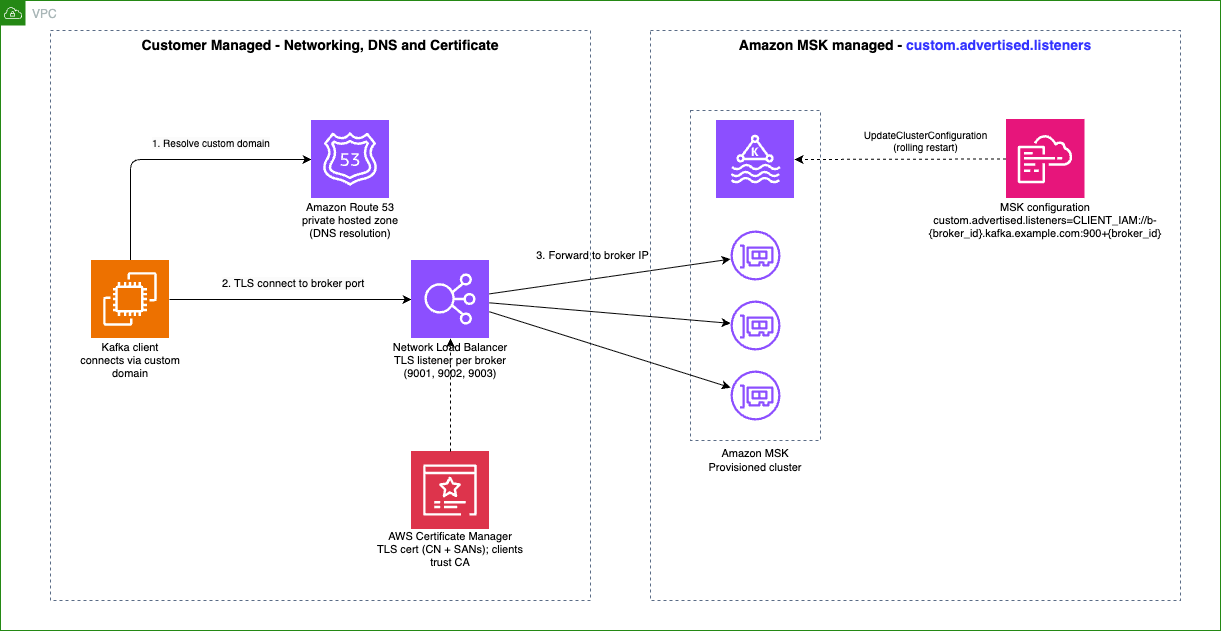
Figure 1: The client connectivity and trust layer (left) is a prerequisite you own and manage. The advertised listener configuration on the cluster (right) is what Amazon MSK manages for you
Important: When you apply
custom.advertised.listeners, your custom domain name replaces the default addresses that clients use to connect to broker nodes. If the networking and trust layer is not already in place, resolvable, reachable, and trusted from the client, the client cannot reconnect, even though it was connected moments earlier.
Part 1: The client connectivity and trust layer (you manage)
The Prerequisites section below shows the key requirements. You can find the detailed setup in an existing post, Configure a custom domain name for your Amazon MSK cluster, which includes a diagrammed walkthrough of the NLB, Amazon Route 53, and AWS Certificate Manager (ACM) topology.
Part 2: The advertised listener configuration (Amazon MSK managed)
After the connectivity layer exists, you tell the brokers which custom address to advertise to clients. This is the part that used to require a per-broker CLI override, and it is what this launch simplifies. This next section describes how it works.
Prerequisites
Before a client can reach your brokers through a custom domain, the connectivity and trust path must exist. You create and manage this layer. It covers three things:
- Networking: A network gateway, like a Network Load Balancer (NLB), TLS certificate, DNS records, and security groups that route traffic from your custom domain to your broker IPs.
- Certificate trust: The client’s truststore must include certificate authorities in the path (the load balancer’s custom-domain cert).
- DNS resolution: Clients must resolve the custom domain to your NLB, typically through an Amazon Route 53 private hosted zone associated with the client virtual private cloud (VPC).
This layer must be in place for custom domain names to function. It is a prerequisite for this feature to work.
How it works
You add a property to your Amazon MSK configuration. The value takes the form:
where <LISTENER> is one of your cluster’s client listeners and <hostname>:<port> is the custom address pattern. For example, on an IAM cluster:
The property specifies two things:
- Each listener corresponds to an authentication type on your cluster. Custom advertised endpoints can be set only for client listeners:
CLIENT,CLIENT_SECURE,CLIENT_SECURE_PUBLIC,CLIENT_SASL_SCRAM,CLIENT_SASL_SCRAM_PUBLIC,CLIENT_IAM, andCLIENT_IAM_PUBLIC. Internal listeners (REPLICATION,CONTROLLER) are not supported and are rejected at validation. The listener you specify must also be bound (active) on your cluster. For example, if your cluster uses only IAM authentication, specifyingCLIENT_SECUREis rejected, and the error message lists the valid client listeners for your cluster. - A custom
hostname:portpattern that includes the{broker_id}template variable. Each broker resolves to a unique address. In this pattern, the{broker_id}template variable is replaced with each broker’s numeric ID. The port number9000+{broker_id}means the broker ID is added to the base port 9000, so broker 1 resolves to 9001, broker 2 to 9002, broker 10 to 9010, and so on. The base port 9000 is only an example. You can use any base port, as long as the resulting ports match the TLS listeners you provisioned on your NLB.
{broker_id}can appear in the hostname, the port, or both, as long as each broker’s resolvedhost:portis unique. Placing it in the port alone is valid, so a shared hostname with a per-broker port also works:
Before you begin, you need an MSK configuration to hold this property. You create one with the CreateConfiguration API (or the AWS Management Console), passing your server properties as the configuration body. MSK returns a configuration ARN and a revision number, which together identify the exact configuration you apply to the cluster.
custom.advertised.listeners does not need its own standalone configuration. You can include it alongside any other broker-level properties MSK already supports, such as auto.create.topics.enable, num.partitions, or log-retention settings, within a single configuration revision. If you already manage an MSK configuration for your cluster, add custom.advertised.listeners to it and create a new revision using the UpdateConfiguration API. No separate configuration is needed.
You then apply the configuration to your cluster with the UpdateClusterConfiguration API. Amazon MSK then performs three actions:
- Validates the configuration.
- Resolves the pattern for each broker.
- Applies it through a rolling restart across the cluster.
These safeguards prevent you from accidentally removing or modifying the internal listeners that Amazon MSK manages. Validation is synchronous. The listener must be a client-facing listener, the pattern must include {broker_id}, and each broker’s resolved host:port must be unique. If any check fails, the API returns a descriptive error and makes no change.
The override affects only the advertised address of the named listener. Replication, authentication, multi-VPC (CLIENT_IAM_VPCE), and AWS PrivateLink connectivity remain unaffected. The change is also fully reversible: remove the custom.advertised.listeners property and re-apply the configuration, and Amazon MSK reverts the listener to its original address.
You can track progress with the DescribeOperation API, which shows state transitions from UPDATE_IN_PROGRESS to UPDATE_COMPLETE or UPDATE_FAILED. If a broker fails to start, the rollout halts at that broker, the remaining brokers keep their previous configuration, and you can fix the property and re-apply to recover.
Setting up a custom domain name end to end
When you apply custom.advertised.listeners, your custom domain name replaces the default addresses that clients use to connect to broker nodes. If the networking and trust layer is not already in place, resolvable, reachable, and trusted from the client, the client cannot reconnect, even though it was connected moments earlier.
The networking layer, the Network Load Balancer (NLB), DNS, and TLS certificate that route traffic from your custom domain to your broker IPs, is a prerequisite you own. It is not specific to this launch. The existing post Configure a custom domain name for your Amazon MSK cluster covers it in detail, with a diagrammed walkthrough of the NLB, Route 53, and ACM topology. With the networking in place, the following steps cover the cluster-side setup this launch introduces.
Step 1: Add the custom domain to your Amazon MSK configuration
Create or update an Amazon MSK configuration that includes the custom.advertised.listeners property, matching the hostnames and ports you provisioned on the NLB. For a three-broker IAM cluster fronted by an NLB with ports 9001–9003, put the property in a file:
Then create the configuration, passing the file as the server properties:
Use fileb:// (not file://) so the CLI reads the file as bytes and base64-encodes it. Passing the value inline is fragile because of the {broker_id} braces. Leave {broker_id} literal in the file. Amazon MSK resolves it per broker at apply time. The response returns the configuration ARN and LatestRevision.Revision, which you use in the next step.
Step 2: Apply the configuration
Apply the configuration to your cluster with UpdateClusterConfiguration, using the console, AWS Command Line Interface (AWS CLI), AWS CloudFormation, CDK, or Terraform. This is the same workflow you already use for broker configuration changes.
If the configuration fails to apply, review the errors. For details, see the troubleshooting section in the Amazon MSK Developer Guide.
Step 3: Track the rollout
After the configuration is accepted, Amazon MSK applies it through a rolling restart. Wait until the operation reports SUCCESS. If it reports FAILED, a broker could not apply the change. The rollout halts at that broker, the remaining brokers keep their previous configuration, and you can fix the configuration and re-apply to recover.
Step 4: Verify
Confirm clients can connect through the custom domain:
If your topic list is returned, clients are successfully connecting through your custom domain. If the operation reported SUCCESS but clients cannot connect, the cluster-side configuration is correct, but your networking layer likely needs attention.
Client connectivity during rollout
This step is important. Clients can be disconnected if the networking is not ready. Kafka clients do not keep using the original address they bootstrapped with. On a periodic metadata refresh, each client learns the broker’s advertised listener. The client uses that address for all subsequent connections. When you apply a custom domain name, that advertised address changes from the default name that Amazon MSK generates to your custom domain, so at the next metadata refresh every client connects over the custom domain. For this reason, the connectivity and trust layer described in What you set up, and what Amazon MSK manages is a prerequisite, not a follow-up task.
The safe sequence, which is also how customers move from Amazon DNS to a custom domain today, is two phases:
- Build the networking path first: Stand up the NLB, DNS, and certificate, and point your clients at the custom bootstrap endpoint, but do not set the advertised listener yet. Clients bootstrap through the custom endpoint while still connecting to brokers over the addresses that Amazon MSK generates.
- Configure the advertised listener: With the path already in place, applying
custom.advertised.listenerschanges what the brokers advertise. At the next metadata refresh, clients pick up the custom domain and cut over to it automatically.
Because the path already exists, this cutover is transparent: as Amazon MSK applies the change broker by broker, clients reconnect on their own, with no restart or reconfiguration.
Scaling and replacement of brokers
When you scale the cluster or a broker is replaced during automated healing, Amazon MSK automatically applies the configuration to the new broker, resolving {broker_id} for its ID, with no manual steps required on the cluster side. Remember to add the corresponding NLB listener, target group, and DNS record for any new broker, because the networking layer does not auto-scale.
Conclusion
Custom domain name configuration turns a per-broker CLI workaround into a single, validated, cluster-wide Amazon MSK configuration property. It works identically on ZooKeeper and KRaft, persists through scaling and failover, and flows through your existing Terraform, CloudFormation, and CLI workflows. If you rely on custom domain names, we recommend adopting the static configuration now.
This capability is available on all Amazon MSK Provisioned clusters with Standard and Express brokers, in all AWS Regions where Amazon MSK Provisioned is available. To get started, see the Amazon MSK Developer Guide and the end-to-end networking walkthrough in Configure a custom domain name for your Amazon MSK cluster.